
Role-Based Access Control in Cloud-Native Security

RBAC is one of the main controls that decides who can do what in a cloud-native stack. And that matters fast: one study of 12,000 Kubernetes clusters found 58% had RBAC mistakes that could open the door to lateral movement or admin-level access.
If I had to boil this article down, I’d put it like this: keep access small, keep scope tight, and keep every role reviewable. In Kubernetes, that means using the right mix of Roles, ClusterRoles, RoleBindings, and ClusterRoleBindings. In SaaS apps, it means checking user, tenant, and role on every request. And in regulated sectors in Canada, it means keeping logs, role records, and access reviews that an auditor can inspect.
Here’s the short version:
- RBAC handles authorization, not login
- Namespace scope comes first; cluster-wide access should stay limited
- Groups work better than user-by-user access for staff changes
- Each workload should get its own service account
- Multi-tenant apps need tenant checks at the app and data layers
- RBAC works best with network policy, quotas, and pod security
- Audit logging must be turned on if you want traceable access records
- Access reviews should catch stale rights, wildcard rules, and excess service account access
A simple way to think about it:
| Area | What RBAC should do |
|---|---|
| Kubernetes cluster | Limit access to APIs, namespaces, workloads, and secrets |
| Multi-tenant SaaS app | Stop one tenant from reaching another tenant’s data |
| Microservices | Limit service-to-service and service account permissions |
| Compliance in Canada | Show who had access, when, and under which role |
Put another way: RBAC is not just a permission system. It is a control for risk, tenant separation, and audit readiness. The rest of the article explains how to set that up without letting access spread too far. For organizations modernizing their infrastructure, aligning security with a digital transformation roadmap ensures compliance from day one.
RBAC in Kubernetes: Role-Based Access Control Explained | Kubernetes Security Tutorial
sbb-itb-fd1fcab
Core RBAC components in cloud-native platforms
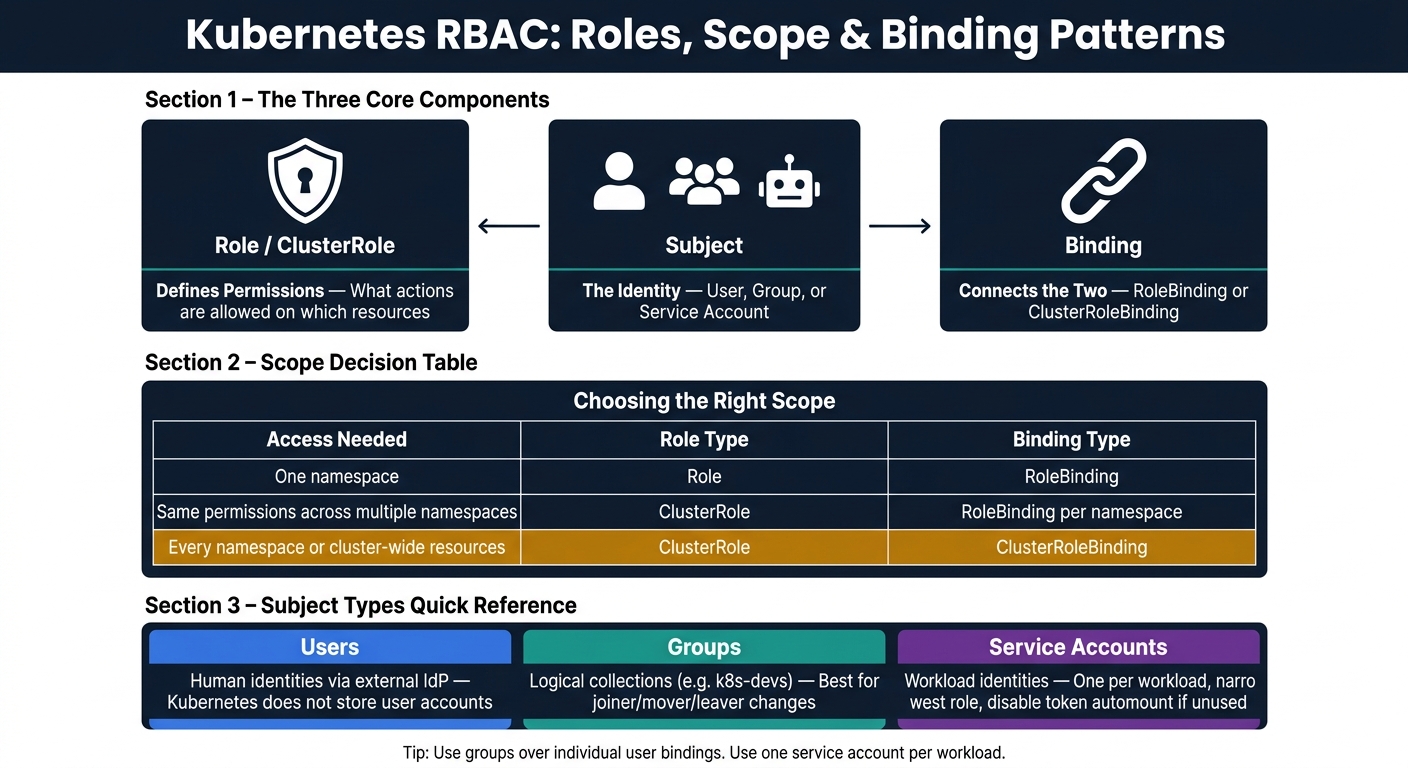
Kubernetes RBAC: Roles, Scope & Binding Patterns Explained
Kubernetes RBAC has three main parts: roles, subjects, and bindings. A role sets the permissions. A subject is the identity. A binding ties the two together. In a web app setup, this is how you split app, tenant, and platform access while using a custom app feature planner to map out these requirements without giving away more cluster access than you meant to.
The first call to make is scope. You need to decide whether access belongs at the namespace, project, or cluster level.
Roles and policy scope: namespace, project, and cluster
A Role is namespace-scoped. Its rules work only inside one namespace, such as web-prod or app-qa. That includes resources like Pods, Deployments, ConfigMaps, and Services inside that namespace.
A ClusterRole works differently. It can apply to cluster-wide resources like Nodes, Namespaces, and PersistentVolumes. It can also be reused in RoleBindings when you want to grant the same set of permissions inside selected namespaces.
Namespaces separate application workloads. Projects or teams can group related namespaces, pipelines, and monitoring. Cluster scope is best kept for shared admin work, security controls, compliance tooling, and shared platform pieces like ingress controllers and logging stacks.
Use the smallest scope that does the job:
| Access needed | Pattern |
|---|---|
| One namespace | Role + RoleBinding |
| Multiple namespaces with the same permissions | ClusterRole + one RoleBinding per namespace |
| Every namespace or cluster-wide resources | ClusterRole + ClusterRoleBinding |
Keeping ClusterRoles and ClusterRoleBindings on a tight leash reduces blast radius if credentials are stolen.
Once scope is set, the next step is assigning access to users, groups, and service accounts.
Subjects: users, groups, and service accounts
Kubernetes RBAC recognizes three subject types. Users are human identities authenticated through an external identity provider. Kubernetes does not store user accounts.
Groups collect users into logical units like k8s-devs or sec-audit. Granting access to groups instead of individual people makes things much easier to run as teams grow. Service accounts are the third subject type, and they stand for workloads, not humans.
A good rule of thumb is simple: use one service account per workload, and bind it only to the narrowest Role it needs. If a pod does not need Kubernetes API access, set automountServiceAccountToken: false.
Bindings are what connect those identities to the permissions they need.
Bindings: how permissions are attached and enforced
A RoleBinding lives in a namespace. It attaches a Role – or a ClusterRole – to one or more subjects, but only inside that namespace. A ClusterRoleBinding works at cluster scope and grants a ClusterRole’s permissions across the whole cluster, including all namespaces and cluster-level resources.
Group-based bindings make joiner-mover-leaver changes much simpler: add a user to the right group and their access updates on its own; remove them and that access disappears everywhere the group is bound.
These building blocks are what you use to set up namespace isolation, tenant-scoped roles, and service-to-service controls in cloud-native web applications.
Designing RBAC for cloud-native web applications and multi-tenant systems
Once roles, subjects, and bindings are set up, the next step is using them across SaaS platforms, microservices, and multi-team clusters without letting access spread too far or letting one tenant reach another tenant’s data.
Namespace and tenant isolation for web applications
Namespaces only act as isolation boundaries when RBAC is used with network, quota, and pod-security controls. If you want a namespace to be a real boundary, pair its RBAC bindings with a NetworkPolicy to limit cross-namespace traffic, ResourceQuota and LimitRange objects to cap CPU and memory usage, and Pod Security Admission set to restricted to cut the risk of privilege escalation.
Two common patterns show up again and again:
- One-team-per-namespace: a good fit for internal platforms and public-sector shared clusters where team-level accountability matters.
- One-tenant-per-namespace: a better fit for Canadian SaaS providers handling regulated data, like health records or financial information, where strict tenant separation is a contract or compliance issue.
In practice, many platforms blend both models. You might have environment-level namespaces such as prod and staging, then split those further by tenant or team, each with its own scoped Role and RoleBinding.
For shared clusters, a layered setup is the practical starting point: RBAC bindings mapped to identity provider groups, network isolation policies, ResourceQuota and LimitRange objects, and Pod Security Admission set to restricted. That mix gives Canadian SaaS teams clear separation without piling on too much overhead. Namespace controls protect the cluster. Tenant roles protect application data.
The same idea carries into the application itself, where tenant-scoped roles decide who can touch customer data.
Tenant-scoped roles in multi-tenant SaaS applications
Tenant RBAC is the application-layer extension of cluster RBAC. Each access decision should be based on userId, tenantId, and role: confirm tenant ownership, confirm membership, then confirm role-based permission. If you skip one of those checks, or do them in the wrong order, cross-tenant data leaks become much more likely.
Store memberships in a UserTenantRole table and include tenantId and role as signed JWT claims. Then enforce the rules at the data layer too, not just in the API or UI, because those layers can be bypassed. Postgres row-level security and Firestore security rules are practical examples of where that enforcement belongs.
Keep the role set small at first:
TenantAdminManagerContributorViewer
Only split permissions further when a real workflow calls for it. If nobody needs the extra role in day-to-day work, it’s probably just adding clutter.
That same least-privilege rule should apply to service identities and internal API calls too.
Microservices, service-to-service access, and policy governance
Each microservice should use its own service account, with Kubernetes API access limited to exactly what it needs. Service accounts are workload identities, so they should follow the same least-privilege rule as human users and groups.
It also helps to pair this with mTLS through a service mesh so services authenticate by identity, not IP. That makes policy far easier to manage. Instead of tying rules to network addresses that may change, you can write them against service identities like payment-service.prod.svc.cluster.local.
For policy enforcement across internal APIs, a centralized policy engine keeps rules consistent and auditable. You define service-to-service rules once – for example, allowing only checkout-service to call payment-service – and apply them across gateways and sidecars. Start with coarse roles such as admin, operator, and viewer, then split permissions only when a workflow needs it.
It also pays to audit ClusterRoleBindings and service accounts on a regular basis for unused or over-privileged access before they turn into risk.
These same controls also support auditability, segregation, and regulated access reviews.
RBAC for compliance and regulated sectors in Canada
Namespace-scoped roles and service-account control are a good start. But in regulated sectors, RBAC also has to stand up to an audit.
For Canadian organisations in healthcare, finance, and the public sector, that means being able to show who accessed what data, when, and under which role. RBAC works well here because it connects each access decision to a defined role and job function.
Least privilege, segregation of duties, and audit trails
The Canadian Centre for Cyber Security directs organisations to allow only authorized access for users or processes acting on behalf of users when that access is necessary to accomplish assigned organizational tasks. That idea should shape how roles are built day to day.
A practical setup starts with four core role families:
- developers for non-production only
- operators for deploys and rollbacks
- security roles for policy definition and review
- auditors for read-only logs and RBAC configs
This split supports segregation of duties without turning role design into a mess.
Audit trails depend on full logging. Kubernetes does not enable audit logging by default, so teams need to turn it on on purpose. Logs should record who performed an action – a user ID or service account – what resource was touched, the action type, and whether it was allowed or denied. They should also record the RBAC role or binding that allowed the action. Changes to Role and ClusterRoleBinding objects need to be logged too, because PCI DSS Requirement 10.2.5 specifically calls out logging RBAC changes cluster-wide.
Retention rules differ by framework. PCI DSS requires 12 months of audit log retention, with at least 3 months immediately accessible. HIPAA-aligned environments often target 6 years for certain documentation categories. Setting --audit-log-maxage=365 on the Kubernetes API server is a simple way to meet the PCI DSS threshold.
These controls only work if every permission change and access event is logged and can be reviewed.
Mapping RBAC to regulated environments
It helps to map RBAC to control objectives instead of legal wording. For HIPAA, the goal is plain enough: only people whose jobs require access to electronic protected health information (ePHI) should have it, and every access event should be logged. In Kubernetes terms, that can mean a role like Clinician-PHI-Access scoped to specific namespaces, paired with a read-only Audit-PHI-ReadOnly role for compliance monitoring.
For PCI DSS, roles such as Payment-App-Operator and Payment-Security-Admin should be limited to the namespaces and services that handle payment data. Access should not spill into nearby workloads. SOX adds another layer tied to financial reporting integrity. Roles like Finance-Data-Maintainer and Finance-Auditor make that split clear and reviewable, so the person changing financial data is not the same person approving or auditing those changes.
Canadian federal cloud guardrails require annual reviews of root and global administrator assignments.
Canadian documentation and data residency considerations
Canadian federal cloud guardrails also require organisations to document role definitions, confirm that each role follows least privilege, and formally review assignments – at least once a year for root or global administrator accounts. In practice, that means keeping RBAC manifests in version control, recording who approved each role change and why, and keeping evidence of periodic reviews with dates, participants, and outcomes.
Data residency adds another layer. Under PIPEDA, there is no blanket federal rule that private-sector personal data must stay in Canada, but organisations still need to show comparable protection and stay accountable when data is processed abroad. Provincial health privacy laws go further. Alberta’s Health Information Act requires a privacy impact assessment whenever health information is stored outside Canada.
RBAC helps support residency controls by limiting who can change storage regions, enable replication, or export sensitive data. Each of those actions should be logged with timestamps and actor IDs, then included in residency compliance attestations and periodic reviews.
Next, those documented roles and logs need to be tested, reviewed, and kept current.
Implementation steps, reviews, and conclusion
A practical RBAC implementation pattern
Once the model is set, the next job is to put it to work.
Start with zero permissions. Then add only the access each job function or workload needs. That simple move helps keep access tight from day one.
Name roles by job function, not by a long list of permissions. Use groups for human access. Give each application or microservice its own service account. That keeps things cleaner and makes access easier to track when you need to check who can do what.
Store Roles, RoleBindings, and service account definitions in version control. Review every change through pull requests, test them in a staging namespace, and then move the same approved policy set into production. This kind of version-controlled RBAC helps cut down on drift between environments.
Testing, reviews, and continuous improvement
After rollout, test every change before it gets anywhere near production. Run can-i checks for actions that should be allowed and for actions that should be blocked.
Periodic access reviews are where privilege creep usually gets caught. Over time, people switch teams, short-term exceptions stick around, and extra permissions pile up quietly. That’s how access gets messy.
Reviews should check for:
- unused permissions
- stale group memberships
- wildcard permissions
- service accounts with access that reaches too far
These reviews also line up with NIST guidance, which says organisations should define how often privileges are reviewed and remove them when they no longer match a business need. A monthly or quarterly review cycle helps catch privilege creep early and gives compliance teams proof that access is being governed on an active basis. Sources also point to the same review targets: unused access, stale memberships, wildcard rules, and over-scoped service accounts.
Conclusion: What strong RBAC delivers
RBAC ties each identity to a defined, controlled set of permissions. That link cuts the attack surface, supports tenant isolation in multi-tenant web applications, and makes cloud-native systems much easier to govern and audit.
For Canadian organisations in regulated sectors such as public services, energy, healthcare, and finance, RBAC also creates the documented access trail that compliance frameworks expect. Strong RBAC cuts attack surface, supports audits, and keeps tenant and workload access contained.
FAQs
How is RBAC different from authentication?
Authentication checks who a user or system is. It often does this with methods like multi-factor authentication.
RBAC decides what that authenticated user or service account can do after sign-in. It assigns permissions based on set roles, which helps enforce least privilege so access lines up with specific job duties.
When should I use a Role instead of a ClusterRole?
Use a Role when permissions should stay inside one namespace. This supports least privilege and keeps the blast radius small.
Use a ClusterRole when the same permissions need to apply across the whole cluster, not just one namespace.
For cloud-native web app security, namespace-level RoleBindings help you avoid over-privileged service accounts. If credentials are misused, the damage stays more contained.
How often should RBAC access be reviewed?
RBAC access should be checked on a regular schedule, ideally every quarter. It should also be reviewed any time there’s a change in the organisation, like when someone moves to a new role or leaves the company.
A good rule of thumb is to keep reviewing and removing users, roles, and policies that are no longer in use. Any account or permission that has been inactive for 90 days should be flagged for review and may need to be disabled.