
Kubernetes vs. Docker Swarm: Pros and Cons

If I had to sum it up in one line: Kubernetes fits growth, policy control, and large multi-service setups; Docker Swarm fits small teams that want a simpler path with lower year-one overhead.
If you’re deciding between the two, here’s the short answer:
- Choose Kubernetes if you need autoscaling, tighter access control, richer tooling, or room for more complex workloads.
- Choose Docker Swarm if you want to get started fast, your team is small, and your web application development needs are simple to mid-sized.
- Watch the long-term cost: both are C$0 to license, but staff, training, cloud fees, and migration risk can change the math fast.
- For regulated Canadian sectors, Kubernetes usually gives more of the policy and isolation controls teams need.
- Market direction matters: by 2024, 93% of organizations were using, piloting, or evaluating Kubernetes, while Swarm use kept falling.
In plain language, this is a trade-off between power and simplicity.
Kubernetes gives you more: autoscaling, stronger multi-team controls, more storage and networking options, and a much larger tool ecosystem. But it also asks for more time, more skill, and more platform work.
Docker Swarm keeps the Docker workflow familiar. That makes it easier for lean teams to run services without taking on as much setup and day-to-day effort. The downside is that it can hit limits sooner as needs grow.
What this article covers:
- how each platform works
- where Kubernetes does well and where it falls short
- where Docker Swarm does well and where it falls short
- setup, scaling, security, ecosystem, and cost
- which option fits small teams, regulated sectors, and larger production setups
Quick Comparison
| Criteria | Kubernetes | Docker Swarm |
|---|---|---|
| Setup | More time and more moving parts | Fast to start |
| Learning curve | Steeper | Easier for Docker users |
| Scaling | Built-in pod and cluster autoscaling | Mostly manual |
| Security controls | Deeper RBAC, namespaces, network policies | Basic role split and built-in secrets |
| Ecosystem | Very large | Much smaller |
| Hiring | Easier to find talent | Harder as market use drops |
| Best fit | Complex apps, multi-team setups, regulated work | Small teams, simpler services, lighter needs |
So if you want the short verdict before reading more: Kubernetes is the safer long-term pick for scale and governance, while Docker Swarm is the simpler pick for small, straightforward deployments.
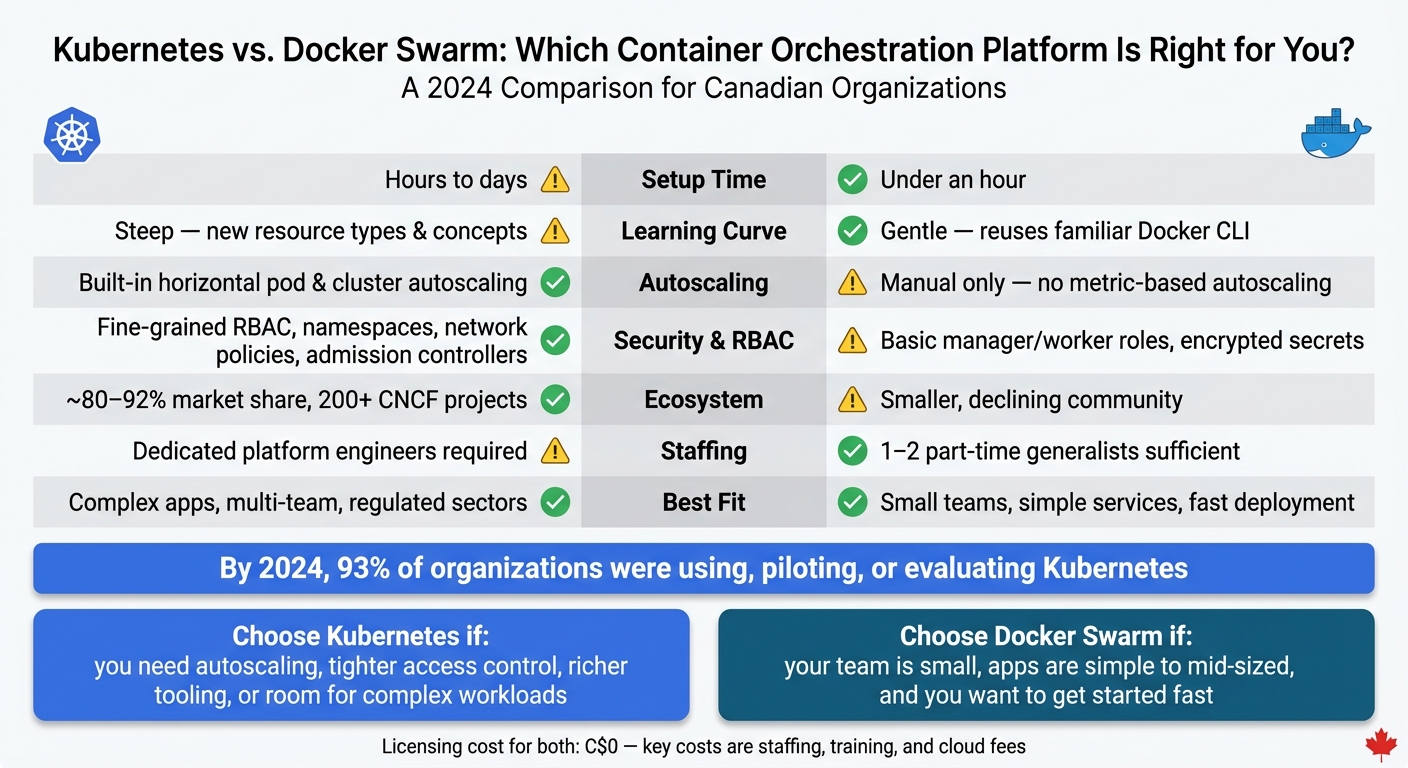
Kubernetes vs. Docker Swarm: Side-by-Side Comparison 2024
Kubernetes: Architecture, Pros, and Cons
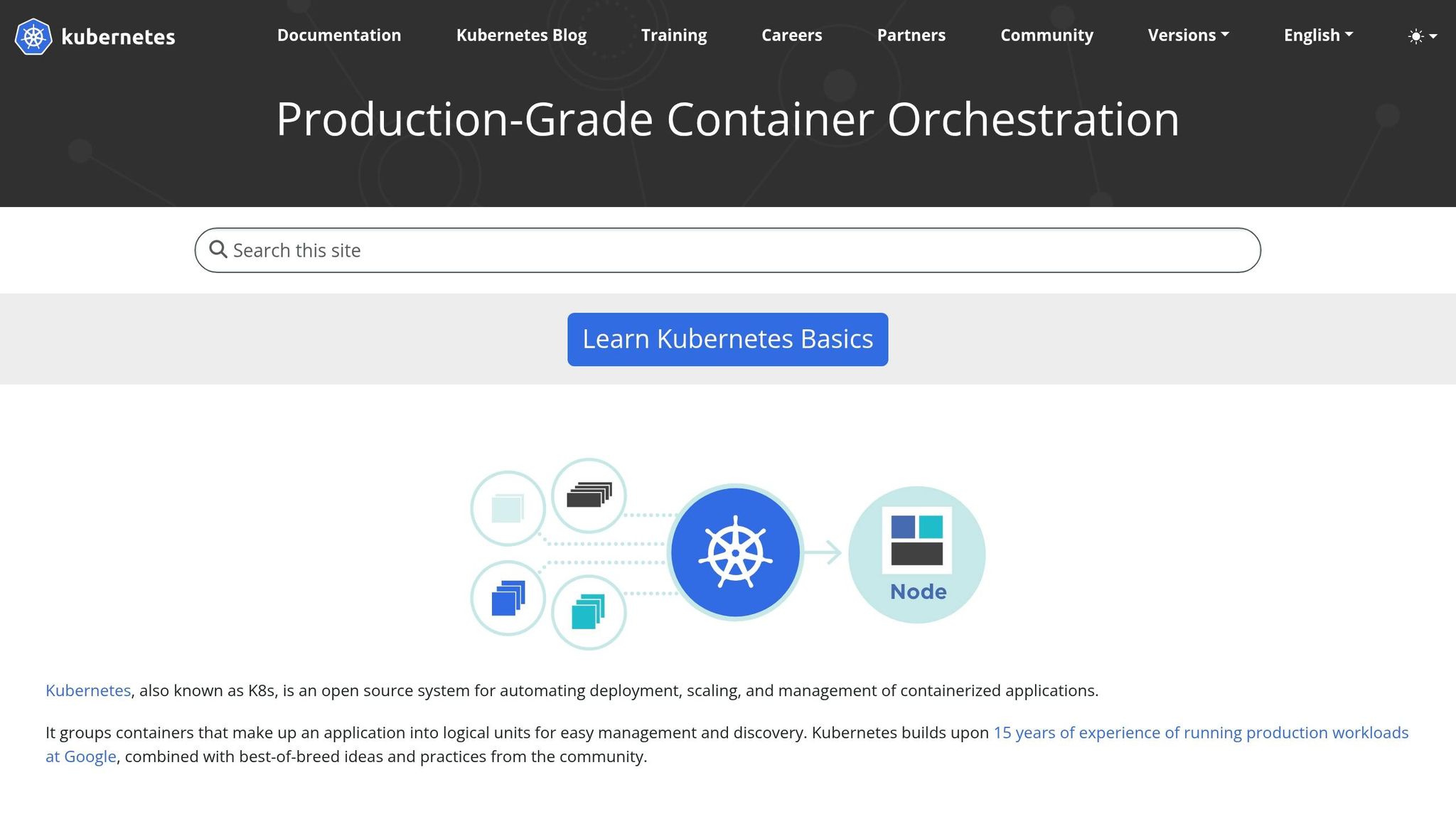
How Kubernetes Works
Kubernetes runs as a cluster made up of a control plane and worker nodes. The control plane manages the cluster’s state. Worker nodes run the pods.
Applications are packaged into pods, the smallest deployable unit in Kubernetes. Pods are managed by higher-level controllers such as Deployments, which handle rolling updates and rollbacks automatically. Services give pods a stable address so other parts of your system can find them, even as individual pods come and go. Namespaces divide the cluster into logical sections – for example, separate dev, qa, and prod environments – each with its own access controls and resource quotas.
You declare the desired state – say, five replicas – and Kubernetes works to keep it there by restarting failed pods or moving them onto healthy nodes. That control loop is a big part of why Kubernetes is resilient. It’s also why it asks more from the team running it.
Key Advantages of Kubernetes
Three strengths stand out most: autoscaling, security, and ecosystem depth.
Autoscaling is one of the clearest day-to-day wins. The Horizontal Pod Autoscaler (HPA) scales application replicas up or down based on CPU, memory, or custom metrics. Pair that with a cloud provider’s Cluster Autoscaler, and the underlying nodes can scale as well. For workloads with uneven demand – public-sector portals during tax season or e-commerce sites during holiday sales – this helps teams avoid over-provisioning and line up spending more closely with actual demand through automated resource management.
Security and multi-tenancy are strong points too. Kubernetes includes Role-Based Access Control (RBAC), namespace-level isolation, network policies, and admission controllers. Combined with envelope encryption for secrets and cloud IAM integration such as AWS IAM or Azure AD, these controls can help regulated industries line up with PIPEDA and provincial privacy rules.
The ecosystem is another major plus. Tools like Argo CD and Flux support GitOps workflows. Prometheus and Grafana cover observability. Kubeflow and the NVIDIA GPU Operator make Kubernetes a solid platform for AI and ML pipelines. By 2024, 93% of organizations were using, piloting, or evaluating Kubernetes. That level of adoption usually means broader support and an easier time hiring people with Kubernetes experience. But there’s a catch: the same depth that makes Kubernetes appealing also leads straight to its biggest downside – operational overhead.
Key Drawbacks of Kubernetes
All that power comes with complexity. Even managed services such as Amazon EKS and Azure AKS still need in-house expertise for networking, security hardening, cost control, and application onboarding. Upgrades need planning because API deprecations can break manifests. Troubleshooting can stretch across several layers at once: application code, cluster resources, CNI plugins, storage drivers, and cloud infrastructure.
For smaller Canadian organizations, staffing cost is often the biggest barrier. A production-grade cluster usually needs at least one or two experienced platform engineers, which can be a hard sell for a smaller team. Larger enterprises may be able to support a dedicated platform team, but then they run into coordination overhead across many product teams and environments.
The City of Montréal offers a useful reference point for what Kubernetes can do at scale: roughly 200 application components that previously ran on hundreds of virtual machines now run on about 8 machines after adopting Kubernetes. That kind of infrastructure consolidation is real, but it also took the organizational investment to make it stick.
sbb-itb-fd1fcab
Docker Swarm: Architecture, Pros, and Cons
How Docker Swarm Works
Docker Swarm is Docker’s native clustering and orchestration layer, built into Docker Engine. It turns a group of Docker hosts into one logical cluster.
Inside a Swarm cluster, manager nodes keep track of cluster state and schedule tasks. They use the Raft consensus algorithm to stay in sync. Worker nodes take those tasks and run the containerized workloads. Managers can also run workloads unless they’ve been drained.
Swarm keeps its core building blocks pretty simple. Services describe the state you want. Tasks are the individual container instances created from a service. Stacks group related services from a Docker Compose file and deploy them together. Swarm also includes overlay networking and routing mesh, which lets containers on different hosts talk to each other and spread traffic across replicas.
That setup is a big part of Swarm’s appeal. A small team can get a multi-node cluster running without a lot of setup. It feels lean and familiar, which is great for smaller environments. At the same time, that same lean design also sets the boundaries of what Swarm does well.
Key Advantages of Docker Swarm
Swarm’s biggest selling point is simplicity. It comes bundled with Docker, works with a familiar CLI, and fits neatly with Compose-based workflows. It also has fewer moving parts than Kubernetes. For smaller teams, that usually means simpler day-to-day admin and less coordination work.
You also get a solid set of built-in features without much extra setup, including:
- rolling updates and rollbacks
- built-in load balancing
- internal DNS-based service discovery
- encrypted secrets management
For teams running internal dashboards, APIs, and other services with moderate load, that feature set is often enough. They can get what they need without taking on the weight of a heavier platform.
Key Drawbacks of Docker Swarm
The trade-offs show up more clearly as workloads grow, teams get bigger, or compliance needs become stricter.
Swarm doesn’t offer custom horizontal autoscaling based on detailed metrics, advanced network policies, or the deeper observability integrations that are common in Kubernetes ecosystems. Its ecosystem is also much smaller, with fewer service meshes, advanced storage drivers, and enterprise add-ons to choose from.
Kubernetes also has much broader production use than Docker Swarm, and Swarm’s active usage keeps dropping. In practice, that matters. For Canadian organizations, Kubernetes talent is much easier to find in the job market, which can make hiring experienced engineers for a Swarm-based platform harder. There’s also some doubt around Swarm’s long-term direction after Docker moved under Mirantis.
Docker Swarm vs Kubernetes Comparison
Kubernetes vs. Docker Swarm: Side-by-Side Comparison
These differences affect hiring, cost, and operational risk.
Setup, Day-to-Day Operations, and Team Skill Requirements
Kubernetes takes more work to set up. Docker Swarm gets going fast and uses Docker tools many teams already know.
| Aspect | Kubernetes | Docker Swarm | Operational implication |
|---|---|---|---|
| Cluster setup time | Hours to days, including networking, storage, and ingress configuration | Under an hour for a small cluster | Kubernetes needs more upfront planning and more infra choices |
| Learning curve | Steep; introduces many new resource types and concepts | Gentle; reuses familiar Docker constructs | Kubernetes often calls for formal training or certifications |
| Daily management | Ongoing management of Deployments, StatefulSets, ConfigMaps, add-ons, and upgrades | Fewer moving parts; simpler API surface | Kubernetes needs more attention from platform staff —a burden often reduced by using a workflow automation planner to map internal processes. |
| Team composition | Dedicated platform engineers at mid-scale | Manageable by 1–2 engineers part-time for modest workloads | Kubernetes staffing costs more |
| Troubleshooting complexity | Rich introspection, but a broader failure surface across Pods, CNI, and controllers | Simpler model, but fewer ecosystem diagnostic tools | Kubernetes is harder to debug but gives more visibility when things go wrong |
For Canadian teams outside major tech hubs, hiring people with hands-on Kubernetes experience can be tough. That makes Swarm easier to live with for lean teams, at least early on.
Once the platform is in place, the gap gets clearer around scaling, governance, and staffing.
Scalability, Security, and Ecosystem Support
Kubernetes fits large, distributed clusters. Swarm fits smaller environments. The gap gets even bigger in security and governance, especially when more than one team shares the platform.
Kubernetes gives you fine-grained RBAC, namespace isolation, network policies, admission controllers, and broad links to external secret managers and identity providers. Swarm includes encrypted secrets and basic role separation, but it doesn’t offer the same depth of policy controls that regulated sectors often need.
| Criterion | Kubernetes | Docker Swarm | Best fit |
|---|---|---|---|
| Autoscaling | Built-in horizontal pod and cluster autoscaling | Manual scaling; no native metric-based autoscaling | Kubernetes for variable or growing traffic |
| RBAC and governance | Fine-grained RBAC, namespaces, admission controllers | Basic manager/worker roles; limited multi-tenant patterns | Kubernetes for multi-team or regulated environments |
| Secrets management | First-class Secrets resource; integrates with cloud KMS and Vault | Encrypted secrets built in, but fewer external integrations | Kubernetes for stricter compliance needs |
| Networking flexibility | Pluggable CNI model; supports service meshes and network policies | Overlay networking and routing mesh; simpler topology | Kubernetes for complex microservice architectures |
| Storage integrations | Broad CSI driver support; dynamic provisioning and snapshots | Functional but less standardised; fewer vendor integrations | Kubernetes for stateful workloads needing advanced storage |
| Ecosystem and community | ~80–92% market share; 200+ CNCF projects; backed by all major clouds | Smaller, declining community; limited third-party tooling | Kubernetes for long-term tooling and hiring confidence |
For Canadian organisations in regulated sectors like public sector, finance, healthcare, or energy, Kubernetes’ governance features aren’t nice-to-haves. They’re often required for compliance under laws like PIPEDA.
Those operating differences flow straight into total cost.
Cost and Long-Term Fit for Canadian Organizations
Both platforms are open source, so direct licensing costs are C$0. The bigger costs come from staffing, training, tooling, and what happens when the platform no longer fits your needs.
For a 10-node cluster, Kubernetes can cost more to run in year one than Swarm. The main drivers are specialised staff and extra tools for monitoring, logging, and security. Managed control planes also add recurring monthly fees.
A mid-size Canadian organisation running Kubernetes should plan for higher yearly staffing and tooling costs than it would with a similar Swarm setup.
| Cost factor | Kubernetes | Docker Swarm | Business impact |
|---|---|---|---|
| Training and certification | Higher; formal training often needed | Lower; builds on existing Docker knowledge | Kubernetes increases onboarding time and cost per engineer |
| Staffing | Typically dedicated platform engineers | Often 1–2 part-time generalists | Kubernetes lifts annual OpEx |
| Cloud control-plane fees | Managed services add recurring monthly fees | Runs on standard VMs; no extra control-plane fees | Swarm has lower baseline cloud costs for small deployments |
| Long-term compute efficiency | Better at scale via autoscaling and better resource use | Less efficient at scale; manual capacity adjustments needed | Kubernetes can lower cloud spend as workloads grow |
| Re-platforming risk | Low; de facto standard with strong vendor support | Higher; smaller ecosystem and less long-term momentum | Swarm carries migration risk if requirements outgrow the platform |
Those cost gaps often shape which platform makes sense for a given workload.
Which Platform Fits Your Use Case?
The choice comes down to team size, workload complexity, and governance needs. Put plainly: pick the platform that fits how your team works today, not the version of your company you hope to become six months from now.
When to Choose Kubernetes
Kubernetes makes more sense when your workloads are more complex, your team is getting bigger, or you work in a sector with strict governance rules. If you’re running complex microservices, AI or ML inference services, or customer-facing APIs with tight uptime expectations, Kubernetes gives you the scheduling, autoscaling, and self-healing features to support that.
It also fits regulated sectors such as public sector, finance, healthcare, and energy, where role-based access control, audit logging, and network segmentation matter.
Kubernetes now has broad enterprise adoption, which points to a platform that has matured in production.
When to Choose Docker Swarm
For smaller and simpler setups, Docker Swarm is the leaner pick. It works well when your team is small, your application stack is fairly straightforward, and deployment speed matters more than deep feature depth.
If you’re running about 10–20 nodes, a small set of services, and traffic that doesn’t swing around too much, Swarm’s simpler model can keep operations lean without extra overhead. It’s also a natural fit for teams already using Docker Compose in local development, since the model carries over with very little friction into a clustered setup.
Final Takeaway for Decision-Makers
The choice is simple: match the platform to today’s operational reality, not tomorrow’s ideal state.
Kubernetes gives you more scale, control, and governance, but you’ll pay for that with more complexity and a bigger staffing investment.
Docker Swarm is faster to adopt and easier to run day to day, but you give up some advanced features and end up with a smaller, less active ecosystem.
FAQs
How hard is it to migrate later?
Migrating later can be moderately hard because it usually means changing how people work, not just swapping out infrastructure. Teams often need to learn new tools, adjust day-to-day processes, and deal with the friction that comes with change.
To make a future migration easier, use infrastructure as code and version control to keep environments consistent, cut down on configuration drift, and make redeployments and rollbacks simpler. It also helps to start small, validate changes with automated testing and monitoring, and then scale once things are working as expected.
Which option is better for stateful apps?
Kubernetes is the better choice for stateful apps. It handles scalable containerised architectures well and is a stronger fit for more complex, stateful, or session-heavy services.
The material also points to patterns like vertical scaling for services that are harder to distribute. At the same time, it does not call out any stateful-specific strengths for Docker Swarm.
Do managed Kubernetes services reduce complexity enough?
Yes. Managed Kubernetes can cut down complexity in a way that actually matters, mostly by taking operational work off your team’s plate, like cluster scaling and keeping configuration consistent.
It can also help standardize deployments across environments. But that doesn’t mean you can set it and walk away. You still need the right monitoring and automation in place to keep cluster performance on track and avoid scaling problems or pod scheduling issues.