
Top AI Tools for Release Feedback Analysis

I’d choose a release-feedback tool by workflow automation – not by rank. Start with the sources you need, then test whether the tool can link customer comments to a release and let you check its AI labels.
I compare six tools across feedback sources, sentiment analysis tools, dashboards, integrations, data controls, team fit, and pricing.
Quick Comparison
| Tool | Where I’d start | Main purchase check |
|---|---|---|
| Enterpret | Bringing scattered feedback into one topic system | Topic accuracy, source links, and connector coverage |
| Chattermill | Comparing themes and sentiment across channels | Issue-level sentiment, alerts, and record matching |
| Zonka Feedback | Collecting and analysing feedback in one place | Survey channels, imported data, and AI credit limits |
| Thematic | Reviewing and editing themes in customer comments | Theme controls, historical updates, and comment limits |
| Qualtrics XM | Running survey-led enterprise programmes | Licence coverage, release fields, and setup costs |
| Medallia | Analysing digital and contact-centre feedback | Module coverage, release filters, and access controls |
My next step: a 14–30 day pilot using at least three channels and 100 human-labelled comments. I’d compare label accuracy, correction time, source links, and issue routing – not just dashboard appearance.
For Canadian buyers, I’d also confirm <u>hosting, cross-border processing, retention, deletion, and model-training terms</u> in writing, then calculate total costs in C$, including implementation, applicable GST/HST, and USD exchange-rate exposure.
This comparison is dated 14 October 2026 and uses the supplied vendor descriptions, not live verification.
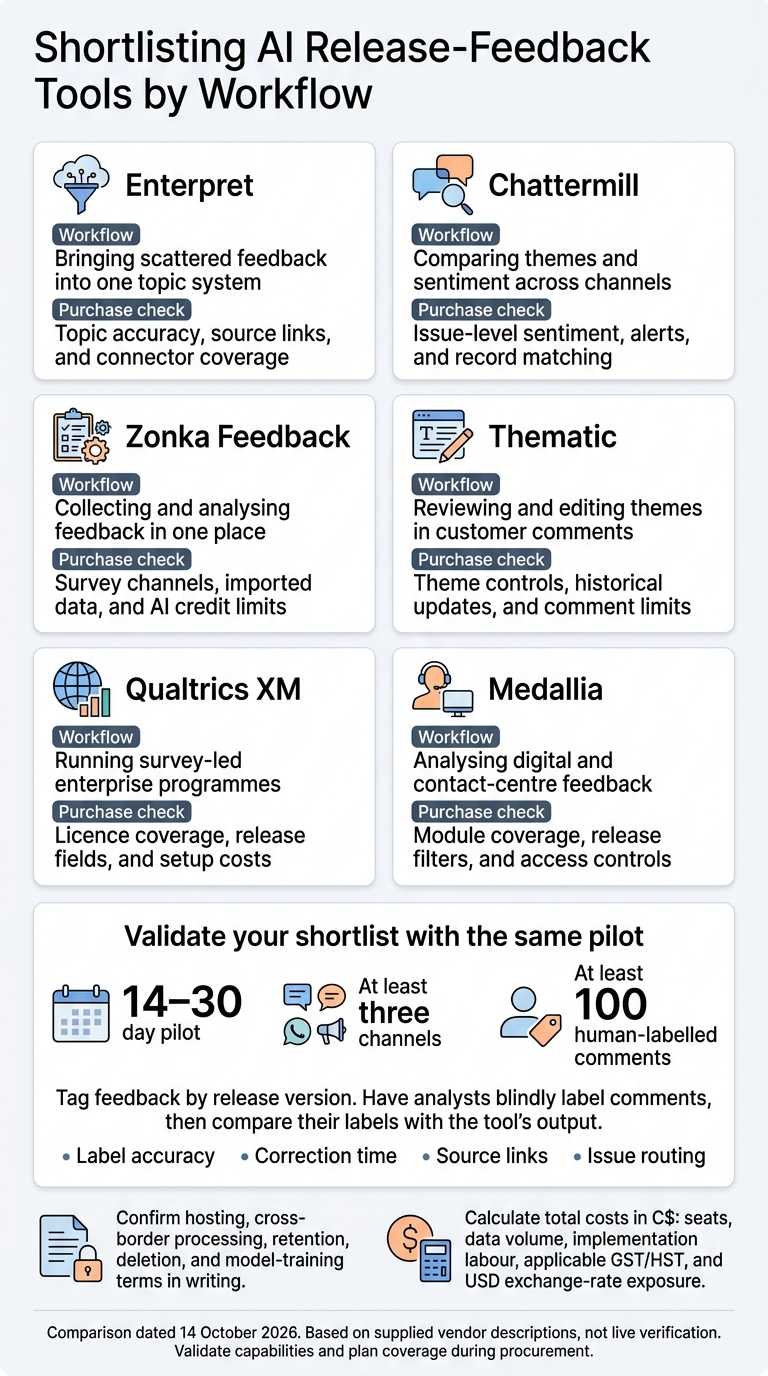
AI Release Feedback Tools: Choose by Workflow
1. Enterpret
Text and Sentiment Analysis
Enterpret works best when release feedback is spread across multiple systems.
Adaptive Taxonomy groups feedback into customer-specific topics and detailed reasons, adjusting as language changes. For release reviews, test it against your product terminology, decide who owns the taxonomy, and check whether sentiment scores apply to messages, topics, or customers.
Dashboards and Release Tracking
Add release dates and version metadata, then check which fields you can use to filter feedback. Saved reports, visual analysis, alerts, and anomaly detection help teams monitor feedback with expert AI insights. Public sources don’t document a release-specific dashboard template.
Intercom properties can include plan type, device, and country, while Salesforce adds account and customer context. Check that teams can trace trends back to the original comments, especially when comparing feedback before and after a release.
Feedback Sources and Integrations
Zendesk and Intercom provide support conversations, Gong adds call feedback, and Salesforce Sales Cloud and Service Cloud supply account and customer context. These sources help teams connect post-release issues to affected accounts and conversations.
CSV uploads, webhooks, Snowflake, and Census can bring in proprietary repositories. Before connecting them, check historical backfill, sync frequency, field mapping, and account matching.
Data Controls and Commercial Fit
Cross-source analysis needs clear rules for data access and handling. Enterpret describes administrator-managed connections, plus PII detection and obfuscation before ingestion. Ask which fields are protected and who can manage connections.
Best for teams bringing scattered repositories into one taxonomy, Enterpret still requires a taxonomy owner and classification checks. Enterpret says native OAuth setup can take under 60 seconds.
There’s no reliable public feature-by-plan matrix, so mid-size and large teams should request a quote covering volume, backfill, users, connectors, exports, security features, and implementation support. Smaller teams with one feedback repository may find the setup broader than they need.
sbb-itb-fd1fcab
What are the Best AI Survey Tools in 2026 to Analyze Customer Feedback?
2. Chattermill
Chattermill helps teams analyse customer feedback across several channels, with a focus on detecting themes and tracking sentiment.
Text and Sentiment Analysis
Chattermill brings multi-channel feedback together and assigns themes and sentiment. A single comment can have several topic tags. For post-release analysis, check whether it scores sentiment for each issue, rather than only for the comment as a whole.
Themes can be linked to NPS, CSAT, CES and churn to support root-cause analysis – but those links don’t establish causation. Test its classifications with Canadian English and French, ambiguous wording, sarcasm and product terms.
Dashboards and Release Tracking
To use themes for release analysis, teams need to filter them by release date and version. Chattermill’s dashboards track theme frequency, sentiment trends and key metrics, with filters for cohorts and stages. Define launch dates, versions and segments before comparing pre- and post-release periods.
Chattermill describes anomaly alerts sent to Slack, email and Jira. Before using them to monitor a rollout, confirm alert thresholds, how often the data updates and whether alerts link to the underlying comments.
Feedback Sources and Integrations
Chattermill reports 65+ native integrations, including Zendesk, Intercom and Salesforce. For release tracking, check which integrations your plan covers, how far back you can import data and whether call recordings need transcription or a separate connector. Also confirm how records are matched and deduplicated across systems.
Data Controls and Commercial Fit
Mid-size teams should assess setup effort and analyst capacity. Larger teams should check role-based access and whether the taxonomy stays consistent across products and regions.
GDPR and SOC 2 Type II do not prove Canadian data residency. Request current security documents and a data-processing agreement that covers hosting and redaction. It should also spell out terms for release-feedback access, retention, deletion and use in model training.
Pricing is quote-based. Ask for an itemized proposal covering platform and implementation fees, connectors and historical data imports, usage limits and renewal increases.
3. Zonka Feedback
Text and Sentiment Analysis
Zonka fits post-release triage when teams want feedback collection and analysis in one place. Its AI Feedback Intelligence analyses survey responses and imported feedback to identify recurring themes, sub-themes, sentiment, urgency, and entities across surveys, tickets, reviews, and chats.
For historical data, check whether your plan analyses imported feedback or only responses collected through Zonka. Also confirm that analysts can edit tags and view the source comment behind each AI label.
Dashboards and Release Tracking
After identifying themes, check whether you can link them to a specific release. Zonka reports NPS, CSAT, and CES across channels, with dashboards showing themes, sentiment, and KPI trends.
Event-triggered in-app surveys collect feedback after someone uses a feature or completes onboarding. Confirm whether release comparisons use tags and date filters rather than a built-in release marker.
Feedback Sources and Integrations
Each channel is more useful when you can trace its feedback to the affected release. Zonka collects responses through web, in-app, email, and SMS surveys. Connections include Salesforce, Zendesk, Intercom, app stores, CSV imports, and open APIs.
For Slack or another collaboration tool, check the connection method and which plans support it. Routing can use score, topic, urgency, customer attributes, or workflow events. Before rollout, define who owns each issue, escalation thresholds, deduplication rules, and how follow-up actions will be logged.
Data Controls and Commercial Fit
Release analysis needs clear access, residency, and retention rules. Zonka states that it is ISO 27001:2022 certified and compliant with GDPR and HIPAA. Canadian buyers should still confirm hosting, residency, subprocessors, retention, deletion, encryption, access logs, role-based permissions, SSO, auditability, masking, and whether data is used for model training.
Mid-size teams may find Zonka a good fit if they want collection, analysis, and routing together. Larger teams should check scale limits and whether required data controls depend on the plan or an enterprise agreement.
Pricing is modular. Feedback Management, the collection product, is priced by response. AI Feedback Intelligence, the analysis product, uses AI analysis credits. You can buy them separately or as a bundle. Request a current CAD quote that covers response limits, credits, seats, channels, dashboards, API access, integrations, historical imports, AI analysis, and overage charges.
4. Thematic
Text and Sentiment Analysis
Thematic uses AI text analytics to find recurring themes in unstructured feedback. Analysts can then review, merge, rename, reorganize, and refine them in the Theme Editor. Before comparing releases, confirm whether taxonomy changes are applied to historical feedback.
Sentiment is scored at both the segment and theme level, so mixed comments can be separated into distinct signals. Check how it handles sarcasm, negation, and technical terms.
Dashboards and Release Tracking
Once you’ve defined themes, check whether you can link them to a release. Thematic dashboards and reports show theme frequency, sentiment, metric impact, sub-trends, score-change drivers, individual comments, and comparisons by region or segment.
Confirm release-date filters, update intervals, alerts, annotations, role-based views, and release tags. These support comparisons by version, date, and cohort. A change in NPS alongside a theme does not, on its own, establish causation.
Feedback Sources and Integrations
To trace comments back to a release, source records need enough context. Thematic documents one-click integrations, API access, sFTP, file uploads, and custom integrations. Each record should include comment text, date, product area, segment, region, channel, and release version.
Before buying, confirm which connectors are available, how often data syncs, backfill limits, and who handles maintenance. You can also calculate workflow automation benefits to justify the investment. Also check whether exports retain themes, sentiment, metadata, and source comments.
Data Controls, Pricing, and Team Fit
Check whether the platform fits your data rules, budget, and review workflow. Test English and French handling directly, including bilingual comments. Thematic’s privacy-by-design documentation says customer data builds models for that client rather than shared base models. Ask about Canadian data residency, retention, deletion, access logs, and redaction procedures.
The published Foundation plan costs US$25,000 annually and includes up to 25,000 comments and three datasets, plus dashboards, API access, and one-click integrations. Enterprise pricing is custom. The Foundation plan may suit mid-size teams. Larger teams should negotiate volume, dataset limits, onboarding, and service levels. Budget for taxonomy review, not just implementation.
5. Qualtrics XM
Text and Sentiment Analysis
Qualtrics combines NPS and effort scores with topic, sentiment, and emotion analysis. The vendor reports support for more than 100 languages. Check coverage and accuracy for your licence and language pair. Use churn-risk scores to guide decisions, not as retention guarantees, and test them against renewal results.
This mix helps when release issues show up in survey comments before they reach support or CRM records.
Dashboards and Release Tracking
Use Embedded Data and Dashboard Data Mapper to compare responses before and after launch by release version, account, and segment. Show response volume alongside sentiment trends and key experience scores. That makes changes in participation easier to spot.
Before rollout, confirm backfill, scheduled reports, exports, and permissions. Make sure you can also trace each release comparison back to its source records.
Feedback Sources and Integrations
Qualtrics integrates with Salesforce, Microsoft Dynamics, Zendesk, ServiceNow, and Slack. Check whether each connection is native, API-based, or dependent on middleware. Specify account keys and sync frequency, and confirm whether workflows can create cases or notify issue owners. You can also estimate workflow automation savings to justify these integration costs.
Data Controls and Commercial Fit
Get written confirmation of which features your licence includes: Text Analytics or Text iQ, multilingual analysis, predictive features, dashboards, and API access.
Qualtrics pricing is quote-based. Ask for separate costs for survey volume, responses, text-processing volume, integrations, storage, support, implementation, training, and renewal increases.
Mid-size teams should pilot one product area and one release. Large teams should budget for broader governance, multiple business units, advanced integrations, and dedicated implementation support. Assign owners for survey changes, topic models, and integrations.
Before importing identifiable records, verify regional hosting, cross-border transfers, retention, and privacy terms against Canadian privacy requirements.
Teams that need to collect feedback across more channels should compare Qualtrics with the next enterprise option.
6. Medallia
Text and Sentiment Analysis
Medallia Text Analytics identifies themes, sentiment, emotion signals, and experience KPIs across multiple languages and dialects. You can use prebuilt models or custom topic models for software development release topics:
Onboarding friction, billing defects, missing features, and documentation gaps.
Check classifications against labelled customer comments, then use those labels in release-level dashboards and alerts.
Dashboards and Release Tracking
Medallia offers theme and sentiment filters, configurable experience KPIs, and alerts triggered by sentiment or category changes. To report on a release, filter issue-level comments by release identifier and confirm how those identifiers reach the dashboard.
Check what each filter changes. A theme filter may narrow the records analysed without changing the underlying response pool or report scores. Release filtering also depends on consistent source-field mapping during ingestion.
Feedback Sources and Integrations
Medallia brings together survey comments, digital feedback, speech, contact-centre data, and social signals. Map each source to shared fields, such as account, product, version, language, and timestamp.
Confirm supported connectors, ingestion limits, API options, and export formats. Also check whether your purchase includes speech transcription and social-data features. Keep versions of the taxonomy to prevent distorted release comparisons, and set access controls and retention rules during setup – not later.
Data Controls and Commercial Fit
Medallia documents role-based access, PII masking, field-level encryption, and IP allowlisting. Check whether these controls cover every module and whether administrators can restrict sensitive exports. Confirm data residency, retention, and deletion terms directly in the contract.
Experience Cloud pricing is quote-based. Request an itemized CAD quote covering analytics modules, interaction volume, integrations, implementation, storage, support, and overages.
Feature and Data Control Comparison
These tables show what each vendor documents, what remains unverified, and what buyers need to confirm in their own environment. Use the 3/2/1/0/U/T scale for procurement scoring only – not performance scoring.
Scoring key: 3 = independently verified in the buyer’s environment; 2 = documented in the relevant plan; 1 = documented but limited, add-on, or custom; 0 = documented as unavailable; U = unverified or not publicly specified; T = untested. No performance scores are included.
Text and Sentiment Analysis
| Tool | Analysis evidence available | Details still needing confirmation |
|---|---|---|
| Enterpret | See tool profile | Entity recognition, aspect-level sentiment, supported languages, confidence indicators, and human review |
| Chattermill | See tool profile | Analyst editing, entity recognition, sentiment granularity, languages, and confidence indicators |
| Zonka Feedback | Not publicly specified in the comparison sources | Theme discovery, taxonomy controls, sentiment, languages, and human review |
| Thematic | Not publicly specified in the comparison sources | Theme discovery, taxonomy controls, sentiment, languages, and human review |
| Qualtrics XM | Not publicly specified in the comparison sources | Entity recognition, aspect-level sentiment, root-cause support, and confidence indicators |
| Medallia | See tool profile | Validate results on the shared sample |
Test all six tools on the same labelled sample, using the same source mix and English/French split. Compare theme precision, sentiment agreement, language performance, multilingual handling, human-review rates, and correction workflows.
Dashboards and Release Tracking
| Tool | Dashboard evidence in supplied sources | Native release/version tracking |
|---|---|---|
| Enterpret | Custom roles for taxonomy and metadata management are documented; dashboard specifics are not publicly specified. | Not publicly specified |
| Chattermill | Not publicly specified | Not publicly specified |
| Zonka Feedback | Not publicly specified | Not publicly specified |
| Thematic | Not publicly specified | Not publicly specified |
| Qualtrics XM | Not publicly specified | Not publicly specified |
| Medallia | Not publicly specified | Not publicly specified |
Release analysis needs usable dashboards and clean source mapping. For release/version comparisons, check filters, alerts, exports, cohort views, and version fields. Treat imported version fields and external BI as custom setup unless the vendor documents native support.
Feedback Sources and Integrations
| Tool | Documented integration evidence | Buyer verification |
|---|---|---|
| Enterpret | More than 50 feedback integrations are documented, including Zendesk, Gong, Qualtrics, Linear, Jira, Slack, and Zoom. | Verify coverage, import method, and field mapping for your actual source mix. |
| Chattermill | Not publicly specified | Verify coverage, import method, and field mapping for your actual source mix. |
| Zonka Feedback | Not publicly specified | Verify coverage, import method, and field mapping for your actual source mix. |
| Thematic | Not publicly specified | Verify coverage, import method, and field mapping for your actual source mix. |
| Qualtrics XM | Not publicly specified | Verify coverage, import method, and field mapping for your actual source mix. |
| Medallia | Not publicly specified | Verify coverage, import method, and field mapping for your actual source mix. |
For each connector, confirm sync frequency, historical import limits, rate limits, custom-field support, deduplication, and deletion behaviour. These checks help you trace feedback to a specific release.
Data Controls, Pricing, and Team Fit
Governance and pricing usually decide which tools make the final shortlist.
| Tool | Documented control evidence | Residency, training, and retention checks | Pricing |
|---|---|---|---|
| Enterpret | PII obfuscation at ingestion, administrator-controlled integrations, SOC 2 Type II, and ISO 27001:2022 are documented. The documentation also states GDPR and CCPA compliance claims. | Get written confirmation of region, training, and retention terms. | Pricing not publicly specified; order terms generally specify annual billing. |
| Chattermill | SOC 2 Type II is stated. | UK/EU storage is standard, with a U.S. option; customer data trains a customer-specific taxonomy isolated from other customers’ models. Confirm retention terms. | Pricing not publicly specified |
| Zonka Feedback | Not publicly specified | Confirm residency, training, and retention terms. | Pricing not publicly specified |
| Thematic | Not publicly specified | Confirm residency, training, and retention terms. | Pricing not publicly specified |
| Qualtrics XM | TLS is documented, along with ISO 27001, 27017, 27018, and 27701 certifications. | Get written confirmation of processing region, training, and retention terms. | Pricing not publicly specified |
| Medallia | SOC 2 Type II, GDPR/SCCs, CCPA, HIPAA, HITRUST, ISO 27001, 27017, 27018, 27701, and FedRAMP Ready are documented. | Retains data until the customer deletes it or ends the relationship; confirm residency and training terms. | Pricing not publicly specified |
For Canadian procurement, request the DPA, cross-border terms, breach-notice commitments, and deletion procedure. Also ask where production data, backups, and AI-processing data are located.
Pros and Cons by Team Size
Match each tool’s features to the team that will maintain it, similar to how AI enhanced mobile and web apps require specific oversight. Team fit depends on who runs the workflow, not just what the tool can do. This table compares workload, controls, and team size.
| Tool | Documented pros | Cons or procurement questions | Implementation and governance burden | Best fit |
|---|---|---|---|---|
| Enterpret | Adaptive taxonomy and contextual analysis. | Users have reported setup and integration difficulties. Confirm taxonomy versioning and traceability back to source comments. | Plan for field mapping, taxonomy ownership, and theme validation. | Mid-sized teams with dedicated insights staff; large teams needing contextual analysis. |
| Chattermill | Cross-channel theme, sentiment, and driver analysis. | Confirm connector depth, taxonomy administration, exports, and case-routing targets. | Test identity resolution, reporting setup, and permissions. | Mid-sized and large teams with strong connector and governance needs. |
| Zonka Feedback | Collection and AI analysis in one workflow. | Confirm analysis depth, AI quotas, and administration controls. | Assess survey setup, channel ownership, and analysis configuration. | Mid-sized teams wanting collection and analysis in one workflow. |
| Thematic | Open-text theme discovery with human review. | Verify sub-theme handling, entity and aspect tracking, and release-feedback connectors. | Set aside analyst time for theme review and consistent reporting. | Mid-sized and large insights teams that put theme quality and analyst control first. |
| Qualtrics XM | Survey-first experience management with Text iQ. | Confirm which analysis features are included and what administration controls are available. | Plan for survey ownership, administration, and change control. | Large teams running formal research and release-feedback programs. |
| Medallia | Multichannel sentiment, intent, and topic analysis. | Verify business-unit separation, issue routing, and cross-channel reporting. | Plan for program administration and cross-team governance. | Large organizations managing broad omnichannel release feedback. |
For the trial, use one release window and measure ingestion success, correction time, source traceability, and routing speed.
Conclusion: Choose a Tool for Your Release Workflow
Choose the tool that fits your workflow: source coverage, analysis quality, release reporting, integrations, controls, and total cost. Use this matrix to narrow your procurement review for post-release feedback analysis.
| Priority | Shortlist | Purchase checks |
|---|---|---|
| Channel consolidation | Enterpret, Chattermill, Thematic | Verify native connectors, API rate limits, and deduplication. |
| Enterprise governance | Qualtrics XM, Medallia | Verify SOC 2 Type II or ISO 27001 evidence, access controls, and data residency. |
| Deep text analysis | Enterpret, Chattermill, Thematic | Test taxonomy flexibility, multilingual sentiment accuracy, and alignment with human-labelled feedback. |
| Omnichannel dashboards | Chattermill, Medallia | Check cross-channel correlation, sync speed, and executive reporting templates. |
| In-app collection with analysis | Zonka Feedback | Verify SDK size and performance impact, event-trigger logic, and offline response caching. |
Use your shortlist to plan a 14–30 day pilot across at least three channels. Tag feedback by release version, and have analysts blindly label at least 100 comments. Then compare their labels with the tool’s output.
Use the results to compare rollout effort and reporting value. Calculate the total cost in C$, including seats, data volume, implementation labour, applicable GST/HST, and exchange-rate exposure for USD quotes.
Digital Fractal Technologies Inc offers implementation services for custom feedback pipelines, integrations, and dashboards.
FAQs
How can I separate release issues from unrelated feedback?
Use AI-powered topic clustering to group feedback about shared problems. Then filter by volume, sentiment, and trends to see whether issues are new or have stayed stable after a release. Intent detection separates routine feedback, such as feature requests, from critical technical failures that need immediate attention.
Pair feedback with performance metrics, such as latency and error rates, to check whether reports of sluggishness line up with a drop in system performance after the latest release.
What AI accuracy is good enough for release decisions?
“Good enough” AI accuracy depends on risk. Validate the model against a labelled “gold set” drawn from your own feedback. Use offline metrics such as accuracy, F1 and calibration, then test in shadow mode before letting the model route live traffic.
For low- to medium-risk uses, such as dashboard-only insights, testing with limited traffic may be acceptable if validation results support it. Higher-risk settings need stronger offline validation and expert review before the model informs decisions.
How can I analyse feedback without exposing customer data?
Build a privacy-by-design pipeline that masks personal information before storage or AI processing. Use stream processing with pattern matching and NLP-based entity recognition to replace personal details with tokens.
Protect data in transit with TLS 1.2 or higher, encrypt stored data with managed keys, and restrict access through role-based access control (RBAC). Keep analytics data in Canadian regions and audit data handling regularly to support local privacy compliance.