How AI Speeds Up Mobile App Development

AI can cut mobile app delivery time, but only when people stay in control. In the article, I show where AI helps most: turning notes into requirements, drafting wireframes, writing boilerplate code, building tests, and sorting release work. You can even calculate workflow automation benefits to see the potential impact on your operations. I also make one point clear from the start: AI saves time upfront, but teams still need review, security checks, and sign-off before anything ships.
A few numbers stand out:
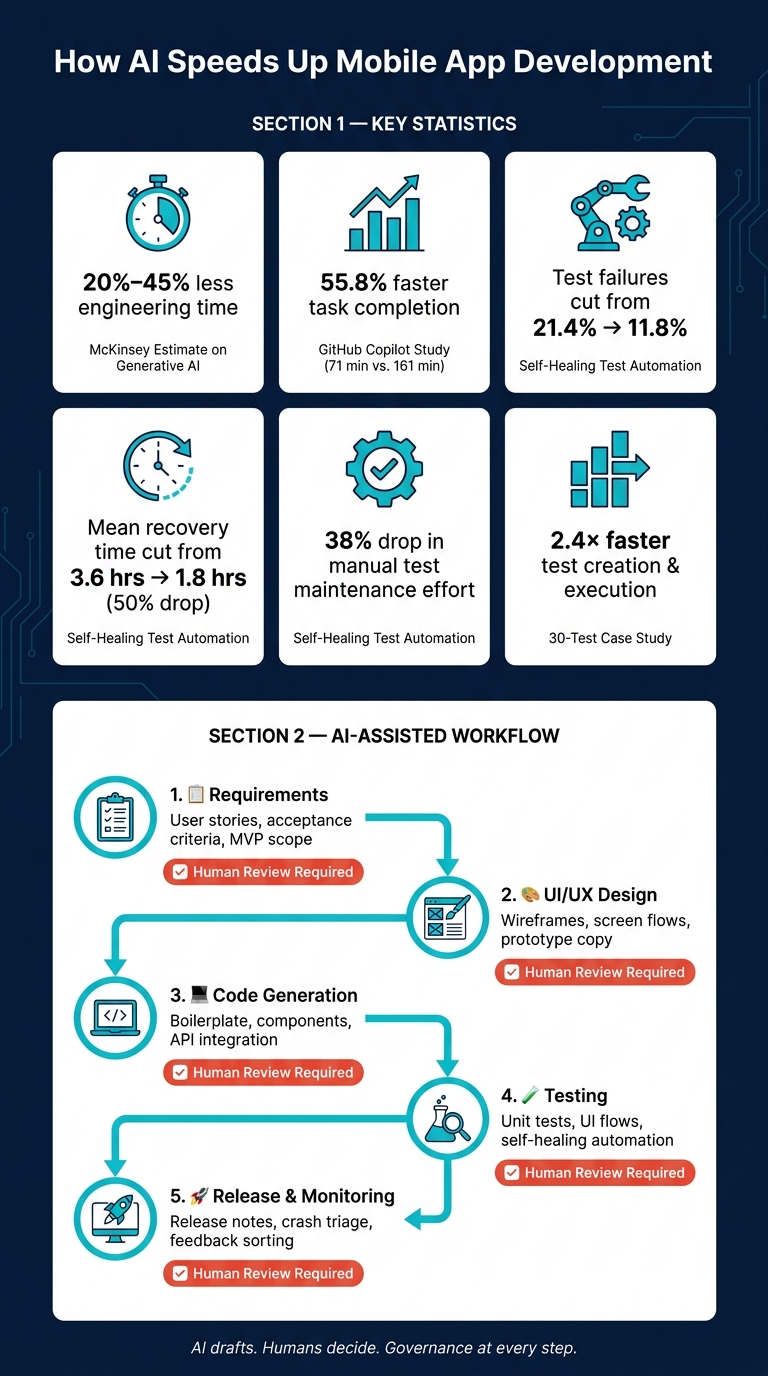
- McKinsey estimates 20% to 45% less software engineering time with generative AI
- In a GitHub Copilot test, developers finished a task in 71 minutes vs. 161 minutes – about 55.8% faster
- One self-healing test study cut failures from 21.4% to 11.8%
- The same study cut mean recovery time from 3.6 hours to 1.8 hours
- Manual test maintenance effort dropped by 38%
If you want the short version, here it is:
- I use AI first to draft user stories, acceptance criteria, and MVP scope
- Then I use it to sketch mobile screens, flows, and UI copy
- Next, I use it to produce repetitive code, refactoring ideas, and test cases
- After that, I use it for release notes, submission checks, and post-launch issue sorting
- At every step, I keep human review, privacy checks, and security controls in place
For Canadian teams, that matters even more. Apps often need bilingual support, PIPEDA-aware data handling, accessibility checks, CAD formatting, ISO dates, and metric units. So the article is not about letting AI run the project. It’s about using it to cut delay while keeping governance in place.
Bottom line: I treat AI like a fast first draft tool. It helps me move from idea to MVP with less manual work, but the team still owns decisions, quality, and risk.
How AI Accelerates Mobile App Development: Key Stats & Workflow
How I Build Apps with AI in 2026
sbb-itb-fd1fcab
1. Use AI to define scope and requirements earlier
AI can turn workshop notes, emails, SOPs, and policy documents into user stories, acceptance criteria, and feature lists much faster. For Canadian organisations working across provinces and time zones, delays add up fast. AI helps cut that lag. Experimental tools like RECOVER can classify requirements-relevant dialogue from stakeholder conversations with around 76% accuracy at the conversation-turn level. That gives analysts a far better starting point than manual note-taking alone.
Turn business goals into user stories and acceptance criteria
Record the workshop, transcribe it, and ask AI to draft stories and acceptance criteria. Give it the business domain, personas, platforms, and constraints like bilingual support, PIPEDA, or offline access.
Ask the AI to format stories as As a [persona], I want [goal], so that [benefit], with Given/When/Then criteria that match INVEST. But here’s the catch: human review is not optional.
AI can draft requirements fast, but it can also miss regulatory details, make wrong assumptions about data handling, or skip sector rules that matter. Product owners, security leads, and compliance reviewers need to sign off before any AI-written story goes into the signed-off backlog. That matters even more in regulated sectors like public sector, energy, or construction.
Prioritise features for an MVP and phased release plan
Once user stories are drafted and reviewed, AI can help sort them into MoSCoW categories – Must, Should, Could, and Won’t – and apply scoring frameworks like RICE to rank features by reach, impact, confidence, and effort. That gives leaders a clearer basis for deciding what belongs in an MVP and what should wait for a later phase.
AI can also spot technical dependencies early. For example, identity management integration may need to happen before personalised dashboards can work. Or offline data modelling may need to come first before a field workflow can run well. Catching those links early helps teams avoid sequencing mistakes that are costly to fix in the middle of a sprint.
Leadership still owns final prioritisation around budget, deadlines, and compliance. AI doesn’t make those calls. It just makes the trade-offs easier to see. Once the backlog is signed off, AI can help move the team into wireframes and screen flows faster.
2. Speed up UI and UX drafting for iOS and Android
Once the requirements are clear, the next job is turning them into actual screens. AI-assisted design platforms help cut the gap by turning plain-language prompts into wireframes, screen flows, and interactive prototypes.
Generate wireframes, screen flows, and prototype copy
Designers – and even product owners or business analysts – can describe what they need in plain language and get an editable layout back. These tools can produce layouts that follow iOS and Android patterns. For example, a prompt like employee timesheet approval flow for a mid-sized construction firm in Alberta, Android, bilingual English–French labels can return a multi-screen flow with navigation, form fields, and status indicators already set up. From there, teams can rate, tweak, and refine the options instead of starting with a blank canvas.
This works especially well for data-heavy internal apps like safety reporting tools, work order management, inspection dashboards, and capital expenditure approvals. In these cases, speed and clarity usually matter more than custom visual polish. AI can also write microcopy, such as:
- Button labels
- Error messages
- Tooltips
- Empty states
For Canadian teams, it helps to spell out details like en-CA spelling, CAD currency, ISO dates, and metric units.
Mid-fidelity prototypes are the sweet spot here. They’re detailed enough for review and testing, but still fast to make.
Prepare cleaner design handoff for development teams
That first draft can then turn into the base for developer-ready assets. After the screens are drafted, AI can parse files, pull out components, and flag platform issues before handoff. Design assistants can document validation rules, point out edge cases like offline mode or failed submissions, and suggest state diagrams that show what happens under different conditions. An email field, for instance, can come with validation rules and inline error states already mapped out. That gives developers a readable spec instead of a static mockup with no notes.
AI can also catch iOS, Android, and accessibility issues before handoff – including low-contrast elements that fail WCAG checks. For public sector apps in Canada, where accessibility rules are strict, finding those issues during design is far cheaper than fixing them after development. Consistent layer naming also helps AI parse files with less friction and keeps the component library clean.
3. Generate code faster and reduce repetitive mobile development work
Once screens and specs are done, coding often becomes the next slowdown. That’s where AI coding assistants can help. Not by taking over the developer’s job, but by handling the repetitive tasks that eat up time.
Create boilerplate, components, and API integration code
Launching a new mobile feature usually means a pile of setup work: navigation stacks, form validation, API clients, and auth flows. IDE-based AI assistants can spin up that scaffolding fast. A senior developer still sets the structure first – whether that’s MVVM for SwiftUI with Combine, Clean Architecture for Kotlin with Jetpack Compose, or a layered setup for React Native. Then AI fills in the routine parts. The outcome is scaffolded code that lines up with the team’s chosen setup.
The time savings aren’t just anecdotal. A large GitHub Copilot experiment found that developers finished a coding task 55% faster with AI help than a control group – 1 hour 11 minutes versus 2 hours 41 minutes. For Canadian teams building data-heavy apps, like inspection tools, permit portals, and work-order systems, that kind of gain can stack up in a hurry.
That said, generated code still needs a careful review before merge. Teams should check architecture, security, performance, and data handling – especially around auth flows, token storage, and offline sync patterns, where mistakes can carry real risk under Canadian privacy law such as PIPEDA.
Once the first draft is there, AI can also help clean things up and make the code easier to work with.
Refactor code and troubleshoot platform-specific issues
AI can help after the app is already up and running too. It can look through stack traces, logcat output, Xcode logs, and crash reports, then connect error patterns to likely root causes. That might mean an Android background location permission problem, an iOS push notification registration failure, or activity lifecycle issues on older Android devices.
It’s also handy for code cleanup. AI can turn repeated patterns into reusable modules, tighten naming and structure, and point teams toward modern replacements for older code. One example is moving older Android lifecycle handling to current Jetpack APIs. For Canadian groups still maintaining Objective-C or Java codebases, AI-assisted refactoring can support step-by-step modernisation without forcing a full rewrite.
Even then, that draft should move through linting, review, and security checks before merge.
Apply governance before AI-generated code reaches production
Speed matters only if the code holds up. AI-generated code should be treated like work from a junior developer: often useful, but not ready for production without review. A practical governance flow usually includes:
- Automatic linting and static analysis, such as SwiftLint, Android Lint, and ESLint
- Dependency scanning for security flaws and licence issues
- Mandatory human code review, with senior engineer sign-off for anything tied to authentication, payments, health data, or personal information
OWASP‘s AI for Code Generation guidance recommends a documented workflow that specifies when and how AI tools may generate, refactor, or review code, mapped to each phase of the secure software development lifecycle. Pull requests and commits that used AI help should be tagged so teams can track them later. For critical modules, prompts should also be saved so future maintainers can see the context behind the output.
For Canadian organisations in regulated sectors such as public services or energy, that audit trail helps show that AI was used as a tool under human oversight, not as an autonomous decision-maker.
From there, the same workflow can extend into test generation and release prep.
4. Use AI in testing, release preparation, and post-launch iteration
Once code is merged, AI can ease the next slow points in app and software development services like QA, release prep, and support. Testing and release work often eat up more time than teams expect. AI helps move each stage along, but human review still matters.
Generate and maintain tests across devices and user flows
AI can produce unit tests, UI flows, and regression scripts from requirements or plain-language notes about user behaviour. A team can describe a journey in simple terms – complete onboarding, submit a form, and verify confirmation – and AI can turn that into executable tests for iOS simulators, Android emulators, and cloud device farms.
Where AI often pulls its weight most is maintenance. When a screen layout shifts or a component behaves a bit differently on iOS and Android, self-healing test tools can suggest new locators, recover from small interface changes, and flag likely false positives. One study found that self-healing automation cut failures from 21.4% to 11.8%, mean recovery time dropped by 50% from 3.6 hours to 1.8 hours, and manual maintenance effort fell by 38%. For Canadian teams shipping frequent updates, that drop in maintenance drag can make a big difference. In one 30-test case study, AI made test creation and execution 2.4× faster overall.
Prepare releases and monitor production feedback faster
Once tests pass, AI can help with release notes, submission checks, and launch triage. Before a build goes to the App Store or Google Play, AI can draft release notes from commits or task lists, sum up what changed, and flag missing artefacts like screenshots, privacy disclosures, permission justifications, or versioning mismatches before submission. People still need to handle policy checks and en-CA formatting, including spelling, currency, and date style.
After launch, AI can sort crash reports, group similar user complaints, and spot repeat failure patterns by error signature, device model, app version, or theme. That gives small teams a clearer view of which fixes matter most and helps cut the time between an incident and a resolved build.
Conclusion: Build a practical AI-assisted mobile delivery workflow
AI has the most impact when it helps across the whole mobile delivery process: requirements, design, coding, testing, and release. When teams use it from end to end, delivery moves faster at each step.
That said, speed matters only if quality doesn’t slip. AI-generated output – whether it’s code, tests, or release notes – still needs human review before it goes into production. AI can draft, suggest, and summarise, but developers, designers, testers, and product leads still have to check whether the output matches the actual product goal.
This is where governance comes in. Clear review rules make AI safer to use at scale. For Canadian organisations that handle user data, privacy duties and sector-specific controls make those guardrails even more important.
AI can speed up delivery, but a lot of the saved time simply moves from typing to review. That’s not a bad trade. It just means teams need to plan for it.
A phased rollout works well here. Start with requirements drafting or test generation, then expand from there. That gives teams time to build strong review habits before using AI across the full workflow.
For organisations ready to put that into practice, Digital Fractal Technologies Inc helps teams build AI-assisted mobile delivery workflows with human oversight from planning through release.
FAQs
Which mobile app tasks benefit most from AI?
AI helps most with repetitive testing and QA work. That includes automated test script creation, predictive bug detection, and self-healing tests that adjust when the UI changes on iOS and Android.
It also speeds up usability testing, along with UI/UX design and prototyping. It can automate participant recruiting, generate test scenarios, analyse user behaviour, and create prototypes, UI components, or code from prompts or design files.
How do teams review AI output before release?
Teams keep humans in the loop by adding review checkpoints. At those points, designers and testers check AI-made content or test results against brand standards and what people would expect in actual use. They also tune the AI over time with steady feedback.
Before release, teams test in live-like conditions. They use gradual rollouts to collect user feedback, watch performance closely, and move fast when alerts show up during development and pre-launch.
What Canadian compliance checks still need people?
Human review is still part of the job for Canadian compliance checks.
That includes PIPEDA privacy-by-design work like confirming meaningful consent, limiting data collection, keeping audit trails, and checking encryption and access controls.
Teams also need human review for security and privacy audits over time, along with accessibility checks against WCAG 2.0/2.1 AA and related Canadian laws. That means looking at things like touch targets, colour contrast, keyboard access, and bilingual layout issues.