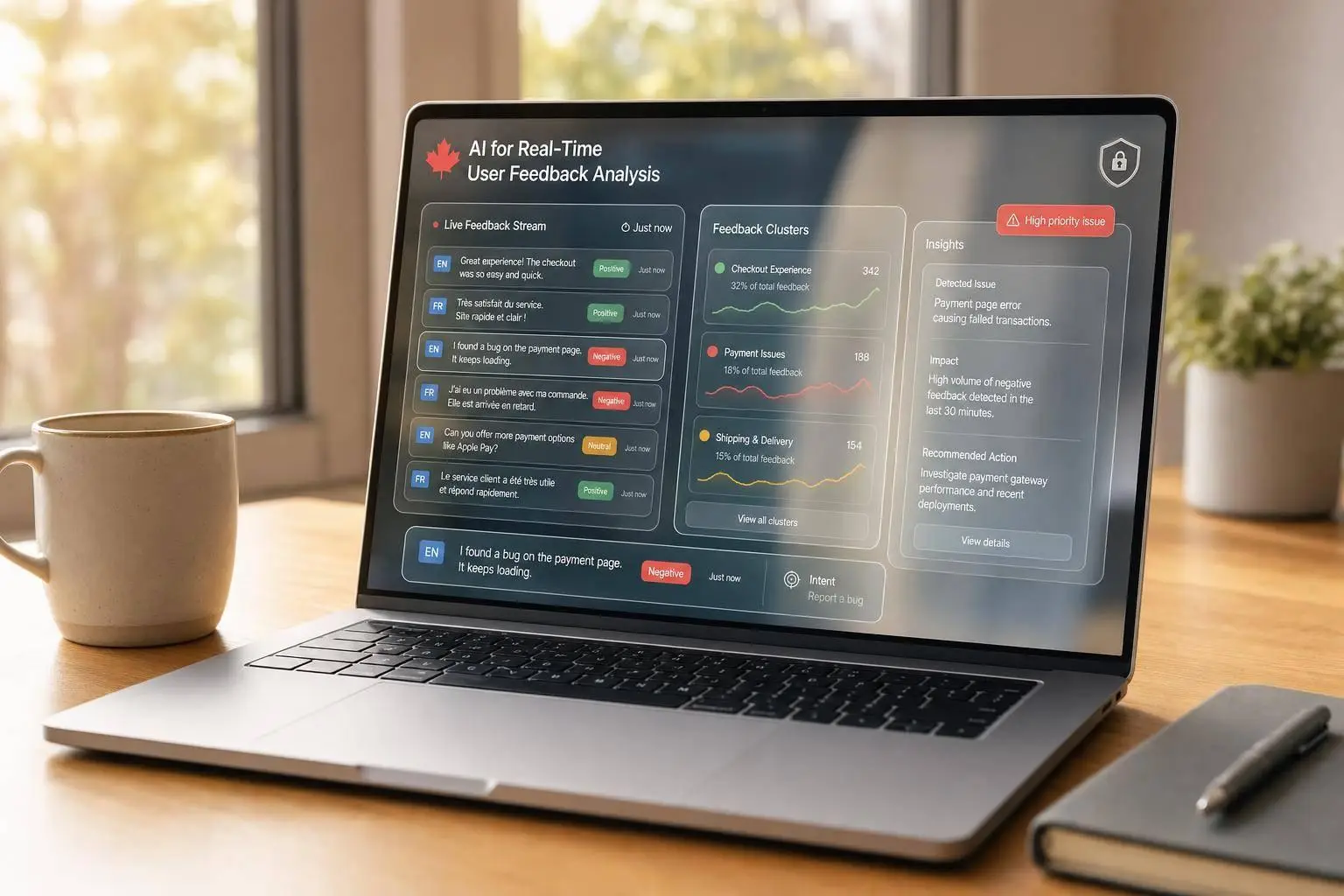
AI for Real-Time User Feedback Analysis

If you wait days to review feedback, you often find problems after users already felt the impact. I’d boil this article down to one point: use AI to read feedback as it comes in, score sentiment, group issues, detect intent, and send the result to the team that can act on it right away.
Here’s the short version in plain English:
- Real-time analysis cuts delay from hours or days to seconds or minutes
- AI helps sort volume at scale across calls, chats, forms, app reviews, CRM notes, and social posts
- The core signals are simple: sentiment, emotion, urgency, topic, intent, and short summaries
- The pipeline matters as much as the model: ingest data, clean it, mask personal details, score it, store it, and show it in live dashboards
- For Canadian teams, bilingual support and privacy rules matter from day one
- The system should trigger action, not just reports – tickets, alerts, reviews, and queue routing
- Model checks cannot stop at launch: drift, bias by language or segment, and false positives need regular review
- Start small: one channel, one workflow, one owner, one SLA, and track ROI in CAD
A few points stand out most to me:
- If negative sentiment jumps past a rolling baseline by more than 2 standard deviations, teams can flag an issue before complaint volume spikes.
- Feedback should be stored with trace details like model version, inference time, confidence score, language, and PII treatment status.
- Dates should use ISO 8601 format, such as 2026-08-08, to keep reporting aligned across provinces and systems.
- In Canada, public-sector and regulated teams may need data to stay in Canadian-approved facilities, while private-sector teams still need clear privacy controls, consent handling, and strong logging.
What I like about the approach in this piece is that it treats feedback like a live service signal, not a survey archive. In other words: don’t just measure what users said – route it, review it, and act on it while it still matters.
To make that work, I’d focus on four things first:
- Bring channels into one stream
- Mask personal data before scoring
- Send high-urgency issues to named owners
- Review model quality by language, segment, and time
That’s the whole model in simple terms: listen live, sort fast, protect data, and connect signals to action.
Analyze customer feedback with AI | No Code App Tutorial
sbb-itb-fd1fcab
How AI-Powered Real-Time Feedback Pipelines Work
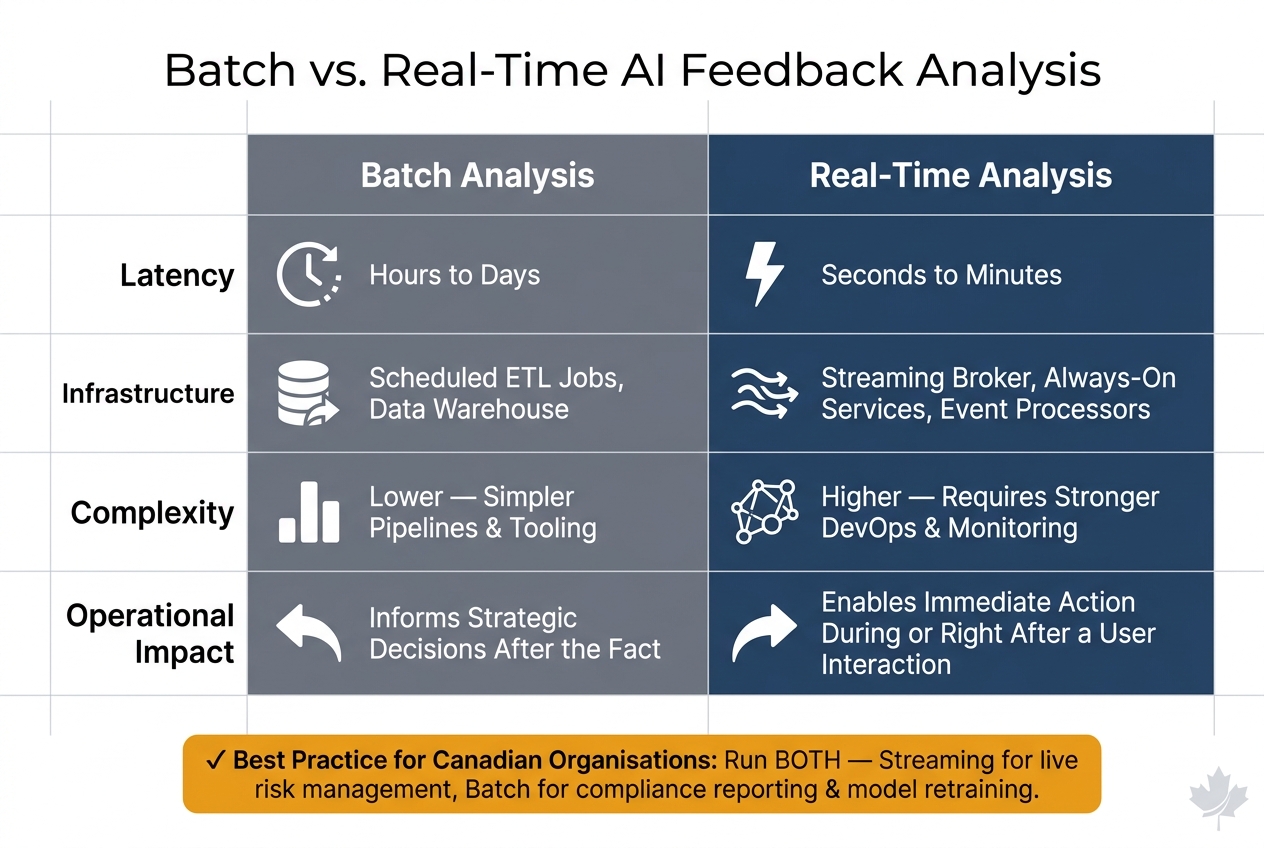
Batch vs. Real-Time AI Feedback Analysis: Key Differences
A real-time feedback pipeline turns feedback into action almost right away, much like how you implement workflow automation effectively to handle repetitive tasks. The core pieces are ingestion, stream processing, storage, and dashboards. Feedback from mobile and web apps, contact centres, or chat systems comes in through APIs, webhooks, or event streams. From there, a stream processor cleans the data, adds context, masks personal details, and scores each event with NLP models. The output then lands in two places: a live operational store for immediate use and a longer-term analytical store for reporting and analysis. The hard part isn’t just making it fast. It also has to stay traceable and privacy-safe.
| Dimension | Batch Analysis | Real-Time Analysis |
|---|---|---|
| Latency | Hours to days | Seconds to minutes |
| Infrastructure | Scheduled ETL jobs, data warehouse | Streaming broker, always-on services, event processors |
| Complexity | Lower – simpler pipelines and tooling | Higher – requires stronger DevOps and monitoring practices |
| Operational impact | Informs strategic decisions after the fact | Enables immediate action during or right after a user interaction |
For most Canadian organisations, the best setup is to run both at the same time: streaming for live risk and experience management, and batch for compliance reporting and model retraining cycles.
Ingestion, Cleansing, and Privacy Controls
Feedback enters the pipeline in three main ways. REST or GraphQL APIs let client apps send events on demand. Webhooks let outside systems call back into your platform when something happens, such as a new support ticket or an app review. Event streams through brokers like Kafka are built for high-volume, continuous flows, where many producers publish feedback at once and many consumers process it on their own.
Before any AI model touches the data, the stream processor runs a set of cleansing steps. Deduplication removes repeat events caused by client retries, often with idempotency keys or hash checks, so sentiment metrics don’t drift off course. Timestamps are then normalised to a standard format: ISO 8601 in UTC, with the local time zone kept in a separate field. That matters when you’re pulling feedback across Canadian time zones, from British Columbia to Newfoundland.
PII masking and pseudonymisation happen before data reaches any storage layer. Teams often use pattern matching plus NLP-based entity recognition to swap personal details for tokens. After that, language detection adds a language code and confidence score to each message, which helps route English and French content to the right downstream models. The last step is metadata enrichment. Each event gets tagged with details like channel, region, product line, and customer segment, so dashboards can break results down in ways the business can actually use.
Model Serving, Storage, and Live Dashboards
NLP and sentiment models usually run as stateless microservices or serverless functions behind an API gateway. They pull events from the stream, score them, and write the enriched results back into the pipeline in milliseconds. If you’re dealing with heavier transformer-based models for emotion or intent detection, GPU-accelerated containers on Kubernetes with autoscaling help keep latency steady when traffic climbs. Lighter models doing high-volume, coarse sentiment can run on CPU-only instances, which is a smart way to keep cloud spend under control without slowing the system down. This approach mirrors how workflow automation cuts costs and enhances efficiency by optimizing resource allocation.
Storage usually follows a hot store and cold store setup. A low-latency operational store keeps recent scored feedback ready for live dashboards and alerting. At the same time, a columnar analytical store in a Canadian cloud region takes in those same enriched events for longer-term trend analysis, cohort comparisons, and audit reporting. Each stored result carries traceability metadata, including model version, inference timestamp, confidence score, language, and PII treatment status.
Live dashboards built with tools like Kibana or BI platforms then show sentiment trends by channel, trigger issue spike alerts when negative sentiment goes past a rolling baseline by more than two standard deviations, and surface top recurring topics with trend indicators that show whether an issue is new or has been around for a while.
Those live scores are what later power urgency scoring, clustering, and automated action.
Canadian Deployment Requirements
These pipelines also have to fit Canadian compliance and language needs. Bilingual support is required for many Canadian organisations. Language detection has to send French feedback to French-specific models, since model performance can differ between French and English. Dashboards should show separate and combined sentiment panels for both languages, with filters that help teams spot regional patterns.
Date fields across the pipeline should use ISO 8601 – for example, 2026-08-08 – to keep reporting consistent. On data residency, the Government of Canada’s Direction for Electronic Data Residency states that sensitive data classified as Protected B, C, or Classified must remain in Government of Canada-approved facilities within Canada. Private-sector organisations under PIPEDA work under a different test: comparable protection rather than strict residency. Even so, hosting streaming platforms, storage, and model inference in Canadian cloud regions can make compliance discussions simpler and help build trust with clients and regulators.
Put plainly, bilingual routing, Canadian residency, and full traceability metadata help keep feedback signals accurate, auditable, and legally sound across the pipeline.
The AI Techniques That Turn Feedback Into Action
Once feedback is scored and stored, the next step is simple: turn signals into action. In practice, these methods answer four day-to-day questions: tone, theme, intent, and summary. The table below shows how each signal connects to a business task.
| NLP Task | Input | Output | Business Use |
|---|---|---|---|
| Sentiment scoring | Comments, chat logs, call transcripts | Polarity (positive/negative/neutral), satisfaction score | Live CX monitoring and alerting |
| Topic clustering | Large volumes of multi-channel comments | Themes such as checkout errors or billing confusion, with frequency and trend data | Issue triage and prioritisation |
| Intent detection | Feedback implying a desired action | Labels such as refund request, feature request, churn risk, needs support escalation | Workflow routing and retention |
| Summary generation | Hundreds or thousands of comments on a topic or incident | Short narrative highlighting key themes, sentiment patterns, and urgent issues | Leadership summaries and incident review |
Sentiment, Emotion, and Urgency Scoring
Binary sentiment is too blunt for day-to-day operations. A comment marked negative doesn’t tell you enough on its own. Teams usually need a finer score, plus emotion and urgency.
Urgency models look for time-sensitive language, direct escalation threats, and reports of outages or service failures. That matters because not every unhappy comment needs the same response. A billing gripe and a login outage may both be negative, but one needs much faster action.
The setup that tends to work best returns three signals in one pass:
- sentiment polarity
- dominant emotion
- urgency score, along with a one-sentence issue summary
When strong negative sentiment shows up with high urgency on a clear topic, like login failures, the system can trigger an incident workflow on its own. Break results down by language and region too. Those signals become far more useful when they’re grouped by issue and intent.
Topic Clustering, Intent Detection, and Summaries
Topic clustering pulls together comments that describe the same problem in different words. So, for example, checkout crashes and failed purchases should land in the same cluster. Each cluster should include a volume count, a sentiment score, and a trend line. That gives teams a quick read on whether an issue is new, stable, or getting worse.
Intent detection sends feedback to the right place. Refund requests, feature requests, and churn-risk signals shouldn’t sit in the same queue. A churn-risk signal can trigger a retention workflow, while higher-stakes intents, such as regulatory complaints, may need human review.
A summary card should state the main issue, the dominant sentiment, and the urgent driver. That short narrative, generated automatically and refreshed continuously, gives product owners and service leads the context they need without forcing them to sift through raw comments. Even so, model quality still needs regular checks.
Accuracy, Bias, and Model Drift Monitoring
Generic sentiment models trained on broad datasets often miss domain-specific language. That’s a common problem. The fix is to fine-tune them on domain-specific corpora – actual feedback from your own web application development systems – and validate results against a labelled gold set reviewed by bilingual domain reviewers.
Bias is a separate issue. A model may perform unevenly across user segments, languages, or dialects, even when top-line scores look fine. Track metrics by language and segment so those gaps don’t stay hidden.
Model drift shows up when language changes, new product features bring in unfamiliar terms, or customer concerns move in a direction the original training data didn’t cover. A drift dashboard can track the distribution of sentiment scores, topic frequencies, and error rates by segment. Pair that with scheduled re-evaluation using fresh labelled samples. If drift appears, route alerts straight to the model review workflow.
Governance, Feedback Loops, and Business Action
Analysis matters only when it lands with the right person and leads to action. That’s what governance is for. It sets out who owns each signal, where it goes, and what happens next before something goes wrong.
Turning Live Feedback Into Workflow Actions
When drift monitoring flags an issue, governance decides who gets the alert, who owns it, and how fast it moves.
A practical way to do this is to map sentiment, emotion, and urgency into four tiers, with a named owner and a clear response path for each one. For example, if highly negative feedback suddenly spikes and mentions "payment failure" with a high urgency score, the system should open a ticket in the incident management queue right away, with a resolution target measured in hours. If the issue is more operational – say, satisfaction scores for delivery times drop sharply in a province – that signal should go to the on-call alerting path, with incident runbooks attached.
Executives need a different view. They should see aggregate trends like NPS shifts, top complaint themes, and weekly volumes of high-risk items on near-real-time dashboards. Those dashboards should include filters for Canadian markets, provinces, and language. After each critical incident, teams should run a review and use what they learn to update triage thresholds and routing rules.
The basic idea is simple: treat AI-detected feedback signals like any other monitoring alert. That means named owners, defined SLAs, and documented response steps.
In regulated sectors such as the public sector, financial services, and healthcare, routing also needs to account for data minimisation rules. Sensitive fields – such as health numbers or financial identifiers – should be masked before tickets are created. Access to those queues should be limited to cleared staff.
Human Review, Retraining, and Release Controls
Live signals need a release process, not just a dashboard.
No production model should run without both a named model owner and a business owner. The model owner looks after technical performance. The business owner is accountable for purpose, risk, and outcomes.
Before an updated model is allowed to affect live routing, it should run in shadow mode for a defined period. In shadow mode, the model scores the same feedback stream as the production model, but its outputs are not yet used for decisions. Teams can then compare results using offline metrics such as accuracy, F1, and calibration, along with online indicators like sentiment distribution stability and false positive rates checked through human review.
For low- to medium-risk use cases, such as dashboard-only insight, sending limited traffic to the new model can make sense. For higher-risk settings like healthcare triage or regulated financial complaints, stronger offline validation and expert review are safer than live testing.
Every model release also needs formal change management. That includes:
- documented approval from the model owner and a risk or compliance representative
- versioned configuration stored in a repository
- a clear rollback procedure
Audit logs should show when a model was promoted, who approved it, and which approval ticket was used.
Risk documentation also needs regular updates. A register that sits untouched after deployment gets old fast.
Security, Consent, and Retention Policies
Routing rules work only when access, consent, and retention stay in sync.
All feedback data in transit should use TLS 1.2 or higher. Data at rest should be encrypted with managed keys and separated by environment – dev, test, and prod – as well as by sensitivity level. Access to raw feedback, model outputs, and dashboards should follow role-based access control (RBAC), and every access event should be logged with timestamps for audit purposes.
Consent notices should clearly state that feedback may be analysed with AI in real time to improve service, and that personal data is handled in line with Canadian privacy law. The Office of the Privacy Commissioner of Canada has clarified that training AI models on personal data generally requires consent, and that pseudonymised data may still count as personal information if the risk of re-identification remains. In plain terms, personal data gathered for one purpose – such as a post-transaction survey – cannot simply be reused for model training without a separate and valid consent basis.
Retention schedules should be documented separately for raw text or audio feedback, pseudonymised training datasets, and model logs or performance metrics. Raw feedback should follow retention periods tied to legal and operational need. Systems should also support automated deletion, so records are removed or anonymised when retention periods end or when users exercise erasure rights, while aggregate statistics are kept where permitted.
Checklist:
| Dimension | Minimal Governance | Thorough Governance |
|---|---|---|
| Signal capture | Ad hoc collection from 1–2 channels; basic timestamps only | Multi-channel ingestion (web, app, chat, call transcripts) with rich metadata: region, language, segment |
| Labelling | Sporadic manual labels; no guidelines or quality checks | Formal playbook, trained reviewers, calibration sessions, inter-annotator agreement tracked |
| Evaluation | Occasional accuracy spot-checks; no bias analysis | Scheduled evaluations covering accuracy, recall, calibration, and fairness across languages, regions, and user segments |
| Retraining cadence | Reactive only – when performance is obviously poor | Time-boxed (e.g., quarterly) plus trigger-based when drift or new topics are detected |
| Access control | Broad access to raw feedback; minimal permission segmentation | RBAC/ABAC with least privilege, encryption, detailed access logs, separate views by role |
| Documentation | Light technical notes; no central model version record | Central model registry with version history, change logs, approvals, risk assessments, and usage constraints |
Use this checklist to move from ad hoc monitoring to a repeatable operating model for alerts, tickets, dashboards, labels, and model logs. In public-sector and healthcare settings, it makes sense to focus first on access control, documentation, and retraining cadence, since the stakes are highest when service access or sensitive personal information is involved.
Implementation Roadmap for Canadian Organisations
Choosing Use Cases by Business Value
Once governance is in place, pick one live use case that can show value fast. The best starting point is usually a single channel where live feedback can lead to a clear operational move right away, like support tickets, a citizen service portal, a field-service app, or an account management platform.
Put value in CAD from day one. Track ROI using metrics tied to work your team already measures: less triage time, fewer escalations, and lower rework. Link those outcomes to existing KPIs such as average handling time, SLA adherence, and escalation rate. That baseline gives the real-time system a business goal, not just an IT task.
Integration Patterns for Sector-Specific Systems
Map each feedback source to the AI signal it needs and to the system that will act on it. In plain terms, the model should not just spot a problem; it should send that signal somewhere useful.
| Industry | Feedback Sources | AI Components | Integration Targets |
|---|---|---|---|
| Public sector | Citizen portals, 311 systems, email, call transcripts | Sentiment, topic detection, urgency scoring | Case-management platform, service manager dashboards |
| Energy | Outage reports, billing queries, mobile apps, call logs | Emotion detection, intent classification, risk scoring | Outage management system, CRM, operations dashboards |
| Construction | Field-service apps, contractor portals, site notes | Topic clustering by site, contractor, or phase, issue flagging | Project management tools, risk dashboards |
| Logistics | Delivery feedback, driver notes, customer messages | Real-time urgency alerts, sentiment trends | Operations management systems, dispatch tools |
| Healthcare | Anonymised patient experience surveys, portal messages | Aggregated sentiment, theme detection | Quality-of-care dashboards using anonymised data |
Those integration targets set the first rollout path.
Conclusion: What to Build First and How to Scale
Start with one channel. Connect AI outputs to one workflow action. Then expand only after monitoring and governance are steady. From the start, build for bilingual routing, data residency, consent, and audit logs.
FAQs
How does real-time feedback analysis work?
Real-time feedback analysis uses AI to process user interactions as they happen. Digital Fractal Technologies Inc makes this possible by pulling data into one place through custom CRM systems and API connections.
Here’s what that usually looks like:
- collecting clicks, navigation patterns, and support interactions
- using NLP and machine learning to spot sentiment, friction points, and emotional cues
- linking feedback with performance metrics to trigger alerts or make real-time adjustments
What data privacy controls are needed in Canada?
In Canada, organisations need to follow PIPEDA and any provincial privacy laws that apply.
That means putting a few core controls in place. They need explicit, informed user consent, plain-language transparency about how data is collected, analysed, and used, and data minimisation so they only collect what they need.
They should also build systems with privacy-by-design, keep sensitive data in Canada when the rules require it, and run regular privacy impact assessments, security audits, and de-identification or masking of personal information.
How should we start with AI feedback analysis?
Start with an AI readiness audit of your current processes, data setup, and tools. The goal is simple: figure out what’s in place today before you try to build anything new.
Then set clear goals. You might want to improve conversion rates, cut churn, or speed up support. From there, focus on the workflows most likely to move the needle first.
Your data matters just as much as your goals. Clean it up, and automate collection from sources like:
- CRM logs
- Surveys
- Support tickets
If you’re working in Canada, pay close attention to data residency, privacy rules, and support for both English and French. It’s also smart to start with a pilot instead of rolling out everything at once. Test it, learn from real-time feedback, and adjust as you go.