Best WMS Software in 2026: Enterprise, 3PL, and Mid-Market Picks

The best WMS software for most operations falls into four clear categories: Manhattan Active for enterprise multi-site distribution, SAP Extended Warehouse Management for SAP-native environments, Infor WMS for mid-market verticals, and Blue Yonder for automation-heavy distribution centers. Cloud-native 3PLs belong on a separate track entirely.
Here is the shortlist with one-line rationale for each:
- Best overall (enterprise): Manhattan Active handles multi-site complexity, labor management, and robotics integration at a scale few platforms match.
- Best cloud-native (3PL/e-commerce): Cloud-native platforms built around multi-client billing and client portals are the right default for third-party logistics operators.
- Best enterprise (SAP-native): SAP EWM is the logical choice when your ERP is already S/4HANA and you need deep process integration without a middleware layer.
- Best mid-market: Infor WMS covers discrete manufacturing, food and beverage, and distribution verticals with industry-specific workflows out of the box.
- Best for automation-heavy DCs: Blue Yonder’s connected supply chain architecture and robotics integration make it the strongest pick when automation is the primary investment driver.
Gartner Peer Insights is the most reliable independent signal for validating these picks against real customer experience. Cross-reference analyst ratings with at least two direct customer references before finalizing any shortlist.
Table of Contents
- How the top warehouse management systems compare across every decision dimension
- Vendor profiles: what each top WMS actually delivers
- How to choose a WMS: criteria, questions, red flags, and pricing
- Are you ready to add AI to your WMS? A practical checklist
- Key Takeaways
- What vendors consistently understate in WMS demos
- Digitalfractal cuts the time between WMS go-live and measurable ROI
- Useful sources for deeper WMS research
How the top warehouse management systems compare across every decision dimension
Five dimensions decide most WMS outcomes: implementation effort, warehouse-floor workflows, ERP and e-commerce integrations, traceability, and total cost at projected volume. The table below maps each vendor against the dimensions that matter most during procurement.
| Vendor | Best for / Ideal size | Deployment | Key features | Integrations | Impl. time | Pricing model | Industry strengths |
|---|---|---|---|---|---|---|---|
| Manhattan Active | Enterprise, multi-site | Cloud-native SaaS | Labor mgmt, robotics, wave/batch picking, slotting | SAP, Oracle, major carriers | 9–18 months | Enterprise licensing | Retail, 3PL, omnichannel |
| SAP EWM | Enterprise, SAP shops | On-prem / cloud / hybrid | Slotting, task interleaving, labor mgmt, RFID | S/4HANA-native, SAP TM | 12–24 months | SAP licensing + impl. | Manufacturing, regulated distribution |
| Oracle Fusion Cloud WMS | Enterprise, Oracle shops | Cloud | Wave picking, RFID, returns, automation | Oracle ERP, NetSuite, carriers | 9–18 months | Subscription + impl. | Retail, distribution, 3PL |
| Blue Yonder WMS | Enterprise, automation-first | Cloud / hybrid | Robotics, labor mgmt, slotting, AI forecasting | SAP, Oracle, TMS | 12–18 months | Enterprise licensing | Retail, CPG, food & bev |
| Infor WMS | Mid-market, verticals | Cloud / on-prem | Lot control, labor mgmt, batch picking, RFID | Infor M3/LN, ERP connectors | 4–9 months | Subscription / quote | Food & bev, manufacturing, 3PL |
| Softeon WMS | Mid-market to enterprise | Cloud / on-prem | Modular design, automation, labor mgmt | Major ERPs, carriers | 4–12 months | Quote-based | 3PL, retail, distribution |
| Körber WMS | Mid-market to enterprise | Cloud / on-prem / hybrid | Automation, slotting, labor mgmt, RFID | SAP, Oracle, e-commerce | 4–12 months | Quote-based | 3PL, retail, manufacturing |
| Oracle NetSuite WMS | SMB to mid-market, NetSuite users | Cloud | Receiving, put-away, wave picking, RFID | NetSuite ERP native | 2–4 months | NetSuite subscription | E-commerce, wholesale, distribution |
| Fishbowl WMS | SMB, QuickBooks users | On-prem / cloud | Inventory tracking, barcoding, basic picking | QuickBooks, Xero | 1–3 months | One-time / subscription | Manufacturing, wholesale, SMB |
| SnapFulfil | SMB to mid-market, 3PL | Cloud SaaS | Multi-client, wave picking, RFID, returns | Shopify, NetSuite, carriers | 2–6 months | Subscription (tiered) | 3PL, e-commerce, retail |
The automation-readiness gap is where most WMS projects stall. Vendors routinely demo robotics integrations on clean reference data. Before signing, ask for a live integration test on your actual SKU mix and order profile. Automation ROI depends almost entirely on data quality and API stability — not on the vendor’s feature list.
Three immediate next steps after reviewing this comparison:
- Schedule demos with your top two vendors using your actual order volume and SKU count, not a generic demo dataset.
- Run reference checks with customers in your specific vertical (3PL, retail, manufacturing) and operation size.
- Define a pilot scope of 30–90 days covering one workflow (receiving or outbound picking) before committing to full deployment.
Vendor profiles: what each top WMS actually delivers
1. Blue Yonder Warehouse Management
Best for: Large retailers, CPG manufacturers, and distribution centers with active robotics programs. Blue Yonder’s strength is its connected supply chain architecture, which links WMS execution to demand planning and transportation in a single data model. Labor management and slotting are genuinely deep, not bolt-ons. The robotics integration layer supports a wide range of AMR and conveyor vendors.
Deployment: Cloud and hybrid. Implementation: 12–18 months for enterprise deployments.
Pros: Best-in-class robotics and automation integration; strong labor management with engineered labor standards. Cons: High total cost of ownership; implementation complexity requires experienced SI partners.
2. SAP Extended Warehouse Management (SAP EWM)
Best for: Enterprises already running S/4HANA. SAP EWM is embedded in the SAP ecosystem, which means no middleware for inventory synchronization and no reconciliation lag between the WMS and the ERP. Task interleaving, slotting, and labor management are all present. For regulated industries (pharma, chemicals), the lot control and traceability capabilities are a genuine differentiator.
Deployment: On-premises, cloud (SAP BTP), and hybrid. Implementation: 12–24 months.
Pros: Native S/4HANA integration eliminates data sync risk; strong compliance and traceability. Cons: Expensive outside the SAP ecosystem; requires SAP-certified implementation partners.
As SAP’s own ERP vs. WMS guidance makes clear, a dedicated WMS like EWM delivers floor-execution depth that ERP warehouse modules cannot match for high-throughput operations.
3. Oracle Fusion Cloud Warehouse Management
Best for: Oracle ERP customers and large distribution operations that need a cloud-native platform with strong returns management. Oracle Fusion Cloud WMS covers wave and batch picking, RFID, and automation integration. Its returns processing is notably strong for omnichannel retailers managing reverse logistics at scale.
Deployment: Cloud-native. Implementation: 9–18 months.
Pros: Deep Oracle ERP integration; strong returns and omnichannel support. Cons: Licensing costs are substantial; less competitive outside the Oracle ecosystem.
4. Manhattan Active (Manhattan Associates)
Best for: Enterprise multi-site distribution, omnichannel retail, and operations where labor management is a top cost driver. Manhattan Active runs as a continuously updated SaaS platform, which means no version upgrades and no frozen-release risk. The labor management module uses engineered labor standards and real-time performance tracking. Robotics integration covers AMRs, goods-to-person systems, and conveyor automation.
Deployment: Cloud-native SaaS. Implementation: 9–18 months.
Pros: Continuous delivery model eliminates upgrade cycles; best-in-class labor management. Cons: Enterprise price point; implementation requires Manhattan-certified partners.
5. Infor WMS
Best for: Mid-market manufacturers, food and beverage distributors, and 3PLs that need industry-specific workflows without heavy customization. Infor WMS ships with vertical-specific configurations for food and beverage (lot control, catch weight, FEFO), discrete manufacturing, and distribution. It integrates natively with Infor M3 and LN, and connects to third-party ERPs via standard APIs.
Deployment: Cloud and on-premises. Implementation: 4–9 months for mid-market deployments.
Pros: Strong vertical depth for food/bev and manufacturing; faster implementation than enterprise peers. Cons: Less competitive for pure e-commerce or high-automation DCs.
6. Softeon WMS
Best for: Mid-market to enterprise operations that want a modular platform and are not locked into a single ERP. Softeon’s architecture lets buyers license only the modules they need, which keeps year-one costs manageable. The automation integration layer supports a range of conveyor and AMR vendors. Labor management and wave picking are both solid.
Deployment: Cloud and on-premises. Implementation: 4–12 months depending on module count.
Pros: Modular pricing reduces initial investment; strong automation integration. Cons: Smaller partner ecosystem than Tier 1 vendors; less brand recognition in enterprise RFPs.
7. Körber WMS (formerly HighJump)
Best for: 3PLs, retailers, and manufacturers that need a configurable platform with strong automation and RFID support. Körber acquired HighJump and has since expanded the platform’s automation and robotics capabilities. The slotting engine and labor management are both mature. Microsoft Dynamics 365 Business Central users will find Körber’s Dynamics connector well-supported.
Deployment: Cloud, on-premises, and hybrid. Implementation: 4–12 months.
Pros: Strong automation and RFID; good fit for Microsoft-centric shops. Cons: Post-acquisition product roadmap requires careful validation during demos.
8. Oracle NetSuite WMS
Best for: SMB and mid-market businesses already on NetSuite ERP. NetSuite WMS is native to the NetSuite platform, which means inventory, orders, and financials stay in a single system. Wave picking, RFID, and basic labor tracking are included. For e-commerce brands and wholesale distributors on NetSuite, it is the lowest-friction WMS option available.
Deployment: Cloud-native. Implementation: 2–4 months.
Pros: Native NetSuite integration; fast implementation; lower TCO for existing NetSuite customers. Cons: Limited automation depth; not competitive for high-throughput or complex 3PL operations.
9. Fishbowl WMS
Best for: Small manufacturers and wholesalers running QuickBooks. Fishbowl is the most widely adopted WMS in the QuickBooks ecosystem. It covers barcoding, basic picking, and inventory tracking without requiring a full ERP migration. Implementation is measured in weeks, not months.
Deployment: On-premises and cloud. Implementation: 1–3 months.
Pros: QuickBooks integration is native and reliable; low cost of entry. Cons: Limited scalability; not suitable for operations with complex automation or multi-site requirements.
10. SnapFulfil
Best for: Small to mid-market 3PLs and e-commerce brands that need a cloud SaaS platform with multi-client support and fast go-live. SnapFulfil’s tiered subscription model makes it accessible for operations that cannot justify enterprise WMS costs. Multi-client billing and client portals are built in, which is the feature 3PLs need most. Shopify and NetSuite integrations are pre-built.
Deployment: Cloud SaaS. Implementation: 2–6 months.
Pros: Fast implementation; built-in multi-client architecture for 3PLs; affordable subscription tiers. Cons: Less depth for high-automation or regulated distribution environments.
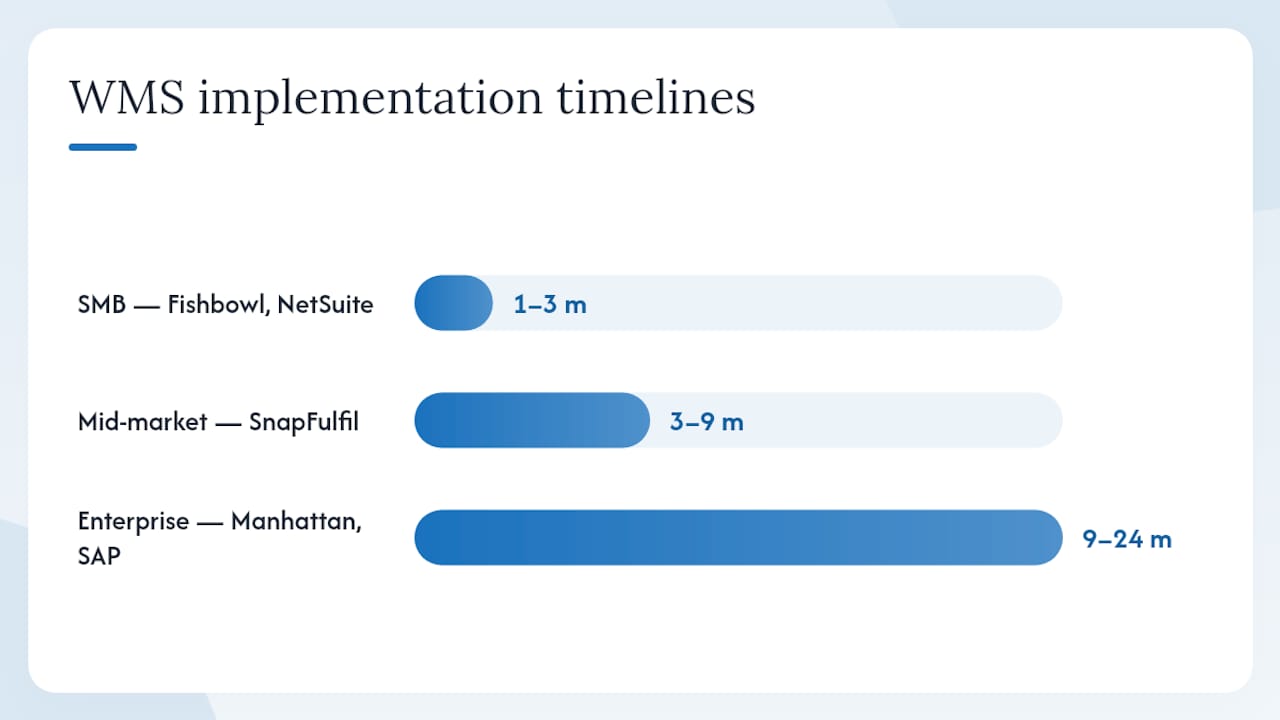
Typical implementation time by operation size:
| Operation size | Typical WMS implementation range | Representative vendors |
|---|---|---|
| SMB | 1–3 months | Fishbowl, NetSuite WMS |
| Mid-market | 3–9 months | SnapFulfil, Infor WMS, Softeon |
| Enterprise | 9–24 months | Manhattan Active, SAP EWM, Blue Yonder, Oracle Fusion |
For 3PL-specific selection, platforms with built-in multi-client billing reduce operational overhead immediately and should be the default starting point for any third-party logistics operator evaluating cloud WMS options.
How to choose a WMS: criteria, questions, red flags, and pricing
Questions to ask during demos and reference calls
- Show me a live integration test with our ERP using our actual data, not a demo dataset.
- What is the average go-live timeline for customers at our order volume and SKU count?
- How are software updates delivered, and what is the typical downtime window?
- Which automation vendors are certified on your platform, and what does the integration process look like?
- What does your support escalation path look like for a P1 outage during peak season?
Red flags to walk away from
- The vendor cannot provide references in your specific vertical or operation size.
- Integration with your ERP requires a third-party middleware layer the vendor does not support.
- The demo runs on a generic dataset rather than your actual SKU and order profile.
- Pricing excludes implementation, training, and annual maintenance from the headline number.
Pricing factors and TCO
Pricing models vary significantly by segment: SMB platforms tend toward tiered subscriptions, mid-market and 3PL systems are usually quote-based, and enterprise suites involve licensing plus substantial implementation budgets. The variables that drive year-two costs are often invisible in year-one quotes.
Key cost drivers to model:
- Per-user vs. per-SKU vs. per-transaction licensing structures.
- Integration development and ongoing API maintenance costs.
- Automation hardware and software run costs (AMR licensing, conveyor control software).
- Annual maintenance and support fees (typically 18–22% of license value for on-premises systems).
- Change management, training, and retraining costs for floor staff.
Pro Tip: Model your TCO at 150% of current order volume, not today’s baseline. WMS projects that look affordable at current scale often become expensive when volume grows and per-transaction or per-user fees compound.
The WMS vs. ERP decision comes down to warehouse KPI criticality. If accuracy, throughput, and labor cost are primary business metrics, a dedicated WMS delivers faster ROI than an ERP warehouse module. If your warehouse is simple and your ERP already handles inventory adequately, the additional investment may not be justified.
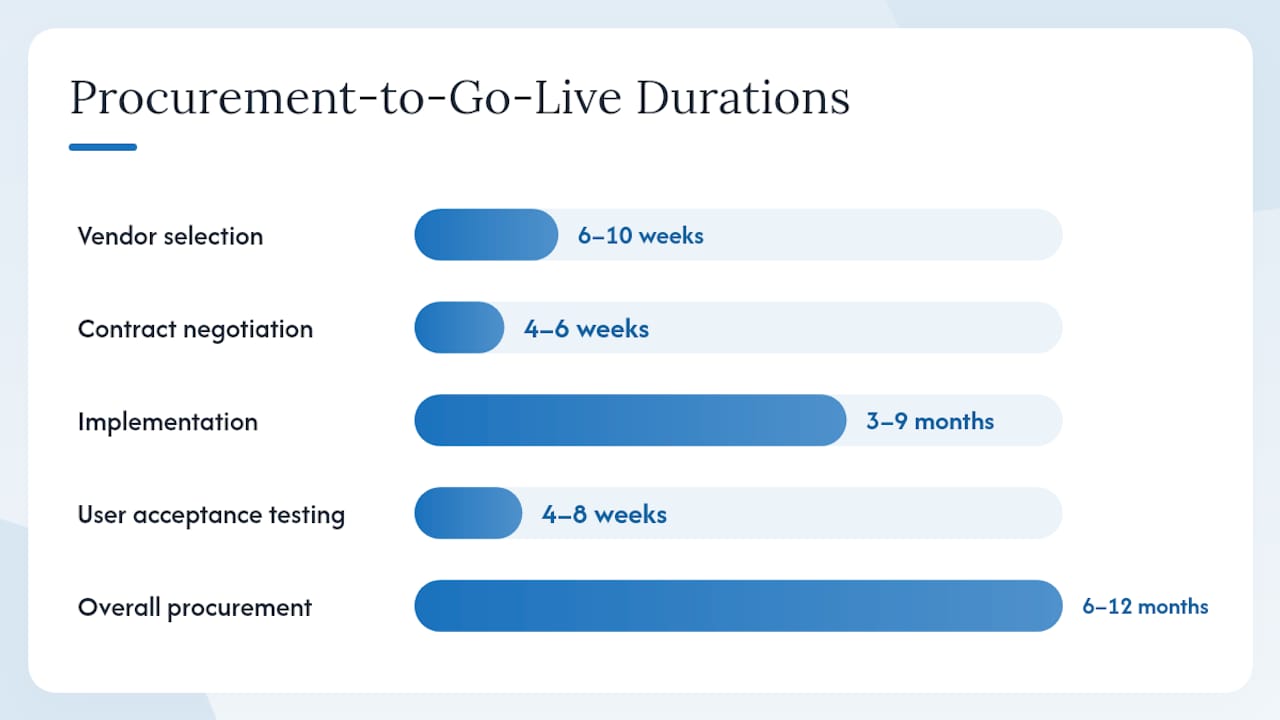
A realistic procurement-to-go-live timeline for mid-market operations runs 6–12 months from RFP to go-live, including vendor selection (6–10 weeks), contract negotiation (4–6 weeks), implementation (3–9 months), and user acceptance testing (4–8 weeks). Enterprise deployments add 6–12 months to that range.
Are you ready to add AI to your WMS? A practical checklist
Adding AI or robotics to a WMS deployment is not a feature decision. It is an infrastructure decision. Most failed automation pilots trace back to one of five root causes, all of which are detectable before you sign a contract.
AI-readiness signals to validate before committing:
- Clean master data: SKU data, bin locations, and order history must be accurate and consistently structured. AI models trained on dirty data produce unreliable outputs.
- Stable SKU flows: High SKU volatility (frequent additions, deletions, or reclassifications) undermines slotting optimization and demand forecasting accuracy.
- Integration APIs: Your WMS, ERP, and automation hardware must expose stable, documented APIs. Proprietary or undocumented interfaces block AI feature deployment.
- OT/IT convergence: Operational technology (conveyors, AMRs, scanners) and IT systems must share a common data layer. Siloed OT data is the most common blocker for real-time AI analytics.
- Staff change management: AI-assisted picking and scheduling change how floor staff work. A change management plan is not optional; it is a prerequisite for adoption.
Pro Tip: Scope your first AI pilot around a single, measurable service-level target: picks per hour or order error rate. A 90-day pilot with a defined baseline and a clear success threshold gives you defensible ROI data before you scale.
Next steps for AI-ready WMS projects:
- Run a data readiness audit before vendor selection to identify gaps in master data and integration architecture.
- Scope a 30–90 day pilot on one workflow (outbound picking is usually the highest-ROI starting point) with a defined baseline metric.
- Validate AI workforce scheduling compatibility with your WMS labor management module before committing to an automation roadmap.
- Define integration milestones: ERP sync, e-commerce connector, and automation hardware API before go-live, not after.
Digitalfractal’s AI Readiness Audit is structured specifically to surface these blockers before they become expensive mid-implementation surprises.
Key Takeaways
The single most important decision in any WMS selection is ERP alignment: choose the platform that fits your existing ERP and automation roadmap, not the one with the longest feature list.
| Point | Details |
|---|---|
| Match WMS to your ERP | SAP EWM for S/4HANA shops, NetSuite WMS for NetSuite users, Oracle Fusion for Oracle environments. |
| 3PL operators need multi-client billing | Platforms with built-in multi-client billing reduce operational overhead from day one. |
| Model TCO at 150% of current volume | Year-two costs compound fast; per-user and per-transaction fees are the most common budget surprises. |
| Validate AI readiness before signing | Clean master data and stable APIs are prerequisites for automation ROI, not post-go-live problems to solve. |
| Digitalfractal accelerates WMS ROI | An AI Readiness Audit before implementation surfaces data and integration blockers before they become costly. |
What vendors consistently understate in WMS demos
The gap between a WMS demo and a live go-live is almost always wider than the vendor’s implementation timeline suggests. Three things get systematically underplayed.
First, integration complexity. Every vendor will show you a pre-built connector to SAP or Shopify. What they will not show you is what happens when your ERP version is two releases behind, your e-commerce platform has custom fields, or your carrier API has rate limits. Those edge cases are where implementation timelines double.
Second, hidden module costs. Many WMS platforms license labor management, slotting, and automation integration as separate modules. The headline price covers core receiving and shipping. When you add the modules you actually need to run a competitive DC, the total looks very different from the initial quote.
Third, change management. Floor staff adoption is the most common reason WMS projects underperform in year one. Vendors will mention training in the SOW. They will not tell you that a poorly managed rollout can push error rates up before they come down, or that turnover spikes during system transitions are common.
Pro Tip: During contract negotiations, ask the vendor to include SLA response times for P1 incidents in writing, with financial penalties for breach. Vendors who resist this clause are telling you something about their support model.
Digitalfractal cuts the time between WMS go-live and measurable ROI
Most WMS projects deliver their first measurable throughput improvement 6–12 months after go-live. The delay is almost never the software. It is unresolved data quality issues, integration gaps, and automation features that were scoped but never fully configured.
Digitalfractal’s AI Readiness Audit identifies exactly those blockers before implementation begins, so your WMS project starts with clean data, stable integrations, and a scoped automation pilot rather than discovering problems after go-live. Services relevant to WMS projects include AI readiness audits, data integration architecture, pilot scoping for picking and labor optimization, and AI workflow automation that connects WMS execution to broader supply chain systems.
The expected outcome: reduced picks-per-hour variance, faster throughput ramp after go-live, and labor savings that are measurable within the first 90 days. If you are in active vendor selection or preparing an RFP, start with the Digital Transformation Readiness Checker to benchmark your current state before your first vendor demo.
Useful sources for deeper WMS research
- Best Warehouse Management Systems (WMS) in 2026: Picks by Operation Type
- WMS Comparison Table (2026) — 16 Systems Side by Side
- Best Warehouse Management Software in 2026: 7 WMS Platforms Compared for 3PLs, Ecommerce Brands, and Enterprise DCs | TopickZ.com
- ERP vs. WMS | SAP
- ERP vs. WMS: Which one is right for you? | TechTarget
- Microsoft Dynamics 365 Business Central
- Warehouse Management Systems — Gartner Peer Insights
- Warehouse Management Systems (WMS) — SoftwareReviews