
Automating Compliance in Cloud-Native Pipelines

If compliance only happens before an audit, it will fail when your release pace picks up. I’d build it into every step of delivery: by learning how to implement workflow automation effectively, code checks at commit, policy gates in CI, admission rules in Kubernetes, and audit logs that stay in place for 12 to 24 months.
Here’s the short version:
- I’d treat compliance as code, not paperwork.
- I’d place each control at the earliest stage that can stop the issue.
- I’d use CI to block bad changes before deploy.
- I’d use Kubernetes admission control as the last hard stop.
- I’d store evidence from pipelines, registries, and clusters all the time.
- I’d track simple metrics like violation rate, MTTR, open waivers, and evidence coverage.
- I’d use AI for custom workflow automation to handle triage, mapping, and anomaly review – not as the main control.
For Canadian teams, that matters even more. Privacy rules such as PIPEDA, Law 25, and PHIPA, plus OSFI scrutiny and supply-chain risk, mean you need proof that safeguards run day by day. That proof should show who changed what, when it changed, what policy ran, and why a deploy was allowed or blocked.
A simple way to think about it:
- Commit/PR: stop secrets, weak code, bad IaC, risky packages
- Build: scan images, create SBOMs, tag artefacts with trace data
- Deploy: enforce registry, privilege, service, label, and region rules
- Runtime: watch for drift, odd behaviour, and policy bypass attempts
- Evidence: keep logs, approvals, scan results, attestations, and audit events in one trail
One stat stands out: 58% of workloads were missing network policies, and 55% of organizations had stability issues tied to missing replicas. That’s the kind of gap policy gates can block before it reaches production.
If I were starting today, I’d begin with secrets scanning, IaC checks, image scanning, and admission policies. Then I’d add evidence retention and waiver tracking. After that, I’d layer in AI where it cuts review time or helps sort alerts.
The main point: make audits a lookup job, not a rebuild job.
Is your multicloud pipeline compliant? DevOps vs GitOps
sbb-itb-fd1fcab
Map Compliance Controls to Each Pipeline Stage
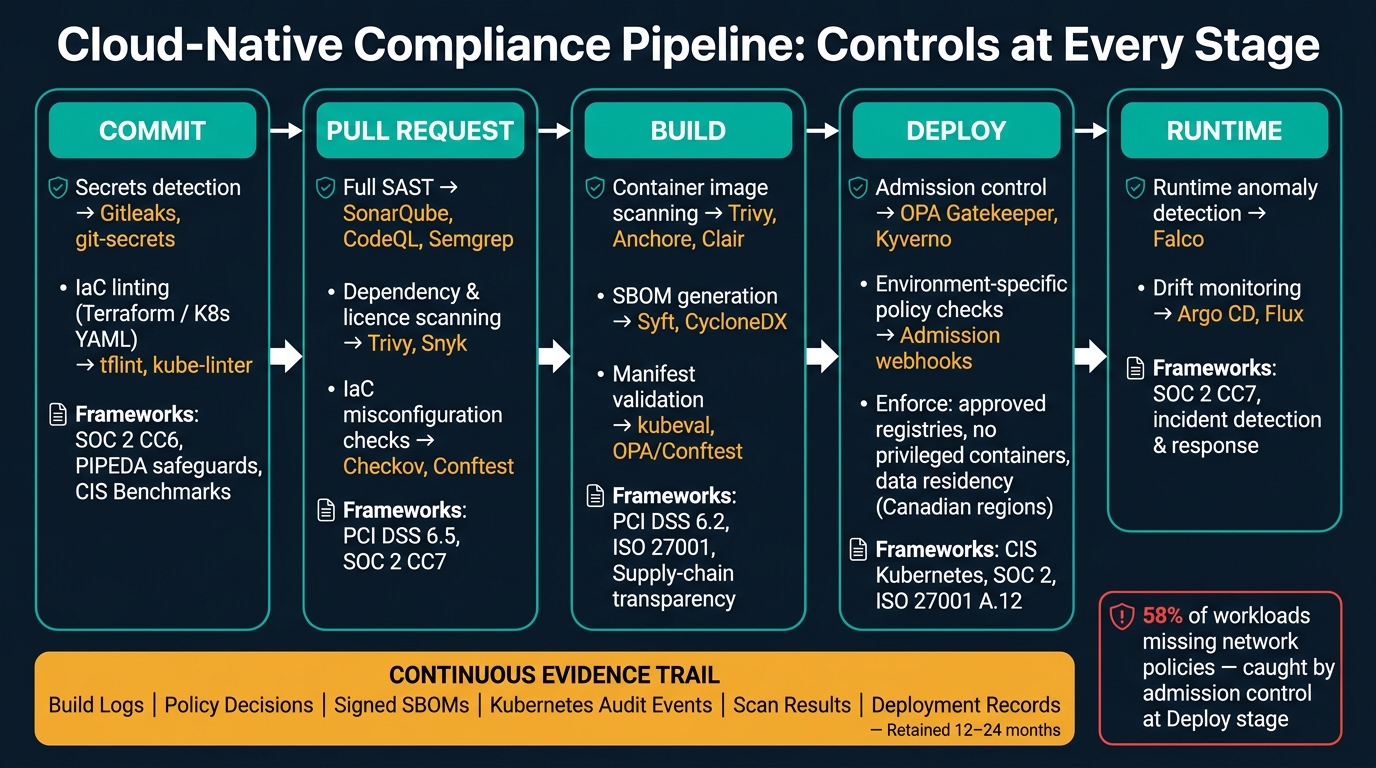
Cloud-Native Compliance Pipeline: Controls at Every Stage
Once you’ve defined your control set, map each rule to the earliest pipeline stage that can stop the risk. Don’t save everything for one giant review at the end. Spread controls across commit, pull request, build, deploy, and runtime.
Why does that matter? Because each stage catches a different kind of issue. And when you fail fast, you spend less time, less money, and a lot less energy cleaning up problems later.
Commit and Pull Request Checks
The commit stage is your first gate. Pre-commit hooks can run secrets detection to stop API keys and credentials from ever entering the repository. That’s a direct safeguard for PIPEDA and SOC 2 obligations. IaC linting can also catch Terraform and Kubernetes YAML misconfigurations before code is pushed, like missing encryption flags or open security groups. Fixing these issues later is slower and costs more than catching them during development.
At the pull request stage, your CI system should run the full set of checks: full SAST, dependency and licence scanning, and IaC policy checks against CIS benchmarks. Branch protection rules should require these checks to pass before anything merges into main branches. Services that handle personal or regulated data should face tighter thresholds. After merge, the focus shifts away from code quality and toward supply chain, deployment, and runtime enforcement.
Build, Deploy, and Runtime Checks
Once code clears the PR gate, the build stage is about what actually gets packaged and shipped. Container scanning can block vulnerable images. SBOM generation records what ships by producing a machine-readable bill of materials for the image, which supports supply-chain transparency and audit evidence. Images should also be tagged with build metadata, including the date in YYYY-MM-DD format, the CI job ID, and the git commit hash. That traceability matters during incident response.
At the deploy stage, admission controllers enforce policy at deploy time. This is the last gate before workloads reach the cluster. If earlier checks miss something, admission control can still block non-compliant workloads. Production clusters should apply tighter policies than dev or test. That includes mandatory TLS, restricted hostPath volumes, and data residency rules that keep regulated workloads in approved Canadian regions and accounts. A good way to roll this out is to start in audit mode, then move to enforcement once false positives are tuned out. That way, drift and policy violations get caught after release instead of surfacing during an audit.
The mapping below shows where each control belongs:
| Pipeline Stage | Automated Control | Example Tools | Related Framework Controls |
|---|---|---|---|
| Commit | Secrets detection | Gitleaks, git-secrets | SOC 2 CC6, ISO 27001 A.8, PIPEDA safeguards |
| Commit | IaC linting (Terraform / K8s YAML) | tflint, kube-linter | CIS Benchmarks, ISO 27001 A.12 |
| Pull request | Full SAST | SonarQube, CodeQL, Semgrep | PCI DSS 6.5, SOC 2 CC7 |
| Pull request | Dependency & licence scanning | OWASP Dependency-Check, Trivy, Snyk | PCI DSS 6.2, SOC 2 CC7 |
| Pull request | IaC misconfiguration checks | Checkov, Conftest | CIS Benchmarks, cloud security baselines |
| Build | Container image scanning | Trivy, Anchore, Clair | PCI DSS 6.2, SOC 2 CC7 |
| Build | SBOM generation | Syft, CycloneDX toolchain | Supply-chain transparency, SOC 2, ISO 27001 |
| Build | Manifest validation | kubeval, OPA/Conftest | CIS Kubernetes, internal security baselines |
| Deploy | Admission control | OPA Gatekeeper, Kyverno | CIS Kubernetes, change management controls |
| Deploy | Environment-specific policy checks | Admission webhooks, GitOps policies | SOC 2, ISO 27001 A.12, data residency requirements |
| Runtime / post-deploy | Runtime anomaly detection | Falco, cloud-native security tools | SOC 2 CC7, incident detection and response |
| Runtime / post-deploy | Drift monitoring | Argo CD, Flux | Change management, configuration management controls |
Enforce Policy in CI/CD and Kubernetes
Mapping controls to pipeline stages is only half the job. The other half is making sure those controls stop non-compliant workloads. In practice, that means wiring policy checks into both your CI pipeline and your Kubernetes cluster, so the same intent is enforced twice: once before deployment, and again at the cluster boundary.
Use Admission Controllers for Cluster-Level Enforcement
At the cluster boundary, admission policies turn mapped controls into hard stops. Kubernetes admission controllers review API requests after authentication and authorization, before the object is stored in the cluster. They can check, rewrite, or block requests before objects are stored in the cluster. That keeps the same policy rules active from code review through to cluster admission.
Use them to enforce things like:
- approved registries
- required labels on Deployments and Namespaces:
owner,environment,data-classification, andcost-centre - no privileged containers or
hostPathmounts - no
LoadBalancerorNodePortServices without approval
Fairwinds’ 2024 Kubernetes Configuration Benchmark Report found that 58% of workloads were missing network policies and 55% of organizations experienced stability issues due to missing replicas, both of which admission policies can enforce automatically.
Start in audit mode first. Then move to enforce or deny mode once you’ve tuned false positives. That’s the safer path. It lets teams see what would be blocked before you flip the switch.
Run Policy Checks in CI Before Deployment
Admission controllers stop bad workloads at the cluster boundary. CI catches the same issues earlier, when fixes cost less and cause less friction. Use the same policy intent in CI so the cluster only sees deployable, pre-screened changes.
A simple flow looks like this: render the plan or manifest, evaluate it against policy, scan for misconfigurations, and fail on any critical violation.
Conftest with Open Policy Agent handles custom policy evaluation against Terraform plans and Kubernetes manifests. Checkov, tfsec, KICS, and Trivy cover misconfiguration and vulnerability scanning across IaC artefacts.
| Tool | Main Use Case | Policy Model | Enforcement Point |
|---|---|---|---|
| OPA Gatekeeper | Kubernetes admission control and governance | Rego / ConstraintTemplate | Cluster admission webhook |
| Kyverno | Kubernetes policy validation and mutation | Kubernetes-native YAML policies | Cluster admission webhook |
| Conftest | Pre-deployment IaC and config validation | Rego policies from OPA | CI pipeline or developer workstation |
Use Gatekeeper for Rego-based governance, Kyverno for Kubernetes-native policy and mutation, and Conftest in CI to run policy before admission. When policy checks fail in a steady, predictable way in CI, you can set clear gates and waiver rules without turning every deployment into a debate.
Define Pass-Fail Gates and Handle Exceptions
A gate only works when the threshold is clear and fixed. Fail the pipeline if any policy labelled critical is violated, if high-severity findings go past the set threshold, or if a manifest requests privileged access without an approved exception on record. The decision logic should be deterministic, so the same input always leads to the same outcome.
Exceptions do come up. But they need structure, not hand-waving. Record each waiver so auditors can trace the control, approver, scope, and expiry. Limit approval to named service owners, platform security, and compliance or risk roles. For higher-risk waivers, add separation of duties. And store waivers in a ticketing or governance system, not in chat.
Build Continuous Compliance Monitoring and Audit Evidence
After enforcement comes evidence. Every decision should be logged, kept, and easy to trace. Gates and admission controllers stop non-compliant changes. Continuous monitoring shows they did that job day after day.
Collect Evidence Automatically from Pipelines and Clusters
The aim is simple: make evidence capture part of your normal pipeline and cluster workflow, not some last-minute audit chore.
Your CI system already knows who started a build, which commit it used, and which checks passed. Your admission controller already records allow and deny decisions. The job is to collect those outputs in a structured format, keep them long enough, and map them to the controls they support.
An academic Jenkins-based policy-as-code study showed this in practice: pipelines can save machine-readable scan, policy, and admission results at the end of each run, creating a traceable record across the full control chain.
Kubernetes audit logging records API requests, user identity, timestamps, and object changes. Turn it on for the events your controls depend on, then send those logs to persistent storage, such as a cloud logging service or an ELK stack.
| Data source | Evidence type | Retention purpose | Related control category |
|---|---|---|---|
| CI/CD system (e.g., GitHub Actions, GitLab CI) | Build logs, approvals, pipeline run IDs, deploy outcomes | Prove who changed what and when | Change management, release control |
| Policy engine (OPA, Kyverno, Conftest) | Pass/fail decisions, policy IDs, exception records | Show enforcement of compliance rules | Policy enforcement, preventive control |
| Container registry (with Sigstore/cosign) | Signed image attestations, SBOMs, provenance records | Demonstrate artefact authenticity and integrity | Supply chain integrity, build security |
| Kubernetes API server | Audit events, access records, configuration changes | Provide immutable cluster activity trail | Runtime governance, access control |
| Benchmark scan outputs (e.g., Trivy, CIS tools) | Configuration findings, severity levels, drift status | Show periodic posture verification | Baseline hardening, configuration management |
| Deployment records | Environment, commit SHA, rollout outcome, deployer identity | Link approved changes to production state | Release approval, segregation of duties |
Once these sources are standardised, retention rules should line up with the same control requirements. Keep core evidence for 12 to 24 months. Keep logs in short-term storage for 3 to 6 months, then move them to object storage for archive. Also, cut personal data from logs where you can under PIPEDA and provincial health privacy rules.
Measure Compliance with Practical Metrics
Evidence collection tells you what happened. Metrics tell you how well the controls are working.
Good metrics show whether compliance is getting better, where exceptions are piling up, and how much manual work automation is taking off your team’s plate.
A good starting set includes:
- Policy violation rate: denials or warnings per 100 deployments, based on CI policy check logs and admission controller decisions.
- Mean time to remediate (MTTR): the average time between detection and fix, based on scan timestamps and the matching fixed deployment. Track this in hours or days.
- Open exceptions count: the number of active, approved risk exceptions on a given date, tracked in your exception registry or GRC tool.
- Deployment blocks by severity: the number of deployments blocked by critical or high findings versus medium or low, pulled from CI or admission controller logs.
- Audit evidence completeness: the share of required evidence artefact types present for a sample of releases.
To make those numbers hit home, tie them to cost in Canadian dollars. If engineers are spending time on rework caused by policy violations, estimate the monthly cost by multiplying those hours by your fully loaded hourly rate in C$, showing how workflow automation cuts costs across the organization.
Review these metrics every month or quarter with security, platform, and development teams. Then adjust controls, cut false positives, and spot repeat work that should be automated.
Use AI and Custom Automation to Improve Compliance Operations
Once you have the right evidence and metrics, AI can cut down the manual work that still slows teams down, especially in policy review, alert triage, and remediation.
Apply AI to Policy Analysis, Anomaly Detection, and Remediation
Rule-based automation works best for fixed checks. AI is better when the job calls for interpretation, pattern detection, or sorting issues by priority.
| Dimension | Rule-based automation | AI-augmented compliance |
|---|---|---|
| Best for | Fixed pass/fail checks (secrets, IaC policy, admission control) | Classification, summarisation, anomaly detection, prioritisation |
| Strengths | Precise, repeatable, easy to audit | Handles ambiguity, scales across large data volumes |
| Limitations | Cannot interpret context or detect novel patterns | Requires validation, monitoring for false positives, and human review |
| Typical use cases | Secret scanning, image signing, OPA/Kyverno policy gates | Mapping regulations to controls, triaging alerts, detecting drift |
| Explainability | High – deterministic output | Requires deliberate logging of prompts, outputs, and rationale |
| Maintenance burden | Low once stable | Ongoing validation and model monitoring needed |
For policy analysis, you can ingest the regulation, pull out control objectives, map them to pipeline and cluster controls, spot evidence gaps, and draft implementation tasks. That can save a lot of time. Still, a human should review the output before any policy is enforced.
For runtime anomaly detection, feed pipeline, cluster, and cloud telemetry into an AI-assisted monitoring layer. It can flag things like unexpected privilege escalation, a workload running in an unapproved region, or a sudden spike in denied admission requests. That said, AI should not work alone. Pair it with deterministic detectors so the system stays easy to audit. Every AI-generated finding should link back to a human-readable rationale and the original control reference.
Remediation should match the level of risk:
- Low-risk issues can be fixed automatically.
- Medium-risk issues should open a ticket.
- High-risk issues should block deployment or trigger rollback.
For every remediation action, log the trigger, evidence, action, and approver.
Use AI as a layer on top of stable policy gates, not as a replacement for them.
Conclusion: Start with High-Value Controls and Expand in Phases
Start with secrets detection, image scanning, IaC checks, and admission policies. Then add evidence collection. After that, bring in AI only where interpretation, anomaly detection, or triage adds clear value.
FAQs
How do we start compliance automation?
Start small with Infrastructure as Code (IaC). Begin with less critical components so your team can test, learn, and tighten the process without causing much disruption.
Keep every script in version control. That gives you a clear audit trail, makes teamwork easier, and helps everyone see what changed and when.
It also helps to add policy-as-code tools like Open Policy Agent (OPA). Pair that with automated CI/CD testing so issues show up early, not after deployment. Then use continuous drift detection to compare live configurations against your baseline and spot changes that slipped in.
If you need a clearer picture of where to begin, a 30-day AI Readiness Audit can map your workflows and regulatory requirements.
What evidence should we retain for audits?
Retain proof of change control, security events, and pipeline traceability, including:
- immutable IaC and version-control records that show who changed what, when, and why
- automated test and deployment artefacts, along with logs for failed runs
- centralized audit logs for access-control and IAM actions
For AI decisions, log structured metadata, the exact model version and configuration, prompt or data hashes or pointers, and any human overrides. Store those records in tamper-evident append-only storage.
When should AI be used in compliance?
AI works well for compliance when you use it to handle repeat work, support real-time monitoring, and keep audit trails in place, especially when teams deal with large datasets or strict rules.
It’s a good fit for continuous monitoring, anomaly detection, and reporting tied to standards like SOC 2, HIPAA, and GDPR. In most cases, a hybrid approach makes the most sense: let AI handle routine checks, while people stay involved for complex logic, result interpretation, and high-risk cases that call for human judgment.