
AI-Driven Mobile App QA: Tool Comparison

If I had to sum this up in one line: pick the tool that matches your team’s workflow, device needs, and compliance rules – not the one with the longest feature list.
This comparison looks at 6 mobile QA tools: BrowserStack, Sauce Labs, Kobiton, testRigor, Mabl, and Appium.
Here’s the short version:
- BrowserStack fits teams that want a large real-device cloud and built-in test analytics
- Sauce Labs gives access to both real devices and virtual devices, plus strong enterprise controls
- Kobiton stands out for private cloud, on-prem, and air-gapped setups
- testRigor is built for plain-English test writing with low script upkeep
- Mabl focuses on low-code mobile testing with self-healing and visual checks
- Appium gives full code-level control, but you need to build more yourself
The article compares them across the points that matter most in mobile QA:
- Platform support for native, hybrid, and mobile web apps
- Low-code or scriptless authoring
- AI-based healing and analytics
- Defect triage and reporting
- CI/CD integrations
- Security and deployment options
- Cost trade-offs, from about $270 CAD/month for BrowserStack App Automate to $0 licence cost for Appium, before infra and engineering time
One of the main takeaways is simple: AI features sit on top of automation – they do not replace the base layer. So while tools like BrowserStack, Sauce Labs, Kobiton, testRigor, and Mabl add self-healing, natural-language authoring, and triage help, Appium remains the open-source base many teams still rely on.
If you want less maintenance, look first at testRigor or Mabl.
If you need device control and stricter hosting options, Kobiton or Sauce Labs are usually the better fit.
If you want broad cloud coverage, BrowserStack is a strong starting point.
If you want full control and no licence fee, Appium is still the code-first option.
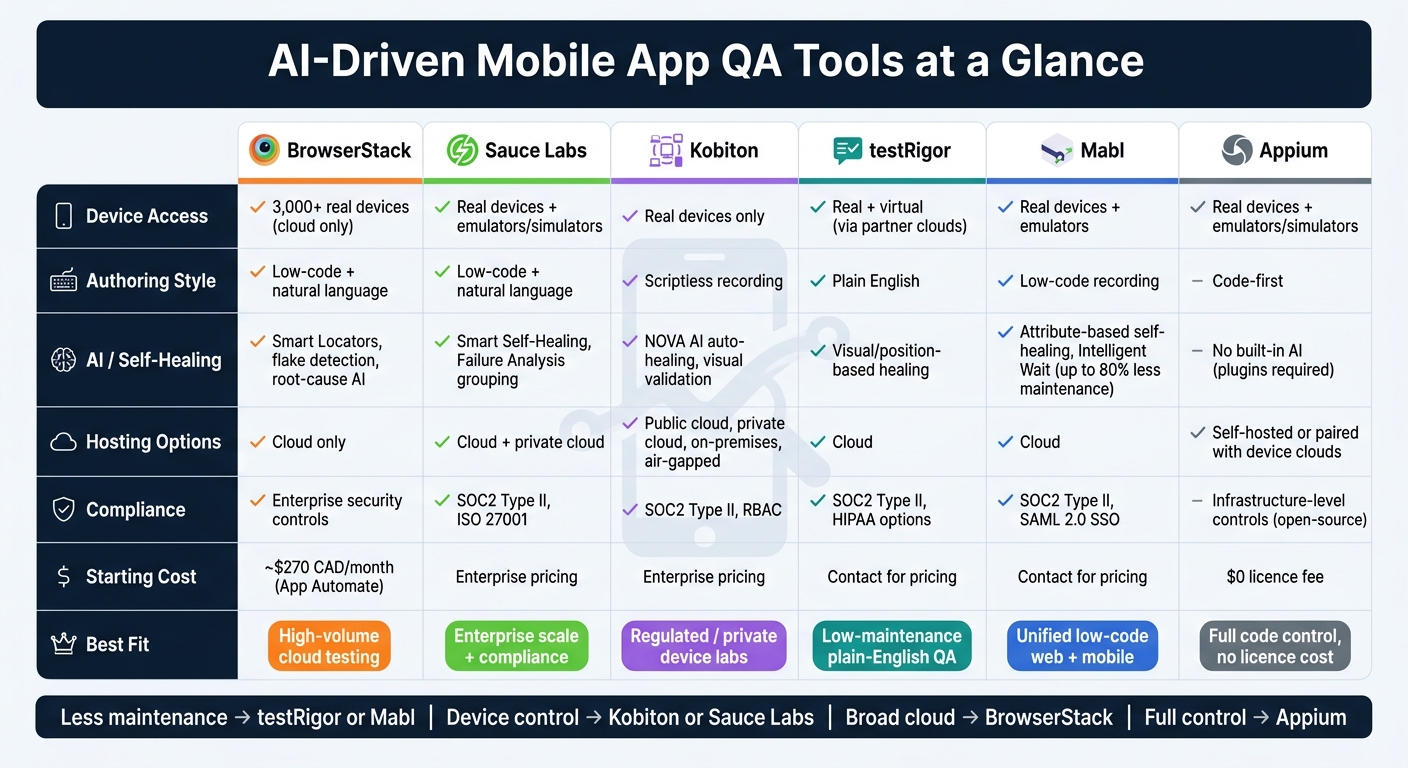
AI Mobile App QA Tools Compared: BrowserStack vs Sauce Labs vs Kobiton vs testRigor vs Mabl vs Appium
Automate Your Mobile Application Using AI Tools | TestRigor Step-by-Step Guide
sbb-itb-fd1fcab
Quick Comparison
| Tool | Device access | Authoring style | AI / healing | Hosting options | Best fit |
|---|---|---|---|---|---|
| BrowserStack | 3,000+ real devices | Low-code + natural language | Smart Locators, flake and root-cause views | Cloud | High-volume mobile cloud testing |
| Sauce Labs | Real devices + emulators/simulators | Low-code + natural language | Self-healing, failure grouping | Cloud + private options | Teams that want cloud scale plus enterprise controls |
| Kobiton | Real devices only | Scriptless recording | Auto-healing, visual checks | Public cloud, private cloud, on-prem | Regulated teams and private device labs |
| testRigor | Real + virtual via partner clouds | Plain English | Visual/position-based healing | Cloud | Teams that want low script upkeep |
| Mabl | Real devices + emulators | Low-code recording | Self-healing, wait logic, visual regression | Cloud | Teams that want one low-code setup for web and mobile |
| Appium | Real devices + emulators/simulators | Code-first | No built-in AI | Self-hosted or paired with device clouds | Engineering-led teams that want full control |
So before you choose, I’d keep the shortlist tied to how AI improves cross-platform mobile testing, device coverage, hosting model, reporting depth, and maintenance effort. That usually decides the outcome faster than feature lists do.
1. BrowserStack
Mobile Coverage
BrowserStack runs tests on a cloud of 3,000+ real devices, with coverage across iPhone, iPad, and Android hardware from Samsung, Google, OnePlus, Xiaomi, and Motorola. Tests run on physical devices only. It supports native apps (.ipa, .apk, .aab), hybrid apps, and mobile web.
AI Authoring and Healing
You can create tests in two ways: record a flow or describe it in natural language and let the platform generate the test. BrowserStack also uses AI-driven Smart Locators to spot changes in the app’s UI locators. So if a locator shifts, Smart Locators can still find the right element.
That automation is backed by detailed run data, which makes debugging less of a slog.
Diagnostics and Analytics
Each test run includes video recordings, device console logs, Appium logs, and network logs. You can view all of this in the Test Observability dashboard, which offers real-time reporting, flaky test detection, and AI-assisted root-cause analysis to help teams move through defect triage faster.
Security and Integrations
BrowserStack includes enterprise security controls and standard CI/CD integrations.
Sauce Labs takes a similar cloud-based approach, but the trade-offs differ when it comes to automation depth and analytics.
2. Sauce Labs
Mobile Coverage
Sauce Labs gives teams two ways to test mobile apps: a Real Device Cloud (RDC) and a Virtual Device Cloud (VDC).
The RDC gives you access to thousands of physical iOS and Android devices. That matters when you want to see how an app behaves on actual hardware, not just in a simulated setup. The VDC covers Android emulators and iOS simulators, which makes it a good fit for early-stage development testing, when teams need to move fast and check changes before pushing them onto real devices.
AI Authoring and Healing
Sauce Labs also includes a low-code authoring experience with natural-language test authoring. In plain terms, non-technical users can write tests in plain English instead of building everything from scratch in code.
On top of that, Smart Self-Healing updates tests when IDs or XPaths change. That can save a lot of cleanup work after small UI updates. Failure Analysis groups similar failures and flags flaky tests, so teams can spend less time chasing the same noisy issues and more time looking at actual regressions.
Diagnostics and Analytics
For visibility, Sauce Insights shows test suite health and flakiness trends. If a team is trying to figure out whether failures come from the app or from unstable tests, that kind of view helps.
Each run can also capture screenshots, logs, and HAR files. For crash reporting, Sauce Labs integrates with Backtrace.
Security and Integrations
Sauce Connect Proxy creates a TLS-encrypted tunnel between Sauce Labs’ cloud and your internal network. That means teams can test apps behind a firewall without opening ports, which is often a sticking point for security reviews.
The platform is SOC2 Type II and ISO 27001 certified. Sauce Labs also integrates with Jenkins, GitHub Actions, GitLab, Azure DevOps, and CircleCI.
Kobiton shifts the comparison toward device access and low-code execution.
3. Kobiton
Mobile Coverage
Kobiton keeps its focus tight: real-device testing only. That means teams test on physical iOS and Android devices, not emulators or simulators. Its Real Device Cloud includes hundreds of devices across current, legacy, and beta OS versions.
Kobiton also gives teams more control over how they run tests. You can choose from three deployment options:
- Public Cloud for shared access
- Private Cloud for more control
- On-Premises for testing inside your own setup
That matters for organisations with strict privacy rules. If data traffic and device access need to stay inside a controlled setup, Private Cloud or On-Premises can help keep things locked down.
AI Authoring and Healing
Kobiton’s NOVA AI engine focuses on scriptless authoring. A tester records one manual session, and NOVA turns that session into an automated suite. That suite can then run across other device models and operating systems without extra scripting.
When a UI changes after an update, Kobiton’s auto-healing updates test scripts on its own. So instead of cleaning up broken selectors by hand after every design tweak, teams can keep moving. Kobiton also supports scriptless-to-Appium export, which turns recorded sessions into editable Appium scripts.
Diagnostics and Analytics
Session Explorer is Kobiton’s main diagnostics tool. It gives testers a timeline view that includes video, screenshots, and device, Appium, and console logs. It also records performance data such as CPU, memory, network, and battery usage for each session. That makes it easier to tie a failed test to a spike in resource use instead of guessing what went wrong.
NOVA also adds visual validation and layout analysis. In plain terms, it helps teams spot UI mismatches across screen sizes and devices before those issues slip into production.
Security and Integrations
Kobiton is SOC2 Type II compliant and uses RBAC to manage device and data access. Kobiton Tunnel provides secure connections for testing internal apps.
On the CI/CD side, Kobiton connects with Jenkins, Azure DevOps, GitHub Actions, GitLab, TeamCity, and Bamboo. It also has a direct Jira integration, so testers can send bug reports and session data straight into dev workflows without jumping between tools.
That Appium export is a big part of Kobiton’s appeal. Teams can start with scriptless testing, then move into deeper custom automation when they need more control. It gives Kobiton a practical middle ground before stepping into Appium’s code-first model.
4. testRigor
Mobile Coverage
testRigor supports native iOS and Android apps, along with hybrid apps. It runs on real devices and virtual environments, and it works with major third-party clouds for broader real-device coverage. That setup makes it simple to pair plain-English test writing with access to more devices.
AI Authoring and Healing
testRigor’s main difference is its plain-English test authoring. Testers write steps in plain English instead of code or selectors. The AI turns those instructions into executable test steps, which opens the platform up to non-technical QA team members as well as developers.
Its self-healing engine finds UI elements based on visual appearance and relative position instead of brittle selectors. In practice, that means less selector upkeep, especially for actions like swiping or Face ID simulation. The trade-off is pretty clear: you get less code-level control than you would with script-first frameworks.
Diagnostics and Analytics
Every test step comes with an automatic screenshot. Each run also includes full video recordings and device console logs. On top of that, testRigor suggests missing test cases based on usage patterns. That can make triage faster when a failure needs fast reproduction and a clean audit trail.
Security and Integrations
testRigor is SOC 2 Type II compliant and supports HIPAA options, SSO, RBAC, audit logs, and test-suite versioning. On the CI/CD side, it connects with Jenkins, GitHub Actions, GitLab, Azure DevOps, and CircleCI.
For defect triage, it integrates with Jira and can auto-create tickets with plain-English reproduction steps and links to visual evidence when a test fails. It also syncs with TestRail, Xray, and Zephyr for teams that manage test cases in dedicated platforms.
That makes testRigor a good fit for teams that want lower-maintenance, language-based mobile QA. If your team wants more direct scripting control, the next tool takes a code-first approach.
5. Mabl
Mobile Coverage
Mabl supports native iOS and Android apps, including .ipa and .apk builds, plus hybrid apps and mobile web testing. You can run tests on real devices and emulators in the cloud across different screen sizes and OS versions.
Where Mabl tends to stand out is its low-code setup and AI-driven self-healing. That matters if your team wants mobile test coverage without writing a lot of code from day one.
AI Authoring and Healing
Mabl’s main draw is low-code mobile QA with strong self-healing. Mabl Trainer records native mobile flows without code, and its attribute-based self-healing re-matches elements when the UI changes.
The platform also includes Intelligent Wait, which adjusts timing for slow-loading elements on its own and helps cut down flaky mobile tests. Mabl says this approach can reduce test maintenance by up to 80%.
Diagnostics and Analytics
Each test run includes screenshots, video, Appium logs, and HAR files. That gives teams a clear paper trail when they need to track down API failures or latency issues during mobile sessions.
Mabl also includes visual regression testing, which helps flag layout shifts and UI drift before those changes turn into user-facing problems.
Security and Integrations
Mabl is SOC 2 Type II compliant and supports SSO via SAML 2.0. For apps behind firewalls or in private environments, Mabl Link provides secure tunnelling without open inbound ports.
It also integrates with:
- GitHub Actions
- GitLab CI/CD
- Jenkins
- Azure Pipelines
- CircleCI
- Bitbucket Pipelines
- Jira
- Slack
- Microsoft Teams
Teams that want full code-level control usually move next to Appium’s code-first model.
6. Appium
Appium is the code-first option on the other side of Mabl’s low-code setup.
Mobile Coverage
Appium supports a broad range of platforms. It works with native, hybrid, and mobile web apps on Android and iOS. It also extends to Windows (UWP), macOS, tvOS, and Tizen. You can run tests on real devices, Android emulators, and iOS simulators.
It also supports cross-platform scripting, which means one test can often run across Android and iOS with only small changes.
AI Authoring and Healing
Appium has no built-in AI features. Appium 2.0 does support AI add-ons through plugins and third-party frameworks, such as visual locators and self-healing layers, but teams need to build and wire these in themselves. This manual effort is often the price for achieving the benefits of AI in mobile usability testing without vendor lock-in. Getting to the same level as built-in AI tooling usually takes a lot of custom engineering.
The trade-off is clear: you get freedom, but you also take on more manual setup for reporting and triage.
Diagnostics and Analytics
Appium can capture server-side logs, device logs, screenshots, and screen recordings. Appium Inspector helps with element inspection and visual debugging. There’s no built-in reporting dashboard, so teams usually plug in tools like Allure, ExtentReports, or ReportPortal to create stakeholder-ready reports and track flaky tests.
That makes Appium a strong fit for teams that already have their own logging and reporting stack in place.
Security and Integrations
Its open-source model fits security-sensitive environments well. Appium can run fully on-premise, behind a corporate firewall, with no data leaving your infrastructure. It does not need access to the app’s source code. It only needs the compiled .apk or .ipa file. Access controls remain at the infrastructure level.
Appium also connects with major CI/CD tools and device clouds, and it supports Java, Python, JavaScript, Ruby, and C#.
Strengths, Trade-Offs, and Best-Fit Scenarios
Each platform has a clear lane. The best pick comes down to your team’s technical depth, compliance needs, and how much control you want over where test data lives.
In practice, the main decision points are pretty straightforward: device coverage, low-code depth, healing, reporting, security, and CI/CD fit.
The matrix below turns those points into a quick shortlist.
| Tool | Pros | Cons |
|---|---|---|
| BrowserStack | 3,000+ real devices; cloud-only | Costs can climb quickly at enterprise scale |
| Sauce Labs | Private cloud options; SOC2 Type II | Harder to adopt; more complex setup for advanced features |
| Kobiton | On-premises and air-gapped device support; scriptless recording | Smaller public device cloud; scriptless tests may need manual cleanup |
| testRigor | Plain-English test creation; low maintenance; fast authoring | Limited debugging depth compared with scripted tools |
| Mabl | AI self-healing; one platform for web and mobile; low-code | Mobile features are newer and less mature than its web offering |
| Appium | Open-source; no licensing costs; full control | High maintenance cost; no built-in device cloud or AI |
For regulated Canadian teams, Kobiton and Sauce Labs stand out when device control matters most. If your main goal is cutting test upkeep, testRigor and Mabl are often the easier path. BrowserStack fits high-volume cloud testing, while Appium makes sense for teams that want full code control.
If you already know your main constraint, this shorter table makes the decision easier.
| Use Case | Best-Fit Platform(s) |
|---|---|
| Rapid mobile regression | BrowserStack, Sauce Labs |
| Scriptless / low-code testing | testRigor, Mabl, Kobiton |
| CI/CD-heavy engineering teams | BrowserStack, Sauce Labs |
| Air-gapped or private environments | Kobiton (on-prem), Sauce Labs (private cloud) |
| Open-source-first strategy | Appium |
Conclusion
No tool is the right fit for every team.
The comparison shows a clear pattern: each option is built to handle a different part of mobile QA. Managed platforms cut down infrastructure work. Appium gives you the most control. AI-assisted tools reduce maintenance, but they can also limit custom scripting.
When you review your shortlist, use criteria that reflect how your team actually works:
- Test each shortlisted tool with a real MFA flow, not a basic login test
- Validate self-healing by running scripts against a modified app version
- Confirm data residency for PIPEDA requirements
- Request SOC 2 Type II reports and encryption details
- Test device cloud latency from your main Canadian development locations
- Compare total cost of ownership: subscription, setup, training, parallel execution limits, script maintenance, and on-premise infrastructure
- Review support SLAs for North American business hours, especially around critical deployment windows
Pick the platform that lines up with your device needs, compliance requirements, and maintenance budget across platform support, low-code depth, analytics, healing, security, and reporting.
FAQs
How should we pilot a mobile QA tool?
Start with an AI readiness audit of your current processes, data, and tools. Then map out a 6- to 12-month roadmap instead of trying to change everything in one shot. It’s a much saner way to work, and it gives your team room to learn as you go.
At the same time, record baseline metrics like defect rates and testing time so you can measure what changes after rollout. If you don’t know where you started, it’s hard to tell whether AI is helping or just adding noise.
For the pilot, stick to high-impact, repetitive work. Good examples include regression testing and cross-platform checks. These are the kinds of jobs that eat up hours, follow the same patterns, and are often a good fit for AI support.
Just make sure the pilot fits into your existing CI/CD and bug-tracking workflows. If it sits off to the side, people usually stop using it. And keep humans in the loop to validate AI output and check the actual user experience, because passing a test isn’t always the same thing as shipping something that feels right.
When is low-code better than code-first testing?
Low-code testing tends to work best when your team wants to lower the technical hurdle for non-developers or spin up tests fast.
With natural language features, teams can write, debug, and refine tests in plain English. That speeds up the workflow and makes the whole process feel less like wrestling with code.
It’s especially handy for repetitive tasks like form filling or scheduling. So instead of spending hours on routine checks, testers can put more of their time into exploratory testing and user experience testing.
What hidden costs matter most in tool selection?
The biggest hidden costs often show up when manual work doesn’t disappear – it just moves to human oversight.
So even if AI takes care of routine tasks, teams still need time for expert review, security audits, and compliance sign-offs. That work adds up, and it’s easy to miss at the start.
Costs can climb further when a tool doesn’t support Canadian accessibility needs, bilingual formatting, or smooth DevOps integration. In that case, teams often end up paying for fixes later, while also dealing with broken-up workflows and extra handoffs.