
What AI Agents Do: 7 Core Capabilities

AI agents do more than answer questions – they plan work, use business systems, follow rules, and move a task from start to finish. If you want to know where they fit in, the short answer is this: they help with work that has clear steps, set limits, and a human review point for high-risk actions.
In this article, I’d boil it down to seven core capabilities:
- Planning: turning a goal into steps
- Memory: keeping the right facts across tasks or sessions
- Tool use: connecting to systems like CRM, ERP, email, or internal apps
- Task execution: doing an approved action in a system
- Decision logic: choosing whether to proceed, ask, escalate, or stop
- Context handling: pulling in only the facts needed right now
- multi-step workflow automation: carrying a job through several linked actions
A few numbers show why this matters. 12.2% of Canadian businesses used AI in production or service delivery in the 12 months before Q2 2025, up from 6.1% in 2024. And in McKinsey’s 2025 research, 62% of organisations said they were trying AI agents, while 23% were already scaling at least one agentic system. To see how these efficiencies translate to your bottom line, you can use a workflow automation benefits calculator to estimate potential savings.
Here’s the main point: an AI agent is not just a chatbot with extra steps. It needs permissions, approval rules, audit logs, and stop conditions. Without those controls, it should not handle high-risk work like payments, payroll changes, refunds above a set limit, or legal notices.
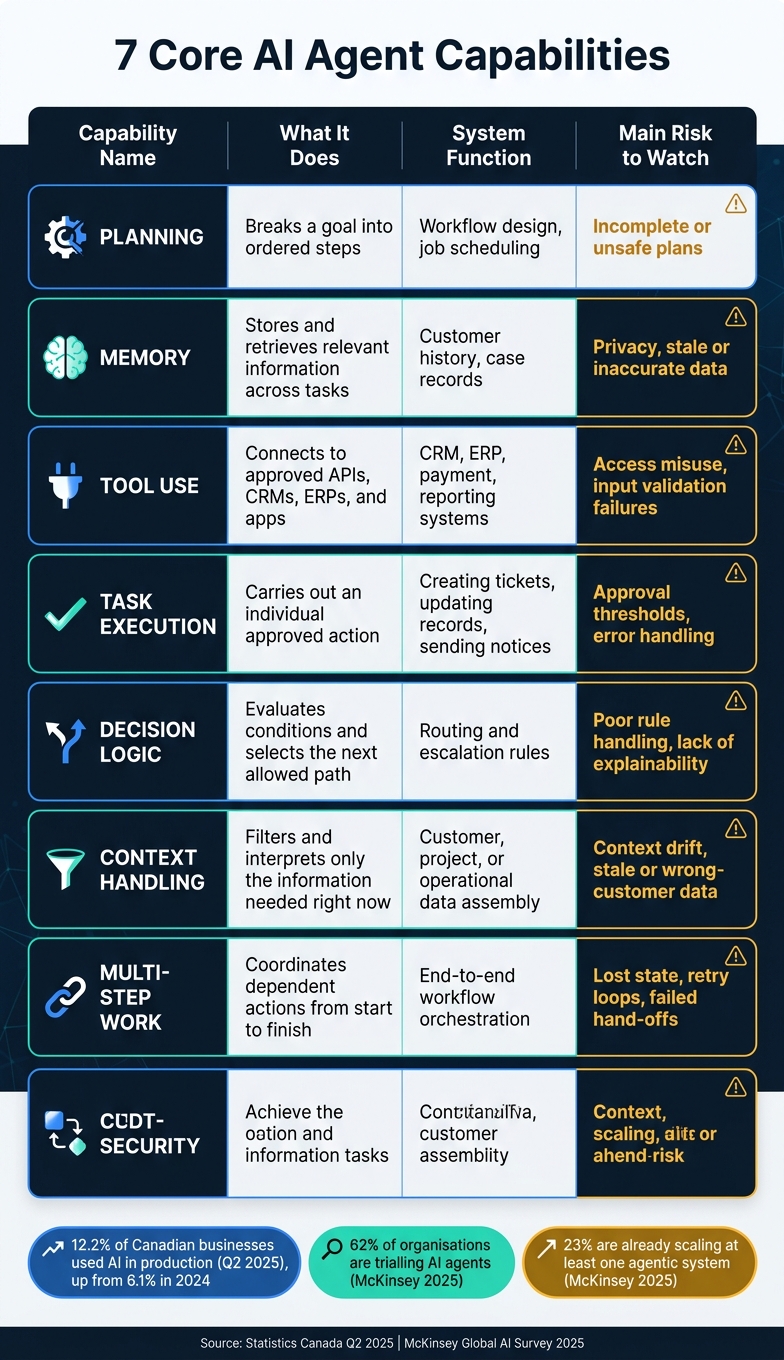
7 Core AI Agent Capabilities: What They Do, How They Work & Key Risks
8 Core Components of a Modern AI Agent #AIAgents #AgenticAI #Shorts
sbb-itb-fd1fcab
Quick comparison
| Capability | What it does in plain language | Main risk to watch |
|---|---|---|
| Planning | Breaks a goal into ordered steps | Bad or unsafe steps |
| Memory | Keeps facts for now and later | Wrong, stale, or private data |
| Tool use | Connects to approved systems | Access misuse or bad inputs |
| Task execution | Completes an approved action | Failed or partial actions |
| Decision logic | Picks the next allowed path | Poor rule handling |
| Context handling | Selects the right facts for the task | Wrong or stale context |
| Multi-step work | Keeps a workflow moving to completion | Lost state, loops, failed hand-offs |
If I were reading this to judge whether an agent fits my business, I’d use one simple test: can this workflow be clearly scoped, checked, logged, and paused for a person when needed? If yes, an agent may be a good fit. Our AI consulting services can help you validate these use cases.
1. Planning
Planning turns a broad goal into a clear set of steps. Instead of treating “resolve an invoice discrepancy” as one action, an agent splits it up: check the invoice, compare it with the ledger, find the difference, and send the fix for approval before any record is changed. That step-by-step approach shows the agent what information, tools, permissions, and decision points it needs along the way. This matters even more when the work moves across several systems.
Most business workflows span several systems, so the agent has to track dependencies across apps.
Planning can shift based on the job. For predictable, repeatable processes, a fixed sequence is often the best fit. For less structured work, the agent can replan as it goes: look at the result of one step, then adjust the next step based on what it finds. Breaking work into smaller sub-tasks helps contain mistakes and makes long workflows easier to handle.
Clear boundaries matter here. Set firm limits on what the agent can do on its own, what needs approval, and when it must stop. A refund below a set dollar threshold might be prepared automatically. A larger one, or any change to a protected record, should pause for review. Scoped permissions, approval gates, and audit trails enforce these limits at the system level – not just through prompts.
Once the plan is set, memory keeps earlier decisions available for the next step.
2. Memory
Memory lets an agent carry useful information from one step or session to the next. Without it, each interaction starts from scratch. With it, the agent can remember client preferences, open cases, and prior approvals. That kind of continuity makes an agent far more useful in business workflows. In practice, this comes down to two layers: what the agent needs right now, and what it should keep for later.
Use two layers: working memory for the current task and long-term memory for persistent facts such as preferences, decisions, and approved exceptions. A simple example is a procurement agent that keeps the current request in working memory while storing purchasing rules in long-term memory.
Memory works in four steps: capture, store, retrieve, apply.
For Canadian businesses handling customer files, employee records, or public-sector data, the main safeguard is a governed memory layer between the agent and the memory store. Every stored item should include a source, a timestamp, an access scope, and a set retention or deletion rule. Put plainly, a customer address shouldn’t overwrite a record just because it showed up in a chat. The system should flag it for confirmation instead. Businesses can use an AI benefits analyzer to determine where these memory-driven workflows add the most value.
Once memory is governed, the agent can use it alongside live systems and tools. Audit logs, scoped retrieval, and clear update rules help keep memory dependable. With memory in place, the next capability is tool use.
3. Tool Use
Once memory is set up, tool use is what lets the agent do something inside business systems. Memory holds context. Tool use puts that context to work. When an agent uses a tool, it connects to an external system – a CRM, ERP, email, chat, or another business system – and that link is what turns reasoning into action.
Here’s what that looks like in practice: the agent gets a task, figures out which system it needs, calls the right API, and then acts on the response. For example, it might pull data from a field ticket or OCR scan and use it to update the right system or kick off a workflow. That kind of automation can cut response times from hours to seconds. This efficiency is a key component of a digital transformation roadmap.
This is where a lot of routine work starts to disappear. Manual handoffs drop off, and staff can spend more time dealing with exceptions instead of moving data from one place to another.
Before launch, define every API and data flow the agent can touch. Then test those workflows in a sandbox before moving to production. That keeps the agent inside its approved scope.
For compliance-heavy or safety-critical work, add human sign-off and log every tool action. Automated audit trails record what the agent did, in which system, and when – so the workflow stays capable and traceable.
Once an agent can use tools safely, the next question is how well it executes the full task.
4. Task Execution
Once an agent can use tools, the next step is simple in theory and hard in practice: doing the authorised task the right way.
Tool use gives an agent access to outside systems. Task execution is what happens after that. The agent doesn’t just suggest what a person should do. It carries out an authorised action inside those systems, like creating a record, updating a field, generating a service ticket, or starting an internal workflow. In plain terms, it turns a tool call into a finished business action.
A dependable execution cycle usually follows five steps:
- identify the action that needs to happen
- choose an authorised tool
- prepare structured inputs
- run the operation
- verify the result
That last step matters more than it might seem. If the result is incomplete or unclear, the system should return success, failure, or pending – and never pretend the task worked when it didn’t. For longer workflows, execution can be broken into traceable sub-tasks, with state saved at checkpoints so the process can restart after an interruption.
This is where AI starts to affect day-to-day operations. It moves from reasoning to action. A custom CRM agent can read a new enquiry, update the contact record, assign the lead, and schedule a follow-up task. In an energy company, a service-request agent can take in a customer report, pull account details, check for a known outage, create a work order, assign it to an available team, and send a status update. The routine parts happen automatically. Anything unusual gets passed to a human coordinator.
The payoff can be large, but it’s still tied to the study setup. In one 2025 research paper on generative business-process agents, evaluated workflows saw up to a 40% drop in processing time and a 94% drop in error rate.
Reliable execution depends on a permissioned tool layer with clear guardrails. Each tool should have a narrow job, checked inputs, role-based permissions, and a clear record of who or what started the action. The table below shows how different actions line up with execution models and controls.
| Execution model | Suitable actions | Main control |
|---|---|---|
| Fully automatic | Routing, classification, draft generation, low-risk internal updates | Scoped permissions, validation, and logging |
| Approval-based | Purchase orders, account changes, customer-facing commitments | Human approval tied to the specific action |
| Prohibited or isolated | Destructive bulk deletion, unbounded financial transfers, unrestricted privileged access | Hard system-level restrictions and sandboxing |
Every action should leave behind a complete audit trail: the request, the relevant context, the authorised tool, the parameters, the result, the identity, the timestamp, and the approval status. If something goes wrong, that record shows where it broke. It also helps with compliance reviews.
Which action the agent should take, and when it should stop, depends on decision logic.
5. Decision Logic
Decision logic is the checkpoint before an agent acts. It looks at observations, goals, policies, and available options, then picks the next step. After reading the request and the current context, the agent should choose only one allowed path: proceed, ask, escalate, or stop.
Fixed workflows work well for repeatable tasks. Agents are better when the situation calls for a choice between approved paths.
AI reasoning is good at handling messy, unstructured inputs. That includes things like reading a customer message, classifying an invoice, or summarising a contract. Deterministic rules should handle anything that must stay consistent and auditable, such as spending limits, approval thresholds, user permissions, and compliance checks. Put simply, the model can help figure out what’s going on, but policy rules should decide what happens next.
For example, an agent might detect that a customer wants a refund. But a policy engine should still check the refund window, the transaction status, and the authorised amount before any credit goes out. Keeping those layers separate makes the system easier to test, update, explain, and audit.
The main control here is bounded authority. Define exactly what the agent can decide and do, then enforce those limits outside the model. A practical way to do this is with a risk-based approval model:
- Low-risk actions, like categorising a ticket, can run automatically
- Medium-risk actions need an extra validation step
- High-risk actions, like payments, deletions, or production changes, need human approval
McKinsey reported that agentic AI could resolve up to 80% of common incidents autonomously in a service-management use case, while reducing resolution time by 60% to 90%.
Each decision path should also be observable and auditable. Log the inputs reviewed, the policy applied, the tool used, the decision made, and whether a human approved or overrode the result. Those overrides matter. They often point to faulty logic, missing evidence, or policies that are out of date. The table below shows a practical risk-based tier structure.
| Decision tier | Example actions | Control required |
|---|---|---|
| Low-risk, reversible | Categorising a ticket, drafting an internal summary | Automated, within defined limits |
| Medium-risk | Updating a CRM field, sending a proposed internal notification | Validation check or second system confirmation |
| High-risk, irreversible | Approving a payment, deleting records, modifying a production system | Mandatory human approval before execution |
The next issue is context: the agent must keep the right information in view while it acts.
6. Context Handling
Context handling is the process an agent uses to pull together the information that matters for the task in front of it. Before it does anything, it builds a working context from the user’s request, relevant business rules, retrieved records, tool outputs, and the current task state. As the task moves forward, that context changes too: old details get dropped, new records are added, and the agent keeps its attention on what matters in that moment. Once it knows what matters now, it can carry the right facts into the next step.
Memory stores facts that can be reused. Context handling picks the small set of facts needed right now.
That difference matters in a business system. A service agent in a custom CRM might pull together the customer’s current account status, recent support history, active service agreement, and approved discount rules, while leaving out unrelated customers and restricted financial data. Access-controlled context selection helps make sure the agent uses the right case, asset, or customer record. The payoff is plain: more relevant answers, fewer repeated questions, and smoother continuity across software modules, as long as the underlying access controls stay in place.
The main risk is context drift. That can show up as stale records, wrong-customer data, or missed constraints. High-value facts such as approval limits, contract terms, dates, or safety requirements should stay in structured records or be pulled from authoritative sources, not rebuilt from a generated summary.
The main control here is a bounded, observable context policy. In practice, that means setting clear rules for:
- which sources the agent may retrieve from
- how much each source can contribute
- how stale records are treated
- when the agent must ask for clarification or human approval before moving ahead
Each retrieved item should include metadata such as source, timestamp, record identifier, access scope, and version. Trigger summarisation at around 85% of the model’s input limit. Log context composition at each step so errors can be diagnosed and compliance reviews have a clear audit trail. With the right context in place, the agent can move through the task one step at a time.
7. Multi-Step Work
When planning, memory, tool use, and decision rules are already in place, multi-step work is what keeps the workflow moving from one task to the next. Put simply, it’s the ability to carry a business goal through a chain of linked actions until the job is done. Planning shows the path. Multi-step work is what gets the work across the finish line.
What sets it apart is saved workflow state. That means completed steps, tool outputs, approvals, and open actions are all kept in place, so the agent doesn’t repeat work or lose its spot. Workflow systems rely on state, retries, and recovery to keep long-running jobs on track.
For example, a logistics agent can assign drivers, plan routes, and send ETA updates. A claims agent can extract submission data and create a case. These artificial intelligence services help automate complex business logic.
This only works well with limited autonomy. Before an agent can act on its own, the workflow needs clear steps, permissions, limits, and stop conditions. You also need a record of every input, decision, tool call, result, and failure. That record matters when something goes wrong and when compliance teams need to review what happened.
High-risk or irreversible actions should stay behind human approval until the agent has a proven track record. And if the agent hits a failure limit or reaches a high-risk step, it should stop or hand the work off. It should not keep going in circles.
When a step fails, the workflow should stop or escalate instead of running forever. A well-built agent retries within a set limit, then sends the exception to a human reviewer. Pair that with saved workflow state, so the agent can restart from the last successful checkpoint after a failure, and you get the difference between a dependable business workflow and one that feels unpredictable.
The table below compares how these capabilities differ in practice.
Capability Comparison Table
The table below shows how the seven capabilities fit into a business workflow.
They work as one chain. Planning sets the order. Memory and context bring in the right information. Tool use and task execution handle the work itself. Decision logic picks the right path. Multi-step work keeps everything moving until the job is done.
| Capability | What the Agent Does | System Function | Main Prerequisite | Primary Control Concern |
|---|---|---|---|---|
| Planning | Breaks a goal into ordered steps | Workflow design, job scheduling | Clear goal, defined constraints, accessible task information | Incomplete, unsafe, or unnecessarily costly plans |
| Memory | Stores and retrieves relevant information | Customer history and case records | Structured records, retention rules, reliable retrieval method | Privacy, accuracy, and stale-information risks |
| Tool Use | Calls approved APIs, databases, or applications | CRM, ERP, document, payment, reporting systems | Documented interfaces, authentication, permissions, clear tool descriptions | Least-privilege access, input validation, audit logging |
| Task Execution | Carries out an individual approved action | Creating tickets, updating records, sending notices | Validated inputs, action policy, execution environment | Approval thresholds, reversibility, error handling |
| Decision Logic | Evaluates conditions and selects a path | Routing and escalation rules | Business rules, quality data, defined exception paths | Explainability, bias, consistent rule application, human escalation |
| Context Handling | Filters and interprets information relevant to the current request | Customer, project, regulatory, or operational data assembly | Relevant, current, and appropriately scoped data | Data access boundaries, source verification, prompt injection |
| Multi-Step Work | Coordinates dependent actions from start to finish | End-to-end workflow orchestration | State tracking, workflow orchestration, completion criteria | State integrity, retry limits, monitoring, human hand-off on failure |
A simple order-change workflow makes this easier to picture. In an order-management process, a customer-service agent handles a request to change an order by checking inventory, verifying pricing, updating the order, and confirming the result. That one flow touches planning, tool use, decision logic, task execution, context handling, and multi-step work, one after another.
Here’s the plain-English version: tool use reaches into the system, while task execution finishes the approved action. Multi-step work sits above both. It coordinates several linked actions, keeps track of state between them, and decides when the whole workflow is complete.
The main point is simple: treat these capabilities as controlled system functions, not open-ended autonomy. A business agent needs a defined scope, approved tools, visible actions, validation checks, and a clear path to a person when a decision is high-impact or unclear.
With those roles mapped out, the next section looks at the controls needed to build a reliable business agent.
What It Takes to Build a Reliable Business Agent
Those seven capabilities only hold up in production when the system around them is built well. The language model is just one part of the picture. What makes an agent useful is everything around it: data connections, approved tools, validation rules, and the controls that keep it inside a clear lane.
Before you build agent logic, map your systems, APIs, data flow, and human review points using a custom app feature planner. Set the agent’s role, its users, and its KPIs before you get into architecture. That work sounds basic, but it saves a lot of pain later.
Access controls and orchestration should be designed at the same time. If you split them up, things can get messy fast. Orchestration logic needs to track state across multi-step workflows and send sensitive or high-risk actions into the approval flows you already use.
A good rollout usually looks like this:
- Start in a sandbox
- Test how the agent handles multi-step tasks
- Check how approvals work for risky actions
- Monitor logs and exceptions after launch
A reliable agent needs system mapping, scoped APIs, approval rules, and monitoring over time. In practice, what makes planning, memory, tool use, and decision logic safe isn’t the model by itself. It’s the surrounding system: permissions, approvals, state tracking, and monitoring.
With scope, controls, and monitoring in place, the next step is figuring out whether the agent is ready for production use.
Conclusion
The seven capabilities work best when they operate as one controlled system, not as separate pieces.
With that in place, the next move is simple: apply those capabilities to one bounded workflow. That’s usually the best place to start. Pick a workflow where an agent can remove manual handoffs without giving up control. Then map the basics clearly: the trigger, inputs, decisions, outputs, and approval points. McKinsey’s 2025 global AI survey found that workflow redesign had the strongest link to EBIT impact, yet only 21% of respondents had redesigned at least some workflows.
Before anything goes live, lock down the workflow steps, data access, permissions, and approval thresholds. Some decisions should never be left to the system alone. Contract changes, large payments, and safety-critical equipment settings should always go to a named human approver.
Once the scope and approvals are clear, the next call is whether the workflow needs a purpose-built system. For organizations with specialized operations, like public-sector services, energy, construction, or complex internal workflows, that route is often the better fit. Custom software can match the agent to existing policies, terminology, and data structures instead of forcing teams to work around a generic tool.
Digital Fractal Technologies Inc. supports this kind of custom implementation through custom software development, AI consulting, workflow automation, and business management tools.
An agent is only as reliable as the workflow, permissions, and approvals built around it.
FAQs
How is an AI agent different from a chatbot?
A chatbot mainly talks. An AI agent acts.
That’s the simplest way to think about it.
Chatbots usually answer questions or share information based on set scripts or rules. They’re good at handling back-and-forth conversation, especially when someone needs a quick answer.
An AI agent goes further. It can reason, plan, and handle multi-step work across your software stack. So while a chatbot might explain how to reset a password, an agent can do the job: reset the password, email the user, and close the support ticket.
Same general space. Very different level of action.
Which business workflows are best suited for AI agents?
AI agents work best in workflows that are repetitive, high-volume, and easy to map out. They tend to do well when the steps follow a clear pattern instead of changing all the time.
A strong fit is any task that runs on existing digital data. That includes data entry, invoice processing, lead routing, and report generation.
For early rollouts, internal-facing and low-risk workflows are usually the smartest place to begin. That gives teams room to test, learn, and fine-tune before using AI in more sensitive parts of the business.
Digital Fractal Technologies Inc. helps organizations spot these high-impact use cases in energy, construction, and the public sector.
What controls should be in place before an AI agent goes live?
Before an AI agent goes live, set up a strong governance framework for security, compliance, and day-to-day control. Start with a data-readiness audit and a Privacy Impact Assessment. Then give each agent its own verifiable identity and least-privilege access.
For high-stakes actions, require clear human approval. Put policy checks on tool calls, set action budgets, keep immutable audit logs, add a kill switch, and test the agent in a sandbox before a phased, monitored rollout.