AI Agents for Workflow Automation: Guide 2026

AI agents are reshaping how businesses handle repetitive tasks, offering a way to save time and reduce costs. Unlike older automation tools, these agents can make decisions, adapt to different scenarios, and complete tasks with minimal human input. By 2026, 68% of Canadian businesses have adopted AI agents, cutting operational costs by 40% and improving efficiency in areas like customer service, finance, and IT.
Key Points:
- What They Do: AI agents automate workflows by observing, reasoning, acting, and learning.
- Why It Matters: Rising labour costs and competition make automation necessary for staying competitive.
- Business Use Cases: Common applications include invoice processing, ticket resolution, inventory management, and HR tasks.
- Implementation Costs: Pilots start at $15,000–$30,000 CAD, with full-scale deployments costing up to $100,000 CAD.
- Governance and Security: Strong controls, audit logs, and compliance measures are essential to manage risks effectively.
AI agents are more flexible than traditional automation tools like RPA, handling unstructured data and adapting to unexpected changes. Canadian businesses can start small with a pilot project, focusing on high-volume, low-risk tasks, and scale up based on results.
AI Agents EXPLAINED in 14 minutes and TOOLS for building one
sbb-itb-fd1fcab
How AI Agents Power Workflow Automation
AI Agents vs. Traditional Automation (RPA): Key Differences 2026
Core Functions of AI Agents
AI agents operate through a continuous four-step cycle: perceive, reason, act, and learn. Here’s how it works: they receive inputs (like an invoice email, API trigger, or form submission), interpret the context using large language models (LLMs), and plan a course of action. Once the action is carried out across connected systems, they assess the results and refine their approach for the future.
Each stage builds on the last, creating a system that evolves over time.
| Function | What It Does |
|---|---|
| Perception | Receives signals from the environment (e.g., document, API trigger) |
| Reasoning | Interprets context and plans actions using LLMs |
| Action | Executes tasks across integrated systems (e.g., updating a CRM) |
| Learning | Reviews outcomes and adjusts future responses based on feedback |
For complex workflows, a supervisor agent plays a key role by breaking down overarching goals into smaller, manageable tasks. These subtasks can include anything from extracting data to validating compliance. This multi-agent coordination allows AI to tackle processes that would be too intricate for a single system to handle.
One critical safety measure is Retrieval-Augmented Generation (RAG). This approach enables agents to access verified data from internal sources, cutting down hallucination rates by over 40%. For workflows in sensitive areas like finance or compliance, this reliability is essential. It ensures automation is not only efficient but also trustworthy.
This dynamic and adaptable approach sets AI agents apart from older, more rigid automation systems.
AI Agents vs. Traditional Automation
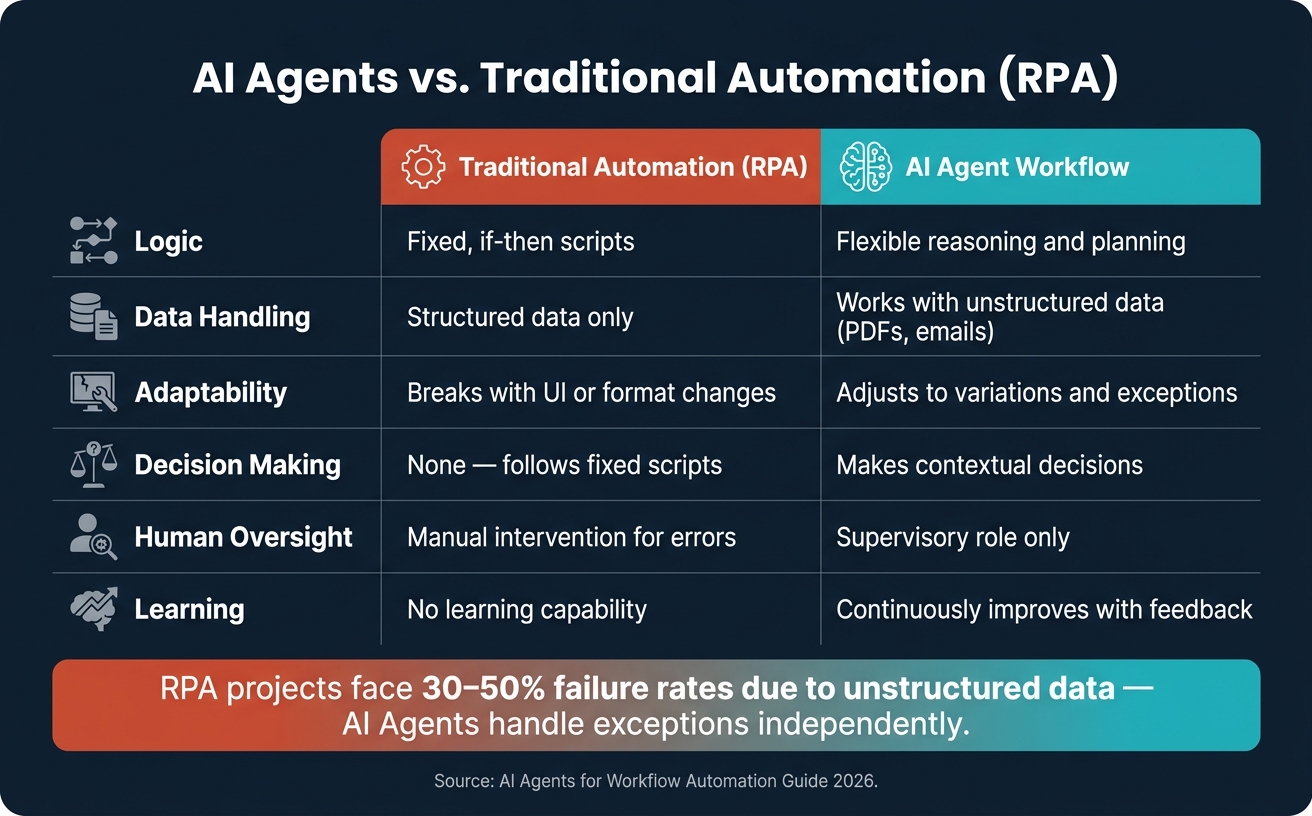
Unlike AI agents, traditional automation systems lack the ability to adapt. Robotic Process Automation (RPA), for instance, relies on rigid scripts that fail when data doesn’t match the expected format.
"A script runs the same logic every time; an agent observes, decides, and adapts dynamically based on what it finds." – Kushal Byatnal, Extend
RPA projects often face high failure or stall rates – anywhere from 30% to 50% – because they can’t handle unstructured or unexpected inputs. AI agents, on the other hand, excel in interpreting context and managing ambiguous data, such as unstructured PDFs, customer emails, or incomplete fields.
| Dimension | Traditional Automation (RPA) | AI Agent Workflow |
|---|---|---|
| Logic | Fixed, if-then scripts | Flexible reasoning and planning |
| Data Handling | Structured data only | Works with unstructured data (PDFs, emails) |
| Adaptability | Breaks with UI or format changes | Adjusts to variations and exceptions |
| Decision Making | None – follows fixed scripts | Makes contextual decisions |
| Human Oversight | Manual intervention for errors | Supervisory role only |
| Learning | No learning capability | Continuously improves with feedback |
The difference isn’t just in how these systems operate – it’s in how they shift responsibilities. Traditional RPA requires constant human intervention for errors or unexpected situations. AI agents, by contrast, manage exceptions independently, leaving humans to focus on higher-level tasks like reviewing overall outcomes instead of micromanaging every step.
Business Use Cases for AI Agents in 2026
Top Use Cases by Business Function
By May 2026, 68% of Canadian commercial organisations had implemented AI agents in at least one area of their operations. These businesses report an impressive 40% average reduction in operational costs.
Different regions in Canada are excelling in specific sectors: Toronto dominates in finance and SaaS, Montréal shines in research and creative industries, and Vancouver leads in tech services and gaming. Despite these regional strengths, several business functions across industries are consistently benefiting from AI agents:
| Function | High-Impact Applications |
|---|---|
| Finance | Invoice processing, reconciliation, fraud detection, FINTRAC reporting |
| Customer Service | Scheduling, intake, qualification, autonomous refunds/exchanges |
| IT Operations | Ticket triage, ticket resolution, security monitoring, password resets |
| Supply Chain | Inventory management, rerouting shipments, negotiating spot freight rates |
| Construction | RFI management, safety monitoring, HSE trend analysis, carbon reporting |
| HR | Employee onboarding, knowledge sharing, performance metric tracking |
In 2026, AI agents are completing entire workflows by seamlessly integrating with CRM, ERP, and HRIS systems, removing the need for manual hand-offs. While AI handles repetitive and time-consuming tasks, human oversight remains crucial for high-stakes decisions.
"The opportunity isn’t AI as a chatbot. It’s AI as a role-based digital staff member – project controls assistants, cost analysts, safety monitors – working alongside people." – Jeff Weiss, Chief Revenue Officer, CMiC
These applications highlight how AI agents are reshaping operations, paving the way for examples of their tangible impact.
Examples of AI Workflow Automation in Practice
The following real-world examples demonstrate how AI agents are driving measurable improvements across different business functions:
Bell Canada
Bell Canada’s agentic triage system manages 11 inboxes and integrates with 14 systems, automating 450,000 cases annually. This system has reduced customer response times by 25% while maintaining an accuracy rate of 90%.
Linamar
Ontario-based manufacturer Linamar tackled machine downtime using a multi-agent system developed during the Vector Institute‘s bootcamp. Their orchestrator agent works with a search agent – capable of scanning manuals ranging from 400 to 1,500 pages – and a work order agent that generates maintenance records. This system reduced retrieval times from 30 minutes to mere seconds, achieving 70% accuracy in real-world applications.
"After validating the use case through a low-code proof of concept, we had a team participate in Vector Institute’s Agentic AI Bootcamp to intentionally build internal capability. This allowed us to move beyond experimentation and develop more robust, agentic solutions that scale to higher-impact operational use cases." – Dana Sharp, Director of Linamar Robotics
Both examples underline a proven strategy: start with a narrow focus, validate the workflow’s potential during a short pilot (often four weeks), and then scale based on the results by following a proven framework to implement workflow automation effectively. These case studies show how AI agents can deliver meaningful improvements when deployed thoughtfully.
How to Implement AI Agents for Workflow Automation
Getting the most out of AI-driven workflow automation in 2026 hinges on a well-planned implementation process. Most successful deployments are broken down into three distinct phases.
Steps to a Successful Deployment
Start with a 4-week pilot project, which typically costs between $15,000 and $30,000 CAD. This phase is designed to validate one workflow and determine if moving forward makes sense. If the pilot proves successful, proceed to a Production Build. Over 8 to 12 weeks, at a cost of $40,000 to $100,000 CAD, this phase integrates the AI agent with systems like your ERP or CRM, complete with audit trails and monitoring tools. Once the system is live, an Operating Retainer – ranging from $5,000 to $15,000 CAD per month – covers ongoing monitoring, regular updates, and quarterly expansions into new workflows.
When deciding which workflow to automate first, consider these two questions:
"What does this workflow cost in human hours today?" and "What is the worst thing that happens if the model gets it wrong on a Tuesday at 3am?" – Derik Lawlis, Founder, ThriveAI
Focus on workflows that consume at least 5 hours of human effort per week and where the risks of failure are manageable. Once a workflow is chosen, map out every step before starting development. Automating an already chaotic process will only amplify the chaos. By the second week, create a versioned evaluation suite with 50–100 labelled cases. This will allow your team to move from subjective guesses to clear, data-driven assessments of whether the AI agent is ready for production.
Before diving into code development, ensure you’ve got the foundational elements in place.
What You Need Before You Start
Four critical components are essential before writing any code:
- Clean, accessible data: Your data must be organised and easily accessible, with verified API access to platforms like QuickBooks Online, SAP Business One, HubSpot, or Microsoft 365. Integration times vary – QuickBooks Online might take 3–5 days, while a more complex SAP Business One setup could require 2–4 weeks.
- Human-in-the-Loop (HITL) checkpoints: Set up HITL checkpoints for key actions, such as posting payments, sending customer-facing emails, or adjusting prices.
- Privacy Impact Assessment (PIA): Canadian organisations must complete a PIA before going live. For example, Quebec’s Law 25 mandates transparency for automated decisions (Section 12.1).
- Funding options: Secure funding early. Programs like Mitacs Accelerate, NRC IRAP, and Scale AI may cover 40–80% of eligible R&D and labour costs.
Once these prerequisites are met, choose a deployment scenario that aligns with your organisation’s goals and readiness.
Implementation Scenarios: A Side-by-Side Comparison
The scale of your deployment depends on the complexity of the workflows and your organisational preparedness.
| Scenario | Requirements | Primary Challenges | Typical Timeline |
|---|---|---|---|
| Small Task (Pilot) | Single workflow map; 20–50 labelled cases; read-only API access | Proving ROI quickly and avoiding gut-feel decisions | 4 weeks |
| Department-Level (Production) | 1–3 systems (ERP/CRM); 100+ labelled cases; HITL design; Law 25 PIA | Data cleaning; mapping custom fields and approval flows | 8–12 weeks |
| Enterprise-Wide | Multi-agent orchestration; SOC 2 infrastructure; sovereign cloud endpoints | Data residency; cross-platform coordination; change management | 6+ months |
For ongoing operations, expect model token costs of $50–$300 CAD per month per agent. Using prompt caching can reduce these costs by up to 80%.
Governance, Security, and Risk Management
Integrating AI agents into business systems comes with its own set of risks. While these agents bring powerful capabilities, they also require robust governance and security frameworks. Unlike traditional software, AI agents can read, write, and act across systems, which amplifies the potential impact of errors. Glenn Baruck of Cyber Advisors highlights this distinction:
"If a chatbot is wrong, it may mislead a user. If an agent is wrong, it may change a system."
To ensure smooth operations and scalable integration of AI agents, clear governance measures and a digital transformation roadmap are non-negotiable.
Access Controls, Audit Logs, and Permissions
A key principle in managing AI agents is least privilege access – agents should only access what they need to perform specific tasks. Permissions should be narrowly scoped to particular objects, avoiding broad access. Each agent must have a unique identity tied to permissions and generate immutable audit logs that record essential details like timestamps, workflow IDs, state changes, reviewer information, and outcomes. These logs, as required by the EU AI Act Article 26, must be retained for at least six months. Using technologies like Merkle chains for append-only logs helps meet Article 12’s standards for automatic event recording and ensures tamper resistance.
For high-stakes actions – like financial transfers, accessing personal information (PII), or deleting accounts – blocking gates should be implemented. These gates require explicit human approval before the workflow can proceed, with a service-level agreement (SLA) of 15 minutes. Krishna Chheta, an AI Automation Expert, emphasizes the importance of embedding compliance from the outset:
"Compliance is not a checkbox you add at the end. It is an architectural decision you make in week one."
The level of control applied should correspond to the level of risk associated with the task.
Risk Levels and How to Manage Them
Risk management strategies should align with the complexity and potential impact of tasks. Here’s a breakdown of how to handle different risk levels:
| Risk Level | Task Examples | Required Controls |
|---|---|---|
| Low (Tier 0) | Retrieving knowledge base content, drafting reports, summarizing meetings | Advisory gates (logged but not blocked), standard RBAC, audit logs |
| Medium (Tier 1) | Updating CRM data, triaging tickets, drafting emails, routing leads | Validating gates (4–24 hr SLA), On-Behalf-Of delegation, PII masking |
| High (Tier 2) | Handling financial transactions, deleting accounts, processing PHI/PII, modifying security settings | Blocking gates (15-min SLA), human-in-the-loop approval, immutable audit logs, scope attenuation |
For organisations in regulated sectors like healthcare, finance, or the public sector, the compliance landscape is even more intricate. Regulations such as GDPR Article 22 and the EU AI Act’s high-risk obligations (effective 2 August 2026) demand additional safeguards. If an AI agent is involved in activities like credit scoring, HR decision-making, or operating critical infrastructure, compliance with Articles 9–15, 26, 27, and 73 is mandatory. This includes reporting serious incidents to market-surveillance authorities within 15 days.
Finally, every AI deployment must include a kill switch to immediately revoke access tokens and block connectors when necessary. These measures are critical for maintaining secure, compliant operations while reaping the benefits of AI automation.
How Digital Fractal Technologies Can Help
To implement effective governance frameworks and risk controls, you need a partner capable of building reliable systems. Enter Digital Fractal Technologies Inc, an Edmonton-based company specializing in custom software and digital transformation. They work with Canadian businesses to design, develop, and deploy AI-driven workflow automation tailored to the unique needs of each operation. This collaboration bridges the gap between governance requirements and practical AI implementation.
Custom AI Consulting and Solutions
Digital Fractal starts with an AI Readiness Audit – a process that typically takes about 30 days. This audit examines your current workflows, pinpoints 3–5 high-return automation opportunities, and identifies gaps in data readiness or system integration. The result? A detailed roadmap complete with a cost-savings model.
"Real transformation happens when AI becomes part of your daily operations – not just a proof of concept sitting on the sidelines." – Digital Fractal
Their team creates agent personas and decision logic, clearly defining escalation rules and handoff conditions. This is particularly beneficial for industries like the public sector, energy, and construction, where compliance and auditability are non-negotiable. Pricing for their AI Readiness Audits ranges from $2,500 to $10,000 CAD, depending on the scope of the organisation.
Building Scalable Workflow Automation
Digital Fractal excels at integrating AI into existing workflows without disrupting current systems. By leveraging APIs and middleware, they connect legacy systems seamlessly. AI-assisted routing, approvals, and reporting are embedded directly into tools like CRM and business management software, helping employees save between 20 and 50 hours each month.
Their approach to scalability relies on modular architecture and reusable workflow logic. For single-workflow deployments, the timeline from start to finish is typically 4 to 8 weeks. For more complex solutions involving multiple agents, the process usually takes 8 to 12 weeks from discovery to production.
Conclusion: Getting Started with AI Agents
The journey into the world of AI agents begins with a practical, focused approach. By 2026, it’s expected that 40% of enterprise applications will incorporate task-specific AI agents, a sharp rise from under 5% in 2025. This rapid shift highlights the importance of acting now to stay competitive.
To get started, identify a high-volume, repetitive task – such as document routing, lead qualification, or tier-1 support – and calculate the current cost in human hours. As Derik Lawlis, Founder of ThriveAI, explains:
"The two questions that separate a serious build from a demo: ‘what does this workflow cost in human hours today?’ and ‘what is the worst thing that happens if the model gets it wrong on a Tuesday at 3am?’"
Begin with a low-risk pilot project to test and refine your workflow before scaling. Canadian businesses can also explore federal funding opportunities to help cover initial costs.
By automating repetitive tasks and reducing errors, AI agents not only improve efficiency but also maintain operational reliability. For tailored guidance, consider reaching out to Digital Fractal Technologies Inc for a discovery call or an AI Readiness Audit to identify areas with the highest potential for automation.
"Organisations with the right governance foundation will transform AI availability into advantage. Those without it will create risk, not value." – PwC 2026 AI Business Predictions
FAQs
How do I pick the first workflow to automate with an AI agent?
The first step is to take a close look at your team’s daily workflow. Pinpoint tasks that are repetitive, high in volume, and follow predictable patterns. These are often the best candidates for automation, especially when they rely on existing digital data.
Some examples of tasks that fit the bill include:
- Data entry
- Invoice processing
- Lead routing
- Report generation
The key is to focus on processes that are rule-based and produce measurable results. This approach ensures a faster return on investment.
If you’re unsure where to start, Digital Fractal Technologies Inc can assist in mapping out workflows and prioritizing tasks to ensure you’re targeting the areas with the most potential impact. Start small, track the outcomes, and expand your automation efforts gradually as you see results.
What controls stop an AI agent from making risky changes in my systems?
To reduce the chances of risky changes, implement layered controls such as input/output guardrails to validate or block unsafe requests. Restrict AI access by using scoped, least-privilege credentials to limit permissions. For sensitive tasks – like edits, cancellations, or irreversible operations – introduce human-in-the-loop approvals. This ensures actions are paused until a human reviews and approves them. Additionally, enforce strict policies before running sensitive tools to prevent untrusted data from triggering privileged actions.
What data and system access are required before starting a pilot?
Before kicking off a pilot, it’s essential to conduct a data readiness audit. This helps pinpoint where critical data is stored, who owns it, and how quickly it can be accessed. Take a close look at your infrastructure – whether it’s CRMs, ERPs, HR systems, or compliance tools – and evaluate their ability to handle real-time processing.
You’ll also want to secure read-only or sandbox access to an upstream system, such as Microsoft 365 or SAP, to ensure smooth operations during the pilot. Companies like Digital Fractal Technologies Inc specialize in secure integrations while ensuring compliance with Canadian data residency requirements.