
AI Agents vs Employees: Cost and Efficiency Breakdown

If the work is repeatable and high-volume, I’d usually lean toward AI. If it needs judgement, trust, or empathy, I’d keep a person in the loop.
Here’s the short version in $CAD:
- A workflow AI agent in this article lands at about $138,000 over 3 years
- A full-time employee lands at about $225,000 over 3 years
- A hybrid setup lands at about $238,800 over 3 years, but can take on more volume before you need another hire
- AI is strongest at 24/7 task handling, low cost per interaction, and steady output
- Employees are strongest at judgement, edge cases, and people-facing work
- In Canada, privacy rules, bilingual service needs, and review steps can change the math fast
So the choice is not AI or people across the whole business. It’s which workflow should be AI-led, human-led, or shared.
Quick Comparison
| Model | 3-Year Cost | Best For | Main Limit |
|---|---|---|---|
| AI Agent | $138,000 | High-volume, rules-based work | Review, compliance, and error risk |
| Employee | $225,000 | Judgement, trust, and messy cases | Higher cost and limited hours |
| Hybrid | $238,800 | Teams that need scale and human review | More setup and handoff design |
I’d read the article as a workflow guide, not a hiring debate: use AI for routine volume (estimate your potential workflow automation savings), keep humans on high-stakes tasks, and use a hybrid model where errors cost more than speed saves.
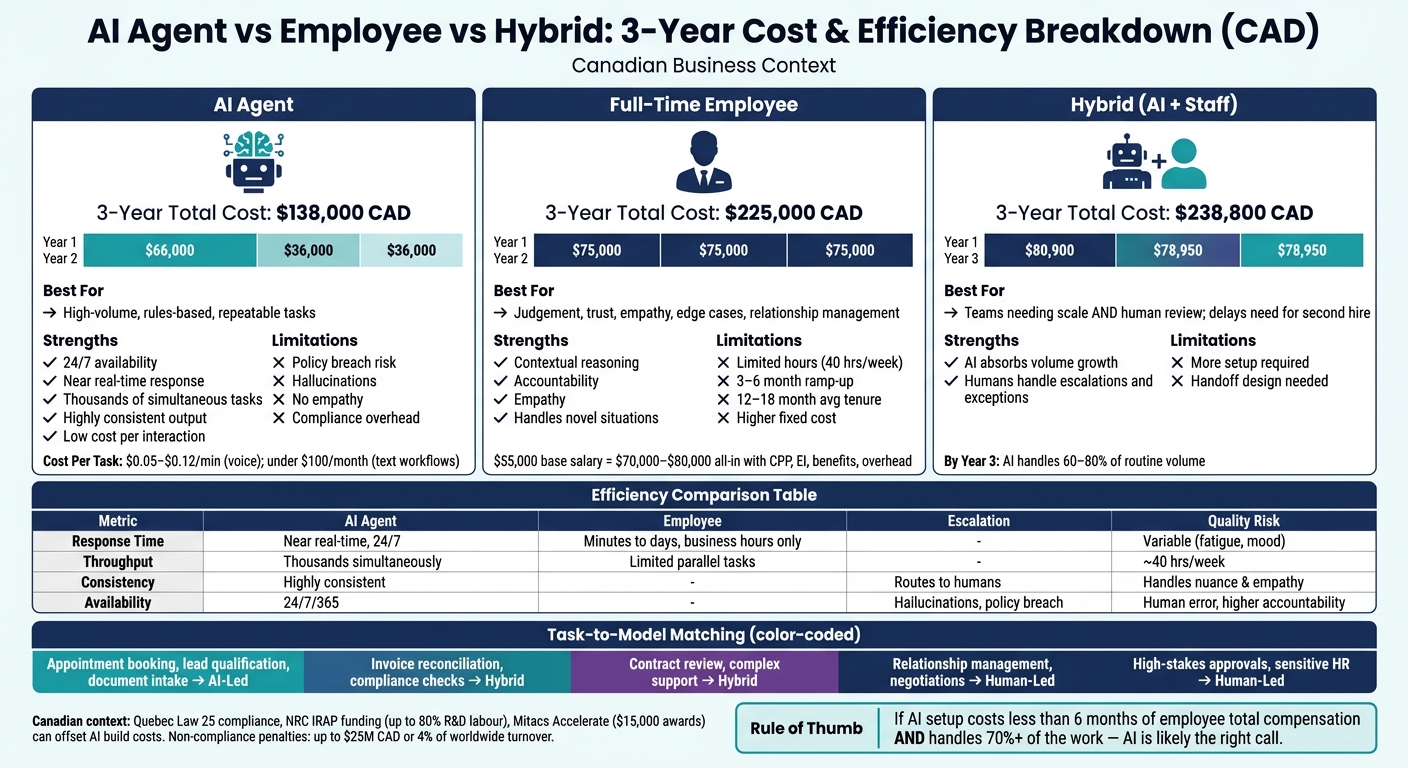
AI Agent vs Employee vs Hybrid: 3-Year Cost & Efficiency Comparison (CAD)
Cost Breakdown: AI Agents vs Employees in $CAD
AI Agent Costs: Build, Integration, Usage, and Maintenance
AI agent costs are usually front-loaded. Most of the money goes into the build and integration first, then ongoing usage and maintenance tend to be lower.
A basic chatbot or assistant usually costs $3,000–$15,000 CAD to build, with monthly operating costs of $100–$300 CAD. A workflow agent – the kind that connects to your CRM or scheduling system – costs $40,000–$100,000 CAD to build, with an ongoing retainer of $5,000–$15,000 CAD per month. That kind of upfront spend only works when task volume is high enough and the workflow is stable enough to make maintenance worth it.
Those retainers cover things like model updates and connector fixes when APIs change. For example, connecting to QuickBooks Online usually takes 3–5 days, while a customised SAP Business One integration can take 2–4 weeks.
Canadian organisations also need to budget for compliance work. In Quebec, a production agent that handles personal information needs a Privacy Impact Assessment (PIA) under Law 25. Data residency controls and transparency rules for automated decisions can add governance costs that often get missed in early quotes. Non-compliance can bring penalties of up to $25 million CAD or 4% of worldwide turnover.
Digital Fractal Technologies Inc. builds custom AI workflows, automation, and system integrations for organisations that need a purpose-built deployment. Canadian cost-sharing programmes can also soften the build cost. NRC IRAP may cover up to 80% of R&D labour, and Mitacs Accelerate offers $15,000 research awards for eligible organisations.
Employee Costs: Salary, Benefits, Overhead, and Turnover
Base salary is only one part of what an employee costs.
A $55,000 CAD administrative or support hire usually ends up costing $70,000–$80,000 CAD all-in once you add CPP, EI, benefits, vacation pay, equipment, software, and workspace overhead. That spend gives you flexibility and human judgement, but not the same speed or scale that software can deliver.
Then there’s the ramp-up period. New hires often need 3–6 months to reach full productivity. Average tenure in many administrative roles is only 12–18 months, which makes turnover a major cost – even though it often doesn’t show up in the original hiring budget.
Cost Per Task, Per Interaction, and Over Three Years
Low-volume work usually leans toward employees. High-volume, repeatable work tends to lean toward AI, with breakeven often landing in 30–60 days.
For voice interactions, AI agents usually cost $0.05–$0.12 CAD per minute in variable usage fees. For text-based tasks, model API costs for a typical workflow agent – like invoice triage – often stay under $100 CAD per month after caching and batching. And unlike one employee, that same system can handle many interactions at once.
The three-year numbers make the gap easier to see:
| Model | Year 1 | Year 2 | Year 3 | 3-Year Total |
|---|---|---|---|---|
| Workflow AI Agent | $66,000 | $36,000 | $36,000 | $138,000 |
| Full-Time Employee | $75,000 | $75,000 | $75,000 | $225,000 |
| Hybrid (1 AI + 1 Staff) | $80,900 | $78,950 | $78,950 | $238,800 |
Note: The hybrid model assumes the AI absorbs volume growth and delays a second hire.
The hybrid model costs a bit more than one employee on its own, but it can take on more volume and push back the need for a second hire.
Cost is the starting point; the next section looks at speed, scale, accuracy, and oversight.
sbb-itb-fd1fcab
Efficiency Breakdown: Speed, Scale, Accuracy, and Oversight
| Metric | AI Agent | Human Employee |
|---|---|---|
| Response Time | Near real-time, 24/7 | Minutes to days, during business hours |
| Throughput | Thousands of tasks simultaneously | Limited parallel throughput |
| Consistency | Highly consistent on identical inputs | Variable; affected by fatigue or mood |
| Availability | 24/7/365; no sick days or holidays | Standard 40 hours/week |
| Escalation Handling | Routes low-confidence cases to humans | Handles empathy, nuance, and edge cases |
| Quality Risk | Policy breaches and hallucinations | Human error, but higher accountability |
The biggest efficiency gap shows up in repetitive, measurable workflows, where AI improves workflow automation by handling high-volume tasks without fatigue.
Where AI Agents Outperform
AI agents pull ahead on volume, speed, and consistency. You see the gap most clearly in high-volume, low-judgment work, like invoice classification, appointment booking, lead qualification, lead enrichment, and data extraction.
This is where agents shine. They don’t get tired, they don’t slow down at 4:30 p.m., and they can handle a flood of similar tasks at the same time.
Danfoss is a strong example. In February 2026, the company rolled out AI agents to process email orders by pulling data from attachments and checking it against SAP. The result was a sharp drop in response time, from 42 hours to near real-time, with more than 80% of transactional decisions automated.
Where Employees Outperform
The picture changes when speed matters less than judgment, trust, and accountability.
Work that involves judgement, accountability, or trust still leans human. Negotiating a contract, helping a distressed client, or dealing with a new regulatory issue calls for contextual reasoning and genuine empathy that agents can only simulate.
Klarna shows this well. The company used AI agents to handle two-thirds of customer inquiries and cut response times by 82%. But the hard cases still needed people. Klarna later went back to hiring humans as part of a hybrid model.
Risk-Adjusted Efficiency in Regulated and Public-Facing Work
On paper, a workflow can look much faster with AI. In practice, that time savings can vanish if mistakes carry real costs.
In regulated Canadian work, the review load can eat up much of the gain. In healthcare administration, productivity drops to 1.2x once mandatory clinical review is added. That’s a good reminder that raw speed isn’t the whole story. To see how these factors impact your bottom line, you can use a workflow automation benefits calculator to estimate potential savings.
In Quebec, Law 25 requires organisations to give meaningful information about the principal factors and parameters behind automated decisions. That means teams need to build and maintain a strong audit trail of model calls and human approvals.
That’s why human-in-the-loop checkpoints matter so much for high-stakes actions, such as posting invoices, sending external messages to customers, or changing prices. Those checkpoints shape the operating model:
- Some workflows can run AI-first
- Some need human sign-off
- Some work best as hybrids
Best-Fit Operating Models for Canadian Organisations
The best model depends on the kind of task, the level of risk, and the amount of work involved. So the first question isn’t should we automate? It’s which tasks can be handed off safely.
For most Canadian organisations, the practical path isn’t full replacement. It’s a phased split of work: AI for repeatable tasks, people for judgement, and a hybrid setup for workflows that sit somewhere in the middle.
Tasks Best Suited to AI Agents
AI agents work best on high-volume, repetitive, rule-based tasks where the rules are clear and mistakes can be reversed without much fallout. Think document intake and extraction, appointment scheduling, lead qualification, and repeat compliance checks.
These workflows are often expensive to run by hand. Manual document review costs $8–$25 per document, while AI can bring that down to $0.50–$2.00 per document at scale.
Tasks Best Suited to Employees
Employees should stay in charge of relationship management, negotiations, crisis response, and sensitive client work.
This is where human judgement matters most. So do empathy, context, and clear accountability. If the situation is messy, emotional, or hard to unwind, people need to lead it.
Hybrid Teams: The Most Practical Three-Year Model
For the next three years, a hybrid model is the most practical setup for many Canadian organisations.
In Year 1, teams usually test one high-volume workflow, such as invoice triage, document extraction, or appointment scheduling. A pilot like this usually costs $15,000–$30,000 CAD and can be launched in about four weeks.
In Year 2, the work expands into more workflows, and staff move into supervision and exception handling. By Year 3, AI can handle 60% to 80% of routine volume, while employees focus on strategy, escalations, and continuous improvement.
The table below turns that idea into a working model. It helps match each workflow to the lowest-cost setup that still meets risk and quality needs.
| Work Type | Recommended Model | Rationale |
|---|---|---|
| Appointment booking, lead qualification, document intake | AI-Led | High volume, low risk, fully reversible |
| Invoice reconciliation, report drafting, compliance checks | Hybrid | AI handles the first pass; humans review low-confidence outputs |
| Contract review, complex customer support | Hybrid | AI drafts or extracts; humans verify and sign off |
| Relationship management, procurement negotiations | Human-Led | Trust and accountability are the primary requirements |
| High-stakes approvals, sensitive HR issues | Human-Led | Empathy, judgement, and regulatory accountability are required |
Human review should still be required for actions with serious impact, such as posting invoices, sending client messages, or changing prices. In Quebec, Law 25 requires clear disclosure of how automated decisions are made and human review for consequential automated decisions.
For Canadian organisations that are ready to move from pilot to production, Digital Fractal Technologies Inc builds custom AI workflows, management tools, and integrations with compliance built in.
Conclusion: Choosing Between AI Agents, Employees, or a Hybrid Model
Here’s the bottom line: AI agents are best for repeatable work. Employees are best for judgement. And in many cases, a hybrid team gives you the best three-year ROI. You get the low marginal cost and 24/7 scale of AI, while still keeping human judgement and relationship-building where they matter most.
That’s why this decision should happen workflow by workflow, not job by job.
The best choice usually comes down to six things:
- how repeatable the task is
- the level of risk
- the accuracy required
- the compliance load
- how hard the system is to integrate
- the amount of work you expect
A practical rule of thumb is simple: if an AI setup costs less than six months of a comparable employee’s total compensation and can handle 70% or more of the work, it’s often the right call. But if a mistake could lead to legal, financial, or reputational harm, a human should stay involved.
Klarna is a good example of that trade-off. AI took care of routine volume, but people came back in for more complex cases.
For Canadian organisations moving from pilot to production, the next step is usually one focused workflow. That keeps scope tight and makes results easier to measure. Programmes like NRC IRAP and Mitacs can cover a large share of build costs. And if the workflow touches personal data, compliance with Quebec’s Law 25 isn’t optional.
For organisations ready to move from pilot to production, Digital Fractal Technologies Inc builds custom AI workflows and integrations with compliance requirements built in from the start.
FAQs
When does AI become cheaper than hiring?
AI tends to make the most financial sense when you use it for repetitive, well-defined, high-volume tasks like admin work, lead qualification, or customer support.
Here’s the simple rule of thumb: the switch is usually a good one when the AI setup costs less than six months of a comparable Canadian salary and can handle at least 70% of the workload.
Where does it usually fall apart? Low-volume tasks are a common one. Work that depends on complex judgment or relationship-building is another. In those cases, AI often looks cheaper on paper than it is in practice.
Which workflows should stay human-led?
Workflows should stay human-led when they involve high-stakes judgment. If a mistake could lead to legal trouble, money lost, or safety issues, a person should stay in charge.
The same goes for work that depends on empathy, trust, or strong relationships. People should also lead when the problem is new, unclear, or hard to interpret.
And when rules assign accountability to a specific named person, human oversight isn’t optional. That includes roles like lawyers, financial advisors, and clinicians.
How do Canadian privacy rules affect AI costs?
In Canada, privacy rules such as Bill C-27 can push AI project costs up. Why? Because teams often need extra work around risk checks, transparency, and data governance.
That usually means budgeting for things like data anonymization, audit trails, encryption, and model explainability. It’s not just the model itself that costs money. The compliance layer can add a fair bit too.
Formal privacy impact assessments and legal reviews can add $5,000 to $50,000 CAD, and overall development costs may increase by 10% to 25%.