
Ultimate Guide to AI Automation in Calgary

Most Calgary firms using AI still aren’t getting clear ROI. From what I see in this guide, the fix is simple: start with one process, pick the right tool, clean the data, and set rules before launch.
If you want the short version, here it is:
- I’d start with a high-volume task like invoices, email triage, onboarding, or lead handling
- I’d match the tool to the job: workflow automation, RPA, ML/LLMs, or AI agents
- I’d check for Alberta issues early, especially PIPA, HIA, data residency, and weak internet at remote sites
- I’d run a 4–8 week pilot and track time saved, error rates, and monthly labour cost using a savings estimator
- I’d look harder at automation if the manual work costs more than $4,000 CAD/month
A few numbers stand out:
- 93% of Canadian businesses use some form of AI, but only 2% report measurable ROI
- RPA users report productivity gains in 86% of cases
- AI can return 3+ hours per user per week
- Small pilots often fall in the $2,500 to $10,000 CAD range, while larger rollouts can hit $40,000 to $100,000+ CAD
Here’s the part that matters most: AI automation is not one tool. Some jobs need fixed-rule bots. Some need language tools that read emails and PDFs. Some need agents that can check records, make decisions, and complete steps across systems.
| Option | Best fit | Good starting point |
|---|---|---|
| Workflow automation | Moving data between apps | Repetitive admin handoffs |
| RPA | Fixed, repeatable steps | Data entry and file transfers |
| ML / LLMs | Prediction or language work | Forecasting, summaries, triage |
| AI agents | Multi-step work across systems | Quotes, bookings, service workflows |
For Calgary, local details shape the build. Energy, construction, public sector, and health-related work often need more control over data, review steps, and deployment. Remote sites may also need edge or offline setups when internet service is weak.
So if I had to sum up the whole article in one line, it would be this: pick one process, prove the numbers fast, and build around Alberta’s rules from day one.
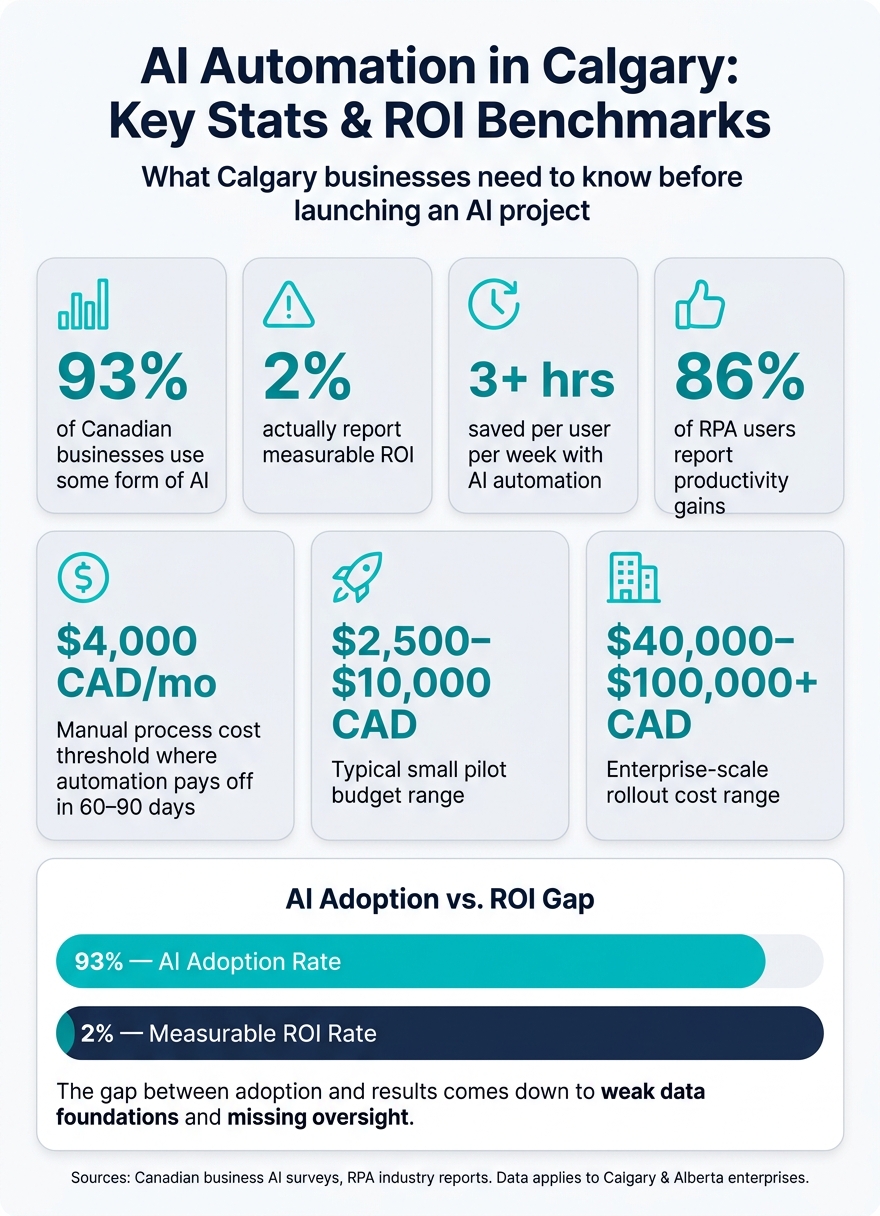
AI Automation in Calgary: Key Stats & ROI Benchmarks
The AI Automation Landscape in Calgary
Where Calgary Organisations Are Applying AI Today
Calgary organisations are putting AI to work on repetitive, rules-based tasks across the business, and the payoff is showing up in time and cost savings. You can estimate your own potential ROI using a workflow automation benefits calculator.
| Business Area | Common Automation Use | Typical Benefit |
|---|---|---|
| Customer Service | AI chatbots and voice agents | 80% of routine queries handled; cost per interaction falls to $0.50–$0.70 |
| Finance | Invoice processing and automated reporting | 40–75% fewer processing errors |
| Operations | Inventory tracking and IoT sensors | 20–30% reduction in inventory levels |
| HR | Resume screening and employee onboarding | Faster hiring cycles, less administrative overhead |
| Professional Services | Meeting transcription and report drafting | Up to 12 hours saved per employee per week |
One of the biggest changes is how these systems work. Older chatbot tools, automation, and AI agents have key distinctions. Fixed tools answer set questions and stop there.
AI agents go further. They can check records, take action, and carry a task through several steps inside the systems a company already uses. For Calgary businesses dealing with heavy call volumes or messy intake workflows, that difference can be a big deal.
Local Factors That Affect Project Design
In Calgary, project design needs to account for compliance, connectivity, and deployment limits from day one.
Data residency is a serious issue for Alberta organisations. Keeping data in Canada can help reduce exposure to the US CLOUD Act, especially when a project handles personal information or health records. Alberta’s PIPA governs private-sector use of personal data, while the HIA applies to work involving patient or health records.
Connectivity can also shape the build. In remote energy and agricultural sites, weak or patchy internet means some AI tools need edge processing or an offline mode at the start. Calgary’s lower-cost talent market also helps keep pilot and delivery costs down.
These use cases connect straight to the core technologies behind them. And those local limits play a big part in which tools make sense for each workflow.
sbb-itb-fd1fcab
Core Technologies and High-Value Use Cases
RPA, Machine Learning, NLP, and Computer Vision Explained
Four technologies cover most AI automation use cases for Calgary businesses, and each one handles a different type of work.
Robotic Process Automation (RPA) is built for rule-based, repetitive tasks like data entry, form filling, and file transfers. If the steps stay the same every time, RPA is usually a strong fit. It follows fixed rules, which makes it reliable. 86% of businesses using RPA report productivity gains, and 59% see direct cost reductions.
Machine Learning (ML) fits jobs where you need to spot patterns in large datasets or make predictions. Think predictive maintenance for oilfield equipment, demand forecasting for supply chains, and anomaly detection.
Natural Language Processing (NLP) deals with human language. That includes reading invoices, triaging emails, summarizing meetings, or powering a chatbot. Computer Vision does something similar with images and video. It can support industrial inspections, monitor job site safety, or analyze core samples in the energy sector.
In practice, local operating conditions shape the right choice. A clean back-office workflow calls for one tool. A remote field job with spotty internet calls for another.
Use Cases by Function and Industry
The simplest way to choose is to match the task to the tool. Here’s where these technologies tend to fit best for Calgary teams.
| Business Function | Technology | Practical Example |
|---|---|---|
| Finance | RPA + NLP | Extracting vendor data from PDF invoices and routing for approval |
| Operations / Field Services | ML + IoT | Predictive maintenance for oilfield or industrial equipment |
| Customer Support | NLP / AI Chatbots | 24/7 lead capture, appointment booking, and FAQ handling for trades |
| HR / Internal Service Desk | RPA + NLP | Automated onboarding and account provisioning |
| Knowledge Management | NLP / LLMs | Extracting action items from Teams or Zoom meeting transcripts |
| Energy / Construction | Computer Vision | Safety monitoring on remote industrial job sites |
For remote energy and construction sites, edge computing matters because connectivity is patchy. In those settings, AI models need to run locally on-device instead of depending on a cloud connection.
How to Compare Automation Options for the Same Process
Not every automation tool does the same job, even when the process looks similar on the surface.
If a task has 15 fixed answers, a limited-scope chatbot is often enough. If it needs to look up records, generate a quote, and book follow-up, you’re no longer dealing with a simple chat flow. That’s where an AI agent makes more sense.
| Automation Type | Best For | When to Use |
|---|---|---|
| RPA | Back-office data tasks with fixed rules | No reasoning required; steps never change |
| ML / LLMs | Forecasting, email triage, document summarization | Requires pattern recognition or language understanding |
| AI Agents | Multi-step workflows across multiple systems | Needs to act – not just answer – across different software |
There’s also a cost gap between these options. A limited-scope chatbot pilot usually lands at roughly five figures (CAD), while a full AI agent with complex system integrations comes with a higher price tag.
A practical way to start is with one high-volume task, such as invoice processing, then track results over 30–60 days before rolling it out more broadly.
How to Implement AI Automation in a Calgary Enterprise
Readiness, Prioritization, and Building a Business Case
Once you know which kind of automation fits, the next job is making sure the process is actually ready.
Start with the basics: process maturity, data quality, and clear internal ownership. If those pieces are shaky, don’t rush into buying tools. Fix the weak spots first.
A smart place to begin is one high-volume process with clear rules and labour savings you can measure. Then build a simple business case around the time your team gets back. AI automation typically recovers 3+ hours per user per week. For a 25-person team, that’s close to the work capacity of two full-time employees.
Training support can help the numbers work. The Canada-Alberta Job Grant can reimburse up to 50% of AI training costs, capped at $5,000 CAD per employee per fiscal year, with a $100,000 CAD annual employer cap. In many cases, a 4–8 week pilot gives you enough proof to take back to leadership and secure approval for a broader rollout.
Data, Integrations, Security, and Governance
Bad data sinks AI projects fast. If the model is fed incomplete or messy records, the output will reflect that. Before deployment, audit the source systems that matter most, such as your ERP, CRM, and field operations tools, and clean the records the system will actually use.
Integration work also needs attention early. AI tools often depend on strong API connections and microservices to work with existing systems like ERPs and CRMs. In plain terms, integrations often drive the timeline, so scope them up front.
Privacy and security need close review in Alberta. Any system that handles personal information must comply with Alberta’s Personal Information Protection Act (PIPA). For health-related AI, complete a Privacy Impact Assessment (PIA), and apply that same level of scrutiny to any system dealing with sensitive personal data. If data will sit in the cloud, it’s often wiser to use Canadian-owned cloud services or Canadian data centres to limit exposure to the US CLOUD Act.
Before rollout, review data permissions and add human checks for any output that affects customers or employees. That matters even more when 66% of organisations predicting major AI impact in 2025 but only 37% having security evaluation processes in place. Many teams are moving into AI faster than they’re building guardrails around it. Canada’s proposed Artificial Intelligence and Data Act (Bill C-27/AIDA) will bring tighter expectations around responsible AI use and data transparency, so it makes sense to build accountability into the model from the start.
Delivery Model and Partner Responsibilities
After the technical and compliance work is mapped out, assign who owns what.
One useful way to look at rollout planning is to compare a small pilot with an enterprise-scale deployment.
| Small Pilot | Enterprise-Scale Rollout | |
|---|---|---|
| Scope | Single high-volume workflow | Cross-departmental orchestration and custom APIs |
| Risk | Low; focused on internal productivity | Higher; involves customer-facing data and PIPA compliance |
| Goal | Prove ROI and build team confidence | Transform core business operations at scale |
| Budget | $2,500–$10,000 CAD (audit + pilot) | $40,000–$100,000+ CAD (full deployment) |
Internal ownership matters just as much as the software. In many Calgary firms, a department head in Finance, Operations, or HR leads the work because they’re closest to the bottlenecks. That person usually becomes the internal champion, while the external partner handles the technical build and delivery.
| Role | Internal Team | External Partner |
|---|---|---|
| Discovery | Identify pain points and process bottlenecks | Map user journeys and define technical architecture |
| Data | Provide source system access and domain expertise | Clean, structure, and integrate data via APIs |
| Development | User Acceptance Testing (UAT) | Custom solution design, mobile and web app development |
| Governance | Set internal policies and human oversight | Ensure PIPA/HIA compliance and data security |
| Maintenance | Ongoing feedback and internal training | Bug fixes, model monitoring, and updates |
Digital Fractal Technologies Inc supports Calgary enterprises with discovery, workflow automation, integrations, custom app development, and ongoing maintenance across the public sector, energy, and construction.
Choosing the Right Path Forward and Key Takeaways
When Custom AI Automation Makes the Most Sense
After you’ve picked your tools and set up governance, one last call remains: do you need a custom build?
A simple rule works well here: use the simplest tool that can do the job. Go custom when the workflow is too tied into your systems, too regulated, or too site-specific for a standard template.
Off-the-shelf tools are often a good fit for common workflows. But custom AI automation becomes the practical option when your operations depend on legacy systems, strict compliance rules, or processes that don’t map cleanly to prebuilt templates.
That usually includes cases like:
- Legacy system integrations where no pre-built connector exists
- Field operations with limited or spotty connectivity, such as remote oilfield sites
- Regulated workflows in healthcare or the public sector where Alberta’s Health Information Act (HIA) or PIPA create rules that generic tools may not handle well
- AER filing processes that require a human review step
- Custom CRM or business management tools that need to match your own data model
Custom builds also give you code ownership. That matters when automation moves from a nice-to-have into something your day-to-day operations depend on.
For Calgary organisations in energy, construction, and the public sector, local delivery can cut rework and help keep projects in step with Alberta rules and time zones.
Key Points to Remember
Once you know the fit, the next step is knowing what matters before you commit budget.
Most of the choices that shape whether an AI automation project works out are made before any code gets written. Process selection, data quality, and governance structure usually matter more than the tool itself.
If manual labour costs for the process you want to automate are more than $4,000 CAD per month, automation often pays for itself in 60 to 90 days. Funding can help too. The Canada-Alberta Job Grant and SR&ED tax credits may reduce upfront costs, with SR&ED covering 15% to 35% of qualified AI development spending.
Governance needs to be built in early as well. With 93% of Canadian businesses using some form of AI but only 2% seeing measurable ROI, the gap between adoption and results usually comes down to weak data foundations and missing oversight, not the tech itself.
Digital Fractal Technologies Inc helps Calgary organisations plan and deliver custom AI automation, from discovery through implementation.
FAQs
How do I choose the right AI automation tool?
Start with the business problem and the result you want. That gives you a clear target before you look at tools.
From there, pick a solution that fits your team’s technical skills and works well with your current systems. It should also be easy to connect, simple for people to use, and able to handle more work as your needs grow.
The best choice depends on the job:
- Use workflow tools for linear tasks
- Use RPA for high-volume data entry
- Use intelligent process automation for more complex work
If you need tailored guidance, Digital Fractal Technologies Inc can help you sort through the options and choose a setup that makes sense for your business. It also helps to start with a small pilot first, then scale once you know what works.
What should I automate first in my business?
Start with one high-volume, repetitive task instead of trying to change the whole business in one shot. Put your attention on the work that drains the most time, like invoice processing, appointment scheduling, or document summarization.
When you begin with one clear, measurable workflow, you give yourself a better shot at quick wins. You also help your team build confidence, while putting the right data governance and processes in place before you scale.
What Alberta compliance issues should I check first?
Start with Alberta’s PIPA. It sets strict rules for how you handle, de-identify, and protect customer and employee data.
You’re also legally responsible for AI-generated content such as advertising, contracts, and invoices under the Consumer Protection Act. That means if your system produces it, your business still owns the outcome.
It also makes sense to prepare for federal rules such as AIDA and Bill C-11. Digital Fractal Technologies Inc. can help build these privacy and security requirements into automated workflows.