
Pod-to-Pod Communication in Kubernetes

Most Pod-to-Pod traffic should go through a Service DNS name, not a Pod IP.
I’d boil the whole topic down to this: Pods can talk to each other directly because Kubernetes gives each Pod its own IP on one shared cluster network. But Pod IPs change when Pods restart, scale, or move, so I’d use Services, DNS, and the full service name across namespaces for app traffic.
Here’s the short version you can act on right away:
- Every Pod gets its own IP
- Pods can connect across nodes without NAT or host port mapping
- Pod IPs are temporary
- Service DNS names stay the same even when Pods change
- Short DNS names work best in the same namespace
- Cross-namespace calls should use the full name
- If traffic fails, I’d check Pod health, Service endpoints, DNS, then NetworkPolicy
- Stateless apps usually belong behind a ClusterIP Service
- Stateful apps may need a headless Service with a StatefulSet
A few hard facts shape the setup:
- A Pod network often uses a CIDR such as
10.244.0.0/16 - A standard Service gives one stable virtual IP for a group of Pods
- A headless Service with
clusterIP: Nonereturns Pod-level DNS records instead
If I were reviewing a cluster before launch, I’d ask three simple questions:
- Am I sending app traffic to a Service instead of a Pod IP?
- Am I using the full DNS name when traffic crosses namespaces?
- Do my NetworkPolicy rules allow the traffic I expect?
This is the core of steady in-cluster communication for container-based web apps, and it helps cut down failed requests during rollouts, restarts, and scaling events.
4 The Flat Network: K8s Pod Communication Made Simple
Flat Network Model and Pod IP Assignment
Kubernetes gives every Pod its own routable IP address. That means Pods can talk to each other across the cluster without host-port mapping, NAT, or port forwarding. Put simply, Kubernetes uses a flat Pod network model: one shared internal network across all nodes.
Those Pod IPs come from a Pod CIDR such as 10.244.0.0/16, which the CNI layer provides. Each node gets part of that range, and when a Pod starts, the CNI gives it an open IP from that slice. One practical rule matters here: keep Pod CIDRs separate from VPC, on-premises, and corporate ranges so you don’t run into routing conflicts.
How Traffic Moves Between Pods on the Same Node and Across Nodes
When two Pods run on the same node, each Pod connects to that node through veth interfaces and CNI-managed routing. The traffic stays on the node and gets forwarded locally.
When Pods sit on different nodes, the CNI routes traffic through the cluster network, whether that setup uses overlay networking or routed traffic. From the application’s point of view, nothing changes. It still looks like one flat network.
That routing model is exactly why Pod IPs are fine for direct connectivity, but a poor choice for long-term app endpoints.
Why Pod IPs Are Not Stable Application Endpoints
The same flat network that makes Pod-to-Pod traffic simple also makes Pod IPs temporary. Rolling updates, autoscaling, node failures, rescheduling, and crash loops can all replace a Pod and give the new Pod a different IP. So if you hard-code a Pod IP anywhere, that setup will fail the moment the Pod is terminated and recreated.
The stable options are Service IPs and DNS names. A Kubernetes Service keeps a steady virtual IP, called a ClusterIP, plus a DNS record that stays in place even when Pods come and go.
| Endpoint Type | Stability | Purpose | Typical Use |
|---|---|---|---|
| Pod IP | Low – changes when the Pod is recreated or rescheduled | Ephemeral IP for a running Pod | Debugging, diagnostics, low-level checks |
| Service IP (ClusterIP) | High – persists while the Service exists | Stable virtual IP for matching Pods | Standard in-cluster communication between services |
| DNS name (Service) | High and human-readable | Human-readable name that resolves to the Service IP | Preferred reference in app config, environment variables, and code |
For most web apps, the Service path is the one that survives Pod churn. That’s why Services and DNS are the default choice for app-to-app traffic.
Use Pod IPs for temporary diagnostics only. For application traffic, use a Service DNS name.
For stable application traffic, the next section covers DNS names and Services.
DNS, Services, and Namespace Scope
Kubernetes uses CoreDNS to publish Service records, and in some cases, Pod records too. The network lets Pods reach each other. DNS gives that network a name people and apps can count on.
So instead of calling an IP address that may change, an app calls a Service by name. DNS then resolves that name to the Service’s stable cluster IP. From there, namespace scope decides how that name is resolved inside the cluster.
Two Service types matter most here. A standard ClusterIP Service gets one virtual IP and a DNS record such as orders-api.default.svc.cluster.local. Traffic is then load-balanced across all matching Pods.
A headless Service with clusterIP: None works differently. It skips the virtual IP and publishes DNS records for each Pod instead. Pair that with a StatefulSet, and each Pod gets a predictable record like db-0.mysql.default.svc.cluster.local. That setup is handy when a workload needs each Pod to keep a stable identity.
| Service Type | DNS Resolves To | Best For |
|---|---|---|
| ClusterIP (standard) | Single stable virtual IP | Stateless APIs, web services, internal HTTP/gRPC calls |
Headless (clusterIP: None) |
Individual Pod IPs or per-Pod records | Databases, StatefulSets, identity-aware patterns |
When to Use a Service DNS Name Instead of a Pod IP
For stateless web apps and internal APIs, send traffic through a Service DNS name. That’s usually the safe bet.
Here’s why: when replicas scale up, the Service’s label selector picks up the new Pods on its own. No client-side changes. If a Pod crashes or gets evicted, the Service stops sending traffic there and shifts requests to healthy replicas. If you call Pod IPs straight away, you’re signing up for extra work each time Pods are rescheduled or scaled.
Put simply, Service DNS names give you a stable, human-readable target that keeps working through Pod churn, rolling updates, and autoscaling.
How Namespaces Affect DNS Lookups and Communication
DNS resolution in Kubernetes is namespace-scoped. Short names work inside the same namespace. For cross-namespace calls, use the full DNS name, such as payments-api.finance.svc.cluster.local. That helps avoid mix-ups when more than one namespace has a Service with a similar name.
Pods in different namespaces can talk to each other by default as long as DNS resolves and NetworkPolicy allows the traffic. If your team runs a default-deny setup, cross-namespace traffic has to be allowed on purpose with namespace and label selectors in your NetworkPolicy rules.
One small gotcha: DNS can still resolve even when NetworkPolicy blocks the traffic. So if nslookup works, that does not mean the app can connect.
If a name resolves but traffic still fails, the next section shows the verification order.
sbb-itb-fd1fcab
Troubleshooting Pod-to-Pod Connectivity
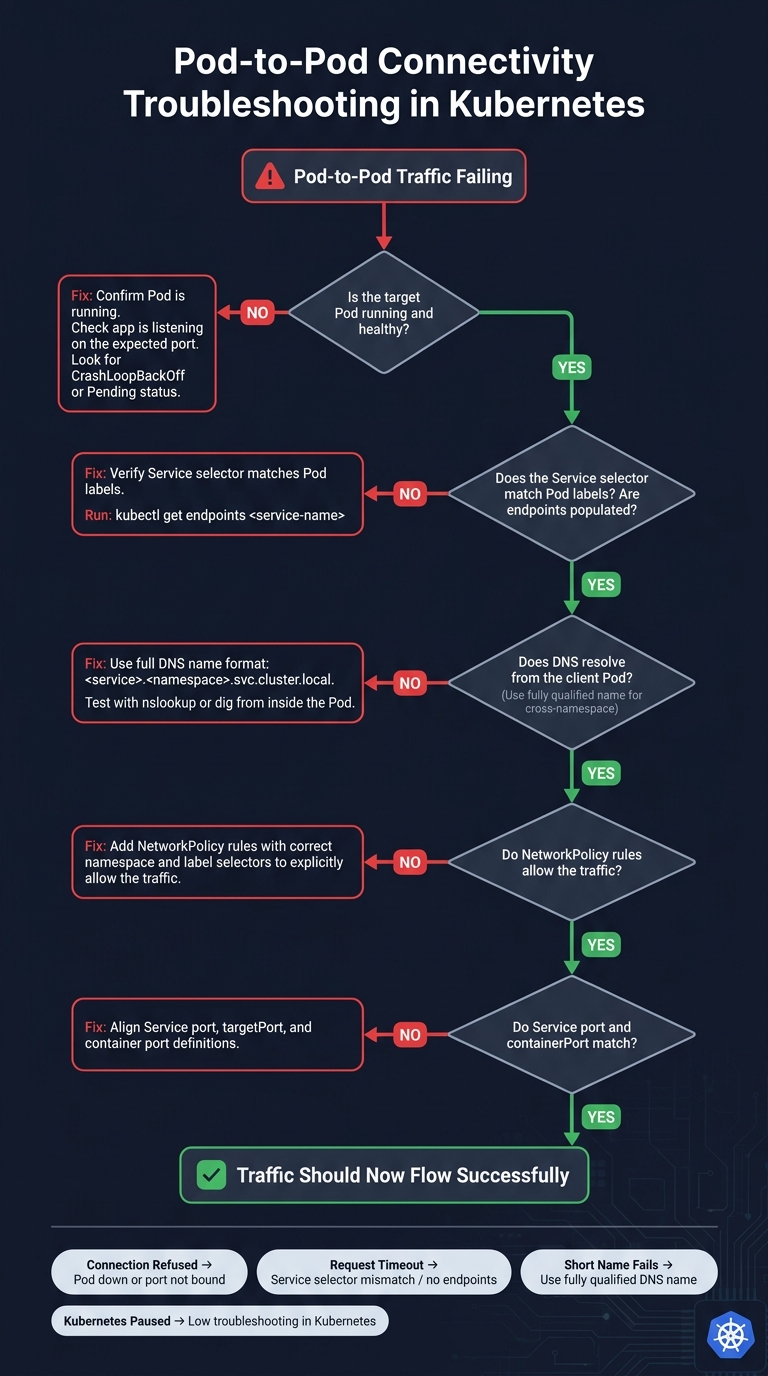
Pod-to-Pod Connectivity Troubleshooting in Kubernetes
If DNS resolves but traffic still fails, check the Pod, Service endpoints, and DNS in that order.
Step-by-Step Verification Order
Start with the target Pod. A connection refused error usually means the Pod is down, or the app isn’t listening on the expected port.
If the Pod looks healthy, check the Service next. Make sure the Service selector matches the Pod labels and that the Service has endpoints.
Then test DNS from the client Pod. For cross-namespace traffic, use the fully qualified service name.
Common Symptoms, Likely Causes, and First Checks
| Symptom | Likely Cause | First Check |
|---|---|---|
| Connection refused | Target Pod not running or port not bound | Confirm the target Pod is healthy and the app is listening on the expected port |
| Requests time out | Service selector does not match Pod labels; no endpoints | Check the Service selector and endpoints |
| Short name fails across namespaces | Use the fully qualified service name | Confirm the full DNS name resolves from the client Pod |
If Pod health, endpoints, and DNS all check out, look at NetworkPolicy and port mapping next.
Design Checks for Container-Based Web Apps
After connectivity checks, make sure the app’s communication setup matches how each workload is meant to run.
Communication Patterns to Confirm Before Launch
Start by sorting workloads into stateless and stateful. That one call shapes the rest of the setup. It tells you whether Pods can be treated as interchangeable, or whether each Pod needs its own steady identity.
Stateless workloads – API servers, front-end renderers, and background job processors – usually fit well behind a ClusterIP Service with DNS. That’s the common path, and for good reason: it keeps service discovery simple and avoids hard-coding Pod-level details.
Use a StatefulSet with a headless Service only when each replica needs a stable identity. If replicas don’t need that kind of fixed naming or direct addressing, there’s no reason to add the extra moving parts.
One more rule is worth spelling out: route service-to-service traffic through Services, not Pod IPs. Pod IPs can change. Services give you a steady path.
Review Points for Enterprise Teams
For production teams, the technical review should also cover governance.
Document namespace boundaries and apply least-privilege NetworkPolicy rules to service-to-service traffic before launch. Doing this early helps you avoid a messy situation later, where traffic between Pods gets blocked because access control was added after deployment.
Also plan for Pod replacement during rollouts. Pods won’t live forever, and your app needs to keep working when they’re cycled out.
Conclusion: Key Rules for Reliable Pod-to-Pod Communication
Pod IPs don’t stick around. If a Pod restarts or moves to another node, it will usually get a new IP.
That’s why Pod IPs aren’t a safe target for app-to-app traffic.
Use Services and DNS names instead. A Kubernetes Service gives you a stable virtual IP and a DNS name that stays in place, so your apps have a steady endpoint to talk to.
If traffic crosses namespaces, use the fully qualified Service name.
For day-to-day application traffic, lean on Services and DNS. Save Pod IPs for short-term checks and one-off testing.
FAQs
When is a Pod IP okay to use?
In Kubernetes, using a Pod IP directly is usually a bad bet for service-to-service communication.
Why? Pods are short-lived. If a Pod gets restarted, recreated, or scaled, its IP can change. That means anything pointing at that IP can break without warning.
Direct Pod IPs are fine in a couple of narrow cases:
- Temporary debugging or troubleshooting
- Special setups with custom external logic that tracks Pod lifecycle changes
For normal app design, stick with a stable layer like a Kubernetes Service or a service mesh.
How do I call a Service in another namespace?
Use the Service’s fully qualified domain name (FQDN): service-name.namespace.svc.cluster.local.
For example, if you need to reach a Service named backend in the production namespace, send requests to http://backend.production.svc.cluster.local.
Kubernetes internal DNS handles the lookup automatically and routes the request to the right Service IP.
Why choose a headless Service?
Choose a headless Service when you need to talk to specific Pods directly instead of sending traffic through a load-balanced Service.
Setting the cluster IP to None turns off the virtual IP. In that setup, Kubernetes returns the individual Pod IPs through DNS.
This works well when an app manages its own service discovery or custom load balancing. It also helps when the app needs to connect to specific members of a stateful cluster.