
Ethical Considerations in Image Recognition

If image recognition can identify people, score them, or affect access, jobs, safety, or services, I need strict rules before launch – not after.
Here’s the short version: I should set a narrow purpose, get proper consent, limit data use, test error rates by subgroup, keep humans in the loop for high-stakes cases, and make sure logs, deletion, and rollback are built into the system. The article also makes one point very clear: a strong accuracy score alone does not mean the system is safe to use.
A few facts stand out:
- NIST found false-positive gaps of 10 to 100 times between some groups in face matching tests.
- The same testing found false-positive rates 2 to 5 times higher for women than men.
- A CSIS review found median false-negative rates from 13% to 64% based only on camera placement.
So if I’m planning to use image recognition in Canada, I should check these basics first:
- Purpose: What exact job is the system doing?
- Consent: Did people agree to this specific use?
- Data limits: Am I collecting only what I need?
- Bias checks: Do error rates change by subgroup or setting?
- Human review: Can a person override the system?
- Logs and rollback: Can I trace decisions and shut the system down fast?
- Legal review: Do PIPEDA, the Privacy Act, or Québec biometric rules apply?
Bottom line: image recognition needs privacy, bias, security, and governance controls from day one – especially in Canada, where biometric use can trigger tighter consent and notice rules.
Bias, Fairness & Responsible AI Explained | AI Ethics in Data Science
sbb-itb-fd1fcab
Define Purpose, Consent, and Acceptable Data Use
Most image recognition projects go off track for one simple reason: the purpose is fuzzy. When that happens, teams tend to gather too much data, keep it longer than needed, and use it again later without clear approval. In custom applications, purpose limits, retention rules, and access controls need to be part of the system from day one.
Set a Specific Purpose Before Collecting or Analysing Images
Before choosing a tool or collecting a single image, write one clear purpose statement. It should spell out the objective, the images and outputs needed, the users, the legal basis or consent, and the retention period. Under PIPEDA, purposes should be identified at or before collection, and collection should be limited to what is needed for those purposes.
Storage, classification, template creation, verification, and identification should each be approved on their own. That applies whether the system is for internal use or a public-facing service. Identification brings more privacy risk and a higher false-match risk than verification. If verification does the job, use that instead. And where possible, use local or on-device processing rather than sending everything to a central database.
A simple check helps here: can you meet the goal without identifying people at all? In some cases, a badge, QR code, or training-database lookup may do the job. In others, anonymous occupancy counting may work better than keeping identifiable images. If any of those options can meet the need, that less intrusive route should be documented and weighed seriously before moving ahead. These limits should live inside the software workflow itself, not just in a policy document nobody reads.
Meet Canadian Consent and Transparency Requirements
Consent for a photo is not the same as consent for biometric processing, identification, model training, or sharing. The OPC’s biometric guidance is clear: organisations will almost always need express, informed, and specific consent for collecting, using, or disclosing biometric information, subject to limited legal exceptions.
A sign that says "Facial recognition in use" doesn’t come close to enough. People should be told what is being collected, why it is being collected, who can access it, how long it will be kept, the main risks, and how they can withdraw consent. That consent should come before collection and should not be buried inside vague terms of service.
Québec organisations face extra rules. Express consent is generally required, and the Commission d’accès à l’information must usually be notified at least 60 days before a biometric identification system is deployed or a biometric database is created. For federal institutions, the Privacy Act generally bars the use or disclosure of personal information without consent unless a statutory exception applies.
Control Secondary Use, Retention, and Deletion
Function creep is one of the most common ethical failures in image recognition. Data gathered for access control often ends up being reused for new jobs. Under PIPEDA, personal information generally cannot be used or disclosed for a purpose other than the one identified at collection without consent or legal authority. Every new use – analytics, model training, security investigations, or disclosure to a vendor – needs its own documented privacy and legal review before it goes live.
Retention should be set by data type, not by habit.
- Discard live frames right away
- Delete access templates when they are no longer needed
- Keep incident footage only for the investigation and any legal hold
Deletion has to reach production systems, backups, vendor environments, caches, and training copies. Deleting only the image is not enough. If full deletion can’t happen right away, document the limit, block any further use, apply expiry controls, and delete the source data and accessible derivatives as soon as technically possible.
Once purpose, consent, and retention are fixed, the next control is testing privacy and bias across the full lifecycle.
Reduce Privacy and Bias Risks Across the System Lifecycle
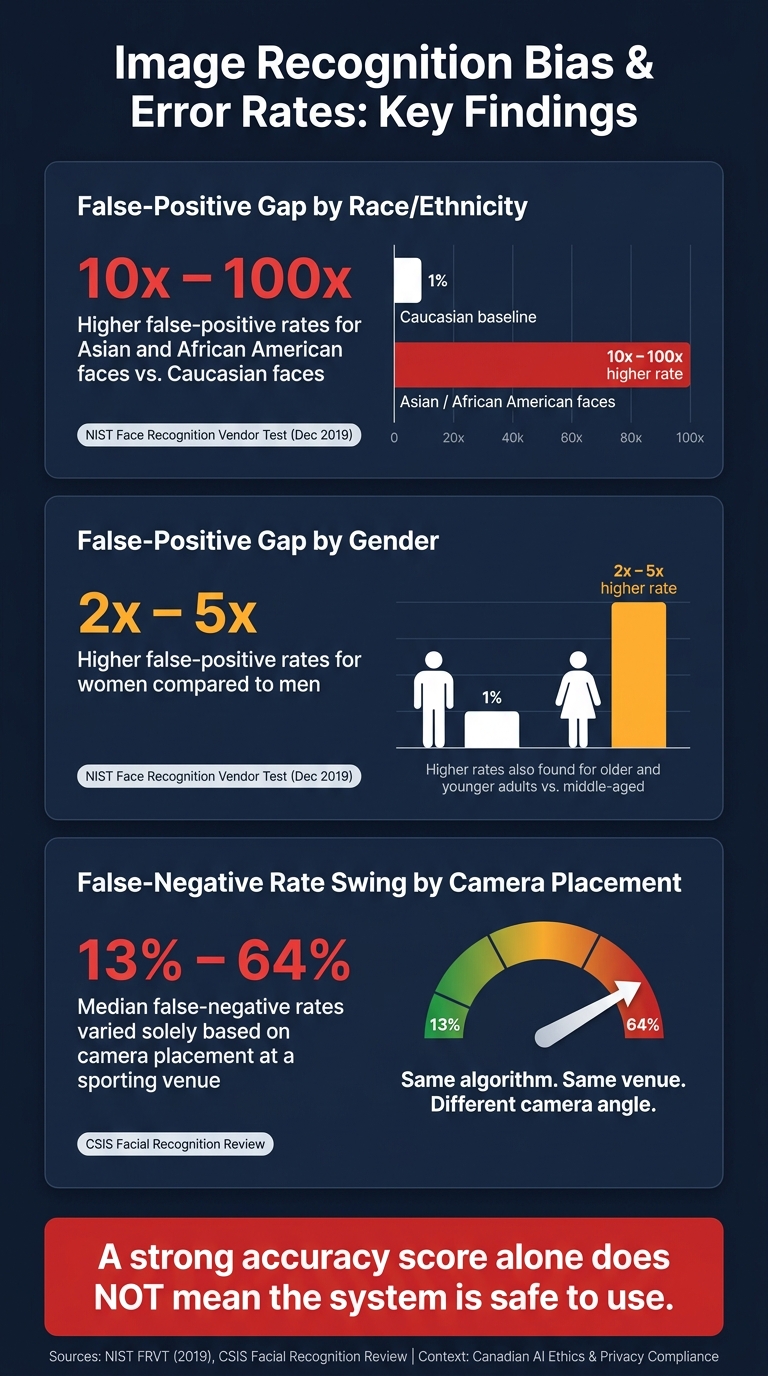
Image Recognition Bias & Error Rates: Key NIST & CSIS Findings
Privacy and fairness can break in different ways, and sometimes at the same time. Strong encryption won’t stop biased outputs. Balanced training data won’t stop misuse or data kept far too long. You need to manage both from start to finish across the system lifecycle. And those controls only hold up when the data reflects actual use cases and the model is checked under live-like conditions.
Protect Image Data at Every Stage: Collection, Storage, and Sharing
Risk shows up at every step. Start with a simple rule: collect only the image data and metadata needed for the approved purpose, and nothing else.
Access should be limited by role. Each person should see only the minimum data needed for their task. If identification isn’t needed, keep direct identifiers – names, employee numbers, client IDs – separate from image files, and link them only through a controlled mapping key. Derived templates and embeddings still count as personal or biometric information, so they need the same level of protection as the original image.
The table below links each lifecycle stage to its main risk and the control that should be in place.
| Lifecycle Stage | Main Risk | Required Control |
|---|---|---|
| Collection | Excessive capture, uninformed collection, or unnecessary metadata | Define the purpose, collect only what is necessary, provide clear notice, and record consent or legal authority |
| Preparation and labelling | Copies, exposed identifiers, inaccurate labels, or unauthorised reuse | Restrict workspace access, pseudonymise records, document provenance, and validate labels |
| Model development | Training data reused beyond its approved purpose | Enforce dataset-use restrictions, maintain a data inventory, and approve secondary use before experimentation |
| Storage | Theft, unauthorised access, or cross-system linking | Encrypt data in transit and at rest, use role-based access, manage keys securely, and log access |
| Sharing and deployment | Vendor leakage, excessive disclosure, or uncontrolled outputs | Share the minimum necessary data, assess suppliers, use contractual controls, and limit APIs and exports |
| Monitoring | Undetected drift, subgroup harm, or unauthorised use | Review error rates and access logs, monitor operating conditions, and investigate complaints |
| Retention and deletion | Images or derived biometric data remaining indefinitely | Set retention periods, automate deletion, verify deletion across systems, and document exceptions |
| Incident response | Delayed containment or failure to notify affected parties | Maintain an escalation plan, revoke credentials, preserve evidence, assess harm, and meet applicable breach-reporting obligations |
The response plan needs to be ready before anything goes wrong. If credentials are exposed, revoke them at once. Stop any unauthorised processing. Then figure out what was exposed: raw images, templates, labels, model predictions, or some mix of them. A biometric breach needs extra care under Canadian privacy rules because you can’t swap out a face or fingerprint the way you can reset a password.
Once data handling is under control, the next big risk is dataset quality, a core focus of our artificial intelligence services.
Build Representative Datasets and Document Known Gaps
Uneven sampling is one of the quiet ways image recognition systems cause harm. A model trained mostly on well-lit indoor photos from high-resolution cameras may struggle in low light, outdoor settings, or on older mobile devices. Those conditions are common in many Canadian settings, including northern and rural areas.
And this isn’t only about demographics. Lighting, pose, occlusion, motion blur, seasonal clothing, and camera quality all shape accuracy. A dataset can look fine across broad demographic buckets and still fail badly at the intersections. For instance, an older person using a low-quality camera in poor lighting may face higher error rates even if each factor seems covered on its own.
Each dataset should have a written record that covers:
- source, collection date, jurisdiction, and responsible owner
- approved purpose and prohibited uses
- consent status or other legal authority
- population and operating-condition coverage
- labelling method, quality checks, and known label uncertainty
- exclusions, missing groups, and sampling limits
That record helps reviewers decide whether a dataset fits a specific use case instead of assuming old approval applies to new uses. It also supports measurable fairness testing. The NIST Artificial Intelligence Risk Management Framework treats fairness and bias as issues that should be measured as part of AI risk management, which supports a documented and repeatable evaluation process.
But written coverage notes aren’t enough on their own. You also need to check how the system performs by subgroup.
Test Fairness Using Subgroup Error Rates, Not a Single Accuracy Score
A single accuracy score can look strong and still hide serious problems. If one group makes up most of the test set, the overall score mostly reflects that group’s experience – not everyone else’s. NIST’s Face Recognition Vendor Test, published in December 2019, found that false-positive differentials for Asian and African American faces relative to Caucasian faces often ranged from 10 to 100 times, depending on the algorithm, in one-to-one matching. The same testing found false-positive rates two to five times higher for women than men, and higher rates for both older and younger people compared with middle-aged adults.
Teams should report false-positive rates, false-negative rates, precision, recall, and rejection rates separately for each relevant subgroup and operating condition. Every subgroup result should also include sample sizes and confidence intervals. Test before launch with a holdout set that matches real deployment conditions as closely as possible. Then test again after any change to training data, thresholds, camera setup, model architecture, or intended use. Even a threshold change – with no change to the underlying model – can shift false-positive and false-negative rates in a material way across affected groups.
Test in Real Conditions and Keep Humans Accountable
After subgroup testing, the next step is to test the system where it will actually be used. The point is simple: production conditions can break a system that looked fine in a lab. This is where you check whether privacy controls, fair treatment, and human oversight still hold up once the tool is live.
Validate Performance in the Actual Operating Environment
Live cameras, shifting light, and day-to-day operating conditions can expose failure modes that lab tests miss. A CSIS review of facial-recognition algorithms analysing footage from a sporting venue found that median false-negative rates ranged from 13% to 64% depending solely on camera placement. That kind of swing rarely shows up in clean, studio-style test images.
Before launch, build a test matrix that matches the setting where the system will run. That should include different lighting conditions, such as daylight, glare, shadows, and low-light indoor scenes. It should also cover weather, camera angles, distances, motion blur, occlusion from hats or protective equipment, and different image resolutions.
You should also test difficult and adversarial cases. That includes partially covered faces, protective equipment, reflections, low-light scenes, unusual poses, altered images, spoofing attempts, and manipulated inputs, especially when outputs may shape high-impact decisions. Set acceptance thresholds before testing starts, and put them in writing. Those thresholds should cover false-positive rates, false-negative rates, and subgroup error gaps.
The table below links each testing stage to the proof required, who makes the call, and what happens when results miss the approved thresholds.
| Testing Stage | Evidence Required | Decision Owner | Action When Approved Thresholds Are Missed |
|---|---|---|---|
| Pre-deployment | Independent test results; subgroup performance; robustness and security testing; privacy and threat assessment; documented limitations | Product owner, privacy lead, technical lead, and accountable business or public-sector executive | Do not release until the model, data, workflow, or safeguards are changed and retested. |
| Pilot | Results from a limited live environment; human-review outcomes; user feedback; override and appeal rates; incident records; comparison with existing processes | Operational owner with risk, privacy, and subject-matter representatives | Pause expansion, narrow scope, increase human review, and retest. |
| Post-deployment | Continuous monitoring; drift analysis; subgroup error rates; complaints; overrides; security events; changes in population or operating conditions | Named system owner and governance or risk committee | Trigger corrective action, suspend affected functionality, or roll back. |
Require Human Review for High-Impact or Uncertain Outcomes
Accountability does not end when the model produces an output. Treat that output as evidence, not fact. Human review is required whenever a result could materially affect a person’s employment, healthcare, access to benefits or services, safety, legal status, or identity.
Meaningful review has to be more than a rubber stamp. The reviewer should be able to inspect the source image and the surrounding context, understand what the system detected and how reliable that result is, reject or override the output without penalty, and record the reason for the final decision. The affected person should also have a clear way to ask for reconsideration.
If a reviewer cannot question the system, there is no real oversight. Build the workflow so reviewers assess the evidence on their own, and do not present the model output as final before they have formed their own view. Periodic review exercises that hide the model’s prediction can help catch automation bias before it turns into a pattern.
When confidence is low, inputs fall outside the tested range, or the case is high-stakes, the system should send the case to a review queue instead of forcing a prediction. A "no decision" outcome is valid. It should never penalise the person waiting for a result.
Maintain Logs, Monitoring, and Rollback Procedures
Human review only works when decisions can be traced and reversed. AI systems need continuous oversight because behaviour can shift when input data changes.
At a minimum, logs should record:
- the model and configuration version
- input-quality indicators
- confidence score
- output
- human reviewer action and rationale
- final decision
- any escalation or appeal, all timestamped in a consistent format
Access to logs should be restricted. Logs should also be encrypted, with clear retention limits.
Monitoring should track data drift, rising false-positive or false-negative rates, subgroup disparities, unusual override patterns, and complaint volumes. Define incident triggers before release. A sudden spike in false matches, repeated failures for a specific subgroup, confirmed spoofing, or high reviewer disagreement should all trigger immediate investigation.
Every deployment also needs a named rollback owner, a clear suspension threshold, an approved previous version ready to restore, and a documented process for reconsidering decisions made while a faulty version was active.
Governance and Custom Software Controls for Ethical Deployment
Establish Policy, Ownership, and Approval Gates
After testing, governance turns ethical controls into rules your team can actually use in production. The goal is simple: make sure accountability is written down before anything goes live.
That starts with clear ownership. Assign decision-makers for privacy, security, legal/compliance, technical review, operations, and executive sign-off before deployment. The executive approver should accept any remaining risk in writing.
Each proposed use case should also go through a formal approval gate. Mark it as approved, restricted, or prohibited, and apply extra review when the system affects high-impact decisions. For federal institutions, an Algorithmic Impact Assessment (AIA) may need to be completed and published before an automated decision system is deployed.
A Privacy Impact Assessment (PIA) should be completed before any collection or procurement begins. It should be reviewed again when the law changes, when a new image source is added, when a vendor or model version changes, or when the system’s purpose expands. Supplier contracts should also require clear records on training-data provenance, subgroup performance, security practices, and notice of material changes.
Those approvals shouldn’t live only in a policy binder or a shared drive. They should be enforced inside the software itself.
Build Ethical Safeguards Directly Into Custom Applications
Version control and audit logging are core deployment controls. Approved safeguards should be built into the application so policy is enforced at runtime, not left to memory or manual checks.
Custom software development makes this possible by placing those controls directly inside the workflow.
Conclusion: Ethical Image Recognition Requires Controls at Every Stage
When governance is built into the software, deployment stays tied to the approved purpose instead of drifting over time. Federal and provincial requirements differ – especially for biometric identification, Québec operations under the Commission d’accès à l’information, and public-sector decisions – so confirm your approach with qualified privacy and legal professionals before deployment.
FAQs
When is image recognition considered high-risk?
Image recognition is classed as high-risk when it relies on biometric data, such as facial geometry, fingerprints, or iris patterns, to identify a person.
It can also fall into the high-risk category when it’s used for large-scale profiling, surveillance, or automated decisions that have a serious effect on people. Think denying building access, shaping hiring decisions, or deciding who qualifies for a service.
In Canada, these kinds of uses may trigger formal reviews, including AIAs or PIAs.
How can we prove consent was meaningful and specific?
Use more than implied agreement or pre-checked boxes. Consent should come from a clear yes. It needs to be freely given, informed, and unambiguous.
Keep records of the exact wording people saw, the time consent was given, and the specific reason for collecting the data. Offering other options, such as PIN codes or key cards, also helps show that the choice was voluntary.
What should trigger a system rollback?
A system rollback should happen when performance drops below set limits or when security controls are breached.
It also becomes necessary when a poisoned artefact is found, such as a compromised dataset snapshot, model configuration, or weight. The same goes for cases where automated agents or multi-step workflows make mistakes that stack up over time and become hard or expensive to undo.