
Enterprise Disaster Recovery For Multi-Cloud: Guide

If I had to boil this guide down to one line, it would be this: multi-cloud only helps if your recovery plan can still run when shared services fail.
I’d treat this as a business control first and a cloud design second. The article makes four points clear:
- Set RTO and RPO from business impact, not from what a platform team hopes to deliver
- Map shared dependencies like identity, DNS, keys, networks, pipelines, and outside providers
- Pick a recovery pattern per workload tier, based on outage limits, data-loss limits, and cost
- Test failover, failback, and cyber recovery with proof, because backup success alone means little
A few details stand out. The guide warns that two clouds can still fail together if they share one identity tenant or DNS provider. It also notes a gap between confidence and test results: more than 60% of organizations thought they could recover within hours, but only 35% actually could.
So if you’re reviewing your own DR setup, I’d focus on this short checklist first:
- Who owns each service and its recovery target?
- What breaks if one shared dependency goes down?
- Can the recovery zone handle capacity, quotas, access, and licences?
- Do tests show the service works for users, not just that servers start?
- Is there audit proof for every recovery test and control?
That’s the core message of the article: provider spread does not equal recovery readiness. Tested recovery does.
Building Multi-Cloud Recovery That Actually Works | STRIVE
sbb-itb-fd1fcab
Governance and service prioritization
Governance comes before tools or cloud design in multi-cloud DR. Make it the first call: set scope, budget, and decision rights before anyone gets deep into architecture. If that part is vague, backup ownership, recovery targets, and dependency maps tend to look fine on paper but fall apart when tested. The programme needs an executive-approved mandate before the architecture discussion starts.
Define scope, roles, and decision rights
Set up a steering committee with leaders from business, technology, security, privacy/legal, risk, finance, communications, and operations. One senior executive should approve risk tolerance and funding. A named DR programme manager should keep the roadmap, standards, inventory, testing schedule, and exception register up to date. In Canada, privacy, contract terms, data residency, and sector-specific rules all affect recovery sites and third-party services.
The governance charter should spell out scope, ownership, retention, encryption, change control, testing, invocation, communications, exceptions, and evidence retention. It also needs to say who can accept residual risk when a target RTO or RPO can’t be met, and how exceptions are time-limited and escalated. That charter becomes the rulebook for consistent tiering, ownership, and testing.
Accountability across the recovery lifecycle:
| Activity | Accountable role | Responsible contributors |
|---|---|---|
| Approve risk appetite, funding, and recovery priorities | Executive sponsor | Steering committee, finance, risk |
| Own service impact assessment and recovery targets | Business or service owner | Process owners, finance, legal, customer-support teams |
| Design recovery patterns and dependency architecture | Enterprise or solution architect | Cloud, network, database, and platform teams |
| Implement backups, replication, infrastructure, and runbooks | IT operations or platform owner | Cloud engineers, application teams, vendors |
| Define security, identity, encryption, and access controls | Security leadership | Security engineering, IAM, SOC, cloud teams |
| Assess privacy, residency, retention, and breach obligations | Privacy officer or legal/compliance owner | Service owner, procurement, cloud and security teams |
| Command a recovery event and authorize failover or failback | Incident commander | Operations, service owners, communications, vendors |
| Validate controls and retain independent evidence | Internal audit or risk assurance | Programme office, control owners, external assessors |
Give each decision one accountable role. That cuts down on arguments during an outage and helps with auditability.
Rank applications by business impact and recovery targets
Start with a business impact analysis, or BIA, not a raw list of cloud resources. Talk to process owners and ask what happens after 15 minutes, one hour, four hours, one business day, and three days without each service. Look at lost revenue, contract penalties, reporting deadlines, safety issues, customer harm, and reputational damage. A simple payment-authorization service may matter far more than a complex internal reporting platform because the outage hits revenue and customers right away. Technical complexity and business criticality are not the same thing.
NIST identifies recovery prioritization as the final step of the BIA process, based on business-process criticality, outage impacts, tolerable downtime, and available system resources.
Tiering turns business impact into recovery targets. In plain terms, it tells you where to spend money and effort on replication, automation, and testing.
| Tier | Typical business impact | Target RTO | Target RPO | Minimum service state | Protection method | Testing cadence |
|---|---|---|---|---|---|---|
| 0 – mission-critical | Safety, essential public service, core revenue, or severe legal impact | 15–60 minutes | Near-zero to 15 minutes | Core transactions and critical controls operating | Synchronous or near-synchronous replication where feasible; automated failover; immutable backups | Quarterly failover exercise; monthly recovery validation |
| 1 – critical | Material customer, financial, regulatory, or operational impact | 4 hours | 1 hour | Reduced but usable service | Cross-zone or cross-cloud replication plus tested infrastructure-as-code | Semi-annual end-to-end test; monthly backup restore |
| 2 – important | Productivity or departmental impact | 24 hours | 4–24 hours | Priority functions available manually or in degraded mode | Scheduled backups, standby environment, documented rebuild | Annual recovery test; quarterly restore sampling |
| 3 – standard | Limited disruption with acceptable manual workarounds | 72 hours or longer | 24–48 hours | Basic access or deferred processing | Central backup with documented rebuild procedure | Annual tabletop and restore test |
These are example values, not fixed rules. The BIA should set the organization’s actual targets, and each one needs to be checked against achieved test results, not treated like a guarantee.
Map dependencies to avoid partial recovery
An application can be restored in full and still be unusable if one dependency is missing in the recovery environment. For each application, document databases, message queues, APIs, identity and privileged-access systems, DNS, certificates, secrets, network routes, firewalls, load balancers, storage, file systems, time services, observability, deployment pipelines, licensing servers, payment or telecommunications providers, SaaS platforms, and human approval steps. Record the owner, recovery order, consistency needs, alternate endpoint, authentication method, location, SLA, and last test date.
The inventory needs to cover third-party providers too, not just internal compute resources. A single missing dependency can stop recovery cold, whether it’s identity, DNS, keys, an external API, or a manual approval step. Require quarterly owner attestation and updates after major architecture, provider, or regulatory changes. Also flag any asset that has no owner, no recovery target, no backup policy, or no tested recovery procedure.
Use the dependency map to shape recovery zones and cross-cloud architecture.
Recovery zones and multi-cloud architecture choices
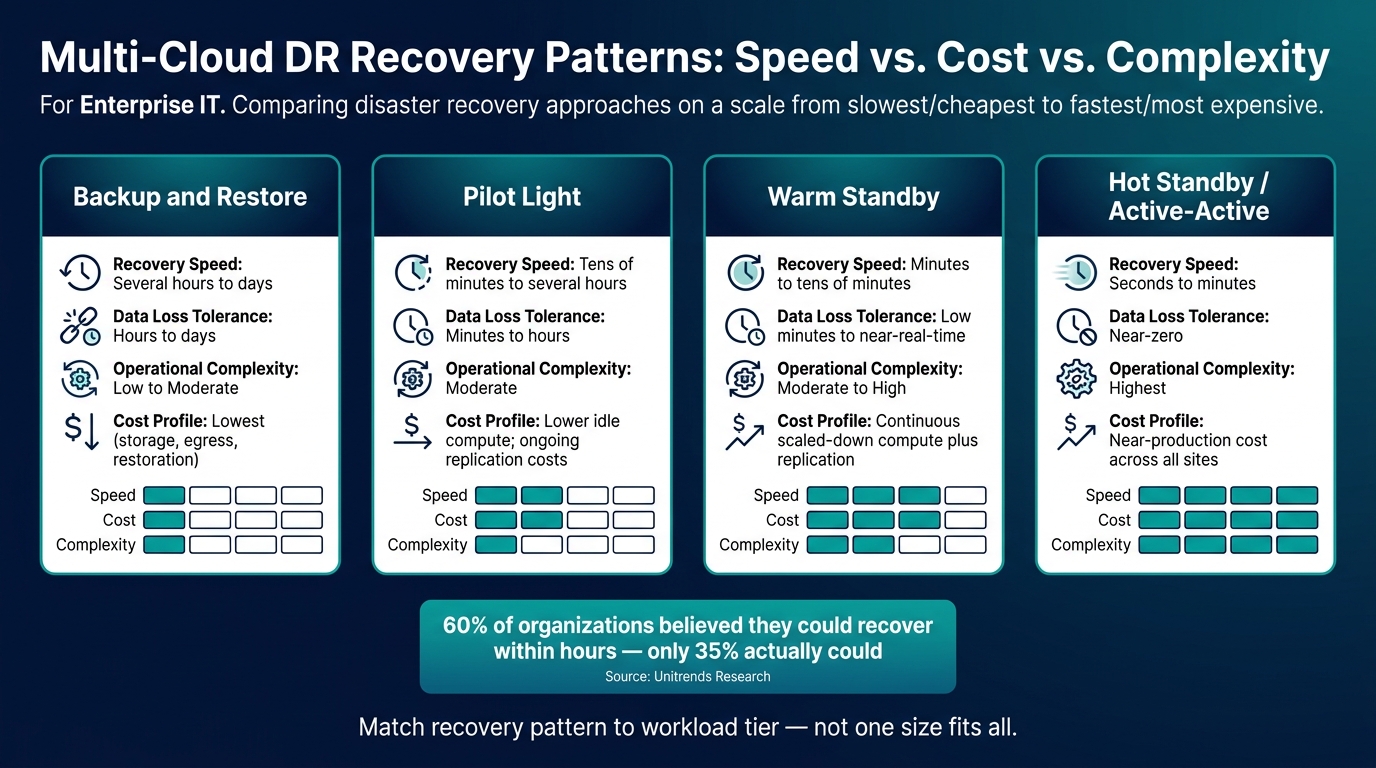
Multi-Cloud DR Recovery Patterns: Speed vs. Cost vs. Complexity
Your BIA and dependency map should lead to one clear decision for each workload: where it recovers. That location might be another availability zone, a different region, another cloud, a private cloud, or an isolated recovery setup. The test is straightforward: can that location hit the approved RTO and RPO when things go wrong, not just on a diagram but in actual operation?
Choose the right recovery pattern for each workload tier
Different workloads need different recovery setups. If you use your most expensive pattern for everything, costs climb fast. If you use your cheapest option for business-critical services, you take on too much risk. Backup and restore, pilot light, warm standby, and hot standby or active-active each balance recovery speed, data loss, complexity, and cost in different ways.
| Recovery pattern | Typical recovery speed | Data-loss tolerance | Operational complexity | Cost profile |
|---|---|---|---|---|
| Backup and restore | Several hours to days | Hours to days unless backups are frequent | Low to moderate | Lowest ongoing cost; storage, egress, restoration, and testing add variable costs |
| Pilot light | Tens of minutes to several hours | Minutes to hours, depending on replication frequency | Moderate | Lower idle compute cost than standby; ongoing replication and scale-up costs |
| Warm standby | Minutes to tens of minutes | Low minutes to near-real-time | Moderate to high | Continuous scaled-down compute plus replication and network costs |
| Hot standby / active-active | Seconds to minutes | Near-zero to low minutes | Highest | Near-production cost across sites, plus replication and testing |
These are planning ranges, not fixed cost figures. Actual spend depends on compute reservations, storage, replication, egress, database licensing, support plans, network connectivity, observability, staffing, and how much capacity you need during a long incident. If a design misses the approved RTO in testing, rule it out, no matter what pattern label it carries.
A pattern on its own isn’t enough. The application, its data, and the control plane all need to move with it.
Design cross-cloud data protection and portability
Backups by themselves do not make a workload portable. A full recovery package needs backups, replication, versioned copies, immutable storage, infrastructure as code, binaries, configuration, secrets recovery, and dependency documentation.
The failure point that shows up again and again is the hidden provider-specific dependency. A workload may depend on a provider-specific database engine, serverless runtime, queue, object-storage behaviour, key-management service, identity provider, private DNS system, load balancer, service mesh, or proprietary monitoring interface. That means a "multi-cloud" claim can fall apart fast if the app, identity plane, DNS, or encryption keys still sit on one provider.
For each dependency, document:
- export format
- maximum practical restore size
- required credentials
- network path
- licensing model
- recovery sequence
- expected performance
If a managed service can’t be replicated, keep a tested export-and-restore path or a compatible secondary implementation.
Keep at least one backup copy separate from production credentials in a different account, subscription, or tenant with independent identity controls.
Even then, portability can still break down if the recovery zone doesn’t have the capacity, network access, or permissions needed to run the workload.
Validate recovery-zone capacity, quotas, and connectivity
A recovery zone can look perfect in an architecture diagram and still fail when you need it. The region may be healthy, but recovery can still stall because of low service quotas, exhausted IP ranges, missing firewall rules, blocked network routes, unavailable software licences, or admins who can’t get into identity systems during the outage.
Before you call a recovery design operational, verify reserved compute capacity, storage IOPS, database capacity, load-balancer limits, account or subscription quotas, software licences, container-registry access, encryption keys, inter-region or inter-cloud bandwidth, DNS propagation behaviour, and VPN or private-link capacity. Quotas should be approved ahead of time, not requested for the first time during an outage.
Success also needs to be defined the right way. It isn’t enough for virtual machines to boot. Successful failover means users can sign in, transactions complete, data is reconciled, integrations work, and response times stay within acceptable limits. Measure the full failover timeline and compare it directly against the approved RTO.
Once the recovery zone checks out, the next step is to automate failover, failback, and the control checks around it.
Automation, security, and audit-ready operations
Once your recovery zones are in good shape, the next weak spot is execution. That’s where automation comes in. It turns recovery from a stressful one-off event into a process you can run the same way each time, measure, and prove later.
Automate failover, failback, and dependency-aware recovery
Start by sorting each recovery step based on how repeatable it is, what happens if it fails, whether it can be undone, and how much it affects the business. That gives you a sane way to decide what should be automated and what still needs a human call.
Some tasks are a good fit for full automation because they’re predictable and low risk. That includes infrastructure provisioning from IaC templates, configuration baseline application, backup selection and restoration, health checks, evidence capture, and pre-approved traffic changes. Use approval gates for actions with a bigger blast radius, such as promoting a replicated database, changing production DNS, releasing customer-facing services, activating encryption keys, or initiating failback. Keep manual decisions for forensic containment, disputed data reconciliation, legal holds, and recovery from suspected compromise.
Use one fixed sequence and stick to it: isolate the failed environment, provision the recovery zone from IaC, restore identity, networking, and keys first, then bring back data stores, applications, health checks, traffic, business sign-off, resynchronisation, and controlled failback. Every step should be safe to rerun, tracked in version control, logged with timestamps, and matched with a written rollback step. Failback also needs clean-environment validation, data resynchronisation, and explicit approval. Production coming back online isn’t enough on its own.
Your dependency maps need to include the pieces that shape recovery order: identity, DNS, certificates, secrets, message brokers, observability platforms, and inter-cloud connectivity.
Those workflows only stand up when recovery access, keys, and approvals are kept apart from the primary environment.
Apply security controls across the recovery process
The recovery environment should be treated with the same discipline as production. Apply least-privilege, role-based access; phishing-resistant multi-factor authentication; separate administrator and operator identities; separation of duties; just-in-time privileged access; encryption in transit and at rest; customer-managed keys where required; network segmentation; centralized logging; and secrets rotation across every recovery workflow.
Keep incident declaration, recovery execution, traffic approval, and business acceptance as four separate roles. Recovery credentials and key-management permissions should be separate enough that a compromise in the primary environment does not automatically spread into the recovery environment.
For workloads with ransomware risk, keep multiple backups in separate locations, including at least one offline, air-gapped, or immutable copy with separate administrative credentials and protected key-management paths. If ransomware recovery is needed, isolate affected accounts, preserve forensic evidence, identify a known-clean recovery point, validate backup integrity, rebuild from trusted IaC and approved images, rotate all credentials and secrets, and restore in dependency order before reconnecting anything. An automated failover workflow should never copy encrypted or corrupted data into the clean recovery environment without integrity and threat checks first.
Document the jurisdiction of every replica, backup, log, snapshot, key, and recovery service. A second cloud region is not always acceptable. Data residency changes by classification, province, contract, and sector. Use policy-as-code guardrails to block unauthorized copies and pause routine deletion when a legal hold, investigation, or access request applies.
Those controls matter only if they’re tested and preserved as proof.
Test regularly and retain evidence for audits
A backup success message does not prove you can recover. A scheduled isolated restore that checks boot, application function, data integrity, dependencies, authentication, and business-owner acceptance tells you far more. Don’t lean on one yearly failover exercise and call it done. Use a test programme that builds over time.
Audit-ready recovery comes from repeated proof, not one drill that happened to go well.
| Test type | Primary purpose | Disruption level | Evidence produced | Suggested cadence |
|---|---|---|---|---|
| Tabletop exercise | Validate roles, decisions, communications, and escalation | None or negligible | Attendance, scenario, decisions, issues, action owners | Quarterly or after major organizational change |
| Component restore | Verify individual backup, database, object, or configuration recovery | Low | Backup identifier, restore logs, integrity checks, elapsed time | Monthly for critical backups; at least quarterly for other tiers |
| Isolated recovery test | Validate an application stack without affecting production | Low to moderate | IaC version, dependency results, test data controls, screenshots, timings | Quarterly or semi-annually |
| Regional failover | Validate recovery in a separate region within the same provider | Moderate | Approval record, traffic changes, RTO/RPO results, monitoring data, rollback record | Semi-annually for critical services |
| Cross-cloud recovery | Validate portability and operation with another provider | Moderate to high | Provider-independent runbook, restored workload evidence, compatibility defects, cost data | Annually and after major architecture changes |
| Cyber-recovery exercise | Validate clean restoration after compromise or ransomware | Moderate to high | Incident timeline, forensic controls, clean-point selection, credential rotation, detection results | At least annually and after significant threats or incidents |
| Controlled failback | Validate return to the primary environment without data loss or prolonged outage | Moderate | Resynchronisation metrics, reconciliation results, change approvals, final health checks | After failover tests and before declaring a design operational |
NIST adds that contingency testing should validate individual procedures and the overall plan, including alternate-platform recovery, connectivity, performance, notification, and restoration of normal operations.
Plan the evidence package before the exercise starts. Each test run should keep the approved test plan, runbook and IaC version, change and approval records, backup identifiers, milestone timestamps, configuration and policy results, access logs, health and integrity checks, defects, corrective actions, and business-owner sign-off. Store that evidence in tamper-resistant, access-controlled repositories with timestamps and retention metadata. Also keep operational logs separate from approval records, so one compromised account cannot rewrite the whole audit trail.
Phased rollout, operating metrics, and conclusion
Roll out the programme in controlled phases
Once design and validation are done, move into production through gated rollout phases. In plain terms: roll out multi-cloud DR step by step, so untested assumptions don’t slip into production. Each phase puts earlier decisions into practice, including governance, dependencies, and recovery zones.
| Phase | Entry criteria | Core deliverables | Approval authority | Evidence | Exit criteria |
|---|---|---|---|---|---|
| Foundation | Executive sponsor appointed; scope and critical services identified | Governance charter, roles and decision rights, service catalogue, BIA, policy baseline, risk register | Executive steering committee and business owners | Charter, inventory export, ownership register, meeting decisions | Every in-scope service has an accountable owner and provisional recovery target |
| Design | Priorities and dependency discovery complete | Target architecture, recovery-zone design, data-protection strategy, security model, runbooks, test plan | Enterprise architecture, security, operations, and service owners | Architecture records, dependency diagrams, threat model, runbooks | Each priority service has a recoverability design |
| Build | Design baselined and funding approved | Backups, replication, IaC, automation, monitoring, access controls, integrations | Technology delivery owner and control owners | Configuration records, deployment logs, access reviews, code and change approvals | Recovery capability deployed for agreed workload scope |
| Validate | Build complete; test data and participants available | Test scenarios, execution records, results, defects, corrective-action plan | Business service owner, CIO delegate, risk or audit representative | Test logs, screenshots, monitoring exports, after-action report | Demonstrated recovery meets targets, or exceptions have owners and due dates |
| Operate and improve | Production handover accepted | Test calendar, dashboards, training, audit package, improvement backlog, change-triggered tests, capacity reviews | Service owner and resilience governance forum | KPI history, test evidence, exception register, review minutes | Controls operate on schedule and material gaps are tracked to closure |
The point of each gate is simple: prove recoverability, not just finish deployment. A workload is only recovery-ready after testing shows that:
- the application and data recover
- identity and privileged access work
- critical dependencies reconnect
- the service owner confirms the service functions as expected
- approved RTO and RPO targets are met
- no unapproved critical exceptions remain
Track performance with executive and operational metrics
After rollout, measure demonstrated recovery, not assumed capability. That’s where many programmes get tripped up. Teams often think they’re ready because backups ran or infrastructure came up, but tested recovery tells the real story.
Research from Unitrends found that more than 60% of organisations believed they could recover from a downtime event within hours, while only 35% actually could. That gap starts to shrink when metrics focus on tested results instead of backup job completion alone.
Executive dashboards should show protected-workload coverage by tier, the percentage of critical services meeting tested RTO and RPO, open high-risk recovery exceptions, and recovery-zone capacity, quotas, and connectivity. Operational dashboards should go deeper into replication lag against each workload’s RPO, backup success rate, automation success rate, and evidence completeness.
For backup success rate, use successful scheduled jobs / scheduled jobs. Report failures, skips, stale jobs, and unverified jobs separately. That level of detail matters. A clean headline number can hide a lot of trouble underneath.
Set targets by service tier during the BIA instead of forcing one threshold across every workload. A payment service might need near-continuous replication, a four-hour RTO, and a fifteen-minute RPO. An internal reporting service might be fine with a twenty-four-hour RTO and daily recovery points. Same DR programme, very different business needs.
A service also shouldn’t appear green on a dashboard if its dependency chain failed or if business validation did not pass, even when the infrastructure itself is available. If the app is up but users still can’t do the job, recovery isn’t done.
Where Digital Fractal Technologies Inc can support implementation
Where delivery support is needed, implementation should stay tied to the same control gates. Digital Fractal Technologies Inc can support recovery portals, workflow automation, AI-assisted dependency discovery, recovery dashboards, audit evidence flows, and dependency-aware orchestration, while your business and technology owners keep recovery accountability.
Final summary: what makes enterprise multi-cloud DR work
Taken together, these controls make multi-cloud DR operational rather than theoretical. Multi-cloud resilience is an operating discipline, not just a set of tools. The programmes that work bring together clear governance, business-led tiers, mapped dependencies, sized recovery zones, automated recovery, strong security, repeatable testing, and audit-ready evidence. Every major control needs a named owner, a measurable target, a test method, and an evidence source. No workload is ready until recovery is demonstrated against approved objectives.
FAQs
What should we recover first?
Recover the workflows and data you need to bring back critical operations first. Then restore the supporting data systems those workflows rely on.
In practice, start with your highest-priority business processes. Have an alternate process ready if core systems go down, and make sure your recovery plans cover automation across the business.
How often should multi-cloud DR be tested?
Multi-cloud disaster recovery plans need regular testing if you want them to keep working as your infrastructure changes. A plan that looked solid six months ago can fall out of date fast once new systems, apps, or workflows enter the mix.
For many businesses, quarterly testing lines up well with planning cycles and keeps the process consistent. That said, the right schedule depends on your risk profile and how complex your day-to-day operations are.
It also makes sense to test after major changes, including:
- large software deployments
- infrastructure updates
- new service integrations
Digital Fractal Technologies Inc can help build recovery plans that support resilience and compliance with Canadian standards.
What shared services can break recovery?
Shared services can derail multi-cloud disaster recovery when they turn into single points of failure or tie workloads too tightly across environments. This tends to hit hardest in integration layers and workflow dependencies that aren’t restored or failed over the same way every time.
Problems also show up when recovery plans skip over workflow restoration, data recovery, and backup processes after a failure. Keep governance and change control in place, and make sure DR plans clearly cover shared services along with their workflow and data dependencies.