
RFI Automation in Construction: A Project Manager’s Playbook

RFI automation replaces email chains and spreadsheet trackers with a system that links every question to the exact drawing revision, routes it to the right reviewer, and escalates it automatically when it stalls. Piloted correctly, it shortens response time from days to hours and removes one of the biggest hidden sources of schedule risk. The right first move isn’t buying software. It’s running an AI Readiness Audit against a single trade or phase, then piloting a confined workflow before you scale anything.
TL;DR:
- RFI automation links questions to specific drawing revisions, routes them automatically, and escalates stalled responses to prevent schedule delays.
- Critical features include drawing-linked creation, mobile photo capture, automated routing, exportable logs, and AI integration for draft responses.
- Successful pilots require baseline metrics, targeted scope, document indexing, and strict governance to avoid scope changes and contractual issues.
- Industry benchmarks show manual RFIs averaging 5 to 10 days for responses, while AI pilots can reduce turnaround to hours or a single day.
- Adoption is driven by trust in AI-drafted answers through limited scope pilots that demonstrate source citing and relevance to field staff and reviewers.
Table of Contents
- What RFI Automation Does and Why It Matters to Your Schedule
- Checklist: Core Features a Successful RFI Automation Solution Must Have
- How to Roll Out RFI Automation: A 6-Stage Pilot Roadmap
- What Metrics Prove RFI Automation Is Working?
- Governance and Pitfalls: Contract Cautions You Can’t Skip
- Get a 90-Day Path From Manual RFIs to a Working Pilot
- What Actually Gets Field Staff and Reviewers to Trust This
- Sources
- FAQ
What RFI Automation Does and Why It Matters to Your Schedule
An RFI stops being a loose email and becomes a tracked workflow the moment you automate it: a question tied to a needed-by date, a “ball-in-court” owner, and an audit trail that survives closeout. That structure is the actual product. It’s not the software, it’s the discipline the software enforces.
Procore’s guidance on RFI management treats every RFI as a workflow with a clock attached, so automated aging and escalation catch questions before they quietly derail a schedule. Compare that to the typical inbox-and-spreadsheet method, where a subcontractor’s question sits unread for four days because it got buried under thirty other emails. That’s not a hypothetical. It’s the default state on most projects without a tracking system.
Automation delivers three concrete gains:
- Fewer blind spots, because every open RFI shows up on a dashboard instead of in someone’s inbox
- Faster answers, because routing and reminders replace manual follow-up calls
- Better records for closeout and claims, since every exchange is timestamped and exportable
Where AI genuinely helps is context synthesis: pulling the relevant spec section, the drawing sheet, and any prior similar RFI into a draft response in seconds. Vendor case studies on AI agent-assisted RFI response show this cutting turnaround from days to hours in pilot deployments. What AI does not do, and should never do, is approve the answer. Final judgment on cost, scope, and contractual exposure stays with a human reviewer every time.
Checklist: Core Features a Successful RFI Automation Solution Must Have
Before you evaluate any tool or scope an internal build, run it against these five requirements. Skip one and you’ll end up rebuilding the workflow six months in.
- Drawing-linked creation. Every RFI ties to a specific sheet and revision number, not a generic “attached PDF.” Bluebeam’s documented RFI workflow shows how drawing-linked creation and live review sessions keep questions anchored to the exact version under discussion, which matters enormously once a drawing gets superseded mid-conversation.
- Mobile and photo capture. Field staff need to snap a photo, mark it up on-site, and attach it directly to a new or existing RFI, no re-typing at a desk later.
- Automated routing and escalation. Due dates, ball-in-court tracking, and automatic escalation when a response passes its needed-by date without action.
- Exportable logs. PDF, CSV, or XML exports that satisfy owner reporting requirements and hold up as evidence in a closeout or claims review.
- Connectors and AI capabilities. APIs into your project management software, BIM or Revit models, and document repositories, plus duplicate detection and AI-assisted draft generation.
Pro Tip: Test duplicate detection before anything else during a demo. A system that lets the same question get filed three times by three trades isn’t saving anyone time, it’s adding noise.
How to Roll Out RFI Automation: A 6-Stage Pilot Roadmap
Skipping straight to a company-wide rollout is the single most common way these initiatives fail. Run this as a phased pilot instead.
- Baseline your current metrics. Pull your last 90 days of RFIs and calculate average response time and percent overdue. Gather your document corpus: specs, drawings, and prior RFI logs. You can’t prove improvement without a starting number.
- Run an AI Readiness Audit. This identifies which documents are indexable, where your data lives, and which automation opportunities offer the fastest payback. A Digital Fractal AI Readiness Audit is built for exactly this diagnostic step.
- Index specs and drawings. Legacy scans typically need OCR as a one-time preprocessing step before they’re searchable. From there, specs get loaded into a searchable corpus or vector database so an AI agent can cite exact spec sections and prior RFI numbers when drafting a response.
- Map approval chains and integration points. Identify how RFIs currently flow through your PMS, BIM environment, and filing systems, then pick a narrow pilot scope, one trade or one phase, not the whole project.
- Run the pilot with clear service-level agreements. Set a needed-by target, measure actual turnaround, and gather feedback from both field staff and office reviewers to refine your prompts and templates.
- Scale gradually and enforce governance. Roll out to additional trades only after the pilot proves out, and build in a hard rule: any RFI answer that touches scope gets converted to a formal change event before work proceeds.
Pro Tip: Pick your pilot trade based on RFI volume, not project prestige. The trade generating the most repetitive, template-able questions, usually mechanical or electrical coordination, gives you the clearest before-and-after numbers.
What Metrics Prove RFI Automation Is Working?
Four numbers tell you whether a pilot is paying off: average response time, percent of RFIs overdue, RFI volume per $1 million of contract value, and the percentage of RFIs that get auto-drafted by the system before a human touches them.
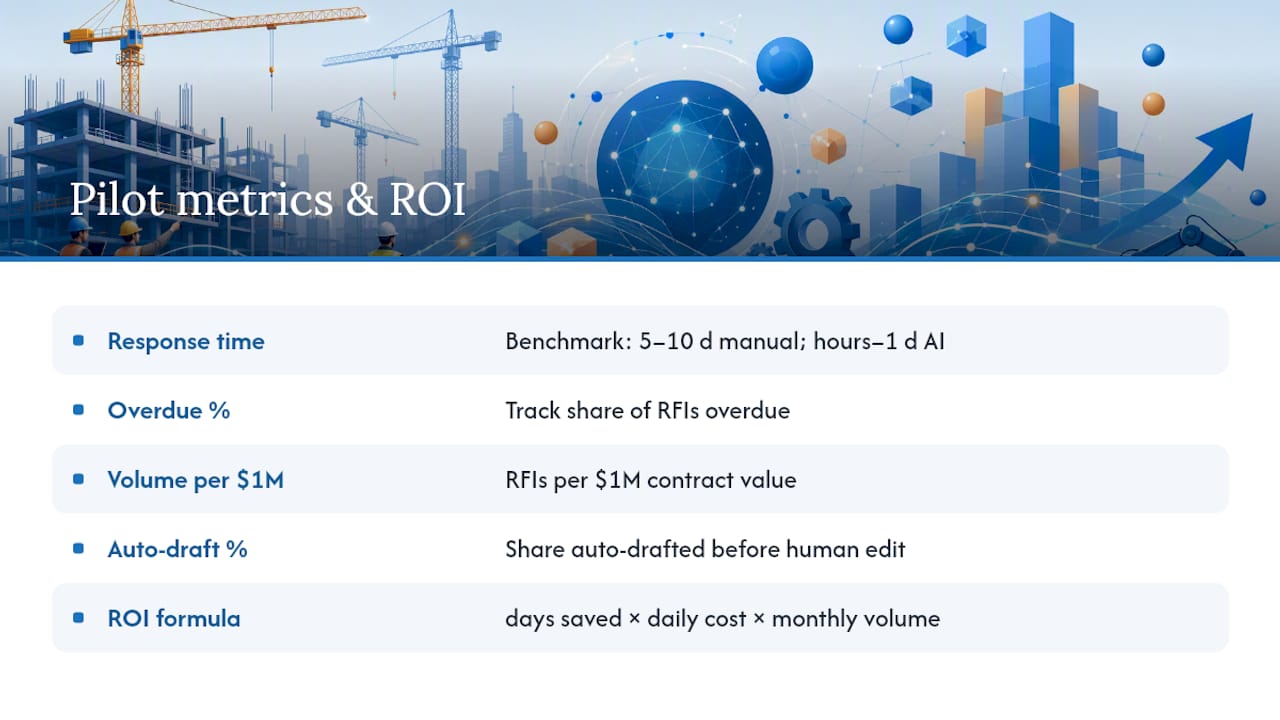
Industry benchmarks put median RFI turnaround at 5 to 10 days on projects running manual processes, with AI-assisted systems in some pilot deployments claiming reductions to hours or single-day approvals. Use a conservative version of that range when building your own business case rather than assuming the best-case figure applies to your project.
The ROI math is straightforward once you have a baseline: take your average days saved per RFI, multiply by your project’s daily overhead cost, then multiply by your monthly RFI volume. A tool like the Workflow Automation Savings Estimator can run this calculation against your own numbers instead of a generic industry average, which matters because a $2 million renovation and a $50 million tower carry very different daily costs for the same delay.
Governance and Pitfalls: Contract Cautions You Can’t Skip
Automation speeds up the workflow. It does not change what an RFI legally means on your contract, and that distinction trips up more teams than any software bug.
- An RFI answer does not automatically change scope. If a response requires added material, labor, or design work, that has to convert to a formal change event before anyone proceeds, not get treated as verbal authorization buried in a thread.
- An RFI usually does not satisfy formal contractual notice requirements for delay or extra cost. Check your contract’s notice clause; most require a separate, specific notice document within a defined window.
- Avoid RFI flooding. Best-practice guidance from construction software vendors recommends one clear question per RFI, with referenced drawings or specs and a proposed solution attached, rather than vague multi-part questions that stall in review.
- Use automatic escalation for anything on the critical path, and keep an exportable audit trail. Analysis of RFI-driven schedule risk points to timestamped logs with impact flags as primary evidence in delay or performance claims.
The single biggest procedural failure teams make is proceeding on an RFI answer that quietly changes scope. Build the change-event flag into your automation from day one, not as a fix after the first dispute.
Get a 90-Day Path From Manual RFIs to a Working Pilot
There’s a real gap between reading about RFI automation and actually having it running on a live project. This gap can be closed with an approach built specifically for construction workflows, not a generic software rollout.
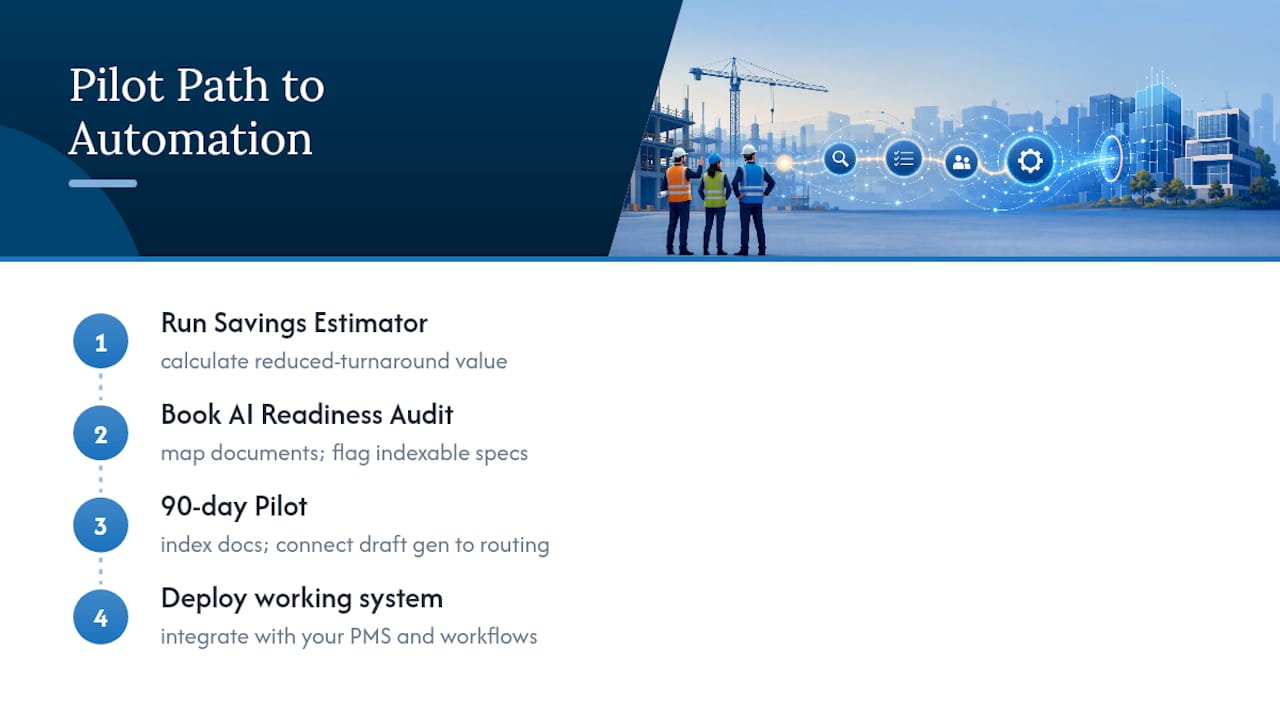
The starting point is the AI Readiness Audit, which maps your existing documents, identifies which specs and drawings are ready to index, and flags the automation candidates with the fastest payback, exactly the diagnostic work described in the roadmap above. From there, Digitalfractal’s Workflow Automation service applies a 90-day pilot framework: index your documents, connect draft generation to your approval routing, and hand you a working system tied to your own PMS instead of a generic template. Because every solution is built around your actual workflows rather than sold off a shelf, the pilot reflects how your team actually files and answers RFIs.
Before committing budget, run your own numbers through the Workflow Automation Savings Estimator to see what reduced turnaround is worth on your specific project size. Then book an AI Readiness Audit to find out what’s actually indexable in your document stack.
What Actually Gets Field Staff and Reviewers to Trust This
The technology is rarely the obstacle. Adoption stalls when field staff suspect an AI-drafted answer papers over a real judgment call, and when office reviewers worry they’re rubber-stamping something they didn’t fully vet.
The fix is narrow scope, not more training. Pilot one trade, one phase, and let the AI-drafted response show its sources, the exact spec section, the prior RFI number, right in the draft. Once a superintendent sees the system cite the same paragraph they’d have dug up manually, the trust builds itself. Trying to roll this out project-wide before that trust exists is the fastest way to get it quietly ignored.
— Souhail
Sources
For deeper detail on the mechanics covered here, Bluebeam’s RFI workflow documentation shows drawing-linked creation in practice, while Procore’s RFI management guidance covers ball-in-court tracking in more depth. For the ROI figures behind AI-assisted drafting, see the industry turnaround analysis from Ruh.ai.
FAQ
What Does RFI Automation Actually Save in Turnaround Time?
Industry benchmarks put median manual RFI turnaround at 5 to 10 days, with AI-assisted pilots reducing that to hours or single-day approvals in some cases. The exact gain depends on document readiness and how narrowly you scope the pilot.
Can AI Approve an RFI Response on Its Own?
No. AI agents draft responses by synthesizing specs, drawings, and prior RFIs, but final approval stays with a human reviewer to avoid contractual mistakes. This split, AI drafts and humans approve, is the standard structure in current implementations.
Does an RFI Answer Automatically Change the Contract Scope?
No, and treating it that way is a common and costly mistake. Any RFI response that adds material, labor, or design work needs to convert to a formal change event before work proceeds, regardless of how the automation platform is configured.
How Much Does an AI Readiness Audit Cost?
Digitalfractal’s AI Readiness Audit runs from 2500-10000 $ one-off, scoped to your document volume and systems. It’s the recommended first step before committing to a full RFI automation pilot.
What’s the Fastest Way to Pilot RFI Automation Without Disrupting the Whole Project?
Pick one trade or one phase with high RFI volume, index its specs and drawings, and run a defined pilot with clear response-time targets. Scale to additional trades only after the pilot proves out and governance rules, like automatic change-event flags, are confirmed working.