
Prove Submittal Tracking AI in 90 Days for Architects and PMs

AI submittal tracking automates log creation and spec compliance checks, cutting review cycles and administrative hours while keeping approval authority with human reviewers. It works best for architects, engineers, and project managers drowning in spec-heavy packages, and it’s not a replacement for judgment. It flags mismatches; someone still signs off.
TL;DR:
- AI submittal tracking automates the extraction of required submissions from dense specifications, reducing project startup time by days or weeks.
- It automates compliance checks against submittal documents, flagging missing or mismatched data before reviewers open files.
- The strongest ROI occurs on large, spec-heavy projects with repetitive submittal types, potentially saving multiple QA staff hours.
- Pilot success relies on clear acceptance criteria, a representative sample of spec sections, and proper integration into existing project management tools.
- Building this technology internally often requires specialized skills and resources, making a short, vendor-led pilot the most practical first step.
Table of Contents
- What Does AI Submittal Tracking Actually Do?
- How Does AI Fit Into Your Existing PM Tools?
- What ROI Should You Actually Expect?
- How Do You Pilot AI Submittal Tracking Without Overcommitting?
- What Proof Points Should You Look For Before You Commit?
- Should You Build This In-House Or Bring In an Integrator?
- Ready to Pilot AI Submittal Tracking on Your Next Project?
- Sources
- FAQ
What Does AI Submittal Tracking Actually Do?
Most submittal software still asks a project engineer to build the log by hand, one line at a time, reading through a 400-page spec binder with a highlighter. Submittal tracking AI skips that step. It parses the specification documents directly and produces a working register, complete with expected submission types and required documentation, before the first RFI ever hits an inbox.
The core capability is extraction: the software reads spec sections and pulls out what’s actually required, then structures it into a usable log. Autodesk’s AutoSpecs tool, for example, scans specification binders to identify required submissions, action items, and QA/QC requirements automatically, which shaves days off project start-up on any job with a dense spec book.
From there, the AI runs compliance checks against what a contractor actually submits. That means comparing product data sheets, cut sheets, and O&M manuals against spec requirements for product type, model number, manufacturer, and performance criteria, flagging anything missing before a reviewer even opens the file, according to iFieldSmart’s submittal AI documentation.
A few other things worth knowing before you evaluate a tool:
- Auto-classification typically anchors to CSI MasterFormat divisions, so submittals land in the right bucket (Division 08 for openings, Division 26 for electrical) without manual tagging, per Kodori’s tracker documentation.
- Change detection flags when a spec revision affects an already-submitted item, which matters more than people expect on projects with mid-construction addenda.
- Audit trails record every disposition, reviewer, and timestamp automatically, which becomes critical if a dispute ever lands in front of an owner’s attorney, per Trueleveler’s submittal tracker documentation.
- Numbering conventions get applied consistently across trades, which sounds minor until you’ve tried to reconcile three different subcontractors’ numbering schemes in one closeout binder.
None of this replaces the reviewer’s judgment call on substitutions or design intent. It just means the reviewer opens a file that’s already been checked for the obvious stuff.
How Does AI Fit Into Your Existing PM Tools?
The honest answer: it depends on where in the workflow you plug it in, and most teams get better results treating this as three separate insertion points rather than one big swap.
- Preconstruction spec parsing. This is where the AI builds the initial submittal register from the spec binder, before any subcontractor has submitted a single document. Teams that skip this step and only apply AI at intake lose most of the early-schedule benefit.
- Intake and compliance review. As submittals arrive, whether by email, a document control portal, or direct upload, AI checks completeness and compliance, then routes to the right reviewer automatically.
- Export and closeout sync. Once approved, data needs to flow somewhere useful: a CSV/Excel export, a direct sync to a platform your team already runs, or a push into a document-control folder structure for the closeout binder.
Vendor-neutral pilots that support one-click exports to CSV or Excel, or a sync into whatever PM platform is already in use, cut migration friction significantly compared with tools that lock data into a proprietary format, according to AECify’s feature documentation. If your team already runs a construction-specific project management platform, confirm the AI layer can push structured data into it rather than creating a second system of record nobody trusts.
Reviewer routing matters more than most procurement checklists admit. Decide up front whether reviewers work in parallel (faster, but harder to reconcile conflicting comments) or sequentially (slower, cleaner audit trail), and set overdue-alert thresholds that match your actual contract SLAs, not a generic default. Governance questions to settle before rollout: where do original documents live, who has final sign-off authority over an AI-flagged discrepancy, and how do you preserve the paper trail if a claim goes to arbitration? A clear answer to each of those questions before kickoff saves weeks of rework later, a pattern that shows up consistently in document control practice.
What ROI Should You Actually Expect?
The metrics that matter aren’t abstract accuracy scores. They’re operational: review cycle time, number of review rounds per submittal, rejection and resubmit rate, admin hours saved, and time to closeout. Track those four or five numbers before and after a pilot, and you’ll know within weeks whether the tool earns its keep.
What the industry is reporting: Practitioners using automated submittal log creation and AI review describe saving the equivalent of two to three full-time QA/QC staff on large projects, according to Fieldwire’s submittal workflow data. Separately, some AI submittal review tools report large reductions in manual review time and lower rejection rates when submittals are pre-checked before a designer ever sees them, though those figures come from vendor reporting and deserve validation in your own pilot before you build a budget around them, per BuildSync’s published claims.
The projects that see the strongest return share a profile: large scale, spec-heavy documentation, and repetitive product categories where the same submittal type shows up dozens of times across a building. A hospital or a large multifamily project with hundreds of door hardware submittals sees far more benefit than a small tenant fit-out with a dozen line items.
There’s a less obvious benefit too. A complete, timestamped audit trail doesn’t just save admin time. It changes your negotiating position in a dispute. When every disposition, reviewer, and date is preserved automatically instead of reconstructed from email threads months later, closeout moves faster and claims get resolved with less back-and-forth. That alone justifies a pilot on some projects, separate from the time savings.
How Do You Pilot AI Submittal Tracking Without Overcommitting?
You don’t need to roll AI out across an entire portfolio to find out if it works. A scoped pilot with clear acceptance criteria tells you more in six weeks than a year of committee meetings.
- Pick a representative slice. Choose three to five spec sections, ideally from your highest-volume CSI divisions like 08 (openings), 09 (finishes), or 26 (electrical), to maximize early signal and surface common extraction failure modes fast, a pattern Kodori’s documentation recommends for exactly this reason.
- Gather your training inputs. Spec binder PDFs, historical submittal logs, and past O&M or test reports give the AI something real to validate against instead of a clean-room demo.
- Set acceptance criteria before you start. Define an accuracy threshold and an acceptable reviewer override rate up front, so “did it work” isn’t a subjective argument at the end.
- Confirm export and sync paths. Verify the pilot tool can hand off structured data to your existing systems before you commit to a longer engagement.
- Plan the change management. Train reviewers on what the AI flags mean, adjust submittal SLAs to reflect faster turnaround, and schedule checkpoint reviews at two, four, and six weeks.
Pro Tip: Map your acceptance criteria to reviewer override rate and reviewer time-per-submittal, not raw model accuracy. A tool can score 95 percent on paper and still fail in the field if reviewers override it constantly, because override rate is what actually predicts schedule impact.
What Proof Points Should You Look For Before You Commit?
Case studies and audit assets matter more in this category than in most software decisions, because “AI compliance review” means very different things depending on who built it. Look for a partner who can show, not just claim, how a pilot ran.
Digitalfractal approaches this the same way it approaches any workflow automation engagement: start with an assessment, run a small pilot with defined success criteria, and only scale once the numbers hold up. That structure applies directly to submittal tracking.
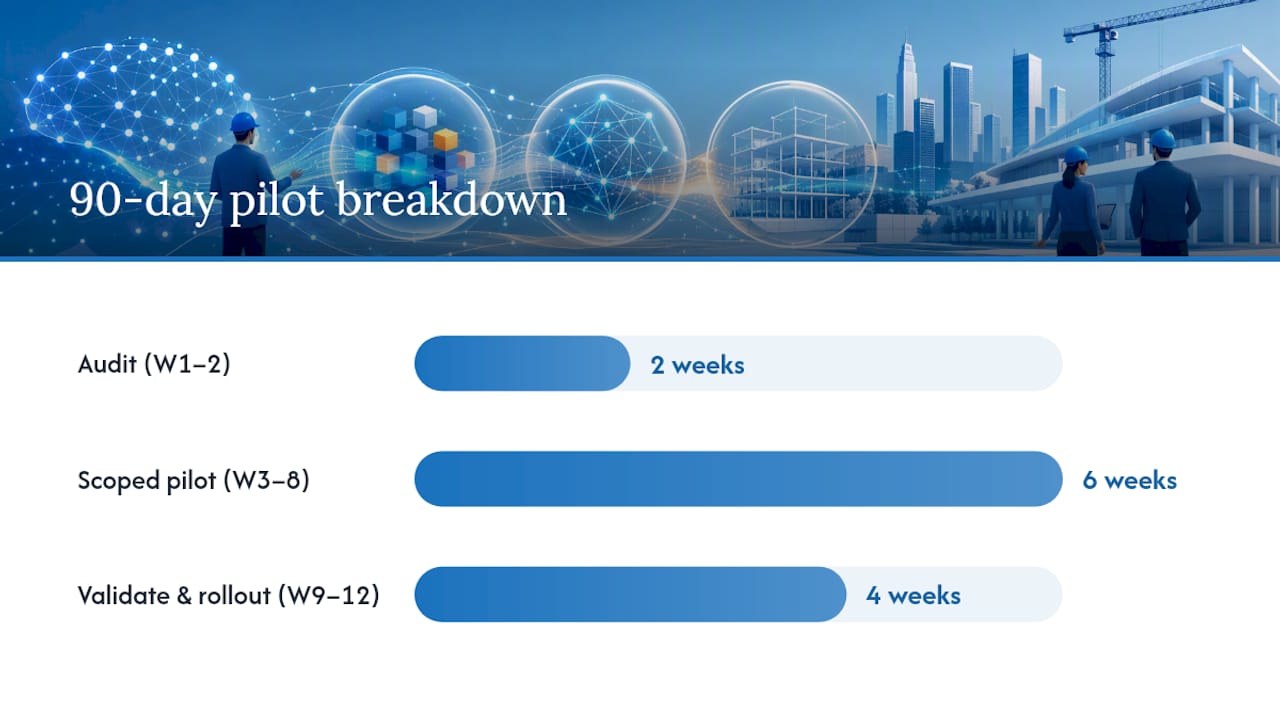
A typical 90-day pilot flow looks like this:
- Weeks 1 to 2: An AI Readiness Audit assesses your current spec formats, document volume, and existing PM stack to identify realistic automation opportunities.
- Weeks 3 to 8: A scoped pilot runs against real spec sections and submittal history, with reviewer feedback loops built in from day one.
- Weeks 9 to 12: Validation against the acceptance criteria set at kickoff, followed by an integration and rollout plan if the metrics clear the bar.
This mirrors the approach used in jobsite progress tracking pilots, where the same phased structure: audit, pilot, validate, scale. This applies to a different but related tracking problem. The output is never a black box making final calls. It’s a system that hands reviewers a cleaner starting point and a defensible paper trail.
Should You Build This In-House Or Bring In an Integrator?
Building submittal AI in-house sounds appealing until you total up what it actually requires: someone who can label training data accurately, someone who understands spec parsing well enough to catch edge cases, and someone who can wire the output into your existing PM stack without breaking anything. Most construction firms have zero of those three roles sitting idle.
That’s the real trade-off. An integrator can scope and run a 90-day pilot with defined acceptance criteria. An internal build, without dedicated data and engineering resources, tends to stretch into a multi-quarter initiative with no clear finish line and no guaranteed payoff.
My honest read: run the short pilot first, wherever it comes from. A defined 90-day test with hard metrics tells you more than a year of internal debate about whether “AI is ready” for your submittal process. Vendor-neutral testing, the same discipline recommended for evaluating any construction approval workflow automation, is what separates a good decision from an expensive guess.
— Souhail
Ready to Pilot AI Submittal Tracking on Your Next Project?
Most firms exploring this space get stuck comparing feature lists instead of testing anything real. Digitalfractal takes the opposite approach: instead of a generic platform demo, you get a structured AI Readiness Audit that maps your actual spec formats, document volume, and PM stack against what a submittal pilot needs to succeed.
The audit is offered as a one-time engagement and it sets the foundation for a 90-day pilot with defined acceptance criteria rather than an open-ended experiment. From there, Digitalfractal’s workflow automation team builds the integration plan connecting your submittal AI to the tools your team already uses, so you’re not starting a second system of record. If your firm has been putting off a real test of AI submittal tracking because nobody wants to own a failed pilot, book the readiness audit and let the acceptance criteria do the deciding.
Sources
For deeper background on submittal workflows and AI compliance checks, see Bluebeam’s submittal workflow guide, Fieldwire’s submittal tracking overview, and the productivity data in AI for agencies: 3.2x ROI research.
FAQ
What Is Submittal Tracking AI?
Submittal tracking AI is software that automates the creation of a project’s submittal log and runs compliance checks against spec requirements. It flags missing documentation, mismatched product data, and overdue reviews, but final approval authority stays with human reviewers.
How Much Does an AI Submittal Pilot Cost?
Costs vary by scope, but Digitalfractal’s AI Readiness Audit runs 2500-10000 dollars as a one-time fee and typically precedes a 90-day pilot. Other services, including the pilot integration itself, are priced based on project scope and aren’t published, so ask for a scoping call.
How Long Does It Take To See Results From AI Submittal Tracking?
A scoped pilot with clear acceptance criteria usually produces measurable results within a few weeks. That timeline covers spec parsing, live testing against real submittals, and reviewer feedback, well before any full-scale rollout decision.
Does AI Replace the Submittal Reviewer?
No. AI handles extraction, classification, and compliance flagging, but the reviewer still makes the final call on substitutions, design intent, and disputed items. The tool’s job is to hand reviewers a cleaner starting point, not to make the decision for them.
Which Projects Benefit Most From AI Submittal Tracking?
Large, spec-heavy projects with repetitive product categories, like hospitals, multifamily buildings, or projects with hundreds of similar submittal types, see the strongest return. Smaller projects with limited submittal volume typically see a smaller, though still positive, benefit.