
AI Readiness Checklist for 2026

Most AI work fails before launch, not after. If I had to boil this article down to one point, it’s this: before I approve any AI project in 2026, I need seven things in place – clear goals, ranked use cases, usable data, fit-for-purpose systems, trained staff, written rules, and a controlled pilot plan.
The article makes a plain case. Many Canadian organizations already use generative AI, but far fewer can show a return. That gap usually comes from weak data, unclear ownership, loose privacy controls, poor system fit, and no clear review path. In Canada, I also need to check data residency, PIPEDA duties, CAD budgeting, bilingual needs, and cross-border data flows before moving ahead.
Here’s the short version of the checklist:
- Start with the business problem, not the tool
- Set one measurable KPI and name one owner
- Rank use cases by impact, data state, risk, and effort
- Check data quality and access rules before any pilot
- Confirm cloud, API, and monitoring setup
- Document privacy, security, and AI-use rules
- Train leaders, managers, and frontline staff
- Run a small pilot with baseline metrics, review dates, and a go/no-go call
A few facts stand out:
- 60% of AI projects without AI-ready data may be dropped through 2026
- 72% of organizations say responsible AI is a top priority
- Yet 36% still have no dedicated AI governance function
If I’m reading this as a decision-maker, the message is simple: AI readiness is not about buying software. It’s about making sure the business, data, systems, people, and controls are ready before money is spent.
That’s the lens the rest of the article uses.
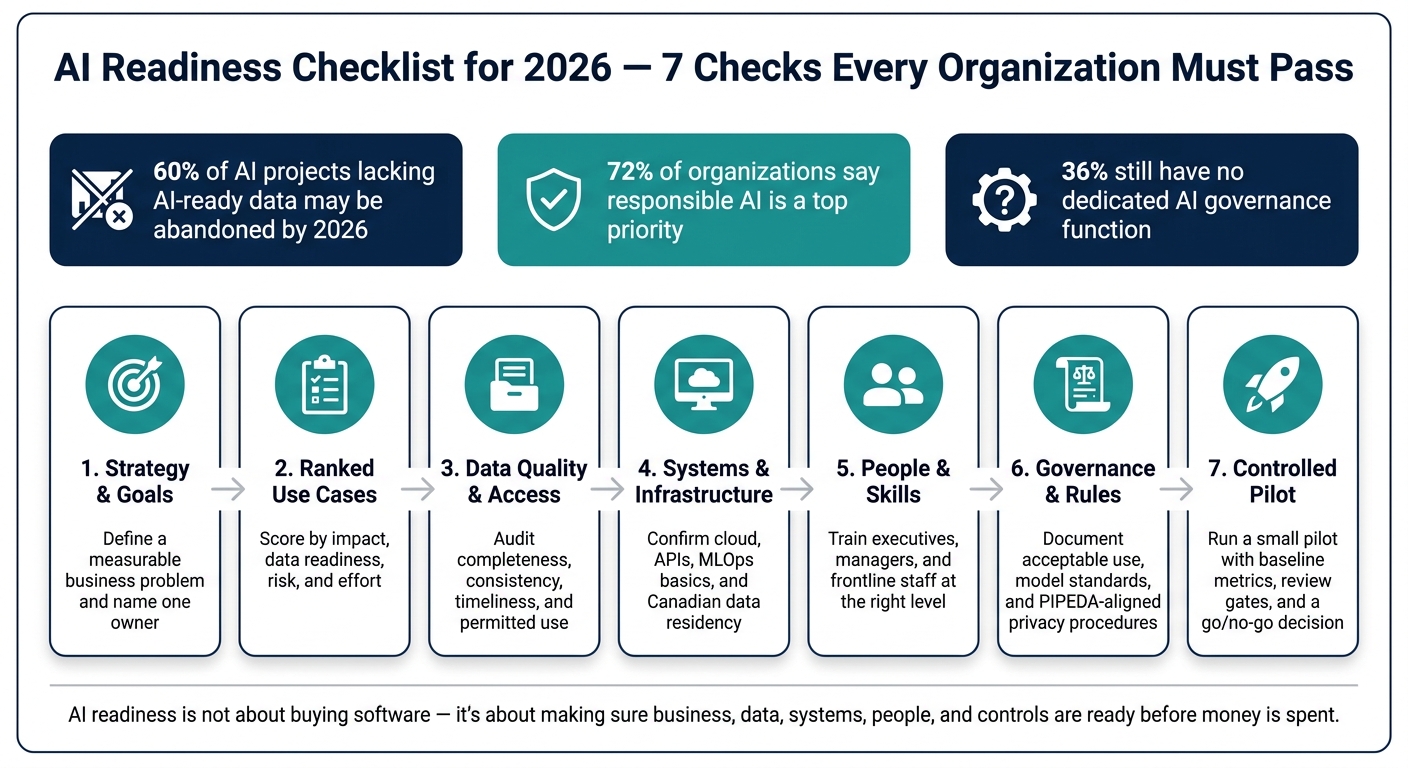
AI Readiness Checklist 2026: 7 Checks Before You Launch
Everyone Claims They’re AI-Ready. The Data Says Otherwise. (2026 Report) Ft. Dave Shuman
sbb-itb-fd1fcab
1. Strategy and Use Case Checklist
Before anything gets approved, pin down the business problem and the success metric. Start with a measurable business issue, not the tech. This section is your filter for ideas before any build, purchase, or vendor choice.
Define Business Goals, KPIs, and Owners
Every AI initiative should begin with a written objective tied to an operational problem. Each one needs to connect to one measurable outcome such as faster response times, fewer manual entries, or better forecast accuracy. Goals like "improve efficiency" or "use AI" sound fine on paper, but they don’t give anyone a clear way to measure results or take responsibility.
Each initiative also needs a named business owner. In most cases, that’s the leader closest to the problem, not the IT team. That person signs off on the use case, owns the result, and decides whether to continue, stop, or expand after review.
Before moving ahead, confirm:
- A written objective linked to a specific operational problem
- A baseline measurement that exists today
- A target improvement with a defined metric, such as cost per transaction, cycle time, or error rate
- A named business owner with decision authority
- A scheduled review date
Rank Use Cases by Impact and Feasibility
Not every AI idea should get the same level of attention. The simplest way to sort them is to look at business impact and delivery feasibility together. Put plainly: how much value will it add, and how hard will it be to deliver?
Strong first projects tend to be narrow, repetitive, and based on data you already have. Think document intake automation, support ticket classification, internal report summaries, or demand forecasting for one business line. These are often easier to pilot because they don’t require major process changes. That keeps early risk lower and helps teams build confidence before putting more money behind bigger projects.
The table below shows one way to compare use cases before assigning people and budget:
| Use Case | Expected Benefit | Data Readiness | Compliance Sensitivity | Implementation Effort |
|---|---|---|---|---|
| Automated document classification | High – reduces manual review hours | High – structured data available | Low to moderate | Low – single workflow, limited integration |
| AI-assisted demand forecasting (single product line) | High – reduces forecast error | Moderate – some cleansing needed | Low | Moderate – ERP integration required |
| Enterprise-wide hiring screening tool | High – reduces recruiter time | Low – data fragmented across systems | High – bias review required | High – formal review required |
If a use case scores low on data readiness or has unclear ownership, move it down the list, even if the tech sounds impressive.
High-value ideas can still fall apart when the data or systems aren’t ready. That’s the next check.
Set Realistic Budgets and Delivery Timelines
AI projects often run over budget when teams lump build costs and operating costs into one number. Keep them separate. Up-front costs usually include discovery, data prep, development, licensing, testing, and deployment. Operating costs continue for at least 12 months and usually include cloud, support, monitoring, retraining, and training.
It also helps to leave room for rework and change management. Those costs are often underestimated, and they have a habit of showing up late. Set a pilot window that runs from a few weeks to a few months, and include discovery, testing, user review, and a clear go/no-go decision point before scaling.
If a use case passes the strategy check, the next step is data, access, and infrastructure.
2. Data and Infrastructure Checklist
Once you’ve ranked your use cases, the next step is simple: make sure your data and systems can actually support them.
That step gets skipped more often than teams like to admit. Gartner estimates that through 2026, organisations will abandon 60% of AI projects that lack AI-ready data.
Check Data Quality, Ownership, and Access Controls
Start with a central data catalogue. For each major source system – CRM, ERP, project management, sensor or IoT platforms, and case management tools – log the system, business owner, technical owner, data domain, sensitivity, refresh rate, location, and integration method.
When that inventory is in place, run a baseline quality check on your highest-priority datasets. Focus on four measures:
- completeness
- consistency
- timeliness
- permitted use
Set a clear minimum bar before any dataset enters a pilot. For example, you might require that 95% of records include all critical fields, that dates use a consistent ISO format, and that temperatures are recorded in °C and currency in CAD.
Quality is only half the story. Access controls matter just as much.
Each data domain should have a named owner who can approve new AI uses of that data. Role-based access should run through your identity and access management (IAM) system, with least-privilege rules in place. In practice, that means data scientists use anonymised or aggregated extracts during testing, while access to raw personal information in production stays limited to a small, approved group.
Sensitive data access should also be logged in a way that answers three plain questions: who accessed it, when they accessed it, and why. Those logs need regular review, not just storage.
Review Integration, Cloud Readiness, and MLOps Basics
Interactive AI features like chatbots or intelligent assistants depend on stable APIs with authentication and error handling. Periodic analytics and model training can run on batch ETL jobs, as long as those jobs follow a dependable schedule and include reconciliation checks. Near-real-time use cases – such as anomaly detection on energy usage or predictive maintenance from sensor data – need event-driven pipelines with message buses or streaming infrastructure.
Beyond integration, check whether your cloud or hybrid setup can scale storage and compute for both training and inference. The point here isn’t to ask whether the stack can handle reporting. It’s whether it can support pilots that people will actually use.
| Capability | Current State | AI-Ready State |
|---|---|---|
| Storage | Siloed on-prem file shares; residency undocumented | Consolidated data lake or warehouse; Canadian region documented; encryption at rest and in transit |
| Compute | Ad-hoc servers; no GPU access; no capacity planning | Elastic cloud or on-prem GPU/CPU capacity sized for training and inference |
| Integration | Manual CSV exports; nightly batch ETL only | APIs, batch, and streaming pipelines; standardised schemas; SLAs and observability |
| Security | Basic network rules; limited logging; weak RBAC | SSO, MFA, fine-grained RBAC, DLP where needed, cross-border data flow controls |
| Monitoring | Infrastructure uptime only; no model-specific metrics | Full-stack observability: infrastructure, application, and model metrics with audit logs |
For MLOps, you don’t need a giant setup on day one. But you do need the basics in place:
- versioning
- rollback
- monitoring
- retraining triggers
Use versioned pipelines, a model registry, canary or blue-green releases, rollback steps, drift monitoring, and threshold-based retraining.
Confirm Canadian Data Residency and Sovereignty Requirements
Federal guidance requires that sensitive information, such as Protected B data and above, reside in Canada. Sector-specific rules from bodies like OSFI add more expectations for financial institutions. As of July 2026, Canada’s Artificial Intelligence and Data Act (AIDA) remains paused, while PIPEDA obligations and the federal Directive on Automated Decision-Making remain fully active.
Before any AI workload moves into production, document every cross-border data flow and get the required internal approvals. If an ERP or another source system is hosted outside Canada, confirm whether the data it holds can legally be used for AI training or inference under your current agreements and privacy assessments.
Where residency is mandatory, use Canadian-hosted cloud or hybrid environments. Record residency, data flow, and approval details before production, then move to people, policy, and risk checks, or consult with experts on AI consulting services to refine your roadmap.
3. People, Governance, and Risk Checklist
Once the data and infrastructure are set up, governance becomes the next gate. It decides whether AI can be used safely at all. This is also where many Canadian organizations still struggle: 72% say responsible AI is a top priority, but 36% still have no dedicated AI governance function. So after the data layer is ready, the next question is simple: who approves AI use, who watches it, and who carries the risk?
Assess Leadership Support and Workforce AI Skills
Executive support has to show up in the org chart, not just in a speech. Look for a named executive sponsor, such as a CIO, CDO, or COO, with clear accountability for AI outcomes. A cross-functional AI steering committee also matters. If IT, legal, risk, HR, and business leaders meet on a set schedule and record decisions, that’s a strong sign governance is in place.
Training matters just as much, because adoption is already moving faster than staff capability. And the training can’t be one-size-fits-all.
- Executives need enough AI literacy to set risk appetite.
- Managers need hands-on practice spotting hallucinations and setting team rules.
- Frontline staff need simple playbooks that show how to write effective prompts for their day-to-day work and when human judgment must override the AI.
That override point is a big deal. In high-value contracts, safety-critical instructions, or personnel decisions, people need to step in.
Document Policies for Privacy, Security, and Responsible AI
Every AI deployment needs three core documents. First, an acceptable use policy. This spells out which tools are allowed, what data can and can’t be entered, and what happens if someone misuses them.
Second, model governance standards. These set out what must be recorded for each AI system, including training data sources, known limits, performance metrics, and explainability expectations for high-impact decisions.
Third, privacy procedures aligned with PIPEDA. These should require privacy impact assessments (PIAs) for automated decision-making and clear consent practices for affected individuals.
Beyond those core documents, keep a live AI system inventory. Each record should include the owner, purpose, data used, risk level, controls, evidence, and review date. To keep the registry current, tie updates directly into procurement and change management workflows.
Use these documents as the basis for pre-production review and sign-off.
Track Risks with a Formal Evaluation Process
Before any AI system goes live, define the test datasets, set quantitative performance thresholds, and document who signs off. Those thresholds might cover accuracy, false positive rates, and latency. For high-impact or safety-related use cases, the bar should be tighter. Subgroup analysis across regions, languages, or demographic groups is also mandatory.
After deployment, monitoring can’t be a one-time check. It needs to continue. Drift detection compares current model performance against the original deployment baseline and flags degradation. Logs should record inputs, with proper de-identification where needed, along with outputs, model version, user roles, and timestamps so incidents can be reconstructed later. High-risk systems should get monthly or quarterly reviews.
| AI Use Case | Risk Level | Key Controls | Human Oversight Requirements |
|---|---|---|---|
| Automated invoice triage | Low | Acceptable use policy; data leakage training | Periodic spot checks by the business owner |
| Customer support triage | Medium | Performance drift monitoring; PIA complete | Human review for escalated or sensitive cases |
| Hiring or candidate screening | High | Bias assessment; PIPEDA review; NIST AI RMF/MAP applied | Mandatory human-in-the-loop for all decisions |
| Safety inspection flagging (energy/construction) | High | Safety guardrails; accuracy thresholds defined; security review | Human override required for all safety-critical actions |
| Internal document drafting | Low | Acceptable use policy; hallucination awareness training | User review before any external use |
For regulated sectors like financial services, health, and the public sector, add Canadian data residency and regulatory impact columns. That makes compliance discussions with OSFI or internal audit teams much easier.
Only move to pilot if the test results meet the threshold and the owner signs off.
4. Implementation Checklist and Conclusion
Run Pilots with Clear Metrics and Review Gates
Once governance is signed off, the next step is a tightly controlled pilot. Keep the first test small: one high-priority use case in one team, branch, or region.
For example, a claims-processing team might track:
- average handling time per case
- accuracy rate
- rework rate
Before the pilot begins, document the baseline, set clear entry and exit criteria, and run the test in a sandbox with anonymised or minimised personal data. Then set formal review gates on predefined dates, with a steering group responsible for comparing pilot results against the baseline.
A go decision should mean that most thresholds are met across:
- business impact
- user acceptance
- technical stability
- risk and compliance checks
Any open issues should also have clear remediation plans.
A no-go decision is the right move when the business upside is small and workflow automation benefits are negligible, bias or explainability issues are still unresolved, or support capacity is plainly too weak. In some cases, a conditional go makes more sense, where rollout is limited to specific units until extra safeguards are in place. Expansion should happen only after the pilot hits its target metrics and passes risk checks.
Fix Gaps Before Scaling Across the Organisation
Use the pilot review to fix problems before any broader rollout. The post-pilot review should work like a gap-closure exercise, not just a report that gets filed away.
Turn findings into time-bound fixes across data, systems, policy, training, and support. Each action should have an owner, a budget in CAD, a timeline, and clear success criteria.
Conclusion: The Core Checks Every Organisation Should Pass in 2026
AI readiness in 2026 comes down to seven checks: strategy, use cases, data, infrastructure, skills, governance, and implementation.
The gap between a promising pilot and a working system is often operational. Data quality issues, integration gaps, governance weak spots, and change management problems are usually where things start to wobble. An organisation that clears all seven checks is ready to scale. Partnering with expert artificial intelligence services can help bridge these operational gaps. Treat AI readiness as a continuing operating discipline, and revisit the checklist as technologies, regulations, and business priorities shift.
FAQs
How do I know if a use case is ready for a pilot?
A use case is ready for a pilot when process maturity, data quality, and internal ownership are already in place.
Put simply: your systems need to support AI-driven work, and the use case should be a clear, high-volume workflow with rules people can point to without guessing.
The best place to start is usually work where labour savings are easy to measure. Think routine documentation or inquiry classification. Those jobs tend to have repeatable steps, which makes them easier to test and judge.
Digital Fractal Technologies Inc. can help spot these openings and check whether your current infrastructure is ready.
What counts as AI-ready data in practice?
AI-ready data is accurate, complete, consistent, timely, and relevant to your project goals. Put simply, it needs to be data your team can trust.
It also needs to be organised, easy to access, and properly governed. If your data is stuck in silos or people aren’t sure whether it’s reliable, AI results can slip fast.
In practice, that usually means:
- cleaning messy data
- standardising formats and naming conventions
- tracking how data changes over time
- lining up governance with Canadian privacy laws such as PIPEDA and Alberta’s PIPA
Think of it this way: even a strong AI system will struggle if the data behind it is patchy or all over the map.
What Canadian compliance checks should I do first?
Start with three checks:
- A Privacy Impact Assessment (PIA) and Privacy Checklist if personal information is involved. This helps support PIPEDA obligations and gives your team a clear paper trail from day one.
- A data readiness audit to find where critical data lives, who owns it, and whether Canadian data centres are required. If you skip this step, things can get messy fast.
- AI risk classification, with formal reviews and legal sign-off for high-impact systems. Put simply: the higher the stakes, the more care the system needs.