
RBAC vs ABAC in Cloud-Native IAM

I use RBAC for job duties and ABAC for tenant, project or case limits. When you need both, I recommend one server-side access check: the role must permit the action, and every required attribute check must pass.
Here’s how I weigh the choice:
- Policy control: Roles define permissions; attributes set conditions.
- Scale: Stable duties suit RBAC. More resource boundaries can mean more roles – or more attribute rules.
- Administration: RBAC needs membership reviews. ABAC needs reliable data and tested policies.
- Audits: Keep permission history, policy versions and decision records – not just login logs.
Quick Comparison
| Criterion | RBAC | ABAC |
|---|---|---|
| Access basis | Assigned roles | Identity, resource, action and request attributes |
| Best fit | Stable job duties | Tenant, project, classification and context limits |
| Growth challenge | Too many role combinations | Missing, stale or incorrect attributes |
| Review focus | Roles and assignments | Attribute sources and rules |
| Audit trail | Permissions held at the time | Inputs and policy used for each decision |
For SaaS, internal tools and Canadian public-sector systems, I treat deny by default as the starting point. <u>Enforce access in APIs and jobs – not just the UI.</u> Before rollout, test allowed, denied and failure cases, including cross-tenant checks with at least two isolated tenants.
RBAC vs ABAC Explained with Real-World Examples | IAM Security Concepts for AWS #aws #security #iam
sbb-itb-fd1fcab
RBAC vs ABAC: Policy, Scale, Administration and Audits
Each model keeps some access decisions simple while adding its own governance work.
| Dimension | RBAC | ABAC |
|---|---|---|
| Policy control | Uses predefined roles; stays simple when job functions are stable. | Uses identity, resource, action and context attributes for finer-grained control. |
| Identity growth | Assigns existing roles to new identities. | Applies existing policies to new identities when attributes are accurate and complete. |
| Resource diversity | Tenant, project and classification differences multiply scoped roles. | Resource attributes reduce role variants but need metadata and policy maintenance. |
| Administration | Needs role creation, assignments, approvals and membership reviews. | Needs attribute ownership, data quality, rule reviews and change testing. |
| Audit needs | Records role definitions, membership history and current permissions. | Records evaluated attributes, policy versions, request context and decisions. |
| Typical fit | Suits stable access groups and straightforward permissions. | Suits fine-grained rules based on tenant, project, classification or changing context. |
An RBAC role change affects every member. An ABAC rule change can affect many identity-resource combinations. Test expected allows and denies before deployment.
Assess scale beyond user count. Compare identity volume, resource diversity and how often policies change. RBAC can handle many identities efficiently when permissions stay uniform. ABAC can reduce role variants across diverse resources, but its metadata must stay accurate and reliable.
AWS’s documented principal-tag-to-resource-tag matching pattern makes that dependency explicit: both sides need consistent tags.
Administration changes – it doesn’t disappear. RBAC reviews must catch obsolete memberships, excessive role combinations and separation-of-duties conflicts. ABAC adds reviews of attribute sources, checks that attributes are up to date and tests of how policies interact.
Audit evidence must preserve history. Current membership can’t prove which permissions someone held at the time of an earlier request. For RBAC, keep assignment changes and approvals. For ABAC, retain relevant decision inputs and policy versions. Both need timestamps, requested actions, resources and outcomes. Limit sensitive attribute values in logs.
Separate infrastructure admin from record access. Infrastructure admin rights don’t grant access to every record. Evaluate infrastructure roles and application policies separately when choosing a model for SaaS, internal tools and public sector systems.
Choosing Access Controls for SaaS, Internal Tools and Public Sector Systems
Treat these designs as starting points, not fixed choices. Check them against your data, workflows and audit obligations. The table outlines each approach; the sections below explain where roles and attributes do the most work.
| Application type | Baseline pattern | Required controls | Main risks | Governance priorities |
|---|---|---|---|---|
| SaaS platform | RBAC for tenant, billing and support duties; ABAC for resource boundaries | Deny-by-default decisions, tenant-aware APIs, jobs and service calls, server-side tenant validation, cross-tenant tests and audit logging | Leakage, forgery, staleness, confused-deputy | Isolation, testing, response, reviews |
| Internal tool | RBAC for stable job functions; ABAC for department, project, employment and approval conditions | Authoritative identity data, verified project assignments, separation of duties, approval workflows and entitlement reviews | Role-sprawl, staleness, overprivilege, tampering | Ownership, approvals, least-privilege, traceability |
| Public sector system | Roles for duties; attributes for clearance, classification, jurisdiction and case assignment | Need-to-know enforcement, separation of duties, controlled attribute updates, versioned policies and tamper-protected decision logs | Staleness, overprivilege, disclosure, audit-gaps | Documentation, authority, screening, compliance |
SaaS: Enforce Tenant Isolation
RBAC sets baseline tenant, billing and support duties. ABAC limits access by tenant, ownership, project, subscription and classification. Deny access by default across requests, exports, jobs, webhooks and service calls. Validate tenant IDs against the authenticated identity, server-side membership and the resource’s stored tenant. Don’t trust the URL or job payload.
Run automated regression tests with at least two isolated tenants. Check list, search, detail, update, delete and export paths, including caches and file downloads. Test forged tenant IDs, missing context and expired memberships.
To address confused-deputy risks, verify that privileged services retain the initiating caller’s authority and tenant scope. They must check the target resource before acting and log both caller and service identities.
Internal Tools: Combine Job Roles with Project Limits
Start with one baseline job role, then limit updates using authoritative project assignments, active employment, unit match and approval state. Allow a change only when the approval state permits it.
Apply the same approach to department boundaries instead of creating a role for every variation. Give each attribute an owner and a staleness limit. Fail closed when data is missing or stale.
Public Sector: Enforce Access Rules and Keep Audit Evidence
Map documented duties to roles. Use attribute checks to enforce clearance, classification, jurisdiction and case assignment, including case-specific restrictions. Roles set baseline access; attributes apply the case-level rules.
Add explicit separation-of-duties rules so the same person cannot perform incompatible actions. Use authoritative identity data, approved attribute updates and versioned policies. Review both roles and assignments.
Protect decision logs against alteration. Define incident procedures for revoking access, preserving evidence and investigating what happened.
Combining RBAC and ABAC
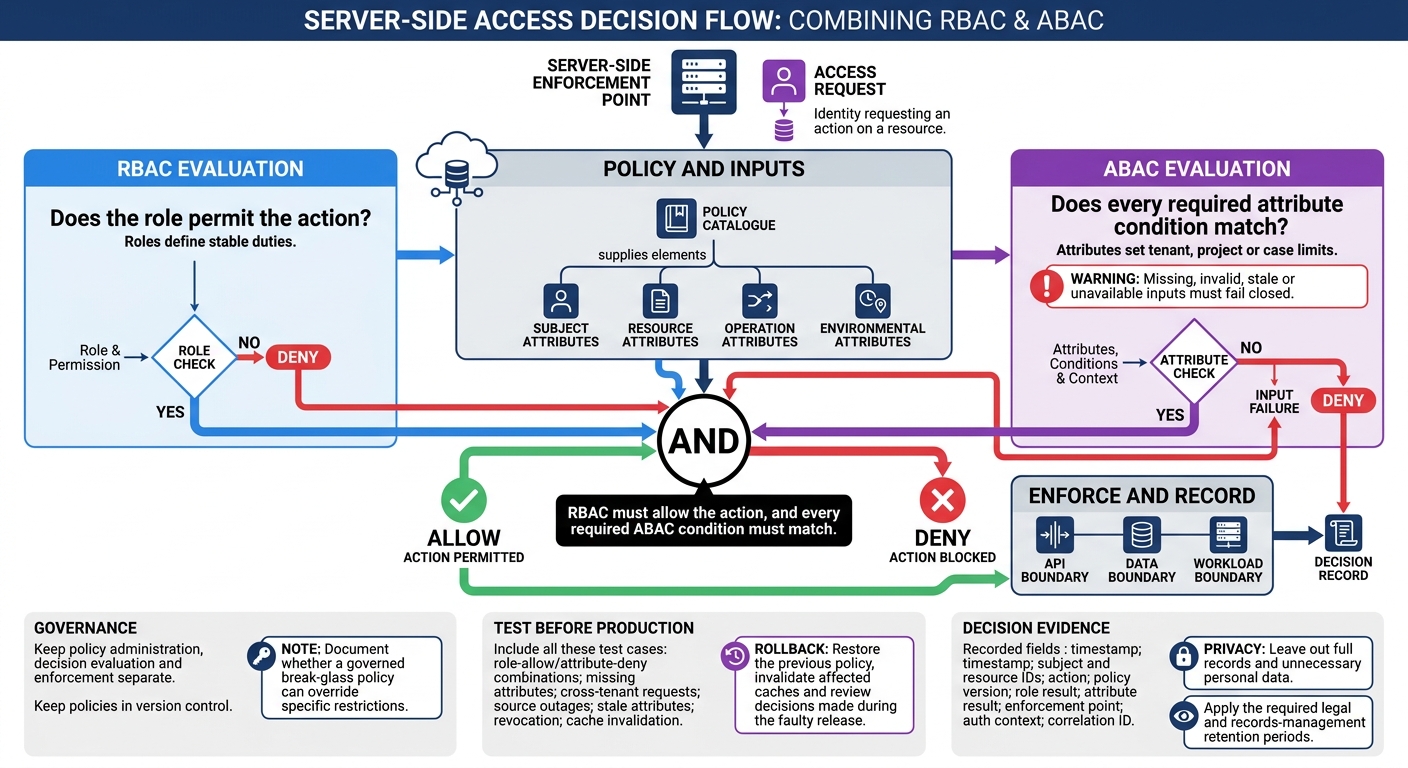
How Hybrid RBAC and ABAC Access Decisions Work
Use RBAC and ABAC together when roles define stable duties and attributes set tenant, project or case limits.
Make one access decision: RBAC must allow the action, and every required ABAC condition must match. Missing, invalid, stale or unavailable inputs must fail closed. Document whether a governed break-glass policy can override specific restrictions.
Define Roles, Attributes and Access Checks
With the hybrid model chosen, spell out how roles, attributes and enforcement points work together.
Create a policy catalogue that covers permissions, resource types, actions, roles, attribute owners, authoritative identity sources, permitted values, formats and freshness limits.
Keep policy administration, decision evaluation and enforcement separate at API, data and workload boundaries. Include subject, resource, operation and environmental attributes, as defined in NIST’s ABAC model – not just user fields.
Test Policies and Log Access Decisions
Validate the combined policy before it reaches production, and keep policies in version control.
Test role-allow/attribute-deny combinations, missing attributes and cross-tenant requests. Before release, also test source outages, stale attributes, revocation and cache invalidation. Rollback procedures should restore the previous policy, invalidate affected caches and review decisions made during the faulty release.
For each access decision, record the timestamp, subject and resource IDs, action, policy version, role result, attribute result, enforcement point, auth context and correlation ID. Leave out full records and unnecessary personal data. Apply the required legal and records-management retention periods.
Build Access Controls into Custom Applications
Build IAM into the application design – not just the UI. Use this approach when access rules need to follow workflows across APIs and migrated systems.
Treat IAM as a software requirement. Define identity integration, policy ownership, enforcement points, test evidence, logging, support and rollback.
Conclusion: Match Access Controls to Rules and Governance
Choose your access model based on stable duties, changing conditions and audit evidence. Use RBAC for stable job duties. Use ABAC for access based on tenant, project, classification or context. When both apply, use a hybrid model with one documented server-side evaluation path. Assess the choice against policy control, scale, administration and audit evidence using comprehensive development solutions.
Then document the inputs: identities, roles, attributes, resources, actions and access rules. Separate stable duties from changing conditions, and check attribute quality and the audit evidence you need.
Pilot the model with allowed, denied, boundary and failure cases. Include these final validation scenarios:
Test SaaS tenant isolation, internal project reassignment and public-sector clearance changes and jurisdictional restrictions.
Turn these scenarios into automated regression tests before rollout.
FAQs
How can I migrate from RBAC to a hybrid model safely?
Centralize identity management and enforce least privilege. Before making changes, map roles to attributes and policies. Use tags, resource groups or namespaces to scope resources, and avoid wildcards to limit the impact of changes.
Review access quarterly and connect your HR system to automate provisioning and deprovisioning. Set governance rules to prevent role sprawl, separate high-risk duties, and add immutable, time-stamped audit logs.
Roll out changes in phases, using Just-In-Time access and human approval for sensitive actions.
How do I prevent cached permissions from delaying revocation?
Set time limits on sessions so access expires automatically. When you need to act immediately, use a kill switch to instantly revoke access tokens and block connectors. With Just-in-Time (JIT) access, grant elevated privileges only for a specific task, then revoke them automatically when the work is done. These controls shorten the access window and reduce risks from stale or cached credentials.
How can I audit access without exposing sensitive attributes?
Enable and centralize audit logging. Record only the minimum IAM event metadata needed for reviews: who changed which permission or policy, and when. Do not record protected data. Set alerts for high-risk actions such as SetIamPolicy, CreateServiceAccountKey and DeleteRole.
Use immutable, append-only audit logs, and control access to retained logs. Keep operational logs separate from approval records so no account can rewrite the audit trail.