
EKS vs AKS vs GKE: Cost, Scale, Security

I’d choose by cloud fit, total cost, and team workload – not cluster fees alone. EKS suits AWS-based teams, AKS suits Azure and Microsoft identity setups, and GKE offers more node control with Standard or less node work with Autopilot.
My first step: compare the same workload in a Canadian region, with monthly totals in CAD. At 730 hours, EKS version-support fees alone range from US$73 to US$438 – six times as much if you delay upgrades into extended support.
Quick Comparison
| Criteria | EKS | AKS | GKE |
|---|---|---|---|
| Cost | Cluster fee; Auto Mode adds charges | Free or paid management tiers | Cluster fee; Autopilot resource billing |
| Scaling and node work | Managed node groups or Auto Mode | Configured node pools or Automatic | Standard node pools or Autopilot |
| Identity | AWS IAM | Microsoft Entra ID | Google Cloud IAM |
| Best fit | AWS integration and EC2 choice | Azure integration and Microsoft identity | Google Cloud integration and less node work |
For all three, I’d check upgrade ownership, scaling limits, access controls, audit logs, and recovery tests. <u>A Canadian cluster does not prove Canadian data residency.</u> Backups, logs, keys, and support access need separate checks.
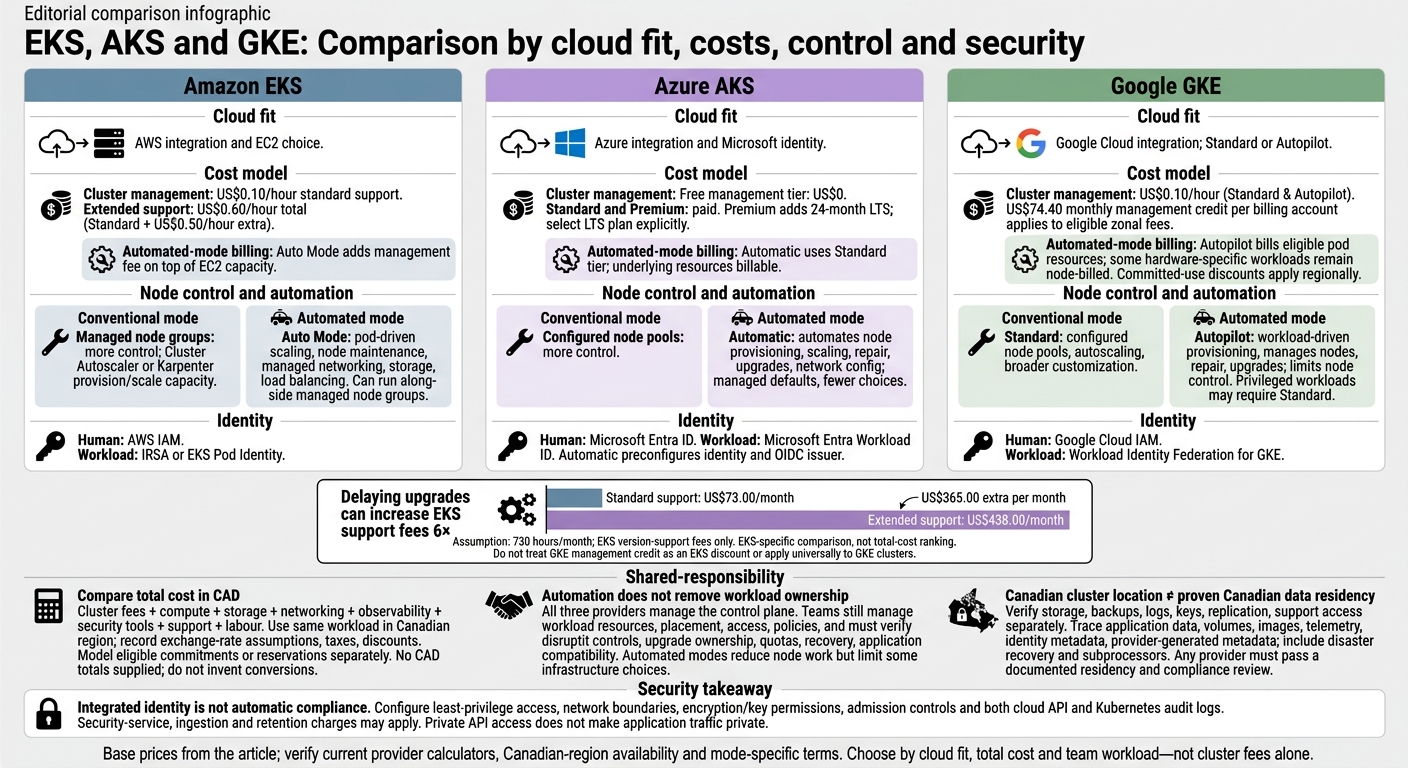
EKS vs AKS vs GKE: Cost, Control and Security
Cost: Cluster Fees, Infrastructure, and Labour
Compare EKS, AKS, and GKE Billing
An older Kubernetes version can cost more even when usage stays the same. At 730 hours/month, EKS standard support costs US$73.00, while extended support costs US$438.00 – an extra US$365.00 per month. Treat that gap as the cost of delaying an upgrade.
To plan for budget, growth, and risk, compare version support, automated capacity, and separate service charges – not just cluster fees. Check the figures below against current provider calculators and Canadian-region price sheets. They serve as the base prices for the CAD worksheet that follows.
| Billing item | EKS | AKS | GKE |
|---|---|---|---|
| Cluster management | US$0.10/hour for standard Kubernetes-version support | Free: US$0; Standard and Premium: paid | US$0.10/hour for Standard and Autopilot |
| Extended support | US$0.60/hour total: the standard fee plus US$0.50/hour extra. | Premium adds 24-month LTS; select the LTS plan explicitly. | No separate version-support charge listed |
| Automated mode | Auto Mode adds a management fee on top of the EC2 capacity it provisions and manages. | Automatic uses the Standard tier and automates node provisioning, scaling, upgrades, and network configuration. Underlying resources remain billable. | Autopilot bills eligible pod resources; some hardware-specific workloads remain node-billed. |
| Credits and commitments | Model eligible EC2 commitments separately | Model eligible Azure reservations and other discounts separately | US$74.40 monthly management credit per billing account for eligible zonal Standard and Autopilot cluster-management fees; Autopilot committed-use discounts apply regionally |
Cluster fees are only part of the bill. Compute, storage, networking, observability, security add-ons, and support are billed separately.
Convert these charges into a monthly CAD total to make the billing differences easier to compare. This financial planning is a core part of our app and software development services for Canadian enterprises.
sbb-itb-fd1fcab
AWS EKS vs Azure AKS vs Google GKE
Scaling, Node Management, and Upgrades
Once you’ve compared monthly costs, check how each platform scales and handles upgrades under the same workload.
Treat pod, node, and cluster scaling separately. The provider manages the control plane, but you still need to plan worker capacity, quota limits, and room for upgrades.
Set pool minimums and maximums, peak replica counts, pod limits, and enough spare capacity to handle the loss of one zone. Check vCPU, IP, disk, load-balancer, and GPU quotas. GPU availability and startup time can limit scale-out.
| Responsibility | EKS | AKS | GKE |
|---|---|---|---|
| Capacity provisioning | Managed node groups with Cluster Autoscaler, Karpenter, or Auto Mode | Configured node pools and autoscaling; Automatic adds managed provisioning | Standard: configured pools and autoscaling; Autopilot: workload-driven provisioning |
| What the provider manages | Control plane; Auto Mode adds node maintenance | Control plane; Automatic adds provisioning, repair, and upgrades | Control plane; Autopilot also manages nodes |
| What you manage | Workload resources, placement, disruption policies, and add-ons | Workload resources, placement, identity, and policies | Workload resources, placement, disruption policies, and supported add-ons |
| Node control | Managed groups offer more control; Auto Mode automates more | Configured pools offer more control; Automatic uses managed defaults | Standard offers broader customization; Autopilot limits node-level control |
Keep workload assumptions consistent across all three services so you can compare node management and upgrade duties directly.
EKS: Compute Options and Upgrade Duties
Managed node groups suit fixed EC2 families, with Cluster Autoscaler handling scaling. Karpenter provisions capacity for unschedulable pods. Auto Mode adds pod-driven scaling plus managed networking, storage, and load balancing. It can also run alongside managed node groups.
Upgrade the control plane first, followed by nodes and compatible add-ons. Managed-node upgrades default to one unavailable node. If eviction is blocked, an upgrade can fail after 15 minutes without forced termination.
Workers still need placement across multiple zones. Karpenter needs permissions and disruption policies, while Auto Mode limits some low-level choices.
AKS: Node Pools and Automated Upgrades
Put system, general-purpose, memory-optimised, GPU, and Spot workloads in suitable pools. Cluster Autoscaler changes node counts, HPA/VPA scale workloads, and KEDA responds to events such as queue depth.
Plan Kubernetes upgrades separately from node image updates. Set upgrade channels, maintenance windows, and surge capacity.
AKS Automatic handles more provisioning, repair, and upgrades, but limits configuration choices. Check quotas, subnet space, VM availability, identity, and policy. Give Spot workloads retries, checkpointing, and fallback capacity.
GKE: Standard and Autopilot Management
Standard keeps node-pool control in your hands; Autopilot cuts node administration. Standard supports cluster autoscaling and, where supported, node auto-provisioning alongside HPA/VPA. Autopilot preconfigures node repair and upgrades, but privileged workloads, host access, and specialised node configurations may need Standard.
Use release channels, maintenance windows, and exclusions to control timing. Both Standard and Autopilot receive automatic lifecycle changes, but Autopilot leaves you with less node-level control.
Test Scaling and Upgrade Disruption
Test in staging with production-like workloads and dependencies. Run through burst traffic, unschedulable pods, upgrades, loss of one zone, Spot/GPU interruption, quota exhaustion, and rollback or recovery. Measure scheduling and node-provisioning time, replica availability, error rate, queue lag, and the cost impact in CAD.
Keep spare capacity for upgrades, and validate backups and disaster recovery in the target Canadian region. Provider automation does not guarantee application compatibility or uninterrupted service. Use the test results to size that spare capacity before comparing security controls.
Security, Compliance, and Data Residency
Labels such as built in, integrated, configuration-dependent and separately paid tell you where a control lives and what it costs. None makes an application compliant on its own. Security choices also shape your team’s workload and risk – not just compliance checkboxes.
After scaling and upgrade testing, check who can act, which identities they use and whether you can trace each action to its source.
Separate Administrator and Workload Access
| Control | EKS | AKS | GKE |
|---|---|---|---|
| Human identity federation | Integrated: AWS IAM authentication | Integrated: Microsoft Entra ID | Integrated: Google Cloud IAM |
| Authorization and RBAC | Configuration-dependent: Kubernetes RBAC and IAM access mappings | Configuration-dependent: Azure RBAC or Kubernetes RBAC; define which governs access | Configuration-dependent: Google Cloud IAM for cloud operations; Kubernetes RBAC for in-cluster resources |
| Workload identity | Integrated: IRSA or EKS Pod Identity | Integrated: Microsoft Entra Workload ID | Integrated: Workload Identity Federation for GKE |
| Setup and mode differences | Map service accounts to roles; avoid broad node permissions | Automatic preconfigures workload identity and the OIDC issuer; other modes require setup | Give dedicated Kubernetes service accounts scoped permissions; verify mode settings |
Keep human, CI/CD, workload and emergency access separate. Require MFA and conditional-access controls for humans. Assign different identities to production and non-production workloads, and review role bindings regularly. For EKS, make sure actions remain traceable to individuals: a shared assumed role can blur who acted in Kubernetes audit logs.
Compare Network, Image, and Audit Controls
| Control | EKS | AKS | GKE |
|---|---|---|---|
| Private API and network boundaries | Configuration-dependent: private endpoint, VPC subnets, security groups and routes | Configuration-dependent: private cluster, VNet, NSGs and routes | Configuration-dependent: private or restricted control-plane access, VPC firewall rules and routes |
| Network policy and egress | Configuration-dependent: supported policy implementation and egress restrictions | Configuration-dependent: selected network-policy model and egress controls | Configuration-dependent: mode-compatible policies and supported policy logging |
| Encryption and customer-managed keys | Built in: platform encryption; AWS KMS configuration and charges apply | Built in: platform encryption; Key Vault or managed HSM configuration and charges apply | Built in: platform encryption; Cloud KMS configuration and charges apply |
| Secrets | Integrated: Kubernetes Secrets or AWS-managed secret services; service charges apply | Integrated: Kubernetes Secrets or Key Vault; service charges apply | Integrated: Kubernetes Secrets or Secret Manager; service charges apply |
| Image scanning | Integrated: registry and security tools; check charges | Integrated: Defender for Cloud and supported registries; check charges | Integrated: Artifact Registry scanning; check charges |
| Admission control | Configuration-dependent: Policy and signature verification | Configuration-dependent: Policy and signature verification | Configuration-dependent: Policy and signature verification |
| Cloud API and Kubernetes audit logs | Configuration-dependent: CloudTrail and separately enabled control-plane logs; CloudWatch charges apply | Configuration-dependent: Azure activity logs and Kubernetes diagnostic logs; check ingestion and retention charges | Configuration-dependent: Cloud Audit Logs and Kubernetes audit logging; check Data Access settings and charges |
| Posture management | Integrated: GuardDuty, Security Hub and Config; check charges | Integrated: Defender for Cloud and Azure Policy; check charges | Integrated: Security Command Center and Policy Controller; check charges |
Private API access does not make application traffic private. Test network policies and egress restrictions together; NAT alone is not an egress allow-list.
Keep key administration separate from cluster administration, and limit secret access by workload. Encryption at rest cannot stop an authorized identity with excessive permissions from reading data. Scanning detects vulnerabilities, but admission controls must enforce approved registries, signatures and attestations.
Retain both audit layers. Cloud API logs track cloud-resource changes; Kubernetes audit logs track cluster API activity. GuardDuty EKS Protection does not enable or retain your own EKS audit logs. Store evidence where deletion is restricted, set retention periods to meet contractual and regulatory needs, and test retrieval.
Once access, encryption and logging are defined, map those controls to each Canadian data path.
Check Canadian Residency and Compliance Duties
| Verification | EKS | AKS | GKE |
|---|---|---|---|
| Canadian availability | Verify the required AWS Canadian Region and every dependency | Verify the required Azure Canadian region and every dependency | Verify the required Google Cloud Canadian region and every dependency |
| Service-specific evidence | Obtain current EKS and supporting-service attestations | Obtain current AKS and supporting-service attestations | Obtain current GKE and supporting-service attestations |
| Residency settings | Verify storage, backups, logs, keys, replication and support access separately | Verify storage, backups, logs, keys, replication and support access separately | Verify storage, backups, logs, keys, replication and support access separately |
| Customer duties | Document workload controls, access reviews, retention and recovery evidence | Document workload controls, access reviews, retention and recovery evidence | Document workload controls, access reviews, retention and recovery evidence |
A Canadian cluster location does not prove residency. Trace application data, volumes, backups, images, telemetry, identity metadata and provider-generated metadata separately. Include disaster recovery and subprocessors in those checks.
Confirm compliance coverage for the exact services, region and mode. Have qualified counsel assess PIPEDA, applicable provincial privacy and health-information laws, and public-sector requirements. Retain configuration, access, incident-response and restore-test evidence.
Conclusion: Choose by Budget, Growth, and Risk
Use the cost, scale, and security findings above to choose an operating model your team can sustain. No option wins across the board. The right fit depends on region, Kubernetes version, workload constraints, discounts, support tier, and your team’s ability to run Kubernetes.
EKS fits well when your stack already uses AWS networking, IAM and related services. AKS may cut integration work for Microsoft-focused environments using Microsoft Entra ID and Azure governance services. GKE offers a choice: Standard gives you more control, while Autopilot reduces node-management work.
The matrix below groups the choices by budget, growth, and risk.
| Priority | Potential fit | Decision rule |
|---|---|---|
| Tight budgets | AKS Free tier; right-sized EKS or GKE Standard | Count infrastructure and labour costs, not just cluster fees. |
| Predictable management | GKE Autopilot, AKS Automatic, or well-run managed-node operations | Check compatibility, maintenance timing, recovery planning and ownership. |
| Growth | Any option that meets quota and capacity needs | Match quota headroom and autoscaling behaviour to expected growth. |
| Bursty demand | GKE Autopilot; autoscaled EKS or AKS | Check that quota headroom and autoscaling behaviour can handle demand spikes. |
| Reduced node administration | GKE Autopilot or AKS Automatic | Verify support for required host access, workloads and security agents. |
| Infrastructure control | EKS, standard AKS node pools, or GKE Standard | Choose more control when specialised infrastructure warrants the extra operations work. |
| Existing cloud investment | Match EKS to AWS, AKS to Azure, or GKE to Google Cloud | Weigh integration gains against migration and retraining costs. |
| Regulated workloads | Any option that passes a documented residency and compliance review | Select only options that pass that review. |
Confirm Costs, Residency, and Team Responsibilities
Before approval, check the workload profile, Canadian-region requirements, residency scope, cost model, upgrade ownership and recovery targets.
Build the monthly estimate in CAD. Include cluster fees, compute, storage, networking, observability, security tools, support and labour. Record your exchange-rate assumption, taxes and discounts. Version support can make a large difference to monthly costs.
Run a representative pilot in the target Canadian region. Compare cost per request, scale-out time, recovery time, error rate and engineering hours.
FAQs
How do I compare total EKS, AKS and GKE costs in CAD?
Import cloud billing data into your internal dashboards and convert every amount to CAD. Providers report billing differently, so group costs by Kubernetes namespace and service to spot over-allocated resources.
Use the 1,234.56 CAD format and record scaling events to link changes to costs. Include shared costs, such as NAT gateways and data transfer fees, which can make up a large share of unallocated spending.
How can I test autoscaling and upgrades without downtime?
Take a phased approach that accounts for risk. For autoscaling, keep your configuration in forecast-only or recommendation mode for two to four weeks. This lets you check performance against live traffic before turning on automation.
For upgrades, use canary or blue-green deployments to route traffic to new versions while tracking health metrics. For both autoscaling and upgrades, set automated rollback triggers to act when performance or error thresholds are breached.
What evidence do I need to verify Canadian data residency?
Verify that infrastructure, logs, metrics, traces and training datasets stay in Canadian regions, such as AWS ca-central-1 or GCP northamerica-northeast1. Set default regional constraints in Terraform and Helm to prevent accidental data leakage.
Conduct a Privacy Impact Assessment (PIA) to map data flows and risks. Keep audit-ready records of model versions and training data sources to support regulatory reporting and demonstrate PIPEDA compliance.