
Choosing Between Single-Agent and Multi-Agent AI

I’d start with one agent – and add more only when tests show a clear reason. A 10-step workflow can still suit one agent if its steps share context, permissions, and one owner. Multiple agents make sense when AI agents and intelligent automation, separate access, or parallel tasks outweigh the cost of coordination.
Before choosing, I’d map the decisions, data sources, tools, owners, and approvals. Then I’d test both designs on the same cases, comparing success rate (%), response time, human review, and total cost per completed case (C$) – including integration, monitoring, and retries.
More agents don’t automatically mean better results. I’d use fixed rules for predictable checks, enforce data permissions outside prompts, and require <u>human approval for high-impact actions</u>.
Quick Comparison
| Criterion | Single agent | Multiple agents |
|---|---|---|
| Workflow fit | One bounded goal; mostly sequential work | Specialist roles or independent branches |
| Context and tools | Shared context and tool access | Separate contexts, tools, or permissions |
| Setup | One execution loop to test and maintain | Routing, handoff rules, and shared-state controls |
| Response time | Fewer handoffs | Parallel work may save time; coordination adds delays |
| Total cost | Fewer calls and simpler upkeep | Extra calls, coordination, and possible duplicate work |
| Reliability | Test reasoning and tool failures | Also test routing, handoffs, and conflicting outputs |
| Oversight | One authority boundary and review path | Controls and audit trails across agents |
My final check: does the pilot meet its targets without failing privacy, approval, or fallback checks? If one agent does, I’d keep it.
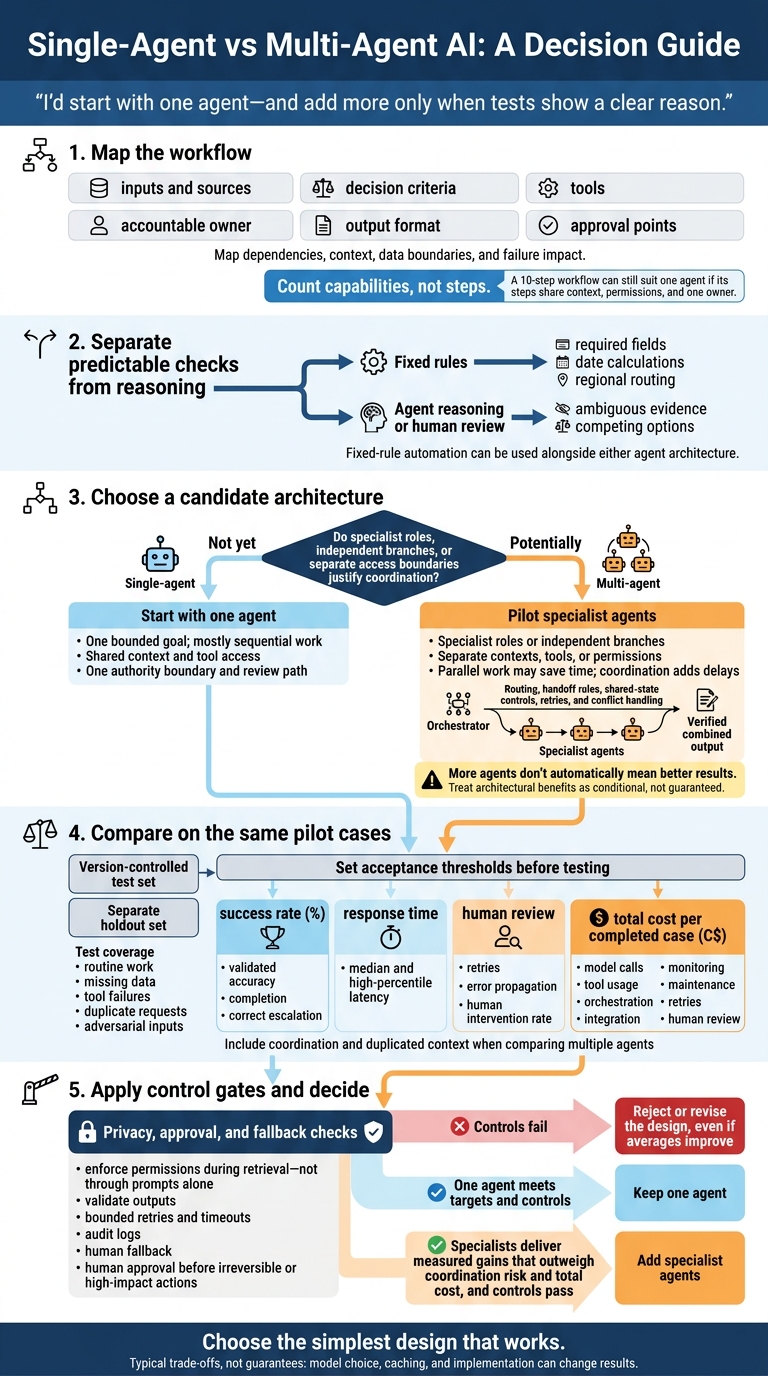
Single-Agent vs Multi-Agent AI: A Decision Guide
Single Agent vs Multi-Agent Systems: Which Should You Build?
sbb-itb-fd1fcab
Single-Agent vs Multi-Agent AI: How They Work
A single-agent system uses one AI to plan and complete a task within one workflow. A multi-agent system divides work among specialist agents with separate roles, contexts, or permissions, managed by an orchestrator. The number of tools alone doesn’t make a system multi-agent.
The comparison below can help you match the architecture to your custom workflow automation needs, budget, and governance. These are typical trade-offs, not guarantees: model choice, caching, and implementation can change the results.
| Consideration | Single-agent architecture | Multi-agent architecture |
|---|---|---|
| Fit | Clearly bounded, connected, mostly sequential tasks with one overall objective | Specialist, independent, parallel, hierarchical, or security-separated tasks |
| Complexity | Lower; one prompt, tool registry, execution loop, and state model | Higher; needs orchestration, agent contracts, routing, shared state, retries, conflict handling, and observability |
| Latency | Often lower, with fewer handoffs and model calls | Coordination and sequential handoffs can add time; parallel execution can save time on independent tasks |
| Cost | Model usage is usually easier to predict and control | Can be higher when agents process overlapping context or generate coordination messages |
| Governance | Centralized permissions and a simpler audit trail | More granular permissions, but governance must cover every agent, handoff, tool, and shared data store |
| Limits | Unrelated context, complex prompts, too many tools, and broad permissions can reduce reliability | Coordination failures, inconsistent outputs, duplicated work, state errors, and harder debugging can offset the gains from specialization |
Single-Agent AI for Bounded Tasks
One agent interprets the objective, retrieves information, chooses tools, takes action, and checks the results. It repeats that loop as needed. This setup works best when the objective, context, and data access are clear, and decisions stay with one owner. With just one reasoning loop to govern, it’s easier to build, test, monitor, and debug.
When work branches into specialist roles or parallel paths, the design shifts towards multi-agent coordination.
Multi-Agent AI for Specialist and Parallel Work
Coordination is the price of separation, parallel work, and permission boundaries. An orchestrator manages specialist agents and combines their outputs when tasks divide by role, timing, or access boundary. In a sequential design, each agent passes its output to the next. A parallel design runs independent subtasks together, while a hierarchical design uses supervisors to assign work to teams or workers.
Every handoff needs a destination, only the input data needed, an expected output format, timeout and retry rules, and an owner to resolve disagreements. Shared data also needs rules about who can change or overwrite results. This extra setup makes sense when specialist agents improve focus, let independent tasks run together, or enforce separate access boundaries. Their outputs still need verification and error handling.
Assess Workflow Complexity Before Choosing Agents
Map Decisions, Dependencies, and Owners
Start by identifying which steps depend on others. For each step, record inputs and sources, decision criteria, tools, accountable owner, output format, and approval points. Include volume, latency, sensitivity, failure mode, rollback, and escalation. Map the workflow from its trigger to the final output, noting context, roles, and the impact of failures.
Count capabilities, not steps. A ten-step process may suit one agent if all steps share context, permissions, and decision policy. Label each step as retrieval, interpretation, a tool call, a fixed rule, or human approval. Use rules for deterministic checks, such as required fields, date calculations, and regional routing. Ambiguous evidence or competing options may need agent reasoning or human review.
Check the scope, required tools, and how much context must stay available throughout the task. Give every decision with material effects an owner. Split agents only when decision authority, access, or ownership differs. High-impact actions need approval gates, regardless of agent count.
With the workflow mapped, compare architecture options and calculate potential automation benefits in a simple decision matrix.
Compare Architecture Choices in a Decision Matrix
Use this matrix to assess whether the workflow needs one agent, multiple agents, or fixed-rule automation. Shortlist a design, then test it against measured results.
| Factor | Favours one agent | Favours multiple agents |
|---|---|---|
| Workflow shape | One bounded goal with mostly sequential steps | Independent branches or separately owned processes |
| Specialisation | Shared knowledge and decision criteria | Distinct specialist judgment or evaluation criteria |
| Parallelism | Little independent work | Analyses can run concurrently |
| Context | Relevant information fits one shared context | Domain-specific context needs partitioning |
| Data separation | Consistent permissions within one trust boundary | Different roles need role-based access |
| Latency | Handoffs would consume the response-time budget | Parallel work saves more time than coordination adds |
| Cost | Fewer calls and simpler operations meet the need | Specialist work offsets coordination overhead |
| Governance | One accountable owner and review path | Separate owners or audit boundaries |
Example: retrieval vs. permission-scoped specialists. One retrieval-and-answer agent works when the records live in a single secured repository. Add schedule and procurement specialists only when each needs different data and permissions.
Agent count does not enforce security; check identity, membership, document permissions, and field restrictions before any tool call or data return.
Use the shortlist to compare data access, cost, reliability, and oversight.
Compare Data Needs, Cost, Reliability, and Oversight
Compare these trade-offs to decide whether specialist coordination is worth the extra overhead.
| Dimension | Single-agent design | Multi-agent design |
|---|---|---|
| Data access | One permission set is simpler to audit, but may be broad | Role-specific access requires controls for every agent, connector, and handoff |
| Handoffs | Few internal handoffs mean less risk of losing context | Requires versioned handoff contracts, validation rules, retry limits, and one accountable owner |
| Total operating cost | Track model, tool, and review costs | Also track coordination, duplicated context, and state management |
| Latency | Measure tool-call delays | Also measure handoff and slowest-branch delays |
| Reliability | Test agent and tool failures | Also test routing failures and error propagation |
| Observability | Trace one plan, context window, and action path | Use trace logs, correlation IDs, per-agent logs, and state history; validate handoffs |
| Governance | Audit one authority boundary | Audit delegated authority and agent-to-agent communication |
| Human oversight | Record approvals along one action path | Link approvals to actions across agents |
Set Data Access and Handoff Rules
For a single agent, document the inputs and context each task needs. For multiple agents, add a versioned handoff contract that includes the task, relevant evidence, assumptions, confidence or uncertainty, source references, timestamp, data classification, and required next action. Define who can update shared state and how to resolve conflicts. Reject stale updates and limit onward disclosure.
Agents can use the same foundation model while having different permissions and retrieval sources.
Test both designs with outdated documents, conflicting records, missing fields, duplicate data, ambiguous customer names, and misleading content. Measure retrieval precision, recall, freshness, and provenance completeness. Enforce permissions during retrieval – not through prompts alone. Every material answer or action must be traceable to an approved source or an explicitly labelled model inference.
Measure Total Cost and Workflow Performance
Count model calls, tool usage, orchestration, integration, monitoring, maintenance, retries, and human review. Report costs in Canadian dollars, accounting for taxes and foreign-exchange exposure where applicable. Compare cost per completed case, not just cost per model call.
Test both designs on the same workload and compare success rate, latency, retries, and error propagation. Parallel work saves time only when those savings exceed the delays from coordination, verification, and the slowest branch. This balance is critical when determining how workflow automation cuts costs across complex agent architectures.
Set Privacy Controls and Approval Gates
For regulated workflows, privacy and approval rules can shape the architecture as much as model quality.
Ask legal, privacy, and security teams to review applicable privacy laws, sector rules, contracts, and data-residency commitments. Don’t assume Canadian data must stay in Canada. Verify transfer permissions, safeguards, and accountability obligations. Under PIPEDA-related guidance, an organization remains responsible for personal information transferred to a third party for processing and must ensure a comparable level of protection.
Apply least privilege, retention limits, encryption, and traceable activity logs. Treat retrieved content as untrusted input, and test for prompt injection, unauthorized tool use, and data exfiltration.
Require human approval before irreversible or high-impact actions. Show the evidence, uncertainty, affected records, and policy exceptions. Record who approved the action and their decision. Assign business, technical, and privacy/security owners; accountability must not sit with the model or a sub-agent.
Use these controls as pass/fail criteria in the pilot.
Pilot the Architecture Before Deployment
Test the baseline in a sandbox before adding agents. Use fixed-rule automation for deterministic checks and one agent for tasks that require interpretation. Measure the current process’s performance first, then test whether specialist agents improve results. Document the test sets, metrics, and evaluation tools so reviewers can reproduce the results. Use the same measures to compare the baseline with each specialist version.
Test Whether Specialist Agents Improve Results
Build a version-controlled test set using actual or carefully anonymized cases. Label each case’s expected outcome, escalation condition, and required approval. Keep a separate holdout set for final evaluation. Cover routine work, missing data, tool failures, duplicate requests, and adversarial inputs. Test every design with the same cases, tools, permissions, and evaluation criteria.
Set acceptance thresholds before testing. Measure validated accuracy, completion, correct escalation, median and high-percentile latency, cost per successful transaction in CAD, and the human intervention rate. Add specialists only when measured gains outweigh coordination risk.
Before production, verify output validation, bounded retries, timeouts, audit logs, approval gates, and human fallback. Reject designs that improve averages but fail control checks.
Define Development and Integration Requirements
To plan integration and scope implementation, document one candidate workflow. Identify its owner, current steps, existing systems and APIs, data boundaries, approval requirements, and fallback owner. Include the pilot dataset, success thresholds, CAD cost limits, and requirements for security, accessibility, and records management. Ask the assessment to determine whether rules, one agent, or specialist agents meet those requirements.
Digital Fractal Technologies Inc can support workflow automation, AI consulting, and integration work when a pilot needs to connect agents to business systems, approval workflows, CRM data, or industry-specific applications.
Conclusion: Choose the Simplest Design That Meets Your Needs
Compare workflow complexity, data boundaries, cost, and oversight, then choose the simplest design that works. Use one agent for bounded work that shares context. Add agents only when specialist roles, parallel tasks, or separate data access offer clear gains that outweigh the work of coordinating them.
With multiple agents, assign one owner to each handoff. After the pilot, let the results decide whether to scale: gains in quality, reliability, or speed must justify the total cost in CAD and the oversight required. Keep one agent if it meets your needs; add specialized roles only when there’s a clear reason.
FAQs
How can I tell if my workflow needs specialist agents?
Use specialist agents for multi-step workflows that span several systems and need reasoning and autonomous execution. These workflows might involve looking up records, generating quotes, and booking follow-ups. For simple, linear, or rule-based tasks, basic automation is often enough.
Digital Fractal Technologies Inc can help identify where agents fit through an AI Readiness Audit. Specialised agents support scaling, simplify maintenance, and allow targeted governance with human-in-the-loop checkpoints.
What data should agents share without increasing privacy risk?
Apply least privilege: give agents access only to the data they need for their tasks. Mask personally identifiable information (PII), anonymize data where possible, and remove sensitive details that aren’t needed.
Before sharing data, conduct a Privacy Impact Assessment to identify risks and check compliance with Canadian regulations. Use input and output guardrails to validate data, keep immutable audit logs of all access, and limit data collection.
How do I weigh better results against cost and oversight?
Match approval gates to risk. Use advisory gates for low-risk tasks. High-stakes actions need blocking gates, a 15-minute service-level agreement and mandatory human approval.
Track cost per successful task, not just speed. Test performance in a pilot before scaling. Assign a named risk owner, restrict access using least-privilege permissions and keep immutable logs to support safety, accountability and efficient operations.