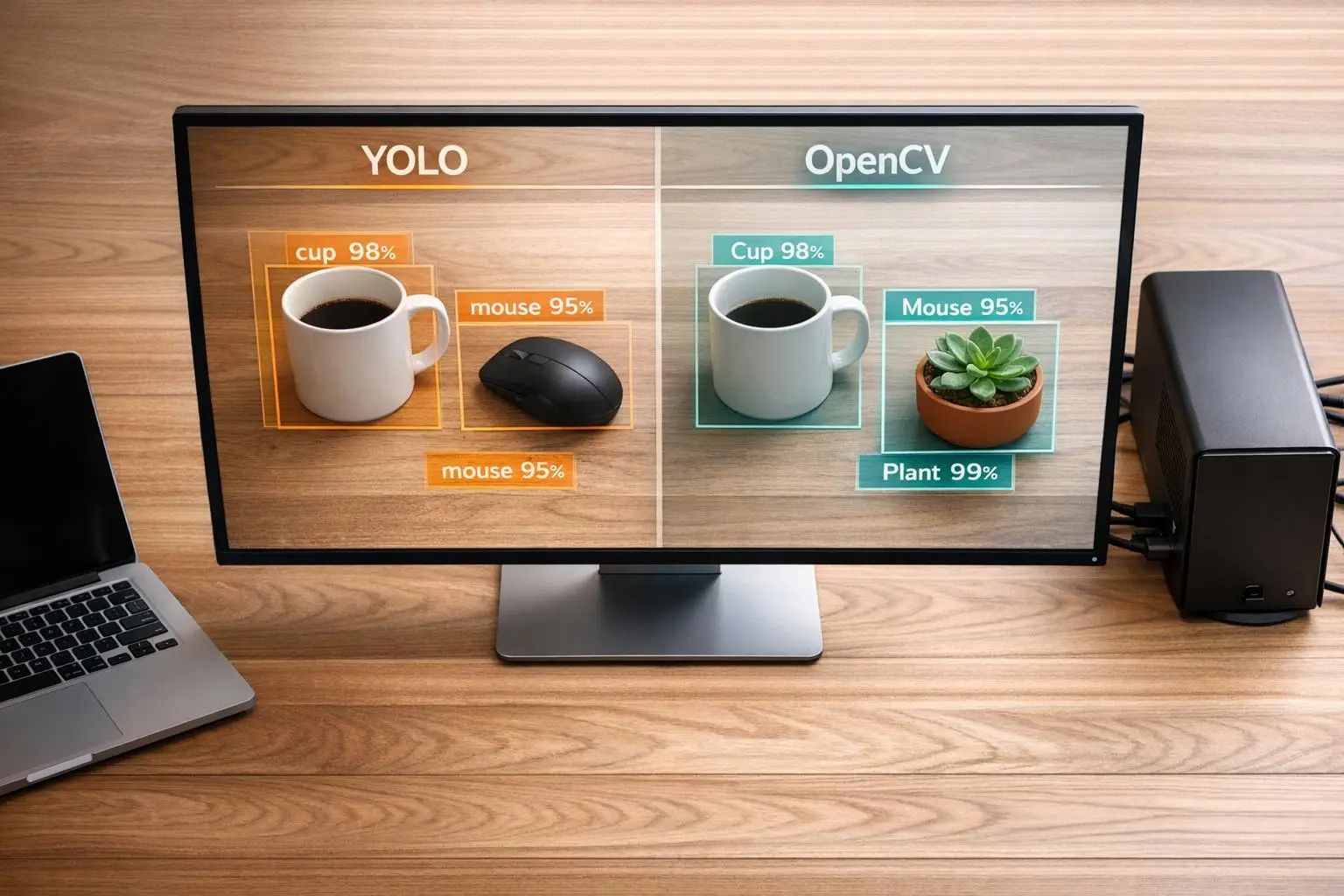
YOLO vs. OpenCV: Object Detection Tools Compared

YOLO and OpenCV serve different purposes in computer vision:
- YOLO: A deep learning model designed for fast, high-accuracy object detection. It excels in identifying objects in complex scenes and operates best with GPUs. Recent versions (e.g., YOLOv12) offer advanced features like instance segmentation and pose estimation.
- OpenCV: A software library for image processing and video analysis. It supports traditional detection methods (e.g., Haar Cascades) and integrates with modern models like YOLO through its DNN module. OpenCV is lightweight and works well on CPUs, making it ideal for simpler tasks or preprocessing.
Key takeaway: Use YOLO for high-speed, precise object detection in complex settings. Opt for OpenCV when handling general visual data tasks or when hardware resources are limited.
Quick Comparison:
| Feature | YOLO (v8–v12) | OpenCV |
|---|---|---|
| Purpose | Object detection | General image/video processing |
| Accuracy | High in complex scenes | Lower with classical methods |
| Speed | GPU-accelerated; up to 145 FPS | Slower on CPUs |
| Setup Complexity | Moderate; requires AI and machine learning solutions | Simple; library install |
| Hardware Needs | GPU recommended | Runs efficiently on CPUs |
| Best Use Cases | Security, traffic analysis | Preprocessing, basic detection |
For Canadian businesses, choosing depends on the task complexity, hardware availability, and licensing requirements. Often, combining both tools yields the best results.
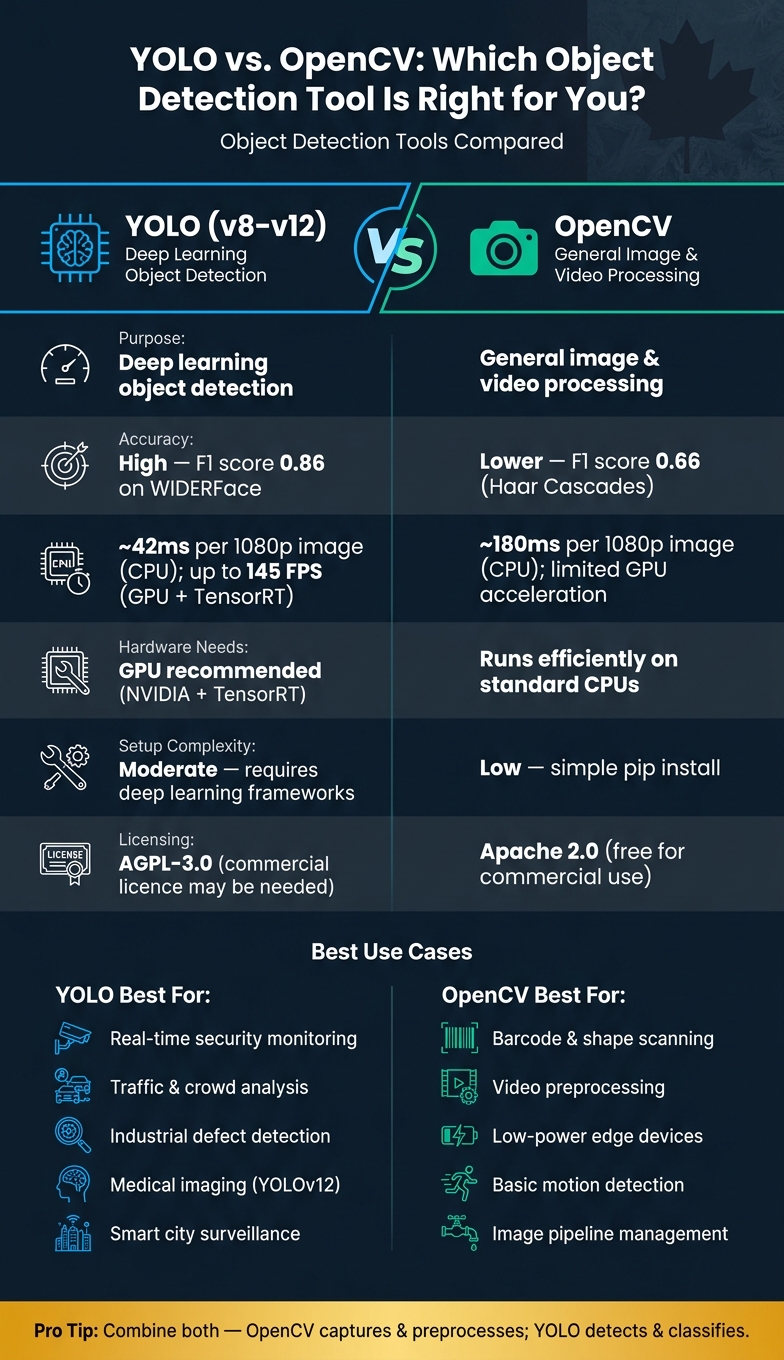
YOLO vs. OpenCV: Side-by-Side Comparison for Object Detection
YOLO vs OpenCV: What to Use for Real-time Visual Inspection in Manufacturing (Factory Use Cases)
sbb-itb-fd1fcab
What Is YOLO?
YOLO (You Only Look Once) is a deep learning model designed to detect objects in a single pass. Unlike earlier methods that required multiple stages, YOLO uses a grid-based approach and an anchor-free design, making it a major step forward in object detection. By 2026, versions like YOLOv8, YOLOv10, and YOLOv12 have become widely used in production settings.
Core Features and Architecture
YOLO approaches object detection as a regression task. It divides an image into an S × S grid, with each cell predicting bounding boxes and class probabilities in just one pass through the neural network. More recent iterations, such as YOLOv8 and beyond, have adopted anchor-free detection, eliminating the need for manual anchor box tuning. This adjustment allows the model to handle objects of varying sizes more effectively. YOLOv12 introduces "Area Attention", which improves the model’s ability to maintain large receptive fields without adding extra computational load.
Performance Overview
One of YOLO’s standout qualities is its speed. For instance, YOLOv8, when accelerated with TensorRT on an NVIDIA RTX 3080, achieves an impressive 145 FPS compared to 85 FPS using standard PyTorch. The YOLOv8n (Nano) variant delivers an inference latency of just 1.8ms on a GPU, making it ideal for high-speed video tasks. However, achieving this level of performance requires an NVIDIA GPU with TensorRT support. Here’s a quick look at how the different YOLOv8 variants perform:
| Model Variant | Inference Speed (GPU) | Best Use Case |
|---|---|---|
| YOLOv8n (Nano) | 1.8ms | Edge devices / high-speed tracking |
| YOLOv8s (Small) | 2.1ms | Balanced speed and accuracy |
| YOLOv8m (Medium) | 3.5ms | General-purpose production |
| YOLOv8l (Large) | 5.8ms | High-precision requirements |
| YOLOv8x (X-Large) | 8.3ms | Maximum accuracy / complex scenes |
Benchmarks for YOLOv8 variants.
Strengths and Limitations
YOLO’s ability to process entire images at once helps it distinguish objects from background noise more effectively than multi-stage detection methods. Its newer versions go beyond simple object detection, incorporating features like instance segmentation, pose estimation, and image classification.
That said, YOLO does have some drawbacks. It may struggle with detecting very small objects or items that are closely packed together, such as overlapping tools on a construction site. Additionally, setting up and fine-tuning YOLO requires expertise in artificial intelligence and machine learning solutions like PyTorch. Without a powerful GPU, achieving real-time performance can be challenging.
"YOLO is significantly better for real-time ‘detection’ because it was designed specifically for speed." – upGrad
Next, we’ll dive into OpenCV’s object detection methods and see how they compare to YOLO.
What Is OpenCV?
OpenCV (Open-Source Computer Vision Library) is a free, open-source toolkit designed for image processing, video analysis, and computer vision tasks. Released under the Apache 2 licence, it’s available for both personal and commercial projects. Unlike YOLO, which focuses on object detection, OpenCV provides a broad range of tools to build complete vision pipelines. As of 2026, the library’s current Long-Term Support (LTS) version is OpenCV 4.10, while OpenCV 5.0 is undergoing beta testing.
"YOLO is a model, while OpenCV is a library of tools. Even if we get better detection models than YOLO, we will still need a tool like OpenCV to capture video frames, manage memory, and display the results." – Sriram, Senior SEO Executive, upGrad
Classical Object Detection Methods
Before deep learning became mainstream, OpenCV relied heavily on its built-in algorithms like Haar Cascades and HOG + SVM for detection tasks. Haar Cascades were commonly used for face detection, while HOG + SVM (Histogram of Oriented Gradients combined with Support Vector Machines) was favoured for detecting pedestrians. Additionally, contour-based detection was employed for identifying shapes and edges. These methods are lightweight and efficient enough to run on standard CPUs, making them ideal for low-power devices like Raspberry Pi.
However, these classical methods had their limitations. While they performed well in controlled environments, their accuracy dropped significantly in challenging conditions like low light, crowded scenes, or overlapping objects. They could identify that something was present but often struggled to determine what it was. Despite these drawbacks, these methods laid the groundwork for OpenCV’s compatibility with modern deep learning models.
Using OpenCV with YOLO
OpenCV bridges the gap between traditional computer vision techniques and modern deep learning by integrating AI seamlessly with YOLO. Through its DNN (Deep Neural Network) module, developers can load and run pre-trained models, including YOLO, without relying on heavier frameworks like PyTorch or TensorFlow. OpenCV supports YOLO versions ranging from YOLOv3 to YOLOv10.
The integration process typically involves three steps. First, OpenCV’s blobFromImage function is used to resize and normalise images (e.g., 640×640 for YOLO). Next, the model performs a forward pass using ONNX to generate raw detection tensors. Finally, OpenCV applies Non-Maximum Suppression (NMS) to eliminate overlapping bounding boxes and map the coordinates back to the original image size. One important note for developers: OpenCV uses the BGR colour format by default, while most deep learning models expect RGB. Forgetting to convert with cv2.cvtColor can lead to errors during inference.
"The OpenCV DNN module shines, as it has a single API for performing Deep Learning inference and has very few dependencies." – Kukil, LearnOpenCV
Strengths and Limitations
OpenCV’s greatest strength lies in its versatility and lightweight nature. It handles essential vision tasks like capturing video frames, converting colour formats, resizing images, and drawing bounding boxes, all with minimal dependencies. This makes it particularly suitable for embedded systems or environments with limited resources. For businesses looking to deploy these tools, an AI implementation strategy can help determine the best hardware-software balance.
That said, OpenCV’s performance in high-accuracy detection depends entirely on external models. Its classical methods can’t compete with deep learning models in complex scenarios. Additionally, while the DNN module is capable, it has limitations when running on CPUs. For example, tests on an Intel i7 (9th Gen) showed that the ONNX Runtime was 33% to 43% faster than OpenCV’s DNN module for YOLOv3 inference. On NVIDIA GPUs, using DNN_BACKEND_CUDA can help close this performance gap.
YOLO vs. OpenCV: Direct Comparison
This section breaks down the key differences between YOLO and OpenCV, especially in the context of industries in Canada like public infrastructure, energy, and construction. By comparing their strengths side by side, it’s easier to see which tool fits specific needs.
Performance and Accuracy
When it comes to detection, YOLO’s deep learning approach and OpenCV’s classical methods shine in different areas. However, YOLO takes the lead in both speed and accuracy. For instance, YOLOv8 processes a 1080p image in about 42 ms, while OpenCV’s Haar Cascades take roughly 180 ms on a CPU. YOLO also excels in challenging conditions like tilted angles or dim lighting, which are common in Canadian environments like snowy parking lots or dimly lit warehouses. On the WIDERFace validation set, YOLOv8n-face achieves an F1 score of 0.86, far exceeding Haar Cascades’ 0.66.
| Feature | YOLO (v8–v12) | OpenCV (Classical Methods) |
|---|---|---|
| Accuracy | High; handles crowded scenes | Lower; struggles with busy scenes |
| CPU Speed (1080p) | ~42 ms | ~180 ms |
| GPU Speed | Up to 145+ FPS with TensorRT | Limited GPU acceleration |
| Scalability | Scales well with GPUs | Best for simpler tasks |
| Hardware Needs | GPU recommended | Runs well on standard CPUs |
Ease of Use and Setup
OpenCV is easier to get started with. A simple pip install opencv-python gives you access to its tools, and its classical methods don’t require training data or deep learning knowledge.
YOLO, on the other hand, requires more effort upfront. Its deep learning framework demands some familiarity with neural networks. That said, modern tools like the ultralytics package simplify the process significantly. With just a few lines of Python, you can handle tasks like Non-Maximum Suppression automatically. However, running YOLO on a CPU alone can take about 1.54 seconds per image, making it impractical for real-time applications without hardware acceleration.
| Feature | YOLO (Deep Learning) | OpenCV (Classical Methods) |
|---|---|---|
| Setup Complexity | Moderate; needs deep learning frameworks | Low; simple library install |
| Learning Curve | Steeper; requires neural network basics | Shallower; focuses on image processing |
| Training Requirement | High for custom tasks; needs annotated data | Low; uses pre-defined filters |
| User-Friendliness | High for v8+ with APIs | High for general tasks |
Deployment and Application Scenarios
The deployment strategies for YOLO and OpenCV highlight their differences even further. Often, OpenCV is used for video capture and preprocessing, with YOLO handling the object detection as part of comprehensive development solutions.
For organisations in Canada with strict data residency rules, edge deployment is a strong option. YOLO models can run entirely on devices like Raspberry Pi 4 using formats like ONNX or TensorRT, achieving 5–10 FPS with NCNN. This makes it suitable for remote areas with limited connectivity. Meanwhile, high-throughput applications, such as real-time security monitoring or traffic analysis, benefit from deploying YOLO on NVIDIA GPUs with TensorRT acceleration.
Licensing is another consideration. YOLOv8 to v12 are released under AGPL-3.0, which might require source code disclosure for SaaS products unless a commercial licence is purchased. In contrast, OpenCV is free for commercial use under the Apache 2 licence.
"YOLO is significantly better for real-time ‘detection’ because it was designed specifically for speed. While OpenCV can do basic motion detection very fast, it cannot tell you what is moving with the same level of accuracy as YOLO." – Sriram, Senior SEO Executive, upGrad
Picking the Right Tool for Your Business
When deciding between YOLO and OpenCV, it’s essential to weigh how each tool aligns with your specific business environment. Rather than treating these tools as competing solutions, consider how they can complement each other to meet your operational needs.
Scenario-Based Recommendations
The key question to ask yourself is: Do you need to identify an object or simply detect its presence?
For straightforward tasks like barcode scanning, colour detection on a production line, or basic shape tracking, OpenCV’s rule-based methods are often sufficient. These tasks can be efficiently handled on standard CPUs without requiring advanced hardware or complex algorithms.
On the other hand, YOLO is better suited for more intricate scenarios. Tasks such as real-time security monitoring, traffic analysis, industrial defect detection, or identifying vehicles in crowded environments benefit greatly from YOLO’s advanced feature-learning capabilities. For instance:
- YOLOv11 excels in detecting industrial defects and supporting logistics operations, where precision is key.
- YOLOv12 stands out with its attention-focused architecture, making it highly effective for applications like medical imaging or smart city surveillance.
Here’s a quick comparison of tools based on specific use cases:
| Use Case | Recommended Tool | Reason |
|---|---|---|
| Barcode or shape scanning | OpenCV | Simple, rule-based, and CPU-efficient |
| Real-time security alerts | YOLO (v10+) | Performs well in crowded scenes |
| Industrial defect detection | YOLO (v11) | Designed for complex environments |
| Video preprocessing in harsh weather | OpenCV + YOLO | OpenCV captures; YOLO detects |
| Low-power edge devices | YOLOv8n (NCNN) | Achieves 5–10 FPS on Raspberry Pi 4 |
These recommendations take into account the unique challenges businesses face, especially under Canadian conditions.
Factors for Canadian Businesses
Canada’s climate and geography introduce unique challenges, such as low-light winters, heavy snowfall, and remote locations. YOLO holds a distinct edge in harsh weather conditions, as its ability to train on specialised datasets makes it particularly effective in detecting objects in snowy or dimly lit environments – areas where traditional methods like OpenCV may falter.
For industries like energy or construction, where connectivity can be unreliable, lightweight YOLO models (e.g., YOLOv8n exported to NCNN or OpenVINO formats) allow for local processing without relying on constant cloud access. This capability is especially useful in remote or off-grid operations.
It’s also important to evaluate licensing terms. OpenCV’s Apache 2 licence is straightforward and business-friendly, making it easy to use for commercial purposes. However, YOLO’s licensing varies by version and may require source code disclosure for some SaaS applications. Be sure to review these terms carefully to ensure compliance with your business model.
Working with a Custom Software Partner
To fully integrate these tools into your business operations, you may need expert guidance. Off-the-shelf YOLO or OpenCV implementations rarely fit seamlessly into enterprise systems. Effective integration requires careful planning around data workflows, hardware compatibility, and regulatory compliance.
This is where partnering with a custom software provider can make a difference. For example, Digital Fractal Technologies Inc specializes in building tailored AI-driven solutions for industries like construction, energy, and the public sector. By creating purpose-built computer vision pipelines, they ensure your system is aligned with your specific environment, data residency needs, and existing infrastructure. A custom approach means your detection system is not just functional but optimized for your unique requirements.
Conclusion
YOLO focuses on object detection, while OpenCV handles visual data processing. As upGrad explains:
"It is unlikely that YOLO will replace OpenCV because they do different things. YOLO is a model, while OpenCV is a library of tools."
Choosing between them depends on your specific needs. If your task involves detecting a colour, shape, or barcode, OpenCV is a great option – it’s fast, lightweight, and works well on standard CPUs. On the other hand, YOLO is better suited for identifying objects in complex scenes. In many real-world applications, these tools are used together to leverage their strengths.
This comparison shows that OpenCV excels in lightweight image preprocessing, while YOLO stands out for real-time, high-accuracy detection in complex scenarios. Your decision should be guided by practical factors.
For Canadian organisations, here are key considerations:
- What hardware is available? If you lack a GPU, OpenCV or a quantized YOLO nano model may be more practical.
- How complex is the scene? Crowded settings, low-light winters, or unpredictable weather make YOLO’s learned features a better fit than OpenCV’s rule-based methods.
- What licensing applies? OpenCV’s Apache 2 licence is simple for commercial use, but YOLO’s AGPL-3.0 may require extra review depending on your deployment.
Integrating these tools into your workflows can be tricky. Partnering with experts like Digital Fractal Technologies Inc can simplify this process, especially in industries like energy, construction, or the public sector, where conditions are often far from predictable.
FAQs
Can I run YOLO in real time without a GPU?
Yes, it’s possible to run YOLO in real time on a CPU, even though GPUs are usually the go-to choice for such tasks. Lightweight models like YOLOv8n or Tiny-YOLO are designed to achieve real-time performance without requiring heavy computational power.
To make this feasible on a CPU, certain optimizations come into play:
- Leveraging frameworks like OpenCV DNN or ONNX Runtime for efficient processing.
- Applying techniques such as pruning, which reduces the size of the model while maintaining its accuracy.
These adjustments make YOLO a practical option for devices with limited resources.
Digital Fractal Technologies Inc. specializes in creating scalable AI applications that help improve productivity, even in scenarios where resources are constrained.
When is OpenCV alone enough for detection?
OpenCV is a great fit for straightforward tasks like motion detection, especially when speed is a priority over identifying specific objects. It’s also highly effective for image processing functions such as colour space conversion, blurring, thresholding, and contour detection. When it comes to simple vision pipelines that don’t demand advanced object classification, OpenCV’s classic algorithms offer a solid and efficient base for development.
How can I use OpenCV and YOLO together in one pipeline?
To combine OpenCV and YOLO, you can use OpenCV’s Deep Neural Network (dnn) module to load and run pre-trained YOLO models. OpenCV takes care of tasks like video capture and preprocessing (such as resizing), while YOLO handles the object detection part. Once the detection is complete, you can use OpenCV’s drawing functions to display the results visually.
Here’s a typical workflow:
- Convert YOLO models to the
.onnxformat for compatibility. - Use the
cv2.dnn.readNetfunction to load the YOLO model. - Preprocess the input image using
cv2.dnn.blobFromImageto prepare it for inference.
This setup allows you to seamlessly integrate video processing and object detection into your applications.