5 Steps to Build an AI Receptionist

Missed calls mean missed opportunities – and for industries like construction, energy, and public services, that could cost you valuable leads. An AI receptionist ensures no call goes unanswered, offering a cost-effective, 24/7 solution compared to hiring full-time staff. It handles tasks like routing calls, scheduling appointments, and qualifying leads, all while maintaining compliance with Canadian standards like PIPEDA and PHIPA.
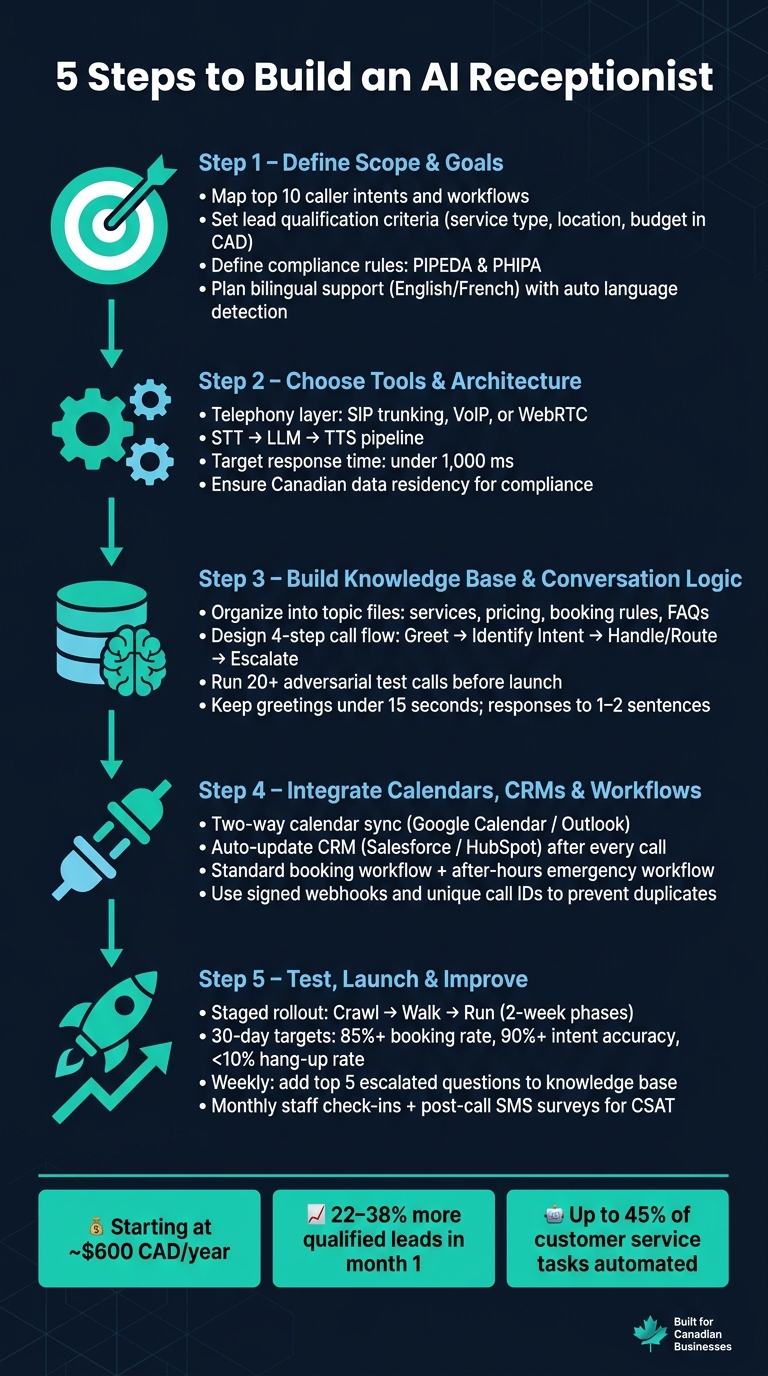
Here’s how to build one in 5 steps:
- Define its role: Identify common caller intents, workflows, and lead qualification criteria using an AI implementation planner. Plan for bilingual support and compliance with Canadian regulations.
- Choose the right tools: Use telephony, voice recognition, and AI platforms that integrate seamlessly while meeting local requirements.
- Build a knowledge base: Organize information into categories like services, pricing, and FAQs to ensure accurate responses.
- Integrate calendars and CRMs: Sync systems for real-time scheduling, CRM updates, and automated workflows.
- Test and refine: Roll out in phases, monitor metrics like booking rates and intent accuracy, and continuously improve.
With annual costs starting around $600 CAD, an AI receptionist is an affordable way to improve customer experience and streamline operations. Follow these steps to modernize your front desk while staying compliant and efficient.
5 Steps to Build an AI Receptionist for Your Business
I Built an AI Voice Receptionist with Vapi and n8n MCP (free template)
sbb-itb-fd1fcab
Step 1: Define the AI Receptionist’s Scope and Goals
Start by outlining the exact role your AI receptionist will play. Without a clear purpose, the system may confuse callers and slow down development. This step lays the groundwork for everything else.
Identify Key Use Cases and Workflows
Begin by analysing one week of call activity. Track call volume, peak times (e.g., 9–11 a.m., 2–4 p.m.), and the most common reasons people call. From this, create a "Top 10" list of the main caller intents and design a specific workflow for each scenario.
These workflows should cover essentials like greeting callers, detecting their intent, answering FAQs, managing bookings or rescheduling, and routing calls to the right person or department. For Canadian businesses, it’s important to account for multiple time zones (from NST to PST) and provide bilingual support. Start each call with a combined greeting like, "Hello / Bonjour", and use immediate language detection to adapt the flow based on the caller’s preference. This ensures smoother interactions, especially for Quebec or nationwide audiences, without forcing callers to repeat themselves.
Set Lead Qualification Criteria
Collaborate with your sales team to define the criteria your AI receptionist will use to qualify leads. These might include screening questions about the type of service needed, the caller’s location (to confirm it’s within your service area), their budget (in CAD), and the urgency of their request.
Once the criteria are in place, the AI can collect key details – such as the caller’s name, contact information, service type, and budget – and assign a lead score. This ensures your team gets well-organized data before following up. This approach is especially helpful for industries like construction or energy, where field teams often can’t answer every call. Automating up to 45% of customer service tasks (calculate your potential workflow automation savings), AI receptionists have been shown to boost qualified leads by 22–38% in just the first month of use.
Define Policies and Compliance Rules
In addition to qualifying leads, it’s essential to define the operational and compliance rules that will guide your AI receptionist. Start by documenting operational policies, such as business hours (e.g., Monday–Friday, 08:00–17:00 MST), after-hours procedures, escalation triggers, and compliance notifications to meet legal standards like PIPEDA and PHIPA. For example, escalation triggers – keywords like "emergency", "complaint," or "billing dispute" – should immediately transfer the caller to a human agent, complete with the context of their call.
On the compliance side, healthcare providers in Ontario must ensure their AI system aligns with PHIPA requirements. This means vendors handling call transcripts or recordings need to sign a Business Associate Agreement (BAA), and all data must be stored within Canada. Additionally, document where call transcripts are stored and how long they’re retained.
"An English-only AI receptionist that a Quebec customer is forced to navigate is a compliance exposure, not just a UX problem." – DialPhone
Step 2: Choose Your Tools and Plan the System Architecture
Once you’ve defined the scope, it’s time to gather the tools and map out your system’s architecture. Starting with the right framework is critical. As enterprise analyst Katherine Stone explains:
"The architectural choice you make in week one sets your cost ceiling and flexibility for the next two years."
Your technical decisions will shape the system’s ability to deliver high call quality, meet compliance standards, and scale effectively.
Core System Components
An AI receptionist operates through several interconnected layers. At the foundation is the telephony layer, which manages inbound and outbound calls using SIP trunking, VoIP, or WebRTC. Next, a Speech-to-Text (STT) engine transcribes spoken words into text in real time, handling challenges like Canadian accents, background noise, and even switching between languages. This text is then processed by a Large Language Model (LLM), which interprets the caller’s intent and generates appropriate responses. Finally, a Text-to-Speech (TTS) engine converts these responses into clear, natural-sounding audio.
All these components are coordinated by an orchestration engine. This layer ensures smooth conversation flow, keeps track of context across multiple exchanges, and decides when to escalate the interaction to a human agent. To maintain a seamless experience, aim for a total response time of under 1,000 milliseconds. This can be achieved by using platforms that integrate telephony and AI processing on the same network.
The Role of Custom Development
While off-the-shelf tools can handle simple use cases, they often fall short for more complex requirements. Standard platforms may lack advanced customisation, robust CRM integrations, or compliance features tailored to Canadian regulations, such as PIPEDA for data residency or PHIPA for healthcare.
Collaborating with experts like Digital Fractal Technologies Inc offers a solution. They specialize in creating custom CRM systems, workflow automation, and AI integrations designed for industries with strict compliance needs. For sectors like construction, energy, or public services – where workflows are intricate and data handling is tightly regulated – a custom-built system ensures both control and regulatory alignment that generic tools simply can’t provide.
Integration Best Practices
Seamless integration with your existing tools – like calendars, CRMs, and automation platforms – is essential. Use signed webhooks for secure API connections to block unauthorised access. Assign a unique call ID to every interaction to prevent duplicate CRM entries or repeated SMS confirmations caused by webhook retries.
For Canadian deployments, there are additional integration requirements to consider. These include:
- Supporting postal code validation for service area checks.
- Accommodating all six Canadian time zones, from NST to PST, to ensure accurate scheduling.
- Formatting currency in CAD for invoices and transactions.
It’s also crucial to confirm that your providers store call logs and transcripts on Canadian servers. This step is especially important for industries governed by PIPEDA. By addressing these specifics, your AI receptionist will meet both operational demands and regulatory standards in Canada.
Step 3: Build the Knowledge Base and Conversation Logic
Now that you’ve set up the architecture, it’s time to arm your AI receptionist with the knowledge and logic it needs to manage calls effectively. This step is all about ensuring the AI not only understands incoming queries but also responds in a way that meets expectations. It’s a critical step in transforming your front desk operations with automated workflows.
"Vague inputs at this stage produce vague answers on every call, forever."
Build a Structured Knowledge Base
One common misstep is cramming all information into a single document. Instead, organize your knowledge base into smaller, topic-specific files. Each file should address a single area of expertise.
| Knowledge Base Category | Key Information to Include |
|---|---|
| Service Catalogue | A complete list of services with concise descriptions for intent mapping |
| Pricing Structure | Exact CAD figures or ranges, with clear details on inclusions and exclusions |
| Operational Details | Hours by location, holiday schedules, and service areas (e.g., by postal code) |
| Booking Rules | Policies for notice periods, cancellations, and deposits |
| Transfer Matrix | Staff names, roles, and criteria for escalating to a human |
Keep entries short and in a Q&A format. This approach reduces ambiguity and helps the AI retrieve answers more efficiently. Also, include a knowledge gap protocol – instructions for how the AI should respond when it doesn’t have an answer. For example: "I’ll have a manager call you back with a custom quote." This avoids the risk of the AI guessing or giving incorrect information.
Once your knowledge base is in place, you’ll be ready to map out conversation flows.
Design Conversation Flows
Every call your AI handles should follow a structured four-step process: greet, identify intent, handle or route, and escalate. Start by planning the escalation paths before diving into handling rules. This ensures callers never hit a dead end.
Focus on the most common call types – like booking appointments, answering pricing questions, or responding to service inquiries. These typically make up 70–90% of inbound calls. Incorporate automatic language detection to provide a bilingual experience seamlessly.
Keep greetings under 15 seconds and limit responses to one or two sentences. In voice interactions, long-winded replies can cause callers to lose focus or interrupt the AI.
With these structured flows, you’ll have a solid foundation to create precise AI prompts and decision rules.
Set Up AI Prompts and Decision Rules
Think of the system prompt as the AI’s operating manual. Divide it into clear sections: the AI’s persona and tone, key business details, limitations, escalation triggers, and fallback behaviours. Use "always" and "never" language to enforce rules. For instance: "Never quote a price not listed in the knowledge base" or "Always confirm the spelling of the caller’s name."
When qualifying leads, stick to one question per turn. Asking too many questions at once can overwhelm callers and compromise the quality of the information collected. Define escalation keywords – such as "emergency", "complaint," or "billing dispute" – to automatically trigger a transfer to a human agent.
Before launching, conduct at least 20 adversarial test calls. Use scenarios like frustrated callers, heavy accents, or unexpected queries to stress-test your conversation logic and identify any weak spots. This final step ensures your AI receptionist is ready to handle real-world interactions effectively.
Step 4: Connect Calendars, CRMs, and Automated Workflows
Once your conversation logic and system architecture are in place, often refined through AI consulting services, the next step is to link your calendars, CRM, and automated workflows. This integration ensures that every call translates into actionable updates, boosting the efficiency and value of your AI system.
Calendar and Scheduling Integration
A good integration process involves three main components: the AI handles the conversation, a scheduling platform acts as the intermediary, and your business calendar (like Google Calendar or Outlook) serves as the final source of truth. With two-way syncing, the AI can access your calendar in real time via API, display available slots, and temporarily hold a selected time until confirmed.
"The AI handles the entire booking conversationally, in real time. Sending a scheduling link mid-call doesn’t work." – Yiming Han, Founder, CallCow
To optimize scheduling, configure 15–30 minute buffers between appointments to prevent overlaps. Automatic time zone adjustments should also be enabled, ensuring callers see times relevant to their region. The AI should always confirm the date and time with the caller before finalizing the booking.
CRM and Lead Management
Your AI should automatically update your CRM for every call it handles. This means creating or updating contact records, logging call summaries, and tagging interactions (e.g., "new lead", "booking", or "complaint"). When setting up integrations with platforms like Salesforce or HubSpot, allocate 30–60 minutes to map fields correctly and ensure data flows to the right locations. Use secure API connections with signed webhooks and unique call IDs to avoid duplicate entries.
Automation Scenarios
Streamline your post-call processes by implementing targeted automation workflows. Focus on these two key workflows:
- Standard booking workflow: The AI answers the call, checks live calendar availability, collects caller details (like name, phone number, and service type), confirms the time slot, and writes the appointment to the calendar. After the call, a webhook updates the CRM and triggers an SMS confirmation.
- After-hours emergency workflow: During off-hours, configure the AI to handle bookings and emergencies only. Use predefined escalation triggers and compliance rules for emergencies. For example, set keywords like "leak", "no heat", or "urgent" to instantly route the call to an on-call staff member or send a high-priority SMS to a dispatcher. General inquiries can be queued for follow-up during regular business hours.
These workflows can help recover lost revenue. Studies show that fewer than 30% of callers leave a voicemail when they can’t reach someone directly. At the same time, automating these processes helps keep staffing costs under control.
Step 5: Test, Launch, and Improve the AI Receptionist
Once the AI receptionist is integrated, the next step is to assess its performance and refine it continuously.
Run a Staged Rollout
A gradual deployment approach works best to identify and resolve issues early without disrupting operations. Think of it as a process with three stages: crawl, walk, run.
Start small by limiting the AI’s use to a specific scenario, such as handling after-hours calls or one type of interaction like appointment bookings. Let this phase run for at least two weeks. If the results are stable, expand its use to daytime overflow calls and routine FAQs. Only after these steps should you move to full 24/7 coverage, incorporating advanced features like payment processing or CRM integration.
Test calls play a crucial role here. Simulate various scenarios with different accents, background noise, and interruptions. This helps uncover any logic gaps while ensuring complex calls are smoothly transferred to human staff with full context. This way, callers won’t have to repeat themselves, which is key to a good experience.
Getting front-desk staff involved early is also important. When they see the AI as a tool to handle repetitive tasks rather than as a replacement, they’re more likely to support its adoption.
Track Key Performance Metrics
During the first 72 hours, review every call transcript multiple times per day, then shift to weekly reviews. Focus on identifying and resolving issues like failed handoffs, misunderstandings, or dropped bookings.
Here are some key metrics to monitor:
| Metric | Target (30 Days) | Target (90 Days) |
|---|---|---|
| Booking Completion Rate | 85%+ | 90%+ |
| Escalation/Transfer Rate | < 20% | < 15% |
| Hang-up Rate | < 10% | < 10% |
| Intent Accuracy | 90%+ | 95%+ |
| Average Call Duration | < 4 min | < 3.5 min |
Pay special attention to calls that last less than 30 seconds, show signs of caller frustration, or end with a transfer to a human. These red flags often point to breakdowns in the system. Use these insights to guide immediate updates for the next rollout phase.
Make Continuous Improvements
Continuous improvement is vital to the AI receptionist’s success. Use performance data and test results to make deliberate, regular updates.
Each week, add the top five most escalated questions to the AI’s knowledge base. This simple step can significantly lower the escalation rate over time. Keep a dated changelog to track which adjustments improve or hinder performance. For the first 90 days, aim for two to three meaningful prompt updates per month, then reduce to one or two per month once the system stabilises.
Monthly check-ins with front-desk staff can uncover subtle business nuances that data might miss. Additionally, post-call SMS surveys are an easy way to gauge customer satisfaction. Combining CSAT scores with operational metrics provides a well-rounded view of how the system is performing – not just technically, but also from the perspective of the people using it.
Conclusion: What an AI Receptionist Can Do for Your Business
Creating an AI receptionist involves five key steps: defining its scope, selecting the right tools, building a knowledge base, integrating calendars and CRM systems, and then testing and refining the system. When these steps are followed, the result is a 24/7 solution that eliminates the need for a full-time hire.
The numbers speak for themselves. An AI receptionist can significantly reduce costs compared to hiring a traditional receptionist. It also helps solve a common issue for small businesses – missed calls, especially during evenings and weekends. These savings don’t just benefit your bottom line; they also enhance the experience for your customers.
For Canadian businesses, compliance and customer-focused features are equally critical. Any AI system managing customer interactions must adhere to PIPEDA standards, ensure data is stored appropriately, and maintain transparent call recording practices. In bilingual regions like Quebec or for businesses serving French-speaking clients, offering support in both English and French, with automatic language detection, is becoming a standard expectation.
If you’re looking for expert guidance, Digital Fractal Technologies Inc provides AI Readiness Audits tailored to your needs. These audits expand on the five steps by identifying automation opportunities, assessing current systems, and delivering a customized roadmap within 30 days. As they explain:
"Our AI Readiness Audit is designed for business leaders who want to uncover the highest-impact automation and agent opportunities in their organisation."
For industries like construction, energy, or the public sector – where compliance and operational challenges are more complex – this tailored approach can be a game-changer. By combining the five steps with expert insights, an AI receptionist evolves from a basic tool into a scalable, efficient solution designed to meet the unique demands of Canadian businesses.
FAQs
How do I keep an AI receptionist PIPEDA/PHIPA compliant?
To align with PIPEDA and PHIPA, it’s crucial to follow stringent data privacy measures that meet Canadian legal standards. Here are some key practices:
- Encryption: Protect all personal data during storage and transmission by using strong encryption methods.
- Audit Logging: Maintain detailed logs of data access and modifications to ensure accountability.
- Secure Data Handling: Implement robust protocols to safeguard personal information, ensuring it is handled securely at all stages.
Avoid storing or transmitting personal information unless your system is explicitly compliant with these regulations. For any health-related applications, ensure you have a Business Associate Agreement (BAA) in place and escalate sensitive calls or interactions to human agents when necessary.
Regular compliance reviews are essential. Consult legal experts to address specific requirements and stay updated on any changes to privacy laws. This proactive approach helps mitigate risks and ensures your practices remain lawful.
What’s the best way to hand off calls to a human with full context?
To make call handoffs seamless and efficient, set up your AI receptionist to identify when escalation is needed. This could be triggered by things like a caller specifically asking for a human agent or when an issue remains unresolved. Incorporate a call-forward fallback system to ensure the call gets transferred smoothly, and include a pre-transfer message to prepare the caller.
When transferring, ensure you share key details with the human agent, such as the conversation history, caller information, and the nature of the inquiry. This prevents the caller from having to repeat themselves. Finally, test your escalation processes thoroughly to ensure the transitions feel effortless and professional.
How can I ensure the AI handles English and French callers reliably?
To manage calls from English and French speakers with precision, start by implementing automatic language detection right at the beginning of the call. This ensures the system can identify the caller’s preferred language without delay.
It’s crucial to involve native speakers when testing the system’s ability to recognize various accents and dialects. This step helps refine the AI’s understanding and ensures it performs well across different regional variations.
When creating scripts, focus on developing separate, natural dialogues for each language. Avoid relying on machine translations, as they can sound unnatural and lead to misunderstandings. Instead, craft scripts tailored specifically for English and French speakers.
Additionally, test the system’s ability to handle mid-call language switching. This ensures a smooth experience for bilingual callers who may switch languages during the conversation. Regularly reviewing call logs can also provide insights into areas that need improvement.
Finally, make it a priority to retrain the AI continuously. Use flagged issues from call logs to fine-tune the system and improve its accuracy over time. This ongoing process is key to maintaining reliable performance and meeting the needs of all callers effectively.