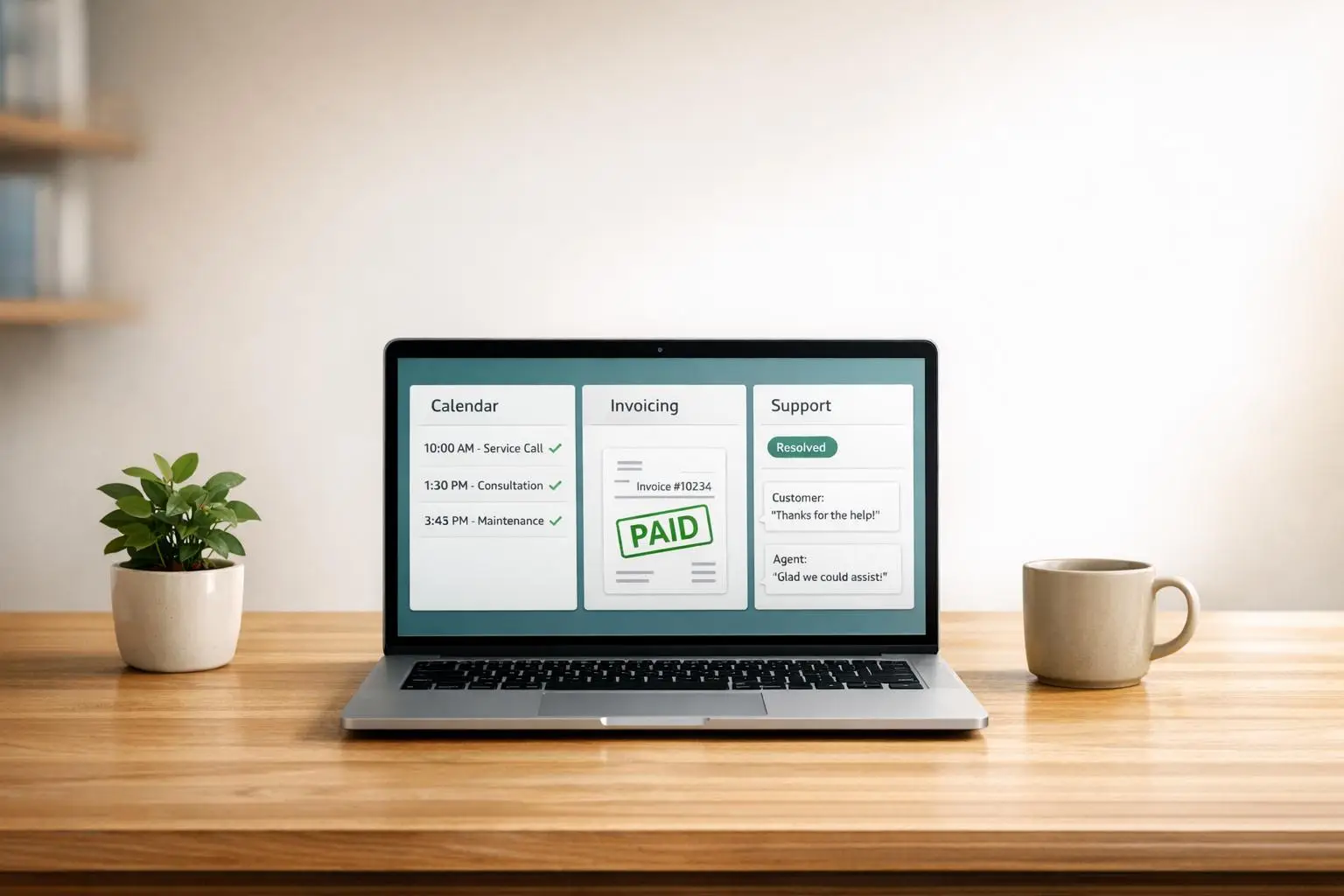
How to Use AI to Cut Admin Work in Service Businesses

Running a service business? Here’s the bottom line: AI can save you time, reduce costs, and help you focus on growth.
Administrative tasks like scheduling, invoicing, and customer support often consume 40–60% of your budget. AI tools can handle repetitive work, saving professionals an average of 240 hours per year. Businesses using AI for tasks like scheduling or invoicing report faster payments, improved customer response times, and fewer missed opportunities.
Key Takeaways:
- Missed Opportunities: 62% of calls to small businesses go unanswered, and 85% of callers don’t call back.
- AI Benefits: AI can automate up to 82% of customer inquiries and cut scheduling time by 60–80%.
- Financial Impact: Automating invoicing speeds up payments by 30–50%, improving cash flow.
- Cost Savings: AI scheduling tools cost as little as $50/month, compared to $2,830/month for a receptionist.
Start small: audit workflows, implement workflow automation effectively, and scale up. Tools for scheduling, invoicing, and customer support can reclaim hours and boost efficiency. Ready to reclaim your time? Keep reading.
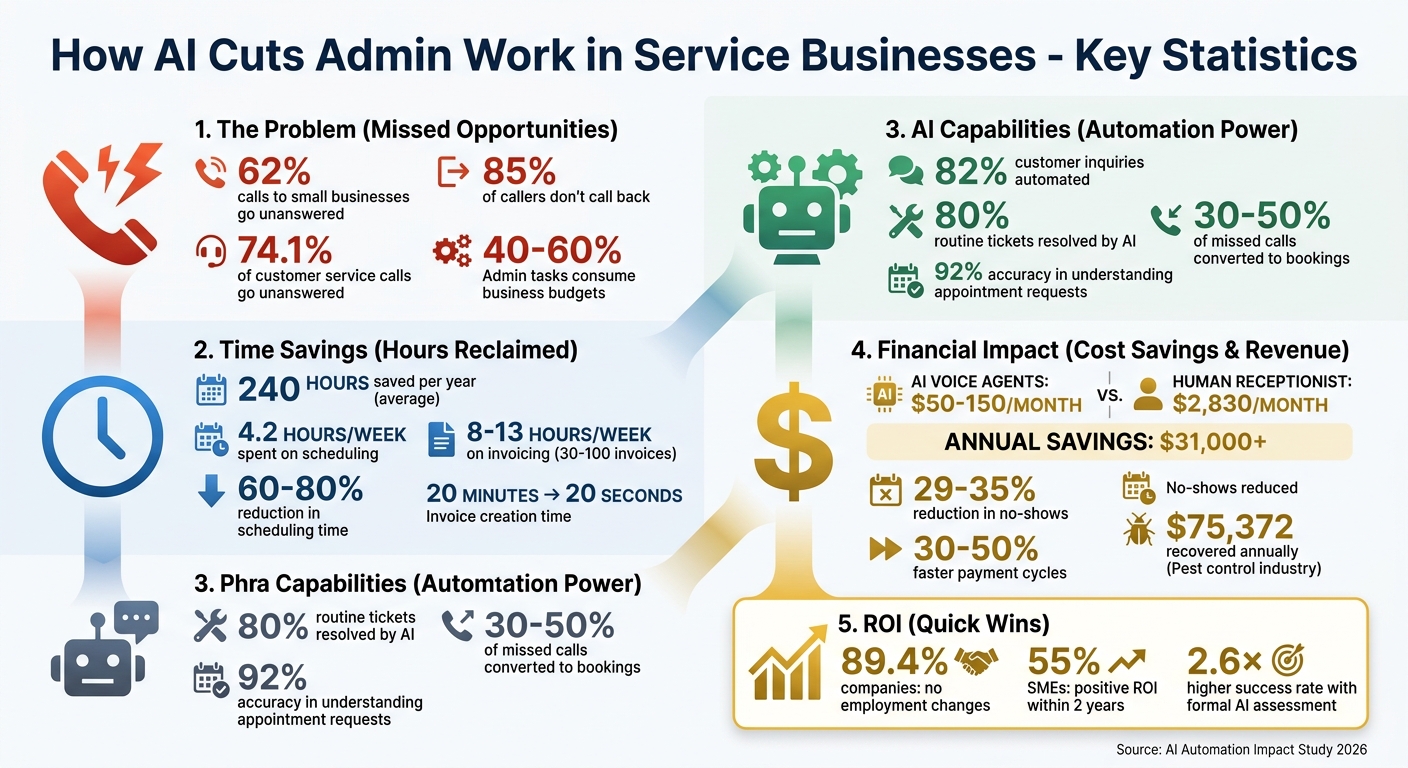
AI Impact on Service Business Admin: Cost Savings and Time Recovery Statistics
This AI Setup Replaced My Entire Admin Process (No Code, No Zapier)
sbb-itb-fd1fcab
Step 1: Find Repetitive and Time-Consuming Tasks
Before jumping into automation, take a step back and document your workflow. Many small service businesses struggle more with understanding their processes than with automation itself. If your workflow is unclear, adding automation can end up amplifying inefficiencies rather than solving them.
Review Your Current Workflows
Start by laying out your daily and weekly tasks in a simple, structured way. Create a table that outlines:
- Trigger: What starts the process?
- Who: Who is responsible for the task?
- Action: What steps are taken?
- Time: How long does it take?
- Frequency: How often does it occur?
For example, if handling a new inquiry takes 10 minutes, break it down into these components. This will help you pinpoint areas where time is being wasted or tasks are being unnecessarily repeated.
Pay close attention to friction points – areas where information is manually copied, rewritten, or reformatted. These are excellent opportunities for automation. Also, identify delays in your process. For instance, responding to inquiries within five minutes can drastically improve results – businesses that do this are 100 times more likely to make meaningful contact compared to those that wait 30 minutes. If leads are sitting in your inbox for hours, that’s a clear bottleneck that could be costing you revenue.
Once you’ve identified these friction points and delays, rank tasks by their financial impact to determine which ones to automate first.
Choose Which Tasks to Automate First
Not all repetitive tasks are worth automating. The key is to focus on cost rather than frustration when deciding what to tackle first. Use this formula to calculate the annual cost of manual work:
(Hours spent per week) × 52 × (Your effective hourly rate).
This will help you rank tasks based on their return on investment (ROI) potential.
To decide what to automate, use a simple framework:
- Automate: Tasks that are rule-based, follow a pattern, and repeat predictably (e.g., lead qualification or invoice follow-ups).
- Delegate: Tasks requiring human judgment but not your personal expertise.
- Keep Manual: Tasks that involve strategic thinking or relationship building.
Start small. Pick one routine workflow – something that happens weekly, has a clear starting point, and produces a predictable result. Businesses that succeed with AI often begin with one focused win and gradually expand their efforts.
Step 2: Automate Scheduling and Appointments
Did you know scheduling takes up about 4.2 hours per week for most service businesses? And here’s the kicker – 74.1% of customer service calls to small businesses go unanswered, with 7.7% of all calls specifically about scheduling appointments. Every missed call could mean lost revenue.
AI Tools for Calendar Management
AI tools are changing the game for scheduling. These tools handle bookings across phone, web, SMS, and social media, offering 24/7 availability. With natural language processing now boasting 92% accuracy in understanding appointment requests, AI can manage conversational requests like, “I need to come in sometime next week,” seamlessly.
From a financial perspective, the workflow automation benefits speak for themselves. AI voice agents cost between $50 and $150 per month, compared to a human receptionist’s average cost of $2,830 per month. That’s an annual saving of over $31,000. Plus, these tools convert 30% to 50% of missed calls into booked appointments, while automated reminders cut down no-shows by 29% to 35%. For industries like pest control, where 34.7% of calls are for scheduling, automation could recover around $75,372 annually.
AI scheduling also saves time – teams report a 60%–80% reduction in scheduling time within the first month. The trick is to choose tools that sync with your existing calendar system, whether it’s Google Calendar, Outlook, or iCal, to avoid double bookings. Advanced systems can even differentiate between routine requests and emergencies, ensuring urgent issues like “pipe burst” are routed to staff immediately, while standard bookings are handled automatically.
Adding AI Scheduling Assistants to Your Systems
To make the most of AI scheduling, start by documenting your rules – things like service durations, buffer times, and cancellation policies. This ensures the AI works within your established guidelines.
Set up the AI to integrate with the same calendar system your staff uses. Make sure permissions allow the AI to not just view but also write events to the calendar. Adding 10-minute buffers between appointments can help prevent overlaps. Keep intake questions short – stick to three or fewer, as every extra question can reduce conversions by 10%.
During the first two weeks, review AI call transcripts daily. This helps you identify any issues or moments where callers might get frustrated. Start with one specific scheduling workflow, measure its success, and then expand to more complex tasks.
Once your scheduling automation is running smoothly, the next step is to simplify invoicing and payment tracking. Stay tuned!
Step 3: Automate Invoicing and Payment Tracking
Once scheduling is sorted, the next priority is speeding up invoicing and improving cash flow. For many businesses, manual invoicing can take up a staggering 8–13 hours a week to handle 30–100 invoices. That’s time that could be spent on more important tasks. AI steps in here, slashing the time needed to create a single invoice from 20 minutes to just 20 seconds – a massive improvement in efficiency.
Automate Invoice Creation and Follow-Ups
AI takes the hassle out of invoicing by generating invoices automatically the moment you mark a project as "complete" in your project management software. For example, if you input a simple description like, "40 hours of consulting at CA$150/hr", the system can instantly produce a professional, branded invoice that includes accurate tax calculations.
But it doesn’t stop there. AI can also handle follow-ups by sending reminders at strategic intervals – 3 days before the due date, on the due date itself, and 3, 7, and 14 days after. This consistent communication significantly reduces late payments. As Jacob King, Founder of King Intelligence, puts it:
"The simple act of sending consistent, timely reminders dramatically reduces late payments."
To make payments seamless, include a direct payment link (e.g., Stripe, which charges 2.9% + CA$0.30 per transaction) in every invoice. AI can even link your payment processor to accounting software like QuickBooks (starting at CA$30/month) or Xero. As soon as a payment is received, the system automatically matches it to the invoice and updates your records in real time – no more tedious manual cross-referencing [22,23].
Track Cash Flow with AI
Automating invoicing doesn’t just save time; it speeds up the payment cycle by 30–50%. For a service business earning CA$20,000 monthly, getting paid 10–15 days faster means an extra CA$7,000–CA$10,000 in liquid cash that can be reinvested into the business immediately. Faster payments strengthen cash flow, making your operations more flexible.
AI also provides a clear view of your financial health with real-time dashboards. These show which invoices are paid, pending, or overdue. Some systems even use predictive analytics to identify invoices that are likely to become late, giving you the chance to act before it’s too late.
As the Claude Code Playbooks team explains:
"The mental load of remembering to follow up on 40 open invoices is the real cost – and once that’s offloaded, the bottleneck disappears."
With invoicing under control, the next logical step is automating customer support to further reduce administrative work.
Step 4: Use AI for Customer Support
Once invoicing is streamlined, the next step to improving efficiency is upgrading your customer support. Missed calls and slow responses can harm both revenue and customer trust. AI offers a way to provide 24/7 support at a fraction of the cost of hiring additional staff, transforming how businesses handle customer inquiries.
AI Chatbots for Customer Questions
AI chatbots can resolve up to 80% of routine customer tickets, which means your team can focus on more complex issues. Start by automating repetitive, low-risk tasks like answering FAQs, checking order statuses, scheduling appointments, and basic troubleshooting.
The foundation of any effective chatbot is a well-organized knowledge base. Think of it as a 100-question guide where you answer common queries once, and the AI takes it from there. Without this structure, the AI might provide incorrect answers. As DigitalApplied puts it:
"Your AI support agent is only as good as its knowledge base. Without structured product and service information, the AI guesses."
Modern chatbots go beyond simple keyword matching by using semantic search. This allows them to understand the meaning behind questions. For instance, the system can recognize that "I forgot my login" and "How do I reset my password?" are asking for the same solution. Intent classification further refines this process by identifying whether a question relates to pricing, technical issues, or something else, ensuring customers get relevant answers.
AI can cut response times from hours to under 30 seconds. Considering that 82% of customers expect quick replies, this speed can greatly improve satisfaction. Businesses that respond within five minutes are 100 times more likely to engage leads. To maintain accuracy, it’s wise to start with a phased rollout. Begin by running the chatbot in "assist mode" for 7–14 days, focusing only on FAQs. This allows you to review transcripts, fine-tune its performance, and set up clear triggers for escalating complex, high-value, or emotional issues. Curtis Nye from AffinityBots sums it up well:
"Automate the predictable, assist with the complex, and escalate the emotional."
From a cost perspective, AI is highly efficient. AI interactions can cost less than CA$0.10 per conversation, compared to CA$2–CA$5 for a human agent. Small businesses typically spend between CA$50 and CA$200 per month on hosting, AI API calls, and embedding services, while API costs for support systems range from CA$150 to CA$400 monthly. This is a stark contrast to the CA$6,000–CA$8,000 monthly cost of a full-time agent.
Next, we’ll explore how AI can make customer interactions more personal, building trust and loyalty.
Personalize Customer Interactions with AI
Nobody likes robotic, generic responses. To avoid this, train your AI to understand your business using Retrieval-Augmented Generation (RAG). This involves feeding the AI your product catalogue, pricing details, internal policies, and examples of high-quality past communications to reflect your brand’s tone and style.
Integrating AI with your CRM takes personalization even further. By accessing customer history and preferences, the system can craft responses tailored to each individual. AI can also use sentiment analysis tools to detect emotions like frustration or urgency in real time. When a sensitive situation arises, the AI escalates the issue to a human agent, complete with a concise summary so the customer doesn’t have to repeat themselves.
The benefits are clear. In January 2026, Thrasio adopted AI to process 420,000 historical tickets across 190 brands. The result? A 97% customer satisfaction score and CA$1.8 million in annual cost savings. However, as Oscar O’Neill points out:
"AI for customer communication works. But it works like every other AI tool: it’s a draft machine, not a send machine."
AI should always operate under human oversight, especially for tasks involving pricing, legal matters, or complaint escalations. The goal is for AI to manage the routine 80% of interactions, freeing your team to focus on the 20% that truly add value. This approach reduces administrative burdens while strengthening customer relationships.
Step 5: Work with AI Experts for Custom Solutions
After automating customer support, you might feel tempted to rely on off-the-shelf tools. But here’s the catch: generic chatbots and scheduling apps often fall short compared to custom software when it comes to adapting to your specific pricing models, internal policies, or the unique voice of your brand. Custom AI solutions, on the other hand, are crafted around your data and workflows, making them far better equipped to handle the challenges your business faces.
Why Custom AI Solutions Are a Better Fit
Generic AI tools are built to handle general needs, which means they often miss the finer details that matter to your business. Custom AI agents, trained specifically on your data – like pricing structures, policies, and tone – can take on tasks that standard tools simply can’t. For instance, they can automatically extract key data from contracts or classify emails with impressive efficiency.
Think about this: the average small-to-medium business owner spends over 12 hours a week on administrative tasks. Custom AI solutions are designed to tackle these time-consuming challenges head-on. Additionally, these systems can integrate seamlessly with your existing CRM or business management platforms, eliminating the need for manual data entry. The implementation process is phased, starting with an initial audit, moving on to piloting a specific task, and eventually scaling up to handle more complex workflows. By 2026, AI automation is expected to shift from being a luxury for large corporations to an essential tool for small businesses.
How Digital Fractal Technologies Inc Can Assist
This is where Digital Fractal Technologies Inc steps in to help service businesses streamline operations and reclaim valuable time. They specialize in AI consulting and custom software development tailored specifically for service-based businesses. Their process kicks off with an AI Readiness Audit – a 30-day assessment designed to identify high-impact automation opportunities and lay out a clear 6–12-month roadmap. This audit includes an in-depth maturity analysis, gap-mapping, and cost-savings modelling for three to five high-return opportunities tailored to your business.
The cost of an AI Readiness Audit typically ranges from CA$2,500 to CA$10,000, making it an accessible starting point. To put this into perspective, if an AI agent books just five extra appointments per month at a customer value of CA$500, it could generate CA$2,500 in monthly revenue – often covering the initial investment.
Digital Fractal’s expertise spans diverse industries, including the public sector, energy, and construction. They create industry-specific solutions like AI dispatch agents for logistics, automated job-site form processing for construction, and quote generation tools for sales teams. These systems are trained using your proprietary data and are designed to integrate seamlessly with your existing tools, whether it’s a custom CRM, workflow automation software, or business management system.
The process is highly collaborative. You’ll be involved in interviews, system audits, and data reviews to ensure the team fully understands your workflows. At the end of the audit, you’ll receive detailed documentation and participate in decision-maker workshops to guide the next steps. This structured approach guarantees a solution that fits your business needs. With a custom AI solution in place, you’ll be ready to transform your administrative processes for good.
Conclusion
AI can take the weight of repetitive tasks off your team’s shoulders, giving them back precious hours to focus on more strategic work. By following these five steps, you could recover anywhere from 58 to 97 hours each month. Whether it’s automating scheduling, simplifying invoicing, or improving customer support with AI chatbots, each action contributes to reclaiming valuable time.
In Canada, businesses have seen daily time savings with minimal effort. Notably, 89.4% of companies reported no changes to employment levels, and 55% of small and medium enterprises (SMEs) achieved a positive return on investment within the first two years.
A formal AI readiness assessment can increase your chances of success by 2.6×. Vendors play a key role here, helping businesses achieve a 67% success rate. These numbers highlight how targeted investments in AI can deliver quick and meaningful results.
Digital Fractal Technologies Inc offers an AI Readiness Audit designed to provide a customized roadmap. This includes everything from assessing your current maturity level to modelling potential cost savings – all starting at CA$2,500. With their expertise, you can confidently integrate AI and unlock new levels of productivity.
Say goodbye to the administrative tasks that sap your energy and profits. With a well-planned AI strategy and professional support, you can transform your operations and reclaim the hours that matter most. Start implementing these strategies today and turn routine tasks into opportunities for growth.
FAQs
What’s the best first admin task to automate with AI?
When introducing automation, it’s smart to begin with repetitive, low-risk tasks that provide obvious advantages and don’t involve sensitive data. For instance, consider automating property descriptions in real estate, scheduling, data entry, or routine reporting. These kinds of tasks can free up significant time and resources. For example, writing property descriptions, which might normally take 45 minutes, can be reduced to just a few minutes. This approach not only boosts efficiency but also ensures sensitive information remains secure.
How do I keep AI from booking the wrong appointments?
To prevent mistakes in bookings, it’s essential to configure your AI system with clear and precise appointment rules. Incorporate natural language understanding to interpret client requests correctly and minimize confusion. Implement validation steps to double-check details before confirming any bookings.
Make it a habit to monitor the system regularly and address any recurring issues promptly. You can also use tailored prompts or specific rules to guide the AI, ensuring it meets your scheduling requirements effectively.
What data do I need to set up an AI customer support agent safely?
To set up an AI customer support agent securely, start by collecting essential data such as customer interaction records (like chat logs or emails), FAQs, and customer profiles. This information ensures the AI provides accurate and relevant responses. Additionally, include business policies and implement security measures, such as encryption, to safeguard sensitive information and maintain compliance with privacy regulations. Proper data management is crucial for ensuring the AI respects privacy, operates securely, and aligns with your company’s standards.