PPE Detection AI: How It Works and What to Check First

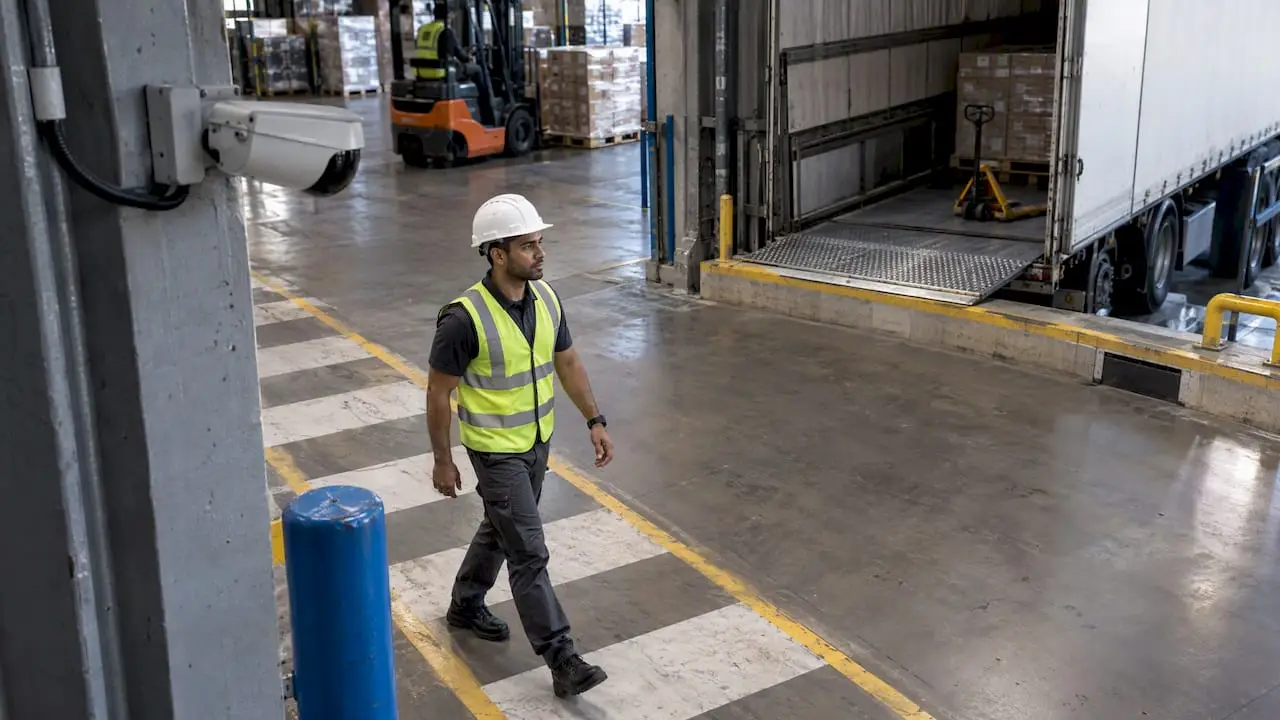
PPE detection AI is computer vision software that watches a camera feed, finds each person in the frame and checks whether the required gear is on them: hard hat, hi-vis vest, glasses, gloves or a mask. When something is missing, it raises an alert or logs the event. It works best as a coaching tool for supervisors, and it only pays off when the rules, zones and data handling are set up for your site, not copied from a demo.
This guide is for operations, EHS and IT leads at Canadian logistics, construction and industrial firms deciding whether to pilot it. It covers how the technology works, what accuracy is realistic, what Canadian rules apply, and how to run a pilot that your crews will accept.
TL;DR
- AI PPE detection finds people in a video frame, then classifies whether each one wears the required gear. It usually runs on cameras you already have.
- Peer-reviewed models reach about 97% mAP in controlled studies. A live site with glare, dust and occlusion will perform below lab results, so measure on your own footage.
- In Canada, no federal law mandates AI PPE monitoring. Your employer duties under provincial and federal OHS rules stay the same, and privacy law applies to the video.
- Zone rules, dwell-time thresholds and anonymous verification matter more than the model name.
- Start with one area, one or two PPE types and a 90-day pilot with a clear baseline.
Table of Contents
- How AI PPE detection works
- How accurate is it in practice?
- Configure for the site, not the demo
- Canadian rules: OHS duties, standards and privacy
- The harder problem is adoption
- Where it fits: logistics, construction and industrial sites
- Build, buy or integrate?
- A practical 90-day pilot plan
- Our perspective
- Not sure where to start? Begin with an audit
- FAQ
- Sources
How AI PPE detection works
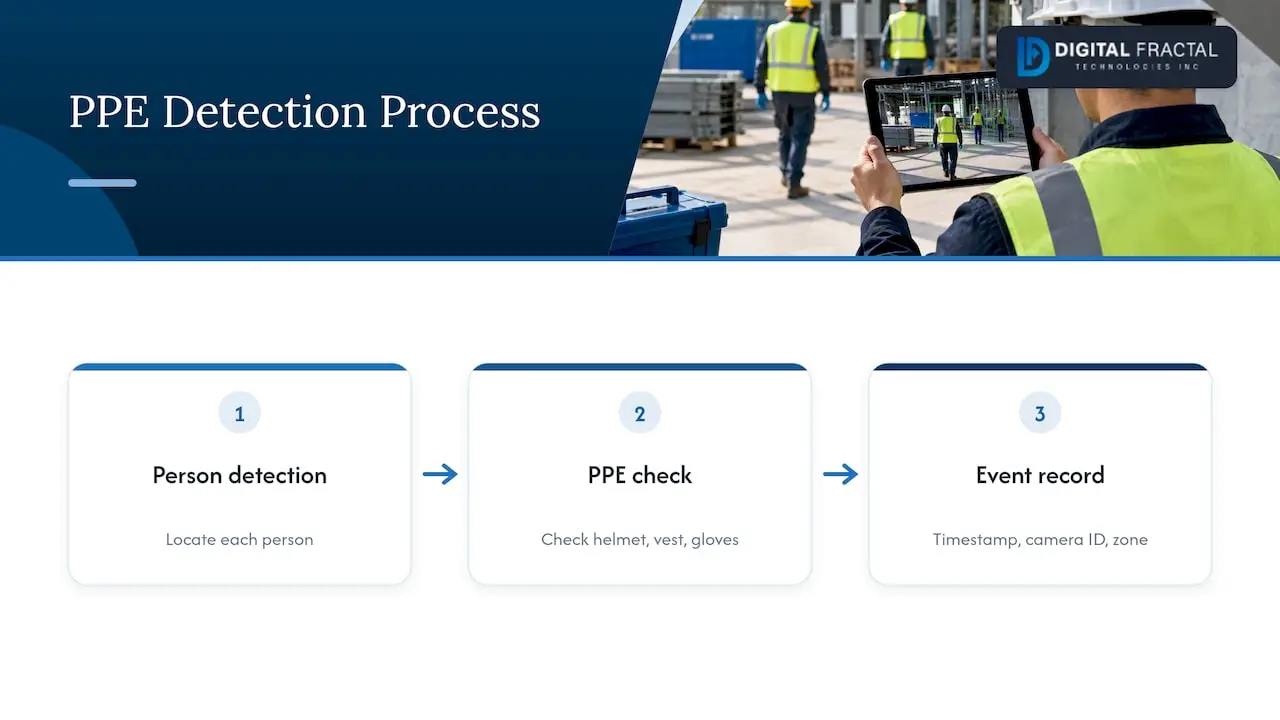
Most systems run two linked steps on every camera stream. First, an object detector locates each person. Second, a classifier checks whether the expected equipment is present on that person: a helmet on the head region, a vest on the torso, gloves on the hands. Results become events with a timestamp, a camera ID and a zone.
The detector is usually from the YOLO family, because it is fast enough for live video. A peer-reviewed construction study reports mAP up to 97% in controlled conditions, and a lightweight PPE detector was designed to exceed 100 frames per second for edge hardware. Speed matters because a model that cannot keep up with the stream misses the moment a worker steps into a hazard zone.
If you want to understand the model choices behind this, our comparison of YOLO and OpenCV for object detection explains where classic image processing is enough and where a trained network is needed.
Where the processing happens
You have two main options. Edge processing runs the model on a small computer near the cameras, so video stays on site and alerts arrive with little delay. Cloud processing sends video or frames to remote servers, which simplifies scaling but raises bandwidth and data-residency questions. For many Canadian sites, especially remote or industrial ones with limited uplink, edge is the practical default. Whichever you pick, decide it before you sign anything, because it shapes your privacy assessment.
What it can and cannot see
A camera only detects what it sees clearly. Typical limits:
- Distance and angle: a worker 40 metres from a ceiling camera may be a handful of pixels. Helmets are easy to detect from the side and harder from above.
- Occlusion: a person behind a pallet or machine can be half visible, and the model may guess.
- Lighting: glare, backlight, night shifts and reflective surfaces change how vests and helmets look.
- Look-alikes: a yellow toque can pass for a yellow hard hat. A safety vest and a high-contrast jacket can confuse a poorly trained model.
- Gear that is hard to see: hearing protection, safety boots and fall-arrest harness connections are much harder than helmets and vests.
This is why most successful pilots begin with the two items cameras see best: head protection and hi-vis clothing.
How accurate is it in practice?
Published figures are a ceiling, not a promise. The 97% mAP above comes from a controlled study. A systematic review of computer vision PPE compliance covers the same field and discusses the gap between academic results and industry practice, including challenges still open. Treat every vendor accuracy number the same way: ask what footage it was measured on.
It also helps to accept that predictions are probabilistic. Logistics safety teams working with computer vision, as described on DHL’s Canadian computer vision pages, see its strongest value in shifting EHS from manual spot checks toward proactive analysis, so the sensible use is trends and fast supervisor correction, not treating each alert as proof of a violation.
Measure it on your own footage
Before you commit, run this test:
- Pull 2 to 4 weeks of footage from the exact cameras you would use, across shifts and weather.
- Have a safety lead label a random sample of a few hundred events as compliant or not.
- Compare the model’s calls against the labels, and record both missed violations and false alarms.
- Break the results down by camera, time of day and PPE type.
- Set a minimum bar per camera before alerts go to supervisors. Cameras that miss it are repositioned or left out.
That gives you your own precision and recall, which are the only numbers that predict how supervisors will feel about the alerts.
Configure for the site, not the demo
The biggest difference between a pilot that sticks and one that gets switched off is configuration. Three habits show up repeatedly in expert deployments.
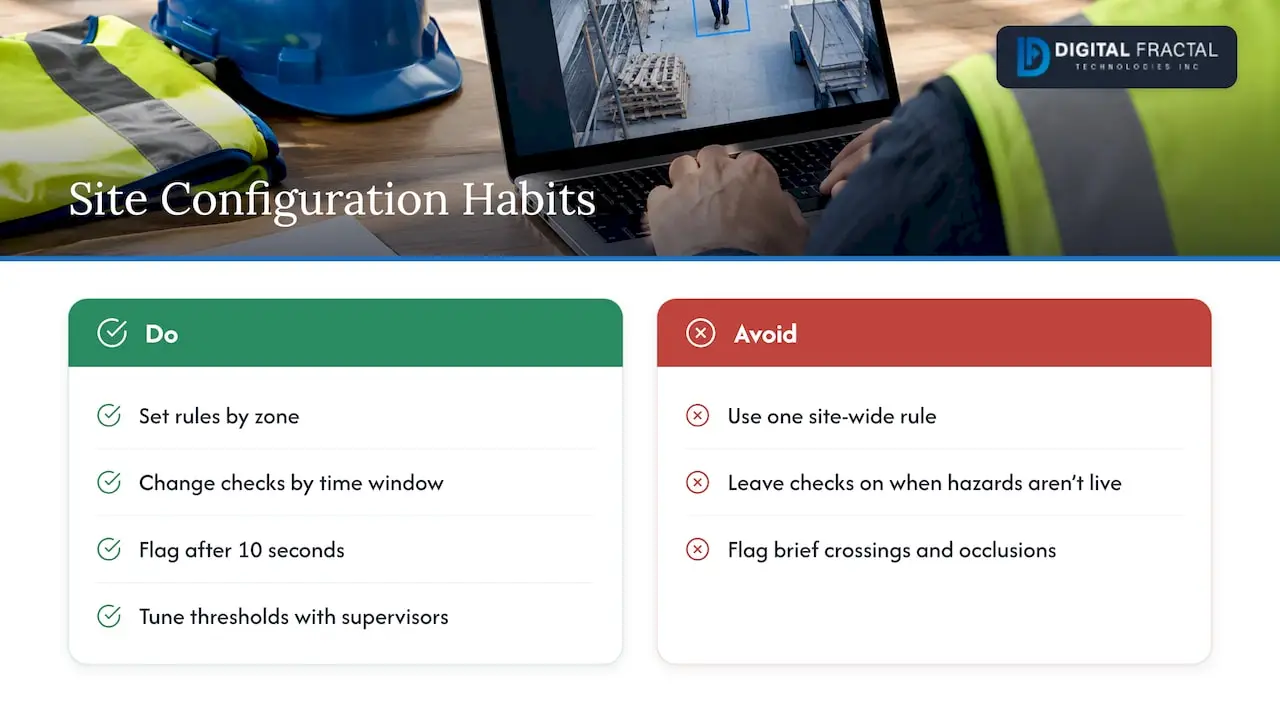
Zone-specific rules. Hi-vis may be required on the loading dock but not in the administrative corridor. A site-wide rule creates noise. Guidance on zone-based logic from a Canadian deployment write-up calls this the step that turns generic monitoring into usable safety information.
Time windows. Cleaning crews, maintenance shutdowns and shift changes follow different rules. Switch checks off or change them when the hazard is not live.
Dwell-time thresholds. Flagging only after, say, 10 seconds of non-compliance filters out brief frame crossings and short occlusions. The same source describes this as a common practice among advanced users. Start with a threshold like that and tune it with your supervisors.
Alert fatigue kills these projects. If a supervisor gets twenty false alarms before a real one, the tool stops being read.
Canadian rules: OHS duties, standards and privacy
Your OHS obligations do not change
To our knowledge no single federal law requires AI-driven PPE monitoring. Employers still carry the duties set by provincial or federal OHS legislation: identify hazards, assess risk and apply controls. For federally regulated workplaces, for example, the Canada Occupational Health and Safety Regulations require employers to provide eye or face protection where there is a risk of injury. Provinces such as Alberta, Ontario and Quebec have their own codes, so check the one that governs your site.
PPE also remains a last line of defence. The federal guide Personal protective equipment: Doing it right frames it that way. A camera that spots missing helmets does not replace engineering controls, training or supervision. It adds a way to see whether the gear you already require is being used.
Standards still define the gear itself. For example, CSA Z94.1 covers industrial protective headwear performance, selection, care and use. The AI checks presence, not whether a helmet is within its service life or meets the standard. Your inspection program still handles that.
AI in a health and safety program
The Canadian Centre for Occupational Health and Safety advises that AI used for health and safety should suit the organization and the work, and be overseen by qualified people. In practice that means a named owner, a review of what the system gets wrong, and your joint health and safety committee involved from the start, not told after installation.
Video of workers is personal information
Cameras that capture identifiable workers raise privacy questions under federal or provincial law, depending on your sector and province. Practical steps that reduce exposure:
- Prefer anonymous verification: count and classify gear, do not identify individuals or link events to names.
- Keep alert clips short and set a clear retention period.
- Tell workers what is collected, why, who sees it and how long it is kept.
- Complete a privacy impact assessment before go-live.
Our 8-step PIPEDA checklist for AI walks through the audit trail, and the piece on ethics and governance in image recognition covers consent and bias. This is not legal advice: for your specific province and workplace, have your privacy officer or counsel confirm the approach.
The harder problem is adoption
Technical detection is rarely what fails. Workforce reaction is. Systems introduced as supportive safety coaching, with open communication about data use, see better acceptance than ones that feel like hidden surveillance, according to the same Canadian deployment guidance. That matches what we hear from operations leaders.
What works in the field:
- Brief crews and the safety committee before cameras go live, and show them an actual alert.
- Use aggregate compliance by zone and shift in toolbox talks, not names.
- Route alerts to the supervisor for a quick conversation, not straight to discipline.
- Review false alarms weekly in the first month and show crews you fixed them.
- Publish the results: compliance rate before and after, and the changes you made.
Where it fits: logistics, construction and industrial sites
Warehouses and logistics. Loading docks, yard crossings and forklift aisles are natural zones: hi-vis and head protection where pedestrians and vehicles share space. This pairs with vehicle-pedestrian detection. See our look at computer vision forklift safety and the CSA KPIs pilots need.
Construction. Sites change daily, lighting is variable and workers wear mixed gear. Cameras on fixed points such as gates and hoists work better than trying to cover everything. Our pilot-first guide to construction safety analytics explains how to scope this. Small objects in drone footage are a separate problem, covered in UAV small-object detection models.
Oil and gas and heavy industry. Gear requirements are tighter (flame-resistant clothing, respirators), which raises the stakes on what cameras cannot verify. Here the AI should supplement permits, gas testing and supervision.
For a broader view of tools in this area, see AI-powered safety compliance tools.
Build, buy or integrate?
There are three routes, and the right one depends on your cameras, your systems and your appetite for ownership.
| Route | Good for | Watch out for |
|---|---|---|
| Packaged PPE detection product | One-site pilots with standard gear | Fixed rules, limited fit to your zones, data leaving your site |
| Custom model on your footage | Unusual gear, difficult lighting, specific zones | Needs labeled data and ongoing tuning |
| Integration into existing systems | Sites with VMS, incident tools and dashboards already running | Needs clean data flows and an owner on your side |
Whichever you choose, ask where video is processed, who owns the labeled data, how alerts reach your incident system, and what happens when the model is wrong.
A practical 90-day pilot plan
A pilot should be small enough to finish and specific enough to judge.
- Weeks 1 to 2: scope. Pick one area, one or two PPE items, and a baseline from manual audits. Check camera angles and network.
- Weeks 2 to 4: privacy and people. Complete the privacy assessment, brief the safety committee and workers, decide on retention.
- Weeks 4 to 7: test on your footage. Label a sample, measure precision and recall, set zones, time windows and dwell time.
- Weeks 7 to 10: live with supervisors. Alerts go to a small group. Review false alarms weekly.
- Weeks 10 to 13: decide. Compare compliance and near-miss trends with the baseline, tally supervisor time, then expand, adjust or stop.
Define the stop criteria upfront. A pilot that cannot fail tells you nothing.
Our perspective
We build AI for logistics, construction and oil and gas operators, and our view is that PPE detection is rarely the right first project on its own. It is a good project when you already know where your compliance gaps are, your cameras are usable and your people understand why it is there.
What we see decide outcomes is fit with the workflow. A model that detects a missing vest is a commodity. A system that knows the dock is a vest zone, alerts the right supervisor within seconds and logs the event where your EHS team already works is what changes behaviour. That is why we do not offer generic off-the-shelf consulting: we tailor solutions to your workflows, systems and goals, with the aim of a visible result inside 90 days.
We also push clients toward anonymous verification and aggregate reporting. It is simpler to defend, simpler to run and far easier to explain to a crew.
— Souhail
Not sure where to start? Begin with an audit
If you are weighing PPE detection against other automation options, our AI Readiness Audit looks at your data, cameras, systems and processes to show where AI will pay off and where it will not. It is a one-off engagement priced at $2,500 to $10,000. If the audit points to a build, our AI implementation and machine learning services cover computer vision and integration, and workflow automation connects alerts to the tools your team already uses.
FAQ
Does PPE detection AI need special cameras?
Often not. Many systems work on existing IP cameras if resolution, angle and lighting are adequate. A site assessment should check each camera against the footage test above. Cameras that fail are repositioned or replaced, not the whole fleet.
Is AI PPE monitoring legal in Canada?
No federal law bans it or mandates it, but your OHS duties and privacy obligations still apply. Video of identifiable workers is personal information, so assess it, tell workers and limit retention. Confirm the specifics for your province with your privacy officer or counsel.
Can it replace safety inspections?
No. It adds continuous visibility on a few visible items, mainly head protection and hi-vis clothing. It cannot check gear condition, fit, certification or the many hazards that cameras never see. Inspections, training and supervision stay in place.
How do we avoid false alarms?
Use zone-specific rules, time windows and a dwell-time threshold, and review mistakes weekly during the first month. Test accuracy camera by camera on your own footage before alerts reach supervisors. Expect to keep tuning, because models make errors by nature.
Sources
- Real-Time Detection of PPE Violations for Construction Workers, Journal of Construction Engineering and Management
- 100+ FPS detector of personal protective equipment, PMC
- A systematic review of computer vision-based PPE compliance, Artificial Intelligence Review
- Computer Vision Health and Safety, DHL Canada
- AI PPE Detection: Helmet and Vest Compliance
- Canada Occupational Health and Safety Regulations, section 12.12
- Personal protective equipment: Doing it right, Canada.ca
- CSA Z94.1 Industrial protective headwear
- CCOHS: Artificial Intelligence (AI)