
How to Automate Repetitive Tasks in Your Business

Start with work that repeats on a schedule, uses predictable inputs, and produces output a person can check in minutes. Invoice matching, CRM data entry, status updates, dispatch paperwork and report assembly all fit. Pick one, run it as a small pilot with a human approving anything risky, and expand only after it works. AI now handles steps that older rule-based tools could not, such as reading emails or documents, but the order of operations still decides whether you save time or create a new mess.
This guide is written for owners and operations leads at Canadian companies, especially in logistics, construction and energy, who want to know where to begin and what to ask before they spend money.
TL;DR
- Automate tasks that repeat, have knowable inputs and produce output you can verify quickly. Leave vague, one-off problems to people.
- Rule-based tools suit fixed steps. AI suits the messy parts: free-text emails, scanned documents, variable formats.
- Pilot one workflow first, keep a human approval step for anything that sends, spends or changes sensitive records.
- In Canada, privacy law (PIPEDA) still applies when automation touches personal information, so document what you do.
- Real savings come from redesigning the workflow, not just handing the old one to a machine.
Table of Contents
- What counts as a repetitive task worth automating
- Rules-based automation or AI: which one do you need?
- Automating CRM data entry and other manual tasks
- A five-step method that works
- Keep a person in the loop where it counts
- Canadian privacy and compliance: what to check
- Common mistakes that waste the budget
- Our perspective: why industry-specific beats generic
- Where AI helps in other parts of the business
- Build, buy or bring in help
- How we can help
- FAQ
- Sources
What counts as a repetitive task worth automating
Not every dull task is a good candidate. A task is worth automating when it passes four tests:
- It repeats often. Daily or weekly beats quarterly. A task done twice a year rarely repays the build.
- The inputs are knowable. The data arrives from the same few places: an inbox, a form, a spreadsheet, a CRM, a telematics feed.
- The output can be checked fast. If a person can confirm the result in a couple of minutes, errors get caught before they spread.
- The rules are stable enough to write down. If your team cannot explain how they decide, a machine will not guess better.
The reverse also holds. Pointing an AI agent at a vague, one-off problem tends to return a vague, one-off answer. Reliability comes from narrow, repeated jobs.
Typical examples by industry
- Logistics: reading rate confirmations and bills of lading, updating shipment status in your TMS, sending proactive delay notices, reconciling carrier invoices.
- Construction: turning site photos and daily logs into reports, routing change orders for approval, chasing subcontractor paperwork, tracking equipment hours.
- Oil and gas: compiling field inspection reports, flagging maintenance windows from sensor data, filing recurring compliance documents.
- Any office: CRM data entry, appointment scheduling, lead routing, expense categorization, weekly reporting.
Rules-based automation or AI: which one do you need?
The two are not rivals. They solve different parts of the same job.
| Situation | Better fit | Why |
|---|---|---|
| Same fields, same format, same steps every time | Rules-based workflow | Cheap, predictable, easy to audit |
| Data arrives as free text, PDFs, photos or varied formats | AI-assisted step | It can read and classify what rules cannot |
| A decision needs judgment on exceptions | AI drafts, person approves | Keeps accountability with a human |
| Many systems must exchange data | API integration | Removes copy-and-paste between tools |
| Customers ask the same questions repeatedly | AI chatbot with escalation | Handles volume, hands off hard cases |
Most useful automations combine them. A rules-based flow moves the data, an AI step reads the messy document, and a person approves the final action when it matters.
Where AI is actually being used in Canada
Adoption is still early. Statistics Canada reports that 12.2% of Canadian businesses used AI to produce goods or deliver services in the second quarter of 2025, up from 6.1% a year earlier, and that a further 14.5% planned to adopt it over the following 12 months. Among adopters, the most common applications were text analytics (35.7%), data analytics (26.4%) and virtual agents or chatbots (24.8%).
That mix tells you something practical: most of the value so far sits in reading and sorting information, which is exactly the heart of manual data entry and inbox work.
Automating CRM data entry and other manual tasks
CRM data entry is the example readers ask about most, because it is a small task that quietly eats hours. A salesperson finishes a call, then retypes notes, updates the deal stage, logs the contact and sets a follow-up. Multiply by a team and a year.
A sound approach looks like this:
- Capture at the source. Pull data from email, web forms, calendar and call notes automatically rather than asking people to retype it.
- Let AI structure the unstructured. An AI step can read an email thread and extract the company, contact, request and next step into the right CRM fields.
- Validate before saving. Flag low-confidence entries for a person instead of writing them straight into the record.
- Deduplicate. Match against existing contacts so automation does not create three versions of the same customer.
- Log what happened. Keep a trail of what was changed, by which automation, and when.
The same pattern applies to other manual tasks: capture, structure, validate, write, log.
A five-step method that works
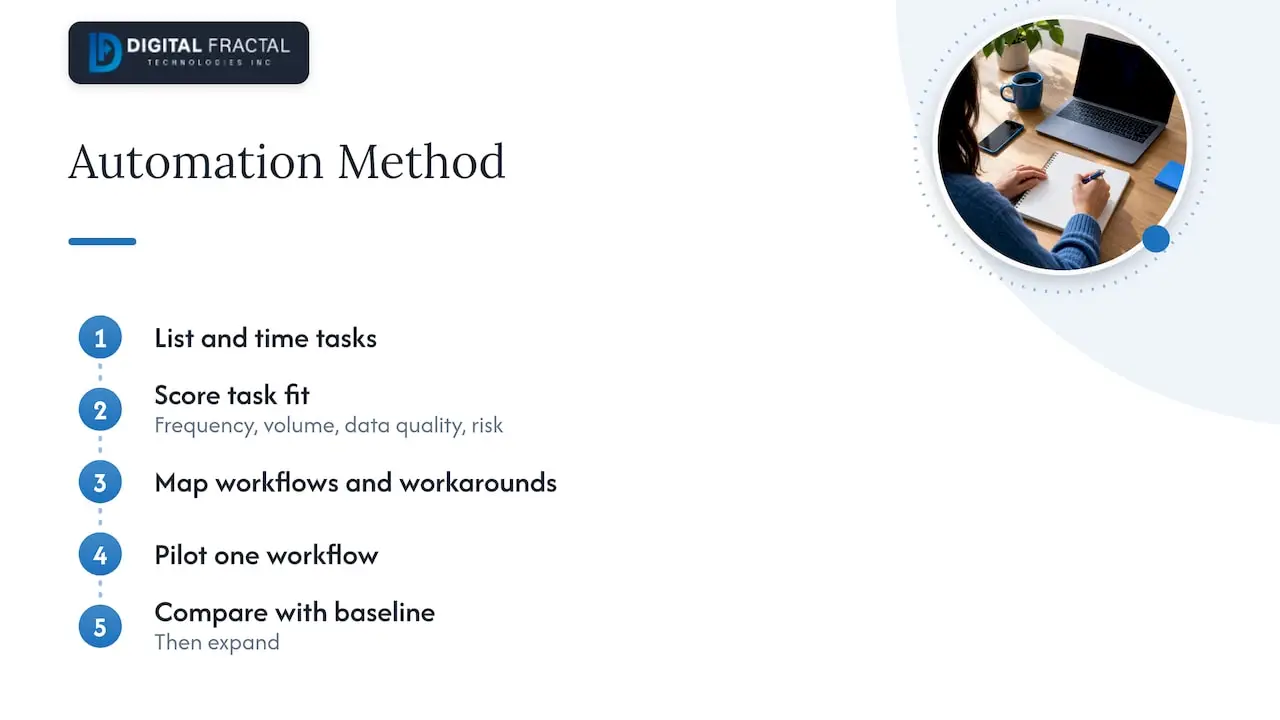
Step 1: List the tasks and time them
Ask each team member to list the tasks they repeat weekly and estimate the hours. Do not rely on what managers think happens. The tasks people complain about are usually the right starting list.
Step 2: Score each task
Rate frequency, volume, data quality and risk. High frequency and clean data with low risk goes to the top. High risk with messy data goes to the bottom, or to a later phase with more safeguards.
Step 3: Map the current workflow
Write out every step, including the workarounds. This is where many teams discover that half the steps exist only because two systems do not talk. Fixing that is often worth more than automating it. Statistics Canada found that among businesses that adopted AI, the most common operational change was developing new workflows (40.1% of adopters), followed by staff training. Automation changes how teams work, so plan for that.
Step 4: Pilot one workflow
Small pilots let you refine the logic, find edge cases and build trust before touching department-wide processes. Asana’s guidance on automating repetitive tasks makes the same case for starting small. Choose a workflow with a clear before-and-after measure, such as minutes per invoice or hours per weekly report.
Step 5: Measure, then expand
Compare the pilot against your baseline after a few weeks. Count errors caught, time saved and time spent on exceptions. Only then move to the next workflow.
Keep a person in the loop where it counts
The most important design decision in AI automation is where a human approves. Require approval for any action that sends something externally, spends money, or changes sensitive records. Anything a person can check in seconds can run with lighter review; anything hard to reverse should not run unattended.
This matches the broader view that AI automation works best as support for human judgment, applied to real operational problems rather than adopted for its own sake.
A simple rule: if a mistake would embarrass you in front of a customer, cost real money or break a record you rely on, put an approval step in front of it.
Canadian privacy and compliance: what to check
If your automation touches personal information about customers, employees or drivers, you are inside Canadian privacy law. Law firm commentary on AI regulation in Canada notes that existing legislation such as PIPEDA already requires transparency and consent, and that businesses should put concrete practices in place to document compliance, particularly around generative AI and automated decision-making.
In practice, before you go live:
- Know what personal information the workflow reads, stores and sends.
- Check whether your privacy notices and consent cover that use.
- Keep records of how the automation makes or supports decisions.
- Confirm where data is processed and who can access it.
Provincial rules, such as Quebec’s, can add requirements. For a structured walk-through, see our PIPEDA checklist for making AI audit-ready in Canada. If your situation involves a regulatory grey area, talk to a privacy lawyer before launch.
Common mistakes that waste the budget
- Automating a broken process. You get the same errors, faster. Fix the workflow first.
- Starting with the hardest task. Pick a win that proves the approach.
- No owner. Every automation needs a named person who watches it and handles exceptions.
- Skipping the data. Automation fed with inconsistent records produces inconsistent results. Our guide to enterprise data readiness explains how to assess this.
- Ignoring the team. People who are not trained or consulted route around the new system. Our piece on AI training for employees covers this side.
- Counting only hours saved. Also count errors avoided, faster turnaround and capacity freed for higher-value work.
Our perspective: why industry-specific beats generic
We see the same pattern when companies come to us. The tool is rarely the problem. A logistics dispatcher who retypes load details into three systems does not need a bigger platform; they need those three systems connected and one AI step that reads the incoming email correctly. A construction project manager who spends Friday afternoon compiling site reports does not need a generic assistant; they need the daily logs, photos and schedule pulled into the format their clients expect.
That is why we do not sell off-the-shelf consulting. Every solution is built around the client’s own workflows, systems and goals, and we aim for a tangible change inside 90 days rather than a long strategy deck. We start with the audit because it forces the honest questions: which tasks repeat, where the data lives, what is safe to automate and what is not. Many companies discover that two or three workflows account for most of the wasted hours, and that is where we begin.
Our advice to any owner reading this: choose one workflow, define what success looks like in numbers, keep a human on the risky steps, and resist the urge to automate everything at once.
— Souhail
Where AI helps in other parts of the business
The same capture-structure-validate pattern applies outside operations. Marketing teams, for example, use AI to speed up keyword research, content planning and publishing, as shown in this example of an AI-powered content workflow. The principle holds across departments: automate the repeatable steps, keep people on the decisions.
Build, buy or bring in help
You have three realistic routes:
| Route | Best when | Watch out for |
|---|---|---|
| Configure a low-code platform yourself | Your tasks are simple and mostly inside common cloud tools | Time spent learning, limited handling of messy documents, per-user or per-action costs that grow |
| Hire a developer or in-house specialist | You have continuous automation needs and budget for a permanent role | Hiring time, single point of failure |
| Work with an AI integration consultancy | You need custom connections, AI steps and a fast first result | Choose one that learns your workflows rather than reselling a template |
For many small and mid-sized Canadian firms, the practical path is to start with an assessment, then decide what to build, what to buy and what to leave alone.
How we can help
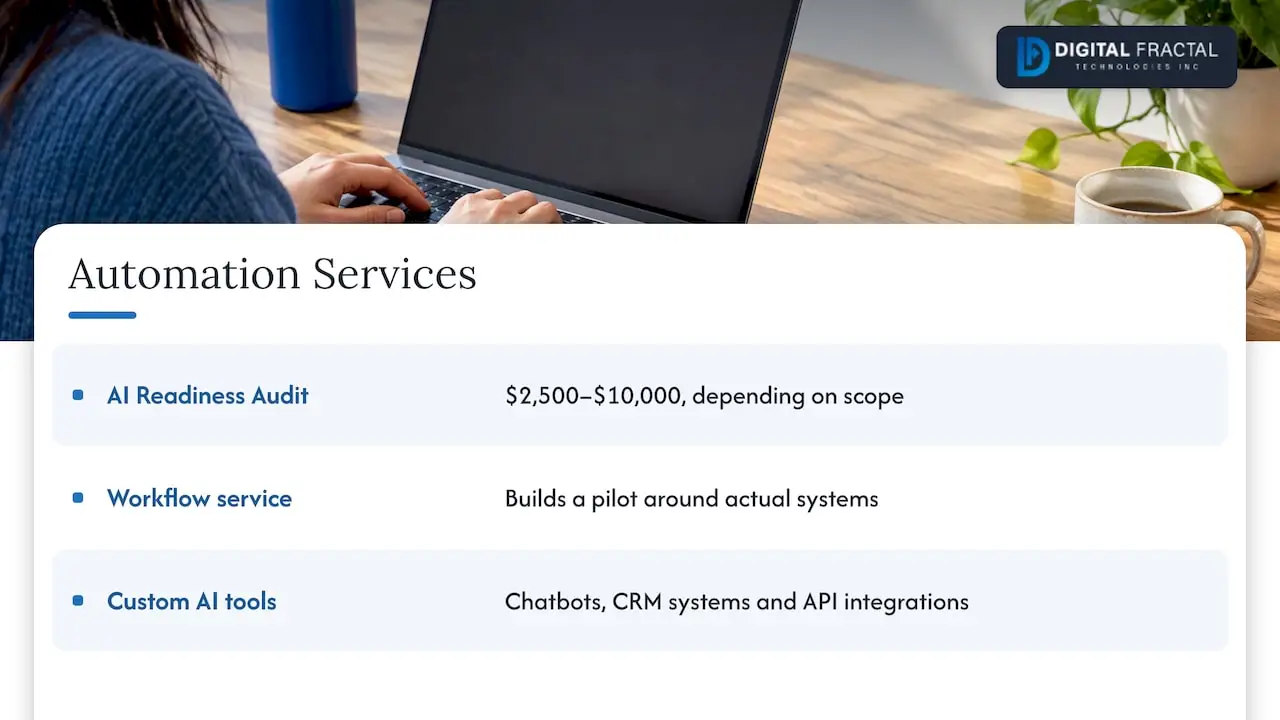
Our AI Readiness Audit identifies which of your repetitive tasks are good automation candidates, what data and systems they depend on, and what a sensible first pilot looks like. It is a one-off engagement published at $2,500 to $10,000, depending on scope. From there, our workflow automation service builds the pilot around your actual systems, and our custom AI chatbots, CRM systems and API integrations cover the connections between tools.
Want to size the opportunity first? Try our workflow automation savings calculator, or read our guide to operational efficiency with AI. We also work with teams in Calgary, Toronto, Montreal, Ottawa and Edmonton.
FAQ
How can AI automate repetitive tasks?
AI reads and interprets the unstructured parts of a job, such as emails, PDFs and notes, then passes clean data to the next step or drafts an action for approval. Rules-based tools move data between systems, and AI handles the parts that vary. The best results come from combining them on tasks that repeat and can be checked quickly.
Which tasks should I automate first?
Start with frequent, low-risk tasks that use consistent inputs, such as CRM data entry, report assembly, status updates and invoice matching. Time them for a week to find the biggest drains. Avoid starting with anything high-stakes or poorly defined.
Will automation replace my staff?
In most projects the goal is to remove the repetitive work, not the role. The view that AI should enhance human judgment is widely shared, and approvals, exceptions and customer relationships stay with people. Budget for training, since adopters commonly retrain staff and redesign workflows.
Do I need to worry about privacy law?
Yes, if the workflow handles personal information. In Canada, PIPEDA and provincial laws apply to AI use, with an emphasis on transparency, consent and documentation. Check your notices and keep records, and consult a privacy lawyer for unclear cases.
How long does it take to see results?
It depends on the workflow and the quality of your data. A narrow pilot can show measurable results quickly, and we aim for tangible change within 90 days. Broader rollouts take longer and should follow a successful pilot.
Sources
- Statistics Canada: Analysis on artificial intelligence use by businesses in Canada, Q2 2025
- Asana: How to Automate Repetitive Tasks in 5 Steps
- Microsoft Copilot: AI Automation
- Torys LLP: AI regulation in Canada and abroad