
Operational Efficiency with AI: A Canadian Business Guide

Yes, AI can materially improve operational efficiency — and the evidence is no longer theoretical. A Stanford field experiment found generative AI assistants raised agent productivity by an average of 14%, with gains reaching 35% for the least experienced workers. Microsoft surveys report some businesses achieving up to 40% efficiency gains when AI is well-implemented. Statistics Canada data shows a growing share of Canadian businesses now report AI use, with early adopters seeing measurable productivity signals.
For a busy executive, the prioritized next steps are:
- Run a 90-day readiness audit to identify your highest-volume, most repetitive processes.
- Pick one pilot with clear metrics, available data, and a defined success threshold.
- Define KPIs before you start — throughput, error rate, resolution time — so you can prove ROI.
- Conduct a data governance review before full rollout. Canada’s PIPEDA rules and provincial privacy laws apply to any AI system processing personal information.
The biggest mistake Canadian leaders make is treating AI as a technology project rather than an operations project. Start with the bottleneck, not the tool.
Table of Contents
- 1. Where AI delivers the fastest operational gains
- 2. Where Canada stands on AI adoption right now
- 3. What benefits to measure and realistic ROI benchmarks
- 4. Risks, Canadian compliance, and what to do about your workforce
- 5. A practical 90-day roadmap from audit to scale
- 6. Which platforms are available to Canadian businesses?
- 7. How to evaluate an AI integration partner
- Key Takeaways
- The part most AI guides get wrong
- Digitalfractal helps Canadian businesses get to measurable results faster
- Authoritative sources for further reading
1. Where AI delivers the fastest operational gains
The highest-value AI use cases share a common profile: high transaction volume, repetitive decision logic, and measurable outcomes. That combination makes ROI visible quickly and keeps pilot scope manageable.
Knowledge-assisted front-line agents sit at the top of the list. AI captures the tacit knowledge locked in your best workers’ heads and distributes it across the team. The Stanford research found this effect alone can bring a two-month employee up to the performance level of a six-month veteran. For logistics dispatch, construction site coordination, or oil and gas field operations, that acceleration is significant.

Automated invoice and document processing is the second fastest win. Accounts payable teams processing hundreds of invoices weekly can cut cycle time by 60–80% with AI-assisted extraction and validation, with error rates dropping sharply once the model is trained on your document formats.
Predictive maintenance matters most in asset-heavy industries. Sensors feeding an ML model can flag equipment degradation before failure, cutting unplanned downtime. For a construction fleet or a manufacturing line, one avoided breakdown often pays for the pilot.
IT and HR ticket automation is where enterprise teams see fast, measurable backlog reduction. AI-assisted ticket resolution resolves 30–70% of common requests automatically, freeing specialist staff for complex work. Jamf, for example, cut its level-1 helpdesk load substantially after deploying an AI assistant for self-service.
Demand forecasting and supply chain optimization take longer to tune but deliver compounding returns. Logistics company C.H. Robinson reported a 45% productivity gain from AI agents embedded in its workflows.
Quality inspection using computer vision is now accessible to mid-market manufacturers. A camera-based model trained on defect images can inspect at line speed with consistency no human team can match across a full shift.
Pro Tip: When selecting your first pilot, apply three filters: Does this process run more than 500 times per month? Do you have at least 12 months of historical data? Can you measure the outcome in a number? If yes to all three, it is a strong candidate.
2. Where Canada stands on AI adoption right now
Canadian businesses are adopting AI, but the distribution is uneven. Statistics Canada analysis shows a growing share of businesses reporting AI use, with early adopters concentrated in finance, professional services, and manufacturing. Productivity and employment signals among adopters are positive, though the national average still reflects a large base of businesses that have not yet started.
Canadian SMB surveys paint a more optimistic picture at the firm level. Many SMBs that have adopted AI tools report improved efficiency and productivity, though adoption rates vary considerably by sector and company size. The gap between early movers and the rest is widening.
The barriers Canadian leaders most commonly cite:
- Skills shortage: Finding staff who can implement and maintain AI systems remains the top constraint, particularly outside major urban centers.
- Data residency concerns: Many Canadian businesses, especially those in regulated industries, need data to stay within Canadian borders. Not all cloud providers offer Canadian regions for every service.
- Legacy system integration: Most mid-market Canadian companies run ERP or operational systems that predate modern APIs, making integration the most expensive part of any AI project.
- Cost uncertainty: Leaders struggle to estimate total cost of ownership, particularly for ongoing model maintenance and retraining.
For mid-market Canadian buyers, the practical implication is this: the technology is ready, the ROI evidence is real, but the implementation path requires local expertise in data governance and legacy integration. Buying a generic SaaS tool and expecting it to work out of the box rarely delivers the gains the surveys describe.
3. What benefits to measure and realistic ROI benchmarks
Setting the right KPIs before a pilot starts is what separates a successful AI project from an expensive experiment. The primary metrics for process automation with AI fall into five categories: throughput per FTE, resolution or cycle time, error rate, cost per transaction, and mean time to resolve (MTTR) for operational incidents.
| Use Case | Typical Productivity Lift | Typical Cost Reduction | Timeline to Measurable ROI |
|---|---|---|---|
| Front-line agent AI assist | 14–35% productivity gain | Varies by headcount | 30–60 days |
| Invoice / document processing | 60–80% cycle time reduction | — | 45–90 days |
| IT/HR ticket automation | At least 30% autonomous resolution | 25–40% L1 support cost | 30–60 days |
| Predictive maintenance | — | Varies by asset value | 60–120 days |
| Demand forecasting | 10–25% inventory cost reduction | 5–15% logistics cost | 90–180 days |
Sources: Stanford GSB, Microsoft surveys, Moveworks case studies, C.H. Robinson logistics data. Figures are benchmarks, not guarantees; actual results depend on data quality, process maturity, and implementation approach.
A simple payback calculation for an AI-assisted customer support pilot: if your team handles 2,000 tickets per month at an average cost of $18 per ticket, and AI automates 40% of them, you recover $14,400 per month in capacity. A typical pilot implementation costs $30,000–$60,000 all-in. Payback lands in two to four months. That math holds for most Canadian mid-market operations.
Realistic timelines: administrative automation and ticket resolution show results in weeks. Predictive maintenance and forecasting models need 60–120 days of live data before they outperform baseline. Do not judge a forecasting model at day 30.
4. Risks, Canadian compliance, and what to do about your workforce
Canadian regulatory checklist
PIPEDA governs how personal information is collected, used, and disclosed by private-sector organizations in Canada. Any AI system that processes customer or employee data falls under its scope. Quebec’s Law 25 adds stricter consent and transparency requirements for businesses operating in that province. British Columbia and Alberta have their own private-sector privacy legislation. Before any AI pilot touches personal data, get a privacy impact assessment on record.
Data residency is a separate but related concern. If your AI system processes sensitive operational or personal data, confirm that your cloud provider offers a Canadian region and that your contract specifies data stays there. Microsoft Azure, AWS, and Google Cloud all operate Canadian data centers, but not every service within those platforms defaults to Canadian residency.
Operational risks beyond privacy
- Algorithmic bias: Models trained on historical data can encode past inequities. Audit outputs regularly, especially in hiring, lending, or customer-facing decisions.
- Model drift: A model accurate at launch degrades as real-world patterns shift. Build retraining schedules into your operating model from day one.
- Cybersecurity exposure: AI systems connected to operational data are attack surfaces. Apply the same security controls you would to any production system.
- Vendor lock-in: Proprietary AI platforms can make switching costly. Negotiate data portability and model export rights upfront.
Workforce strategy
The Stanford research is clear: AI augments workers, it does not simply replace them. The productivity gains come from giving every employee access to expert-level guidance, not from cutting headcount. That framing matters for how you communicate the rollout internally.
Practical workforce steps: identify which roles will change (not disappear), design reskilling programs before deployment, and involve frontline staff in pilot design. Workers who help shape the tool are far more likely to use it effectively. Turnover risk spikes when AI is announced without a clear communication plan about what changes and what does not.
Pro Tip: Embed a governance checkpoint into your pilot design: a weekly 15-minute review of model outputs against expected ranges. Catching drift or bias early costs almost nothing; catching it after six months of bad decisions is expensive.
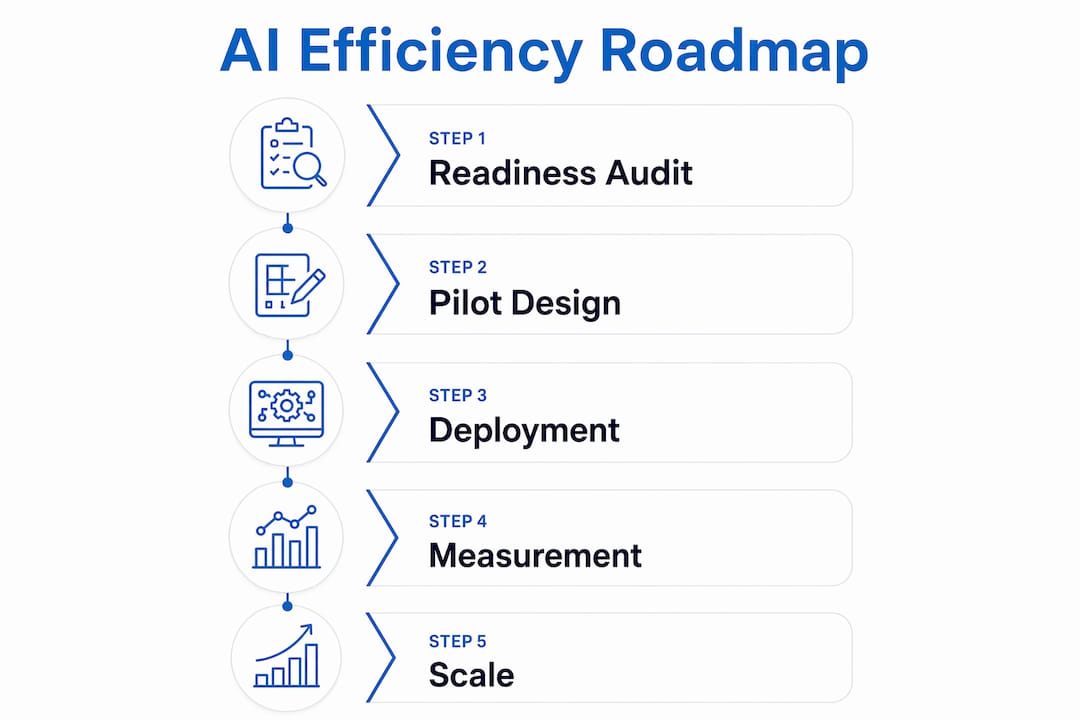
5. A practical 90-day roadmap from audit to scale
Weeks 1–3: Readiness audit
Map your top 10 highest-volume processes. Score each on data availability, repeatability, and measurability. Identify the one process that scores highest on all three. Conduct a data audit: is the historical data clean, labeled, and accessible? Document your current baseline metrics for that process.
Weeks 4–6: Pilot design and data preparation
Define success criteria in writing before you build anything. Assign a process owner, a technical lead, and an executive sponsor. Confirm data residency and PIPEDA compliance scope. Select your platform (cloud-hosted model service, RPA plus ML, or specialist tool). Budget for data engineering — it typically consumes 40–60% of pilot effort.
Weeks 7–10: Deployment and measurement
Deploy to a controlled subset of transactions or users. Collect daily output metrics against your baseline. Run a weekly governance review. Do not expand scope during this phase.

Weeks 11–13: Go/no-go decision
Compare results against your predefined success threshold. If the pilot hits the mark, build the scaling plan. If it does not, document what failed and whether it is fixable. A failed pilot with good documentation is still valuable — it eliminates a bad path cheaply.
| Metric | Collect Daily | Collect Weekly | Collect Monthly |
|---|---|---|---|
| Transaction volume processed | ✓ | ||
| Error / exception rate | ✓ | ||
| Cycle time per transaction | ✓ | ||
| Cost per transaction | ✓ | ||
| User adoption rate | ✓ | ||
| ROI vs. baseline | ✓ |
Typical pilot budget range: $25,000–$80,000 CAD all-in for a focused, single-process pilot. The largest cost drivers are data engineering, integration with legacy systems, and change management. Licensing is often the smallest line item.
For the scale phase, the critical addition is a retraining pipeline and an observability layer so you can monitor model performance in production without manual spot-checks.
6. Which platforms are available to Canadian businesses?
Canadian businesses have strong access to enterprise-grade AI infrastructure, with meaningful data residency options across the major cloud providers.
- Microsoft Azure / Copilot: Azure operates Canadian data centers in Toronto and Quebec City. Azure OpenAI Service, Cognitive Services, and Microsoft Copilot for Microsoft 365 are all available with Canadian data residency options. Best fit for organizations already running Microsoft 365 or Dynamics.
- AWS (Amazon Web Services): AWS Canada (Central) region is based in Montreal. Services include Amazon SageMaker for ML development, Amazon Bedrock for foundation model access, and a full suite of automation tools. Strong choice for organizations with existing AWS infrastructure.
- Google Cloud: Google Cloud’s Montreal and Toronto regions support Canadian data residency. Vertex AI and Document AI are the primary AI services. Well-suited for analytics-heavy workloads and organizations using Google Workspace.
- Oracle: Oracle Cloud Infrastructure offers Canadian regions and is particularly relevant for organizations running Oracle ERP or database systems. AI services integrate directly with existing Oracle data assets.
- RPA plus ML combinations: Tools like UiPath and Microsoft Power Automate pair rule-based automation with ML models for document processing and workflow routing. Lower implementation complexity than custom ML, faster time to value for structured processes.
- On-premises and hybrid: Regulated industries (financial services, healthcare, government) sometimes require on-premises deployment. This adds cost and complexity but is achievable with the right integration partner.
When to choose a managed integration partner over an in-house build: if your team lacks ML engineering experience, if your data sits in legacy systems without modern APIs, or if you need Canadian compliance documentation as part of the deliverable. For AI integration with legacy systems, the integration layer is usually where projects stall without specialist support.
AI-driven digital transformation also increasingly touches ERP systems. Understanding how AI is transforming ERP — from demand forecasting to automated reconciliation — is worth reviewing before scoping any back-office pilot.
7. How to evaluate an AI integration partner
Not all AI consultancies are equal, and the wrong partner choice is the most common reason Canadian AI pilots fail to scale. Use this checklist before signing anything.
- Canadian deployments: Ask for references from at least two Canadian clients in your industry. Data governance, legacy integration patterns, and compliance requirements differ enough from US deployments that experience matters.
- Data governance practices: Can they produce a data flow diagram and a PIPEDA compliance checklist for your pilot? If not, walk away.
- Legacy system integration experience: Ask specifically which ERP, SCADA, or operational systems they have integrated AI with. Generic answers are a red flag.
- Measurable client outcomes: Request before-and-after metrics from past projects, not just testimonials. Productivity percentage, cycle time reduction, cost per transaction — specific numbers.
- Post-launch support model: Who owns model monitoring and retraining after go-live? What are the SLAs? A partner who disappears after deployment leaves you with a degrading model.
- IP and data ownership: Confirm in writing that your data and any trained model weights belong to you, not the vendor.
Red flags to watch for: no Canadian client references, vague statements about “AI-powered solutions” without specifics, no measurement plan in the proposal, and contracts that lock your data into a proprietary platform with no export rights.
The make-versus-buy decision comes down to three factors: internal ML engineering capacity, timeline pressure, and compliance complexity. Most Canadian mid-market companies lack all three conditions for a successful in-house build. A focused integration partner with Canadian experience typically delivers faster and cheaper than building from scratch.
Key Takeaways
AI improves operational efficiency fastest when applied to high-volume, repetitive processes with clean data, a defined success metric, and a governance plan embedded from day one.
| Point | Details |
|---|---|
| Start with a readiness audit | Map your top processes by volume and data availability before choosing any tool or platform. |
| Productivity benchmarks are real | Stanford research shows 14–35% productivity gains; logistics deployments have reached 45% with AI agents. |
| Canadian compliance is non-negotiable | PIPEDA and provincial rules (especially Quebec’s Law 25) apply to any AI system touching personal data. |
| 90 days is enough to prove ROI | A focused single-process pilot with clear KPIs can show measurable results within 30–90 days. |
| Digitalfractal offers a structured path | Digitalfractal’s AI Readiness Audit and 90-day pilot model are designed for Canadian businesses with legacy systems and compliance requirements. |
The part most AI guides get wrong
Most articles about AI and operational efficiency focus on the technology. Which model, which platform, which vendor. That framing sends leaders down the wrong path almost every time.
The real constraint in Canadian businesses is not access to AI tools. Azure, AWS, and Google Cloud are all available here, all capable, all reasonably priced. The constraint is organizational: unclear ownership of the process being automated, data that has never been cleaned or labeled, and a workforce that was never told what the AI is supposed to do or why.
The Stanford research on tacit knowledge is the most underappreciated finding in this space. The productivity gains did not come from replacing workers. They came from capturing what the best workers knew and making it available to everyone else. That is a knowledge management problem as much as a technology problem. Leaders who treat it as purely a technology problem spend six months on integration and then wonder why adoption is low.
The other thing most guides understate: the 90-day timeline is real, but only if the data is ready. Data preparation is where most pilots stall. If your historical transaction data lives in three different systems with inconsistent field names and no documentation, your 90-day pilot becomes a 180-day data engineering project. The audit phase exists precisely to surface that reality before you have committed budget to a vendor.
My honest recommendation for any Canadian business leader reading this: do the audit first. Not because it generates a consulting fee, but because it is the only way to know whether your data and processes are actually ready for what you are about to attempt.
Digitalfractal helps Canadian businesses get to measurable results faster
Canadian businesses that have tried to implement AI without local expertise consistently hit the same walls: legacy system integration, PIPEDA compliance documentation, and data that is not ready for a model. Digitalfractal was built specifically to solve those three problems.
The starting point is an AI Readiness Audit that maps your highest-value automation opportunities, assesses your data and systems, and produces a prioritized pilot plan with defined KPIs. From there, Digitalfractal’s 90-day implementation model takes a single process from audit to measurable result, with Canadian compliance documentation included. The firm works across logistics, construction, oil and gas, and enterprise operations, with integration experience across legacy ERP and SCADA environments.
Three reasons Canadian decision-makers choose Digitalfractal: proven Canadian deployments with documented ROI, a fixed-scope pilot model that limits cost uncertainty, and post-launch monitoring built into every engagement. Use the Digital Transformation Roadmap Generator to map your pilot scope, or contact the team directly to book a readiness assessment.
Authoritative sources for further reading
These sources back the claims in this article and are worth bookmarking when building your internal business case.
- Statistics Canada — AI use by businesses analysis: National adoption data and employment/productivity signals from Canadian businesses. Use this for board-level benchmarking.
- Office of the Privacy Commissioner of Canada (OPC): Authoritative PIPEDA guidance and AI-specific privacy resources. Required reading before any pilot touching personal data.
- Stanford GSB — Generative AI productivity research: The field experiment behind the 14–35% productivity gain figures. Use for ROI justification in business cases.
- Microsoft — AI productivity guidance: SMB-focused efficiency benchmarks and tool guidance. Useful for Microsoft 365 environments.
- Moveworks — Enterprise AI efficiency guide: IT and HR automation benchmarks, including ticket resolution rates. Use for service desk pilot scoping.
- Digitalfractal — AI workflow automation guide: Implementation guidance and use-case examples specific to Canadian operations. Use for pilot design templates.
- Singleclic — AI in digital transformation: Practical frameworks for AI-driven transformation and ERP integration. Useful for back-office pilot scoping.