
Cloud-Native ML Deployment: Cost-Saving Guide

Deploying machine learning models in the cloud can be expensive, but smart strategies can cut costs significantly. Here’s what you need to know:
- Cloud-native platforms save money by offering pay-as-you-go pricing and dynamic scaling, eliminating the need for costly idle servers.
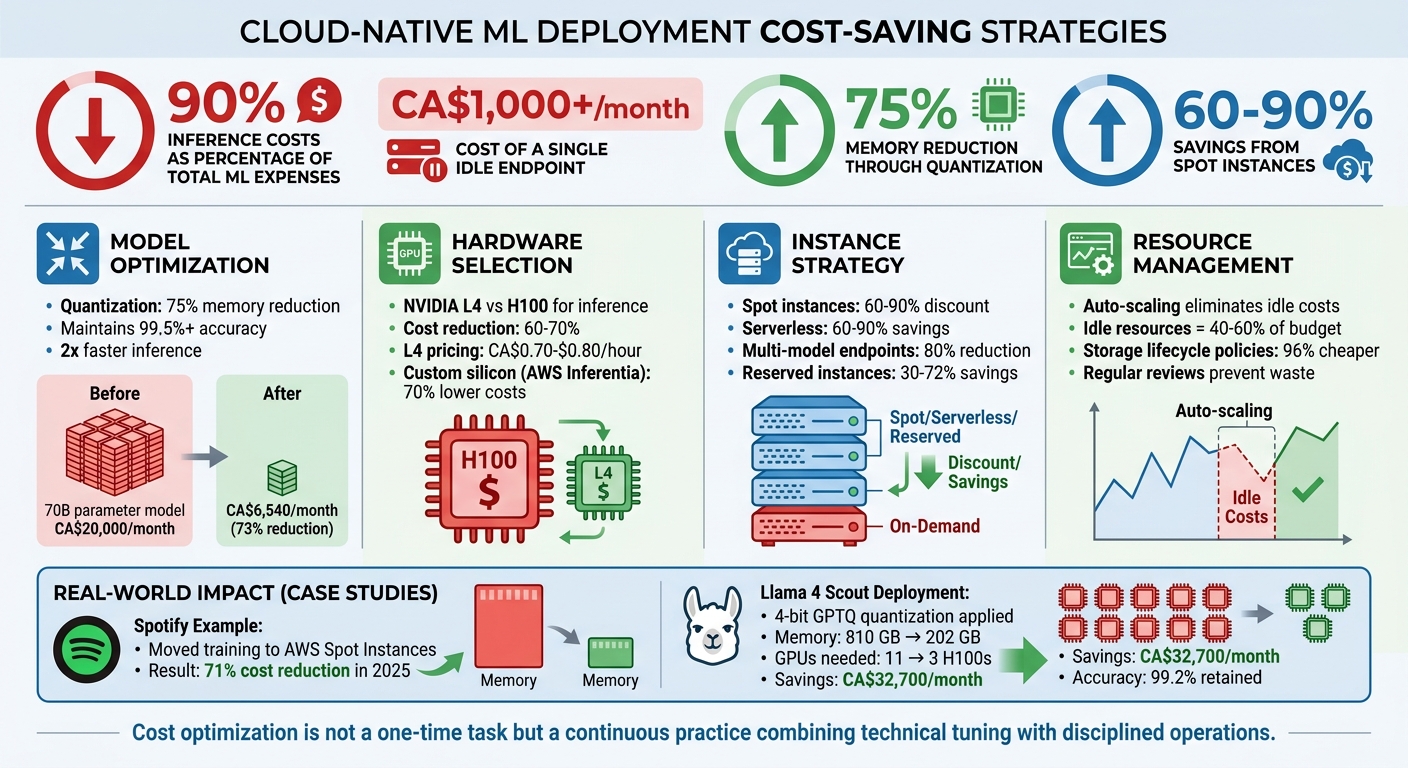
- Inference costs dominate budgets – up to 90% of total ML expenses. Idle endpoints alone can cost over CA$1,000/month.
- Model optimizations like quantization and pruning can reduce memory usage by 75% or more, slashing GPU costs while maintaining accuracy.
- Choosing the right hardware matters. Using GPUs like NVIDIA L4 instead of H100 for inference can cut costs by 60–70%.
- Spot instances and serverless options save up to 90%, though spot instances require handling interruptions.
- Monitoring and tagging resources prevent waste, while automated alerts and regular reviews ensure spending stays under control.
Cloud-Native ML Deployment Cost Optimization Strategies and Savings
Cost Optimization for ML Infrastructure: Smarter AI at Lower Cost | Uplatz

sbb-itb-fd1fcab
Optimizing ML Models for Cost Reduction
Before choosing cloud instances, focus on reducing the size and speed of your machine learning models. In many cases, the model itself is the main driver of costs. Take this example: a 70-billion parameter model running at full precision needs 280 GB of memory and costs close to CA$20,000 per month just to operate. By applying compression techniques, you can significantly cut costs without sacrificing much performance.
Implementing Quantization and Pruning
Quantization is a method that reduces numerical precision – like switching from 32-bit floats to 8-bit or 4-bit integers. This approach can cut memory usage by 75%, double inference speed, and still retain over 99.5% accuracy.
In May 2026, engineers successfully deployed the 405-billion parameter Llama 4 Scout model using 4-bit GPTQ quantization. This reduced memory needs from 810 GB (which required 11 H100 GPUs) to just 202 GB (manageable with 3 H100 GPUs). The result? A 73% cost reduction, saving CA$32,700 per month, while maintaining 99.2% accuracy recovery.
Pruning is another effective technique. It involves removing unnecessary weights, neurons, or even entire layers from a trained model. Pruning can shrink model size by 30–50%. When combined with quantization, these methods can reduce model size by 80–90%. This directly translates to fewer compute resources and lower cloud costs.
"The teams deploying the largest models cost‐effectively aren’t using more GPUs – they’re quantizing aggressively." – Bhuvaneshwar A, AI Engineer
For further optimizations, start with FP16 or BF16 precision to halve memory usage and improve GPU inference. If speed is a priority, Post-Training Quantization (PTQ) can be set up in minutes. On the other hand, Quantization-Aware Training (QAT) is useful for squeezing out that last 1% of accuracy when needed.
Once you’ve optimized model sizes, you can select cloud instances more precisely.
Right-Sizing Models for Cost-Effective Cloud Instances
After compressing your models, align their memory requirements with GPU capacity to avoid overspending. A good rule is that a model with X billion parameters needs about 2×X GB of VRAM in 16-bit precision. Always leave at least 20% of GPU memory free for the key-value cache and activations during inference. For example, a 7-billion parameter model in FP16 requires about 14 GB of VRAM. This fits well on GPUs like the NVIDIA L4 (24 GB) or T4 (16 GB). If the model weights take up 80% of the VRAM, you risk out-of-memory errors or being forced into slower, costlier multi-GPU setups.
Another cost-saving strategy is multi-model endpoints, which consolidate smaller models into a single deployment. This can reduce costs by up to 80%. For instance, instead of deploying a large model for every task, you could use a tiered setup: a fast 7-billion parameter model with INT4 quantization for everyday queries, and a larger 70-billion parameter model for complex tasks that justify the higher cost.
At Digital Fractal Technologies Inc, we use these techniques to create cloud-native ML deployments that balance performance with affordability.
Selecting the Right Cloud Infrastructure
Picking the right cloud infrastructure is all about balancing workload needs with cost efficiency. A key step is understanding how training and inference workloads differ. Training demands high computational power for batch processing, often relying on advanced GPUs like the NVIDIA H100 or A100. On the other hand, inference focuses on continuous operations with lower latency and benefits from specialised GPUs such as the NVIDIA L4 or T4.
Using high-cost training GPUs for inference is a common mistake. For instance, the NVIDIA L4 provides 20–30% of the H100’s latency performance but only costs 20–25% as much, slashing expenses by 60–70% for comparable tasks. Even though AWS reduced H100 instance prices by 44% in June 2025, picking the right GPU tier remains the best way to cut costs.
Mismatched hardware leads to wasted resources and hidden costs. GPU idle time, data egress fees (ranging from CA$80–$120 per terabyte), and spending on high-performance storage for checkpoints can eat up 30–40% of your ML budget. To avoid this, ensure GPU utilisation stays above 60% by profiling workloads effectively.
Choosing the Best Instance Types for ML Workloads
Matching instance types to your workload patterns is another way to improve efficiency. For real-time inference on models with up to 13 billion parameters, the NVIDIA L4 (24 GB VRAM) is a great option. It costs about CA$0.70–$0.80 per hour on demand and handles low-latency tasks well. For larger models or more demanding tasks, GPUs like the A100 or H100 may be necessary, with costs ranging from CA$1.00–$3.90 per hour depending on the provider and region.
Custom silicon options can also help. AWS Inferentia and Trainium instances, for example, offer up to 70% lower inference costs and 50% better price-performance for training compared to standard GPUs. Google’s TPU v5p and Azure’s Maia chips provide similar benefits for workloads that are compatible.
Another way to save is through regional arbitrage. GPU spot pricing and availability vary by location, and choosing regions with lower demand can result in savings of 2–5× compared to sticking to a single region. Tools like SkyPilot can automate the search for the best spot capacity across multiple clouds.
Using Spot Instances and Preemptible VMs
Spot instances and preemptible VMs offer massive discounts – up to 60–90%. However, they come with a catch: these instances can be interrupted with little notice, usually 30 to 120 seconds. This makes them ideal for fault-tolerant tasks like pre-training, hyperparameter sweeps, and batch inference, but they’re less suited for real-time production inference.
Spotify, for example, managed to cut its ML infrastructure costs by 71% in 2025 by moving training workloads to AWS Spot Instances while implementing robust checkpointing. To minimise recovery losses, save model weights and optimiser states to persistent storage like S3 or Google Cloud Storage every 15–30 minutes. This way, if an instance is reclaimed, you lose at most one checkpoint interval.
"The engineering investment to add checkpoint handling to a training job is typically 2–4 days of work; it pays back in the first billing cycle for any team with meaningful GPU spend."
- Cesar Ramirez, SOC Infrastructure Engineer
To increase spot availability, diversify your requests across 10–15 different instance types and multiple availability zones. This reduces the risk of losing access to a single capacity pool. Adding graceful shutdown handlers that catch the SIGTERM signal from cloud providers can also help. These handlers trigger emergency checkpoints before an instance is terminated.
For workloads that can’t tolerate interruptions, Reserved Instances or Savings Plans are better alternatives. They can reduce costs by 30–72% compared to on-demand pricing, making them ideal for steady-state tasks. Combined with other optimisation strategies, these approaches can significantly lower overall ML deployment costs. For more on strategic planning, see our AI consultancy FAQs.
Scaling and Resource Management for Cost Savings
Efficiently scaling your machine learning (ML) infrastructure ensures you only pay for the resources you actually use. Two primary approaches help with this: Horizontal Pod Autoscaler (HPA), which adds replicas during traffic spikes, and Vertical Pod Autoscaler (VPA), which adjusts CPU and memory allocations based on demand. These strategies complement earlier optimizations in model and instance usage, further reducing costs.
Choosing the right scaling trigger is key. For workloads with high throughput, monitoring queue size helps respond to spikes quickly – scaling up as requests pile up and scaling down as the queue clears. On the other hand, for latency-sensitive tasks, batch size is often a better metric to track. Thresholds also matter: a 40% utilization target prioritizes availability, while a 70% target leans toward cost efficiency. Many systems include a default 0.1 "no-action" range to avoid frequent, unnecessary adjustments.
"When the workload decreases, autoscaling removes unnecessary instances, helping you reduce your compute cost."
- Chaitanya Hazarey, Machine Learning Solutions Architect, Amazon SageMaker
Auto-Scaling and Serverless Deployment Options
Building on dynamic scaling for AI enhanced mobile & web apps, serverless inference takes cost control a step further by eliminating idle resource expenses. Traditional ML endpoints often leave resources underused, with idle endpoints accounting for 40–60% of total inference costs. In some cases, a single idle endpoint can cost over CA$1,000 per month. Serverless solutions solve this problem by scaling down to zero when there’s no traffic, charging only for the milliseconds your model processes requests.
For workloads with unpredictable traffic, the savings can be dramatic. Many organisations report cost reductions of 60–90% compared to always-on dedicated endpoints, with overall savings of 40–70% achieved within 30–60 days of adopting serverless strategies. For instance, AWS Lambda charges approximately CA$0.0000033 per invocation for a function with 1 GB of memory running for 200 milliseconds. However, serverless does have a trade-off: "cold start" latency. This delay occurs when a container spins up after a period of inactivity, making serverless less suitable for applications requiring sub-100 millisecond response times. Combining serverless with techniques like model quantization can further lower memory requirements, enabling smaller, more cost-efficient setups.
Multi-Model Endpoints and GPU Time Slicing
Beyond autoscaling, consolidating multiple models on shared infrastructure can unlock even more savings. Multi-model endpoints (MMEs) allow hundreds or even thousands of models to share a single resource pool. Models are dynamically loaded into memory when needed and unloaded when idle, avoiding the linear cost increases associated with dedicating one instance per model.
This approach can significantly cut deployment costs. For example, organisations have reported savings of up to 90% compared to single-instance endpoints, with average reductions around 50%. Hosting two model ensembles on a single g4dn.4xlarge instance, for example, could save over CA$13,000 annually.
Another efficiency boost comes from GPU time slicing, which allows multiple models to share a single GPU core simultaneously. This is particularly useful for workloads that don’t fully utilize a GPU’s capacity. Some platforms also let you scale individual models to zero while keeping the underlying instance active for other tasks, ensuring resources are used effectively.
| Hosting Strategy | Resource Allocation | Cost Efficiency | Best For |
|---|---|---|---|
| Single-Model Endpoints | Dedicated instance per model | Linear (one model per cost unit) | High, steady traffic |
| Multi-Model Endpoints | Shared fleet across models | Sub-linear (shared infrastructure) | Intermittent traffic with many models |
| Serverless | Scales to zero when idle | Pay per request/duration | Sporadic, unpredictable traffic |
To get the most out of these strategies, prioritize your models based on their importance to the business. Assign dedicated resources to mission-critical models for guaranteed performance, while moderate-priority models can share instances or use spot capacity. Experimental models can run on shared queues with scale-to-zero policies. Tracking metrics like GPUReservation and CPUReservation also helps you fine-tune your scaling and resource allocation policies, ensuring you’re making the most of your infrastructure.
Monitoring and Continuous Optimization
Optimizing models and scaling resources are great for efficiency, but the real challenge is maintaining those benefits over time. That’s where active monitoring comes in. Cloud usage is constantly changing, and without keeping a close eye, costs can spiral out of control. For instance, a single misconfigured training job running on a high-end GPU instance could rack up over CA$15,000 in just 11 days. To avoid these kinds of surprises, it’s crucial to follow specific monitoring practices.
Treating cost as a core performance metric – just as important as accuracy and latency – is a must. Since inference tends to dominate ongoing expenses, keeping tabs on it is essential. A continuous cycle of optimization – monitoring resource use, tweaking configurations, refining policies, and feeding insights back into deployment decisions – ensures technical choices stay aligned with business goals, a key focus of AI consulting services.
Implementing Cost Monitoring and Alerts
The first step in cost monitoring is tagging resources properly. Every machine learning (ML) resource – whether it’s a training job, an inference endpoint, or a storage bucket – should have tags that identify the project, environment (like dev, test, or production), ML phase (such as training or inference), and owner.
"Cloud usage is dynamic. This requires continuous cost reporting and monitoring to make sure costs don’t exceed expectations and you only pay for the usage you need."
- AWS
In addition to tagging, set up tiered budget alerts at 50%, 80%, and 100% of your budget to catch potential overspending before it becomes a problem. For deeper insights, track ML-specific metrics like cost per inference, cost per training job, and cost per data point. These metrics uncover trends that total spending numbers might miss.
Automated tools can help enforce cost control at the infrastructure level. For example, cloud-native policies like Azure Policy or AWS Service Control Policies can block the creation of untagged resources, stopping untracked spending before it starts. Anomaly detection tools can flag unusual spending spikes, and automated scripts can shut down idle notebooks or underused GPU instances – resources that often account for 40–60% of total inference costs.
Conducting Regular Reviews of ML Deployment Efficiency
Automated alerts are helpful, but regular reviews are what turn raw data into actionable savings. For example, in early 2025, an ML platform lead discovered that their AWS bill had jumped 40% to CA$80,000 in one month. The culprit? A training job stuck on ml.p3.8xlarge instances for 11 days, costing CA$15,300. By introducing a review program that included using spot instances, adjusting storage tiers, and cleaning up idle resources, the team cut their monthly bill to CA$31,000 within six weeks – all while maintaining the same workload.
Scheduling regular reviews that compare resource usage with application performance can help identify opportunities to switch to less expensive instances without affecting the user experience. Monitoring model metrics like accuracy and latency also ensures timely retraining or scaling, so resources aren’t wasted on underperforming models.
Another way to save is by implementing storage lifecycle policies. For example, older model artefacts and datasets can automatically move from standard storage to cheaper tiers like Glacier or Deep Archive after 30–90 days. Deep Archive, in particular, can be up to 96% cheaper than standard storage.
Conclusion
Deploying machine learning models in a cloud-native environment doesn’t have to break the bank. By using strategies like model quantization, which can shrink model size by up to 75%, or leveraging spot instances that offer discounts ranging from 60–90%, you can significantly lower costs while maintaining performance levels. The secret lies in treating cost management as an ongoing practice, not a one-time adjustment.
Inference costs are a major factor in production budgets, often accounting for a large share of expenses. In fact, idle resources alone can eat up 40–60% of your inference budget if left unchecked. This makes continuous monitoring and optimization critical. By embedding cost metrics into every step of your deployment process, you can avoid unnecessary expenses and keep operations lean.
"Cost optimization is not merely a finance team responsibility but a cross-functional imperative in AI deployments."
- Jordan Michaels, Senior DevOps Strategist & Editor
The best results come from combining technical fine-tuning with disciplined operational processes. Actions like right-sizing instances, setting up storage lifecycle policies, and using multi-model endpoints can slash deployment costs by as much as 80%.
Start with straightforward changes that deliver quick wins. For example, enable checkpointing for spot training, automate the shutdown of idle notebooks, and move older data to budget-friendly storage options like Glacier Deep Archive. These simple steps can lead to noticeable savings right away. From there, focus on creating a culture where cost awareness is built into your MLOps workflows. Every decision – whether related to infrastructure or deployment – should weigh both performance and cost.
With the right engineering mindset, cloud flexibility becomes a tool for meaningful savings. Keep optimising, measure the impact, and your ML deployments will deliver the best possible outcomes at the lowest possible cost.
FAQs
How can I estimate inference cost per request?
To figure out the inference cost for each request, start by calculating the total number of tokens involved – this includes both the tokens in the prompts and the responses. Once you have that, multiply the total by your cloud provider’s per-million-token rate. Depending on the model and the provider, rates typically range between $0.05 and $0.30 per million tokens for certain configurations.
For a more accurate estimate tailored to your setup, consider using benchmarking tools or Total Cost of Ownership (TCO) formulas offered by providers like NVIDIA or AWS. These can help account for specific factors such as your hardware and workload requirements.
When should I choose serverless vs always-on endpoints?
For traffic patterns that are unpredictable, spiky, or intermittent, serverless endpoints are a smart choice. They automatically scale down to zero when not in use, which can reduce costs by as much as 40–60%. However, keep in mind that this approach may lead to delays caused by cold starts.
On the other hand, always-on endpoints are ideal for applications that handle steady, high-volume traffic or require immediate, consistent responses. They are particularly suited for latency-sensitive tasks where reliability and speed are critical.
In short, opt for serverless when cost savings are a priority, and choose always-on when performance and low latency are non-negotiable.
What’s the safest way to use spot GPUs without losing progress?
To make the most of spot GPUs without risking your progress, prioritize fault tolerance and regular checkpointing. Save your model weights at frequent intervals – every 10 to 30 minutes is a good rule of thumb. Set up termination handlers to detect and handle instance shutdowns effectively. Use training frameworks that support checkpointing and resuming, and automate the process of re-launching instances to keep your workflow smooth. These steps help safeguard your progress and maintain a steady deployment process.