AI-Powered OCR: Benefits for Document Automation

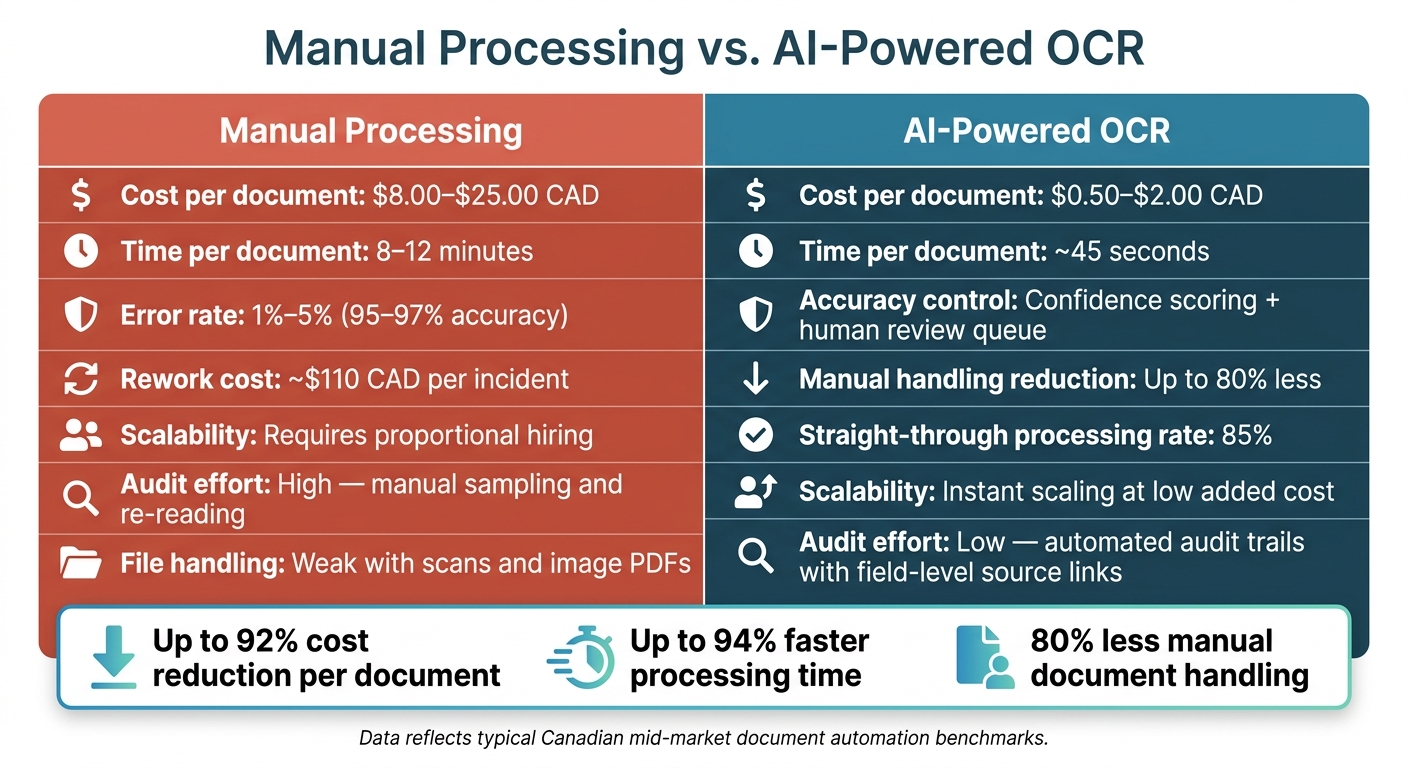
If I’m still keying data from PDFs by hand, I’m paying too much and waiting too long. Manual document work can cost $8.00 to $25.00 CAD per file, takes minutes per document, and often brings a 1% to 5% error rate. AI-powered OCR cuts that work by reading PDFs, scans, and forms, pulling out fields, checking confidence, and sending clean data into ERP, CRM, or case systems.
Here’s the short version:
- It lowers processing cost to about $0.50 to $2.00 CAD per document at scale
- It speeds up turnaround from 8 to 12 minutes down to about 45 seconds
- It trims manual handling with up to 80% less hands-on work
- It improves accuracy by sending low-confidence fields to a person instead of letting bad data pass
- It helps with compliance through audit trails, source links, and Canadian hosting options
- It works well for mixed files like invoices, claims, contracts, reports, and bilingual English-French documents
- It fits into current systems through APIs, validation rules, and human review steps
The main point is simple: OCR is not just about reading text. It’s about turning hard-to-use files into structured data that can move through your workflow without all the retyping, delays, and follow-up fixes.
Manual Processing vs. AI-Powered OCR: Cost, Speed & Accuracy
New course! Document AI: From OCR to Agentic Doc Extraction
sbb-itb-fd1fcab
Quick Comparison
| Area | Manual processing | AI-powered OCR |
|---|---|---|
| Cost per document | $8.00–$25.00 CAD | $0.50–$2.00 CAD |
| Time per document | 8–12 minutes | ~45 seconds |
| Accuracy control | Manual checks after entry | Confidence scoring + review queue |
| Scale | More volume means more staff | More volume means more system throughput |
| Search and audit | Harder to trace | Field-level links back to source |
| File handling | Weak with scans and image PDFs | Better with mixed layouts and poor scans |
If I’m dealing with backlogs, invoice delays, or audit pressure, this is the part of document automation that changes the flow first.
What Is AI-Powered OCR for Document Automation
OCR (Optical Character Recognition) turns text from scanned files and PDFs into machine-readable data. That change matters because document automation depends on solid capture at the start, not manual rekeying. AI-powered OCR takes this further. It uses machine learning and computer vision to read text, understand page layout, and pull out data based on context, which cuts down on the manual exceptions that slow document workflows.
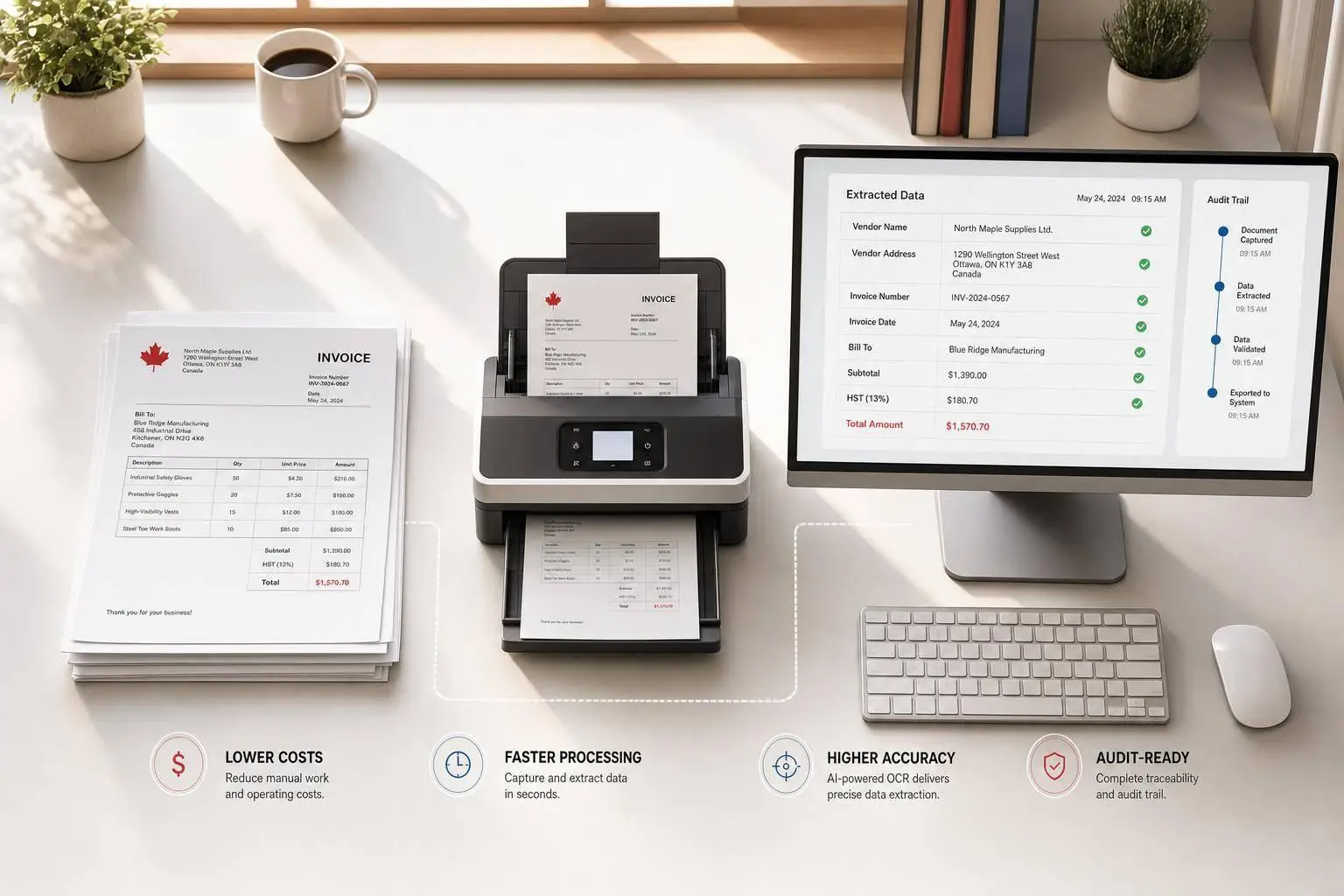
In document automation, AI-powered OCR is the first step in the flow. It takes in files from email, SFTP, scanners, or mobile uploads, classifies them, extracts the data, and passes that data into ERP, CRM, or case management systems. The difference becomes clear when document layouts change from one file to the next.
How AI-Powered OCR Differs from Basic OCR
Basic OCR matches characters and works best with clean documents and fixed layouts. AI-powered OCR does more than that. It reads layout and structure, so it can handle changing formats, handwriting, degraded scans, and bilingual English-French documents without separate templates.
That matters in day-to-day operations. AI-powered systems consistently outperform traditional OCR on complex and degraded documents, which is often where manual processing mistakes begin.
What AI-Powered OCR Outputs
The system extracts fields like supplier names, totals, dates, addresses, and document IDs. It then formats that data to match the target system’s schema and routes it straight into downstream systems such as ERP, CRM, or case management platforms.
When extraction fails, the impact is pretty direct: errors, delays, and audit gaps.
Document Problems AI-Powered OCR Solves
The main issues land in three buckets: data quality, processing speed, and the fact that many teams still deal with files their systems can’t properly read. In day-to-day work, those issues tend to show up in the same three ways.
High Error Rates and Inconsistent Data Entry
Manual data entry usually runs at 95–97% accuracy. That sounds decent at first glance. But at 1,000 documents per month, it still leaves 30 to 50 errors that someone has to find and fix.
And those fixes aren’t cheap. Rework costs about $110 CAD per incident, so the total can climb fast once payment disputes and reconciliation delays start piling up.
Artificial intelligence services tackle OCR at the field level. Fields with more than 95% confidence can pass through automatically, while low-confidence fields get routed to a person for review. That setup improves end-to-end accuracy because the uncertain fields don’t just slip through unnoticed. Validation rules add another check. You can also use an AI Integration Benefits Analyzer to estimate potential gains for your specific workflow. For example, extracted invoice totals can be cross-matched against purchase orders in the ERP.
Speed is the next pain point, and this is where manual work often starts to drag.
Slow Processing and Document Backlogs
Manual entry takes 3–5 minutes for a simple PDF and 8–12 minutes for a complex or scanned document. At small volumes, that may feel workable. At 500 or 5,000 documents a month, it turns into a bottleneck built right into the process, especially during month-end close.
AI-powered OCR handles documents in seconds, not minutes, with 24/7 throughput and elastic scaling. Put simply, documents keep moving instead of sitting in a queue while staff try to catch up.
The last issue is access. A lot of files still come in formats that lock the data away.
Unstructured Files, Locked Data, and Audit Gaps
Non-searchable PDFs and scanned attachments are basically invisible to downstream systems because the data is trapped inside an image. So staff end up re-entering information by hand that should move through the workflow on its own. That slows everything down and leaves records disconnected from the source files.
AI models can read document structure and pick out fields like vendor name or totals based on context and position, even when the layout is unfamiliar. The result is structured, searchable data in JSON or CSV. Each extracted record also stays linked to its source image, which makes audit review much easier.
Key Benefits for Canadian Document Automation
When documents come in clean, the payoff shows up fast: lower costs, less waiting, and fewer compliance headaches. That’s where AI-powered OCR starts to make a clear difference in Canadian document workflows.
Higher Accuracy, Faster Turnaround, and Lower Processing Costs
At scale, AI-powered OCR can cut per-document handling costs from $8.00–$25.00 CAD to $0.50–$2.00 CAD.
And the time savings add up just as fast. AI-powered systems process documents in about 45 seconds on average, while manual entry usually takes 8–12 minutes. Teams using AI-powered OCR also report an 80% drop in manual document handling and an 85% straight-through processing rate.
That gap matters. If your team handles a high volume of invoices, forms, claims, or intake files, shaving off several minutes per document can change the pace of the whole operation—you can even calculate your potential savings to see the impact.
Better Compliance, Traceability, and Service Experience
Cost savings get attention, but in Canada, governance is often what tips the decision. Quebec’s Law 25 allows penalties of up to $25M CAD or 4% of worldwide turnover for non-compliant data processing. AI-powered pipelines help support compliance by spotting personal information at capture and routing it through Canadian-hosted infrastructure before downstream processing starts.
The audit trail is also much easier to work with. Every extracted field links back to its exact location in the source document through field-level source links. That means auditors can verify a result in seconds instead of reading through an entire file again.
There’s also a service upside. When processing is faster and cleaner, response times shrink for the person waiting on the other side – whether that’s a contractor waiting for invoice approval, a patient expecting a referral, or a citizen submitting a public sector form.
Manual Document Processing vs. AI-Powered OCR
The difference is easiest to see side by side.
| Criterion | Manual Processing | AI-Powered OCR |
|---|---|---|
| Time per Document | 8–12 minutes | ~45 seconds, including review |
| Scalability | Requires proportional hiring | Instant scaling at low added cost per document |
| Searchability | Limited to manual indexing | Full-text and structured data search |
| Audit Effort | High – manual sampling and re-reading | Low – automated audit trails and field-level source links |
| Operating Cost | $8.00–$25.00 CAD per document | $0.50–$2.00 CAD per document |
How to Implement AI-Powered OCR in Existing Systems
Those gains only show up when OCR is connected to the systems that already run the work.
Technical and Governance Requirements
A production-ready AI-powered OCR setup usually follows four stages: Capture (normalising documents from email, SFTP, or mobile), Extract (running the AI model), Validate (applying business rules and confidence checks), and Route (sending structured data to your ERP or CRM).
In plain terms, you’re not just reading documents. You’re turning them into data that can move through the rest of your stack without creating extra manual work.
OCR should connect to existing ERP and CRM systems through APIs or webhooks. It should also preserve page geometry so each extracted field can be traced back to the source document. That traceability matters. If someone asks where a number came from, your team should be able to point to the exact spot on the page.
For Canadian deployments, PIPEDA and Law 25 need to be built in from capture through storage. That means:
- tagging documents with personal data at the capture stage
- routing them through Canadian-hosted infrastructure such as AWS Canada Central, Azure Canada East, or Google Cloud Montréal
- completing a Privacy Impact Assessment (PIA) before deployment
The system also needs to support both English and French documents, especially for Quebec-based and public-sector operations.
Validation and routing often decide whether the workflow works well or falls apart. Set a confidence threshold, and send anything below that threshold to a human reviewer. That helps keep straight-through processing high while stopping uncertain extractions from reaching core systems.
When to Use a Custom Implementation
A custom build makes sense when document types, validation rules, or user entry points are tied closely to how your operation runs.
This approach fits workflows that need to live inside your own mobile, web, or internal systems. It can be a much better fit than forcing staff to jump between disconnected tools.
That’s often the case in energy, construction, and the public sector. Teams in those settings deal with safety tickets, timesheets, and vehicle documentation that need to be captured, checked, and routed without slowing down day-to-day work. A custom pipeline can be trained on your actual document types, apply your specific validation rules, and connect directly with your line-of-business systems.
For scoping, typical Canadian mid-market custom builds for supplier or PO ingestion usually range from $20,000 to $60,000 CAD and ship in 8 to 12 weeks. More complex multi-document pipelines can reach $120,000 CAD.
Conclusion: What Businesses Gain from AI-Powered OCR
When capture, validation, and routing are lined up, the workflow becomes faster and easier to audit.
The compliance and audit upside is clear, especially for Canadian organisations working through PIPEDA and Law 25. But good results depend on how well the setup matches real business processes: the right validation rules, the right integrations, and governance built in from day one instead of patched on later. The biggest win comes when OCR, validation, routing, and governance operate as one workflow.
FAQs
How does AI-powered OCR handle low-confidence fields?
AI-powered OCR deals with low-confidence fields by sending them to human reviewers for validation. That extra check helps keep accuracy high and cuts down on errors.
It also often gives a confidence score for each field, which makes the review process easier to manage.
What documents work best with AI-powered OCR?
AI-powered OCR works best with clean, text-based documents like PDFs, invoices, receipts, contracts, and forms, especially when the layout stays predictable.
That said, it can also handle messier files. More advanced OCR tools can process complex layouts, handwritten content, and degraded scans with high accuracy.
How hard is it to connect OCR to our current systems?
Connecting OCR to your current systems is usually manageable, but it does take careful planning. Most AI-powered OCR tools can plug into systems you already use, like ERP, CRM, and databases, through APIs, connectors, or message queues.
The big job is making sure validated data moves cleanly into those systems without hiccups. Cloud, on-premises, and hybrid setups are all common. In most cases, a smooth rollout depends on close work between IT, data science, and business teams.