Push Notification Personalization: A Practical Guide

Push notification personalization means sending each user a message shaped by what you know about them: their name or city, what they browsed, where they are in the customer lifecycle, and what they did last. Done well, it replaces the identical blast with a message a person actually wants to open. Done badly, it trains users to switch notifications off. This guide covers how it works technically, which data to use, where AI helps and where it fails, what Canadian consent rules require, and how to choose between Firebase and OneSignal.
TL;DR
- Personalization inserts recipient data (name, city, product viewed) into a message template. Personal messaging goes further and reacts to behavior, lifecycle stage and context.
- Start with segmentation and triggers (abandoned basket, purchase, location) before adding AI. Test one variable at a time.
- AI can adapt timing, frequency and wording per user, but generated copy needs guardrails against invented offers and broken links.
- In Canada, push messages that are commercial need a valid consent basis, records proving it and a working unsubscribe, under CASL.
- Firebase Cloud Messaging is the free delivery layer; OneSignal builds a managed engagement platform on top of it.
Table of Contents
- How push notification personalization works
- Personalized versus personal: the distinction that matters
- The data you can personalize on
- Send fewer, better messages
- Where AI helps, and where it does not
- Measure and test properly
- Consent and privacy rules in Canada
- Firebase or OneSignal: choosing a push service
- Perspective: personalization is a data and discipline problem
- Where we can help
- FAQ
- Sources
How push notification personalization works
The delivery chain is the same whatever tool you use. An app that the user has opted into registers with Apple’s or Google’s notification service and receives a device token. The app passes that token, with customer and application identifiers, to the messaging platform, which sends the targeted message to the platform notification server (Cheetah Messaging’s push documentation).
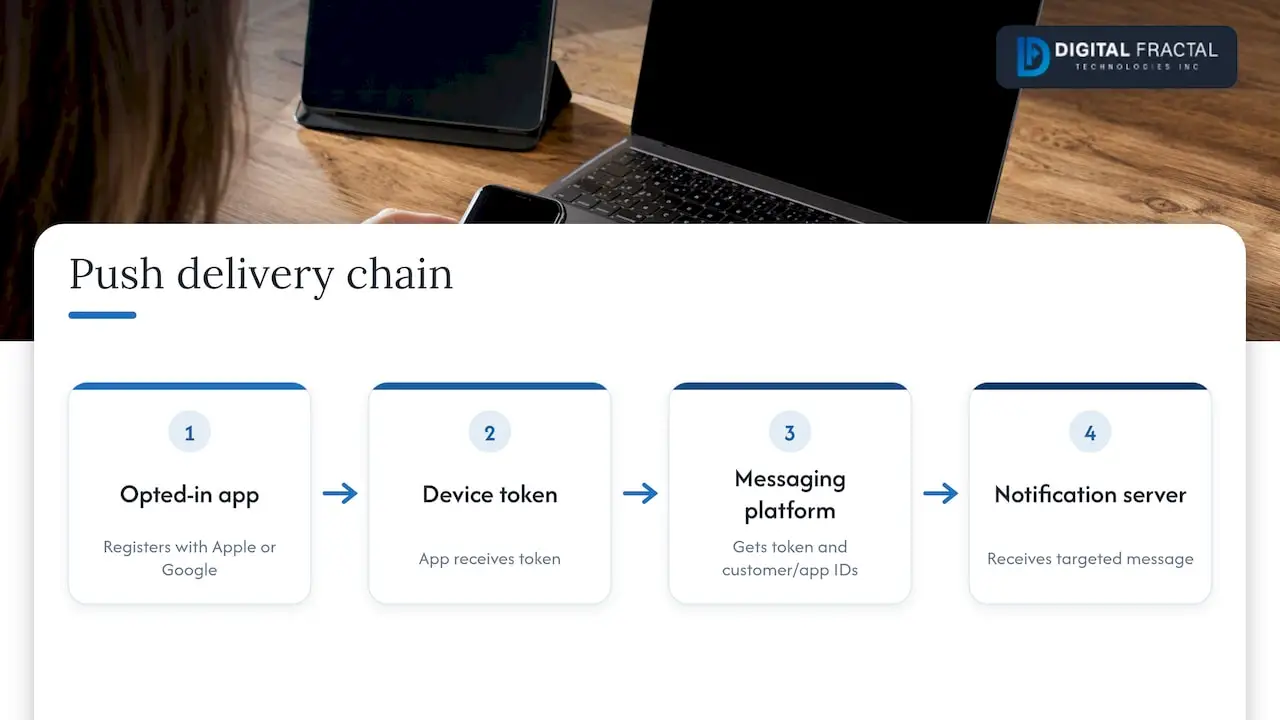
Personalization happens at the step where the token is tied to a person. Once a push registration is associated with a customer ID, campaigns can use demographic or engagement data. Simple fields such as name and location go in as merge tags, while dynamic content can change the text and links by audience characteristics (same source). In practice, the platform swaps placeholders for recipient values when it processes the message. Adobe’s documentation describes this as replacing expressions with data from the profile dataset, and Microsoft’s journey documentation describes the same idea with values drawn from audience, trigger or compliance data sources.
The practical consequence: the quality of your personalization is capped by the quality of the data attached to each device token. A beautiful template with a blank first-name field sends “Hi ,” to real customers.
Personalized versus personal: the distinction that matters
Most guides stop at inserting a first name. Customer.io draws a sharper line: personalization uses data such as a name, city or product browsed, while a personal message responds to behavior, lifecycle stage and context. That matters for push in particular because a notification lands in the same high-attention space on the lock screen as a message from a friend or colleague.
A quick test: would the message still make sense if you removed the merge tag? If “Sam, your order is 20% off” becomes “Your order is 20% off” and nothing is lost, you personalized the greeting, not the message. “The pump controller you ordered ships tomorrow, tap to confirm the delivery window” is personal, because it depends on what the user did.
The data you can personalize on
Think in four layers, from easiest to most valuable:
| Layer | Examples | Typical use |
|---|---|---|
| Profile | Name, city, language, plan type | Greeting, local relevance, language choice |
| Behavior | Products viewed, features used, last session | Re-engagement, feature adoption |
| Event triggers | Purchase, basket abandonment, geolocation | Real-time, contextual messages |
| Lifecycle | New user, active, lapsing, loyal | Different content and frequency per stage |
Adobe’s mobile-engagement documentation names purchases, basket abandonment and geolocation as the common contextual triggers, and notes that platforms can report opens, actions and bounces so you can see what worked.
Segmentation is the cheapest gain. A study of more than 90 billion notifications reported that segmenting audiences on data tags can lift click-through rates by 21 percent (OneSignal’s analysis). Treat that as a vendor-reported benchmark, not a promise: your lift depends on how different your segments really are.
We covered the monetization side of this in AI in app monetization and personalizing user offers, and the broader craft in six ways to improve the value of your push notifications.
Send fewer, better messages
Personalization is also about restraint. Broadcasting identical messages can teach users to ignore notifications or revoke permission, which is the worst outcome because you cannot win that permission back with a better campaign. Two habits protect it:
- Frequency caps. Set a ceiling per user per day and per week, and let high-priority transactional messages bypass it.
- Time-zone-aware delivery. Sending by each user’s time zone avoids a 3 a.m. buzz (OneSignal). For a Canadian app that spans six time zones, this is not optional.
There is research behind sending less. In a production A/B test at Twitter, a model that filtered which notifications to send produced fewer notifications, higher open rates and slightly better daily active users (Should I send this notification?). The lesson for any app: a suppression rule that says “do not send” is a personalization feature.
Where AI helps, and where it does not
Rule-based segments only go so far. AI moves personalization from “which segment is this user in” to “what should this one user receive, when, and how often”.
A 2025 paper at the ACM Recommender Systems conference describes this as an individual-level decision process that adapts timing, content and frequency over time, using observed responses to balance exploiting known preferences with exploring alternatives (Agentic Personalisation of Cross-Channel Marketing). The same paper flags real-world wrinkles: preferences change, repetition can have counter-intuitive effects, and the authors rely on human-maintained sets of approved copy actions to avoid language-model confabulation.
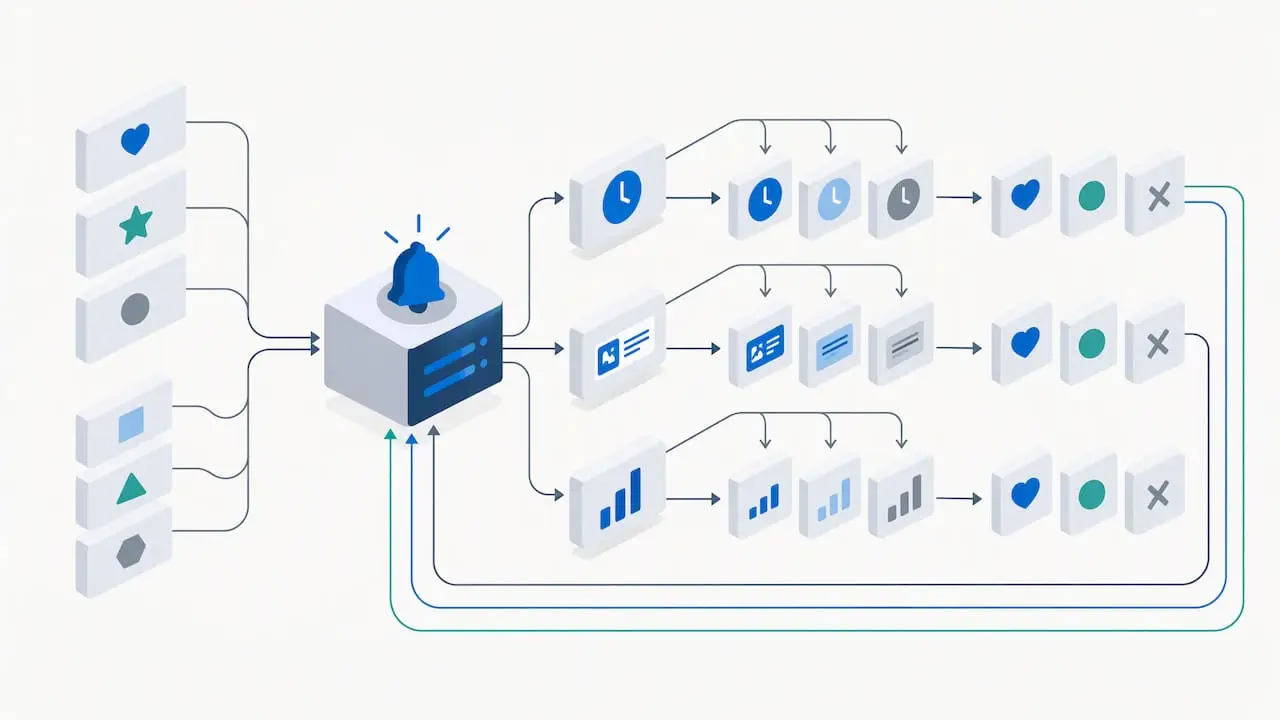
On the content side, AI targeting can analyze behavioral signals and performance history, then generate and scale the best message variants. One language-learning app case study reports click-through gains of up to 82.3% from this approach, with AI-written variants tested against human-written ones and the winners scaled in real time (Reteno case study). It is a vendor’s own case study, so read the figure as an upper example. The same logic of reading signals and improving outreach over time is explored in this playbook on AI personalization at scale.
Guardrails for generated messages
A generated push that promises a discount that does not exist is a trust problem and possibly a legal one. An engineering write-up from a large food-delivery company recommends monitoring generative messaging for toxicity and hallucinated details, with blocklists and programmatic validation, because wrong promotions, products or deep links damage trust and create legal risk (iFood engineering). Our working rules follow from that:
- The model chooses among approved offers and templates. It does not invent offers.
- Every deep link and price is validated against live data before the send.
- A human reviews new copy patterns, and a kill switch pauses a campaign.
- Model gains are measured against a holdout group that gets the plain version.
AI also needs data that is clean and connected. If your events live in three systems with no shared user ID, fix that first. Our guide to enterprise data readiness explains how to check.
Measure and test properly
Change one variable at a time: the wording, the send time, the image or the call to action. Compare results so you know what drove the change (OneSignal). Testing a new headline and a new send time together tells you nothing about either.
Track metrics in this order:
- Delivery and opt-out rate. A rising opt-out rate cancels any open-rate win.
- Opens and actions on the notification itself.
- Downstream conversion: the purchase, booking or task completed after the tap.
- Incrementality: the gap between the personalized group and a holdout that received a generic message.
If you want the app-side view, our pieces on AI-powered mobile app analytics and real-time user feedback with AI show how to connect notification results to in-app behavior.
Consent and privacy rules in Canada
Personalization runs on personal data, and in Canada the messages themselves may be regulated. Under Canada’s anti-spam legislation (CASL), commercial electronic messages need consent. Express consent stays valid until withdrawn, while implied consent applies only in specified circumstances and is generally time-limited (Innovation, Science and Economic Development Canada). Whether a given push notification counts as a commercial electronic message depends on its content and purpose, so have counsel review your message types.
Two practical points for the team building the system:
- You carry the burden of proof. The CRTC advises that the sender must be able to prove consent, and should keep evidence of consent, documented collection methods, and unsubscribe requests with the resulting actions (CRTC enforcement advisory). Store consent timestamps and the source screen alongside each device token.
- Apps are in scope. Federal partners reminded 36 mobile-app companies in Canada of obligations around misleading claims, collecting or using personal information without consent, and informed consent about app functions (CASL performance report 2020-21).
Build the unsubscribe path and the consent log before you build the clever targeting. Personalization that uses more data needs a clearer reason for collecting it, stated at the point of collection.
Firebase or OneSignal: choosing a push service
This is the question developers ask most often, and the two are not direct equivalents. Firebase Cloud Messaging (FCM) is a free, developer-focused delivery layer. OneSignal is a managed customer-engagement platform that builds on FCM and adds no-code segmentation, A/B testing and cross-channel orchestration (OneSignal’s own comparison). That source also notes FCM comes with a Firebase composer, audience targeting, A/B tests and campaign analytics, while OneSignal adds multichannel messaging, user-level reporting and paid plans. Because that comparison comes from one of the two vendors, check current limits and prices on each vendor’s pricing page before you commit.
| Question | FCM-centered setup | Managed platform on top of FCM |
|---|---|---|
| Main role | Delivery transport | Engagement platform |
| Personalization | Audience targeting, custom logic in your backend | Segmentation and templates in a dashboard |
| Who runs campaigns | Developers | Marketers, with developer setup |
| Channels | Push | Push plus other channels |
| Cost model | Free delivery, your engineering time | Paid plans, less custom code |
Our view, from building these systems: choose FCM with your own logic when personalization depends on proprietary data, such as equipment status, job-site events or shipment milestones, and you have developers to maintain it. Choose a managed platform when marketers need to launch and test campaigns without tickets. Many teams start managed and move critical triggers into their own backend later. Whichever you pick, keep your customer data in a system you control and pass only what the push needs.
Perspective: personalization is a data and discipline problem
We see the same pattern in the apps we are asked to improve. The notification tool is rarely the problem. The problem is that nobody can say which user did what, when, and whether they agreed to be contacted. Teams buy a platform, send a first-name greeting, see a small lift, and conclude personalization is overrated.
Our approach is to work backwards from a business event that matters: a delayed shipment, an inspection due, an abandoned booking. We then ask what data tells us the event is happening, what the user needs at that moment, and what we may legally send. Only then do we pick tools and add AI to choose timing and wording. That is why our work starts with an audit of data, systems and workflows, and aims at tangible results inside 90 days rather than a generic strategy deck.
For logistics, construction and field-service apps, the strongest notifications are operational: a driver needs a rerouting, a site manager needs a permit alert. Those are useful, so users keep notifications on.
— Souhail
Where we can help
If your push program is stuck at first-name merge tags, the fastest way forward is to find out what your data, consent records and app architecture can support. Our AI Readiness Audit is a one-off engagement priced from $2,500 to $10,000, and it identifies where AI and automation will pay off in your workflows, including notification and messaging flows.
When you are ready to build, our app development team designs and ships iOS, Android and cross-platform apps, and our AI and machine learning solutions cover the model, integration and implementation work behind individual-level personalization.
FAQ
What is push notification personalization?
It is tailoring each notification to the recipient using data such as name, city, products viewed, behavior and lifecycle stage. The platform fills placeholders or selects content when it processes the message for each device. The most effective versions react to what the user just did, not only to who they are.
Does AI really improve push notifications?
It can, mainly by choosing timing, frequency and message variants for each user based on observed responses. Published results are often from vendors, so measure against a holdout group in your own app. Generated copy needs validation so it never promises an offer or link that does not exist.
Do I need consent to send personalized push notifications in Canada?
If a message is a commercial electronic message under CASL, you need express or valid implied consent, a working unsubscribe and records proving consent. Express consent lasts until withdrawn, while implied consent is limited. Ask a lawyer to classify your message types.
Is Firebase or OneSignal better for personalization?
Firebase Cloud Messaging is free delivery that suits teams with developers and custom data logic. OneSignal layers segmentation, testing and multichannel tools on top, which suits marketer-led programs. The better choice depends on who runs campaigns and where your personalization data lives.
How often should I send personalized notifications?
There is no universal number. Set frequency caps per user, send in each user’s local time zone, and watch the opt-out rate alongside opens. If opt-outs climb, you are sending too much or too generically.
Sources
- Cheetah Messaging push notification documentation
- Personalize content in Journey Optimizer
- Push messages in Customer Insights journeys
- How to personalize push notifications, Customer.io
- Mobile App Engagement, Adobe Journey Optimizer
- 6 Best Practices for Push Notifications, OneSignal
- Should I send this notification?
- Agentic Personalisation of Cross-Channel Marketing, ACM
- Reteno case study
- iFood engineering article on generative AI messaging
- Getting consent to send email, ISED Canada
- CRTC enforcement advisory on records of consent
- CASL performance measurement report 2020-21
- Firebase Cloud Messaging vs. OneSignal
- AI personalization at scale