
AI Opportunity Assessment: How to Find Where AI Pays Off

An AI opportunity assessment is a structured review of your actual workflows that ends in a ranked shortlist: which tasks AI or plain automation should take on, what each would return, what it needs in data and oversight, and which one you pilot first. It is narrower than a readiness audit and more practical than a strategy deck. Done well, you leave with one funded pilot and clear success criteria, not a list of 40 ideas.
This guide walks through how to run one, how to score candidates, how to pick quick wins, and what to do in the 30 days after. It is written for operations, logistics, construction and field-service leaders in Canada who want to decide before they spend.
TL;DR
- An assessment looks at your real workflows and answers one question: where would AI or automation save time or money, and at what risk and running cost?
- Not every opportunity needs AI. Rules-based automation handles fixed, predictable steps; AI earns its place where work involves language, judgment, classification or messy inputs.
- Score every candidate on value, feasibility, data readiness, risk, complexity and ongoing cost, then pilot the top one for 30 days with measurable targets.
- Privacy and data quality are part of the assessment, not an afterthought, especially for anything that matches or links records.
- Our own AI Readiness Audit is a one-off engagement priced at $2,500 to $10,000 and builds this kind of ranked shortlist.
Table of Contents
- What an AI opportunity assessment is (and is not)
- Step 1: Map where time actually goes
- Step 2: Score each opportunity on six criteria
- Step 3: Find the quick wins
- Step 4: Check data, privacy and governance before you commit
- Step 5: Turn findings into a plan
- Why Canadian businesses should do this now
- Our perspective
- Get a ranked shortlist from your own workflows
- FAQ
- Sources
What an AI opportunity assessment is (and is not)
The assessment starts from your work, not from a technology. You list what people actually do each week, find the steps that are repetitive, slow or error-prone, and test whether AI, automation or neither is the right fix.
The distinction between AI and automation matters more than most vendors admit. The Government of Canada’s regional AI initiative describes AI as machine-based systems that can learn, solve problems, generate content, make recommendations or support decisions, while automation follows predefined configurations and rules and cannot learn or adapt. That gives you a practical sorting rule:
- Fixed inputs, fixed steps, fixed output: automation. Think copying a purchase order number from an email into your ERP, or routing a form to the right inbox.
- Variable inputs, judgment or language involved: AI, usually with a human checking the output. Think reading supplier emails and extracting delivery changes, or classifying inspection photos.
- A mix: automation for the plumbing, AI for the one step in the middle that used to need a person.
So an automation opportunity assessment and an AI opportunity assessment overlap heavily. In practice you run one review and tag each finding with the tool that fits. Treating them as two projects tends to produce two backlogs and no decision.
How it differs from a readiness audit
A readiness audit looks inward: data, systems, skills, governance, culture. An opportunity assessment looks outward at workflows and asks where the value is. You usually want both, in that order of urgency depending on your situation. If you already know you have a painful process, start with the opportunity assessment. If leadership is unsure whether the company is even equipped, start with the AI readiness audit or run through our AI readiness checklist first.
Step 1: Map where time actually goes
You cannot find opportunities from a conference room. You find them by asking the people doing the work.
One published guide on identifying AI use cases suggests focusing on repetitive low-value tasks, skill bottlenecks and work involving ambiguity, and asking teams where they spend time on manual work or hit blockers. That matches what we see in the field. Useful questions for a 30-minute interview with each team lead:
- Which task do you wish you never had to do again?
- Where do you re-key the same information into a second system?
- What waits in someone’s inbox until they have time to read it?
- Where do mistakes get caught late, and what do they cost?
- Which step depends on one person who knows how it is done?
Write the answers as tasks, not as ideas. “Dispatcher reads 60 carrier emails each morning and updates ETAs by hand” is a task. “Use AI in dispatch” is not.
Filters for spotting good candidates
Canada’s federal public service guidance on automating tasks with AI suggests weighing a task’s complexity, frequency, potential for human error and the time it takes, and notes that synthesis, writing, editing, classification, analysis and information extraction are often suitable for AI. The guidance is written for government, but the filters travel well to a freight brokerage or a general contractor.
A task is a strong candidate when it is frequent, takes real time, involves reading or classifying text, images or documents, and has a known “right answer” a person can check quickly.
What this looks like in logistics and construction
These are the patterns we look for first in our core industries. They are examples of where to look, not promised results:
| Industry | Typical task | Likely tool |
|---|---|---|
| Logistics | Extracting shipment details from carrier emails and PDFs | AI document extraction plus automation into the TMS |
| Logistics | Real-time exception alerts (late pickups, dwell time) | Rules-based automation, with prediction layered on later |
| Construction | Sorting site photos and inspection reports | Computer vision or AI classification |
| Construction | Chasing subcontractor paperwork and certificates | Workflow automation with AI reading the documents |
| Oil and gas | Flagging equipment likely to fail | Predictive maintenance models on sensor data |
| Any | Answering repeated internal or customer questions | A custom AI chatbot connected to your documents |
If the workflow-automation side is where your list is heavy, our workflow automation service and AI workflow automation consulting for Canadian teams cover how those get built.
Step 2: Score each opportunity on six criteria
Once you have 15 to 30 tasks, you need a consistent way to compare them. We score each on six criteria, each from 1 to 5.
| Criterion | What you are asking | Red flag |
|---|---|---|
| Business value | Hours saved, errors avoided, revenue protected per month | Value depends on assumptions nobody can measure |
| Feasibility | Can current AI or automation do this reliably today? | Needs near-perfect accuracy on messy inputs |
| Data readiness | Is the data accessible, clean enough and permitted for this use? | Data sits in PDFs, spreadsheets or one person’s head |
| Risk | What happens if the output is wrong? Privacy, safety, legal exposure? | Wrong answers reach customers or affect safety unchecked |
| Complexity | How many systems, teams and approvals are involved? | Five integrations and three departments for one task |
| Ongoing cost | Licences, usage fees, monitoring, maintenance | Running cost eats the savings |
The last criterion is the one most often skipped. MIT Sloan’s guidance on choosing generative AI use cases advises weighing potential gains against costs such as the human effort needed to monitor and fix errors, particularly for high-stakes tasks. If an AI draft saves a coordinator 10 minutes but a supervisor spends 8 minutes checking it, you have not saved much.
A worked example
Suppose a mid-sized carrier has two candidates.
- Candidate A: reading inbound carrier emails and updating ETAs. High frequency, text-heavy, easy for a dispatcher to verify, data already sits in email and the TMS. Scores: value 4, feasibility 4, data 4, risk 4 (low risk, so a high score), complexity 3, cost 4.
- Candidate B: predicting driver turnover from HR data. Interesting, but data is thin and sensitive, errors affect people directly and validation is hard. Scores: value 3, feasibility 2, data 2, risk 2, complexity 2, cost 3.
A is the pilot. B goes on a “later, once data improves” list. Nobody had to argue about which technology was more exciting.
Keep the scoring sheet short and the scorers honest. Have an operations lead and someone technical score separately, then reconcile the gaps. Disagreements usually reveal a hidden assumption about data or accuracy.
Step 3: Find the quick wins
Quick wins are opportunities with high impact, low difficulty and modest resource needs. They matter because the first pilot sets the organization’s attitude toward everything that follows.
The Canadian Marketing Association’s AI playbook offers a simple formula: Quick Win Score equals (Impact Score × 2) minus Implementation Difficulty Score minus Resource Score, with scores of 8 or higher prioritized for immediate action. The playbook is written for marketing teams, but the arithmetic works for any function because it double-weights impact and penalizes effort.
Here is how it plays out, assuming a 1 to 5 scale for each input:
| Opportunity | Impact | Difficulty | Resources | Quick Win Score |
|---|---|---|---|---|
| Carrier email ETA extraction | 5 | 2 | 2 | 6 |
| Subcontractor certificate chasing | 4 | 1 | 1 | 6 |
| Photo classification on one site type | 5 | 2 | 1 | 7 |
| Enterprise-wide predictive model | 5 | 5 | 5 | 0 |
On a 1 to 5 scale, an 8 requires very high impact and very low effort, so on these numbers nothing clears the bar. That is a useful result, not a failure. It tells you either to narrow a candidate until the effort drops (one site type, one carrier group, one document type) or to adjust your scale if you score on 1 to 10. The same source says the highest-scoring opportunity becomes the 30-day pilot, with clear success criteria and a measurement protocol. Whichever scale you use, apply it consistently across every candidate.
A few habits make quick wins real:
- Narrow the scope. “Invoices from our top five suppliers” beats “all invoices.”
- Keep a human in the loop for the first month and log every correction.
- Set the success number before you start: minutes per task, error rate, turnaround time.
- Baseline first. Measure the current process for two weeks so the pilot has something to beat. Our workflow automation savings calculator is one way to put a first estimate on paper.
Step 4: Check data, privacy and governance before you commit
An opportunity that scores well on value can still fail on data. Data readiness belongs inside the assessment: where the data lives, who owns it, how clean it is and whether you are allowed to use it this way. If this is your weak point, this guide to enterprise data readiness explains how to assess it.
Privacy deserves its own line in the scoring sheet. The Office of the Privacy Commissioner of Canada says privacy supports innovation and trust and encourages privacy-by-design principles for technologies including AI. Practically, that means asking before the pilot, not after: does this use involve personal information, is the purpose consistent with why it was collected, where is the data processed, and who can see the outputs? If you also handle customer security questionnaires or vendor reviews, these data privacy practices for B2B teams are a useful companion when you document how AI touches client data. For a Canada-specific view of policies, accountability and oversight, see our AI governance framework for Canadian businesses.
Special case: matching and linking records
Some of the most valuable opportunities are quiet ones: working out that “ABC Haulage Ltd.”, “A.B.C. Haulage” and a supplier ID in another system are the same company, or that two customer records are one person. This is record linkage, also called entity resolution, and machine learning can help when records lack a clean shared identifier.
Statistics Canada is a useful reference here. It matches records without unique identifiers using both deterministic hierarchical linkage and the probabilistic Fellegi-Sunter method, and warns that treating linked data as if it were error-free can bias analysis. Three lessons carry over to a business assessment:
- Start with rules. If names plus postal codes resolve most duplicates, you may not need a model for those. Use ML for the ambiguous remainder.
- Measure linking errors in both directions. False matches merge different entities; missed matches leave duplicates. Which is worse depends on use: a false match on a billing record can send an invoice to the wrong customer.
- Validate on a hand-checked sample before trusting the output downstream, and keep a review queue for low-confidence matches.
Because linkage combines personal or commercial data from several places, the privacy questions above apply with extra force. Flag it as higher risk in your scoring and plan for it.
Step 5: Turn findings into a plan
The assessment’s output should be short. We aim for a ranked list of five to eight opportunities, each with a score, the tool type, data requirements, risks, a rough effort estimate and a recommended next step. Anything longer goes unread.
For what comes next, Innovation, Science and Economic Development Canada’s SME AI adoption blueprint recommends creating an AI adoption roadmap aligned with business goals, assessing data readiness, defining governance and using pilots to validate use cases and de-risk scaling. Your assessment is the front end of that roadmap.
The first 30 days after the findings
| Week | Focus |
|---|---|
| 1 | Confirm the pilot choice, name an owner, write success criteria, capture the baseline |
| 2 | Prepare data, set access and privacy controls, build the narrowest working version |
| 3 | Run with a human reviewing every output, log errors and edge cases |
| 4 | Compare against baseline, decide: scale, adjust or stop |
Three things commonly stall a pilot. The first is no named owner on the business side. The second is staff who were never told what the tool is for, which is why change management belongs in the plan from week one. The third is an unrealistic accuracy expectation: decide in advance what “good enough with review” means.
When a pilot works, the next question is whether to build in-house, buy a tool or commission a custom build. Our AI implementation planner helps structure that decision.
Why Canadian businesses should do this now
Adoption is still early. Federal reporting notes that in 2023 to 2024, 6% of Canadian businesses said they used AI in business operations, and nearly 25% of those not using it intended to in the next five years. Many of your peers are in the same position: interested, unsure where to start. A structured assessment is the cheapest way to move from interest to a decision, because it can end with “don’t build this” as easily as “build this”.
Our perspective
We see the same pattern in nearly every engagement. Companies arrive with a technology in mind, such as a chatbot or an agent, and leave with a different first project, because the workflow review shows a plainer problem hiding behind it. Often the winning pilot is not glamorous: documents that need reading, a handoff that needs automating, a report nobody has time to build.
That is why we do not sell generic off-the-shelf consulting. Every recommendation is shaped around the client’s workflows, systems and goals, and we aim for something tangible inside 90 days. We also tell clients when the answer is simple automation instead of AI, because a rules-based flow is cheaper to run and easier to trust.
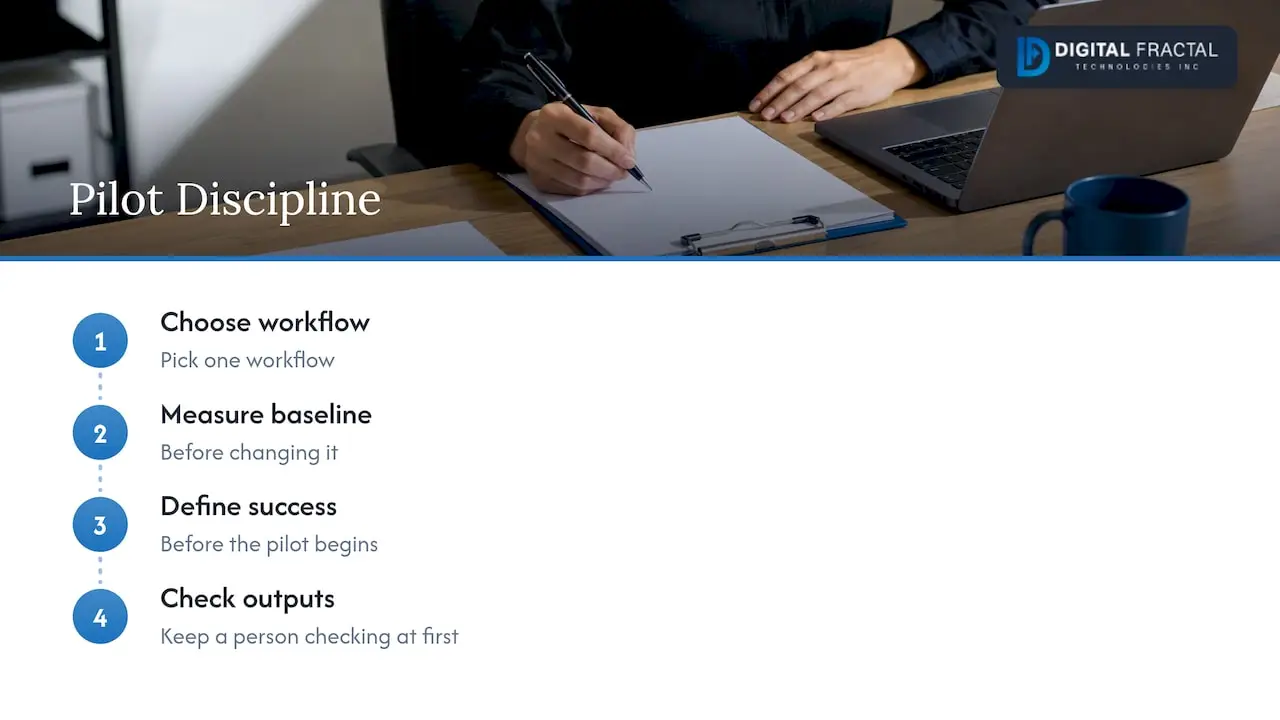
The discipline we ask of every client: pick one workflow, measure it before you change it, keep a person checking the output at first, and write down what “success” means before the pilot begins. Most AI projects that disappoint skipped one of those four.
— Souhail
Get a ranked shortlist from your own workflows
Our AI Readiness Audit is a one-off engagement priced from $2,500 to $10,000 depending on scope. It reviews your workflows, systems and data, and returns a prioritized set of opportunities with a recommended pilot. You can see how that fits with the rest of our work on our AI consulting and machine learning page, or read what an AI audit and opportunity assessment covers before you reach out. For pricing context, the AI readiness assessment cost guide explains what drives the range.
FAQ
How long does an AI opportunity assessment take?
The interviews and workflow mapping usually take a few weeks for a single department or business unit, depending on how many teams are involved and how quickly you can share data and access. A narrower assessment of one process can be faster. Plan for the scoring and the written recommendations to take as long as the discovery itself.
Do I need clean data before an assessment?
No. Finding out how clean your data is happens during the assessment, and it is one of the scoring criteria. Messy data lowers an opportunity’s score or sends it to a “later” list, which is useful information before you spend on a build.
What is the difference between an AI opportunity assessment and an automation assessment?
The tools differ, the method does not. Automation follows fixed rules, while AI can handle variable inputs and judgment-style tasks. A good assessment reviews the same workflows once and labels each opportunity with the approach that fits, often a combination.
How many opportunities should we pursue at once?
One. Pick the highest-scoring candidate, run it as a 30-day pilot with a baseline and success criteria, and decide on the next one using what you learned. Running several pilots in parallel usually splits attention and makes results harder to read.
Is this only for large companies?
No. Smaller firms often benefit most because a single repeated task, such as document handling or dispatch updates, can take a large share of a small team’s week. The scoring method works at any size; only the scope of the review changes.
Sources
- Regional Artificial Intelligence Initiative FAQ, Government of Canada
- Using Artificial Intelligence to Automate Tasks, Canada School of Public Service
- Identifying and Scaling AI Use Cases: A Practical Guide
- How to find the right business use cases for generative AI, MIT Sloan
- CMA AI Playbook: 3 Steps to Your Next AI Win
- The SME AI adoption blueprint, Innovation, Science and Economic Development Canada
- Office of the Privacy Commissioner of Canada annual report 2023-2024
- Overview of Record Linkage at Statistics Canada
- Data privacy best practices for B2B teams