
Human in the Loop AI: What It Is and How to Use It

Human-in-the-loop (HITL) AI is a system design in which a person takes part in the AI’s work: reviewing, correcting or approving its output at defined points. Stanford HAI describes it as systems that include human feedback or intervention as part of their operation, combining what people and machines each do best. For a business, the practical question is not whether to include people. It is where in the workflow they sit, what they decide, and how to keep that review from turning into a bottleneck or a rubber stamp.
This guide is written for operators and decision-makers in Canadian logistics, construction, energy and software teams who are moving AI from a pilot into daily work.
TL;DR
- Human-in-the-loop means a person reviews, corrects or approves AI output before it takes effect. Human-on-the-loop means a person supervises and steps in on exceptions.
- The most useful design is selective: the AI handles routine, high-confidence work and routes low-confidence or high-stakes cases to a person.
- A review step only counts if the person can see the proposed action, can change or reject it, and the action has not already happened.
- Canadian guidance, including federal guidance for managers, points to keeping a human in the loop and monitoring systems after deployment.
- Start with one workflow, define the escalation rules in writing, and measure reviewer workload from week one.
Table of Contents
- What human in the loop AI actually means
- How human-in-the-loop works in practice
- Where HITL shows up in business operations
- Benefits and limits of keeping people in the loop
- What Canadian businesses are doing, and what guidance says
- How to design a human-in-the-loop workflow
- Our perspective
- Where to start with your own business
- FAQ
- Sources
What human in the loop AI actually means
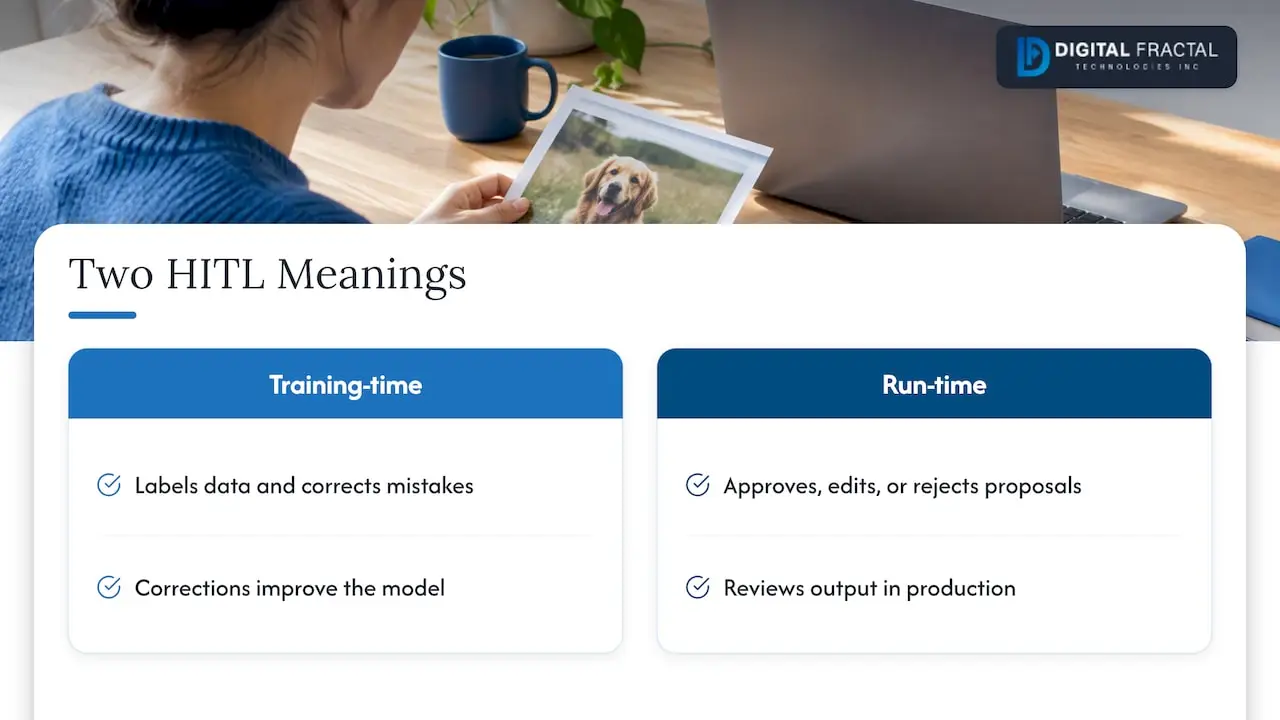
The phrase covers two related ideas, and search results mix them.
The first is training-time HITL. People label data, correct a model’s mistakes and feed those corrections back so the model improves. This is the machine learning meaning: an iterative feedback process between a person and a model.
The second is run-time HITL. The AI is already in production, and a person sits inside the workflow to approve, edit or reject what it proposes. This is the meaning most business buyers care about, especially with AI agents that can send emails, book loads, change records or trigger payments.
Most serious deployments use both. People help tune the system before launch, then keep reviewing a share of its output afterward, and the corrections become new training and testing material.
The three oversight models
The IEEE Technology Navigator separates HITL from human-on-the-loop and from fully automated systems. In plain terms:
| Model | Who does what | Typical fit |
|---|---|---|
| Human in the loop | A person actively reviews, validates or corrects before the action happens | Refunds, contract terms, safety-related decisions, customer commitments |
| Human on the loop | The AI acts on its own; a person monitors and steps in on exceptions | Route re-optimization, ticket triage, alert filtering |
| Fully automated | No routine human oversight | Low-risk, reversible, high-volume tasks with strong testing |
AWS makes the same distinction: HITL involves a person reviewing tasks before action, while human-on-the-loop means monitoring without approving every decision, with intervention when needed. Most real systems mix all three, assigning each task type to the level its risk deserves.
How human-in-the-loop works in practice
The usual run-time pattern has four steps:
- The model makes a prediction or drafts an action.
- The system evaluates how reliable that output is, usually with a confidence score, business rules or both.
- Anything below a configured confidence threshold, or matching a high-risk rule, is flagged for a person. AWS describes this threshold-based flagging as the core mechanism.
- The person approves, edits or rejects, and the decision is logged and, where useful, fed back to improve the system.
What makes a checkpoint real
A review step can exist on a diagram and still do nothing. Stanford Law School’s AI Learning Hub sets out what a useful checkpoint needs: the AI has reached a decision point, its proposed action is visible, the human can allow, change or reject it, and the action has not yet occurred.
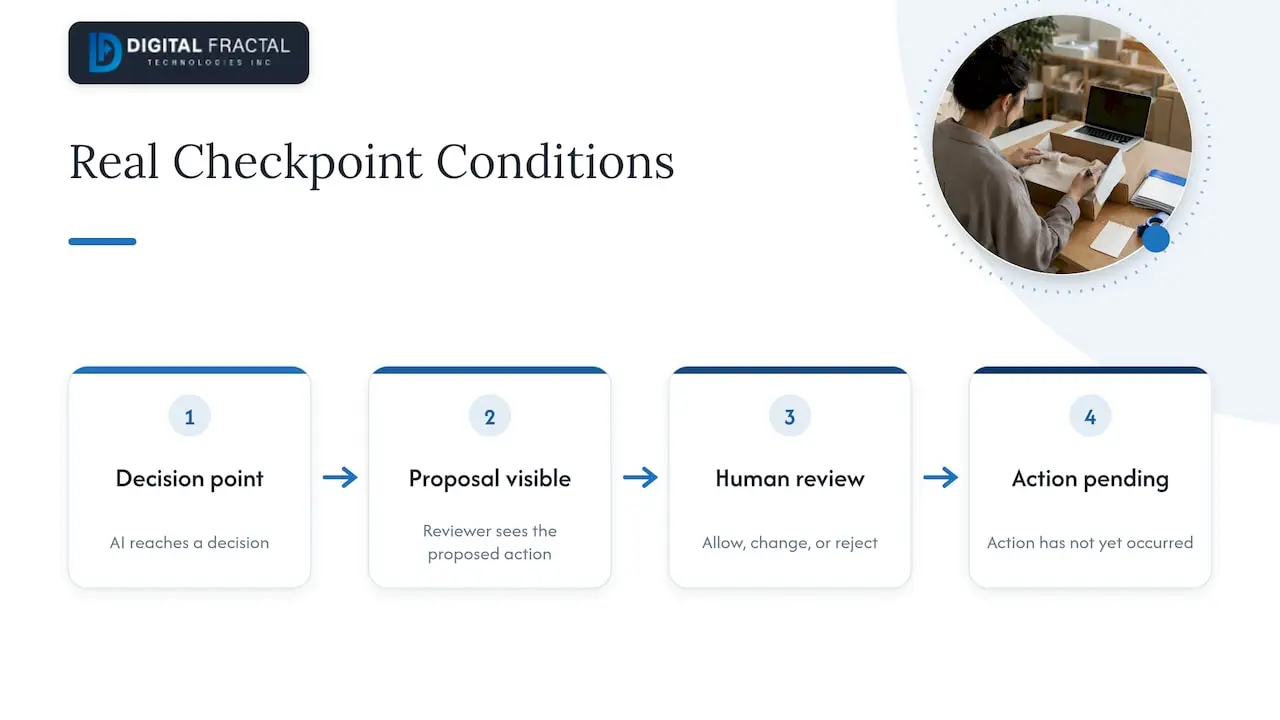
Test your own design against those four conditions. If the reviewer sees only a summary and not the underlying data, or if the action fires before approval, you have the appearance of oversight and not the substance.
Where HITL shows up in business operations
AWS lists common use cases: data labeling, content moderation, medical imaging and clinical decision support, and fraud detection. In the industries we work with, the same logic looks like this.
Logistics and dispatch
An AI scheduling agent can propose driver assignments, delivery windows and load plans. A dispatcher approves the plan, or the system auto-approves routine changes and escalates the ones that touch a key customer, a hours-of-service constraint or a cost above a set limit. We describe one version of this in our piece on an AI scheduling agent for logistics companies.
Construction and field operations
AI can extract quantities from drawings, draft daily reports or flag schedule risk. A project manager confirms anything that feeds a bid, a change order or a safety record. The AI saves the hours of data entry, and the person keeps the accountability.
Document, invoice and compliance workflows
Extraction models read invoices, bills of lading or certificates. Fields the model reads with high confidence flow straight through. Fields it is unsure about, such as a smudged amount or a mismatched PO number, appear in a review queue. This is usually the fastest HITL win, because the queue is small and the rules are easy to state. For compliance-heavy functions, our overview of AI-driven HR compliance covers similar review logic.
Customer-facing chat and agents
A chatbot answers common questions and hands off to a person when the customer is upset, the request is unusual or the system is unsure. The handoff should carry the full conversation so the customer never repeats themselves.
Computer vision
Image models used for inspection or recognition produce uncertain results on unusual inputs. Routing those cases to a trained reviewer is standard practice, and it raises governance questions about how images are stored and used, which we cover in image recognition ethics and governance.
Benefits and limits of keeping people in the loop
The main benefits are fewer errors and better precision. AWS also lists the costs: latency, possible reviewer bias or fatigue, and workforce and coordination costs as review volumes grow.
Stanford HAI has argued that hybrid human-machine systems can outperform both fully automated and fully manual ones when the collaboration is designed well. The phrase “when designed well” carries the weight.
The counterpoint matters just as much. Stanford Law School’s AI Learning Hub cautions that HITL is not a quality guarantee: an approval step only ensures that a decision reached a person, not that the decision is correct. A tired reviewer clicking “approve” on the 400th item of the day adds delay and a false sense of safety.
Common failure modes
- Too much review. If people see everything, they stop looking. Reserve review for cases that need judgment.
- Too little context. A reviewer who cannot see the source document, the confidence score or the reason for the flag cannot judge well.
- No feedback path. If corrections are not captured, the same mistakes come back every week.
- Unclear ownership. When nobody is named as the approver, the queue grows and decisions stall.
What Canadian businesses are doing, and what guidance says
Canadian organizations already lean heavily on human review. A 2025-2026 survey by the Office of the Privacy Commissioner of Canada found that among Canadian businesses using AI for both efficiency and decision-making, 97% report that a human employee reviews decisions before action is taken. Review is close to the norm. The harder question is whether it is designed to work.
Government guidance points the same way:
- Innovation, Science and Economic Development Canada’s implementation guide for managers of AI systems says managers should make sure systems are not operating fully autonomously, keep a human in the loop to monitor, update and maintain operations, and watch for harmful uses or impacts after deployment. It also points to regular review procedures for reported incidents and incident response teams with clear escalation procedures.
- Immigration, Refugees and Citizenship Canada’s AI strategy states that the department is responsible for everything its AI does, and that systems should use only the minimum personal information necessary, with safeguards such as keeping a human in the loop.
- The Information and Privacy Commissioner of Ontario, in its January 2026 checklist on AI scribes, advises health information custodians to have a robust AI governance framework, including human oversight, before using such tools. It frames human oversight as part of a wider risk management approach embedded in organizational culture, not a procedural checklist.
The IRCC and Ontario documents apply to a federal department and to health custodians, so they are not rules for a trucking firm or a general contractor. They are still a useful signal of what regulators and public bodies expect to see: named accountability, minimal personal data, and humans who can actually intervene. If your AI touches personal information, check your privacy obligations with counsel in your province.
How to design a human-in-the-loop workflow
This is the sequence we use when scoping automation for clients.
1. Map the workflow and mark the decisions
Write down every step of the process and mark each point where a decision is made. Many steps are mechanical (copying a value, filling a form). Others commit money, safety, legal exposure or a customer promise. Only the second kind needs a person by default.
2. Rate each decision by risk and reversibility
Ask two questions. What is the worst realistic outcome if the AI is wrong? Can the action be undone cheaply? High consequence and hard to reverse means approval before action. Low consequence and easy to reverse means automate and sample.
3. Set escalation rules in writing
Define triggers such as:
- Model confidence below a set threshold
- Dollar value above a limit
- A customer on a priority list
- Missing or conflicting data
- Any request outside the scenarios the system was tested on
Every rule needs an owner and a response-time expectation. This is also where you decide what the reviewer can do: approve, edit, reject or escalate further.
4. Design the reviewer screen
Show the proposed action, the source data, the reason for the flag and the one-click options. A good screen lets someone clear a case in under a minute. A bad one forces them to open three other systems.
5. Capture every correction
Log what the AI proposed, what the person did and why. This record serves three purposes: it is your audit trail, it is your improvement data, and it shows whether the thresholds are set right.
6. Measure, then relax or tighten
Track the share of cases escalated, how often reviewers overturn the AI, time to resolve and error rates after release. If reviewers approve 99.5% of one category untouched for months, consider moving it to sampled review. If overturns spike in another, tighten it. Treat the thresholds as settings you tune.
7. Monitor after launch
Models drift as data, customers and conditions change. Keep an incident process and schedule periodic reviews, as the federal guidance for managers recommends.
A worked example: a freight brokerage lets an AI agent draft carrier rate confirmations. Confirmations under a set dollar value with a known carrier and a matching rate sheet go out automatically and are sampled weekly. Anything above the limit, with a new carrier, or with a rate mismatch goes to a coordinator with the rate sheet and the email thread alongside. The coordinator handles perhaps a small fraction of volume, and every override feeds the weekly review. The design choices (limit, trigger, sample size) are the ones you would tune with your own numbers.
Our perspective
We see the same mistake in most first AI projects: teams treat human oversight as a safety net added at the end, when it is a design decision made at the start. A workflow built around “the AI does everything, someone will check it” produces an overloaded reviewer and an unclear owner within a month.
We start from the opposite end. Which steps are repetitive and safe to automate? Which carry real consequences? Where does a specialist’s judgment add value that software cannot? The answers shape the architecture, the thresholds and the reviewer screens, and they depend on a client’s actual workflows, systems and goals. That is why we do not sell generic, off-the-shelf consulting. A dispatcher’s review queue in logistics looks nothing like a site engineer’s sign-off in construction.
We also believe the best HITL systems get lighter over time. Early on, reviewers see more cases, because that is how you learn where the model is strong. As evidence builds, you narrow review to the cases that deserve it and give people their time back. Our goal with clients is tangible change within about 90 days, and a well-scoped, well-instrumented HITL workflow is how we get there without taking risks the business has not agreed to.
— Souhail
Where to start with your own business
You do not need a company-wide AI program to apply any of this. Pick one workflow with clear volume, a visible cost of errors and a team that feels the pain. Document it, set escalation rules, and run it with review on for a few weeks.
If you are not sure which workflow to pick, our AI Readiness Audit is built for exactly that decision. It identifies where automation fits, where human review should stay, and what your data and systems can support. The audit is a one-off engagement priced from $2,500 to $10,000 depending on scope. For a view of what the audit covers, see our AI readiness audit guide, and for planning the work after it, the AI implementation planner.
Once you have chosen the process, our workflow automation team builds the automated steps and the review queues together, and our write-up on how AI powers custom workflow automation shows the pattern in more detail.
FAQ
What is the difference between human in the loop and human on the loop?
In a human-in-the-loop system, a person actively reviews or approves work before the action happens. In a human-on-the-loop system, the AI acts on its own while a person monitors and steps in when something looks wrong. The first suits high-stakes or hard-to-reverse decisions, and the second suits high-volume work where exceptions are rare.
Does human in the loop make AI slower?
It can add latency, and AWS lists latency and coordination costs among the main limits. The fix is selectivity: let the AI complete routine, high-confidence work on its own and send only flagged cases to a person. Well-tuned thresholds keep review queues small.
Is human oversight of AI required in Canada?
There is no single Canadian rule that requires it for every business use. Federal guidance for managers does recommend keeping a human in the loop and monitoring systems after deployment, and privacy regulators expect governance, including human oversight, where personal information is involved. Rules vary by sector and province, so confirm your obligations with legal counsel.
Does having a human review guarantee the AI’s output is correct?
No. Stanford Law School’s AI Learning Hub notes that an approval step only ensures a decision reached a person, not that the decision is right. Reviewers need context, realistic workloads and the authority to reject, and their corrections should be tracked.
Which processes should keep a person in the loop?
Start with decisions that are costly, safety-related, legally sensitive or hard to reverse, and decisions that use personal information. Routine, reversible tasks with strong test results are better candidates for automation with sampled review.
Sources
- What is Human-in-the-Loop? | Stanford HAI
- Human in the loop | IEEE Technology Navigator
- What is Human in the Loop? | AWS
- Put a Human in the Loop | Stanford Law School AI Learning Hub
- Humans in the Loop: The Design of Interactive AI Systems | Stanford HAI
- 2025-2026 Survey of Canadian businesses on privacy-related issues | Office of the Privacy Commissioner of Canada
- Implementation guide for managers of Artificial Intelligence systems | ISED Canada
- Artificial Intelligence Strategy | Immigration, Refugees and Citizenship Canada
- AI Scribes: Checklist of Key Considerations for the Health Sector | Information and Privacy Commissioner of Ontario