
Workflow Automation in Logistics: What to Fix First

Logistics workflow automation cuts order-to-cash cycle times, slashes manual data-entry errors, and typically pays for itself within a few months when you start with the right process. The fastest wins come from automating document processing and order intake, the two workflows with the highest volume and the lowest exception rates. Your next move: map your five most repetitive, document-heavy processes this week and run a short readiness assessment before you touch any software.
- Automate document processing (BOLs, invoices, customs paperwork) first
- Automate order intake and booking validation second
- Run an AI Readiness Audit or process map before selecting tools
- Consider a provider like Digitalfractal and check the savings calculator to size the opportunity
Key Takeaways
Logistics workflow automation delivers its fastest, most reliable returns when teams pilot document-heavy, high-volume processes before attempting exception-heavy automation.
| Point | Details |
|---|---|
| Start with documents, not exceptions | Automate BOLs, invoices, and order intake before touching exception handling. |
| Map the process first | Fix inefficiencies in the current workflow before automating it, or you’ll automate the mess. |
| Track four core KPIs | Watch processing time, exception rate, time to resolution, and cost per order from week one. |
| Set human-in-loop thresholds | Define confidence cutoffs and exception ownership before any pilot goes live. |
| Digitalfractal scopes pilots around a 90-day window | Its AI Readiness Audit and savings calculator help prioritize workflows before committing budget. |
Table of Contents
- What ROI Should You Expect From Logistics Workflow Automation?
- Which Technologies Actually Power Logistics Automation?
- Which Five Workflows Should You Automate First?
- How Do You Roll Out Automation Without Breaking Operations?
- How Does Automation Connect to Your TMS, WMS, and ERP?
- How Do You Keep Automated Workflows Auditable and Secure?
- What Does Digitalfractal Bring to a Logistics Automation Pilot?
- What Most Logistics Teams Get Wrong About Automation
- Ready to Map Your First Automation Pilot?
- Sources
What ROI Should You Expect From Logistics Workflow Automation?
Most automation programs in logistics show up in three places: cost per transaction, error rate, and cycle time. Vendor case studies and sector reports consistently document faster processing and fewer errors after rollouts, particularly when the automation is paired with governance and a pilot phase rather than a full-scale launch on day one.
The variance between a mediocre result and a strong one usually comes down to two things: transaction volume and exception load. A lane with high volume and predictable documentation (say, standard BOLs from three carriers) automates cleanly. A lane with constant customs exceptions or non-standard paperwork formats needs more human-in-the-loop design before it will show the same payback.
Pro Tip: Calculate payback using your current fully-loaded cost per manual transaction, not just labor hours. Rework costs, chargebacks from documentation errors, and detention fees from delayed processing all belong in that number.
Track these KPIs from week one of any pilot:
- Processing time per transaction (order intake to confirmation, document receipt to validated record)
- Exception rate (percentage of transactions requiring manual intervention)
- Time to resolution for flagged exceptions
- Cost per order processed, fully loaded
- Straight-through processing rate, the share of transactions completed with zero human touch
Broader market data points to sustained, multi-year growth in logistics automation spending, which tracks with what operators report anecdotally: once one lane or one document type is automated successfully, the case for expanding gets easier to make internally. Run your own numbers through a benefits calculator before committing budget. It forces you to state your current error rate and transaction volume out loud, which is usually the exercise that reveals whether a pilot will pay back in three months or nine.
Which Technologies Actually Power Logistics Automation?
Four technology categories do the heavy lifting, and picking the wrong one for the job is the most common reason pilots stall.
Robotic process automation (RPA) handles rule-based, repetitive digital tasks: copying data between systems, populating forms, triggering status updates. It’s fast to deploy and cheap to run, but it breaks the moment a document format changes or a decision requires judgment.
AI and machine learning step in where RPA can’t: reading a scanned bill of lading with inconsistent formatting, predicting which shipments are at risk of delay, or flagging an invoice that doesn’t match its purchase order. This is where document automation earns its keep. Extraction and validation tools can pull data from mixed PDF and scanned formats and route it automatically, which matters enormously in a business where half your carriers still fax paperwork.
IoT sensors solve a different problem: physical visibility. Temperature logging on a reefer trailer, GPS pinging on a container, dock-door sensors triggering a receiving workflow automatically. If your gap is knowing where something is, IoT is the fix. If your gap is processing the paperwork about where something is, it’s not.
Integration middleware and EDI tie all of it together. GS1 maintains the standards for structured EDI messaging that most large trading partners still require, and any automation strategy that ignores those standards will hit a wall the moment you try to connect with a major retailer or carrier. Where EDI isn’t available, which is common with smaller carriers and brokers, document automation with OCR and validation fills the gap. Cloud-based integration platforms accelerate this work by providing prebuilt connectors instead of custom point-to-point code for every system pair.
- RPA: repetitive, rule-based, stable-format tasks
- AI/ML: unstructured data, judgment calls, prediction
- IoT: physical asset and shipment visibility
- EDI/middleware: structured messaging and system-to-system connectivity
Which Five Workflows Should You Automate First?
Not every process deserves equal priority. These five consistently return value fastest because they combine high volume with low ambiguity, the exact profile that pilot-first programs should target before moving to anything exception-heavy.
- Order intake and booking automation. Validate incoming orders against inventory and pricing rules, auto-confirm standard requests, and route anything unusual to a human. This alone often removes the single biggest bottleneck in the quote-to-order cycle.
- Document processing for BOLs, invoices, and customs paperwork. Extraction tools pull structured data from PDFs and scans, validate it against purchase orders or shipment records, and route exceptions for review instead of dumping everything into someone’s inbox.
- Inventory tracking with dynamic replenishment triggers. Automated reorder points tied to real sales velocity beat static safety-stock rules, particularly for SKUs with seasonal or volatile demand. Digitalfractal’s inventory optimization guide covers the modeling approach in more depth.
- Smart routing and carrier tendering. Automated load-matching and status-update pushes cut the phone-and-email tag that eats a dispatcher’s day. An AI scheduling agent can handle appointment coordination and rebooking without a person touching every exception.
- Exception handling with real-time alerts. This is the one most companies try to automate first and shouldn’t. Build it last, once you understand your actual exception patterns from the other four workflows.
Pro Tip: Resist the urge to automate exception handling on day one. You need at least one full pilot cycle of clean data to know what your real exceptions even look like, otherwise you’re building escalation logic around guesses.
How Do You Roll Out Automation Without Breaking Operations?
A phased rollout beats a big-bang launch every time in logistics, mostly because the cost of a failed pilot is contained and the cost of a failed enterprise rollout isn’t.
Phase 1: Assessment (2 to 4 weeks). Map current-state workflows before automating anything. Practitioner guides on logistics automation consistently warn against automating a broken process instead of fixing it first. Document your actual transaction volumes, error rates, and system connections, then build a prioritization matrix that scores each candidate workflow on volume, error frequency, and integration complexity.

Phase 2: Pilot (4 to 8 weeks). Pick one narrow workflow, define success KPIs before you start, and set explicit human-in-the-loop thresholds. That means: what confidence score triggers automatic processing versus manual review, and who owns each exception path. Canadian AI logistics program guidance recommends starting with stable, verifiable processes and only progressing to exception-heavy automation once the team has built trust in the system’s outputs.
Phase 3: Scale (ongoing). Roll out to adjacent lanes or document types, but keep a rollback plan for every deployment. Assign clear ownership for continuous improvement: someone needs to review exception logs weekly and retrain rules or models as patterns shift.
- Assess: map workflows, volumes, and error rates
- Pilot: narrow scope, defined KPIs, human-in-loop thresholds
- Scale: phased expansion with rollback plans and named owners
- Set a hard timebox for each phase so pilots don’t drift indefinitely
- Require a go/no-go decision with data, not gut feel, before scaling
How Does Automation Connect to Your TMS, WMS, and ERP?
Integration is usually where automation projects either accelerate or stall for months. Three patterns cover most situations: direct API connections for modern systems with good documentation, middleware or an integration bus when you’re connecting several systems with different data formats, and staged ingestion for documents that don’t arrive as clean EDI, think faxed BOLs or PDF invoices from a small carrier.
Legacy TMS and WMS platforms are the usual sticking point. Rather than forcing a legacy system to speak a modern API, most teams build a canonicalization layer that translates everything into one internal data format before it touches your core systems. That validation and mapping layer is worth investing in early. It’s the piece that catches a mismatched unit of measure or a malformed customs code before it corrupts a downstream record.
- Direct API for modern, well-documented systems
- Middleware or integration bus for multi-system, mixed-format environments
- Staged ingestion with OCR for non-EDI paper and PDF documents
- Credential vaulting and rotation for every carrier API and EDI connection, never hardcoded keys
How Do You Keep Automated Workflows Auditable and Secure?
Every automated workflow needs a runbook: who owns each exception type, when it escalates to a human, and what triggers a rollback. Skip this and you’ll find out the hard way when an ML model starts silently misclassifying a document type nobody’s watching.
Monitoring dashboards should show exception rate, processing time, and SLA compliance in real time, with alert thresholds set tight enough to catch drift before it compounds. Multi-billion-dollar market growth in logistics automation has pushed more vendors to offer built-in monitoring, but the ownership and escalation logic still has to be yours.
- Define exception ownership and escalation triggers before go-live, not after
- Log every ML-driven decision with enough detail to explain it to an auditor
- Encrypt data in transit and at rest; set explicit retention windows for shipment and customs records
- Review access permissions quarterly for anyone with carrier API or EDI credentials
What Does Digitalfractal Bring to a Logistics Automation Pilot?
Digitalfractal starts every logistics engagement with an AI Readiness Audit that identifies which workflows carry the highest volume and the lowest complexity, the exact combination that pilot-first programs need to succeed early. The savings calculator gives operations leaders a fast way to estimate what automating a specific workflow is actually worth before committing budget to it.
A 90-day outcome window forces discipline into the pilot design. If a workflow can’t show measurable movement on cycle time or error rate in that window, it’s usually the wrong workflow to have started with.
Digitalfractal scopes pilots the same way across industries it serves, including construction and oil and gas alongside logistics: narrow the scope, define the success metric up front, and build toward a scale decision backed by real numbers rather than optimism.
- AI Readiness Audit to prioritize candidate workflows
- Savings calculator to model expected cost and time reductions
- 90-day timeline structure for pilot-to-scale decisions
- Consulting availability across Canadian regions
What Most Logistics Teams Get Wrong About Automation
The conventional advice says “start small,” which is true but useless without specifics. Starting small on the wrong workflow, usually exception handling because it feels like the most painful problem, is why so many pilots die quietly after six months. The research on this is consistent: stable, document-heavy, high-volume processes build the trust and the clean data you need before you touch anything involving judgment calls.
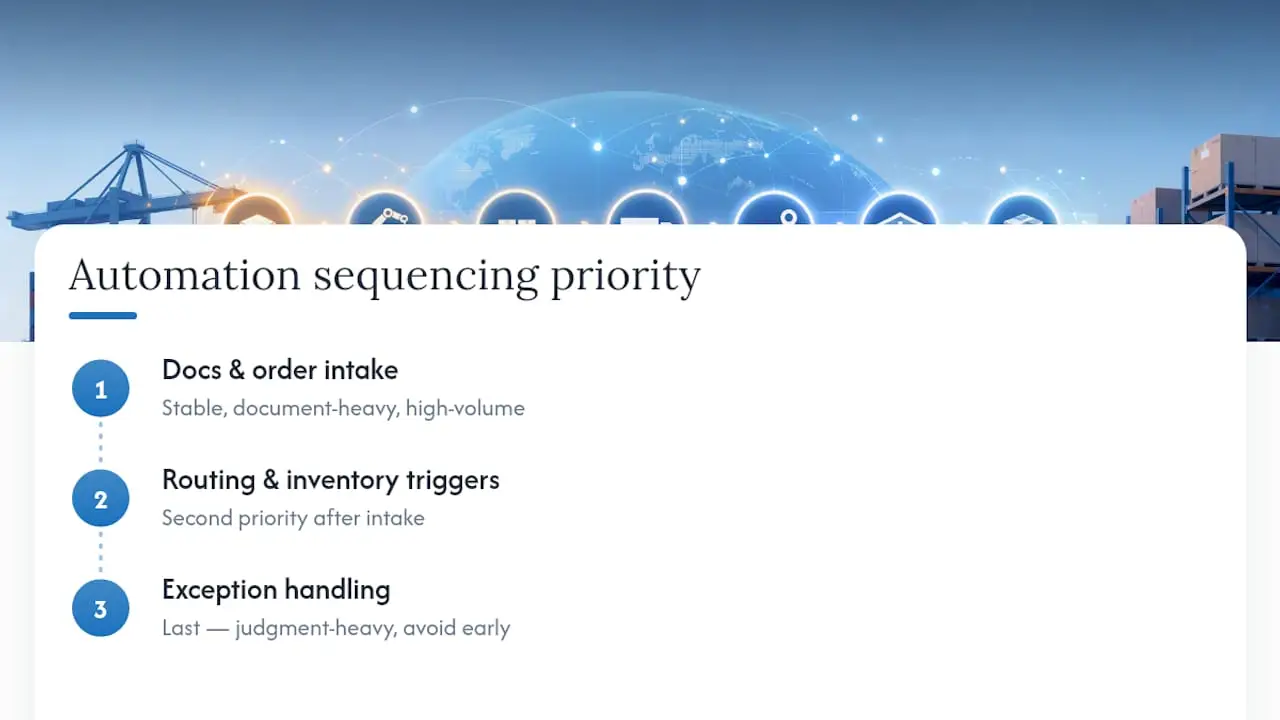
The bigger blind spot is process mapping. Teams jump straight to vendor selection because it feels like progress, then spend the pilot discovering that the workflow itself was broken before automation ever touched it. Fixing the process costs nothing but time. Automating a broken process costs you a failed pilot and a harder internal case for trying again.
If you take one thing from this, take the sequencing: document processing and order intake first, routing and inventory triggers second, exception handling last. Five workflows, roughly in that order, is a realistic 12-month roadmap for most mid-size logistics operations, not a five-year transformation program. That’s the part conventional wisdom tends to undersell.
— Souhail
Ready to Map Your First Automation Pilot?
Most logistics teams don’t need a six-month consulting engagement to get started. They need one clear-eyed assessment of which workflow to automate first, and a partner who can scope a pilot without turning it into a year-long platform migration. That’s the gap Digitalfractal fills: a defined AI Readiness Audit that maps your highest-volume, lowest-complexity workflows in weeks, not quarters, then hands you a pilot design built around a 90-day outcome window.
First contact typically starts with a short conversation about your current volumes, systems, and where manual work is piling up, followed by a scoped audit rather than a generic sales pitch. From there, Digitalfractal’s AI workflow automation services team designs the pilot around one or two of the workflows covered above, with clear KPIs agreed before anything goes live. If you’re weighing whether the payback justifies the investment, run your numbers through the savings calculator first. It takes ten minutes and gives you a concrete figure to bring into your next budget conversation.