
Why AI Projects Fail Without Field Data

I wouldn’t deploy AI based on test scores alone. Before release, I’d check whether its data matches today’s work – and whether staff can act on its output in time.
My checklist comes down to four steps:
- Check the data: Compare lab tests, samples, and past records with current field inputs. Check missing cases, old records, and incorrect labels.
- Test the whole task: Use staff devices and systems, including weak connections at remote Canadian sites. A correct answer delivered too late still fails.
- Set release limits: Test newer records, winter conditions, and rare hazards. Require human review when missing or uncertain information could lead to harm.
- Keep checking after release: Assign owners, track errors and data changes, and test updates before rollout – with a rollback plan.
Field data is a starting point, not proof that AI is ready. I’d expand use only when <u>both the predictions and the workflow pass the checks set before the pilot</u>.
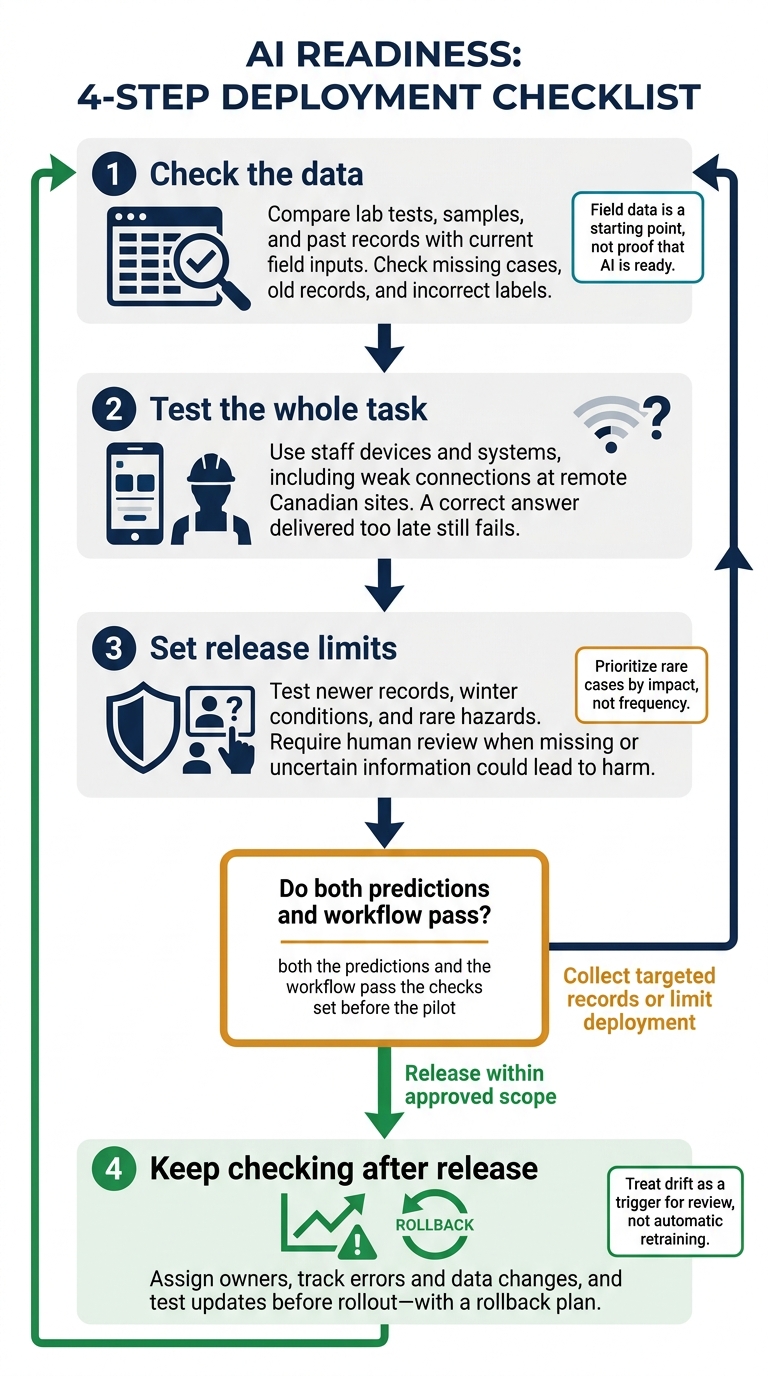
AI Deployment Readiness: Four Field Checks
Why AI Fails in the Real World – and How to Build Systems by Chris Seferlis
sbb-itb-fd1fcab
How Data Gaps Lead to Poor AI Outputs
Problems start when training data no longer matches the work the model needs to support, a common challenge addressed through AI consulting and machine learning solutions.
Compare Lab Data, Sample Sets, Historical Records, and Field Data
The data’s label matters less than how well it matches live conditions.
| Data source | Strength | Gap | Production impact |
|---|---|---|---|
| Lab data | Controlled testing | Limited variation | Performance drops outside controlled conditions |
| Sample sets | Fast development | Missing groups or scenarios | Accuracy varies across users and locations |
| Historical records | Past outcomes | Outdated processes | Predictions follow old workflows rather than current ones |
| Current field data | Live conditions | Errors or collection bias | Models still fail when sampling is biased or quality checks are weak |
Missing Cases, Outdated Records, and Incorrect Labels
Check whether the data covers equipment states, locations, seasons, user groups, and languages – including English and French where relevant. Report performance by segment, since overall scores can hide weak spots. If a segment is missing or too small to assess, collect more records or limit the model’s scope.
Old records can teach decisions that no longer fit. Duplicates give repeated cases too much weight, while missing values and inconsistent schemas distort inputs. Incorrect labels teach the wrong outcome, causing wrong predictions and manual rework.
Document labelling rules, measure agreement between reviewers, and audit high-impact cases. Exclude records that fail checks for schema, recency, or completeness.
When Training Inputs Differ from Live Inputs
Strong test results don’t always translate into reliable predictions in daily work. Distribution shift, data leakage, and train–serve skew can make test results look better than live performance. Live inputs may change, training may use information unavailable at decision time, or development and production may calculate inputs differently.
Define the decision point and remove fields created after it. Run the same records through development and production pipelines. Compare feature calculations, timestamps, category mappings, missing-value handling, and measurement units.
Test on newer records in time order to reveal changes that a random split of older records may miss.
Why AI Falls Short in Daily Work
Field data reflects messy production conditions that controlled tests miss. But good data alone isn’t enough: even robust AI and machine learning solutions can still fail if staff cannot use its output on the job.
Predictions That Do Not Fit the Workflow
An accurate prediction has little value if employees cannot act on it. At remote Canadian sites, intermittent connectivity, older devices, small screens, and short battery life can make results unusable. Alerts might arrive after a crew has left, ask for measurements workers cannot provide, or leave staff without a clear next step. Unreliable connections to inspection or work-order systems can also force duplicate entry.
Have frontline staff test the full task on their usual devices under normal workloads. Do recommendations arrive before the decision? Do they explain the next action and reach the existing system without extra entry? Compare task time, rework, override rates, and adoption rate with the current process. Provide a fallback when connectivity or integrations fail.
Once the workflow fits, test how the model handles uncommon but high-stakes cases.
Rare Cases with High Risks
Prioritize rare cases by impact, not frequency. Missing them can cause injury, financial loss, or non-compliance. Unusual equipment states, contradictory inputs, underrepresented groups, and regulatory changes all need clear escalation paths. Record each high-risk scenario, the required response, and the person responsible for escalation. Where failure could cause harm, missing evidence should block automatic approval – not count as a pass.
Hypothetical Canadian construction example: An inspection model trained mainly on clear summer photographs from southern Ontario could miss a hazard when snow hides a deck edge. A “pass” could delay correction and encourage unsafe reliance on the result. Test winter and shoulder-season images, obstructed views, and actual phone-camera images. Unfamiliar or low-confidence scenes should require manual inspection rather than automatic clearance.
Use these scenarios to set deployment gates, not just test scores.
Check Data Coverage Before Deployment
Check common, rare, and high-risk cases across locations, users, seasons, and workloads. Record sample counts, error rates, uncertainty, and unresolved failures. Few observed errors in a small group do not prove reliability. Assign each check an owner, supporting evidence, and a release condition. If there isn’t enough evidence, collect targeted records or limit deployment.
Each item below must pass its release condition before deployment.
| Evaluation area | What to check |
|---|---|
| Completeness | Required fields and scenarios are present |
| Representativeness | Data matches actual users, locations, conditions, and workloads |
| Label quality | Labels are accurate and consistent |
| Data age | Records match current processes |
| Rare-case coverage | Rare and high-risk scenarios have been tested |
| Temporal stability | Performance holds on newer records |
Close Data Gaps Before Full Deployment
Once you’ve identified the gaps, fix them at the source before deployment.
Map Workflows and Collect Representative Data
Map each step from input to action. Then compare training and production data for schema, units, timestamps, missing values, labels, duplicates, and class balance. Use those gaps to guide collection across shifts, locations, seasons, devices, workloads, and user groups.
Set labelling rules and review disagreements. Assign a data owner to oversee source quality. Before collecting personal information, ask privacy and security leads to confirm applicable Canadian requirements, collection authority, access controls, encryption, and retention controls.
Test on Newer Records and Run a Workflow Pilot
After collection, test the model on later records and in the live workflow. Keep the final holdout set untouched. Pilot the whole workflow – not just predictions – to see how workflow automation cuts costs and improves reliability. Include the pipeline, interface, integrations, and staff actions.
Before the pilot, set release thresholds for quality, coverage, latency, reliability, and outcomes. Use human review or safe fallbacks for uncertain and high-risk results. The workflow owner checks that predictions fit staff roles, timing, interfaces, and escalation paths. The model owner approves the evaluation evidence, while an accountable business sponsor makes the go/no-go decision.
Monitor Data Changes and Control Model Updates
Validation doesn’t stop at deployment. Monitoring starts there.
Assign a monitoring owner, response deadlines, and escalation paths. Track input distributions, missing features, recency, staff corrections, prediction quality, and business outcomes. Treat drift as a trigger for review, not automatic retraining.
Before labelling and retraining, check new field records for quality, permissions, and coverage. Test pipeline changes and candidate models against fixed benchmarks and recent data. Version datasets and models, stage releases, and keep a tested rollback plan.
Support Field Data Collection with Software and Integrations
Field capture tools help close gaps by making the right data easier to collect.
Digital Fractal Technologies Inc builds custom mobile and web tools that capture field data at the point of work and sync it to core systems.
Conclusion: Test AI Against Actual Working Conditions
Field data helps prepare AI for use, but it doesn’t prove readiness. Gaps in coverage, slow outputs, and missed edge cases can still undermine production use. Consult with AI experts and Start by mapping the workflow and reviewing data coverage or using a digital transformation readiness checker. Then run a pilot with pre-set acceptance criteria for high-risk errors and processing-time limits. After release, track performance and expand only when the evidence shows the system supports actual decisions under live conditions, without workarounds.
FAQs
How much field data do we need for a reliable pilot?
A reliable pilot doesn’t require a fixed number of records. Focus on data quality and readiness rather than volume. Before you start, set a minimum standard – for example, require 95% of records to include all critical fields.
Your data should be accurate, complete, consistent, timely, and relevant to your goals. Clean up messy data, standardize formats, and check that your infrastructure can handle inputs from actual use – not just curated lab samples.
How can we test rare hazards safely?
Roll out in phases, using controlled settings and human oversight. Start with a silent pilot – no live alerts – to tune models and cut false positives, aiming for fewer than two per camera per shift. Before going live, simulate conditions in sandboxes with anonymized data.
For high-risk scenarios, set strict accuracy thresholds. Require supervisors to review alerts before any safety-critical action.
How do we distinguish data problems from workflow problems?
Data problems affect information quality, structure, or access. Think missing fields, inconsistent formats, or data stuck in silos. Audit your systems to check that the data is accurate, complete, and consistent.
Workflow problems come down to whether your team is ready to use the system and how work gets done. People may feel uneasy about new processes, ownership may be unclear, or tasks may be poorly coordinated. If your data is clean but the system still isn’t delivering value, the issue likely lies in how you’ve set up the work.