
Process Mapping with AI: Steps for Alberta Businesses

If I were starting an AI project in Alberta, I’d map the process first, not buy tools first. That’s the short answer. The article shows a clear order: set the scope, check the data, map the current workflow, mark which steps are rules vs AI, design human review and fallback, then pilot before rollout.
A few numbers make the point fast:
- 18.4% of Alberta businesses reported using AI in Q2 2026
- 93% of surveyed Canadian organisations used AI in some form
- But only 2% said they saw measurable ROI
- Alberta Health Services automated 47 processes, saved 200 work years, and cut CA$1.3 million
What I take from that is simple: AI pays off when the workflow is clear and the data is usable. If the process has missing steps, hidden workarounds, weak ownership, or messy records, AI usually adds another layer of problems.
Here’s the article in one plain list:
- Pick one process with a clear start, end, and output
- Bring in the right people: frontline staff, IT, compliance, data owners, and managers
- Check the data for accuracy, structure, access, and use limits
- Map every step: actions, decisions, delays, handoffs, and exceptions
- Mark each step as rule-based, AI-assisted, or human-led
- Design the future flow around targets like lower error rates or shorter turnaround times
- Set controls for AI inputs, outputs, confidence thresholds, manual review, and fallback
- Pilot first, often for 8 to 12 weeks, with the manual path still in place
- Track baseline vs results for cycle time, exception rate, cost per case, compliance, and overtime
- Review the map every 6 to 12 months or after system or policy changes
One point that stands out: for Alberta teams handling personal or health data, the map should also show where that data enters, where it is stored, who can access it, and which rules under PIPA or HIA may apply.
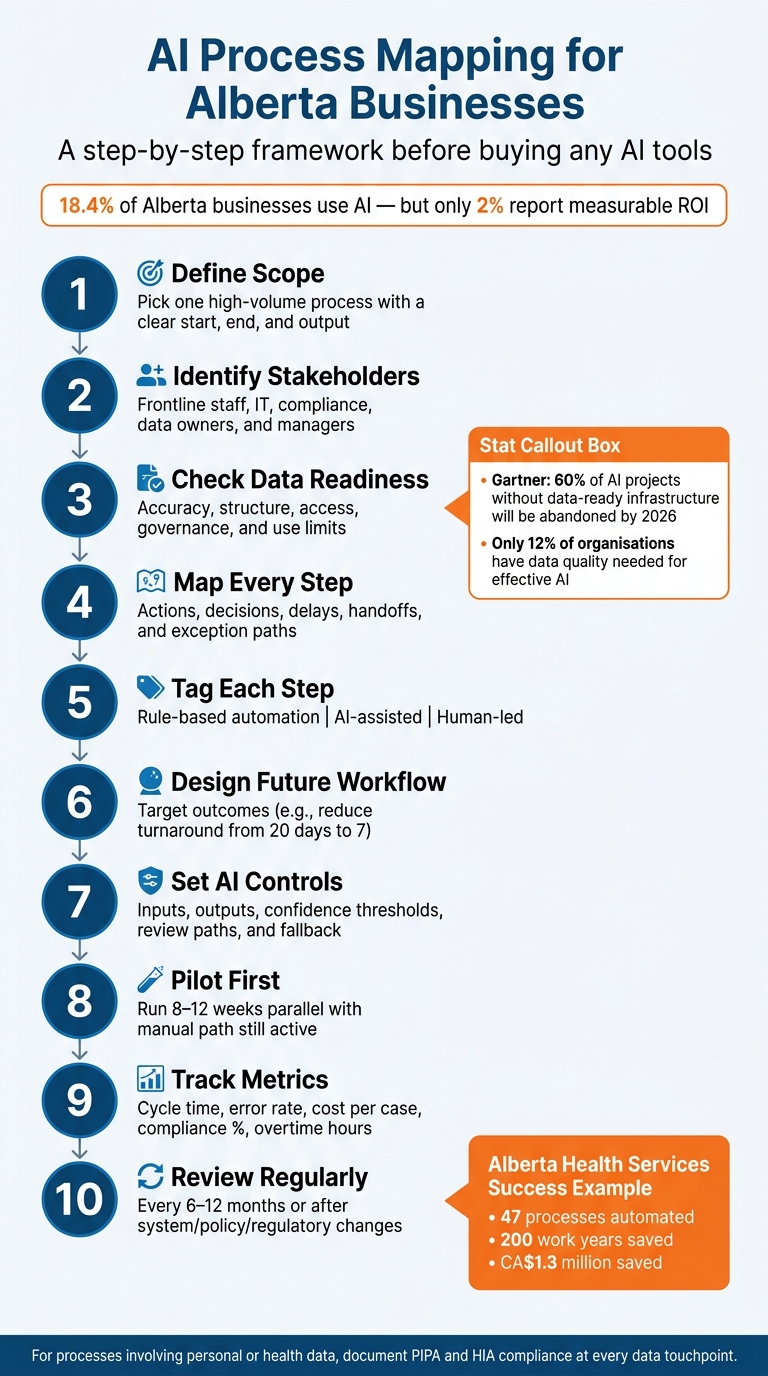
AI Process Mapping for Alberta Businesses: 10-Step Framework
Quick Comparison
| Stage | What I’d focus on | Main question |
|---|---|---|
| Scope | Process boundary, owners, systems | What exact workflow am I mapping? |
| Data check | Accuracy, structure, access, use limits | Can this data support AI? |
| Current-state map | Steps, decisions, delays, exceptions | How does the work happen today? |
| Task tagging | Rules vs AI vs human judgment | What should be automated, and what should not? |
| Future-state design | Outcomes, thresholds, review paths | How should the process work after changes? |
| Pilot and measurement | Parallel run, KPIs, fixes | Did it cut time, errors, or cost? Use a digital transformation roadmap generator to visualize these phases. |
Bottom line: if you want AI to help an Alberta business, I’d start with a process map that shows how work moves, where it breaks, what data it uses, and where people still need to stay in control.
sbb-itb-fd1fcab
Checklist 1: Define Scope, Stakeholders, and Data Readiness
Before you start mapping, lock down three basics: the exact process you’re mapping, who needs to sign off on it, and whether the data behind it can support AI. Skip this, and you often end up with inaccurate maps, poor adoption, and compliance gaps.
Set the Process Boundary Before Mapping Begins
Start with one high-volume, repeatable process. Pick a process with a clear trigger, a defined start and end, and a clear output.
Then document every system that process touches – ERP, CRM, email, shared drives, and custom mobile apps. For each data element, note which system is the system of record.
Don’t stop at the happy path. Map the exception paths too. If a required document is missing, what happens next? If an approval is delayed, who steps in? That’s often where automation falls apart if those details aren’t caught early.
Once the process boundary is clear, bring in the people who run it and own it day to day.
Identify Decision-Makers, Frontline Users, and System Owners
A good process map needs input from the people doing the work, not just the people overseeing it. Bring in operations, IT, compliance, data stewards, and frontline users. They know the workarounds, unofficial templates, and approval shortcuts that never make it into a standard operating procedure. Without them, the map shows the process as designed, not the process as it actually happens.
After roles and ownership are clear, the next step is simple: check the data.
Check Whether the Process Data Is Ready for AI
Gartner estimates that 60% of AI projects unsupported by data ready for AI will be abandoned through 2026. That lines up with broader research showing that only about 12% of organisations have data with the quality and access needed for effective AI implementation.
| Dimension | High Data Readiness | Low Data Readiness | AI Impact |
|---|---|---|---|
| Accuracy & completeness | Core fields are filled in consistently in ERP and CRM systems, with minimal manual corrections. | Frequent errors, missing fields, and heavy reliance on manual fixes. | High readiness supports model training; low readiness means more time spent cleaning data. |
| Format & naming consistency | Standardised date formats (YYYY-MM-DD), consistent CAD amounts, and aligned naming conventions. | Mixed date formats, inconsistent naming, and different decimal separators. | Low readiness often adds several weeks for standardisation. |
| Structure | Structured fields in databases, CRM, ERP, and electronic forms. | Unstructured notes, handwritten forms, siloed spreadsheets, and personal drives. | Unstructured data may need OCR or NLP preprocessing, which adds cost and error risk. |
| Access & governance | Role-based access controls, documented retention policies, and authenticated API connections. | No formal access controls, unclear ownership, and data locked in inboxes or legacy systems. | Weak governance can force an architecture phase before any AI work starts. |
Structure and accuracy aren’t the whole story. You also need to check that the data used for AI was collected – and can be used – for the same purpose as the automated workflow. If personal or sensitive data is involved, document access, retention, consent, and usage limits before connecting AI.
If the data doesn’t pass these checks, fix that first. Then map the automation.
Checklist 2: Map the Current Workflow and Mark Automation Candidates
With scope and data readiness in place, the next step is to map how the work happens today.
Document Every Step, Decision, Handoff, and Exception
Start by laying out the process from your defined starting point to the final output. For cross-functional work, a swimlane diagram works well. If you need more process detail, use BPMN. Create one lane for each role involved – frontline staff, supervisors, IT, external vendors – then map each activity in order.
For every step, note:
- who does the work
- which system they use, such as ERP, CRM, email, or a paper form
- the inputs and outputs
- any decision rules being used
Also record wait times and batch timing in plain language. If people rely on side spreadsheets or paper files while using core systems, mark that too. Those workarounds often point to broken process design and hidden automation openings.
For Alberta businesses in energy, construction, or the public sector, compliance steps and escalation paths need extra attention. Put them on the map before bringing AI into the picture.
Once the map is done, use it to spot where automation could cut delays, rework, and manual routing.
Highlight Bottlenecks, Duplicate Work, and High-Error Tasks
Next, rank the steps that create the most delay, cost, or rework.
After you draft the map, mark the places where work slows down, repeats, or falls apart. Talk to frontline staff. Ask where they wait the longest, where they have to enter the same data more than once, and where they keep fixing mistakes from earlier steps.
Use measurable data to rank these pain points. Track minutes per task, error rates per 100 submissions, and CAD cost per transaction by multiplying average task time by the fully loaded labour rate. That gives you a baseline for judging what AI delivers later. It also helps you see which steps are strong candidates for automation.
Watch for patterns like these:
- repeated data entry across more than one system
- approvals sitting in inboxes or cases waiting to be assigned
- documents sent back because information is missing
- seasonal or operational peaks, such as fiscal year-end or construction season
Separate Rule-Based Tasks from AI-Assisted Decisions
Not every weak spot calls for AI.
Review each flagged task and ask a simple question: does this step follow a fixed rule, or does it need judgment and pattern recognition?
Tasks with clear, stable logic – like checking that required fields are filled in, comparing amounts to fixed thresholds, or sending standard notices – are a fit for rule-based automation through scripts, RPA, or workflow engines.
Tasks that deal with unstructured data or historical patterns – such as classifying incoming service requests, pulling key fields from contracts or safety reports, or routing cases based on past data – are where AI can help most.
| Task Type | Characteristics | Alberta Example | Limits |
|---|---|---|---|
| Rule-based automation | Fixed rules, structured data, repeatable steps | Auto-validating permit application fields before submission | Rules need maintenance; limited ability to handle exceptions |
| AI-assisted decisions | Pattern recognition, unstructured data, probabilistic results | Classifying citizen service requests and routing to the right team | Requires quality data; monitor for model drift and bias |
| Human-led tasks | High judgment, ethical, legal, or safety implications, complex trade-offs | Approving high-risk safety interventions on energy sites | Needs clear guidelines; AI can assist but not decide |
Tag each step on your map with one of these three categories. That label will shape the future-state workflow.
Checklist 3: Design the Future Workflow with AI Controls
Use the tagged current-state map to redesign only the steps that need automation, review, or removal.
Redesign the Workflow Around Outcomes, Not Old Habits
Start with a measurable target. For example: reduce permit turnaround from 20 business days to 7, or process vendor invoices with less than 1% error rate. That target becomes the filter for every decision you make.
Each step in the future-state map should do one of two things: help you hit the target or get removed. If it doesn’t move the work forward, it’s just baggage.
Some multi-layer approvals can be replaced with risk-based thresholds. For instance, invoices under CAD 5,000 may need one approval, while those above CAD 50,000 need two, with the reason logged automatically. That keeps control in place without slowing down low-risk work.
Ad hoc messages, spreadsheets, and long email chains should become defined workflow tasks with named owners and SLAs. That way, the process stops living in people’s inboxes and starts living in a system you can track.
Use the future-state map to assign each step to one of three buckets:
- Automation
- Human review
- Removal
That redesigned flow becomes the control point for data, thresholds, and human review.
Define AI Inputs, Outputs, Thresholds, and Human Review
For each AI step in the future workflow, document four things: what goes in, what comes out, how fast it must respond, and what confidence level is acceptable before a person steps in.
Inputs should be standardised. Set required fields, accepted document formats, and data-quality rules so the AI gets consistent, structured information every time. In field operations, handwritten reports and tickets should be converted into structured data before AI processes them.
Outputs should be clear and narrow. That might be a label like low/medium/high risk, a numeric score, or a suggested action such as schedule inspection. Match speed and confidence thresholds to the risk of the task, then send anything below the accepted threshold to human review automatically.
Each AI-enabled step should include three paths:
- Auto-approve when confidence is high and impact is low
- Human review when confidence is moderate or the decision has heavier consequences
- Escalate when inputs look unusual or the AI can’t classify the case
For irreversible actions – such as payments, compliance filings, or equipment shutdowns – require explicit human sign-off with a logged rationale, no matter how confident the AI seems.
Build manual fallback into every AI step. If the AI is unavailable or returns something unexpected, cases should move straight to a manual queue.
Estimate Complexity, Cost, and Expected Gains
Once the future state is mapped, check whether the build fits your budget, timeline, and integration limits.
| AI Stage | Implementation Complexity | Estimated Cost (CAD) | Timeline | Expected Efficiency Gains |
|---|---|---|---|---|
| Intake (document extraction, classification, case creation) | Low to Medium | CAD 25,000–75,000 | 1–2 weeks | Elimination of manual data entry; 14+ hours/week recovered |
| Decisioning (approvals, routing, exception handling) | Medium to High | CAD 50,000–250,000+ | 3–6 weeks | Improved consistency; reduced human error in financial tasks |
| Monitoring (compliance checks, equipment logs, safety alerts) | High | Project-specific; often includes build and support costs | 2–4 months | Real-time visibility; automated compliance checks and audit readiness |
If the design is too complex for a first release, split it into intake, decisioning, and monitoring phases.
Design support should stay focused on workflow audit, integration scope, and phased deployment.
Checklist 4: Implement, Measure, and Improve the Workflow
Once your future-state design is locked in and the level of effort is clear, the next move is a pilot rollout. Start small. Measure closely. Then fine-tune the workflow before you roll it out across your Alberta operations.
Pilot the Workflow Before a Wider Rollout
Use the pilot to test the thresholds, review paths, and fallback steps in your future-state map.
Pick a pilot area where the work matters, but where mistakes won’t threaten public safety or core service continuity. Good options include invoice processing in one regional office, permit pre-screening in a single municipality, or maintenance request triage in one facility. The pilot should have enough volume to test accuracy, cycle time, and how exceptions are handled.
Before you switch anything fully, run the AI workflow beside the manual process. Send live cases through the AI, but keep the current manual path as the final authority. Then compare AI output with human decisions for accuracy, cycle time, and exception patterns. Move to active deployment only when the parallel run hits your pilot targets.
Your pilot team should include operations, IT, compliance, and frontline staff. Set a fixed pilot period – 8 to 12 weeks is a good range – and schedule checkpoints to decide whether to scale, adjust, or stop. Train frontline users to start cases and escalate exceptions. Train supervisors to review outputs and tune thresholds. It also helps to appoint local AI champions who can flag issues early and help build trust with users.
Track the Right Metrics After Go-Live
Record baseline metrics before go-live. Document cycle time, error rate, process volume, cost per execution, SLA breach rate, and exception or rework rate (or use a workflow automation benefits calculator) so you have a clean point of comparison.
After go-live, measure pilot results against that baseline. Track metrics across efficiency, quality, compliance, and workforce impact:
| Metric | Baseline (Pre-Automation) | Short-Term (0–6 Months) | Long-Term (6–24 Months) |
|---|---|---|---|
| Average turnaround time (days) | 4.5 | 3.2 | 2.0 |
| Exception rate (%) | 15 | 9 | 5 |
| Employee overtime (hours/month) | 120 | 80 | 40 |
| Compliance adherence (%) | 92 | 95 | 98 |
| Customer satisfaction (1–10) | 7.2 | 8.0 | 8.7 |
| Cost per case (CAD) | $95.00 | $78.50 | $60.00 |
For the first 0–6 months, aim for 10–20% faster turnaround and 10–15% fewer exceptions. Longer-term targets can go further once data governance is more stable and staff are fully used to the new workflow.
Treat the process map like a living control document, not a one-and-done file. Review it every 6 to 12 months, and also after regulatory, system, or audit changes. Process owners and frontline users both need to be in those reviews. Why? Because unofficial workarounds and new patterns almost never show up in the original map.
Conclusion: Core Steps Alberta Businesses Should Follow
Across the full workflow, the sequence is simple: define scope, confirm readiness, map the current process, separate rule-based steps from AI-driven steps, design controls, and pilot before scaling.
AI tends to work best when it’s built on accurate process maps, governed data, and a steady habit of improvement. When the process is clearly understood, thresholds are set, and human review is placed at the right points, AI can cut manual effort, reduce errors, and keep compliance in place. And over time, those gains build as the system is tuned and the data gets better.
FAQs
Which process should I map first for AI?
Start with an AI readiness audit. Review your operations, data quality, and compliance needs before you automate anything.
Then focus on 3–5 high-volume, repetitive processes like invoice processing, data entry, email triage, or onboarding. The best early targets are usually internal, low-risk tasks that eat up a lot of manual effort.
A simple filter helps here:
- Manual work costs more than $4,000 CAD per month
- The process happens often
- Time saved is easy to track
- Error reduction is easy to track
That way, you’re not guessing. You’re picking work where the payoff is easier to spot and easier to prove.
How do I know if my data is ready for AI?
Start with a data audit. Check the structure, accessibility, and quality of your data before you do anything else.
Your data should be clean, representative, and free of noise, missing values, and mislabelled fields. If the input is messy, the AI output will be messy too. That part is simple: poor data hurts AI performance.
It also helps to confirm that your systems work well together. Are your tools integrated? Are the data formats compatible? If one platform can’t speak to another, things can fall apart fast.
At the same time, make sure your data practices line up with Canadian privacy law. That includes PIPEDA and Alberta’s PIPA. Secure, auditable governance matters here, not just for compliance, but for keeping your data use clear and traceable.
When should a task stay human-led instead of AI-assisted?
Keep people in charge when the work involves hard calls, high-stakes results, or judgment that goes beyond what AI can handle well today.
That matters most at approval gates, before irreversible actions, and anywhere regulatory reporting or compliance is involved. Human review also plays a big role when situations are ambiguous or when something falls outside known patterns.
And some areas still need a person at the centre. Relationships do. Final safety approvals do too.