
Best Construction Project Management Software for Canadian Builders

For Canadian construction firms evaluating platforms in 2026, four categories cover nearly every use case: enterprise connected platforms (Procore), BIM-native suites (Autodesk Construction Cloud), residential all-in-ones (Buildertrend), and cost-conscious cloud options (Contractor Foreman). The decisive selection factors are AI integration readiness, connected data across BIM and ERP systems, and Canadian data-residency considerations.
Quick shortlist:
- Enterprise connected (Procore): Best for commercial GCs and $20M+ operations needing deep RFI workflows, ERP integrations, and an aggressive AI roadmap
- BIM-native suite (Autodesk Construction Cloud): Best for design-heavy firms already inside the Autodesk ecosystem where model-driven AI workflows deliver compounding value
- Residential all-in-one (Buildertrend): Best for home builders and remodelers under $20M who need client-facing tools, QuickBooks Online sync, and flat-rate pricing
- Cost-conscious cloud (Contractor Foreman): Best for small-to-midsize contractors who need broad features without enterprise pricing, starting at $49/month
Before committing to a demo, compare the capability buckets in the table below. When you reach the AI integration and API access questions, bring an integration partner like Digitalfractal into the room — that conversation changes what you ask vendors.
Table of Contents
- What’s the best construction project management software for your team?
- How do you choose the right construction PM software for your firm?
- How to implement construction PM software and get AI working in 90 days
- Which platform fits your company size and project type?
- Core project management features that actually matter on a job site
- How document management and RFI control reduce project risk
- How do pricing tiers scale from SMB to enterprise?
- What do verified user ratings actually tell you?
- What hidden fees should you watch for in construction software pricing?
- Key Takeaways
- Why the software choice is only half the decision
- What Digitalfractal delivers when you are ready to automate your CPM
- Selected sources for Canadian decision-makers
What’s the best construction project management software for your team?
According to Capterra, 91 % des utilisateurs de logiciels de gestion de construction considèrent les fonctionnalités de gestion de projets comme essentielles ou très importantes, et 83 % priorisent la gestion documentaire intégrée. Those two signals alone narrow the field considerably.
| Platform Category | Best For | Pricing Shape | AI Capabilities | ERP/BIM Integrations | Mobile/Field Sync | Reporting & Financials | Company Size | Canada Support |
|---|---|---|---|---|---|---|---|---|
| Enterprise connected | Commercial GCs, large subs, $20M+ residential | ACV-based, typically $15K–$60K+/year | AI-native (agentic AI, predictive analytics, agent builder) | — | Best-in-class field-to-office sync | Deep job costing, RFIs, submittals | $20M+ revenue, 30+ concurrent projects | Available; data residency confirm with vendor |
| BIM-native suite | Design-heavy firms, large projects, enterprise | Subscription-based, modular | AI embedded in design-to-construction workflows | First-class BIM/CAD, Autodesk ecosystem | Strong mobile, drawing versioning | Portfolio-level reporting | Enterprise and SMB starter packages | Available; confirm Canadian data centers |
| Residential all-in-one | Home builders, remodelers, custom builds under $20M | Flat-rate tiers, $339–$829/month unlimited users | AI client updates, AI bill pay (shipping 2026) | Native QuickBooks Online two-way sync | Mobile-first, client portal | AIA-style progress billing, selections | $1M–$15M residential GCs | Available; English/French support varies |
| Entry-level field app | Small contractors, subcontractor crews, field-first teams | Freemium to paid tiers; flat per-user pricing | Limited; task automation add-ons | Open API, Box/Dropbox integrations | Offline-capable, any device | Basic reporting, daily logs | Small teams, <$10M projects | Available; confirm bilingual docs |
| Cost-conscious cloud | SMB general and trade contractors | Flat monthly from $49/month | Growing automation features | 50+ integrations | iOS/Android native apps | Job costing, purchase orders | Small-to-midsize contractors | Available |
Canada-specific callouts:
- Confirm data residency (Canadian servers vs. US-hosted with PIPEDA compliance) before signing any enterprise agreement
- Bilingual (English/French) documentation and support is not standard across all platforms — ask vendors explicitly for Quebec-based teams
- ACV-based pricing is denominated in USD for most US-headquartered vendors; budget for exchange-rate exposure on multi-year contracts
- Connected construction AI architecture requires platforms with open APIs and accessible historical data — verify this before procurement, not after
How do you choose the right construction PM software for your firm?
Integration fit determines whether AI features can actually access the historical data they need. Choosing software in isolation is the most common and expensive mistake Canadian construction firms make.
Prioritized capability checklist:
- Open API with documented endpoints for ERP, accounting, and BIM systems
- Historical data portability (export formats, migration tools, no vendor lock-in on raw data)
- Native BIM support or first-class BIM integrations that preserve model-linked data for AI risk analytics
- ERP/accounting integration depth (Sage 300 CRE, Sage Intacct, QuickBooks Online — confirm two-way sync, not read-only)
- Mobile offline capability for remote Canadian job sites with unreliable connectivity
- Canadian data residency or documented PIPEDA-compliant hosting
Demo questions to ask every vendor:
- What is the full ACV or annual cost at our construction volume, including implementation and support?
- Which ERP and accounting systems have native two-way sync vs. third-party middleware?
- Where is our data hosted, and what is your PIPEDA compliance documentation?
- What historical data does your AI require, and how long before predictive features activate?
- What is your SLA for Canadian support hours, and do you offer French-language support?
Red flags during evaluation:
- Per-seat pricing that scales unpredictably as field crews grow
- ACV-based opaque pricing with no published ranges — budget for $15K–$60K+/year at enterprise scale
- API access gated behind premium tiers or requiring custom development agreements
- Manual data export workflows that create data islands between field, office, and accounting
For SMB firms in Canada, expect a procurement-to-pilot timeline of 6–10 weeks and a 90-day value ramp. Enterprise selections typically run 3–6 months from RFP to go-live, with implementation costs adding 20–40% on top of licensing.
How to implement construction PM software and get AI working in 90 days
Onboarding experts consistently find that the biggest implementation pitfall is not technical — it is lack of process standardization before rollout. Treat adoption as a business transformation, not a software installation.
Implementation checklist:
- Pre-launch data inventory: audit existing project files, cost codes, and historical job data for completeness and format compatibility
- Process standardization: document core workflows (RFI routing, change order approval, daily log submission) before configuring the platform
- Stakeholder mapping: identify power users, field champions, and finance approvers who need role-specific onboarding
- Integration readiness: confirm API credentials, test ERP data sync in a sandbox environment, and validate BIM file import
- Success metrics: define baseline KPIs (approval cycle time, RFI close rate, cost variance) before go-live
90-day pilot plan:
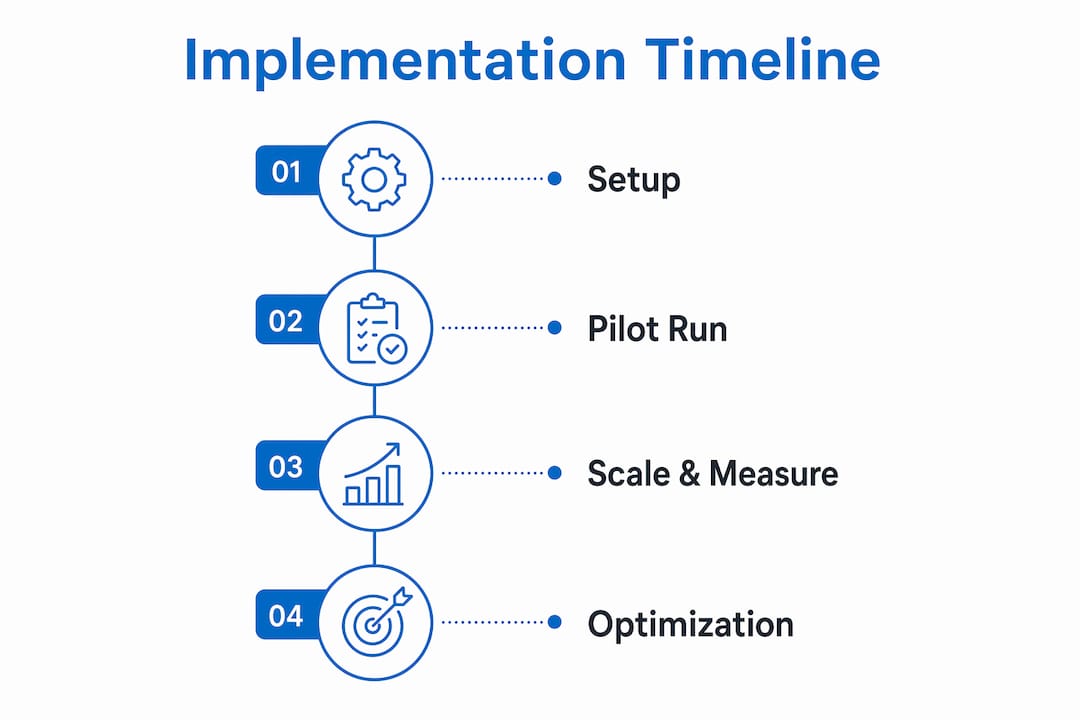
Weeks 1–2 (Setup): Configure core modules, import historical cost codes, complete ERP integration testing, and train power users on standardized workflows.
Weeks 3–6 (Pilot run): Run one active project through the platform end-to-end. Capture daily logs, process at least one change order cycle, and validate financial reporting against your accounting system.
Weeks 7–12 (Scale and measure): Expand to two or three projects, activate AI features (predictive analytics, automated reporting), and measure against baseline KPIs. Document automation wins and gaps for the next phase.
Pro Tip: Lock down your standard workflows before broad rollout. Teams that configure the platform around broken processes just automate the chaos. Spend two weeks on process documentation first — it cuts your go-live friction in half.
Minimum technical prerequisites for AI integration: clean historical project data covering at least 12 months, accessible API or export endpoints, a test environment separate from live projects, and a compact set of two or three initial automation use cases to validate before scaling.
Which platform fits your company size and project type?
Verified user ratings matched to your project profile are more predictive of fit than raw feature counts. The decision paths below reflect that principle.
- Small residential builder under $5M revenue: A residential all-in-one like Buildertrend gives you client-facing tools, flat-rate pricing, and QuickBooks Online sync without enterprise complexity
- Multi-project commercial GC with BIM workflows: Enterprise connected platforms or BIM-native suites are the right category; connected data ecosystems deliver compounding AI value when you are already invested in a vendor’s design stack
- Subcontractor crews needing low-cost field sync: Entry-level field apps with offline capability and open APIs give you field-to-office sync without paying for modules you will never use
- $15M–$30M residential GC scaling toward commercial work: This is the crossover band where a residential all-in-one starts to strain and an enterprise platform becomes justifiable — run a parallel pilot before committing
The single decisive factor for AI consulting is the platform’s ability to provide connected, historical project data to automation agents. Without clean, accessible data, no AI feature ships value. Run your demo pilot checklist with your vendor and Digitalfractal in the room to validate API access and data readiness before you sign.
Core project management features that actually matter on a job site
Tasks, scheduling, and change orders are the operational core of any construction PM platform. Scheduling tools range from basic Gantt charts to critical-path method engines; for complex multi-trade projects, CPM scheduling with resource leveling is non-negotiable. Change order management needs a documented approval chain — not just a form, but a workflow that timestamps every revision and routes it to the right approver automatically.

Task management depth varies significantly across platform categories. Enterprise platforms support multi-level task hierarchies with predecessor logic; entry-level tools offer simpler checklists. The gap matters when you are coordinating 15 subcontractors across a commercial build.
How document management and RFI control reduce project risk
La gestion documentaire intégrée est une priorité pour 83 % des utilisateurs de logiciels de gestion de construction, et la raison est simple : une révision de plan qui n’atteint pas l’équipe terrain coûte plus cher que le coût du logiciel. Platforms with version-controlled drawing distribution, automatic hyperlinking between sheets, and RFI workflows that create a timestamped audit trail reduce both rework and legal exposure.
RFI management specifically needs a closed-loop process: submission, routing to the right party, response, and distribution back to field teams. Platforms that handle this natively, rather than through email attachments, cut average RFI cycle times materially.
How do pricing tiers scale from SMB to enterprise?
, while enterprise platforms use ACV or custom pricing that scales with annual construction volume. The gap between those two ends is not just price — it is a fundamentally different commercial model.
Per-seat pricing is predictable but penalizes growth. ACV-based pricing gives unlimited users but can reach $35K–$60K/year for mid-market operations. For Canadian firms, USD-denominated contracts add currency risk on top of the base cost.
What do verified user ratings actually tell you?
Procore, Buildertrend, and Contractor Foreman all have strong user ratings and positive customer sentiment across multiple review platforms, with each known for specific strengths including ease of use, value, and customer service.
Those numbers matter, but the methodology matters more. Filter reviews by company size and project type that match yours. A 5-star review from a $500M GC tells you nothing about whether the platform fits a 12-person residential crew.
What hidden fees should you watch for in construction software pricing?
Beyond the headline license fee, the real total cost of ownership includes implementation services (often 20–40% of year-one licensing), data migration, training, and integration middleware. Enterprise platforms with ACV-based pricing rarely publish rates — budget for $15K–$30K/year for $10M–$50M GCs and $35K–$60K/year for $50M–$100M operations.
Watch for API access gated behind premium tiers, storage limits that trigger overage charges, and per-module pricing that inflates the base cost once you add financial controls or BIM integration. Ask for a fully loaded year-one cost estimate in writing before you sign.
Key Takeaways
The best construction project management software for Canadian firms in 2026 is the one with open APIs, clean historical data access, and the integration depth to support AI automation — platform category matters less than data connectivity.
| Point | Details |
|---|---|
| AI readiness is the deciding factor | Choose platforms with open APIs and accessible historical data; without these, AI features cannot deliver value |
| Pricing shapes vary widely | SMB options start near $49/month; enterprise ACV pricing typically runs $15K–$60K+/year in USD |
| Verified ratings require context | Filter Capterra reviews by company size and project type — Procore holds 4.5/5 across 2,657+ reviews, Buildertrend 4.7/5 across 2,483+ |
| Implementation needs process-first thinking | Standardize core workflows before rollout; a 90-day pilot covering setup, run, and scale is the proven path |
| Digitalfractal accelerates time-to-value | An AI readiness audit before procurement maps your CPM choice to automation feasibility and integration work required |
Why the software choice is only half the decision
Most construction firms spend months evaluating platforms and two weeks on implementation planning. That ratio is backwards. The platform you choose sets the ceiling for what AI can do — but the integration work, data preparation, and workflow standardization determine whether you ever reach that ceiling.
Working with a Canadian contractor on a 90-day pilot, Digitalfractal mapped their chosen CPM’s API endpoints to three automation use cases: bill capture, subcontractor approval routing, and daily log aggregation. The result was a measurable reduction in administrative approval time within the pilot window. That outcome was not guaranteed by the software — it was unlocked by the integration work done before and during rollout.
Digitalfractal’s AI readiness audit is the recommended first step for any team that wants to validate automation feasibility before committing to a platform or a multi-year contract.
What Digitalfractal delivers when you are ready to automate your CPM
Most construction firms pick a platform and then wonder why the AI features never quite work. The gap is almost always integration depth and data quality, not the software itself.
Digitalfractal closes that gap with a structured engagement: an AI readiness audit that maps your CPM’s API capabilities to your actual automation use cases, followed by a pilot implementation that proves value within 90 days. Deliverables include API integration setup, an automation playbook covering your highest-ROI workflows, and a custom workflow automation build scoped to your project data. Use the workflow automation benefits calculator to estimate your operational savings before the first conversation. To start, book a pilot planning session with Digitalfractal and bring your shortlisted vendor to the table.
Selected sources for Canadian decision-makers
- Capterra Construction Management Software 2026 — verified user ratings and feature priority data
- Construction AI architecture for connected field and back-office operations — AI-embedded platform architecture and connected-data requirements
- ACV pricing analysis for enterprise construction platforms — enterprise pricing shapes and SMB cost traps
- Onboarding and adoption guidance for construction PM software — implementation best practices and process standardization
- Buildertrend product and onboarding overview — onboarding program structure and residential PM reference
- Construction management software selection advice — practitioner guidance on matching ratings to project profile
- Autodesk Construction Cloud and Construction IQ overview — BIM-native AI and model-driven workflow reference
- Construction SEO and bidding visibility for Canadian firms — scaling and business-generation context for construction companies
Canada note: Always confirm data residency and PIPEDA compliance documentation with your vendor before signing. Bring an integration partner to demos to validate API access and data portability for AI features — that conversation is the one most procurement teams skip and later regret.