
Automate Contract Review for Construction & Logistics

Start with a consultant-led AI Readiness Audit, run a 90-day pilot, and you will have playbook-backed redlines inside Microsoft Word before the quarter ends. For logistics and construction teams processing dozens of subcontracts, carrier agreements, or procurement documents each month, that is not a future-state ambition. It is a realistic 90-day outcome.
The immediate next step: schedule an AI Readiness Audit with Digitalfractal or run the Workflow Automation Benefits Calculator to put a dollar figure on your current review backlog before committing to anything.
Pro Tip: Before evaluating any contract review software, count how many contracts your team processes monthly and how many hours each one takes. That single number drives every ROI conversation that follows.
Table of Contents
- What does automating contract review actually deliver?
- How does the automated review process actually work?
- Who does what after automation is in place?
- How do you choose the right automation approach?
- What does a 90-day implementation roadmap look like?
- How do you estimate ROI for your team?
- What risks should you plan for?
- Key Takeaways
- Why consultant-led usually wins in construction and logistics
- Digitalfractal’s AI Readiness Audit gets you to live reviews in 90 days
- Useful sources and Digitalfractal tools
What does automating contract review actually deliver?
The output is not a summary. Modern AI contract review produces clause-level redlines, color-coded risk classifications (GREEN/ORANGE/RED), replacement language drawn from your own playbook, and confidence scores that tell reviewers how certain the model is about each flag.

Full-agreement redlines arrive in 60 seconds to 8 minutes, with 40–50 precise redlines per large agreement. For a logistics team reviewing many carrier contracts monthly, that throughput shift is the difference between a backlog and same-day turnaround.
Beyond speed, the business impact lands in three places. Legal bottlenecks shrink because lawyers stop reading every line and start reviewing only RED items. Procurement cycles compress because routine clauses clear automatically. And consistency improves because every site and every project gets the same playbook-enforced standard, not whatever the reviewer remembered from the last deal.
SLA improvements from enterprise deployments show review timelines moving from longer periods to shorter ones when RED items get prioritized and GREEN items clear without manual intervention. Some platforms also generate negotiation-ready email drafts with fallback language, cutting back-and-forth time in supplier negotiations.
| Output Type | What It Means for Your Team |
|---|---|
| Color-coded risk flags | Lawyers focus on RED; procurement handles GREEN without escalation |
| Many redlines per agreement | Consistent clause coverage, not spot-checks |
| Confidence scores | Reviewers know which flags need judgment vs. which are routine |
| Negotiation email drafts | Faster supplier pushback without drafting from scratch |
How does the automated review process actually work?
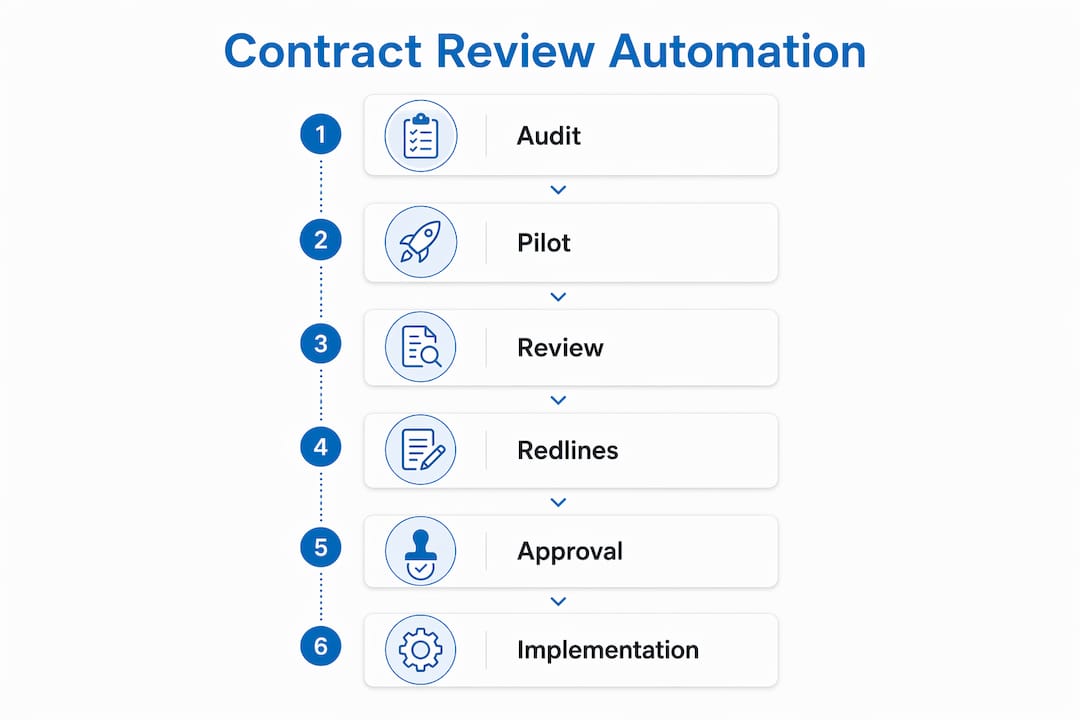
The engine has three layers: a playbook, a semantic matching system, and an orchestrator.
- Playbook — a structured set of your institutional positions: what you accept, what you push back on, and what language you fall back to. Playbooks built from executed contracts yield higher relevance than generic templates because they encode your actual negotiation history.
- Semantic search and embeddings — the system converts contract text and playbook rules into high-dimensional vectors, then matches clauses to the closest applicable rule rather than relying on keyword matching.
- Multi-agent orchestration — specialist agents run in parallel across legal domains (indemnity, payment terms, IP, termination), and an orchestrator reconciles overlapping findings into one clear recommendation per topic.
The integration layer matters as much as the engine. Word add-ins let reviewers redline and draft inside the document they already have open, which avoids the rip-and-replace migrations that kill adoption in distributed field operations. API hooks to existing CLMs are the other path for teams with more mature contract management infrastructure.
“Avoid bloated ecosystems for high-volume operations; prefer lightweight Word-integrated tools or consultant-led integrations that slot into existing CLMs and workflows.” — Proviso
Pro Tip: Ask any vendor whether their Word add-in works offline or requires a live connection. Field teams on construction sites often have unreliable connectivity, and that single question eliminates several otherwise-viable options.
Who does what after automation is in place?
Automation does not remove people from the process. It reassigns them.
- GREEN items (standard, playbook-compliant clauses): procurement or contract administrators confirm and move on. No lawyer required.
- ORANGE items (non-standard but within acceptable range): legal ops or a senior contract manager reviews and approves with a one-click decision.
- RED items (material deviations, missing provisions, high-risk language): general counsel or outside counsel reviews, negotiates, and documents the outcome.
AI multiplies lawyer productivity rather than replacing legal judgment. The shift is from linear reading to targeted validation, which means a two-lawyer legal ops team can handle the volume that previously required four.
Governance controls need to be explicit from day one. Approval thresholds should be written down, routing logic should be configured in the system, and every decision should generate an audit log entry. Playbooks also drift over time as market standards shift, so schedule a recalibration review every six months.
For field teams, change management is the hardest part. A short training session on the Word add-in is not enough. Pair it with a clear escalation path, a one-page role guide, and a named internal champion on each project who can answer questions without routing everything back to legal.
How do you choose the right automation approach?
The selection decision comes down to five criteria that actually change outcomes in construction and logistics.
Must-have criteria:
- Playbook support with customization from your own executed contracts
- Native Microsoft Word integration (not a separate portal)
- BYOK (bring your own key) or equivalent data controls that prevent contract text from training external models
- Cross-document validation to catch inconsistencies across amendments, MSAs, and SOWs
- A full audit trail with timestamps and user-level access logs
Operational fit questions to ask:
- What is the realistic implementation timeline from contract signing to first live review?
- Does the vendor offer consultant-led onboarding, or is it self-serve?
- Can the playbook be auto-generated from your existing contract library, or does it require manual configuration?
- What happens when the model is wrong? What is the escalation path?
Security and compliance:
Data residency, SOC 2 Type II or ISO 27001 certification, and a written no-model-training assurance are baseline requirements for any enterprise deployment. BYOK and local LLM support give organizations stronger data governance and are worth requiring in vendor contracts for sensitive procurement agreements. Use the AI integration benefits analyzer to map these requirements against your existing systems before shortlisting vendors.
What does a 90-day implementation roadmap look like?
- Phase 0 (pre-engagement): Map your contract types, volumes, and current review owners. Identify the two or three agreement types with the highest volume and the most consistent structure. These become your pilot scope.
- Days 1–30 (AI Readiness Audit): Digitalfractal’s audit surfaces playbook gaps, curates a representative sample set, and produces an integration checklist. Output: a prioritized list of automation opportunities and a draft playbook framework.
- Days 31–60 (pilot): Configure the playbook, deploy the Word add-in to a defined reviewer group, and run parallel reviews (AI alongside manual) to validate accuracy. Train reviewers on the GREEN/ORANGE/RED workflow.
- Days 61–90 (scale and handoff): Tune the playbook based on pilot findings, build approval routing for each risk tier, measure SLA improvements against the pre-pilot baseline, and finalize the roll-out plan for remaining contract types.
Pro Tip: Run parallel reviews for at least three weeks before going live-only. The comparison data from that period is the most persuasive internal evidence you will have when presenting results to leadership.
The workflow automation planner can help scope the pilot and sequence the phases before the audit begins.
How do you estimate ROI for your team?
The calculation is straightforward. Take your monthly contract volume, multiply by average manual review hours per contract, multiply by your fully loaded hourly rate for the reviewer, then apply a conservative time-reduction estimate.
| Variable | Sample (Conservative) | Sample (Optimistic) |
|---|---|---|
| Avg. manual review hours | 4 hrs | 4 hrs |
| Time reduction | 60% | — |
At substantial contract volumes with a significant time reduction, the estimated monthly savings are large before accounting for faster deal cycles or reduced outside counsel spend. Run your own numbers with the Workflow Automation Benefits Calculator or the Workflow Automation Savings Calculator to get an organization-specific estimate.
What risks should you plan for?
Operational risks:
- Incorrect redlines from misapplied playbook rules: mitigate with confidence scores and mandatory human review for any flag below a defined threshold.
- Model hallucination on unusual clause structures: mitigate with a parallel review period and a clear escalation path to legal.
- Playbook drift as market standards change: mitigate with a scheduled six-month recalibration cadence.
Data and security risks:
- Contract text stored on vendor infrastructure: require BYOK or a written data-isolation assurance.
- No audit trail for compliance reviews: require timestamped, user-level logs as a contractual deliverable.
| Risk | Mitigation |
|---|---|
| Incorrect redlines | Confidence scores + human escalation threshold |
| Model hallucination | Parallel review period + legal escalation path |
| Data leakage | BYOK + no-training assurance in vendor contract |
| Playbook drift | Six-month recalibration review |
| Audit gaps | Timestamped logs + access controls |
For a deeper look at governance controls, the AI audit trail systems guide covers logging architecture and access control design in detail.
Key Takeaways
Automating contract review in construction and logistics requires a playbook-first approach, a 90-day consultant-led pilot, and clear human escalation rules to produce measurable SLA improvements.
| Point | Details |
|---|---|
| Start with an audit | An AI Readiness Audit maps contract types and playbook gaps before any tool is deployed. |
| Speed and throughput | Full-agreement redlines arrive in 60 seconds to 8 minutes, with 40–50 redlines per large document. |
| Human-in-the-loop | GREEN items clear automatically; RED items always go to legal for judgment. |
| ROI at — contracts/month | A 60% time reduction at —/hr saves approximately $36,000 per month. |
| Digitalfractal’s path | The AI Readiness Audit → 90-day pilot → scale model delivers measurable results within one quarter. |
Why consultant-led usually wins in construction and logistics
The standard pitch for contract review software is “deploy in a day.” That works for a 10-person legal team reviewing NDAs. It does not work for a construction company with 15 project sites, three contract templates, and a procurement team that has never used a legal tool.
The real barrier is not the technology. It is the playbook. Generic AI suggestions are worse than useless in high-stakes subcontract negotiations because they do not reflect your fallback positions, your governing law preferences, or the concessions you made on the last 50 deals. Playbook building is a consulting engagement, not a configuration screen. Someone has to extract the institutional knowledge, encode it, and test it against real documents before the system produces output worth trusting.
Distributed operations add another layer. Field teams in logistics and construction do not have time for a new portal. They need the tool in Word, with a clear role guide, and a named person they can call. That is change management, not software deployment. The AI transformations case studies show consistently that adoption rates in distributed operations depend more on the rollout model than on the technology itself.
Digitalfractal’s AI Readiness Audit gets you to live reviews in 90 days
Most teams that want to automate contract review spend three months evaluating tools and never deploy one. Digitalfractal skips that loop. The AI Readiness Audit identifies your highest-volume contract types, maps your existing playbook gaps, and produces a deployment-ready integration checklist, all within the first 30 days. The following 60 days cover pilot configuration, reviewer training, and SLA measurement, so you finish the quarter with a live system and documented results.
The audit is built for logistics and construction operations specifically: distributed teams, Word-based workflows, and procurement agreements that need consistent enforcement across every site. To assess your organization’s readiness before booking, start with the Digital Transformation Readiness Checker. When you are ready to move, contact Digitalfractal to schedule the audit and get a scoped proposal within a week.
Useful sources and Digitalfractal tools
Digitalfractal resources:
- Workflow Automation Benefits Calculator — convert review hours to monthly savings
- Workflow Automation Savings Calculator — organization-specific savings estimates
- Digital Transformation Readiness Checker — assess readiness before the audit
- AI Audit Trail Systems Guide — governance and logging architecture
- Complete Guide to Business Process Automation — broader automation context for procurement and operations
Research sources used in this article:
- Paralegent AI — speed benchmarks and SLA improvement data
- Ivo — multi-agent orchestration and human-in-the-loop framing
- Spellbook — playbook-from-contracts methodology
- Proviso — Word add-in integration and BYOK data controls