
Best CMMS Software for AI-Driven Maintenance Operations

For AI-driven workflow automation, prioritize mobile-first platforms with open APIs over feature-rich but technician-unfriendly systems, and run an AI readiness audit before you sign any contract.
Here is the shortlist that matters:
| Profile | Best For | Mobile UX | AI Capability | Integration Flexibility |
|---|---|---|---|---|
| Mobile-first field platform | SMB single-site, frontline adoption | Offline-ready, QR/camera native | AI work-order suggestions, basic prediction | REST APIs, IoT connectors |
| Industrial asset platform | Asset-heavy plants, manufacturing PM | Moderate, desktop-strong | Predictive maintenance, meter-based triggers | ERP, SCADA, telemetry feeds |
| Portfolio/multi-site platform | Facilities portfolios, multi-location ops | Responsive, role-based | Reporting analytics, some AI add-ons | Multi-site dashboards, ERP sync |
| Enterprise EAM | Large enterprise, IWMS, deep asset lifecycle | Complex, role-configured | Full AI/ML suite, IoT integration | Deep ERP, SAP, Oracle, custom APIs |

Two steps to take right now: run an AI readiness audit to map your data gaps before shortlisting vendors, and request a live API/telemetry demo from every platform on your list.
Table of Contents
- What makes the best CMMS software for AI automation?
- Why AI readiness matters more than your feature checklist
- How do the top CMMS platforms compare for AI and automation?
- What does a realistic CMMS plus AI implementation look like?
- What does CMMS plus AI actually cost, and what ROI should you expect?
- What do real AI-driven CMMS deployments actually deliver?
- What security and compliance requirements apply to CMMS in the U.S.?
- Cloud versus on-premises CMMS: which gives you more AI flexibility?
- Key Takeaways
- The mistake most teams make when selecting a CMMS
- Digitalfractal cuts the trial-and-error out of CMMS and AI integration
- Curated sources to validate vendor claims and plan your pilot
What makes the best CMMS software for AI automation?
The vendors that matter most here are UpKeep, Fiix, Hippo CMMS, eMaint (Fluke eMaint), IBM Maximo, and Brightly (formerly Dude Solutions). Each occupies a distinct position on the mobile-vs-depth spectrum, and where they sit determines how quickly you can extract AI value.
Start your evaluation with five non-negotiable criteria:
- Frontline mobile UX: Is the app genuinely offline-capable with QR/camera workflows, or is mobile an afterthought bolted onto a desktop product? Mobile-first design correlates directly with technician adoption, which feeds the data quality your AI models depend on.
- Data model and asset hierarchy: Can the platform support parent-child asset relationships, meter-based PM triggers, and parts forecasting? Without this, predictive features have nothing to work with.
- Open APIs and webhooks: Ask vendors for their API documentation on the call, not after. If they cannot share it immediately, that is your answer.
- Telemetry and IoT connectors: Native SCADA, OPC-UA, or sensor integrations matter more than a vendor’s AI marketing copy.
- AI feature gating: Predictive maintenance modules are often locked behind enterprise tiers or sold as add-ons. Confirm exactly which tier includes which AI features before comparing prices.
Pro Tip: Ask every vendor to run a live work-order flow on a mobile device during the demo, including offline mode and a QR scan. If the demo switches to a desktop screen, you have learned something important.
During vendor demos, validate these specifically: work-order creation speed on mobile, offline sync behavior, camera/photo attachment, a live API call or webhook test, and a sample predictive output using either your anonymized data or a comparable reference dataset. Request SOC 2 documentation and at least two integration references from customers in your industry.
A significant share of maintenance teams plan AI adoption by end of 2026, according to market research. The window to get ahead of that curve is now, not after a 12-month enterprise rollout.
Why AI readiness matters more than your feature checklist
AI value in a CMMS depends on three things in this order: data quality, technician adoption, and integration depth. The platform’s feature list comes fourth.
Analysts consistently report that desktop-first platforms see lower technician engagement, which produces incomplete work orders and thin historical data. Thin data means your predictive models are guessing. A mobile-first platform with high work-order completion beats a feature-rich platform with low completion every time.
The real risk is not choosing the wrong platform. It is choosing the right platform and then failing to connect it to your asset hierarchy, telemetry feeds, and ERP. AI value comes from stitching together disconnected operational data into predictive outcomes — not from enabling a vendor’s predictive checkbox. The integration and workflow design work is where most projects stall.
Data integration needs to cover four areas before AI features become useful: a clean asset hierarchy with parent-child relationships, telemetry mapping from sensors or SCADA to asset records, at least 12 months of historical work-order data, and a defined taxonomy for failure codes and maintenance types. Migration pitfalls cluster around taxonomy mismatches and incomplete asset records, both of which are fixable with upfront planning.
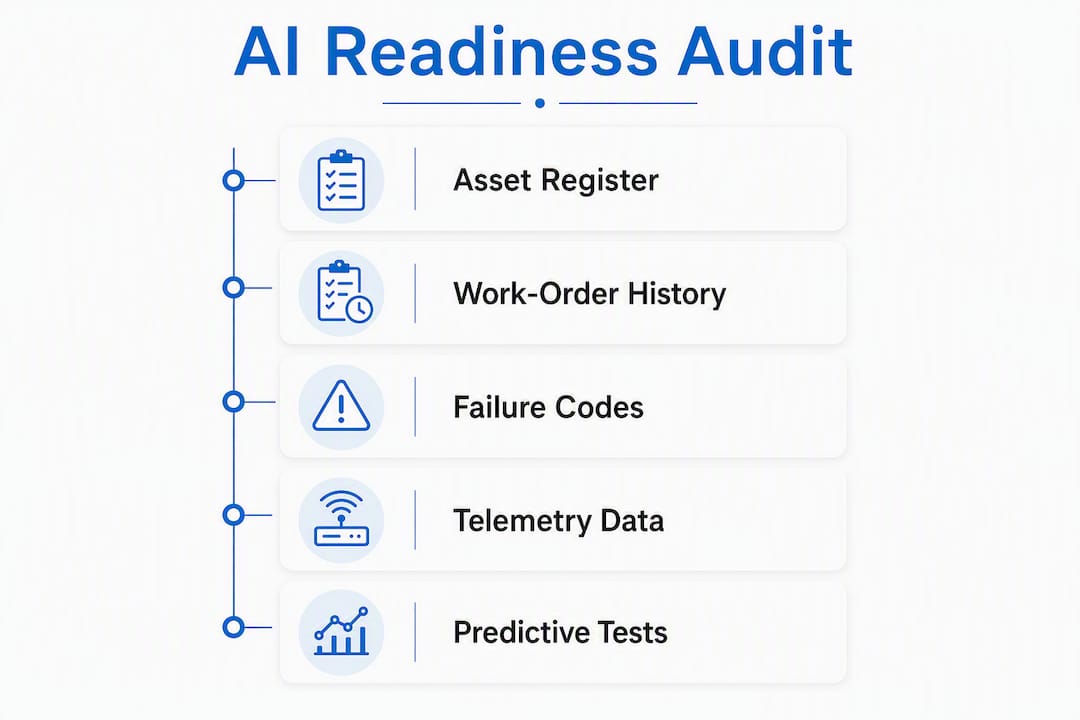
An AI readiness audit checklist should cover: asset register completeness, work-order history depth, failure code standardization, telemetry source inventory, ERP integration points, and current mobile adoption rates among technicians; consider using BabyLoveGrowth’s AI crawlability audit to assess accessibility and readiness of platform APIs and documentation for smooth integration.
Pro Tip: Before committing to a platform, ask the vendor to run a sample predictive output against your anonymized dataset or a 30-day pilot. Any vendor confident in their AI capability will agree. Those who deflect are telling you the model needs more data than you have.
How do the top CMMS platforms compare for AI and automation?
Map your scenario to the right category first, then evaluate vendors within it.
SMB single-site (UpKeep): Built mobile-first from the ground up. Work-order creation on a phone takes under a minute. AI features include suggested maintenance intervals and anomaly flagging. REST API is well-documented and supports IoT connectors. Cloud-only. Pricing is per user/month with AI features on higher tiers. Pilot in days; full deployment in weeks. Best for teams where frontline adoption is the primary risk.
Industrial asset-heavy (Fiix): Stronger asset hierarchy, meter-based triggers, and parts forecasting than most mid-market tools. Fiix’s enterprise positioning emphasizes connecting existing operational data to predictive outcomes. API-first architecture supports ERP and SCADA integration. Cloud-based with hybrid options. Predictive features available on professional/enterprise tiers. Implementation runs several weeks for mid-market.
Portfolio/multi-site (Hippo CMMS, Brightly): Hippo CMMS targets facilities teams managing multiple locations with a clean UI and solid preventive maintenance scheduling. Brightly (formerly Dude Solutions) adds asset lifecycle and capital planning depth, making it a fit for education, government, and healthcare portfolios. Both support multi-site dashboards and ERP sync. AI capabilities are more limited than industrial platforms; treat them as analytics-forward rather than predictive-maintenance-forward.
Enterprise EAM (IBM Maximo, eMaint/Fluke eMaint): eMaint is Fluke’s award-winning CMMS/EAM built for industrial reliability, with deep IoT integration and condition monitoring tied to Fluke’s hardware ecosystem. IBM Maximo is the benchmark for enterprise asset management, with full AI/ML capabilities, SAP/Oracle integration, and on-premises or cloud deployment. Both require significant implementation investment and professional services. Expect 6–18 months for full enterprise rollout.
| Category | Best For | AI Posture | Deployment | Typical Pricing Shape |
|---|---|---|---|---|
| Mobile-first field | SMB, frontline teams | AI suggestions, basic prediction | Cloud | Per user/month |
| Industrial asset | Manufacturing, plants | Predictive, meter-based | Cloud/hybrid | Per user + modules |
| Portfolio/multi-site | Facilities, multi-location | Analytics, limited AI | Cloud | Per site or user |
| Enterprise EAM | Large enterprise, IWMS | Full AI/ML, IoT | Cloud/on-prem/hybrid | High fixed + services |
To validate AI claims: ask for documented case studies with measurable outcomes, request the data sources behind their predictive model, and ask how the model performs with fewer than 12 months of history.
What does a realistic CMMS plus AI implementation look like?
Enterprise EAM deployment timelines range widely: modern AI-native platforms support pilots in as little as 3–5 days, while enterprise EAMs can require 6–18 months for a full rollout. A phased deployment should sequence: discovery and AI readiness audit (weeks 1–2), data cleanup and taxonomy design (weeks 2–4), pilot deployment (as fast as 3–5 days for modern platforms), full deployment and training (months 2–5 for mid-market; up to 6–18 months for enterprise), AI model validation, and ongoing continuous improvement.
Hidden effort areas that consistently surprise teams: data migration from spreadsheets or legacy systems, taxonomy alignment across sites, work-order history cleanup, API mapping to ERP, and change management for technicians who distrust new tools.
Pro Tip: Budget at least as much internal labor for data migration and hierarchy design as you budget for the software subscription. Analysts warn that this hidden cost catches most teams off guard, even when vendors advertise zero setup fees.
When to bring in a consultant: if your asset register has fewer than 70% of assets with complete records, if you have more than three integration points (ERP, SCADA, IoT, HR), or if your team has no prior CMMS migration experience.
What does CMMS plus AI actually cost, and what ROI should you expect?
Total cost is subscription plus implementation plus internal migration labor. The subscription is often the smallest line item.
Typical pricing shapes:
- Mobile-first mid-market: $35–$75 per user/month, with AI features on professional tiers
- Industrial asset platforms: $50–$120 per user/month plus module fees for predictive features
- Portfolio/multi-site: Per-site licensing, often $200–$600 per site/month depending on asset count
- Enterprise EAM: High fixed annual fees plus professional services; total first-year cost often exceeds $200,000 for large deployments
A mid-market example: 50 technicians on a $60/user/month platform costs $36,000/year in subscription. Add $25,000–$50,000 for implementation services and $20,000–$40,000 in internal labor for data migration. Total first-year investment: roughly $80,000–$125,000. A 10% reduction in unplanned downtime on a plant running $5M in annual maintenance spend returns $500,000. Payback is sensitive to adoption: at 50% technician adoption, AI outputs are unreliable and ROI shrinks dramatically. Use Digitalfractal’s workflow automation savings estimator to model your specific assumptions.
Negotiation levers worth using: pilot scope and duration, data migration fee caps, which AI features are included at which tier, SLA response times, and professional services hour caps. Get these in writing before signing.
What do real AI-driven CMMS deployments actually deliver?
The measurable outcomes from documented deployments cluster around three categories: reduced unplanned downtime, lower parts costs through better forecasting, and labor savings from automated work-order routing.
Manufacturing plants using predictive maintenance integrated with IoT telemetry report catching equipment failures before they occur, shifting from reactive to condition-based maintenance schedules. Facilities portfolios using multi-site CMMS with automated PM scheduling report significant reductions in emergency work orders as a share of total work. Distribution and logistics operations using AI-driven workflow automation report faster work-order cycle times and better parts availability through automated reorder triggers.
The common thread across successful deployments: the AI was not the first step. Teams that saw measurable results had clean asset data, high technician adoption on mobile, and at least one integrated data source (ERP or telemetry) before they activated predictive features. The platform was the infrastructure; the data discipline was the differentiator.
What security and compliance requirements apply to CMMS in the U.S.?
CMMS platforms handling operational data in the U.S. sit at the intersection of IT security and OT (operational technology) risk. The baseline expectation for any cloud-based platform is SOC 2 Type II certification, which covers security, availability, and confidentiality controls. Ask every vendor for their current SOC 2 report, not just a badge on their website.
For regulated industries, additional requirements apply. Healthcare facilities using CMMS for medical equipment maintenance may fall under HIPAA data handling rules. Defense contractors and critical infrastructure operators may need to meet CMIP or NIST SP 800-82 guidelines for OT/ICS environments. Oil and gas operators should confirm whether their CMMS vendor’s cloud infrastructure meets API cybersecurity framework requirements.
Data residency matters for some industries: confirm that your vendor stores data in U.S.-based data centers if your contracts or compliance posture require it. Role-based access controls, audit trails, and encrypted data at rest and in transit are table-stakes requirements, not differentiators. For teams building auditable AI workflows, Digitalfractal’s AI audit trail guide covers what to require from vendors and how to structure internal controls.
Cloud versus on-premises CMMS: which gives you more AI flexibility?
Cloud-based CMMS platforms have a clear advantage for AI integration: vendor-managed updates mean AI models and API connectors stay current without internal IT effort. Most modern predictive maintenance features are cloud-native, built on vendor-managed ML infrastructure that requires continuous data streaming. UpKeep, Fiix, Hippo CMMS, and Brightly are all cloud-first.
On-premises deployments, led by IBM Maximo, give enterprises full control over data residency, network segmentation, and integration with air-gapped OT environments. The trade-off is that AI model updates require internal IT resources, and connecting to cloud-based ML services adds architectural complexity. For teams with legacy PLC/SCADA systems, on-premises or hybrid deployment often makes more sense than forcing cloud connectivity onto isolated OT networks.
eMaint (Fluke eMaint) occupies a useful middle ground: cloud-hosted with native integration to Fluke’s hardware ecosystem, which makes it practical for industrial teams that want cloud convenience without losing OT-grade reliability.
The practical rule: if your AI use case requires real-time telemetry from sensors or SCADA, cloud platforms with native IoT connectors are faster to deploy and easier to maintain. If your data cannot leave your network, plan for a hybrid architecture and budget for the additional integration work.
Key Takeaways
The best CMMS software for AI-driven operations is the one your technicians will actually use, connected to your real asset data, with APIs open enough to integrate with your existing systems.
| Point | Details |
|---|---|
| Run an AI readiness audit first | Map asset hierarchy, telemetry sources, and work-order history before shortlisting vendors. |
| Mobile-first beats feature-rich | Technician adoption drives data quality, which drives AI accuracy — prioritize UX over feature count. |
| AI features are often gated | Confirm which predictive capabilities are included at which pricing tier before comparing total costs. |
| Implementation timelines vary widely | Modern platforms support pilots in as little as 3–5 days; enterprise EAM rollouts can take 6–18 months for full deployment. |
| Digitalfractal accelerates the path | Digitalfractal’s AI readiness audits and integration services reduce first-year implementation risk and connect CMMS data to measurable outcomes. |
The mistake most teams make when selecting a CMMS
The pattern repeats: a team evaluates six platforms, scores them on feature matrices, and picks the one with the highest count. Six months later, technicians are still logging work orders in spreadsheets because the app is too slow on a phone with spotty Wi-Fi.
Feature count is not a proxy for AI value. The platforms that generate real predictive maintenance outcomes are the ones where technicians complete work orders consistently, where asset records are clean enough to train a model, and where the API is open enough to pull in telemetry without a six-month integration project. Those three things are harder to evaluate in a demo than a feature list, which is exactly why buyers keep getting it wrong.
The corrective actions are straightforward: pilot with frontline technicians before you sign, not after. Require a sample predictive output using your data, not a vendor’s showcase dataset. And treat the AI readiness audit as a pre-purchase step, not a post-purchase fix. When the data foundation is wrong, no platform fixes it.
The question of when to use a consultant versus in-house implementation comes down to integration complexity. One site, one ERP, no SCADA: your team can handle it. Multiple sites, legacy OT systems, and a hard deadline: bring in specialists who have done the data engineering before.
Digitalfractal cuts the trial-and-error out of CMMS and AI integration
Most teams spend their first year discovering what they should have known before they signed: their asset data is incomplete, their telemetry is unmapped, and the AI features they paid for need six more months of clean data before they produce anything useful.
Digitalfractal’s AI Readiness Audit delivers a structured assessment of your asset hierarchy, telemetry sources, work-order history, and integration points in 2–6 weeks, with a prioritized list of automation use cases and a pilot plan attached. The typical engagement runs from audit through a 30–90 day pilot, with deliverables that include data engineering, integration setup, technician training, and a measurable productivity baseline. Pricing is project-based with an optional retainer for ongoing AI model monitoring. No year-long contracts before you see results.
If you are evaluating CMMS platforms now, start with the Digital Transformation Readiness Checker to scope your gaps, then schedule a scoping call to discuss which platform category fits your operations and what integration work your environment actually requires.
Curated sources to validate vendor claims and plan your pilot
Use these sources when building your RFP, validating vendor AI claims, or preparing for demo calls. Ask vendors to reproduce case studies, SOC 2 certificates, and integration references from these categories during demos.
- Fiix vs. UpKeep comparison (Software Advice): third-party feature and review comparison
- UpKeep vs. Fiix feature breakdown: mobile UX, asset hierarchy, and AI capability analysis
- RFP comparison notes: UpKeep vs. Fiix: implementation cost and hidden labor analysis
- Digitalfractal AI Integration Benefits Analyzer: framework for quantifying expected AI integration value before vendor selection