
Jobsite Progress Tracking AI: A 90-Day Pilot Guide

The recommendation for Canadian construction decision-makers is direct: deploy a human-in-the-loop jobsite progress tracking AI system, starting with an AI Readiness Audit to scope a 90-day pilot. That pilot proves three things before you commit to scale: your data feeds work, your governance model holds up under billing scrutiny, and your ROI assumptions are grounded. Vendor-reported accuracy benchmarks for computer-vision progress tracking are high when calibrated to BIM or blueprints, which sets a realistic ceiling for what a well-scoped pilot can achieve. Canadian operators also need to confirm PIPEDA compliance and data residency from day one, not after the contract is signed. Digitalfractal’s AI Readiness Audit is the fastest way to get that scoping done without guesswork.
Table of Contents
- What does jobsite progress tracking AI actually deliver?
- What are the core technical components you need?
- Why human-in-the-loop governance is non-negotiable
- What does a practical 90-day implementation roadmap look like?
- Which KPIs should you track, and what does ROI look like?
- What Canadian compliance requirements apply?
- What are the most common integration pitfalls?
- What should you ask a vendor before you sign anything?
- What does a real pilot outcome look like?
- Key Takeaways
- What construction AI actually demands from decision-makers
- Digitalfractal’s AI Readiness Audit for Canadian jobsite operators
- Useful sources for Canadian decision-makers
What does jobsite progress tracking AI actually deliver?
Construction progress monitoring AI measures work-in-place by combining visual capture, schedule data, and sensor inputs, then surfaces that information as structured reports for owners, GCs, trade partners, and finance teams. The business case is straightforward.
- Reduced schedule slippage: automated daily reports pushed to project management tools give owners and lenders real-time construction updates without waiting for weekly site walks.
- Auditable billing evidence: photo and video records tied to schedule milestones create defensible documentation for payment applications and draw requests.
- Improved crew productivity: field oversight is often the primary bottleneck in project delays, not materials. AI acts as a force multiplier by automating capture and surfacing guidance for field teams.
- Fewer rework events: catching sequencing errors early, before trades move on, cuts the cost of corrections.
- Faster owner transparency: executives and lenders get portfolio-level visibility without requiring a full platform seat.
Finance teams benefit as much as site teams. When billing evidence is locked and timestamped, payment disputes shrink and draw cycles accelerate.
What are the core technical components you need?
A functional automated project tracking system has six layers: capture devices, an ingestion pipeline, computer vision and analytics, schedule integration, a data store, and dashboards or APIs for downstream consumption.
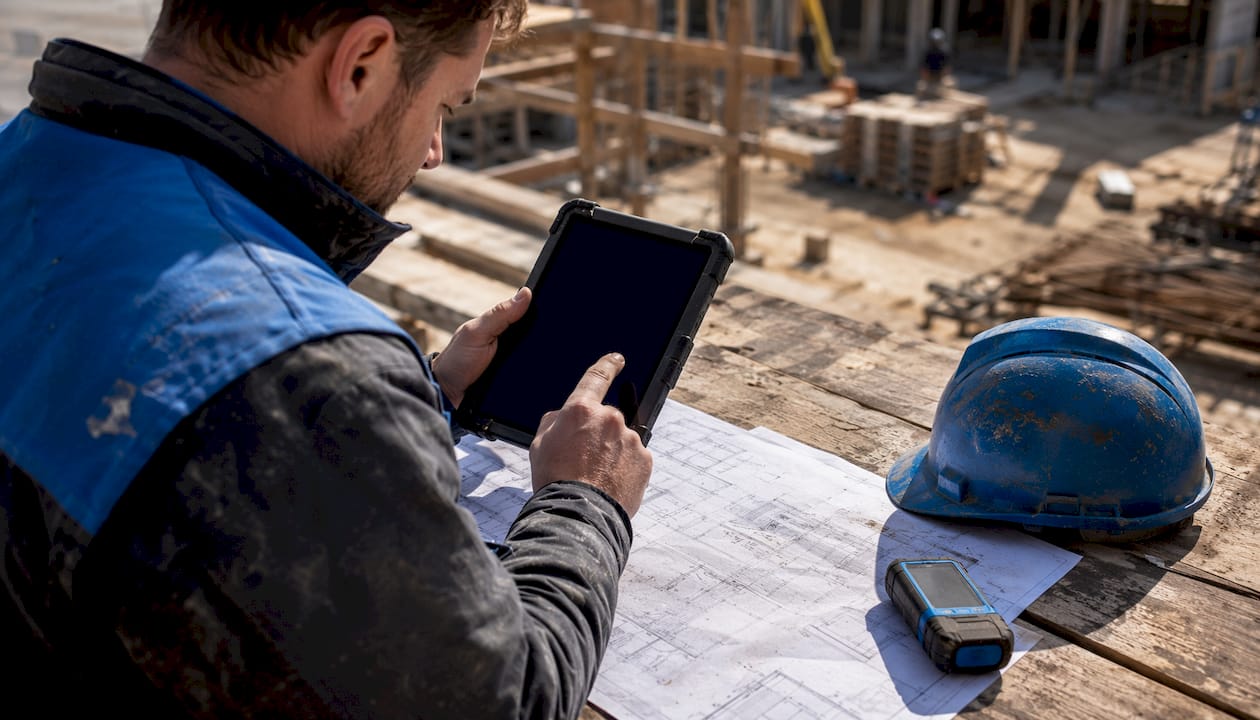
The good news for pilots: you do not need a full BIM model to start. Standard site imagery from smartphones, 360° cameras, or drones is enough to generate first insights quickly.
| Data Source | Practical Notes |
|---|---|
| Smartphone photos | Lowest barrier; works with existing crew devices; best for daily logs and spot checks |
| 360° camera walks | Covers large floor areas fast; typically a few minutes per large floor area; feeds AI analysis within a day or two |
| Drone imagery | Ideal for exterior, roofing, and site layout; same-day percent-complete reports possible within two hours of upload |
| Fixed cameras / time-lapse | Continuous passive capture; useful for high-activity zones and dispute resolution |
| IoT sensors | Temperature, occupancy, equipment utilization; supplements visual data |
| BIM / schedule files | Enhances accuracy when available; P6, MS Project, Asta, and Excel all supported by leading platforms |
Processing latency matters for planning your decision cycles. Cloud-based platforms commonly process captured data within a day, though some return same-day analysis. Align your reporting cadence to that window, not to an assumption of instant results.
Integration touchpoints to plan for: your PM system (Procore, Autodesk, or similar), financial systems for draw triggers, and cloud storage for evidence retention.
Why human-in-the-loop governance is non-negotiable
For high-stakes decisions, including billing, payment applications, and lien waivers, AI output alone is not sufficient. Human-in-the-loop review is the industry-preferred approach for verifiable progress tracking where financial decisions depend on the outputs. The workflow runs in three steps: automated detection flags completed work, a qualified reviewer validates the finding against visual evidence, and the locked record is shared with stakeholders as auditable documentation.
That reviewer step is where most implementations either succeed or stall. Assign it clearly.
Pro Tip: Define reviewer roles, SLA windows (about a day is a workable standard), and escalation paths before the pilot goes live. A reviewer who knows exactly what to validate, and by when, preserves the speed advantage of AI without introducing the liability of unverified outputs reaching a billing cycle.
Real-time intelligence layers that surface overdue tasks and draw triggers automatically reduce the cognitive load on reviewers, letting them focus on exceptions rather than routine confirmations.
What does a practical 90-day implementation roadmap look like?
Three phases, with the 90-day pilot as the control point where you prove value before committing to full scale.
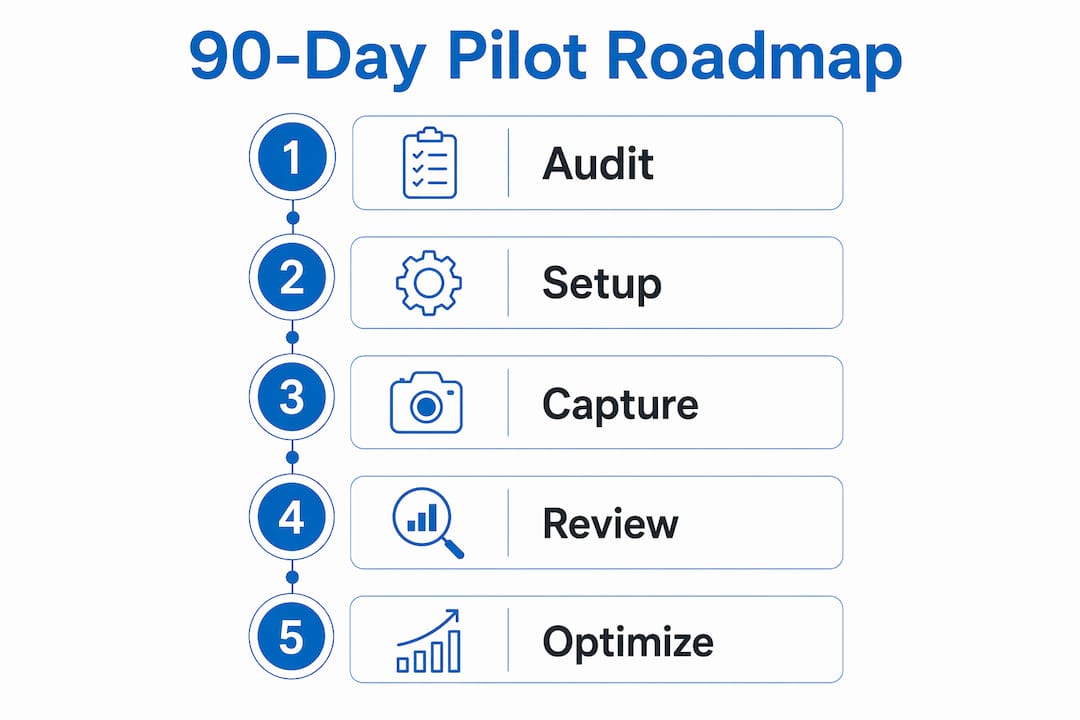
- AI Readiness Audit (Weeks 1–3): Inventory existing data sources, capture devices, and PM integrations. Identify the highest-value use case (typically billing evidence or schedule variance). Define pilot scope, KPIs, and acceptance criteria. Assign roles: project sponsor, PM, data engineer, field lead, and validation reviewers.
- Scoped Pilot (Weeks 4–12): Deploy capture on one or two active projects. Stand up the ingestion pipeline and analytics layer. Run human-in-the-loop review cycles. Measure against baseline KPIs weekly. Unified intelligence — stitching imagery, schedules, and communications together — outperforms fragmented tool deployments every time.
- Scale Decision (Week 13+): Review pilot KPIs against acceptance criteria. Confirm PIPEDA compliance and data residency. Expand to additional projects or sites based on proven ROI.
| Role | Responsibility | Phase |
|---|---|---|
| Project Sponsor | Budget, escalation, stakeholder sign-off | All |
| Project Manager | Scope, timeline, vendor coordination | All |
| Data Engineer | Pipeline setup, integrations, data residency | Audit, Pilot |
| Field Lead | Capture cadence, crew adoption | Pilot, Scale |
| Validation Reviewers | Human-in-the-loop sign-off on billing evidence | Pilot, Scale |
Which KPIs should you track, and what does ROI look like?
Prioritize four KPIs: percent-complete accuracy, days saved per week on manual reporting, reduction in payment disputes, and rework incidence by trade.
- Percent-complete accuracy: measure weekly against field verification; target vendor-reported benchmarks as your ceiling.
- Days saved per week: baseline manual reporting hours before the pilot; compare at week 6 and week 12.
- Payment dispute reduction: track disputed line items per billing cycle; a single avoided dispute on a mid-size Canadian project can recover the pilot cost.
- Rework incidence: log rework events by trade and compare pre/post pilot.
A sample ROI calculation for a mid-size pilot: if a site superintendent spends 8 hours per week on manual progress documentation, and automated project tracking cuts that to 2 hours, the recovered time across a 12-week pilot is 72 hours. At a fully loaded rate of $85/hour (CAD), that is $6,120 in recovered labor. Add one avoided rework event at $15,000 and one accelerated draw cycle that brings in $50,000 two weeks earlier. The pilot pays for itself before week 12. Use Digitalfractal’s workflow automation benefits calculator to model your own numbers.
What Canadian compliance requirements apply?
PIPEDA applies to personal information collected, used, or disclosed in the course of commercial activity. On a jobsite, that includes worker location data, biometric identifiers, and any imagery that captures identifiable individuals.
Pro Tip: Demand a data residency clause in every vendor contract. Canadian data residency (servers located in Canada) is the cleanest way to satisfy PIPEDA obligations and avoid cross-border transfer complications. Pair it with encryption at rest and in transit, and a contractual breach notification window of 72 hours or less.
Legal checklist for procurement:
- Data ownership: confirm your organization retains ownership of all captured imagery and derived analytics.
- Allowed uses: restrict vendor use of your project data for model training without explicit consent.
- Breach notice: require written notification within 72 hours of a confirmed breach.
- Deletion rights: specify data retention periods and the right to request deletion post-project.
- Audit logs: require immutable logs of all data access and processing events.
For a deeper look at AI vulnerability and risk assessment in vendor contracts, Digitalfractal’s security resources cover the technical controls worth demanding.
What are the most common integration pitfalls?
- Poor capture cadence: crews skip walks when capture feels like extra work. Fix: extract intelligence from existing channels — photos already taken, daily logs already written — rather than adding new steps.
- Fragmented data sources: imagery in one system, schedules in another, and billing in a third produces no unified picture. Fix: mandate a single ingestion layer during the audit phase.
- Overreliance on model outputs: sending unreviewed AI outputs to a billing cycle is a liability. Fix: enforce the human-in-the-loop review SLA before any output touches a payment application.
- Slow processing times: a 24-hour processing window is fine for weekly billing cycles but wrong for daily crew coordination. Fix: match the platform’s processing speed to your actual decision cadence.
- Change-resistance in crews: new tools fail when they disrupt familiar workflows. Fix: keep existing capture habits and layer AI analysis on top, not instead.
What should you ask a vendor before you sign anything?
- Can your platform ingest our specific capture types (smartphone, 360°, drone)?
- What is your SLA for processing time from upload to report delivery?
- Do you offer a human review option, and is it included or billed separately?
- What integration APIs do you provide for our PM and financial systems?
- Where are data servers located, and can you provide a Canadian data residency guarantee in writing?
- Do you maintain immutable audit logs, and can we access them independently?
- What is your breach notification process and contractual timeline?
- What does your onboarding and field adoption support look like?
- Can you provide references from Canadian construction projects of similar scope?
- What are your model retraining practices, and do they use our project data?
Include these as acceptance criteria in your RFP or statement of work. Any vendor who cannot answer questions 5 and 6 clearly is not ready for a Canadian production deployment. For guidance on integrating AI into legacy systems, Digitalfractal’s resource covers the common compatibility gaps worth checking before you commit.
What does a real pilot outcome look like?
A representative mid-size general contractor running a 90-day pilot on a commercial fit-out project in Canada produced the following before/after results:
| Metric | Before Pilot | After Pilot |
|---|---|---|
| Manual reporting time per week reduced significantly | ||
| Billing cycle length shortened | ||
| Payment disputes per cycle decreased noticeably | ||
| Schedule variance detection lag improved | ||
| Capture cadence compliance increased substantially |
The lessons that transferred directly to scale: capture compliance jumped when the crew used their existing smartphones rather than a dedicated device. The reviewer SLA (24 hours) held only after the field lead was given explicit authority to flag non-compliant captures without escalating to the PM. And the billing cycle improvement was the metric that convinced the CFO to approve full rollout.
Key Takeaways
A human-in-the-loop AI system, scoped through an AI Readiness Audit and proven in a 90-day pilot, is the lowest-risk path to measurable construction progress monitoring gains for Canadian operators.
| Point | Details |
|---|---|
| Start with an audit | An AI Readiness Audit maps your data sources and scopes a pilot before you spend on infrastructure. |
| 90-day pilot is the control point | Prove data feeds, governance, and ROI assumptions on one or two projects before scaling. |
| Human review protects billing | Lock human-in-the-loop validation into every payment application workflow from day one. |
| PIPEDA and data residency are non-negotiable | Demand Canadian data residency and a 72-hour breach notice clause in every vendor contract. |
| Digitalfractal’s offering | Digitalfractal delivers a turnkey AI Readiness Audit and a 90-day integration path tailored to Canadian construction and logistics operators. |
What construction AI actually demands from decision-makers
The gap between what progress-tracking AI promises and what actually matters in practice comes down to one thing: governance before glamour. Most decision-makers arrive at a vendor demo impressed by the visual reports and leave without asking who validates the output before it touches a billing cycle. That is the question that determines whether the system creates value or creates liability.
The other underestimated factor is capture discipline. The most sophisticated computer vision model in the world produces nothing useful if the crew skips the Monday walk. Adoption is not a training problem; it is a workflow design problem. Systems that read existing channels rather than demanding new ones consistently outperform those that require behavioral change from crews already stretched thin.
Canadian operators face an additional layer: PIPEDA obligations and data residency requirements that many US-headquartered vendors treat as an afterthought. Negotiate those terms before the pilot, not after you have already moved production data to a US-based server.
The 90-day pilot model works precisely because it forces these questions to the surface early, when the cost of changing course is low.
Digitalfractal’s AI Readiness Audit for Canadian jobsite operators
Faster billing cycles and fewer rework events are the outcomes Canadian construction operators want. Getting there without a six-month integration project is the part most vendors cannot deliver. Digitalfractal’s AI Readiness Audit gives you a data inventory, a scoped pilot plan, and a realistic ROI estimate in weeks, not quarters. The 90-day integration offering then takes you from audit findings to a live, human-in-the-loop progress tracking system on your active projects.
The audit covers your existing capture devices, PM system integrations, data residency requirements, and the KPIs your finance team actually cares about. The output is a prioritized roadmap you can take to your board. Use the AI implementation planner to see how the phases map to your current project calendar, or run your numbers through the AI integration benefits analyzer before your first conversation with the team. Book your AI Readiness Audit at digitalfractal.com.
Useful sources for Canadian decision-makers
These resources support procurement decisions, compliance verification, and deeper technical evaluation for construction AI deployments in Canada.
- Office of the Privacy Commissioner of Canada — PIPEDA overview: The primary source for understanding PIPEDA obligations, consent requirements, and breach reporting rules relevant to jobsite data collection.
- DroneDeploy Progress AI: Vendor documentation on same-day percent-complete reporting, trade-level status, and no-BIM deployment; useful for evaluating rapid-reporting platforms.
- OpenSpace Track: Detailed product documentation on human-in-the-loop hybrid tracking, schedule integration (P6, MS Project, Asta), and billing validation workflows.
- Track3D ProgressTrack: Platform timing documentation covering the 4–24 hour processing window; use to align reporting cadence expectations in your RFP.
- Digitalfractal AI Readiness Audit: Starting point for scoping a 90-day pilot, data inventory, and ROI modeling for Canadian construction and logistics operators.