
AI Workflow Automation: Cost, Use Cases, ROI

I’d start AI workflow automation with one repeatable task – not a tool purchase. Collect two to four weeks of baseline data, then test whether automation reduces costs without adding errors or delays. Time saved isn’t a cash saving unless spending falls.
Here’s how I’d assess the work:
- Choose a use case: Invoice processing, service triage, lead assignment, employee onboarding and offboarding, reporting, or field paperwork.
- Split the tasks: Use rules for fixed steps, AI to read and classify content, and people to approve sensitive decisions.
- Count the full cost: Include setup, system connections, training, licences, maintenance, and human review.
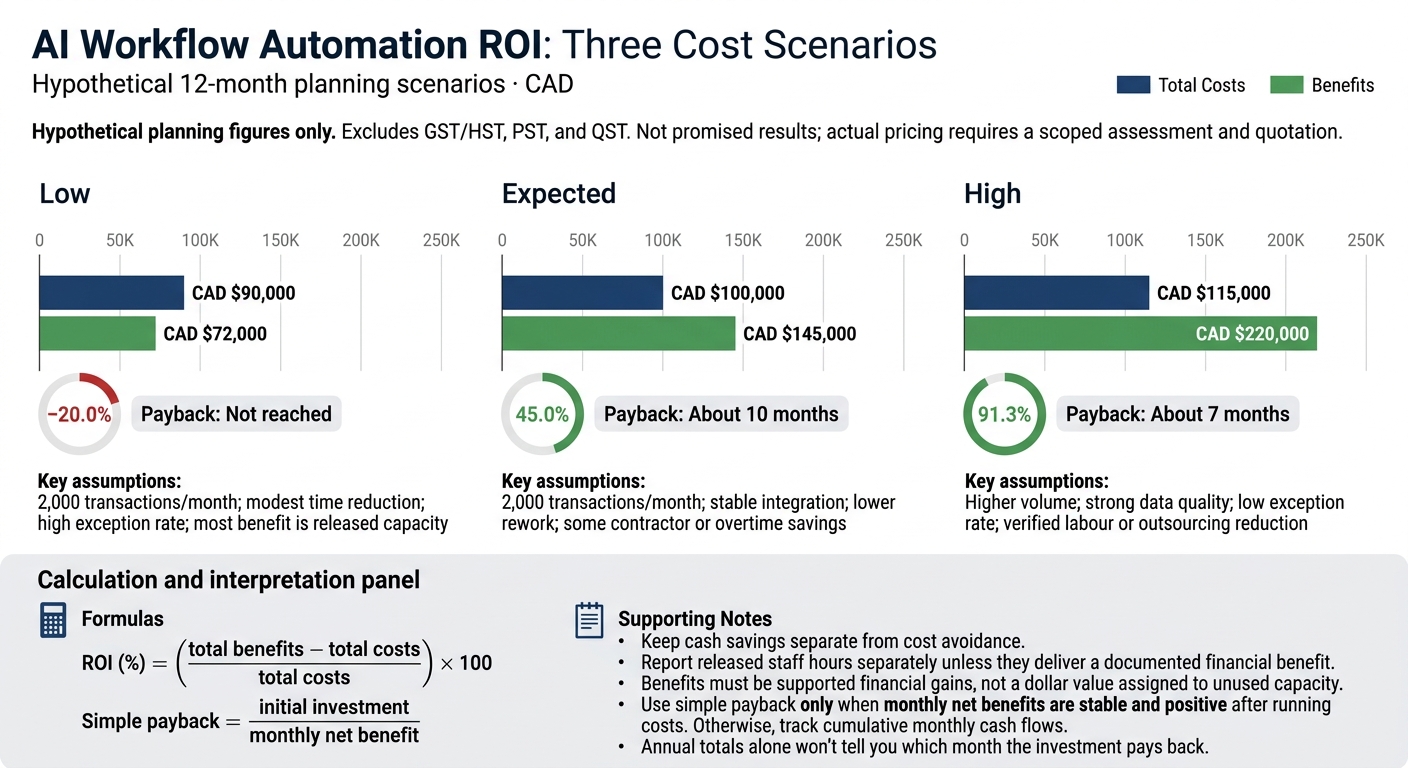
- Check the return: The article’s hypothetical 12-month CAD scenarios range from −20.0% to 91.3% ROI – not promised results.
- Pilot before scaling: Test accuracy, privacy, security, failed transfers, and a fallback process. Apply the Canadian privacy rules that cover your organisation.
My bottom line: <u>prove the numbers before expanding</u>. A short workflow brief, baseline metrics, and clear review duties give you a sound starting point for a scoped estimate, including custom or legacy-system work.
AI Workflow Use Cases and Selection
Document, Service, and Administrative Tasks
Start with work that has a clear hand-off and a result you can check. The table compares common workflow patterns – not claims about savings.
| Workflow | Inputs | AI and rules-based activities | Human review | Likely gains | Primary KPIs |
|---|---|---|---|---|---|
| Invoice processing | Invoice PDFs, email attachments, purchase orders, receiving records | AI extracts fields; rules match records, flag discrepancies, and route by approval limit | Exceptions, unusual vendors, high-value invoices | Faster cycle time, fewer keying errors, better audit trails | Processing time, exception rate, first-pass completion accuracy, cost per invoice |
| Service triage | Emails, chat transcripts, web forms, account data | AI detects intent and urgency; rules classify, assign queues, and set escalation timers | Escalations, complaints, vulnerable-customer situations | Faster first response and more consistent routing | Time to first response, routing accuracy, backlog, escalation rate |
| Lead assignment | Web forms, CRM records, campaign data | AI deduplicates, enriches, and recommends territory or owner; rules assign the record | High-value or ambiguous leads | Faster follow-up and improved data quality | Assignment time, acceptance rate, conversion rate, duplicate rate |
| Employee onboarding and offboarding | HR forms, identity records, role data, policy documents | AI identifies missing information; rules validate completeness, create tasks, request access, and send reminders | Access exceptions, sensitive roles, termination confirmation | Fewer missed steps and clearer accountability | Completion time, overdue tasks, access errors |
| Recurring reporting | Operations data, spreadsheets, narrative updates | AI summarises trends and drafts commentary; rules schedule jobs, calculate metrics, and distribute approved reports | Validate figures and approve published reports | Less manual consolidation and faster reporting | Report cycle time, reconciliation errors, correction count, on-time delivery |
The same pattern works when a task starts in the field and ends in an older system.
Field Workflows and Legacy Systems
Field examples include structuring inspection notes, classifying maintenance requests, linking shipment exceptions to records, and checking public-sector forms for completeness.
The roles stay clear: AI interprets content, rules validate and route it, and people approve actions with serious effects. Supervisors should confirm safety findings. Staff should retain payment and eligibility decisions. Healthcare uses should remain administrative, such as checking referral documents for completeness, with restricted access, encryption, retention rules, and documented human accountability.
Before choosing a field workflow, map its source fields, asset identifiers, formats, and destination records. Use authenticated, logged APIs where available. Older systems may require secure file exchange, database views, middleware, or custom interfaces.
Build in duplicate checks, failed-transfer alerts, reconciliation, and a manual fallback. Avoid creating an untracked parallel database. Federal institutions must separate clerical completeness checks from systems that shape administrative decisions. The latter can fall within the Directive on Automated Decision-Making even when a person makes the final decision.
Select a Measurable First Workflow
Narrow the options to one process with measurable volume and clear hand-offs. Choose a bounded process with stable inputs and outputs, an accountable owner, and an existing exception queue.
Compare candidates by transaction volume, manual effort, rework costs, integration complexity, decision risk, and expected business value. Check data quality, including reliable identifiers and representative inputs: poor scans, incomplete forms, and bilingual content. A narrow routing task is a better place to start than benefit eligibility or payment approval.
Document the start and end points, manual touches, first-pass accuracy, unresolved exceptions, and service-level compliance. Agree on acceptance criteria before building. For complex integrations, business automation consulting can help define these technical requirements. Faster handling must not come at the expense of accuracy or service levels, or lead to more privacy incidents or larger exception backlogs.
Keep human approval for safety-sensitive, regulated, rights-affecting, and high-value financial actions. Reviewers need access to source evidence and the authority to override the system. Record baseline measures for later estimates of cost, ROI, and payback.
sbb-itb-fd1fcab
How to Sell AI Internally: Prove ROI With One Workflow
AI Workflow Costs and ROI
AI Workflow Automation ROI: Three Cost Scenarios
Implementation and Running Costs
Once you’ve selected the first workflow, estimate its costs against the baseline or use a workflow automation benefits calculator before development starts.
Compare total ownership costs and benefits over the same period – usually 12 months. Count internal labour alongside vendor invoices. The budget depends on scope, transaction volume, data sensitivity, integrations, approval steps, and service levels.
| Cost category | Main drivers | Estimation inputs | Timing |
|---|---|---|---|
| Discovery and process design | Number of workflows, stakeholders, workshops, baseline data, exception complexity | Process maps, sample documents, baseline metrics | One-time |
| Data preparation | Document count, formats, quality, labelling, redaction, retention requirements | Cleansing hours, annotation effort, privacy review | One-time and sometimes recurring |
| Development and configuration | Rules, AI prompts or models, workflow branches, approval steps, user roles | Build effort, workflow complexity, acceptance criteria | One-time |
| Integrations | Number and maturity of APIs, legacy systems, authentication, data mapping, test environments | Interfaces, field mappings, testing effort | One-time plus maintenance |
| User and approval interfaces | Number of roles, screens, accessibility requirements, mobile or field use | Approval steps, accessibility needs, user testing | One-time plus updates |
| Testing and security review | Risk level, personal or confidential information, validation volume | Test cases, access controls, security and privacy reviews | One-time plus periodic review |
| Deployment and training | Number of users, locations, training materials, changes to day-to-day work | Rollout support, documentation, training hours | One-time |
| AI usage and licences | Transactions, tokens, seats, model tier, storage, vendor terms | Usage forecasts, seats, storage needs | Recurring |
| Hosting and monitoring | Data volume, uptime, logging, alerting, observability, backup and recovery | Cloud hosting, monitoring tools, backups | Recurring |
| Maintenance and exception handling | Model drift, new document types, failed integrations, manual escalations, support hours | Support hours, quality checks, prompt and model updates | Recurring |
| Internal staff time | Product ownership, subject-matter experts, IT, legal, training | Hours by role × fully loaded hourly cost | One-time and recurring |
Calculate ROI and Payback
Start with the baseline recorded for your selected workflow: volume, handling time, fully loaded labour cost, errors, rework, and delays. Keep cash savings separate from cost avoidance. Report released staff hours separately unless they deliver a documented financial benefit.
Every cost and benefit should relate to that same workflow.
ROI (%) = ((total benefits − total costs) / total costs) × 100
Simple payback = initial investment / monthly net benefit
Use simple payback only when monthly net benefits are stable and positive after running costs. If they aren’t, track cumulative monthly cash flows instead. Annual totals alone won’t tell you which month the investment pays back.
Hypothetical planning figures only: 12-month scenarios in CAD, excluding GST/HST, PST, and QST. Benefits must be supported financial gains, not a dollar value assigned to unused capacity. Actual pricing requires a scoped assessment and quotation.
| Scenario | Key assumptions | Total costs | Benefits | ROI | Payback |
|---|---|---|---|---|---|
| Low | 2,000 transactions/month; modest time reduction; high exception rate; most benefit is released capacity | CAD $90,000 | CAD $72,000 | −20.0% | Not reached |
| Expected | 2,000 transactions/month; stable integration; lower rework; some contractor or overtime savings | CAD $100,000 | CAD $145,000 | 45.0% | About 10 months |
| High | Higher volume; strong data quality; low exception rate; verified labour or outsourcing reduction | CAD $115,000 | CAD $220,000 | 91.3% | About 7 months |
Measure Results Against the Baseline
Compare the same workload before and after launch, accounting for seasonality, staffing, and adoption. Define automation rate as transactions completed without human intervention divided by total eligible transactions. Count review, correction, and exception-handling time in both labour and operating costs. Check results weekly during the pilot, then monthly once performance stabilizes.
Use this framework to measure the selected workflow during the pilot and decide whether it’s ready for full rollout.
| KPI | Definition and measurement | Frequency | Accountable owner |
|---|---|---|---|
| Time saved | Baseline human processing time minus post-launch human and review time, multiplied by completed transactions | Weekly or monthly | Operations manager |
| Cycle time | Elapsed time from intake to completion, including queues and approvals | Weekly | Process owner |
| Throughput | Completed transactions per period at a defined quality level | Weekly or monthly | Operations manager |
| Automation rate | Transactions completed without human intervention divided by total eligible transactions; report human review separately | Weekly or monthly | Product or automation owner |
| Error rate | Transactions requiring correction because of an inaccurate, incomplete, or non-compliant result | Weekly | Quality lead |
| Exception rate | Transactions routed to a human because of uncertainty, missing data, policy rules, or system failure | Daily or weekly | Workflow owner |
| Cost per transaction | Total attributable operating cost divided by completed transactions | Monthly | Finance partner |
| Service outcome | SLA attainment, response time, customer satisfaction, first-contact resolution, or field completion rate | Monthly | Service owner |
| Staff capacity | Documented hours redeployed to higher-value work | Monthly or quarterly | Department leader |
Rollout, Governance, and Integration
Once the business case is set, the rollout must show that the workflow can run safely, deliver measurable results, and handle work at scale.
Map the Process, Pilot, and Deploy
Assign an executive sponsor and process owner who can approve, pause, or reverse automation. Map handoffs, approvals, exception paths, data owners, downstream dependencies, and tasks that need human approval.
For integrations, identify the system of record and use least-privilege service accounts. Use transaction IDs to prevent duplicate writes, and test timeouts and recovery before moving to production.
| Phase | Deliverables | Decision gate | Responsible stakeholders | Evidence required |
|---|---|---|---|---|
| Discover and map | Current-state process map, systems inventory, data classification, exception catalogue, risk assessment | Is the workflow suitable, mapped, and risk-assessed? | Sponsor, process owner, operations, privacy, security | Baseline metrics, data-flow diagram, risk register |
| Design | Target workflow, AI task boundaries, human-review rules, integration design, access model, rollback plan | Are controls and responsibilities defined? | Product owner, solution architect, privacy, security, subject-matter experts | Requirements, control matrix, test plan, vendor assessment |
| Build and test | Configured workflow, API connections, test dataset, audit logging | Does the system perform safely in controlled testing? | Technical team, vendor, process owner | Accuracy, exception, security, and integration results |
| Pilot | Limited deployment, staff training, parallel run where appropriate, support contact, issue log | Does the pilot meet quality, risk, adoption, and ROI thresholds? | Pilot users, operations, IT support, compliance | Pilot metrics, sampled outputs, incidents, user feedback |
| Deploy | Production release, monitoring dashboard, runbooks, communications, escalation process | Is production operation safe and supportable? | Sponsor, IT operations, process owner | Release approval, access review, continuity test, support plan |
| Improve | Drift review, exception analysis, retraining or prompt changes, process updates, periodic audit | Should the system be expanded, changed, paused, or retired? | Governance committee, process owner, risk and audit teams | Trend reports, change records, review minutes, updated risk assessment |
Run a parallel pilot when errors could affect payments, eligibility, safety, or legal or regulatory decisions. Compare quality, adoption, exception handling, and ROI against the baseline.
Set thresholds before testing: no unresolved critical errors, and an exception rate low enough that automation reduces work rather than moves it elsewhere. Test peak volumes, multilingual cases, and accessibility needs. Train users on review and escalation duties, give every exception type an owner, and provide support during the first weeks after launch.
High-impact workflows need the same technical controls as day-to-day workflows, with privacy and security built in from the start.
Canadian Privacy and Risk Controls
Classify inputs and outputs, minimise the personal information collected, and restrict access by role. Require strong authentication, encryption in transit and at rest, protected audit logs, and retention and deletion schedules.
Assess vendors and integrations for subprocessors, secondary use – including model training – breach notification, deletion, audit rights, and continuity. Apply PIPEDA where applicable, along with relevant provincial, sector-specific, and public-sector requirements. PIPEDA does not require Canadian-only hosting. Document data residency, cross-border transfers, and contractual safeguards. The organisation remains accountable for information transferred to an external processor.
Set escalation rules for uncertain or high-impact outputs. Compare error rates across languages, regions, document types, and accessibility conditions, and keep versioned prompts, rules, and reviewer decisions.
Before launch, document who can stop the workflow, investigate incidents, preserve evidence, and arrange required notifications. Test rollback to manual or rules-based handling without losing queued work. Monitor accuracy, overrides, exceptions, and input changes. Route work to people when agreed thresholds are breached.
Scope Custom Development with Digital Fractal Technologies Inc
When custom integration or legacy migration is required, base the scope on process evidence – not assumptions.
For a custom quotation from Digital Fractal Technologies Inc, provide:
- Process and users: A documented process map, transaction volumes and peak periods, user roles, approval rules, exception categories, accessibility needs, target KPIs, and the desired pilot boundary.
- Systems and integration: Source and destination systems, API or legacy constraints, integration documentation, the preferred deployment environment, and reporting requirements.
- Data and controls: Data classifications, retention requirements, residency or cross-border requirements, security standards, and representative sample records that can be shared lawfully.
Ask for documented assumptions and separate implementation and recurring costs.
Conclusion: Prove Value Before Scaling
Treat AI workflow automation as a measurable process change, not just a software purchase. Collect two to four weeks of baseline data on volume, handling time, labour costs, errors, and rework. Use that baseline to judge whether the workflow is ready to scale. Start with one repeatable workflow that has a clear owner and risks you can control.
Keep setup costs separate from running costs. Calculate payback using net monthly savings after operating costs, not gross time savings. This ties the business case to actual costs rather than optimistic labour estimates. Freeing up staff time has value, but it counts as a cash saving only if it reduces costs.
Scale only when the pilot meets predefined targets for quality, security, performance, adoption, and ROI. Assign one named owner to handle exceptions and remain accountable for high-impact decisions. Keep that accountability in place after launch, and continue tracking results. If the workflow handles personal information, document data flows, retention rules, access controls, privacy review requirements, and human-review procedures before launch.
Prepare a one- to two-page workflow brief and baseline metrics sheet to request a formal estimate. If the brief identifies integration work, move to a scoped build plan. If you need legacy integration or custom software, share the brief with Digital Fractal Technologies Inc to assess feasibility, delivery phases, and total cost before a larger rollout.
FAQs
How do I know my workflow needs AI rather than rules?
Rule-based automation is often the efficient choice for repetitive tasks that use structured data and follow clear, fixed instructions.
AI is needed when a workflow deals with unstructured data, such as emails or complex documents, or needs to respond to changing conditions and learn over time. It handles tasks that require nuance, spots patterns, and supports decisions in unpredictable situations where fixed rules would fail.
What transaction volume makes automation worthwhile?
Automation can be worth the investment when manual labour costs exceed CAD $4,000 per month. Projects often pay for themselves within 60 to 90 days.
Start with high-volume, repetitive tasks that follow clear rules, such as invoice processing, data entry or customer inquiries. To achieve measurable ROI, target workflows where automation could cut manual hours by 30–40% or more, especially when mistakes are costly.
What should I do if my pilot misses its ROI target?
Pause scaling to check that process definitions are clear and the data is ready. Run AI alongside the manual workflow for 2–4 weeks to spot differences. Review KPIs: cycle time, error rates, labour hours saved, and costs.
Use those findings to revise workflow logic, retrain AI or tune decision thresholds. Document exceptions and user feedback, then re-test – preferably through A/B testing – before deciding whether to move to production or adjust the scope or timing.