
Email Routing Automation: How AI Triage Works for Business

Email routing automation sends each incoming message to the right person, queue or system without someone reading it first. Basic routing uses fixed rules, such as the address it was sent to or a keyword in the subject. AI triage goes further: a language model reads the message, works out what the sender wants and how urgent it is, pulls out details like order or invoice numbers, and then triggers the next step. For operations teams in logistics, construction and field services, that means dispatch, billing and support requests reach the right desk in seconds, and the urgent ones do not sit in a shared inbox.
This guide explains how it works, what it can handle, how to build it so it fails safely, what Canadian privacy rules mean for it, and how to tell whether it is working.
TL;DR
- Rule-based routing decides by address or keyword. AI triage decides by intent, urgency and context, then acts on the result.
- The strongest use cases are repetitive, high-volume mailboxes: support, billing, orders, dispatch updates and account access.
- A safe design has defined categories, structured AI output, a confidence threshold, a sender trust check and human review for anything uncertain or outbound.
- In Canada, document your legal authority for handling personal information, collect only what the routing needs and protect what you store.
- Measure it against a labelled sample of your own mail, not against vendor claims.
Table of Contents
- What email routing automation actually does
- How AI email triage works, step by step
- Which business tasks it handles well
- Designing a routing workflow that fails safely
- Connecting triage to the systems you already run
- Canadian privacy and security: what to settle before launch
- Where implementations go wrong
- Measuring whether it works
- Our perspective
- Getting started with Digital Fractal
- FAQ
- Sources
What email routing automation actually does
Email routing, in the plain technical sense, is the process of defining where a message goes before it reaches a recipient’s inbox. That can mean forwarding to another address or handing the message to an external application for processing, as Mailtrap’s explainer on email routing describes. Business routing automation sits on top of that idea: instead of only moving a message, it decides what the message is and what should happen next.
There are three levels, and most companies sit on the first or second.
- Address-based routing. Mail to billing@ goes to finance, mail to dispatch@ goes to the dispatch desk. Reliable and cheap, but senders rarely pick the right address.
- Rule-based routing. Filters on sender, subject words or attachments. Works until customers phrase things differently, or a message mentions two topics.
- AI triage. A model categorizes and prioritizes the message, then business logic routes it, sends an automated reply, opens a ticket or marks it as junk. Budibase’s 2026 tutorial defines it in similar terms: reasoning over the message to categorize and prioritize, then applying logic to the outcome.
The practical difference is that a rule sees words, while a model weighs intent, urgency, who the sender is and what is already open for that customer. A message that says the delivery never arrived and the site is shut down without it carries a different weight from one that asks when the next invoice will go out, even if both include the word delivery.
How AI email triage works, step by step
The pipeline is similar across tools and custom builds. Here is what happens between an email arriving and a person acting on it.
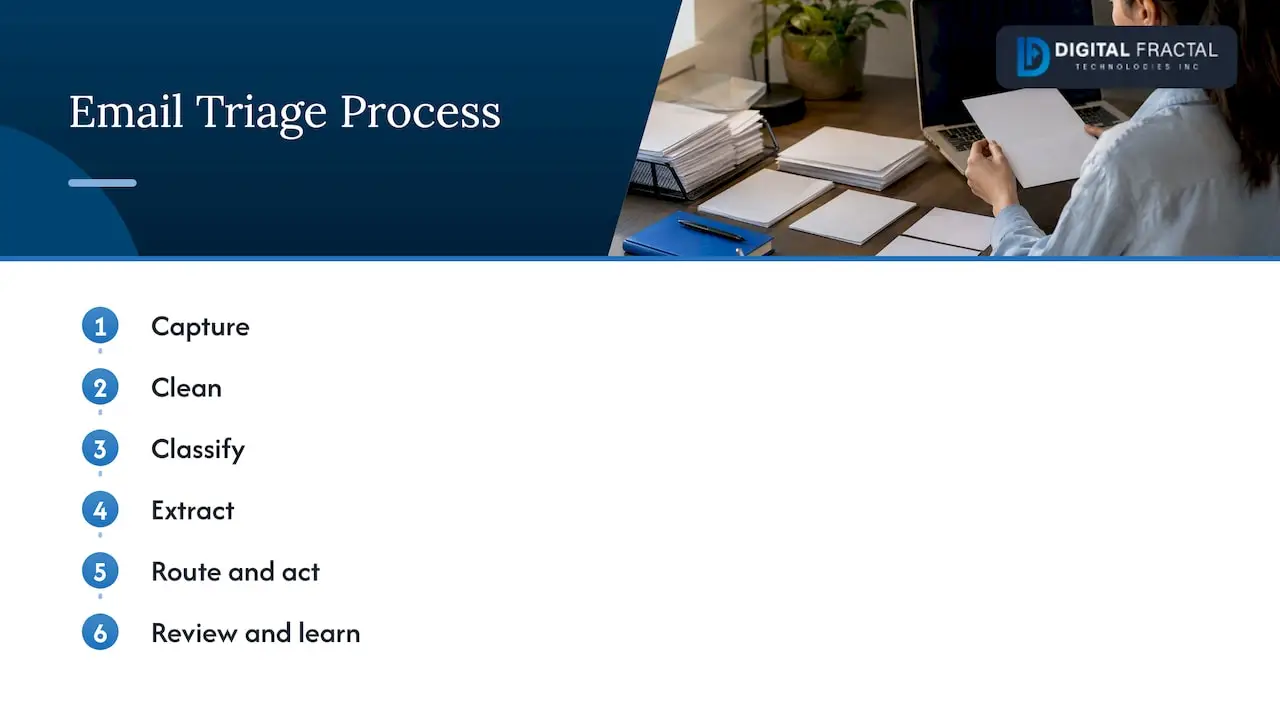
1. Capture
A trigger fires when a new message arrives. Commonly that is an IMAP connection or a webhook from the mailbox provider. The system reads the sender, subject, body and, where useful, attachments such as a bill of lading, a PDF invoice or a photo of damaged freight.
2. Clean
Real email is messy. Threads contain quoted replies, legal footers and signatures that confuse a model and inflate cost. Good pipelines strip these out and keep thread history only where it adds context.
3. Classify
The model assigns a category and an urgency level. The output should be structured, not free text: a category from a fixed list, an urgency value, a confidence score and, if you want it, a suggested reply. Structured output is what lets the next steps run without guesswork.
4. Extract
The model pulls out the details your systems need: order number, shipment ID, invoice number, job site, equipment tag, requested date. These become fields that downstream software can look up.
5. Route and act
Branching logic sends the message to a queue, a named person, a ticket system or an automated reply. It can also assign by workload so one person does not get every complaint.
6. Review and learn
Low-confidence or sensitive cases go to a person, and their corrections become your test data for improving the prompts or rules.
Which business tasks it handles well
AI triage pays off where the same few types of message arrive in volume and the next step is predictable. In support mailboxes, BoldDesk’s guide to support email triage lists billing and refund requests, order requests, account-access problems, complaints and possible outages as routable categories, along with flagging probable duplicates and applying tags and priorities.
For the industries we work with, the same pattern translates like this:
| Industry | Typical inbound email | What triage does |
|---|---|---|
| Logistics | Delivery exceptions, proof-of-delivery requests, rate quotes, carrier updates | Extracts shipment IDs, flags delays against delivery windows, routes quotes to sales and exceptions to dispatch |
| Construction | Change requests, RFIs, invoices, safety incident reports | Routes invoices to accounting, RFIs to the project manager, escalates safety reports immediately |
| Oil and gas | Maintenance requests, inspection reports, vendor invoices | Tags by site and asset, routes to the right maintenance planner, raises priority on equipment faults |
| Professional services | New enquiries, client questions, billing queries | Separates sales leads from existing-client requests, drafts replies for approval |
Two things to notice. First, the value is mostly in the extraction and the handoff, not in the classification alone. A message correctly labelled billing still costs time if someone has to dig out the invoice number. Second, sales enquiries are a natural fit for routing, because speed matters. The same logic applies to lead routing best practices: the fastest, correctly assigned response usually wins the conversation, and the same principle applies when an enquiry arrives by email instead of a web form. If you want the routed leads ranked as well, our piece on AI lead scoring and data readiness covers what has to be true of your data first.
Designing a routing workflow that fails safely
Most problems with AI routing are design problems, not model problems. Here is the sequence we recommend.
Define categories and urgency before you touch a tool
Start with a short list of categories that map to real owners. Four to eight is plenty to begin: for example support, sales, billing, dispatch and spam. Add three urgency levels (low, normal, high) and write down what each means in your business. High might mean a missed delivery window, a stopped job site or a safety issue. If two people on your team disagree about which category a message belongs to, the model will too. Settle that first.
Request structured output
Ask the model for a fixed format: category, urgency, confidence, extracted fields and, optionally, a suggested reply. Reject anything that does not fit the format and send it to a person.
Treat the sender as untrusted until verified
The From header on an email can be forged. A workflow that gives special treatment to messages claiming to come from a key customer, a vendor or your own executive can be tricked. Use sender authentication results as a trust gate: messages that fail authentication go to human review, or are dropped, and never trigger automated actions such as payments, account changes or replies. The Canadian Centre for Cyber Security’s email security best practices are a good baseline for the authentication and transport side of this.
Set a confidence threshold and a review queue
Decide what happens below a certain confidence. The safest default is a review queue where a person confirms the category in one click. As accuracy proves out on your own mail, you can raise the share that passes through untouched.
Keep a person between the model and the customer
If the AI drafts a reply, a person should approve or edit it before it goes out, at least for anything beyond a simple acknowledgement. This is the same human-in-the-loop principle seen in safeguards for AI-drafted outgoing messages: the model speeds up the drafting, a person owns what gets sent. Automatic acknowledgements (we have received your message and here is your reference) are lower risk and are a sensible place to automate fully.
Plan escalation
Some messages should skip the queue. Define triggers such as safety keywords, a named strategic account, a second message from the same sender within an hour, or a mention of legal action. These should alert a named person by text or chat, not wait in a mailbox.
Connecting triage to the systems you already run
Routing is only as useful as what it connects to. A model that labels a message correctly but cannot create a ticket, look up a shipment or update a job record leaves a person doing the copy-and-paste. In practice, integration means four things.
- Mailbox connection. A reliable trigger from your mail provider, with retries so a message is never silently lost.
- Lookup. Using extracted fields to query your transportation management system, ERP, CRM or project software, so the routed message arrives with the shipment status or contract details attached.
- Action. Creating or updating a ticket, assigning an owner, posting to a team channel, or starting an approval flow. Our article on approval workflows and automation software covers how those handoffs should be structured.
- Surfacing the result. Showing the routed item where people already work, which for field crews often means a mobile app rather than a desktop inbox.
The weak point is usually the lookup step, because the data sits in systems that were never designed to talk to each other. Clean identifiers (one shipment ID format, one customer ID) matter more than model choice. If your data is inconsistent, we would fix that first, and our guide to enterprise data readiness shows how to assess it. Where systems need connecting, that is API integration work, which we do as part of our wider service line, and where email is one of several channels, the same logic carries over to phone calls, as in our AI voice agent case study.
Canadian privacy and security: what to settle before launch
Email is full of personal information: names, addresses, phone numbers, account details, sometimes health or employment details. Routing it through an AI service is a use of that information, and it needs to be handled as one. This is general guidance, not legal advice. For your specific setup, talk to your privacy officer or counsel.
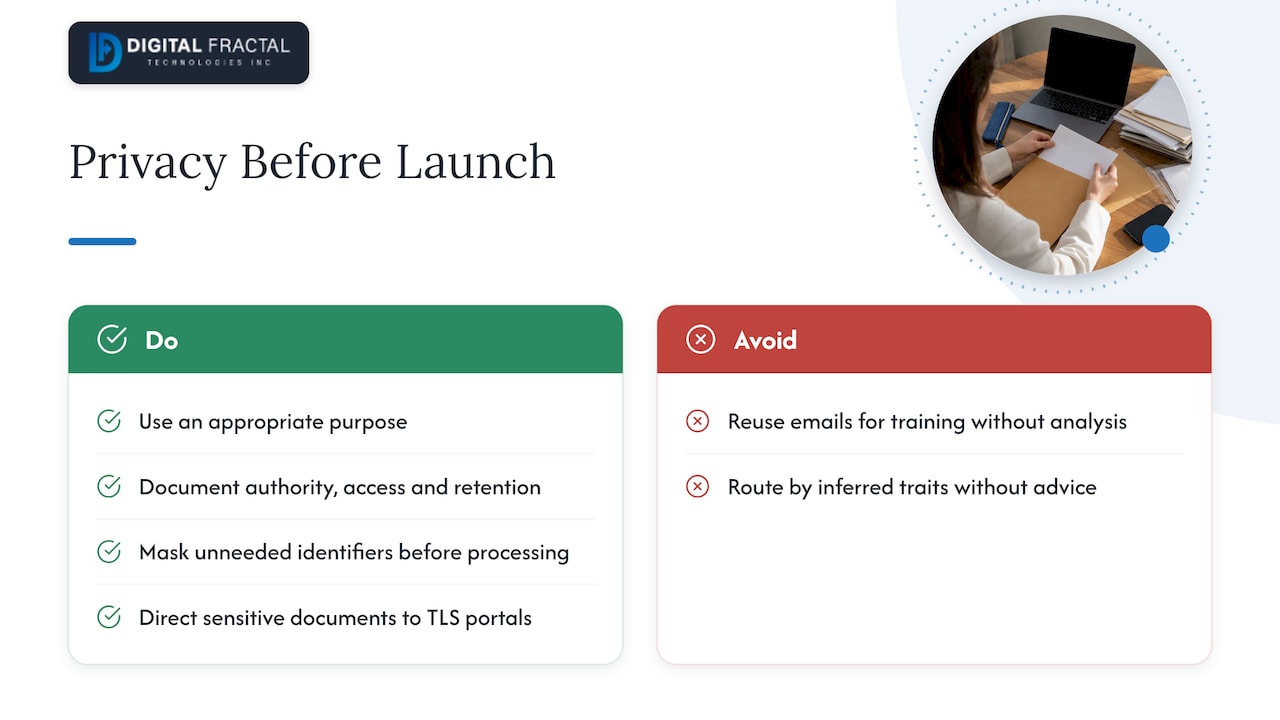
Purpose and necessity. The Competition Bureau’s paper on synthetic media and AI notes that federal and substantially similar provincial private-sector privacy laws, including those in Quebec, Alberta and British Columbia, require that personal information be collected, used and disclosed only for purposes a reasonable person would consider appropriate. Sorting your own customers’ emails to answer them faster is an easy purpose to defend. Reusing those same emails to train a model for other purposes is a different question and needs its own analysis.
Legal authority and documentation. The Office of the Privacy Commissioner’s principles for responsible, trustworthy and privacy-protective generative AI say organizations should document their legal authority for collecting, using, disclosing and deleting personal information. Write down what the triage system reads, why, where it runs, who can see the results and how long they are kept.
Data minimization. The same guidance points to using anonymized, synthetic or de-identified data where personal information is not needed for the purpose. For triage, that suggests masking things the model does not need to classify a message, such as full card numbers or government identifiers, before the text is sent for processing.
Fairness. The OPC also warns organizations to avoid no-go zones such as profiling that could lead to unfair or discriminatory treatment. Routing by topic and urgency is fine. Routing or prioritizing by inferred characteristics of the sender is where you should stop and get advice.
Transport and sensitive documents. For sensitive data, the Cyber Centre’s guidance recommends a hybrid approach: use TLS-protected web portals for secure document transfer rather than relying on end users to manage complex end-to-end encryption. If customers email you contracts or ID, consider directing them to a portal and having triage send the link.
For a fuller walk-through, see our PIPEDA checklist for AI projects, and if you also handle European customers, how PIPEDA compares to GDPR.
Where implementations go wrong
The same failures show up repeatedly.
- Vague categories. Overlapping labels produce inconsistent routing. Fix the taxonomy before the prompts.
- Forged or spoofed senders. Covered above: gate on authentication.
- Multi-topic emails. A message that asks about an invoice and reports a damaged pallet needs to be split or flagged for two owners. Allow multiple labels, with a primary one.
- Missed urgency. Polite messages can describe emergencies. Test urgency on real examples where the tone is calm but the facts are serious.
- Thread blindness. A one-line reply of OK or no means nothing without the thread. Keep enough history for context.
- Silent failures. If the model service is down or returns malformed output, the message must fall back to a human queue, not vanish. Alert on failures.
- Drift. New products, new customers and new phrasing change what mail looks like. Review samples on a schedule.
Measuring whether it works
Measure on your own mail. Take a few hundred recent emails, have two people label them by hand (category, urgency and correct owner), settle disagreements, and run the system against that set. Then track a small number of figures.
| Measure | What it tells you |
|---|---|
| Category accuracy | Share of messages sent to the right queue |
| Urgent recall | Share of truly urgent messages flagged as urgent. This is the number to protect most, because a missed urgent email is the costly error |
| Urgent precision | Share of flagged-urgent messages that really were, which tells you whether people will start ignoring alerts |
| Override rate | How often a person changes the routing, tracked by category |
| Time to first human touch | Minutes from arrival to someone owning the message |
| Extraction accuracy | Share of order, invoice or shipment numbers pulled correctly |
| Review-queue share | Proportion sent to humans, which should shrink as you tune |
Compare these with your baseline before automation, such as average time to first response and how often messages are reassigned. Use a fresh test set every quarter so you are not grading the system on examples it was tuned against. If you want a rough financial view, our workflow automation savings calculator can help you model the time saved.
Our perspective
We see the same pattern with Canadian operations teams: the inbox is where unstructured work enters the business, and it is usually the least instrumented part of the operation. People assume the hard part is the AI. It rarely is. The hard part is agreeing on categories, owners and escalation rules that everyone already half-follows, and getting identifiers consistent across the systems the email has to touch.
Our view is to start narrow. Pick one mailbox with real volume and a clear cost of delay, such as dispatch exceptions or invoice intake. Automate the classification and extraction, keep a person on approvals, and prove the numbers in weeks, not quarters. Then widen. That is why we frame work in 90-day increments aimed at a tangible result rather than an open-ended transformation programme, and why we tailor the build to each client’s workflows and systems instead of dropping in a generic tool.
We also think privacy belongs in the design from day one, not in a review at the end. It is far cheaper to decide what the model should never see than to unpick it later.
— Souhail
Getting started with Digital Fractal
If you are not sure whether your email flows, data and systems are ready for triage, the place to start is our AI Readiness Audit, priced at $2,500 to $10,000 as a one-off. It maps where automation will pay off in your operation, including mailboxes like the ones above, and what needs fixing before you build. After that, our workflow automation service covers building the routing, lookups and approvals around it.
For a sense of how we scope this kind of work, read about our AI integration consulting.
FAQ
What is the difference between email routing and email triage?
Routing is the movement of a message to a destination, whether by address, rule or logic. Triage adds judgment: deciding what the message is, how urgent it is and what should happen. AI triage usually includes routing as its final step.
Can AI email triage replace a shared inbox team?
Not entirely, and it should not try. It removes the sorting, data lookup and first-touch work, so people spend time on decisions and conversations. Sensitive, ambiguous or high-value messages should still reach a person, and outgoing replies beyond simple acknowledgements should be approved.
Is it legal to run customer emails through an AI service in Canada?
It can be, if the purpose is appropriate, you have documented your legal authority, you limit the personal information used and you protect it properly. Details depend on your province and sector, so confirm your setup with your privacy officer or counsel.
How long does it take to set up?
A focused first workflow, such as one mailbox with a handful of categories, can be scoped, built and tested in a matter of weeks. Timelines grow with the number of systems to connect and the state of your data. A readiness audit will give you a realistic plan for your own environment.
What should we automate first?
Choose the mailbox where delays cost the most and categories are clearest, such as dispatch exceptions, invoice intake or inbound sales enquiries. Automate classification and extraction first, keep review on, and expand once your accuracy figures hold up.
Sources
- What Is Email Routing and How Does It Work? (Mailtrap)
- How to Build an AI Email Triage Agent in 4 Steps (Budibase)
- AI Email Triage: Automate Support Email Routing (BoldDesk)
- Email security best practices (ITSM.60.002), Canadian Centre for Cyber Security
- Synthetic Media Paper, Competition Bureau Canada
- Principles for responsible, trustworthy and privacy-protective generative AI, Office of the Privacy Commissioner of Canada
- Lead routing best practices (Vaultio)
- AI-powered content workflow and human-in-the-loop safeguards (Babylovegrowth)