How AI Cut Admin Work by 40% for Service Teams

AI is saving service teams time and money by automating repetitive admin tasks like scheduling, data entry, and email sorting. This shift has reduced administrative workloads by 40%, allowing teams to focus more on serving clients and generating revenue. Here’s what’s driving these results:
- Scheduling Overhaul: AI systems optimize routes and appointments in seconds, cutting scheduling time by up to 92% and reducing technician travel times.
- Data Entry Automation: Smart forms and auto-population have slashed intake times by 75%, while error rates in job costing dropped from ±14% to ±3%.
- Inbox Automation: AI tools categorize and route emails, saving hours of manual sorting and improving response times.
- Customer Communication: Automated reminders and follow-ups reduce missed calls and no-show rates, boosting revenue opportunities.
These tools aren’t replacing people – they’re freeing them from tedious tasks. Businesses that clean up their data and integrate AI with legacy systems see the greatest benefits, including fewer errors, faster task completion, and more capacity for high-value work.
Top 10 AI Tools for Administrative Tasks
sbb-itb-fd1fcab
The Admin Challenges Service Teams Deal With Every Day
Before AI became part of the equation, service teams were bogged down by administrative tasks that pulled them away from their core purpose: serving clients. These inefficiencies were a daily struggle. Let’s break down the key challenges that weighed them down.
Manual Scheduling and Coordination
Coordinating schedules for technicians across different locations and skill sets was a logistical headache. Teams relied on outdated tools like whiteboards and phone calls to juggle availability, certifications, and travel routes. The result? Lost time and productivity—you can see the impact of these inefficiencies using a workflow automation benefits calculator.
Consider this: field service technicians spend 15% of their working hours just travelling between appointments. For a four-person HVAC crew in Twin Falls, that translated to 2.3 hours of drive time per technician each day. With so much time spent on the road, they could only complete 16 jobs daily. That’s a big slice of the day spent on the move instead of doing billable work.
Next, let’s look at how data entry added another layer of inefficiency.
Data Entry and Document Management Overload
Repetitive data entry was a hidden productivity killer. Staff had to copy and paste client details, job information, and addresses across different systems multiple times a day. To make matters worse, intake forms often included irrelevant fields, further slowing things down. On average, manual client intake took 12 minutes per form. Multiply that across a busy week, and the wasted time added up quickly.
For example, a 14-person HVAC company discovered that each manager spent 23 hours per week on tasks like data entry and formatting reports. That’s over half of a standard workweek spent on non-revenue-generating activities. And despite all that effort, their job costing was still off by an average of ±14%.
Delayed Follow-Ups and Customer Communication
Slow follow-ups and manual communication processes created noticeable bottlenecks. Operations managers often spent two to three hours daily sorting through cluttered inboxes filled with vendor quotes, warranty questions, and scheduling updates. Meanwhile, missed inbound calls continued to pile up.
"The callback rate converts at 25–35%, because half the time the customer has already booked someone else by the time you call back." – Greg Solorio, CEO, FACITI
Missed calls were a costly problem. Service businesses failed to answer 30% to 45% of inbound calls, with each missed call representing an average of $260 in lost revenue. And since 78% of prospects hire the first company to respond, delays didn’t just inconvenience customers – they handed opportunities straight to competitors.
These daily roadblocks underscored the need for smarter solutions, setting the stage for AI to step in and transform efficiency.
How AI Tools Changed the Way Admin Work Gets Done
Service teams often faced inefficiencies that slowed them down. AI tools stepped in to tackle these pain points head-on, replacing manual tasks with automated processes that worked faster and with greater precision.
Automated Scheduling and Appointment Management
AI-powered scheduling systems have transformed how appointments and routes are managed. These tools process real-time variables like traffic conditions, technician locations, certifications, and job history to create optimized routes automatically. Gone are the days of dispatchers manually juggling schedules on whiteboards. Instead, the system groups nearby jobs efficiently, cutting down on unnecessary travel and maximizing billable hours.
What makes these systems even more effective is their ability to learn. By analysing historical data, they adjust for real-world scenarios. For example, if a repair consistently takes 137 minutes instead of the estimated two hours, the system updates future schedules to reflect this, avoiding cascading delays. If a last-minute cancellation occurs, AI can reorganize the entire day’s schedule in seconds – a task that used to take over 20 minutes.
AI also improves customer communication. Automated systems handle appointment confirmations, reminders, and "on-the-way" notifications, which has been shown to reduce no-show rates by 30–40%. One accounting firm reported cutting its daily scheduling time from three hours to just 15 minutes with AI, slashing scheduling overhead by 92%.
"We’re not working harder – we’re working smarter. My guys finish their days less exhausted because they’re doing actual HVAC work instead of driving in circles." – HVAC Company Owner
Beyond scheduling, AI has made significant strides in document management.
Smart Inbox Sorting and Document Routing
Operations managers used to spend hours sorting through cluttered inboxes. AI inbox tools have changed that by automatically categorizing emails based on their content – whether it’s vendor quotes, warranty requests, or scheduling updates – and routing them to the appropriate person or system without human intervention.
The efficiency gains are staggering. These tools can process over 2,000 documents per hour, compared to just 50 manually, all while maintaining a 99.4% accuracy rate in extracting data from invoices and contracts. For example, AI has reduced invoice processing time from eight hours to just 45 minutes daily, freeing up staff to focus on tasks that require their expertise.
But AI doesn’t stop at sorting emails and documents – it also streamlines data entry.
AI-Assisted Form Completion and Data Processing
AI has revolutionized data entry by making forms smarter and more user-friendly. Traditional forms often slowed down staff with irrelevant fields that had to be completed regardless of the job type. AI-assisted forms use conditional logic to display only the fields relevant to the service category, whether residential or commercial. Combined with auto-population, this approach has cut intake time from 12 minutes per form to just three minutes – a 75% reduction.
The improvements in accuracy are just as impressive. AI-powered job costing modules now track materials, labour hours, and travel time in real time. This has tightened margin calculations, reducing error rates from ±14% to ±3%.
The Data and System Setup That Made AI Work
AI tools aren’t magic – they need a solid foundation of organized data and seamless systems to deliver results. Here’s how teams laid the groundwork to make AI automation effective.
Clean and Standardized Data Inputs
To ensure AI could function reliably, service teams had to clean up and standardize their data. This meant creating consistent technician profiles, which included details like certifications, labour rates, availability, and proximity to job sites. Historical data – such as job durations, material costs, and seasonal demand – was also organized to improve decision-making.
This effort paid off. For example, Queen’s Medical Centre achieved 96–98% accuracy in forecasting demand up to 120 days ahead. Even better, they cut schedule creation time by an impressive 77%.
"Data standardization happens as you go, not before you start. Pick one workflow that frustrates staff daily and automate that." – Vaibhav Sharma, Nectar Innovations
The takeaway? Start with the data tied to your most repetitive, high-volume tasks. Once your data is clean, the next step is integrating AI with your existing tools.
Connecting AI with Existing Tools and Platforms
After organizing their data, teams connected AI tools to their existing systems – like CRM, invoicing, and scheduling platforms – using secure APIs. This integration eliminated the hassle of switching between multiple systems.
For instance, combining a no-code ERP tool with dispatch and intake workflows slashed administrative time by 37%, saving approximately CA$47,000 annually.
Standardizing Processes to Support Automation
With clean data and integrated systems in place, standardizing processes became essential. Consistent workflows allow AI to route tasks to the right people and trigger follow-ups automatically. Without this standardization, automation can break down, leading to errors and extra work.
Successful teams treated process standardization as a continuous effort, embedding it into their daily routines. Service businesses can also collaborate with experts like Digital Fractal Technologies Inc for customized software, AI consulting, and workflow automation solutions.
Results: What AI Actually Delivered for Service Teams
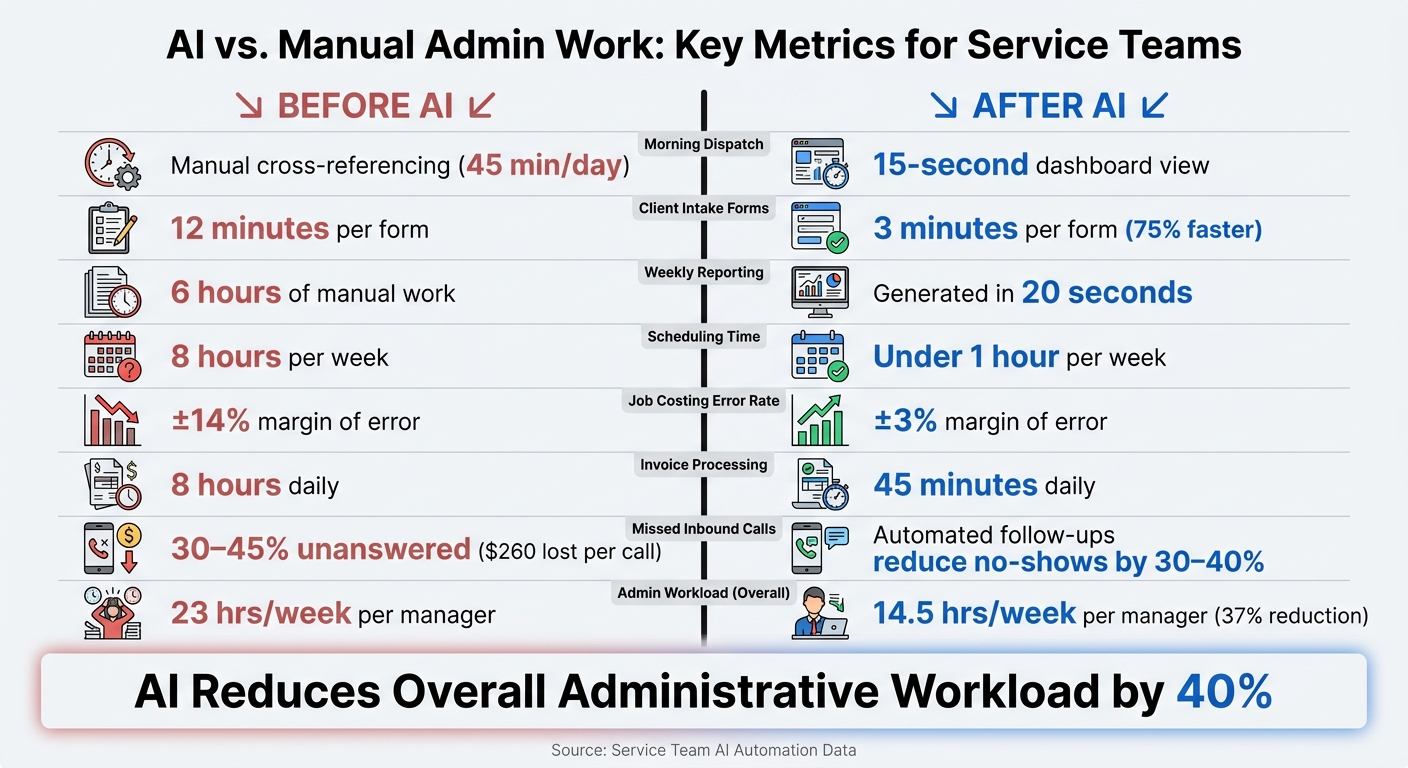
AI vs. Manual Admin Work: Key Metrics for Service Teams
With AI tools integrated into their processes, service teams saw immediate and measurable improvements.
40% Drop in Administrative Workload
By automating repetitive tasks, service teams cut their administrative workload by 40%. For example, AI-powered workforce scheduling reduced labour hours by 40%, and AI-driven quality inspections achieved the same reduction while maintaining over 99% accuracy in defect detection.
A small HVAC company with 14 employees tracked their progress over six months using a shared spreadsheet updated by three managers. Their weekly administrative time dropped from 23 hours per manager to 14.5 hours – a 37% reduction.
| Task | Before AI | After AI |
|---|---|---|
| Morning dispatch | Manual cross-referencing | 15-second dashboard view – saved 45 min/day |
| Client intake | 12 minutes per form | 3 minutes per form |
| Weekly reporting | 6 hours of manual work | Generated in 20 seconds |
| Scheduling | 8 hours per week | Under 1 hour per week |
Fewer Errors and Faster Task Completion
Along with faster task completion, AI significantly reduced errors. Automated intake processes cut mistakes by 62%, while job costing accuracy improved from a ±14% margin of error to just ±3%. This level of precision is critical, especially when accurate estimates affect profitability.
"Getting information correctly is huge for us. Right now, the human aspect comes into play – I collected the number, but I didn’t send it to you. Or I got their name, but spelled it wrong. We get so much of that and it creates back and forth. If that gets eliminated, that’s a big win." – Beth Wiebe, Director of Operations, Cornerstone Insurance Services
In 2026, Cornerstone Insurance Services, a brokerage in Saskatchewan, implemented AI to manage 400–500 daily transactions. As a result, staff productivity jumped by 43%, with daily tasks increasing from 70 to 100. They also achieved 100% accuracy in capturing phone numbers and pre-collecting client data. These improvements not only enhanced accuracy but also freed up significant time, as detailed below.
More Capacity for Staff and Less Overtime
AI didn’t just reduce errors – it also gave staff more capacity by automating routine work. At Community Hope Alliance, a nonprofit with 75 employees, AI-powered help desk automation resolved 70% of tickets automatically and reduced response times from 4 hours to just 8 minutes within 90 days. This automation freed up 195 staff hours weekly, allowing the IT manager to switch to a four-day work week and cutting part-time technician hours from 20 to 10 per week.
"The real impact is in the 195 hours per week our staff reclaimed. That’s nearly 5 full-time employees’ worth of time that now goes toward serving our community." – Sarah Mitchell, Executive Director, Community Hope Alliance
For service teams, the true payoff of AI isn’t just fewer admin hours – it’s the ability to focus on high-value work that drives growth.
What Service Businesses Should Know Before Adopting AI
When it comes to leveraging AI, service businesses can gain a lot – but only if they approach adoption with a clear plan. Here’s what you need to consider before diving in.
Prioritize High-Volume, Repetitive Tasks
Start with the tasks that eat up the most time. Did you know routine admin work can take up to 40% of your time? That’s where automation can make an immediate difference. To figure out where to begin, take a look at your service tickets from the past six months. Identify 20–30 categories that make up about 70% of your workload. For most service-based businesses, the biggest time-drainers are things like after-hours calls, email sorting, scheduling, invoicing, and reporting.
Here’s a plan: pick your biggest bottleneck, implement automation for it, and test it for two weeks. Once that’s running smoothly, move on to the next task. Trying to automate everything at once can cause more confusion than progress.
Keep Humans in the Loop for Edge Cases
AI is great at repetitive tasks, but it’s not perfect when it comes to handling complex or nuanced issues. That’s why human oversight is non-negotiable. Instead of cutting oversight, successful businesses shift their teams to focus on exceptions.
Take this example: a 40-person financial planning firm in Toronto implemented AI for reporting and client prep in early 2025. Their golden rule? Every AI-generated output had to be reviewed. They also used sensitivity labels to block regulated data and created escalation triggers for tricky cases. The result? Month-end reporting went from two days to just four hours – with no compliance issues.
Before you go live, define your own escalation triggers. Any situation involving upset clients, legal or financial risks, or complex disputes should always be routed to a human.
Work with Experienced AI and Software Partners
Off-the-shelf AI tools can handle basic tasks, but service businesses often have unique workflows. That’s where working with experienced AI consultants or software specialists can make all the difference. Companies like Digital Fractal Technologies Inc specialize in creating custom AI solutions that align with your specific processes. By tailoring the AI to fit your existing workflows, you can reduce errors and speed up adoption.
"The people closest to the problems fix them immediately. No waiting, no compromises, no settling for ‘that’s just how the system works.’" – Aiinak Team
This philosophy is key to adopting AI effectively.
Conclusion: What AI Can Do for Service Team Productivity
AI is transforming service teams by cutting administrative tasks by up to 40%. By automating processes like scheduling, data entry, document routing, and client communication, teams can operate far more efficiently. And the benefits only grow as businesses scale.
The real game-changer isn’t just speed – it’s the combination of accuracy and scalability. Danielle Vickstrom, Senior Service Delivery Manager at Marco, highlights this perfectly:
"Now that AI handles repetitive tasks, we can scale our business without needing to hire additional dispatchers."
This means businesses can boost capacity without increasing payroll. AI can reduce intake errors by over 60% and significantly improve job costing accuracy. Over time, these improvements compound, allowing teams to handle more work with fewer mistakes. It’s a clear sign of how AI agents are transforming business operations.
However, achieving these results requires more than just adopting AI – it demands a strategic approach. As discussed earlier, seamless integration and standardized processes are critical to success. This is where expert partners, like Digital Fractal Technologies Inc, come in. Their tailored solutions – ranging from workflow audits to custom AI agents built for specific industries – ensure AI fits your unique needs. Justin N, a Manager, shared his experience working with them:
"They found innovative ways to overcome challenges and churned out an innovative, self-demonstrating technology platform we are extremely proud to offer our client-base. The level of skill was beyond what we expected."
Ultimately, the businesses that thrive aren’t necessarily the largest or the most well-funded – they’re the ones that decide to let machines handle what they do best, freeing their teams to focus on what truly matters.
FAQs
What should we automate first with AI?
Automating tasks like scheduling and communication can make a big difference for service teams. Start with processes such as appointment booking, dispatching, and follow-up reminders. By taking these repetitive tasks off your plate, you’ll not only cut down on administrative work but also improve overall team efficiency.
What data do we need before adding AI?
Before bringing AI into the mix, make sure your data checks all the right boxes: it needs to be accurate, consistent, and up-to-date. Additionally, it should align with governance and compliance standards to ensure AI models are trained responsibly and make sound decisions. Reliable, high-quality data is the backbone of effective outcomes and helps sustain trust in AI-powered systems.
How do we keep humans in the loop with AI?
To ensure humans remain actively involved in the use of AI, it’s crucial to incorporate human oversight during key phases such as training, validation, and execution. This approach helps improve accuracy, minimizes bias, and maintains accountability – especially in tasks that are intricate or carry significant consequences.