Custom CRM vs Off-the-Shelf CRM for Nonprofits

Nonprofits often face a critical decision when choosing a CRM: go with an custom vs off-the-shelf solutions. Here’s the key takeaway: Off-the-shelf CRMs are quicker to implement and cost less upfront, while custom CRMs offer tailored features and long-term scalability.
- Off-the-Shelf CRMs: Ready-to-use, lower cost (CA$100–CA$400/month), and vendor-maintained, but limited in customisation and scalability.
- Custom CRMs: Higher upfront cost (CA$77,000–CA$265,700+), but designed to meet specific workflows, fully scalable, and offer complete data ownership.
If your nonprofit needs quick deployment or has standard workflows, off-the-shelf may suffice. However, for unique needs, integration challenges, or long-term growth, a custom CRM could be worth the investment. Let’s dive deeper into the pros and cons of each option.
How to Choose the Right Nonprofit CRM | A Practical Guide
sbb-itb-fd1fcab
What Are Off-the-Shelf CRM Systems?
Off-the-shelf CRM systems are pre-designed software solutions that are ready for immediate use. For nonprofits, these tools serve as a central hub for managing data related to donors, volunteers, partners, and staff. They come equipped with standard features like donor profiles, automated donation receipts, fundraising campaign tracking, volunteer coordination, and basic reporting. Many of these systems also integrate seamlessly with popular tools like Mailchimp, QuickBooks, Stripe, and PayPal, allowing nonprofits to hit the ground running.
Currently, 94% of fundraisers rely on CRM systems to manage their data. Victoria Burt, Product Marketing Manager at Kindsight, explains:
A nonprofit CRM helps organisations manage relationships with their donors, volunteers, and supporters. Unlike sales-focused CRMs, it’s built for the unique needs of nonprofit work.
These systems provide a structured approach to handling tasks such as donation processing and volunteer scheduling, often using pre-built templates and workflows.
Benefits of Off-the-Shelf CRM
One of the biggest advantages of off-the-shelf CRM systems is their speed of deployment. Nonprofits can start tracking donors and processing donations almost immediately, which is crucial for organisations seeking quick results or operating without extensive resources for complex implementations.
Cost-effectiveness is another key benefit. These systems typically cost between $0 and $700 per month, with many vendors offering discounts or grants for registered charities. For example:
- Salesforce Nonprofit Cloud starts at $60 per user per month, with up to 10 free licences available through the "Power of Us" programme for eligible nonprofits.
- Bloomerang costs approximately $125 per month.
- Neon CRM is priced at around $99 per month.
These subscription-based models often have lower upfront costs compared to custom-built solutions.
Another advantage is that maintenance is handled by the vendor, covering security updates, bug fixes, and technical support. This reduces the workload for nonprofit staff. In fact, 75% of nonprofits using off-the-shelf systems report improved efficiency and better data management.
However, while these systems offer several benefits, they also come with limitations that nonprofits need to consider.
Drawbacks of Off-the-Shelf CRM for Nonprofits
One of the main challenges is limited customisation. Since these platforms are designed for a broad audience, they may not align perfectly with an organisation’s specific workflows or unique mission. This often results in functionality gaps that require workarounds, which can prompt some nonprofits to explore custom solutions.
Another issue is scalability. While these systems may work well for smaller organisations, they can struggle to meet the needs of larger or more complex operations as nonprofits grow.
Matt Roseti, a writer at Virtuous, highlights this limitation:
The best CRM for nonprofits goes far beyond [storing contact info]. Modern nonprofit CRMs connect giving data, engagement history, communication, events, volunteer activity, and context into a single view.
Unfortunately, not all off-the-shelf systems provide this level of integration.
Additionally, nonprofits using these systems are entirely dependent on third-party vendors for updates, new features, and ongoing support. This dependence can sometimes lead to frustration, as one user described:
It felt like they were letting it die. Like it was just going to drift slowly and you had to jump ship at some point or sink with it.
Finally, 41% of nonprofits cite a lack of process automation and organisational efficiency as their top internal challenge. Off-the-shelf systems may not fully address these needs, leaving room for improvement in areas like automation and streamlined workflows.
What Are Custom CRM Systems?
A custom CRM is a software solution tailored to fit the specific workflows, data needs, and objectives of a nonprofit. Unlike ready-made tools that require organisations to conform to pre-set structures, custom systems are designed to align with how a nonprofit actually operates. This approach ensures the software grows alongside the organisation, offering full control over features, integrations, and future updates – without being limited by a vendor’s roadmap. By doing so, nonprofits can address their unique operational needs and unlock capabilities that off-the-shelf tools might not provide.
For instance, a healthcare nonprofit might need a CRM that ensures HIPAA compliance, while an environmental organisation could require features for tracking volunteer skills. Standard software often prioritises quick deployment over flexibility, leaving gaps that custom systems can fill.
Benefits of Custom CRM for Nonprofits
One of the standout benefits of a custom CRM is its flexibility. These systems can handle complex, non-linear processes like multi-step grant approvals or donor lifecycle tracking – from the first donation to legacy giving. This eliminates the need for workarounds and ensures workflows are seamless.
Custom CRMs also integrate effortlessly with tools for accounting, event management, and communications, automating data flow across platforms. Kathryn McCarthy, CEO and President of Pacific Clinics, highlighted the impact of such integration:
What has set our relationship with Salesforce apart is the sense of partnership. We took a complicated situation and made it simple and accessible for our teams. It’s really a game changer for us.
The numbers back this up: 95% of nonprofit users report a positive ROI after implementing a custom CRM, and 82% of nonprofit leaders say it speeds up decision-making when using a unified platform.
Another key advantage is improved data security and compliance. Custom systems can be built to meet specific regulatory standards, such as HIPAA for healthcare or GDPR for international operations, ensuring data is both secure and compliant.
Lastly, custom CRMs are built to grow with an organisation. Unlike standard tools that may struggle with increased data or complex reporting needs, custom solutions can scale as the nonprofit’s mission and operations expand. While the benefits are compelling, there are also challenges to consider.
Drawbacks of Custom CRM
Custom CRMs, while powerful, come with their own set of challenges.
The most notable drawback is the higher upfront cost compared to subscription-based, off-the-shelf options. Though this initial investment can lead to long-term savings – by cutting out recurring licensing fees and reducing manual tasks – it requires thoughtful financial planning.
Development timelines are another hurdle. Creating a custom CRM involves designing, building, testing, and refining the system, which means nonprofits need to be prepared for a longer implementation process before seeing results.
Finally, maintaining a custom CRM demands ongoing effort. Unlike off-the-shelf tools, where vendors handle updates and security, custom systems require nonprofits to ensure regular maintenance, security updates, and monitoring. This may necessitate dedicated technical staff or partnerships with development firms to keep the system running smoothly.
Custom CRM vs Off-the-Shelf CRM: Direct Comparison
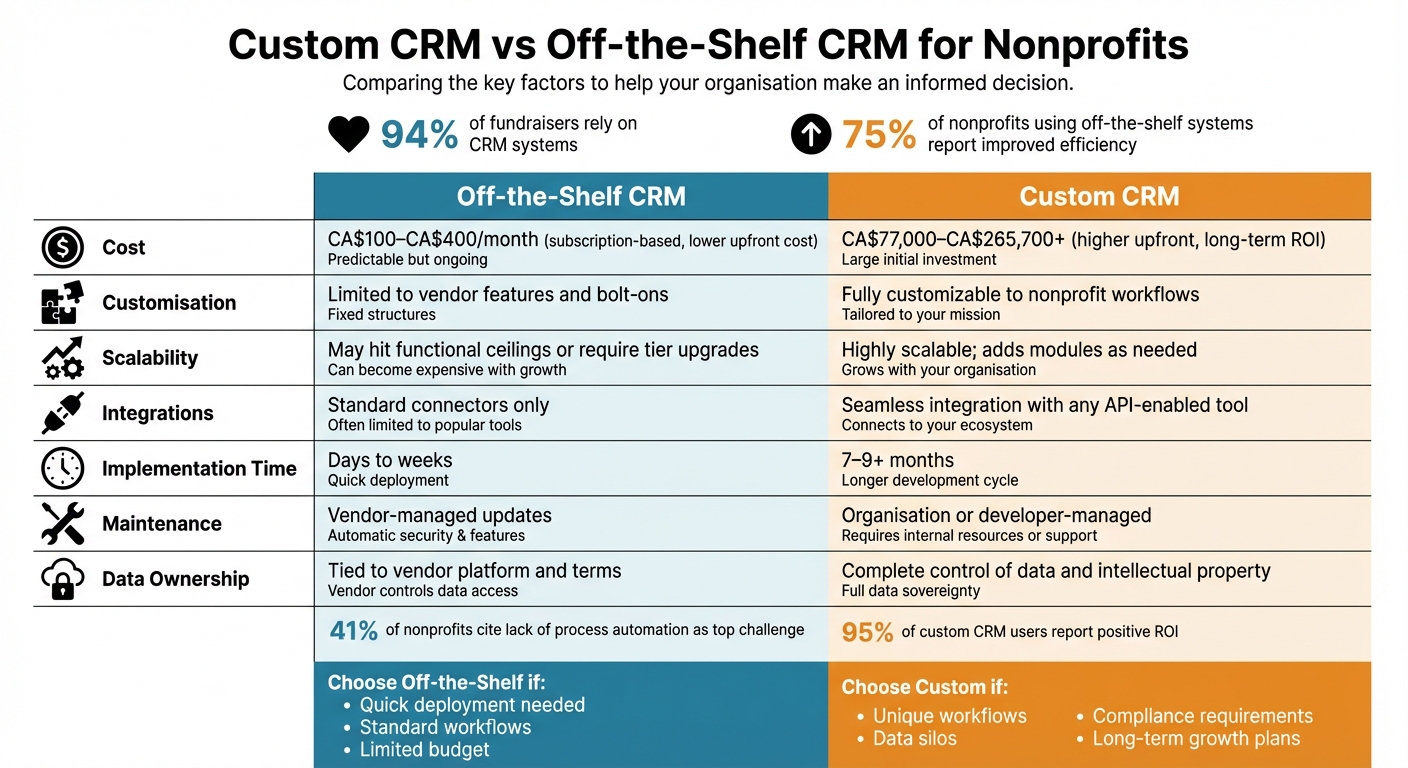
Custom CRM vs Off-the-Shelf CRM Comparison for Nonprofits
When choosing between custom and off-the-shelf CRM systems, nonprofits often weigh how each option meets their specific needs. Off-the-shelf CRMs are known for their quick deployment and ease of use, while custom CRMs are designed to align closely with unique workflows. However, each approach comes with trade-offs that can significantly impact how well the system supports your operations.
One major difference is how well the CRM fits your processes. Custom CRMs are built to match your existing workflows, while off-the-shelf options generally require you to adjust your processes to fit their pre-defined structure. As Ksense puts it:
Your software should match the way your business creates value, not force you into generic workflows that slow you down.
Ownership is another key factor. Off-the-shelf CRMs tie your organisation to the vendor’s roadmap, pricing updates, and service policies. In contrast, custom CRMs give you full control over the source code and intellectual property, freeing you from external limitations. Angel Campa, Founder of GrantPipe, highlights this distinction:
Most nonprofits don’t need a highly customizable platform, they need one that handles grants and donors in the same system without requiring a consultant every time something changes.
Integration capabilities also set the two options apart. Off-the-shelf CRMs usually provide pre-built connectors for popular tools like Mailchimp or QuickBooks. However, these integrations often handle only basic data and may not support more complex workflows. Custom CRMs, on the other hand, are designed to connect deeply with legacy systems, ERPs, or proprietary tools – essentially anything with an API – ensuring seamless data flow and functionality.
For nonprofits with tight budgets and unique operational needs, these differences can be decisive. The table below provides a side-by-side comparison to help guide your decision-making.
Comparison Table
| Feature | Off-the-Shelf CRM | Custom CRM |
|---|---|---|
| Cost | Lower upfront cost, subscription-based (CA$100–CA$400/month) | Higher upfront cost (CA$77,000–CA$265,700+), long-term ROI |
| Customisation | Limited to vendor features and bolt-ons | Customisable to nonprofit workflows |
| Scalability | May hit functional ceilings or require tier upgrades | Highly scalable; adds modules as needed |
| Integrations | Standard connectors only | Seamless integration with any API-enabled tool |
| Implementation | Quick setup (days to weeks) | Longer development timeline (7–9+ months) |
| Maintenance | Vendor-managed updates | Organisation or developer-managed |
| Data Ownership | Tied to vendor platform and terms | Complete control of data and intellectual property |
When Nonprofits Should Choose Custom CRM
Not every nonprofit needs a custom CRM. But if your workflows don’t fit into standard templates, off-the-shelf solutions can lead to frustrating workarounds and a lack of tailored features that meet your needs.
One major issue nonprofits face is data silos – when donor, volunteer, and accounting data are stored separately. This often results in time-consuming manual data entry and makes it hard to get a complete picture of your organisation’s operations. For example, 41% of nonprofits identify the lack of automated processes as their biggest internal challenge, while 35% struggle with manual reporting tasks that eat up valuable time. If these challenges sound familiar, a custom CRM could be the solution to streamline your processes and free up your team for more impactful work. Breaking down these silos also sets the stage for long-term growth.
Custom CRMs are designed to scale with your organisation. As your mission evolves – whether through expanded programs or new initiatives – custom systems can grow with you by adding new modules or features. Off-the-shelf tools, on the other hand, often hit their limits, forcing you to invest in costly workarounds down the line. By investing in a custom CRM upfront, you can save on operational costs over time while maintaining the flexibility to adapt as your organisation grows.
Another key consideration is data ownership and compliance. If your nonprofit handles sensitive data that requires strict security measures – such as compliance with PIPEDA or other regulations – a custom CRM can be built with the exact safeguards you need. Plus, owning the source code of your CRM gives you complete control, eliminating dependency on third-party vendors for updates or integrations.
These advantages explain why many nonprofits opt for custom-built systems, like those offered by Digital Fractal Technologies.
Custom CRM Solutions by Digital Fractal Technologies
Digital Fractal Technologies specializes in creating custom CRMs designed for the unique challenges nonprofits face. Their solutions focus on automating workflows, improving donor analytics, and ensuring compliance reporting through features tailored to your specific needs. Whether you require seamless integration with older systems, AI-powered donor insights, or custom tracking tools, their team develops scalable platforms that grow with your mission. With their expertise in custom software and digital transformation, Digital Fractal Technologies helps eliminate manual inefficiencies and provides the comprehensive view of stakeholders that off-the-shelf CRMs often fail to deliver.
Choosing the Right CRM for Your Nonprofit
Selecting the right CRM for your nonprofit is about finding a system that fits your mission, size, and future plans. If your organisation has unique workflows that set it apart, a custom CRM might be the way to go. On the other hand, for straightforward tasks like invoicing or time tracking, off-the-shelf options can often meet your needs. The key is to match the CRM to your specific processes.
Start by defining your goals. Are you aiming to double donor acquisition, increase retention, or reduce time spent on manual reporting? Bring in input from various departments – administrators, communications teams, and data entry staff. This ensures the system meets the needs of everyone involved and reflects how your team actually works day-to-day. A collaborative approach can help avoid costly mistakes and encourage smoother adoption.
If your current tools are falling short, it might be time to explore custom solutions. Signs that you’ve outgrown your existing CRM include staff relying on spreadsheets to fill gaps or constant frustrations with vendors when trying to make changes. These inefficiencies can result in paying for features you don’t even use.
When considering a custom CRM, don’t just rely on the demo. Look deeper into the expertise of the partner you’re evaluating. For instance, Digital Fractal Technologies specializes in creating custom CRM systems that not only eliminate inefficiencies but also integrate seamlessly with your existing tools. They focus on providing data ownership, compliance safeguards, and solutions that grow alongside your mission.
FAQs
How do I know we’ve outgrown our current CRM?
If your nonprofit is struggling to keep up with its current CRM, it might be a sign that you’ve outgrown it. Common challenges include difficulty pulling accurate data, managing donor information effectively, or creating reports without a hassle. You might also notice an over-reliance on multiple disconnected systems, escalating costs, or growing staff frustration due to time-consuming manual tasks. When these problems start affecting day-to-day operations or limit your ability to grow, it’s worth considering a more adaptable, tailored CRM solution to better support your organization’s goals.
What should we budget for a custom nonprofit CRM in Canada?
Budgeting for a custom nonprofit CRM in Canada generally falls between CAD 50,000 and CAD 150,000, though costs can climb higher based on the system’s complexity, features, and ability to grow with your organization. While pre-built solutions might cost about CAD 99 per month, custom CRMs require a one-time investment. This investment comes with benefits like tailored workflows, improved security, and full ownership of the code. Don’t forget to include ongoing maintenance and updates in your financial planning.
How long does it take to implement a custom CRM?
Implementing a custom CRM can take several months, with the exact timeline depending on factors like the system’s complexity and your organization’s specific requirements. Features, integrations, and the need to accommodate unique workflows often extend the development process. However, this extra time ensures the final product aligns closely with your nonprofit’s goals and operational needs.