
Custom CRM for Real Estate: A Complete Guide

If I were choosing a real estate CRM in Canada, I’d judge it on four things first: fit for brokerage workflows, privacy rules, clean data, and team use after launch. If those four are weak, the system will likely turn into a contact list with extra steps.
Here’s the short version: a custom CRM should track people, properties, deals, documents, tasks, commissions, and reporting in one system. It should also support Canadian needs from day one, like CAD, postal code validation, English/French workflows, PIPEDA, CASL, and Québec’s Law 25. And it should be built in phases, with phase one focused on the work your team does every day.
If I strip the guide down to the parts that matter most, it comes to this:
- Map the full deal flow first – from lead to closing to follow-up
- Keep contacts, properties, and transactions separate but linked
- Set permissions early so agents, admins, managers, and owners each see the right data
- Build compliance into the CRM with consent logs, audit trails, retention rules, and access controls
- Localize for Canada with $1,250,000.00 formatting, province fields, and postal codes like M5V 3C6
- Prioritize phase-one features like lead intake, pipeline stages, reminders, mobile use, documents, dashboards, and integrations
- Plan integrations up front for MLS/IDX, email, calendars, e-signature, and accounting
- Migrate clean data first, starting with active records
- Train by role, then track use for 8 to 12 weeks after launch
- Keep improving after go-live with reporting, automation, and AI based on clean deal history , including the use of real estate AI agents
A few numbers stand out. The guide notes brokerage records may need to be kept for up to 7 years in some cases, and privacy requests may need a response within 30 days. It also cites CRM-related productivity gains of about 26.4%, with some users seeing around 50% better efficiency when the system is used well.
My takeaway: a custom CRM is not just software. It’s the way a brokerage runs, reports, and stays compliant. The build matters, but the data, training, and follow-through matter just as much.
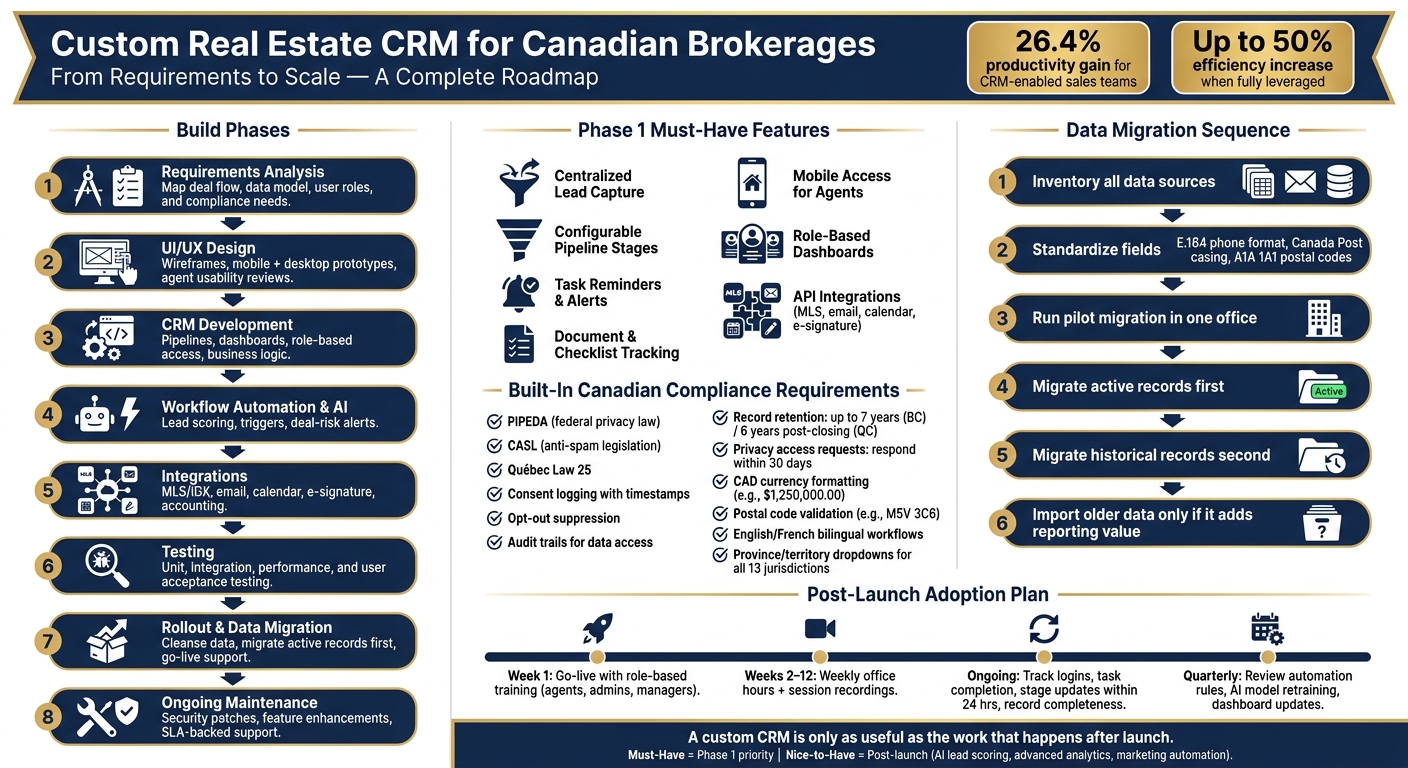
Custom Real Estate CRM Build Process: From Requirements to Scale
How Greenleaf Built a Custom CRM, Saving Thousands of Dollars
sbb-itb-fd1fcab
1. Requirements for a custom real estate CRM
A custom real estate CRM has to match how a brokerage works in day-to-day life. That means turning the brokerage workflow into data structure, user access rules, compliance controls, and feature requirements.
Core workflows, data model, and user roles
Start with the full deal lifecycle from end to end. Map every step from lead capture through to post-sale follow-up: qualification, assignment, marketing, showings, offers, conditions, closing, and referral touches.
Before any development begins, run process-mapping workshops with agents, administrators, and broker/owners. The goal is simple: document how things work now, spot where deals get stuck, and agree on the workflow the CRM needs to support. In many brokerages, condition tracking still lives in manual spreadsheets. That’s often where things start to slip.
The data model should reflect how a brokerage actually runs. People, properties, and transactions need to stay separate, but connected. If everything gets squeezed into one flat contact list, the CRM becomes messy fast.
A solid setup usually looks like this:
- Contacts need flexible role flags because one person may be a buyer today, a landlord later, and a referral source after that.
- Properties should include Canadian-specific fields such as MLS® number, legal description, condo corporation details, strata or condo fees in CAD, property tax amounts, and municipal zoning.
- Transactions should connect contacts to properties, show which side the brokerage represents, and support multiple offers where needed.
Permissions also need to be defined early. Agents should see their own deals. Team leads should see their group. Coordinators should handle documents and tasks. Owners need brokerage-wide reporting. If you leave this until later, access rules can become a headache.
Canadian compliance, records, and localization
Once the workflow and data model are clear, compliance and localization set the rules for how the system can operate in Canada.
Privacy can’t be treated like a box to tick at the end. Real estate files contain personal information: contact details, financial preferences, transaction history, showing records, and more. How that information is collected, used, stored, and deleted is governed by PIPEDA at the federal level, with added provincial rules in British Columbia, Alberta, and Québec. On top of that, real estate regulators bring their own record-keeping, disclosure, and consent rules, including RECO in Ontario, RECA in Alberta, and OACIQ in Québec.
The CRM should include built-in consent logging. In plain terms, it needs to record why and how a contact agreed to receive messages, along with a timestamp and the opt-in source. It also needs simple opt-out suppression. If someone says “stop,” the system should respect that right away.
Audit trails matter too. The CRM should record who viewed, edited, or exported sensitive data. That helps with internal oversight and with answering regulator questions if they come up. For record retention, BC guidance notes that brokerage documents are kept for up to seven years, while Québec regulations require records to be conserved for at least six years after final closing, with access restricted to authorized users. OACIQ guidance is explicit that personal information collected for a transaction cannot later be repurposed for commercial prospecting. That rule has a direct effect on how marketing automation is set up.
Localization should be a formal requirement, not an afterthought. The CRM should use CAD as the default currency, formatted in a consistent way, such as $1,250,000.00. Standard numbers should follow Canadian formatting, such as 1,250.50. Dates should follow Canadian conventions – 2026-08-07 or 7 August 2026 – across the interface, documents, and email templates. Address fields should include province and territory dropdowns for all 13 jurisdictions. Postal code validation needs to accept the Canadian alphanumeric format, such as M5V 3C6, with flexible spacing and case handling. Bilingual labels and templates are also a must for Québec and for brands working across Canada.
Must-have vs. nice-to-have features
Not every feature belongs in phase one. The best approach is to prioritise with agents, administrators, and management, then lock the core feature set before development starts.
Phase one should focus on daily operations first. Fancy automation can wait until the base system is stable. Otherwise, you end up building bells and whistles on top of shaky data.
| Feature | Description | Priority | Business Benefit |
|---|---|---|---|
| Centralized lead capture | Web forms, portal inquiries, referrals, and open house sign-ins flow into one CRM with de-duplication | Must-have | Prevents lost leads; enables accurate lead-source ROI tracking |
| Pipeline stages | Configurable stages aligned to the brokerage’s deal process (e.g., New Lead → Conditional → Firm → Closed) | Must-have | Improves deal visibility and daily prioritization |
| Task reminders and alerts | Automated reminders for follow-ups, condition deadlines, listing expiries, and anniversary touches | Must-have | Reduces missed opportunities and compliance risks |
| Document and checklist tracking | Store offers, IDs, contracts, amendments, and FINTRAC forms with role-based access controls | Must-have | Supports compliance and reduces file loss |
| Mobile access | Agents can update records and tasks from the field during showings | Must-have | Supports real-time updates and faster follow-up |
| Role-based dashboards | Activity, pipeline, and conversion reporting tailored by user role | Must-have | Helps agents manage their day; gives management brokerage-wide visibility |
| API integrations | Connections to email, calendar, MLS® feeds, e-signature tools, and VoIP | Must-have | Reduces duplicate data entry and keeps workflows connected |
| AI lead scoring | Predictive ranking of leads based on engagement and source behaviour | Nice-to-have | Valuable after lead volume justifies it; requires clean data foundation first |
| Advanced analytics | Forecasting, cohort analysis, and custom BI dashboards | Nice-to-have | High value for scaling brokerages; best added once core reporting is stable |
| Marketing automation | Multi-step email and SMS campaigns triggered by contact behaviour | Nice-to-have | Powerful for nurture programs; requires tested messaging strategy to be effective |
2. How to design and build the system
Discovery, process mapping, and solution design
Once the requirements are set, the next step is to turn them into something the team can actually build.
Start with structured discovery workshops that include agents, administrators, brokers, and accounting staff. The goal is simple: map how the brokerage works day to day, not how people assume it works. A one-week activity review helps here because it can show where staff enter the same data twice and where follow-ups fall through the cracks.
Design future-state workflows by business line, but only when those differences affect the system itself. In practice, that means:
- Residential pipelines need household-level profiles, budget in CAD, pre-approval status, and preferred neighbourhoods.
- Commercial deals need company-level contacts, rentable square footage or square metres, NOI fields, and approval routing for senior brokers.
- Leasing workflows need automated renewal reminders at 90, 60, and 30 days before expiry.
- Pre-construction workflows need unit inventory management, deposit schedules, and launch workflows.
This phase should end with a testable solution design. That design should cover personas, permissions, the data model, process maps, requirements, non-functional targets, and integrations. The more specific the requirements are, the better. For example, a page-load target or a rule that creates a follow-up task when no contact is logged within 24 hours of a new lead gives developers and QA teams something clear to test against.
Architecture, integrations, and AI features
From there, lock in the technical base that will support scale, security, and integrations.
Build the CRM as a web-based, mobile-friendly, API-first system. Every core object – listings, offers, commissions, showings, and office-level reporting – should be available through a documented API. That makes it much easier to connect new tools or add more offices later without rewriting the core logic.
Host the system in Canadian data centres or Canadian cloud regions. Security also needs to be built in from day one: role-based access control, field-level permissions for sensitive financial data, TLS encryption in transit, encryption at rest for databases and backups, and a centralized identity layer with single sign-on.
Integration planning deserves its own workstream. For a Canadian real estate CRM, the key connections are:
- MLS/IDX feeds – live listing data, per-lead behaviour such as saved searches and property views, and board update frequency rules
- Email and SMS marketing tools – outbound messages logged in the CRM, with opens, clicks, and replies fed back to update lead scores and trigger follow-up tasks
- Calendar and scheduling – showings, inspections, and client meetings synced with Outlook or Google
- E-signature platforms – recipient details pre-filled from the deal record, signature status tracked at the transaction level, and completed documents auto-archived
- Accounting workflows – commission payables, referral fees, and GST/HST calculations by province passed to the accounting system, with the CRM acting as the source of truth for deal data
For AI, the best place to start is usually practical, not flashy. Predictive lead scoring, message summarization, and deal-risk scoring are good early uses. But there’s a catch: these features depend on clean data. If stage updates are sloppy, communications aren’t logged, or historical deals don’t have clear outcome labels like won, lost, or cancelled, the output won’t be much use. AI suggestions should also be clear and easy to override, so agents can trust the system instead of fighting it.
Working with a custom development partner
A custom development partner should handle the full job: requirements, design, build, integrations, testing, rollout support, and maintenance. The table below shows what that usually looks like, with each phase linked to the brokerage’s compliance, migration, and adoption needs.
| Project Stage | Objective | Key Activities | Typical Outputs |
|---|---|---|---|
| Requirements Analysis | Document workflows, compliance needs, and integration requirements | Stakeholder interviews, process mapping across residential, commercial, leasing, and pre-construction | Requirements backlog, current-state process maps, prioritized feature list |
| UI/UX Design | Design interfaces that match agent and broker workflows | Wireframes, mobile and desktop prototypes, usability reviews with agent representatives | Approved design system, mobile and desktop prototypes |
| Custom CRM Development | Build the data model, pipelines, business logic, and reporting | Iterative sprints, security controls, role-based access implementation | Working CRM with configured pipelines, dashboards, and permissions |
| Workflow Automation & AI Consulting | Implement triggers, notifications, and predictive features | Automation rule configuration, lead scoring setup, AI feature integration | Automated lead routing, scoring models, deal-risk alerts |
| Integrations | Connect the CRM to MLS/IDX, email, calendars, e-signature, and accounting | API mapping, authentication setup, data flow design, error handling | Live integrations with documented data flows and sync schedules |
| Testing | Validate that every requirement behaves as specified | Unit, integration, performance, and user acceptance testing; defect resolution | Test reports, resolved defect log, stakeholder sign-off |
| Rollout Support | Migrate data and launch with minimal disruption | Data cleansing, migration scripts, cutover planning, post-launch hypercare | Migrated data, go-live sign-off, early-issue resolution log |
| Ongoing Maintenance | Keep the system secure, stable, and aligned with evolving needs | Bug fixes, security patches, feature enhancements, performance monitoring | SLA-backed support, release notes, updated documentation |
This sequence helps keep the build tied closely to migration and rollout work in the next phase. And in practice, field observations with agents often surface needs that surveys never catch.
3. Implementation, migration, and user adoption
Once the architecture is in place, the work shifts from planning to rollout. At this stage, the focus is simple: move the data, train the people, and put controls in place.
Data migration and system configuration
Rollout starts when the system is ready to handle live data. This is the point where the data model stops being a diagram and starts affecting day-to-day work.
Start with a full inventory of data sources, then move only active records first. That includes spreadsheets, shared drives, email lists, legacy CRM exports, MLS/IDX feeds, and back-office tools. If messy data goes in first, agent trust can drop before launch even happens.
Before import, standardize core fields like phone numbers, addresses, and unit numbers. Use E.164 or +1 formatting for phone numbers, Canada Post casing, two-letter province codes, and postal codes in the A1A 1A1 format.
A pilot migration in one office helps catch mapping and validation issues early. After that, migrate in phases:
- Active records first
- Historical records second
- Older data only if it adds reporting value
Pipelines should also be set up before launch, with stages that match how the brokerage already moves deals. Use CAD and province-based GST/HST rules.
Once the core records and pipelines are live, the next step is role-based training and governance.
Training, governance, and adoption metrics
Training needs to match how agents, admins, and managers actually do their jobs. CRM adoption usually breaks down for two plain reasons: weak training and weak ownership.
Role-based training works better than one big session for everyone. Agents need scenario-based sessions tied to real tasks, like working a new buyer lead or updating a condo listing from a phone. Administrators need to know the data-quality rules, how to fix records, and how to run key reports. Managers need to focus on dashboards, pipeline visibility, and adoption metrics.
Training should happen at go-live, then continue with weekly office hours for 8 to 12 weeks. Record those sessions so new hires can watch later. In Québec and other bilingual markets, training materials should be offered in both English and French.
Track usage every week. Focus on weekly logins, on-time task completion, stage updates within 24 hours, and record completeness. Data ownership also needs to be explicit. Administrators should own contact data integrity, while finance or back-office staff should own commission and transaction fields. A small governance committee can review data quality and approve system changes.
Internal champions can help move things along. Pick two or three agents who engage early, then let them flag friction points before the rollout reaches the whole brokerage.
When adoption is weak, the cause is usually not mysterious. It usually comes back to rollout mistakes that could have been avoided.
Common implementation risks and how to reduce them
The biggest rollout risks come from poor data, poor training, and unclear ownership. Those issues often decide whether the CRM becomes part of daily work or gets ignored after launch.
| Pitfall | Operational Impact | Mitigation |
|---|---|---|
| Over-customization | System becomes difficult to maintain; upgrades break custom logic; reporting fragments across teams | Follow a "configure first, customize later" approach. Tie every custom field or automation to a documented use case. If 20–25% of fields are custom, the system is likely overbuilt. |
| Poor data hygiene | Agents distrust records; duplicate contacts inflate pipeline counts; reporting is unreliable | Run a structured data-cleansing program before migration. Implement real-time validation at entry so agents cannot save records with missing core fields. |
| Weak training | Teams revert to spreadsheets and email; CRM investment goes unused | Deliver role-specific, scenario-based training staggered over 8–12 weeks post-launch, not a single event. |
| Privacy and compliance gaps | PIPEDA violations; inability to respond to access requests within the required 30-day window; audit failures | Track consent types in dedicated fields, define retention periods, automate archival or deletion workflows, and document cross-border transfers and vendor access. |
| No clear CRM owner | Configuration drifts; data quality degrades; no accountability for issues | Appoint a named CRM administrator responsible for configuration, user management, data quality audits, and vendor liaison. |
PIPEDA allows cross-border storage, but the brokerage still remains accountable for protection, contract terms, and transparency. Those requirements need to be built into vendor agreements and system setup from day one.
4. Optimization, scaling, and conclusion
Improving performance with reporting, automation, and AI
After launch and adoption, the CRM’s next job is simple: improve results in ways you can measure. The brokerages that get the most from a custom CRM don’t treat launch as the end. They treat the system like something that should get sharper over time.
Start with dashboards built around the questions leadership and managers need answered. Lead source conversion shows which channels bring in actual clients, not just traffic. Average time to close helps teams see where deals slow down. Track it from first contact to accepted offer, and from listing date to firm sale, then split the data by property type and price band. That makes bottlenecks easier to spot.
Pipeline value in CAD, shown by stage and weighted by probability, gives leadership a steadier revenue forecast. Agent activity dashboards help managers compare each agent’s output against office averages, which makes coaching more concrete and less based on gut feel. Campaign ROI connects marketing spend to closed commission revenue, using cost per lead and cost per closed deal in CAD as the main numbers. These dashboards should also let users filter by province, office, and date range.
Automation should follow the same pattern. Early on, it usually handles lead routing by postal code, time-based follow-up sequences, and task creation at key deal milestones. As more deals close, those rules can become more precise. If one channel keeps producing leads that convert poorly, the follow-up cadence can change. If a certain lead type tends to reply more often in the evening, scheduling can shift to match. A quarterly review of open rates, response rates, and conversion metrics keeps automation tied to how the market is behaving now, not how it looked six months ago.
AI tends to work the same way. Early-stage teams often start with rules-based lead scoring. Once the CRM has enough clean closed-deal history, machine learning models can take over and predict close probability based on source, engagement pattern, price range, and response time. Content tools can draft follow-up emails, property descriptions, and neighbourhood summaries, while agents review the wording and adjust the tone. Forecasting models can also account for Canadian seasonality, like the spring market jump and the slower periods in December and January, then feed those projections straight into reporting dashboards.
A quarterly feedback loop helps here too. This ensures the system benefits from expert AI insights during the optimization phase. Agents can rate AI suggestions, and those outcomes can retrain the models after major market changes, such as an interest rate shift. The basic idea is straightforward: automation handles repetitive work; agents handle judgment, relationships, and exceptions.
Those AI lessons should then shape how the CRM scales across offices and service lines.
Scaling across offices, regions, and service lines
Scaling a custom CRM across multiple offices and provinces usually works best with a shared core and local workflow settings. The main web application development data model stays the same across the brokerage: contacts, properties, listings, deals, tasks, and activities. What changes from region to region are the workflow details, like condition types, required milestones, local terms, and province-specific checklists. For example, BC teams may use terms like “subject removal.” Role-based permissions make sure agents only see the data tied to their work, while regional managers and national leadership can access cross-office reporting.
The table below shows how key configuration areas often change from launch to a more mature multi-office setup:
| Area | Initial Launch Configuration | Mature Configuration |
|---|---|---|
| Offices & regions | Single office with shared settings and simple lead routing. | Multiple offices across provinces with localized workflows, forms, and language settings (English/French). |
| Lead management | Basic capture from website and manual imports, limited segmentation. | Multi-channel capture with AI-assisted lead scoring, routing by postal code, property type, and persona. |
| Workflow automation | Rules-based triggers for lead intake, follow-ups, and task creation. | More tailored workflows, audience-specific nurture sequences, and quarterly-reviewed cadences. |
| Dashboards & reporting | Office-level pipeline and activity views. | Brokerage-wide executive dashboards, regional dashboards, and per-agent performance views with CAD metrics. |
| Compliance & data | Basic federal data retention and role-based access controls. | Province-specific retention rules and local compliance checklists. |
| Service lines | Residential pipeline only. | Separate pipelines for commercial, property management, and investor services, with a central analytics layer. |
| System integrations | Core CRM with primary communication tools and MLS feed. | Full integration with ERP, accounting, and marketing platforms; modular architecture for new regions. |
Adding service lines like commercial, property management, and investor reporting works best when each module sits on top of a shared client record instead of becoming a separate system. One contact profile with service-line flags gives teams cross-sell visibility and helps avoid the mess that happens when agents have to jump between disconnected tools. A central analytics layer then ties everything together, so leadership can view total revenue by client across all service lines in one place.
Conclusion: Key decisions for a successful custom CRM
A custom real estate CRM creates long-term value when four things stay aligned: brokerage-specific workflows, Canadian compliance and localisation, clean data and structured training, and continuous improvement after launch. If one of those slips, the rest usually feel it.
The choices that matter most often happen after go-live. Weekly dashboard reviews, clear ownership of automation rules, scheduled AI retraining, and a plan for expansion into new provinces or service lines all shape how much the brokerage gets from the system. Teams that assign ownership and stick to a regular operating rhythm tend to get more from their CRM than teams that treat launch like the finish line.
Research shows that agents who fully leverage CRM tools can see around a 50% increase in efficiency, and sales teams using CRM effectively report productivity gains of approximately 26.4%. Those gains don’t come from software alone. They come from the mix of the right system, the right processes, and the discipline to keep improving both. A custom CRM is only as useful as the work that happens after launch.
FAQs
How long does a custom real estate CRM take to launch?
A custom real estate CRM usually goes live in phases. The timeline depends on how much you need it to do.
For a simpler setup with one main workflow, launch often takes 4 to 8 weeks. If the system includes several integrations, supports multiple agents, or needs more setup across teams, that window is often 8 to 12 weeks.
Digital Fractal Technologies Inc. begins with a 30-day AI audit. That step maps your workflows and spots integration needs early, so the CRM is set up to grow with the business and match Canadian data and regulatory requirements.
What data should we migrate first into a new CRM?
Start by reviewing and cleaning your existing data. Remove duplicates, fill in missing details, and check that everything is accurate before you move a single record.
Focus on key data first. That includes customer purchase history, interaction logs, engagement metrics, and contact demographics. Map out how data moves between your old and new systems, then fix mismatches before the transfer starts.
This step matters more than many teams expect. If bad data goes in, bad data comes out. A messy migration can lead to broken reports, missed follow-ups, and annoyed customers.
Stay in line with Canadian privacy rules, including PIPEDA, throughout the process. That means knowing what personal data you’re moving, why you’re moving it, and how it’ll be handled on the other side.
How do we keep a custom CRM compliant in Canada?
Follow PIPEDA and newer frameworks like AIDA. Build compliance into your CRM from the start with privacy-by-design. That means using end-to-end encryption, multi-factor authentication, and strict access controls so sensitive data doesn’t end up where it shouldn’t.
It also helps to keep data on servers in Canada, run regular audits and privacy impact assessments, and maintain clear audit trails. Digital Fractal Technologies Inc can help align your CRM with these standards, with support for bilingual functionality as well.