
90 Day Pilot: Ship Process Mining to Live Bots for Automation Teams

Process mining works because it turns raw event logs into a map of where your processes actually leak time and money, not where you assume they do. When systems log timestamps, activities, and case IDs, process mining reliably surfaces automation candidates and lets you rank them by cost and effort. Expect faster identification of bottlenecks, defensible ROI estimates before you build anything, and a direct path into automation triggers. The sections below walk through the mechanics, the wiring, and a 90 day pilot plan.
TL;DR:
- Event logs must include case ID, activity name, precise timestamps, and resource fields to reliably identify automation opportunities.
- Automation potential is highest in high-frequency, low-variation activities, manual percentage, throughput gaps, and rework loops.
- Data quality issues like time zone mismatches and missing timestamps can lead to false candidates, requiring thorough data standardization first.
- Connecting insights to automation depends on properly configured triggers and accurate schema mapping to ensure smooth system integration.
- Starting with a narrow, high-volume process and defining success metrics early increases the likelihood of a successful pilot and scalable automation.
Table of Contents
- What Process Mining Is and Why It Matters for Automation
- How Process Mining Identifies Automation Opportunities
- Connecting Insights to Automation: Triggers, Orchestration, and Workflows
- Prioritizing Candidates and Quantifying ROI
- Step-by-Step Pilot: From Logs to Live Automation
- When to Add Task Mining or AI-Driven Discovery
- Applied Example: How an AI Readiness Audit Converts Insight Into Automation
- Lessons From the Field
- Key Documentation and Guides
- Sources
What Process Mining Is and Why It Matters for Automation
Process mining reconstructs how a process actually runs by pulling event logs out of the systems that already record it, your ERP, CRM, ticketing tool, or claims platform, and rebuilding the real sequence of steps instead of the flowchart someone drew three years ago. Microsoft frames it as a discipline built specifically to prioritize which tasks deserve low-code automation, because the logs show frequency and delay in a way opinions never do.
Three types of process mining do different jobs:
- Discovery builds the actual process map from scratch, no assumptions, just what the logs show happened.
- Conformance checks that map against the process you designed on paper and flags every deviation.
- Enhancement layers in performance data, cost, cycle time, resource load, to show where the map should change.
Discovery is where most automation programs should start, because you cannot automate a process you have not correctly reconstructed. Task mining enters the picture when the event logs stop at the system boundary and a person is doing something on their desktop that no application logs, more on that later. In practice, order-to-cash, procure-to-pay, IT service management ticket routing, and insurance claims processing are the four use cases that show up again and again, largely because each one generates dense, structured event logs and has enough transaction volume that even small percentage gains translate into real dollars.
How Process Mining Identifies Automation Opportunities
An event log only earns your trust if it contains four fields: a case ID to group events into one process instance, an activity name to identify what happened, a timestamp precise enough to sequence events correctly, and a resource field showing who or what performed the step. Miss the resource field and you cannot tell a manual step from a system step, which defeats the entire point of hunting for automation candidates.
Once the log is clean, four signals point straight at automation opportunities:
- High-frequency, low-variation activities that repeat thousands of times with almost no branching, the classic RPA sweet spot.
- Throughput gaps where a step sits idle for hours or days between the previous action and the next one, usually a sign of manual handoff or batch processing.
- Rework loops where cases cycle back through the same activity, often a symptom of data entry errors that a validation bot could catch.
- Manual percentage per activity, the share of instances where a human touched the step versus a system did, pulled straight from the resource field.
Most process mining platforms let you simulate the effect of automating a node before you build anything. Toggle an activity’s duration down to what a bot would take, and the tool recalculates end-to-end cycle time and rough cost savings. UiPath’s own documentation describes this automation potential dashboard as feeding directly into idea submission, so the simulation and the business case come from the same data.
Pro Tip: Run the simulation twice, once with your best-case automation rate and once at half that rate. If the conservative version still clears your ROI threshold, you have a candidate worth pitching to leadership without caveats.
The most common failure here is not a modeling problem, it is a plumbing problem. Timestamps recorded in different time zones across systems, join keys that do not match between the CRM and the billing system, and missing timestamps on manual steps all corrupt the sequence before you ever open the analysis tool. Fix the joins and standardize timestamp formats before you trust a single frequency chart, or you will chase automation candidates that are actually data artifacts. A comprehensive guide to AI process mapping walks through this data prep stage in more detail.
Connecting Insights to Automation: Triggers, Orchestration, and Workflows
Finding an automation candidate and shipping it into production are two different problems, and the gap between them is where most process mining projects stall. The bridge is trigger configuration: deciding whether an automation fires manually, someone clicks a button after reviewing a case, or automatically, the system launches the bot the moment a condition in the event stream is met.
Manual triggers give you a human checkpoint before anything runs, which matters for high-risk or high-value transactions where a mistake is expensive. Automatic triggers scale further and remove the lag, but they demand more confidence in your data quality and exception handling before you flip the switch. Most teams start manual and graduate to automatic once the bot has a clean track record.
UiPath’s setup documentation is specific about what actually has to happen technically: automations receive their inputs through a Specific Data JSON Schema, and that schema has to map correctly to Orchestrator queues or the automation simply will not receive the data it expects. A field named “invoice_amount” in your process app that maps to a queue expecting “amount_due” will fail silently or, worse, process the wrong value. Get the schema mapping wrong once, and you spend more time debugging than you saved by automating in the first place.
The idea lifecycle itself follows a consistent shape across most orchestration setups:
- Identify the candidate from the process graph, backed by frequency, cost, and throughput metrics.
- Submit the idea to an automation hub with that metadata attached, so the review team is triaging real numbers, not guesses.
- Build the automation against the mapped schema and queue.
- Monitor performance against the original simulation to confirm the projected savings actually showed up.
UiPath allows teams to submit automation ideas directly from the process graph to Automation Hub, prefilled with throughput time, event counts, and event cost. That single step removes the manual data-gathering that usually delays prioritization meetings by weeks. Attaching real metadata to an idea, instead of a one-line description, is what lets an automation team triage requests by actual impact rather than whoever asked loudest.
Governance still matters once automations go live. Rate limits prevent a bot from hammering a downstream system during a volume spike. Access rights should mirror the human role the bot replaces, nothing broader. And deduplication logic needs to catch cases where a manual override and an automated action might both fire on the same transaction, a common source of duplicate payments or double-processed claims.
Prioritizing Candidates and Quantifying ROI
Not every high-frequency activity deserves automation dollars, and the way to separate real candidates from noise is a weighted score across a handful of dimensions rather than a gut call.
A workable scoring model weighs:
- Volume, how many cases hit this activity per month.
- Manual percentage, how much of that volume is currently touched by a person.
- Rework rate, how often the activity loops back on itself.
- Rule clarity, whether the decision logic is simple enough for a bot to execute without constant exceptions.
Score each dimension one to five, weight volume and manual percentage more heavily since they drive the bulk of savings, and you get a ranked list instead of a debate. An activity scoring high on volume and manual percentage but low on rule clarity is often a task mining candidate first, not an automation candidate yet.
Turning that score into a dollar figure works best when you stay conservative. Take the cycles-saved-per-month number from the simulation, multiply by an FTE-equivalent hourly cost, and then discount the result by 30 to 40 percent to account for exceptions the bot will not handle cleanly at launch. That discounted number is the one to bring into a budget conversation, because it survives scrutiny. Documented case studies across finance, manufacturing, and service operations consistently show cycle-time reductions and fewer unnecessary steps once automation targets are chosen this way rather than by intuition.
Once a bot is live, track completion time, exception rate, and manual override frequency weekly for the first month, then monthly after that. The Workflow Automation Benefits Calculator is a useful sanity check on whether your uplift assumptions still hold as real production data comes in.
Step-by-Step Pilot: From Logs to Live Automation
A 90 day pilot works best when it stays narrow. Pick one process with sufficient volume and clean data, and avoid mining multiple processes simultaneously.
- Scope the pilot against a checklist: does the process generate structured event logs, is volume high enough to matter, does at least one stakeholder own the outcome.
- Extract and clean the data, pulling event logs from source systems, standardizing timestamps, and validating case ID joins before any analysis starts.
- Assign roles: an analyst to run the mining and scoring, an automation developer to build against the schema, a process owner to sign off on changes, and IT or security to review access rights.
- Run governance rituals weekly, a short review of exceptions and override rates, so problems surface before they compound.
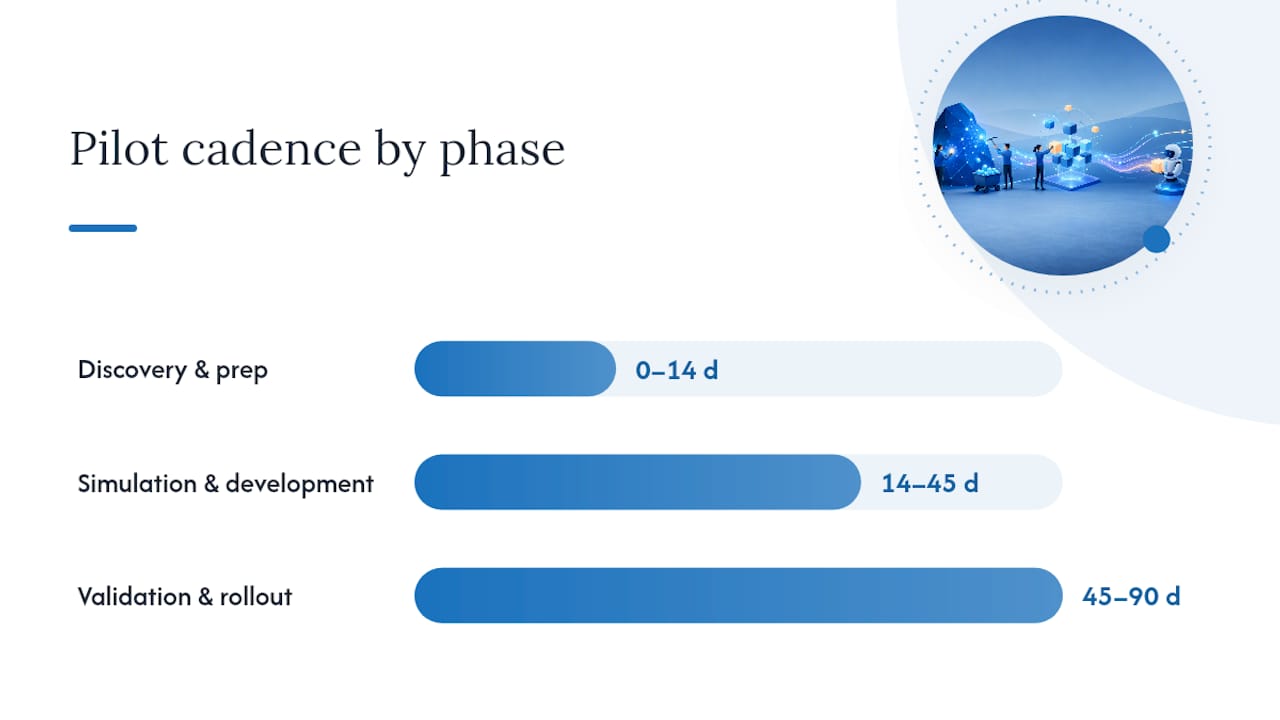
A reliable cadence looks like days 0 to 14 for discovery and data prep, days 14 to 45 for simulation and development, and days 45 to 90 for validation and monitored rollout.
Pro Tip: Set your success criteria before day 14, not after the bot is built. Teams that define “done” only after seeing results tend to move the goalposts to match whatever number they got.
When to Add Task Mining or AI-Driven Discovery
Process mining shows you everything that leaves a digital trace in your systems. It shows nothing about what happens on a person’s screen when they copy a number from one tab and paste it into another, because that action never generates a system log entry.
That gap is exactly where task mining earns its place, capturing desktop-level clicks and keystrokes to explain why a specific step runs slow or breaks often. Run it selectively, on the two or three hotspots process mining already flagged, rather than across every desktop in the company.
- Use process mining first for end-to-end, system-wide visibility.
- Layer task mining onto specific bottlenecks where the cause is unclear.
- Reserve AI-driven discovery interviews for processes too informal or undocumented to leave any structured trace at all.
Practitioner guidance consistently backs this sequencing: start broad, then go narrow only where the process map cannot explain itself.
Applied Example: How an AI Readiness Audit Converts Insight Into Automation
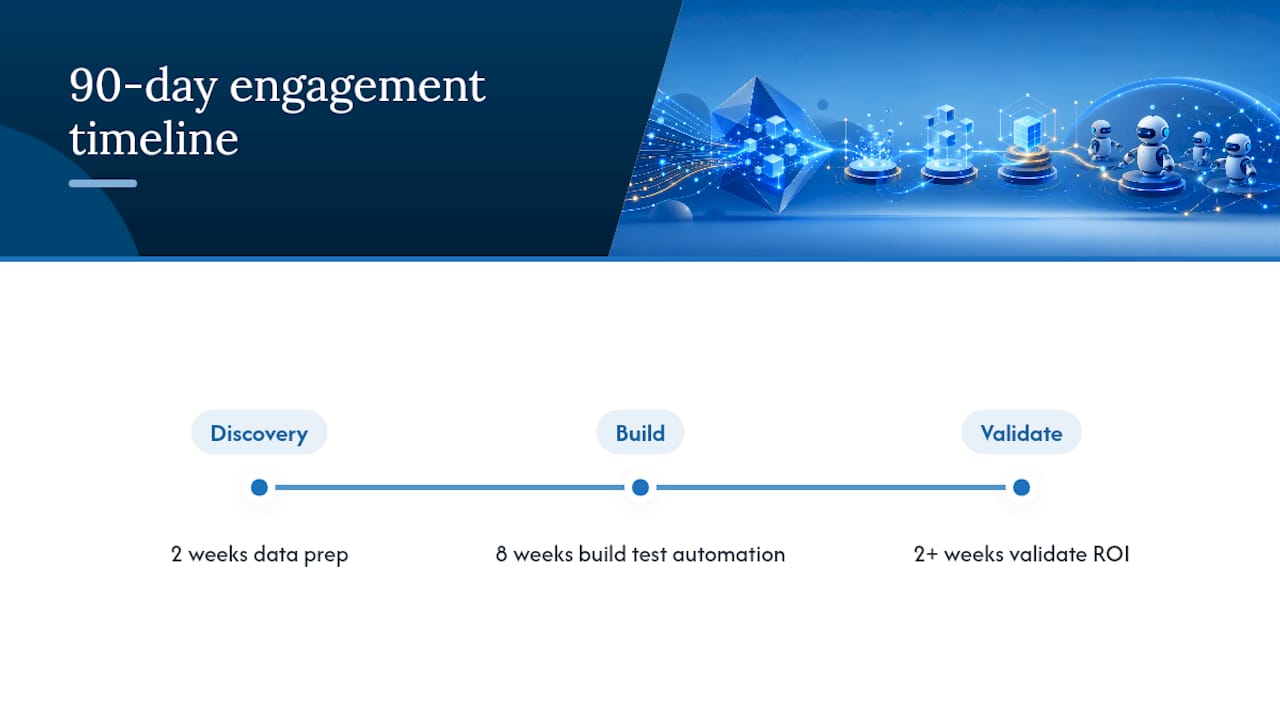
An AI Readiness Audit typically starts by pulling the same event-log data process mining relies on, then scoring which processes are ready for automation versus which need data cleanup first. That scoring becomes the backbone of a 90 day engagement: the first two weeks mirror the discovery and data prep phase above, the middle stretch builds and tests the automation against real system schemas, and the final weeks validate results against the original ROI estimate. Digitalfractal’s AI workflow automation services apply this exact structure across logistics, construction, and oil and gas operations, where high transaction volume tends to make the ROI case obvious once the data is clean.
Lessons From the Field
The single biggest mistake teams make is mining a process before deciding what “good” looks like for the pilot. Fix the scope before you touch the data. Second, narrow pilots beat ambitious ones. A single process done well earns the trust to expand. Third, governance is not paperwork, it is what stops a bot from quietly duplicating payments while everyone celebrates the launch. Fourth, iterate on the automation the same way you iterated on the process map, monitor, adjust, repeat.
Before rollout, check: is the data clean, is one person accountable for the outcome, and does the ROI estimate survive a 30 percent haircut? If yes to all three, you are ready to build.
— Souhail
Key Documentation and Guides
- What Is Process Mining: Tools, Models, and Low-Code
- Setting Up Automation Integration
- Process Mining vs. Task Mining
- Building a Reliable Automation Workflow
If your event logs are ready but you are not sure which process to automate first, Digitalfractal’s AI Readiness Audit walks through exactly that scoring and pilot design within a 90 day timeline, tailored to logistics, construction, and oil and gas workflows.
Sources
- What is Process Mining: Tools, Models, & Low-Code
- Setting up automation integration (Process Mining docs)
- Process Mining vs. Task Mining – SAP Signavio
- Process Mining Success Stories and Common Use Cases