
Pilot First Construction Change Order Automation for Contractors

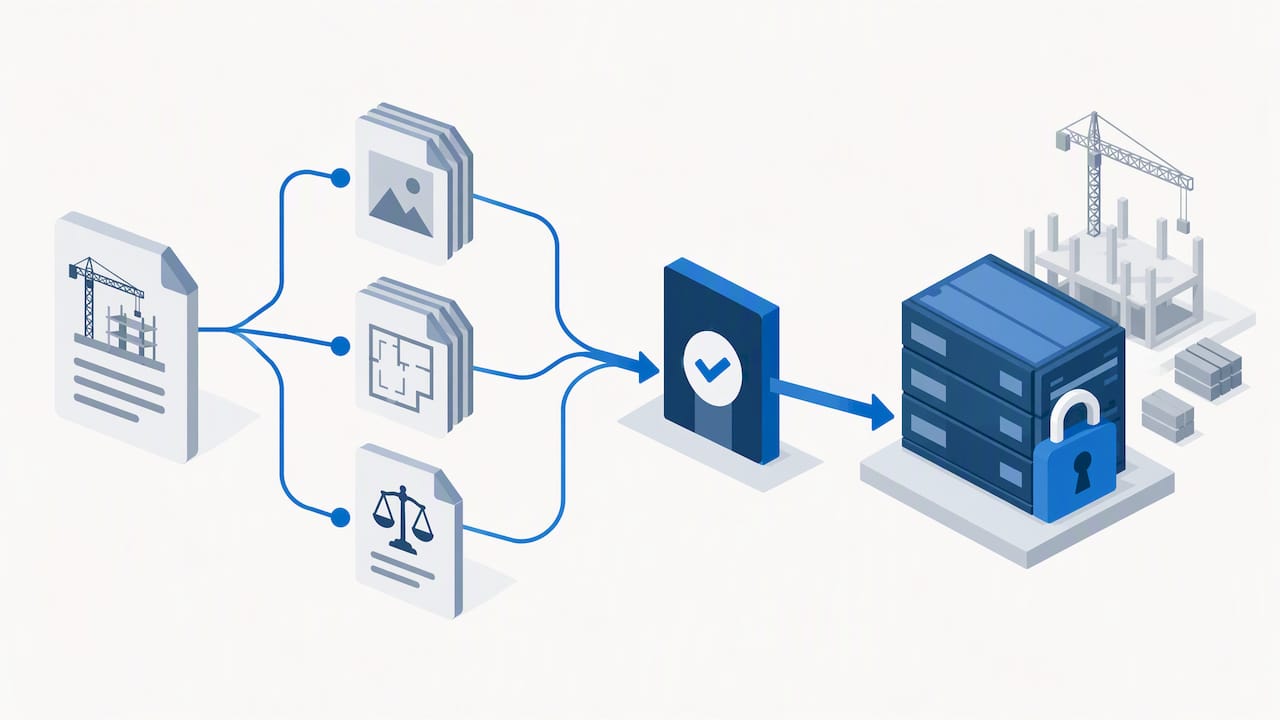
Construction change order automation captures a proposed scope change, assesses its cost and schedule impact, routes it for review, and, once approved, syncs that change into the budget and payment workflow. The single biggest benefit is approval gating: pending proposals stay drafts, so they cannot alter a financial baseline until someone with the right privilege signs off, which keeps approvals faster and the project’s numbers trustworthy.
TL;DR:
- Only approved change orders can update the project budget, preventing unauthorized changes from affecting the financial baseline.
- Robust evidence collection, including timestamps and clear references, is essential to defend change orders and reduce disputes.
- Integrating change order data with accounting and payment systems is critical for maintaining a single reliable record and avoiding manual entry errors.
- A staged implementation, starting with standardization and pilot testing, helps ensure workflow stability and effective AI integration.
- Clear governance, role-based privileges, and an immutable audit trail are fundamental to automating change order processes and minimizing dispute risks.
Table of Contents
- What construction change order automation actually does
- Four capability layers to evaluate in software
- A staged implementation roadmap: pilot, integrate, then automate
- Governance, approvals, and auditability
- Measuring impact: KPIs and outcomes to track
- Common pitfalls, red flags, and how to avoid them
- How one AI consulting firm approaches change order automation
- How an AI consulting firm can help you put this into practice
- FAQ
- Sources
What construction change order automation actually does
Automation replaces a scattered email-and-spreadsheet process with a controlled sequence that everyone on the project can see and trust. The workflow follows the same logical path whether it runs on paper or inside software, but digital capture and routing remove the delays that come from manual handoffs.
A typical flow looks like this:
- A field team flags a potential change using photos, markup on drawings, or an RFI that points to a discrepancy through streamlined capture and workflow tools from Right Flow Solutions Ltd..
- The change becomes a potential change order (PCO), with evidence attached and timestamped.
- The PCO moves to cost and schedule assessment, where someone maps it to cost codes and estimates impact.
- The package routes for approval based on dollar thresholds, contract terms, or owner sign-off requirements.
- Once approved, and only then, the change updates the budget, schedule of values, and payment applications.
The Autodesk change order tracking documentation frames this last step as the highest-value integration point: approved values should flow into the budget and downstream financial records automatically, while anything still in draft form stays quarantined from the baseline. That separation is what prevents a disputed or incomplete change from quietly reshaping a project’s finances before anyone has actually agreed to it.
Four capability layers to evaluate in software
Not every tool labeled “change order software” does the same job. Breaking the decision into four layers makes it easier to compare options against what your team actually needs.
- Change-event capture. Look for mobile field capture that works offline, supports photo and markup attachments, and timestamps every entry so there is a clear record of when evidence was collected.
- Pricing and scope-baseline controls. The tool should map changes to cost codes, sync with the schedule of values, and let estimators edit pricing without touching the approved baseline until the change clears review.
- Approvals and audit trail. Configurable approval workflows, e-signature support, and role-based privileges matter more than a slick interface. The system should record who approved what, and when.
- Integrations and exportability. A change order tool that cannot talk to accounting, ERP, scheduling, or payment applications creates a second system of record instead of eliminating one.
Capterra’s listing for construction management software points to the same four categories as the features buyers consistently check for, alongside collaboration and accounting integration. For firms operating under Canadian contract forms, it is worth confirming that a platform supports the specific contract templates in use, stores data in a way that satisfies your firm’s security requirements, and gives subcontractors appropriately limited access rather than full visibility into the owner’s financials.
Pro Tip: Ask any vendor to demo the exact moment a draft change becomes an approved budget line. If they cannot show that gate clearly, assume it does not exist.
For a broader look at platform options worth shortlisting, see our overview of construction project management software.
A staged implementation roadmap: pilot, integrate, then automate
Rolling out change order automation across every active project at once is how firms end up with inconsistent data and frustrated field staff. A staged approach gets you a measurable win before you ask anyone to change their daily habits at scale.
- Stage 0: Standardize first. Agree on status names, required fields, cost code structures, and dollar thresholds for approval tiers before any software goes live.
- Stage 1: Pilot on one active project. Pick a project with a reasonable volume of changes and require human review of every AI-assisted output during this phase.
- Stage 2: Connect the surrounding systems. Link RFIs, drawings, field logs, estimating tools, your ERP or accounting platform, and payment applications so approved changes flow without manual re-entry.
- Stage 3: Add AI carefully. Once the workflow is stable, introduce AI for tasks like extracting scope details from RFIs or drafting a first-pass cost estimate, with exception flagging and a human sign-off before anything moves forward.
Oracle’s documentation on change order automation describes this same staged sequence, noting that a new budget baseline version should only form once the proper privileges and approvals are in place, not before.
Governance needs to be defined at this stage too: who owns the approval workflow, which roles carry which privileges, how escalations are handled when a change stalls, and what documentation standard every PCO must meet before it is considered complete. Skipping this step is the most common reason pilots stall before producing a usable result.
Governance, approvals, and auditability
Automation only reduces disputes if it is built around the same discipline that prevents disputes on paper: clear approval authority, a complete record, and nothing touching the budget without sign-off. The technical fix is approval gating. Only an “implement” privilege, held by a defined role, should be able to create or update a budget baseline or version. Everyone else can propose, assess, or review, but the system should block them from writing to the financial record.
Pair that gate with an immutable audit trail: timestamps on every entry, versioned attachments so nothing gets overwritten, and a direct link between each change and the contract clause or drawing revision that justifies it.
A documented pattern across disputes: the Arcadis 2025 construction disputes report identifies owner-directed changes, differing site conditions, and contract errors as recurring drivers of construction disputes, and it stresses that technology only helps when it reinforces communication and contract clarity rather than replacing them.
A templated change package should include:
- The originating evidence (photo, RFI, or markup) with a timestamp.
- A cost and schedule impact estimate tied to specific cost codes.
- The contract clause or drawing reference the change relies on.
- A clear approval record showing who signed off and when.
For more on structuring these workflows, see our piece on approval workflow automation.
Measuring impact: KPIs and outcomes to track
A pilot without baseline numbers is just a hope. Before automating anything, record your current cycle times and error rates so you have something to compare against.
Track these during and after a pilot:
- PCO-to-approval cycle time, measured from first capture to final sign-off.
- Approval aging, which flags changes stuck in review past a defined threshold.
- Revision count, since repeated rework on the same PCO signals unclear scope or pricing.
- Documentation completeness, checking whether every package has the evidence and contract reference it needs.
- Unapproved-work exposure, the dollar value of work started before formal sign-off.
- Margin capture, comparing billed change order value against the cost actually incurred.
On the financial side, watch for shorter billing cycles, fewer payment disputes, and tighter forecast accuracy as approved changes start flowing directly into budget and payment systems instead of sitting in someone’s inbox. Our workflow automation benefits calculator can help frame early estimates for a pilot’s expected return. For a deeper look at how these gains show up across construction workflows, see our automation use cases.
Common pitfalls, red flags, and how to avoid them
Most automation efforts that stall or backfire share a handful of root causes, and all of them are avoidable with the right guardrails from the start.
- Letting drafts touch the budget. If a PCO can update financial baselines before approval, the system has already failed its most basic job. Enforce workflow gating so only approved changes write to the budget.
- Accepting weak field evidence. A change order with no photo, no timestamp, and no clear reference to a drawing or RFI is hard to defend later. Set a minimum evidence standard and reject submissions that fall short.
- Relying on brittle exports instead of real integrations. A tool that only produces a CSV someone has to re-enter into accounting defeats the purpose. Prefer native integrations for anything touching payment applications, and confirm export paths are reliable where native integration is not available.
- Skipping training and rushing AI into production. Teams that are not trained on the new workflow revert to email within weeks. Keep a human-in-the-loop policy for any AI-generated scope or pricing interpretation until the system has a track record.
Pro Tip: Run a 30-day “shadow period” where the new system operates alongside your existing process before you retire the old one. Discrepancies surface fast.
Our document control guide covers what counts as sufficient field evidence in more detail.
How one AI consulting firm approaches change order automation
Change order automation can be treated as a governance project with software attached, often starting with an AI readiness audit to map the current PCO workflow, cost code structure, and approval chain, before moving into a pilot on one active project.
Every AI-assisted step, whether extracting scope details from an RFI or drafting a first-pass cost estimate, ideally runs through human review before it affects a budget line. This approval-gating principle applies to the specific contract forms, accounting systems, and field conditions clients work with. Following a pilot-first sequence can lead to faster PCO approval times and cleaner audit trails within the first project cycle, avoiding disruption of a company-wide rollout on day one.
How an AI consulting firm can help you put this into practice
If your team is still routing change orders through email threads and shared spreadsheets, the fastest path forward is not buying new software first. It is mapping your current workflow so you know exactly where automation will save the most time and where approval gating needs to be tightest.
Our AI Readiness Audit does that mapping work directly, identifying where field capture, approvals, and your accounting or ERP system are creating friction today. From there, our Workflow Automation service builds the pilot: a governed, auditable process tied to your actual cost codes and contract terms, not a generic template. For teams ready to go further with custom AI drafting or extraction tools, our AI Consulting & Machine Learning Solutions cover that build-out.
What this looks like in practice:
- Start with an audit that maps your current PCO-to-approval path and flags where delays happen.
- Pilot a governed workflow on one active project with human review built into every AI step.
- Scale integrations to your accounting, scheduling, and payment systems once the pilot proves out.
Book an AI Readiness Audit to see where your change order process stands today.
FAQ
How do you process a change order on a construction project?
A change order typically starts as a potential change order (PCO) once a scope issue is identified, often from an RFI, a field observation, or a drawing discrepancy. The PCO moves through cost and schedule assessment, then through an approval chain defined by the contract, and only becomes a binding change once signed off by the appropriate parties.
What are some examples of automation in construction?
Common examples include automated change order routing and approvals, field data capture through mobile apps with photo and markup evidence, and syncing approved budget changes directly into accounting or payment systems. Predictive scheduling tools and automated document control systems also fall into this category.
What’s the difference between an RFI and a change order?
An RFI, or request for information, asks a question about an ambiguity or conflict in the drawings or specs and does not by itself change the contract. A change order follows once that question, or any other scope issue, is assessed for cost and schedule impact and formally approved, making it a binding modification to the contract.
What does a change order typically cost to process in construction?
Published figures on administrative cost per change order vary widely across markets and contract types, so there is no single reliable number to cite here. What is consistent across industry reporting is that disputes and delays tied to poorly documented changes, rather than the paperwork itself, drive the larger financial exposure, which is why the Arcadis disputes report points to auditability and contract clarity as the stronger cost-avoidance levers.
Sources
- Construction change order tracking | Autodesk Forma
- Change Order Automation for Project Budget Adjustments — Oracle
- Construction disputes report — Arcadis (2025)