
Supplier Onboarding Automation: A Practical Canadian Guide

Supplier onboarding automation replaces the email-and-spreadsheet chase with one structured workflow: the supplier submits their details once, the system validates them, routes approvals by risk, and writes clean records into your ERP. For a Canadian company, a good setup also checks the supplier’s GST/HST registration and handles personal information in line with PIPEDA. This guide covers what to automate, what to leave to people, and how to get a working version live in about 90 days.
TL;DR
- Automate intake, document checks, reminders, approval routing and ERP posting. Keep a named person for exceptions.
- Tier your suppliers by risk and spend, so a low-risk office-supply vendor never gets the questionnaire meant for a critical carrier.
- In Canada, build in GST/HST number confirmation against the CRA registry and a PIPEDA-aware handling of banking and personal data.
- Most failures come from mismatched ERP data fields, not from the automation tool itself.
- Start with one supplier category, prove it, then widen it.
Table of Contents
- What supplier onboarding actually involves
- Where manual onboarding breaks down
- What to automate, and what to leave to people
- Tier your suppliers before you build anything
- Canadian specifics you should build in
- The ERP is where projects succeed or fail
- Buy, build or blend
- A 90-day rollout plan
- Perspective: automate the routine, protect the judgment
- How we can help
- FAQ
- Sources
What supplier onboarding actually involves
Supplier onboarding is the process of setting up a new supplier in your systems so you can start buying from them. Stripe’s guide describes it as collecting tax IDs, banking details and compliance documents before the first purchase order goes out.
In practice, a typical Canadian onboarding touches six things:
- A request from a buyer or department (“we need to use this carrier”).
- A supplier information form: legal name, business number, address, contacts.
- Tax details, including the GST/HST account number and any province-specific registrations.
- Banking details for payment, which are a prime fraud target.
- Compliance documents: insurance certificates, safety records, certifications, signed terms.
- Approval, then creation of the vendor record in the ERP or accounting system.
When this runs on email, each step becomes a thread. Someone attaches a void cheque, someone else asks for a missing insurance certificate, a third person re-types everything into the ERP. Nothing is wrong with any individual person. The process just depends on memory and goodwill.
Where manual onboarding breaks down
The pain shows up in four places.
Cycle time. Onboarding over email and spreadsheets takes weeks, because every missing document restarts a conversation. The project that needed that supplier next Monday waits.
Data quality. Re-keyed fields produce typos in bank account numbers, wrong legal names and duplicate vendor records. Duplicates are how the same invoice ends up paid twice.
Risk blind spots. When checks depend on whoever is handling the file, some suppliers get a thorough review and others get none. Expired insurance goes unnoticed because nothing is watching the date.
Lost audit trail. When finance or an external auditor asks why a supplier was approved, the answer lives in someone’s inbox.
We cover the broader case for moving this work out of inboxes in why you need to digitize your vendor management process.
What to automate, and what to leave to people
Automation is not a switch you flip for the whole process. It works best on steps that are repetitive, rule-based and high-volume.
| Step | Automate? | How |
|---|---|---|
| Supplier invitation and data intake | Yes | A single portal form with required fields, replacing email attachments |
| Document collection and reminders | Yes | Automatic requests, chasers and expiry alerts |
| Document verification (completeness, format, dates) | Yes | Rules and document extraction; flag anything unreadable |
| GST/HST number check | Yes, with care | Format validation automatically, registry confirmation per CRA rules |
| Approval routing | Yes | Route by spend, category and risk tier |
| Bank detail change verification | Partly | Automate the callback request, keep a human sign-off |
| ERP vendor record creation | Yes | Push approved data through an integration, not by re-keying |
| Unusual tax residency, non-standard certifications | No | Route to a named reviewer |
The last row matters. According to Gatekeeper’s vendor onboarding material, the most successful projects use automation to filter out the routine bulk of requests and reserve expert time for the small share of high-risk ones. That roughly 90/10 split is a useful design target, not a guarantee. Your own split depends on your supplier mix.
The same source reports that automated onboarding workflows can cut manual administrative tasks and cycle times by up to 90% compared with email-based processes. Treat that as a vendor’s upper bound. Measure your own baseline first (days from request to first PO, touches per supplier) so you can see what you actually gain.
Tier your suppliers before you build anything
The most common design mistake is one questionnaire for everyone. Stripe’s guidance points toward pre-qualifying vendors and triggering deeper checks by risk level or spend threshold, so low-risk suppliers are not buried in compliance paperwork.
A simple three-tier model works for most mid-sized Canadian firms:
- Tier 1, low risk and low spend. Basic identity, tax number, banking details. Fully automated approval.
- Tier 2, moderate. Adds insurance certificates, references and a short security or privacy questionnaire. Automated routing to a category manager.
- Tier 3, critical or high spend. Adds financial checks, site safety records, certifications and a full contract review. Automated collection, human approval.
For a logistics firm, a fuel card vendor and a subcontracted carrier handling customer freight are not the same risk. For a construction company, a stationery supplier and a concrete subcontractor with workers on site are different again. The tier decides the workflow, which keeps suppliers cooperative and your team focused.
Canadian specifics you should build in
Many guides on this topic are written for a US or global audience. Three Canadian points deserve their own design decisions.
GST/HST confirmation
If you claim input tax credits, your supplier must be validly registered. The CRA explains how to confirm a GST/HST account number on its official page for confirming a GST/HST account number, and it points businesses to its GST/HST registry for that check. A supplier that is not validly registered puts your ability to claim credits on the tax you paid at risk.
In an automated workflow, that means:
- Validate the format of the 9-digit business number and the RT account suffix at the form stage, so obvious typos never reach your team.
- Record the date and result of the registry confirmation on the supplier file.
- Send anything that does not match to a human instead of rejecting it silently. Suppliers with unusual structures or recent registrations are often legitimate.
Check the CRA page for the current method before you design the step, since the options for confirming (manual lookup versus automated services) can change.
PIPEDA and the data you collect
Onboarding collects personal information more often than people expect: sole proprietors’ banking details, contact names, driver licences or identification for owner-operators. Under PIPEDA, private-sector organizations must report a breach of security safeguards to the Privacy Commissioner when it creates a real risk of significant harm. The federal government’s announcement of the breach rules notes that failing to notify can carry fines of up to $100,000.
Two practical consequences follow:
- Collect only what each tier needs. Data you never collected cannot leak.
- If a third-party platform hosts your supplier portal, you remain accountable. The Privacy Commissioner’s findings in PIPEDA 2020-001 show that a contract clause alone is not enough: the organization is expected to assess the vendor’s risk up front and keep monitoring afterward. Plan for security reviews of your own tooling, documented access limits and a regular audit rhythm.
Our 8-step PIPEDA checklist for AI audit readiness goes deeper if your onboarding automation will include AI document processing. If your suppliers or hosting sit outside Canada, PIPEDA vs GDPR explains the differences compliance teams run into.
This is operational guidance, not legal advice. For a specific breach question or a cross-border data arrangement, speak with your privacy officer or a privacy lawyer.
Bilingual and provincial realities
If you buy in Quebec, expect suppliers who work in French and may carry provincial tax registrations in addition to the federal GST. Build the portal so suppliers can choose their language and enter more than one tax registration. It is far cheaper to add this on day one than after launch.
The ERP is where projects succeed or fail
A beautiful portal that feeds a messy ERP just moves the mess. Practitioners who integrate supplier data with Canadian systems such as NetSuite or Sage report that the most common failure is mismatched data mapping. Gatekeeper’s guidance is to design the portal fields to mirror the ERP’s required schema. Otherwise people re-key fields because the two systems do not match, and data drifts.
A practical mapping exercise:
- List every field the ERP needs to create a valid vendor: legal name, remit-to address, payment terms, currency, tax codes, bank details.
- Mark which are mandatory, which have fixed value lists, and which the ERP validates.
- Copy those constraints into the portal form, including dropdowns that use the ERP’s own codes.
- Decide who owns each field after onboarding, so updates flow back through the same workflow.
- Test with ten real, awkward suppliers before launch, not ten tidy ones.
If your ERP exposes an API, push approved records directly. If it does not, a structured export with validation is still better than a person retyping. For construction firms, we have shown how this looks in an ERP software project. For other document-heavy flows, such as logistics paperwork, see how we approach bill of lading OCR.
Buy, build or blend
There are three broad routes, and none is right for every company.
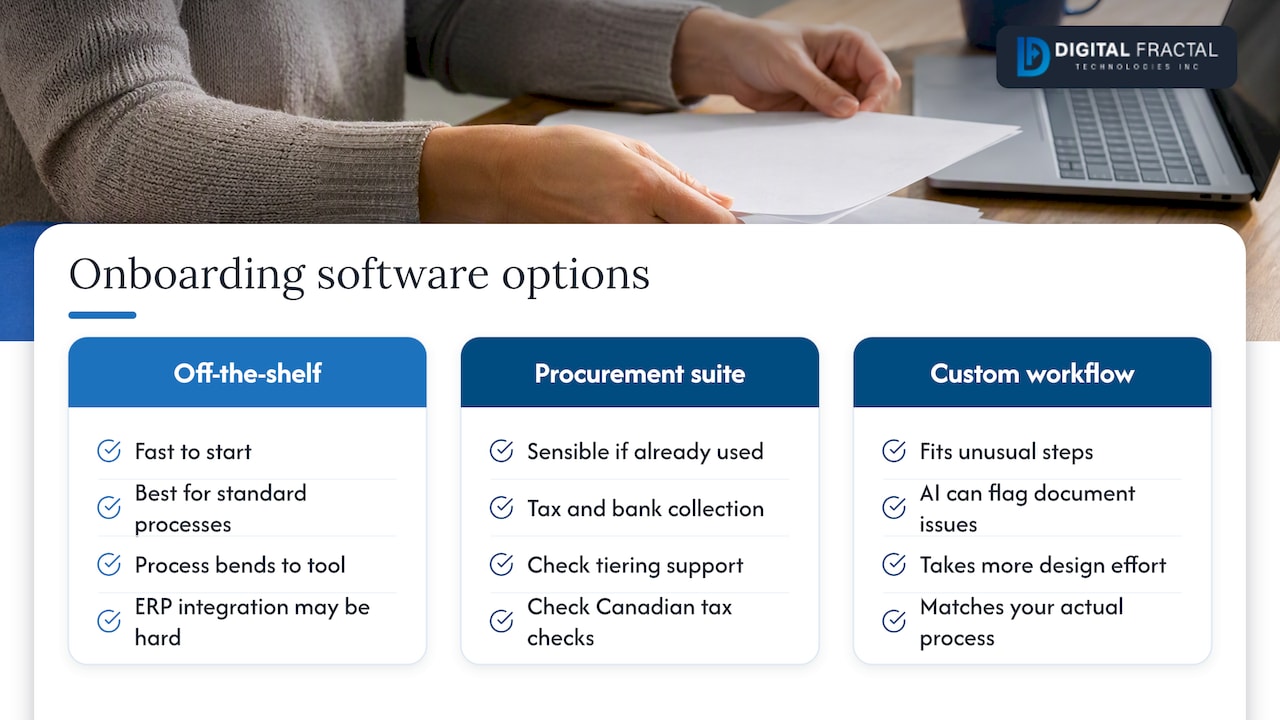
Off-the-shelf onboarding or vendor management software. Fast to start and well suited if your process is standard. The trade-off is that your process bends to the tool, and integration with a less common ERP or an internal system can be the hard part.
Payables or procurement suites with onboarding built in. Sensible if you already run one and mostly need tax and bank collection. Check how deeply it supports tiering and Canadian tax checks.
Custom workflow automation on top of your existing systems. Fits when your onboarding has unusual steps (site safety sign-off, driver qualification, equipment certifications) or when you want AI to read documents and flag problems. It takes more design effort but matches your actual process.
Most firms end up blending: a portal or form layer, workflow rules for routing, and integrations into the ERP. The question to ask any option is simple: does it mirror my tiers, my ERP fields and my Canadian compliance steps? If you want a short framework for proving the approach before committing, prove one workflow before you scale it makes the same point from an adjacent field: start narrow, show results, then expand.
A 90-day rollout plan
A first version does not need to cover every supplier. Here is a plan that fits roughly 90 days.
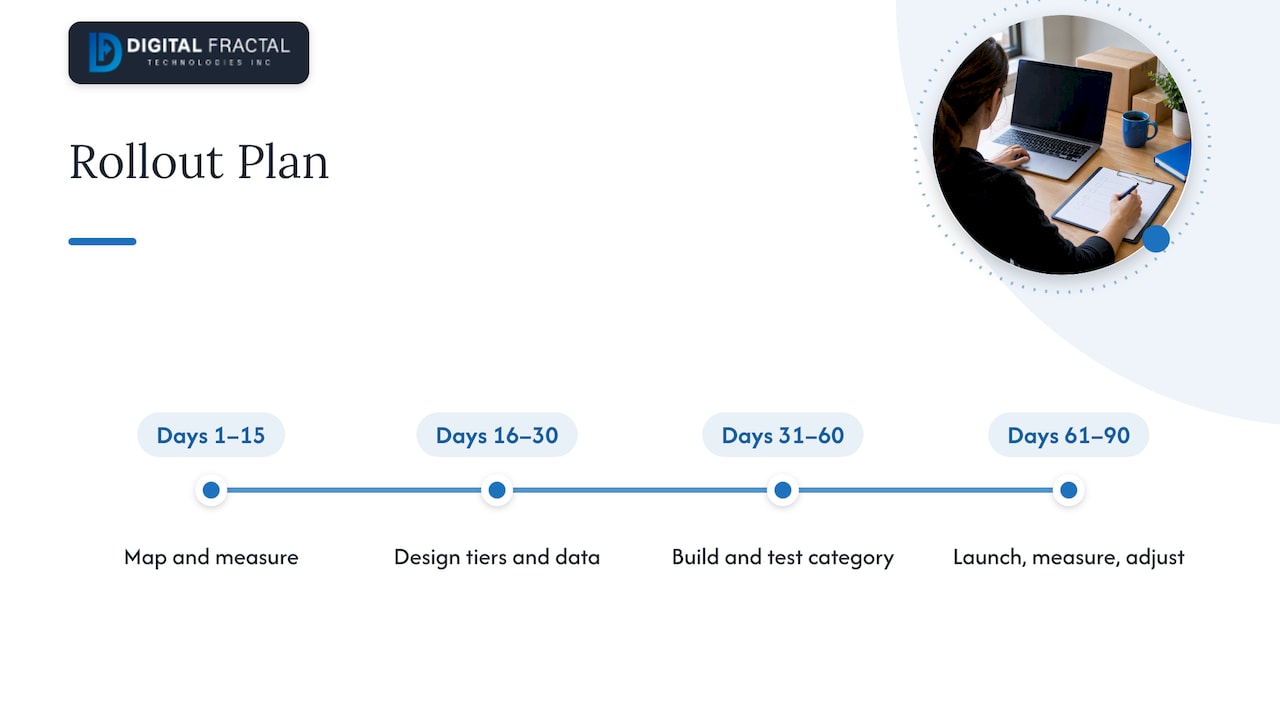
Days 1 to 15: map and measure. Document the current process as it really runs. Pull a sample of recent onboardings and record elapsed days, number of emails and the reasons for delays. Agree who the process owner is.
Days 16 to 30: design the tiers and the data. Define the tiers, the questions for each, the approval rules and the ERP field mapping. Decide the Canadian checks: GST/HST confirmation, privacy handling, retention periods.
Days 31 to 60: build for one category. Pick one supplier category with real volume, such as subcontractors or carriers. Build the intake form, document rules, reminders, routing and ERP integration. Run it in parallel with the old process for a handful of suppliers.
Days 61 to 90: launch, measure, adjust. Switch that category over. Compare cycle time, error rate and touches per supplier against the baseline. Review every exception the workflow could not handle and decide whether it needs a rule or should stay with a person.
After that, add the next category. Each one is faster because the plumbing already exists.
Perspective: automate the routine, protect the judgment
We see the same pattern in the companies that come to us. Their onboarding is not broken because people are careless. It is broken because the process lives in inboxes, and every supplier is treated as a special case.
Our view is that the best automation is boring. It asks suppliers for exactly what their tier requires, checks it against rules, reminds them politely, and creates the ERP record without anyone retyping it. Then it hands the unusual files, such as a foreign-resident subcontractor or a certification nobody has seen before, to someone who can decide.
We also push back on the idea that a tool alone fixes this. Before building anything we want to know which fields your ERP insists on, which suppliers carry real risk, and what your auditors will ask. Without those answers you automate confusion faster. That is why we begin with an audit of readiness, then deliver a tailored solution built around your workflows and systems rather than generic consulting.
— Souhail
How we can help
If you are weighing where automation fits in your supplier process, our AI Readiness Audit is the usual starting point. It is a one-off engagement priced from $2,500 to $10,000, and it identifies which steps of onboarding (and other workflows) are worth automating, what data you need in order, and what to build first. If you already know what you want, our workflow automation team designs and builds the intake, routing and ERP integration. We work with logistics, construction and oil and gas operators across Canada, and our focus is a tangible result inside 90 days.
FAQ
How do I onboard a new supplier?
Collect the supplier’s legal and contact details, tax numbers, banking information and required compliance documents through one form. Verify the tax registration, review documents against your risk tier, obtain approval, then create the vendor record in your ERP. Doing this in a single portal rather than over email keeps the record and audit trail in one place.
What should a Canadian company check about a supplier’s tax status?
Confirm the supplier’s GST/HST account number, because input tax credits depend on the supplier being validly registered. The CRA publishes the method on its GST/HST confirmation page. Record the date and result on the supplier file, and send mismatches to a person to review.
Can supplier onboarding be fully automated?
Routine suppliers can move through with little or no human touch, but a person should still own exceptions such as unusual tax residency or non-standard certifications. Designing for a small share of human-reviewed, high-risk requests is more realistic and safer than aiming for zero involvement.
Does PIPEDA apply to supplier onboarding data?
Yes, when the data includes personal information, such as a sole proprietor’s banking details or an owner-operator’s identification. Private-sector organizations must report breaches that pose a real risk of significant harm, and they stay accountable when a third-party platform handles the data. Ask your privacy officer to review the design.
How long does it take to automate onboarding?
For one supplier category with a clear ERP target, a working first version in about 90 days is a realistic goal. The time goes mostly into mapping data fields, defining tiers and testing awkward cases, not into the technology.
Sources
- Supplier onboarding and vendor onboarding: a guide (Stripe)
- Vendor Onboarding Software (Gatekeeper)
- Confirming a GST/HST account number (Canada Revenue Agency)
- Ensuring the safety and security of Canadians’ personal information (Government of Canada)
- PIPEDA Findings #2020-001 (Office of the Privacy Commissioner of Canada)