Construction Document Control: A Practical Field Guide

Construction document control is the active lifecycle management of every project record, from first draft through final archive, with enforced versioning, audit trails, and role-based access at every step. As Fieldwire defines it, this is fundamentally different from simply storing files in a shared folder. Storage is passive. Document control is a discipline.
If your team is starting from scratch or cleaning up a broken system, four actions move the needle immediately:
- Establish a single source of truth. One platform, one location. No emailed PDFs that become the “real” version on someone’s desktop.
- Enforce a naming convention before the first drawing is issued. Retrofitting names mid-project is painful and error-prone.
- Require mobile access for field crews. If the superintendent can’t pull the current drawing on a tablet at the site, the paper copy in their truck becomes the de facto record.
- Log every transmittal. Date, sender, recipient, document version, and method of delivery. No exceptions.
Key Takeaways
Effective construction document control requires a single source of truth, enforced naming conventions, role-based permissions, and mobile field access, all configured before the first document is issued.
| Point | Details |
|---|---|
| Single source of truth | One platform, one location; no parallel email chains or local copies that become authoritative. |
| Name and version discipline | Apply a consistent naming convention (project, discipline, type, revision, status) before the first drawing is issued. |
| Mobile field access | Field crews need current drawings on a phone or tablet; without it, paper copies become the de facto record. |
| Pilot AI on stable processes | Automate RFI routing, metadata extraction, or closeout aggregation only after the underlying human process is documented and consistent. |
| Closeout starts at day one | Tie O&M manual and warranty collection to subcontractor payment milestones, not to the final month of the project. |
In the next 7 days: Pick one active project, audit its current document log for naming consistency and transmittal completeness, and identify the single biggest gap. Fix that gap before adding any new tooling.
Table of Contents
- Why construction document control determines project outcomes
- How construction document control works: the full lifecycle
- What document types every project should track
- Best practices that actually prevent failures
- What software features actually matter in the field vs. the office
- How to choose and roll out a document control system
- Where AI delivers real value in document control right now
- Preparing for audits, claims, and closeout
- Newforma, Procore, and Autodesk Construction Cloud: what each does best
- Common pitfalls that derail document control programs
- How to protect construction documents from security and data threats
- How document control connects to the rest of your project systems
- Real-world examples of document control done right
- The part most guides won’t tell you about document control
- Sources
Why construction document control determines project outcomes
Version confusion is expensive. When a crew builds from a superseded drawing, the rework cost isn’t just the labor to fix the mistake. It’s the delay, the material waste, the subcontractor coordination to reschedule, and the potential claim exposure if the owner disputes responsibility. Autodesk’s construction blog reports that construction professionals can spend a substantial portion of their time searching for project information. That’s more than one day per week per person, consumed by a problem that good document control eliminates.
The contractual stakes are just as real. Every RFI response, every approved submittal, every change order carries legal weight. If a dispute reaches arbitration or litigation, the question isn’t what happened on site. It’s what the documents prove. A project with clean transmittal logs, timestamped approvals, and a complete RFI chain can defend its position. A project where documents were emailed back and forth with no formal log often cannot.
Collaboration improves measurably when teams share a single, authoritative record. Design leads, subcontractors, inspectors, and the owner’s representative all work from the same version. Fewer coordination meetings. Fewer “which drawing are you looking at?” phone calls. Well-maintained digital documentation reduces rework, improves coordination, and serves as legal evidence, and teams that maintain it through the project complete closeout faster and with fewer disputes.
How construction document control works: the full lifecycle
The document lifecycle has seven distinct steps. Each one has a clear owner, and skipping any of them is where projects get into trouble.
- Intake and logging. Every document entering the project gets assigned a unique ID, logged with metadata (date received, originator, discipline, revision level), and placed in the correct folder or category. The document controller or project administrator typically owns this step.
- Review and approval. The document routes to the appropriate reviewers based on type. Submittals go to the design team. RFIs go to the architect or engineer of record. Change orders go to the owner’s representative. Routing rules should be defined in the project’s document control plan before the first document arrives.
- Issuance and transmittal. Approved documents are issued with a formal transmittal that records what was sent, to whom, when, and at what revision. The Los Angeles Bureau of Engineering’s e2020 system is a clear example of centralized logging and tracking for RFIs, submittals, and change orders, with the construction manager responsible for uploading and monitoring key documents.
- Distribution. The right people receive the right documents. Distribution lists are maintained and updated when project personnel change. This step is where role-based permissions matter most.
- Field issuance and supersedure. When a new drawing revision is issued to the field, the previous revision is formally superseded. Field copies (physical or digital) are marked void or replaced. This step prevents the single most common source of rework.
- Revision control. Every change to a document generates a new revision with a clear revision history. The document control workflow should define how drawings, submittals, RFIs, and change orders each handle revisions, because the rules differ by document type.
- Archival and closeout. At project completion, the full document set is archived in a format that satisfies contract requirements and applicable retention laws. O&M manuals, warranties, as-builts, and inspection records are compiled into a closeout package.
Who owns each step
A dedicated document controller handles intake, logging, transmittals, and distribution on projects above roughly $20 million or with high document volume. On smaller projects, the project administrator or project engineer typically absorbs these duties. The project manager owns the approval routing rules and escalation thresholds. Design leads own review turnaround within their discipline. The superintendent owns field supersedure, confirming that crews are working from current drawings.
Simple transmittal template
A transmittal doesn’t need to be complex. At minimum it should capture: Project name and number | Transmittal number | Date | From (company and contact) | To (company and contact) | Document list (ID, title, revision, date) | Purpose (for approval / for construction / for information) | Response required by (date).
What document types every project should track
A complete construction project documentation scope covers ten categories. Missing any of them creates gaps that surface at closeout or in a dispute.
- Issued-for-construction drawings. The current, approved drawing set. Metadata: drawing number, discipline, revision, issue date, issued-by.
- Specifications. Division-by-division technical requirements. Metadata: spec section number, revision, date.
- Submittals and shop drawings. Contractor-prepared documents demonstrating compliance with specs. Metadata: submittal number, spec section reference, contractor, review status, return date.
- RFIs and responses. Requests for information and the design team’s official responses. Metadata: RFI number, date submitted, date responded, discipline, status.
- Change orders and change directives. Scope and cost changes to the contract. Metadata: CO number, originating PCO, date executed, dollar value, schedule impact.
- Contracts and amendments. Prime contract, subcontracts, and any amendments. Metadata: contract number, parties, execution date, value.
- Permits and regulatory approvals. Building permits, inspection sign-offs, agency approvals. Metadata: permit number, issuing authority, issue date, expiration.
- Daily reports and site photos. Field conditions, labor counts, weather, and progress. Digital twins and reality-capture workflows create a dimensionally accurate, accessible record that supports progress tracking and as-built verification.
- Inspection and test records. Concrete pours, weld inspections, commissioning tests. Metadata: test type, date, inspector, pass/fail, reference spec.
- O&M manuals and warranties. Equipment operation manuals and manufacturer warranties for closeout. Metadata: equipment tag, manufacturer, warranty period, submittal reference.
For field crews, the highest-priority documents are current drawings, active RFI responses, and approved submittals. These need to be accessible on a mobile device, even with intermittent connectivity. Everything else can tolerate a short sync delay.
Best practices that actually prevent failures
Five practices separate teams that control their documents from teams that are controlled by them.
Single source of truth. Every document lives in one place. No parallel email chains, no USB drives, no “I’ll send you the latest version.” This is a cultural rule enforced by tooling, not the other way around.
Standardized naming conventions. A naming convention based on ISO 19650-style minimum fields gives every file a predictable, parseable name. A workable format looks like this:
| Field | Example | Purpose |
|---|---|---|
| Project number | 2024-047 | Ties file to project |
| Discipline code | STR | Structural, MEP, ARC, etc. |
| Document type | DWG | Drawing, SPEC, RFI, SUB, CO |
| Sequence number | 0042 | Unique within type |
| Revision | R03 | Current revision level |
| Status | IFC | Issued for Construction, IFR, IFA |
Full filename: 2024-047-STR-DWG-0042-R03-IFC.pdf
Strict versioning and supersedure. When a new revision is issued, the previous one is marked superseded in the system immediately, not after distribution. The system, not the individual, controls which version is current.
Role-based permissions. Subcontractors see their scope. The owner sees what the contract entitles them to see. Design leads can upload but not approve their own submittals. Permissions are set at project setup, not adjusted reactively.
Mobile field access. If crews can’t access documents on a phone or tablet, they’ll use whatever they have. That usually means a printed set from last week.
Daily, weekly, and phase-based document control checks
- Daily: Log all incoming documents. Confirm field drawings match the current revision in the system. Record any transmittals sent.
- Weekly: Review open RFI and submittal logs for items approaching SLA deadlines. Confirm distribution lists are current. Audit any documents received via email that haven’t been formally logged.
- Phase-based: At each major milestone (design completion, permit issuance, substantial completion), run a full document audit. Confirm all superseded drawings are marked void. Begin incremental closeout collection.
RFI and submittal response SLAs
Pro Tip: The hardest part of enforcing a single source of truth isn’t the software. It’s the superintendent who’s been emailing drawings to subcontractors for 20 years. Pair the policy with a simple mobile setup session on day one of construction. Show crews how to pull a drawing on their phone in under 30 seconds. Adoption follows convenience.
What software features actually matter in the field vs. the office
Software features sound similar across platforms until you map them to real operational problems. Here’s what each one actually solves:
- Version control with automatic supersedure. Solves: crews building from outdated drawings. The system marks old versions void the moment a new one is published.
- Audit trail. Solves: disputes over who approved what and when. Every action, every view, every download is timestamped and attributed.
- Role-based permissions. Solves: unauthorized changes, accidental overwrites, and confidentiality breaches on sensitive contract documents.
- Mobile and offline access with automatic sync. Solves: rural or underground sites with poor connectivity. Crews download the current set before going offline; changes sync when connectivity returns.
- Transmittal management. Solves: undocumented document exchanges that become liability gaps in a claim.
- Drawing pinning and markup. Solves: field observations that need to be tied to a specific location on a drawing, not described in a separate email.
- RFI and submittal workflows. Solves: ad hoc routing that misses reviewers or loses track of response deadlines.
- BIM and CAD integration. Solves: disconnected model and document environments where the drawing set and the model diverge over time.
- Search and metadata filtering. Solves: the time drain of hunting for documents. With proper metadata, a document is findable in seconds by discipline, revision, or date range.
- Scheduling and ERP integrations. Solves: the gap between document status and schedule impact. When a submittal is approved, the linked activity in the schedule can update automatically.
Field crews use mobile access, drawing pinning, and photo documentation most. Office teams rely on transmittal management, RFI/submittal workflows, and reporting. A platform that handles both without requiring two separate logins is worth the premium.
How to choose and roll out a document control system
Selection and rollout are where most firms stumble. They pick software based on a demo, skip the pilot, and then wonder why adoption is poor six months later.
Selection criteria
Before evaluating any platform, confirm it meets these non-negotiable requirements:
- Single source of truth with no parallel file storage
- Mobile and offline access with automatic sync
- Configurable role-based permissions
- Full audit trail with export capability
- Native integrations with your scheduling and BIM tools
- SOC 2 Type II or equivalent security certification
- Responsive vendor support and structured onboarding
For guidance on mapping these criteria to your current workflows, a project management software evaluation can help clarify which integrations are non-negotiable for your firm’s stack.
30/60/90-day rollout timeline
- Days 1–30 (Pilot setup). Select one active project. Configure naming conventions, folder structure, permission roles, and distribution lists. Migrate existing documents. Train the project team. Goal: zero documents exchanged outside the platform by day 30.
- Days 31–60 (Pilot operation). Run the full document lifecycle on the pilot project. Track transmittal compliance, RFI response times, and field adoption rates. Identify friction points. Goal: document all process gaps before scaling.
- Days 61–90 (Evaluation and scale decision). Review pilot metrics. Adjust configuration. Build the rollout plan for remaining active projects. Goal: a written rollout plan with owner assignments and a training schedule.
Cost considerations
Licensing costs vary widely by platform tier and project count. Budget separately for:
- Software licensing. Per-user or per-project pricing; confirm whether field-only users require full licenses.
- Training. Vendor-led onboarding for administrators plus crew-level mobile training. Plan for 4–8 hours per role type.
- Content migration. Moving legacy documents from shared drives or email archives. This is consistently underestimated. Budget for a dedicated resource for at least two weeks on a mid-size project.
- Change management. The time cost of process redesign, policy documentation, and enforcement. This is not optional.
Use a workflow automation benefits calculator to estimate the labor-hour savings from eliminating manual transmittal logging and document search time before committing to a platform budget.
Where AI delivers real value in document control right now
AI in construction document control isn’t a future concept. Several use cases are already reducing admin hours on active projects.
- Automated OCR and metadata extraction. Scanned submittals, permits, and inspection records are automatically parsed for project number, discipline, date, and revision. This eliminates manual data entry for incoming documents. AI-powered OCR can extract structured metadata from unstructured PDFs at a fraction of the time a human administrator would spend.
- RFI and submittal triage and routing. AI classifies incoming documents by type and discipline, then routes them to the correct reviewer without manual intervention. On projects with 500+ RFIs, this alone saves significant coordinator time.
- Automated naming and version tagging. Uploaded files are automatically renamed to match the project’s naming convention and tagged with the correct revision level based on document content.
- Duplicate detection and broken reference detection. AI flags duplicate documents before they enter the system and identifies broken CAD/BIM Xref paths when files are moved between storage environments, a common and costly technical pitfall when migrating from local servers to cloud storage.
- Closeout package aggregation. AI scans the document set at project completion, identifies missing O&M manuals, warranties, and as-builts, and generates a gap report. This turns a multi-week manual audit into a same-day task.
90-day AI pilot outline
Weeks 1–4. Audit scope: pull transmittal logs, RFI response times, and submittal routing records for one project. Identify the three highest-volume manual tasks. Define success metrics (time per transmittal, RFI routing errors, metadata completeness rate).
Weeks 5–8. Deploy automation on the highest-volume task only. Validate outputs against manual baseline. Adjust rules.
Weeks 9–12. Measure against success metrics. Document the time savings. Build the business case for scaling to additional projects or document categories.
A 90-day jobsite AI pilot follows the same scoped, low-risk structure and is a proven model for construction teams new to automation.
Pro Tip: Don’t automate a broken process. Before deploying AI on RFI routing, confirm that your RFI log is clean, your routing rules are documented, and your reviewers are actually responding within SLA. Automating a chaotic process just makes the chaos faster.
Preparing for audits, claims, and closeout
Document control is your legal defense. When a claim arises, the question is always the same: can you prove it?
The minimal evidence set for a defensible claim includes:
- Transmittal logs showing every document sent, received, and acknowledged
- Timestamped approval records for all submittals and change orders
- Complete RFI chains: original question, clarification exchanges, and final response
- Daily reports and timestamped site photos tied to specific dates and locations
- Meeting minutes with attendee lists and action items
- Notices of delay or disruption issued within the contractually required window
Retention policy should be set at project kickoff, not at closeout. As a baseline, retain all project records for a minimum of 10 years after substantial completion, or longer if state law or the contract requires it. Some states impose longer statutes of repose for construction defect claims. Confirm the applicable period with legal counsel for each project jurisdiction.
Before substantial completion, run a quick claim-readiness check:
- Are all change orders fully executed and logged?
- Are all open RFIs closed or formally documented as pending?
- Is the as-built drawing set current and verified by the superintendent?
- Are all subcontractor closeout documents (O&M manuals, warranties, lien waivers) collected or formally requested in writing?
Practitioners who integrate closeout collection into daily workflows, tying documentation deliverables to subcontractor payment milestones, dramatically shorten final closeout and reduce retained claims. Start collecting O&Ms and warranties at substantial completion of each system, not at project end.
This article provides general guidance on documentation practices. Consult qualified legal counsel for advice specific to your contracts and jurisdiction.
Newforma, Procore, and Autodesk Construction Cloud: what each does best
Three platforms dominate the construction document control conversation. Each has a distinct strength.
Newforma is purpose-built for AEC firms managing large volumes of project correspondence and email. Its strength is email capture and project information management, particularly for design firms that need to track correspondence alongside formal submittals and RFIs without manually logging every exchange.
Procore is a full construction management platform with document control as one component of a broader suite covering financials, scheduling, and field management. Its strength is breadth: a general contractor running multiple trades across a large project benefits from having drawings, RFIs, submittals, change orders, and daily reports in one environment.
Autodesk Construction Cloud (which includes Autodesk Docs and the former PlanGrid and BIM 360 capabilities) is strongest for teams with heavy BIM and CAD workflows. The integration between model data and document control is tighter here than on most platforms, making it the natural choice for design-build firms or owners who want model-linked documentation through construction and into operations.
When to evaluate a platform vs. when to use targeted automation
A full platform replacement makes sense when your current system has no audit trail, no version control, or no mobile access. If you already have a platform but specific workflows (transmittal logging, RFI routing, closeout aggregation) are still manual, targeted automation integrated into your existing stack is faster to deploy and lower risk.
Comparison dimensions to apply when evaluating any platform: version control depth, audit trail export capability, mobile offline functionality, BIM/CAD integration, security certifications, onboarding support quality, and total cost of ownership across a three-year horizon.
Common pitfalls that derail document control programs
The most common failure isn’t a software problem. It’s a process problem that software then inherits.
Allowing email to remain authoritative. When a subcontractor emails a revised drawing and the recipient saves it locally, the system of record is broken. The fix is a policy with teeth: documents received outside the platform are not official until logged.
Inconsistent naming conventions. A naming convention that isn’t enforced at upload is no convention at all. Automated naming rules at the platform level, or a pre-upload validation check, are the only reliable enforcement mechanisms.
Broken CAD/BIM references (Xrefs). Moving files from a local server to cloud storage without preserving path mapping breaks Xref links in CAD files. Egnyte’s guidance on AEC document control identifies this as a hidden technical pitfall that causes significant rework for design teams. Virtualized drive mappings or a deliberate path migration plan prevents it.
Permissions set too broadly. When everyone has edit access, version discipline collapses. Permissions should be set by role at project setup and reviewed at each phase transition.
Closeout treated as a phase, not a practice. Teams that start collecting O&M manuals and warranties in the final month of a project consistently miss items and delay final payment. Closeout collection should begin at the first equipment installation.
Training skipped for field crews. Office teams adopt new software faster than field crews. If the superintendent and foremen aren’t trained on mobile access in the first week of construction, they’ll default to paper or email. That gap rarely closes on its own.
How to protect construction documents from security and data threats
Construction documents contain sensitive information: contract values, proprietary design details, subcontractor pricing, and personal data for project personnel. A breach or data loss event can expose the firm to liability and delay a project.
Minimum security requirements for any document control platform:
- SOC 2 Type II certification. This confirms the vendor has undergone an independent audit of its security controls. It’s the baseline standard for cloud platforms handling sensitive project data.
- Role-based access control with audit logging. Every access event is logged. Permissions are enforced at the document level, not just the folder level.
- Data encryption in transit and at rest. All data should be encrypted using current standards (TLS 1.2 or higher in transit, AES-256 at rest).
- Multi-factor authentication. Required for all users, not optional. A single compromised password should not expose the entire project record.
- Backup and disaster recovery. Confirm the vendor’s recovery point objective (RPO) and recovery time objective (RTO). For active projects, an RPO of 24 hours or less is the practical minimum.
- Data residency. For projects with federal or state data requirements, confirm where data is stored and whether it can be restricted to US-based servers.
Internally, limit administrative access to the document control system to named individuals. Review and revoke access for personnel who leave the project or the firm. A quarterly access audit takes less than an hour and prevents the slow accumulation of stale permissions that creates security gaps over time.
How document control connects to the rest of your project systems
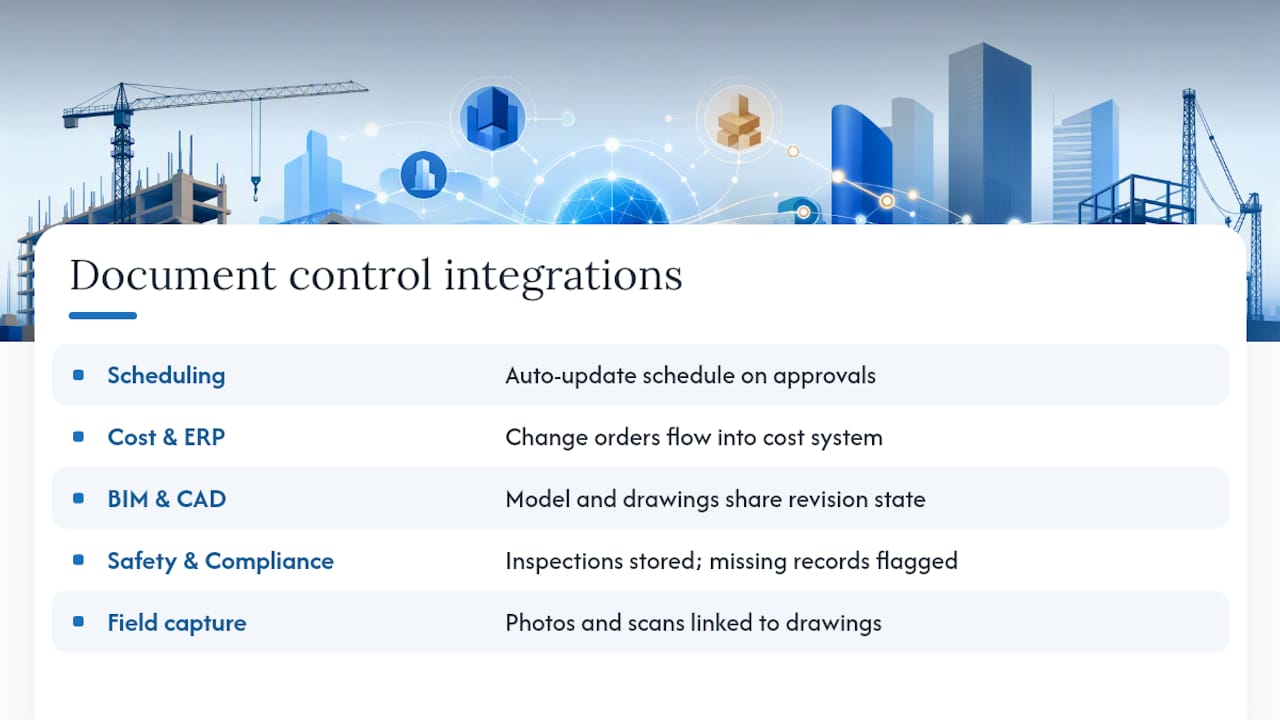
Document control doesn’t operate in isolation. Its value multiplies when it’s connected to the other systems your team already uses.
Scheduling integration. When a submittal is approved or a drawing revision is issued, the linked schedule activity should update automatically. Manual handoffs between document control and scheduling are a common source of schedule errors.
Cost management and ERP. Change orders approved in the document control system should flow directly into the cost management system. Duplicate entry between platforms creates reconciliation errors and delays owner billing.
BIM and CAD. The model and the document set should reference the same revision state. Platforms with native BIM integration enforce this automatically. Without it, the model and the drawing set diverge, and field teams get conflicting information.
Safety and compliance documentation. Inspection records, safety incident reports, and regulatory compliance documents belong in the same controlled environment as drawings and submittals. AI-powered safety compliance tools can automate evidence capture and flag missing inspection records before they become audit findings.
Field capture and reality data. Site photos, drone surveys, and 360-degree scans tied to specific drawing locations create a continuous as-built record. Digital twins act as a living documentation hub, attaching records and annotations in context and reducing repeated site visits for verification.
The goal is a connected project environment where a change in one system propagates correctly to all others. That doesn’t require a single monolithic platform. It requires deliberate integration planning at project setup, not after the fact.
Real-world examples of document control done right
Municipal infrastructure project, Los Angeles. The Bureau of Engineering’s e2020 system centralizes logging and tracking for all project correspondence, including RFIs, submittals, and change orders. The construction manager uploads and monitors key documents, and the system generates status summaries and exportable reports. The result is a verifiable, auditable record that satisfies both contractual and public-accountability requirements without relying on individual discipline.

Large commercial general contractor. A GC managing a $150 million mixed-use development implemented a cloud-based document control platform at project kickoff, with naming conventions and distribution lists configured before the first drawing was issued. By month three, RFI response times had dropped because reviewers received automatic notifications instead of waiting for email follow-ups. At closeout, the full document set was exportable in a single operation rather than assembled manually from multiple sources.
Design-build firm with BIM-heavy workflow. A firm using Autodesk Construction Cloud connected its model environment directly to its document control system. When a structural drawing was revised, the linked model element updated automatically and the previous drawing revision was marked superseded in the document register. Field crews pulled current drawings from the same environment the design team used, eliminating the version gap that had caused two rework incidents on the previous project.
These examples share a common thread: the system was configured before work started, not retrofitted after problems appeared.
The part most guides won’t tell you about document control
Document control fails at the human layer far more often than the technical one. Every platform on the market can enforce versioning, log transmittals, and restrict permissions. What no platform can do is make a project manager care about the audit trail until they need it in a dispute.
The real leverage point is connecting document discipline to outcomes the team already cares about. Superintendents care about not getting blamed for rework. Project managers care about getting paid on time. Owners care about closeout speed. Frame document control in those terms, not as an administrative burden, and adoption follows.
There’s also a tendency to over-engineer the system at the start. A naming convention with 12 fields, a folder structure with six levels of nesting, and a permission matrix that requires a committee decision to add a new user will collapse under field conditions. Start with the minimum viable structure that prevents the three most common failures on your projects: wrong drawing version in the field, undocumented transmittals, and missing closeout documents. Build complexity only when the simple version breaks.
The AI automation opportunity in document control is real, but it’s most valuable after the human process is stable. Automating RFI routing on a project where the routing rules aren’t documented just produces faster confusion. Get the process right first. Then automate the repetitive parts.
Sources
- Construction document control: A practical guide | Fieldwire by Hilti
- 16.5 Construction Document Control | Bureau of Engineering
- Construction documentation and digital twins | Matterport blog
- Construction Document Control Workflow: A Step-by-Step Guide
- 10 Expert Tips for Construction Document Control