Developer Playbook: Mobile Computer Vision in a 90 Day Pilot

Yes, you can run computer vision on-device for most real-time mobile tasks, and for the majority of production apps, you should. Lightweight models like MobileNet variants, paired with hardware delegates and a tuned capture pipeline, handle object detection, classification, and tracking without a round trip to the cloud. The catch: you need to quantize your model, minimize frame copies, and design your tracking logic so the phone isn’t re-detecting the same object every frame. Reach for hybrid or cloud inference only when your model is too large for the device or you need centralized analytics across thousands of sessions.
TL;DR:
- Quantize models and optimize the capture pipeline to run real-time computer vision tasks locally on most mid-range and flagship devices.
- Use a detection interval of every third to fifth frame combined with lightweight tracking to maintain smooth output at 30 frames per second.
- Profile and tune hardware delegates on actual devices, not emulators, to ensure consistent performance across different manufacturers and processor types.
- Prioritize testing across diverse hardware and implement telemetry to monitor inference time, memory use, and errors in production.
- Build with a structured 90-day pilot process to validate performance, accuracy, and device compatibility before full deployment.
Table of Contents
- Getting Your Development Environment Ready for Mobile CV
- Choosing Between ML Kit, TensorFlow Lite, ONNX Runtime, OpenCV, and Core ML
- What Latency Target Should You Actually Hit?
- Shrinking Your Model Without Wrecking Accuracy
- Feeding the Model: Camera Capture Without the Copy Overhead
- Hardware Delegates: Getting GPU and NPU Acceleration Right
- On-Device, Hybrid, or Cloud: Picking the Right Architecture
- Testing, Battery, and Keeping Your App Size Down
- How Digital Fractal Runs a Mobile Computer Vision Pilot
- Reference Documentation Worth Bookmarking
- What Actually Separates a Working Pilot From a Shipped Product
- Turn a Mobile CV Pilot Into a Shipped Feature With Digitalfractal
- Sources
Getting Your Development Environment Ready for Mobile CV
Before you write a line of inference code, get your toolchain and test devices sorted. Skipping this step is how teams end up debugging a “model problem” that’s actually a camera permission bug or an outdated NDK.
On Android, you’ll want Android Studio with a recent NDK level, CameraX for capture, and a minimum SDK target that matches your hardware acceleration plans (API 24+ covers most delegate scenarios, though NNAPI features vary by OEM). On iOS, Xcode plus AVFoundation is the standard pairing, and you should target iOS 15 or later if you want reliable Core ML Neural Engine scheduling.
Install the runtimes you’ll actually test against, not just the one you think you’ll ship with:
- TensorFlow Lite for custom-trained models and broad Android support
- ONNX Runtime Mobile if you’re exporting from PyTorch or need cross-framework portability
- ML Kit for fast wins on common tasks like text recognition or barcode scanning
- Core ML tools for converting models into Apple’s native format
Pick two or three physical test devices spanning low-end, mid-range, and flagship hardware. A model that hits 30 frames per second on a Pixel 9 can crawl on a three-year-old budget Android phone with no NPU. Build a small labeled test dataset (100 to 500 images covering your real lighting and background conditions) before you start benchmarking anything, and set up permission flows for camera access early since App Store and Play Store review both flag late-added permissions.
Finally, wire up basic profiling. Android Studio’s Profiler and Xcode’s Instruments both give you memory, CPU, and thermal readouts. You’ll use these constantly once you start optimizing.
Choosing Between ML Kit, TensorFlow Lite, ONNX Runtime, OpenCV, and Core ML
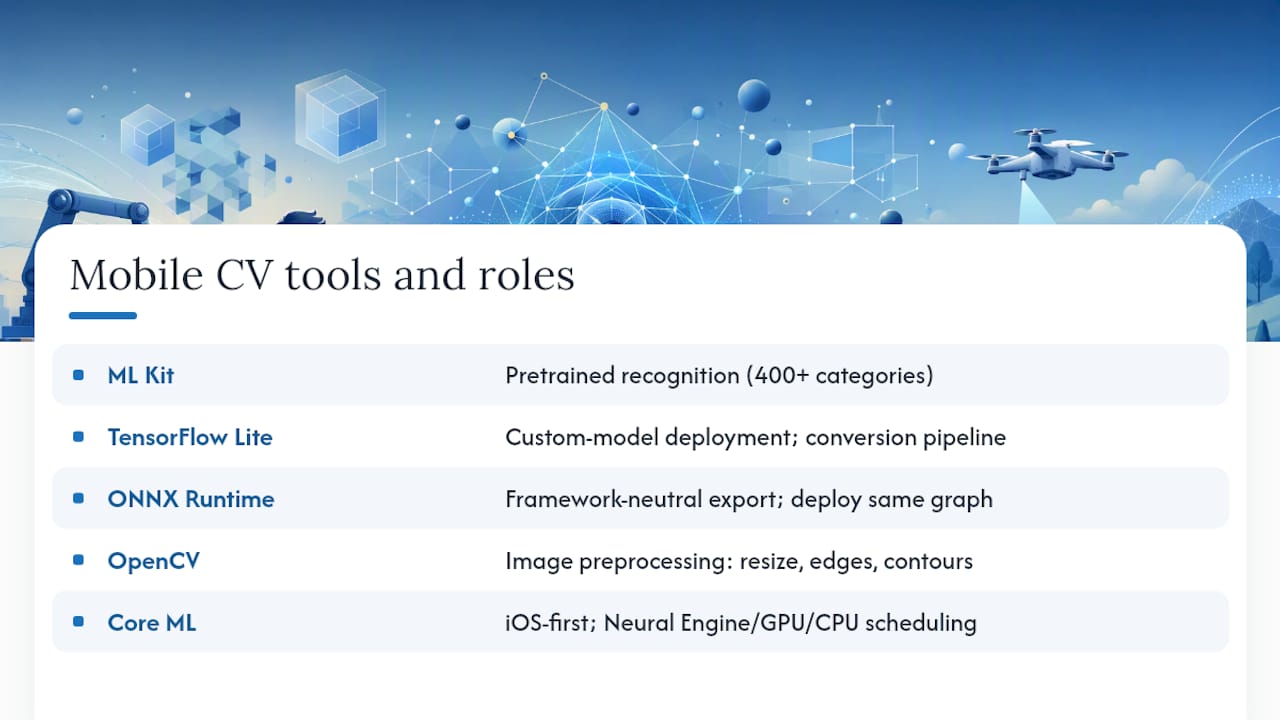
Each of these tools solves a different piece of the mobile computer vision problem, and most serious apps end up using two or three of them together rather than picking just one.
ML Kit is Google’s fastest path to shipping common recognition tasks. Its base image labeling model recognizes over 400 distinct categories out of the box, which makes it a strong choice when you need barcode scanning, face detection, or generic object labeling without training anything yourself. The trade-off is flexibility: once your use case gets specific (detecting a proprietary product SKU, say, or a construction safety violation), ML Kit’s pretrained models stop being enough.
TensorFlow Lite is where you go for custom models. If you’ve trained a detector on your own dataset, TFLite gives you a mature conversion pipeline, broad delegate support, and the largest body of community documentation for mobile deployment. It runs on both Android and iOS, though its Android tooling is noticeably more mature.
ONNX Runtime earns its place when you need framework neutrality. If your data science team trains in PyTorch but your mobile team ships on both platforms, ONNX Runtime lets you export once and deploy the same graph everywhere. The mobile deployment guide for Android walks through running a pretrained MobileNet V2 classifier, which is a genuinely good starting template for your first working pipeline.
OpenCV isn’t a deep learning runtime at all. It’s the workhorse for everything a neural network doesn’t do well: image resizing, color space conversion, edge detection, contour finding, perspective correction. A minimal OpenCV mobile build exists specifically for Android and iOS, trimmed down from the desktop library so it doesn’t bloat your APK with modules you’ll never call.
Core ML is Apple’s answer, and if you’re building iOS-only or iOS-first, it’s usually the right call. It automatically schedules work across the Neural Engine, GPU, and CPU without you writing delegate logic, and its integration with Xcode’s tooling makes profiling far less painful than the Android equivalent.
Use ML Kit when speed to market matters more than customization. Use TensorFlow Lite or ONNX Runtime when you’ve trained your own model. Use OpenCV alongside either one for preprocessing. Use Core ML when Apple is your only platform.
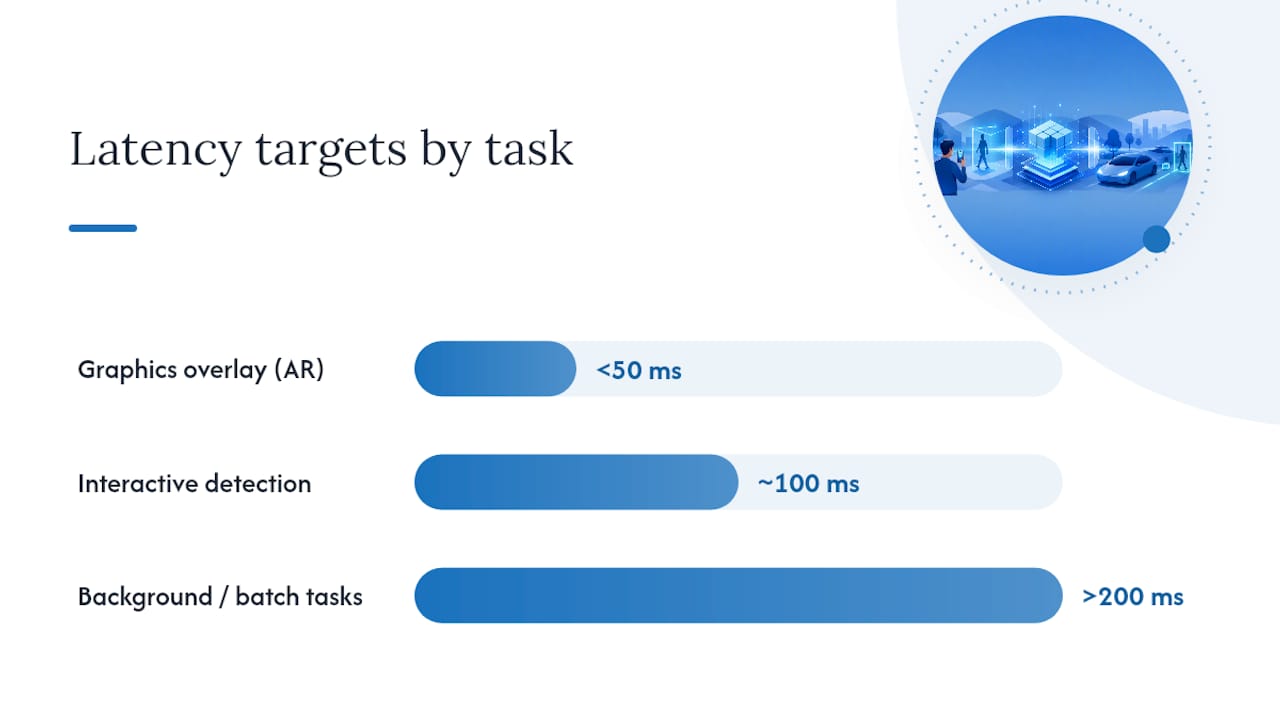
What Latency Target Should You Actually Hit?
Real-time computer vision lives and dies on frame pacing, and the acceptable latency budget depends entirely on what the user is doing with the result.
- Under 50 milliseconds: needed for anything overlaying graphics on a live camera feed, like AR filters or live measurement tools. Anything slower and users perceive visible lag between motion and the overlay.
- Around 100 milliseconds: acceptable for interactive detection tasks, such as scanning a document or identifying a product, where a brief pause feels natural.
- Over 200 milliseconds: only tolerable for background or batch-style tasks, like tagging photos after capture rather than during a live view.
The trick that most teams miss isn’t running a faster model. It’s running the model less often. Full object detection is expensive; running it on every single frame at 30 frames per second is usually unnecessary and often impossible on mid-range hardware. Instead, run detection every third or fifth frame and fill the gaps with a lightweight CPU-based tracker that propagates the bounding box using motion estimation. This is precisely the pattern practitioners recommend for real-time computer vision on mobile: detect at a cadence, track in between, and you get the visual smoothness of 30fps output while only paying the detection cost a handful of times per second.
A practical implementation sequence looks like this:
- Run your detector on frame 1 and get bounding boxes plus class labels.
- Apply non-max suppression on-device to collapse overlapping boxes before they ever reach your UI layer.
- For the next 3 to 5 frames, use optical flow or a simple centroid tracker to move the existing boxes rather than re-detecting.
- Re-run full detection on a fixed interval or when tracking confidence drops below a threshold.
- Never block the main UI thread with inference. Push it to a background queue and update the overlay asynchronously.
Building a mobile-optimized tracker from scratch is sometimes necessary because many high-accuracy tracking libraries were never designed for phone hardware constraints, as MediaPipe’s own tracking documentation notes when discussing why lighter motion-propagation approaches often outperform heavier trackers in production.
Pro Tip: Benchmark your detection-to-tracking ratio on your actual worst-case device, not your development phone. A ratio that feels seamless on a flagship can produce visible stutter on a three-year-old mid-range Android device, and the fix is almost always tuning the interval, not swapping the model.
Shrinking Your Model Without Wrecking Accuracy
Model export and optimization is where most of your latency gains actually come from, more than any clever pipeline trick.
The typical export path runs one of two ways: tf.keras models convert directly to .tflite, while PyTorch models usually go through ONNX first and then either stay as .onnx or get converted again into .tflite or .mlmodel via coremltools for Apple targets. Each hop is a chance to introduce a numeric mismatch, so validate outputs against your original model after every conversion step, not just at the end.
Quantization is your biggest lever:
- Float16 quantization works well on GPU delegates and typically halves model size with minimal accuracy loss, making it a safe default for CNN-based detectors.
- Int8 quantization shrinks models further and runs efficiently on CPU and NPU hardware, but it requires a representative calibration dataset and can cost you a percentage point or two of accuracy on edge cases.
- Pruning and distillation let you build genuinely smaller architectures from the start. MobileNet-family backbones and lightweight YOLO variants are popular because they were designed for exactly this constraint, not because they’re smaller versions of research models.
When you benchmark, measure the entire path end to end, including preprocessing and memory copies between camera buffer and model input tensor. A model that claims 15ms inference time on a benchmark chart can easily cost you 40ms once you add resizing, normalization, and the buffer handoff. Teams that only benchmark the model’s forward pass consistently ship apps that feel slower than their internal numbers suggested.
Feeding the Model: Camera Capture Without the Copy Overhead
The camera pipeline is where a lot of wasted milliseconds hide, mostly in format conversions nobody profiled.
Use CameraX on Android and AVFoundation on iOS as your capture layer. Both give you access to raw frame buffers in formats your model can consume with minimal conversion. Here’s what actually matters for keeping that pipeline fast:
- Request YUV or RGBA formats directly from the camera API instead of accepting a default format and converting it yourself in application code.
- Offload resizing and normalization to the GPU where your runtime supports it. A CPU-bound resize operation on a 4K camera frame can eat more time than the inference itself.
- Avoid bouncing data between CPU and GPU memory more than once per frame. Every round trip costs real milliseconds, and it compounds fast at 30fps.
- Choose a frame selection policy deliberately: fixed-interval sampling is simplest, motion-triggered capture saves battery when the scene is static, and adaptive throttling (slowing inference when the device is thermal-throttling) keeps the app usable during extended sessions.
- Handle orientation changes and autofocus hunting explicitly. A model fed a frame mid-focus-adjustment will produce a confident wrong answer, not an obviously bad one, which makes this bug category easy to miss in testing.
Hardware Delegates: Getting GPU and NPU Acceleration Right
Hardware acceleration is where iOS and Android diverge most sharply, and treating them the same way is a common source of shipped bugs.
On iOS, Core ML handles delegate selection for you. It automatically schedules operations across the Neural Engine, GPU, and CPU based on the model’s operator support, and in most cases you don’t need to write scheduling logic yourself. This is one of the strongest arguments for choosing Core ML on Apple-only projects: you get accelerator use without building the fallback logic by hand.
Android is messier. NNAPI support and vendor-specific delegates vary widely across manufacturers, and a delegate that works flawlessly on a Pixel can fail silently or fall back to CPU on a Samsung or budget device from another OEM. The safe pattern is to supply multiple delegate options (GPU delegate, NNAPI, and XNNPACK) with an explicit CPU fallback, and to detect delegate initialization failures at runtime rather than assuming success.
A few rules of thumb that hold up across most projects:
- Quantized int8 models tend to run best on NPUs and CPU delegates like XNNPACK.
- Float16 models generally perform well on GPU delegates for standard CNN architectures.
- When you’re running detection and something else simultaneously, like an AR session, watch for GPU contention. Splitting heavy detection work onto GPU while lightweight tracking runs on CPU avoids the resource contention that concurrent AR and vision workloads can cause.
Pro Tip: *Run a numeric-difference check between your CPU and delegate-accelerated outputs on a handful of test images before shipping.
Test across a real device matrix, not just simulators. Delegate behavior is genuinely hardware-dependent in ways that emulators can’t reproduce.
On-Device, Hybrid, or Cloud: Picking the Right Architecture
The architecture decision comes down to four questions: how fast does the result need to be, how sensitive is the data, how big is the model, and do you need aggregated analytics across users.
On-device inference wins on privacy, latency, and offline reliability. It’s the right default for most consumer-facing computer vision features, and it comes with the practical bonus that you’re not paying server costs for every frame processed. Running detection locally rather than streaming full video to a server also sidesteps a category of privacy compliance work you’d otherwise need to do, which matters increasingly for apps handling anything resembling personal data. Our breakdown of GDPR compliance for image recognition systems covers what that data-minimization approach looks like in practice.
Hybrid architectures make sense when your model is too large for a phone, or when you need to aggregate insights across thousands of sessions for a dashboard or trend analysis. In that case, run a smaller on-device model for the immediate user-facing result and send lightweight metadata (not raw frames) to the cloud for the heavier lift. Our comparison of edge computing versus cloud for AI workloads digs into where that line typically sits.
A few design habits worth building in from day one:
- Design for graceful degradation. If the cloud component is unreachable, fall back to a smaller local model or a simplified output rather than a hard failure.
- Roll out model updates with staged deployment and remote config, so you can revert a bad model version without an app store update cycle.
- Log inference metrics, error rates, and performance data, not raw images, when you need production telemetry.
Testing, Battery, and Keeping Your App Size Down
Validation for a mobile computer vision app has to cover more ground than a typical feature test, because performance itself is part of correctness here.
- Run benchmarks across a device farm covering low-end, mid-range, and flagship hardware, watching specifically for thermal throttling during extended sessions. A device that performs well for 30 seconds can throttle hard by minute five.
- Set up telemetry that captures inference time, memory footprint, and error rates, while explicitly avoiding transmission of raw camera frames.
- Reduce app size by custom-building your runtime. Trimming unused operators from OpenCV or ONNX Runtime instead of shipping the full library can cut meaningful megabytes, and dynamic feature modules let you defer downloading the CV components until a user actually needs them.
- Profile battery drain directly, and build in a power-saving mode that drops inference frequency or resolution when the device reports low battery.
Pro Tip: Test on a device with the battery saver mode already enabled by the user. Some OEMs throttle CPU and GPU clocks aggressively in that mode, and your carefully tuned frame rate can drop by half without any code change on your part.
How Digital Fractal Runs a Mobile Computer Vision Pilot
Digitalfractal structures mobile computer vision engagements around a 90-day cycle broken into four phases, each with clear owners and deliverables rather than an open-ended research project.
- Discover (weeks 1 to 2): audit existing infrastructure, define latency and accuracy targets, and identify the specific detection or classification task worth automating.
- Pilot (weeks 3 to 6): build a working model on a narrow scope, benchmark it against real devices, and validate accuracy against a labeled test set.
- Optimize (weeks 7 to 10): quantize, tune the capture pipeline, and address device fragmentation issues found in testing.
- Deploy (weeks 11 to 13): ship to production with telemetry in place and a rollback path if the model underperforms.
Two examples show how this plays out. In a manufacturing defect detection pilot, the objective was flagging surface defects on a production line using an on-device model rather than routing every frame to a server, cutting both latency and per-unit inspection cost. Our defect detection breakdown covers the approach in more detail. Another transit safety monitoring project chose on-device inference specifically to avoid streaming continuous video off vehicles, addressing both bandwidth constraints and rider privacy. That reasoning is laid out in our transit safety case study.
Reference Documentation Worth Bookmarking
Keep these open while you build: ML Kit’s vision documentation for pretrained task APIs, ONNX Runtime’s mobile deployment guide for Android conversion examples, and the opencv-mobile repository for a trimmed preprocessing build. For a wider view of what’s possible once your pipeline is solid, this catalog of production computer vision applications spans 50 real deployments across manufacturing, logistics, and retail.
What Actually Separates a Working Pilot From a Shipped Product
Most guides to mobile computer vision spend their energy on model selection, as if picking the right architecture is the hard part. It isn’t. The gap between a demo that works on a developer’s own phone and a product that holds up across a real device fleet is almost entirely about pipeline discipline: frame format handling, delegate fallbacks, and knowing when to skip a detection pass entirely.
The conventional advice to “just quantize your model and ship it” undersells how much of the battery and latency budget gets consumed by camera capture and format conversion, not inference itself. Teams that profile only the model’s forward pass are measuring the wrong thing.
If you’re planning a mobile computer vision pilot, prioritize your device test matrix before your model architecture. A mediocre model that runs reliably across a Samsung mid-ranger, a two-year-old iPhone, and a budget Android phone beats a state-of-the-art model that only works on your test device. Ship something honest about its limits, then optimize. The reverse order is how projects stall in the “almost done” phase for months.
— Souhail
Turn a Mobile CV Pilot Into a Shipped Feature With Digitalfractal
If you’ve read this far, you already know the technical pieces: quantization, delegates, tracking cadence, capture pipeline tuning. What most engineering teams actually lack isn’t the knowledge, it’s the bandwidth to run a structured pilot alongside their existing roadmap while also validating it works across a fragmented device fleet before committing engineering months to it.
Digitalfractal runs that pilot for you, structured around the same Discover, Pilot, Optimize, Deploy framework covered above, with a defined 90-day timeline instead of an open-ended research effort. That matters most for teams in construction, logistics, and manufacturing, where the computer vision use case (defect detection, safety monitoring, inventory tracking) needs to work reliably on whatever hardware your field crews already carry, not just a flagship test device. Our AI mobile compatibility testing service specifically addresses that device fragmentation problem before you commit to a production build.
If you’re weighing whether a mobile computer vision feature is worth building at all, start with an AI readiness audit to map the use case against your existing infrastructure and get a concrete scope before writing a line of model code.
Sources
- ML Kit image labeling
- Real time Computer Vision on mobile
- Mobile image recognition on Android | onnxruntime
- opencv-mobile