AI in Mobile Compatibility Testing: Benefits and Use Cases

AI is revolutionizing mobile compatibility testing, helping teams handle the growing complexity of devices and operating systems faster and more efficiently. Here’s why it matters:
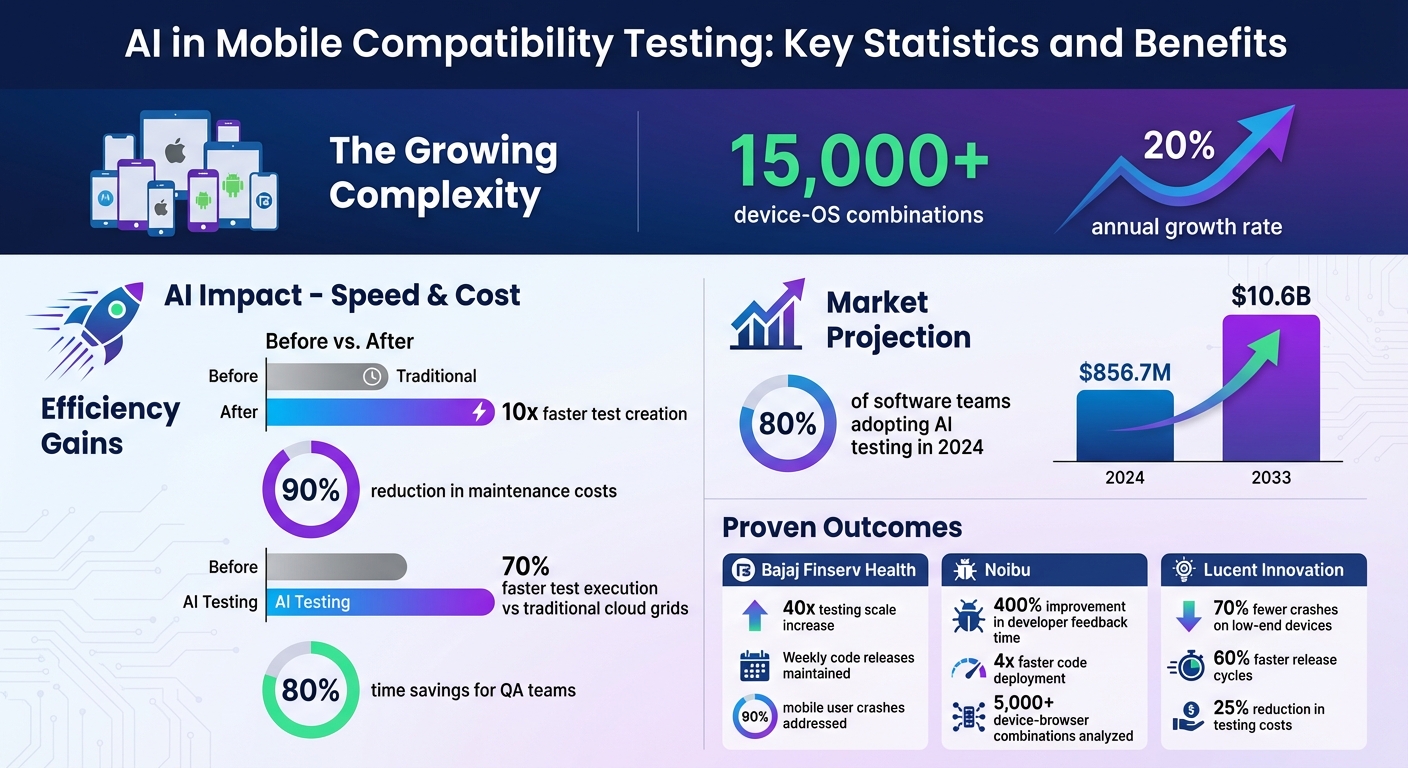
- Device and OS Fragmentation: With over 15,000 device-OS combinations (growing 20% annually), testing manually is no longer practical.
- Speed and Cost Savings: AI-driven testing reduces test creation time by 10x and maintenance costs by 90%.
- Smart Bug Detection: AI predicts and identifies bugs using production data, preventing issues before release.
- Key Technologies: Machine learning, computer vision, and predictive analytics simplify testing across diverse ecosystems like Android and iOS.
Real-world examples include companies like Bajaj Finserv Health and Uber, which have scaled testing, reduced crashes, and accelerated release cycles using AI tools. The AI-enabled testing market is projected to grow from $856.7M in 2024 to $10.6B by 2033. For teams adapting to these challenges, AI offers a practical way forward.
AI in Mobile Compatibility Testing: Key Statistics and Benefits
Cross-Platform App Testing Just Got Stupid Simple with AI
sbb-itb-fd1fcab
Key Benefits of AI-Driven Compatibility Testing
AI brings a host of advantages to mobile compatibility testing, addressing the challenges of manual processes while improving speed, accuracy, and cost-efficiency.
Automated Testing Across Multiple Devices
AI uses real-time production data and market trends to prioritize device combinations for testing. Through AI-powered computer vision, it can capture and analyse screenshots across over 10,000 device-browser combinations, identifying issues like layout shifts, colour contrast problems, and visual inconsistencies automatically. This level of thoroughness is practically impossible to achieve with manual testing, especially as device fragmentation continues to grow by 20% each year.
Faster Error Detection and Prediction
AI excels at identifying and predicting bugs before they escalate into major problems. Machine learning models analyse historical crash data and user behaviour to pinpoint high-risk areas in an application, even before a release.
For example, in 2024, Bajaj Finserv Health adopted AI-driven mobile testing to tackle device-specific crashes affecting 90% of their mobile users. By training AI models on crash patterns, they scaled their testing capabilities 40 times while maintaining weekly code releases.
Similarly, Noibu, an e-commerce error detection platform, leveraged AI for cross-browser testing, analysing user session data across 5,000+ device-browser combinations. The AI identified browser-specific timing conflicts between JavaScript execution and payment processing – issues that manual testing couldn’t replicate. As a result, developer feedback time improved by 400%, and code deployment speed increased fourfold.
These predictive and analytical capabilities not only enhance testing efficiency but also cut down costs and maintenance efforts.
Improved Efficiency and Reduced Costs
AI-driven testing delivers measurable financial and operational benefits. Self-healing scripts, for instance, automatically adapt to UI changes, slashing the time and cost associated with test maintenance. AI-native orchestration platforms also execute tests 70% faster than traditional cloud grids.
Additionally, Natural Language Processing (NLP) enables testers to write scripts in plain English, making test development up to 10 times faster than conventional methods. QA teams that have embraced AI testing platforms report up to 80% time savings.
Digital Fractal Technologies Inc is a prime example of how advanced AI techniques can streamline mobile compatibility testing, ensuring strong performance and a smooth user experience across a wide range of devices.
"Traditional testing discovers failures in production weeks after release. AI-driven systems detect them during development, analysing patterns from production telemetry, crash reports, and user behaviour data." – Farzana Gowadia, Lead Software Developer, Stratus
Core AI Technologies in Mobile Compatibility Testing
AI technologies are reshaping how teams tackle the complexities of mobile compatibility testing. By combining machine learning, computer vision, and predictive analytics, these tools address challenges that manual testing often can’t manage effectively.
Machine Learning for Test Case Generation
Machine learning dives into user behaviour and application logic to create detailed test cases that go beyond the limits of manual testing. These algorithms sift through API data, explore DOM structures, and interpret user interactions to ensure no edge cases are overlooked.
In late 2023, Uber’s Developer Platform team unveiled DragonCrawl, a system powered by a 110-million-parameter MPNet-based language model. This tool executes mobile tests with near-human intuition. Within its first three months, DragonCrawl prevented 10 critical bugs from reaching users and successfully completed trips in 85 of Uber’s top 89 cities – without requiring code adjustments for different languages or UI setups. Spearheaded by Staff Machine Learning Engineer Juan Marcano and Senior Software Engineer Ali Zamani, DragonCrawl saved countless developer hours by eliminating the need for manual test maintenance.
"We realized that we could formulate mobile testing as a language generation problem." – Juan Marcano, Staff Machine Learning Engineer, Uber
Natural Language Processing (NLP) takes things even further, allowing non-technical team members to write validation logic using plain English commands like "verify the checkout total." The AI then translates these instructions into executable backend processes. This is a game-changer, especially since up to 30% of QA budgets are often spent on updating brittle locators and fixing flaky tests.
Computer Vision for UI Testing
Computer vision steps in to analyse visual hierarchies and layouts, offering a smarter alternative to traditional pixel-by-pixel comparisons. This approach filters out insignificant variations caused by anti-aliasing or font rendering, which often trigger false positives in standard snapshot testing.
With AI-powered visual testing, teams can catch subtle issues like layout shifts, overlapping elements, colour mismatches, and missing assets across various screen sizes and viewports. It even identifies and ignores unstable elements like ads, timestamps, or animations, reducing inconsistent test failures. Companies using this technology report a 60–70% cut in manual testing time and up to 80% fewer visual defects making it into production.
| Feature | Traditional Pixel-Based Testing | AI/Computer Vision Testing |
|---|---|---|
| Comparison Method | Pixel-by-pixel matching | Contextual and structural analysis |
| False Positives | High (due to rendering differences) | Low (filters out non-functional shifts) |
| Maintenance | High (manual updates needed) | Low (self-healing capabilities) |
| Dynamic Content | Often fails with changes | Ignores specific regions/elements |
This advanced visual analysis sets the stage for predictive analytics to take a proactive approach to bug management.
Predictive Analytics for Bug Management
Predictive analytics uses historical data and code changes to pinpoint failure-prone areas and performance bottlenecks tied to specific devices, networks, or operating systems. This shifts the focus from reacting to bugs after they occur to identifying risks before they escalate.
By analysing production telemetry, crash reports, and user behaviour patterns, AI systems can flag defects during development. These systems also reduce test maintenance through real-time, automated adjustments, with some setups achieving a 90% drop in test maintenance costs.
"AI is not replacing mobile testers. It’s giving them superpowers." – Isabella Rossi, QA Expert
Together, machine learning, computer vision, and predictive analytics streamline mobile compatibility testing, improving accuracy and efficiency through workflow automation. Companies like Digital Fractal Technologies Inc are leveraging these technologies to build adaptable frameworks that keep pace with the fast-changing mobile landscape.
Use Cases of AI in Compatibility Testing
AI-powered tools are transforming the way compatibility testing is handled, much like AI testing for web apps, simplifying the process of ensuring apps work seamlessly across various devices and operating systems. By leveraging intent-based testing, testers can describe scenarios in plain English, like "log in and verify dashboard", and AI takes over, executing these instructions using accessibility APIs.
A key innovation is the move from selector-based frameworks to vision-based execution. This shift allows tests to remain functional even after UI redesigns or platform changes. As Mahima, a Content Creator at Quash, explains:
"A team that switched from Appium to Quash doesn’t fix broken selectors after UI redesigns anymore. Instead of a maintenance sprint after every design change, they review whether the test’s intent still reflects the feature’s behaviour".
This approach also addresses platform-specific challenges, such as the well-known issue of Android fragmentation.
Handling Fragmentation in Android Devices
With over 24,000 Android smartphone models on the market – and that number growing by 20% annually – testing every possible combination of devices is nearly impossible. AI tackles this issue by employing device clustering and prioritisation. Tools like TensorFlow group devices based on hardware specs, OS versions, and usage patterns to streamline testing.
For instance, Lucent Innovation used a TensorFlow-based clustering model to overcome fragmentation challenges for a global video streaming client in 2026. By combining this model with PyTorch to predict resource demands for devices running Android 8 through 14, they achieved impressive results:
- 70% fewer crashes on low-end devices
- 60% faster release cycles, enabling biweekly feature updates
- 25% reduction in testing costs
These improvements also boosted the app’s Play Store rating to 4.8 stars.
AI further simplifies testing by managing OEM-specific UI customizations, such as Samsung’s One UI. Self-healing scripts automatically detect UI changes and adjust test parameters in real time. This adaptability extends to Apple’s iOS ecosystem as well.
Ensuring Compatibility with iOS Updates
Apple’s yearly iOS updates often introduce changes like API deprecations, new permission models, and UI attribute modifications that can disrupt traditional XCUITest frameworks. AI-based testing platforms overcome these challenges by using vision-based screen reading to identify elements visually, ensuring that tests remain valid without manual script updates.
From August 2025 to March 2026, NBC Owned Television Stations used Apptest.ai‘s AI Testbot to validate their iOS and Android apps directly in production. This approach significantly reduced manual QA workloads.
The vision-based method ensures that tests adapt to iOS updates by identifying elements based on appearance and layout rather than internal attributes, which often change during redesigns. AI platforms also offer early access to beta iOS versions, enabling teams to test app behaviour ahead of public releases. Additionally, AI handles unpredictable permission dialogues for features like camera, location, and Face ID, ensuring smooth compatibility across iOS versions from 15 onward.
These advancements highlight how AI is reshaping mobile compatibility testing. Companies like Digital Fractal Technologies Inc are leveraging these capabilities to deliver reliable, high-quality mobile solutions tailored for Canadian users.
Implementation Steps for AI-Driven Compatibility Testing
Evaluating Testing Needs and Setting Goals
Start by defining clear testing objectives. Dive into user analytics to identify the most critical devices, operating systems, and browsers your audience relies on. Instead of focusing on metrics like "test cases executed", consider success measures such as preventing production failures and detecting new failure patterns before release. As Farzana Gowadia, Lead Software Developer at Stratus, advises:
"Instead of tracking ‘test cases executed’ or ‘device combinations covered,’ measure ‘production failures prevented’ and ‘new failure patterns detected before release.’"
Take Bajaj Finserv Health as an example. They scaled their testing operations 40 times by leveraging machine learning models to uncover crash patterns, all while keeping up with weekly code releases.
Next, assess the technical complexity of your testing needs. Are there challenges like 5G network slicing or IoT protocol interferences (e.g., Bluetooth or Zigbee)? What about handling memory management differences across Android versions? Addressing these specifics will help you map out the scope of your testing strategy.
Once you’ve outlined your challenges, it’s time to explore AI tools that meet these requirements.
Selecting the Right AI Tools and Platforms
Begin with an AI readiness audit. Evaluate your current tools, processes, and data to pinpoint areas where intelligent systems can bring the most value. Create a 6–12 month roadmap to guide your transformation, rather than rushing into an all-at-once overhaul.
Choose platforms that simplify test creation with natural language capabilities. Tools allowing teams to write, debug, and refine tests in plain English lower the technical barrier for non-developers and speed up workflows. Also, prioritize platforms offering access to a wide range of real-device configurations – some provide access to over 10,000 options – rather than relying solely on static presets or emulators.
For Canadian companies, Digital Fractal Technologies Inc offers tailored AI consulting and workflow automation services. Their approach integrates AI into existing platforms, avoiding the need to start from scratch. As they explain:
"Your mobile and web applications shouldn’t just display data – they should interpret, predict, and act."
Cloud-native orchestration tools are another key consideration. These tools can deliver test execution speeds up to 70% faster than traditional methods. With the AI-enabled testing market expected to grow from $856.7 million in 2024 to $10.6 billion by 2033, adopting these solutions is becoming increasingly common across industries.
After selecting tools, the next challenge is integrating them effectively into your current processes.
Integrating AI with Existing Testing Processes
Start by automating repetitive tasks like scheduling and filling out forms. This allows your testing team to focus on exploratory work that adds more value. The "infuse, don’t rebuild" approach is key – enhance your existing platforms with AI capabilities such as computer vision and predictive analytics.
Ensure the AI platform integrates smoothly with your current CI/CD pipelines, collaboration tools, and bug-tracking systems to maintain workflow continuity. Use AI agents to automatically fix broken tests and manage test suites, reducing manual upkeep by up to 90%. Shift to continuous learning models that adapt device configurations based on real-time production data.
AI can also simulate real-world conditions, such as 5G network slicing, low-battery scenarios, and protocol-level handoffs, to uncover issues that might only appear in the field. Aim to see initial results within 90 days. This approach demonstrates progress without overwhelming your team.
Challenges and Best Practices for AI Integration
Integrating AI into workflows can offer benefits like streamlining testing and cutting costs, but it also comes with its own set of challenges. To tackle these effectively, adopting new approaches is essential.
Addressing Data Bias and Model Accuracy
When datasets are limited or too uniform, they can create gaps in AI performance. To improve accuracy, include diverse data sources like production telemetry and crash reports. For instance, relying solely on testing data from the most popular 21 smartphone models overlooks 58% of global users who depend on less common devices with unique hardware quirks.
Another pitfall to watch for is the "Accuracy Paradox." This occurs when overall accuracy appears high but critical, rare events go undetected. Aakash Yadav, QA Lead at Testriq, puts it succinctly:
"Accuracy is no longer just a percentage – it is the foundation of digital trust".
Using tools like SHAP (SHapley Additive exPlanations) can help. These tools make AI decisions more transparent, allowing you to see which factors influence outcomes and uncover hidden biases.
For Canadian businesses, companies like Digital Fractal Technologies Inc offer AI consulting services. They can help integrate predictive analytics into existing platforms, eliminating the need to build new systems from scratch. Their focus is on creating models that interpret and act on real-world data patterns.
Overcoming Integration Complexity
Bringing AI tools into existing workflows – like CI/CD pipelines, bug trackers, or manual processes – can be tricky. The key is ensuring the AI platform you choose is compatible with the frameworks you already use, whether that’s Flutter, React Native, or something else.
Self-healing frameworks can simplify maintenance. These systems automatically update test scripts when UI elements change, such as renamed IDs, reducing manual effort. This approach can cut maintenance costs by up to 35%. Embedding AI testing into your DevOps pipeline ensures tests run automatically with every code update, catching bugs before they make it to production.
Once these integration hurdles are addressed, the next step is focusing on keeping AI models accurate over time.
Ensuring Continuous Improvement of AI Models
AI models need constant refinement to stay effective. Over time, real-world data can drift away from the original training data. For example, new fashion trends or device types can create "data drift", while "concept drift" happens when relationships between variables change – like scammers adopting new tactics. Both require regular monitoring and retraining.
With device fragmentation growing by 20% annually, keeping models updated is critical. This includes adapting to new OS versions, hardware like foldable devices, and evolving network standards. Instead of sticking to static device lists, use live production data to prioritize which configurations to focus on. Metrics such as "production failures prevented" and "time-to-detection" are more effective than traditional ones like "test cases executed".
Additionally, running adversarial tests with noisy inputs can help assess how robust your models are. Regular updates not only improve accuracy but also ensure your AI systems continue to deliver the efficiency gains they were designed for.
Conclusion
Key Takeaways
AI has reshaped mobile compatibility testing in a big way. With over 15,000 device-OS combinations growing by 20% each year, traditional manual testing methods just can’t keep pace. AI-powered testing offers a game-changing edge: test creation happens ten times faster, and maintenance is easier thanks to self-updating scripts.
The best results come when teams focus on meaningful outcomes like preventing production failures and shortening time-to-detection, rather than just tracking activities like the number of test cases executed. Successful AI adoption has led to faster release cycles and fewer failures.
Key technologies driving these advancements include Natural Language Processing, which enables codeless test creation, Computer Vision for visual regression testing, and Predictive Analytics to pinpoint high-risk areas. Importantly, AI works best when combined with human insight: let AI handle repetitive tasks while leaving exploratory and UX testing to manual efforts.
With these breakthroughs, the future of AI in compatibility testing looks incredibly promising.
Future Outlook for AI in Compatibility Testing
These benefits are just the beginning, as new developments like agentic testing and advanced network emulators gain traction. The market for AI-enabled testing is expected to skyrocket – from $856.7 million in 2024 to $10.6 billion by 2033. This year alone, 80% of software teams are projected to incorporate AI into their testing processes. Salman Khan, Test Automation Evangelist at TestMu AI, captures the momentum perfectly:
"AI in mobile testing is evolving rapidly, pursuing smarter automation, enhanced defect prediction, and seamless adaptation".
The industry is moving towards agentic testing, where AI takes over the entire QA lifecycle with minimal human input. These systems will not only create and maintain tests but also leverage advanced AI-driven network emulators to handle the complexities of 5G data bursts and IoT protocol conflicts. For Canadian companies aiming to stay ahead, Digital Fractal Technologies Inc offers AI consulting services to seamlessly integrate these cutting-edge solutions into existing workflows – no full system overhaul required.
FAQs
What data is needed to begin AI testing?
To kick off AI testing, it’s essential to gather key data points. These include test history, details about device and browser configurations, and visual elements crucial for regression analysis. Additionally, information on test stability plays a vital role. This data supports advanced features such as self-healing tests and root cause detection, improving both accuracy and efficiency in the testing process.
How do AI tests stay stable after UI or OS changes?
When UI or OS changes occur, AI tests maintain their stability through self-healing mechanisms. These mechanisms rely on object detection and visual analysis to adapt to updates in the interface, rather than relying on fixed locators or static identifiers. This dynamic adjustment allows tests to continue running smoothly without breaking, offering a more reliable and efficient testing process.
How can we prove ROI from AI-driven compatibility testing?
Proving ROI from AI-driven compatibility testing lies in demonstrating its impact on cost savings, efficiency, and product quality. By automating repetitive tasks and identifying edge cases, AI significantly cuts down on manual effort. This leads to quicker releases and reduced expenses. Additionally, AI enhances test coverage across a variety of devices, which helps in catching potential issues before release, ultimately lowering defect rates.
These improvements translate into tangible benefits: better-quality products, increased user satisfaction, and measurable returns through shorter testing cycles and fewer post-release problems.